- AI Fire
- Posts
- 🔥 7 Claude Cowork Skills I Use Daily to to Automate My Daily Marketing Tasks (Steal Them)
🔥 7 Claude Cowork Skills I Use Daily to to Automate My Daily Marketing Tasks (Steal Them)
These 7 Claude Cowork skills automate research, content, and workflows. Many teams still do this manually. See what most people are missing.

Neil Phan
April 13, 2026
TL;DR
Claude Cowork skills represent a fundamental shift from "chatting" with AI to "directing" an automated workforce. Unlike standard chat, Cowork interacts directly with your local files, controls your browser, and connects to external platforms like Notion, Canva, and Apify. By using specific slash commands and connectors, you can automate complex workflows such as trend tracking, competitor research, and contract reviews allowing the system to execute multi-step tasks in the background while you focus on high-level strategy.
Key points
Task Execution: Cowork doesn't just answer questions; it delivers finished files, organized databases, and rendered designs.
Connector Synergy: By linking tools like Apify (Data) and Canva (Design), Claude handles the manual labor of data entry and formatting.
Skill Persistence: A "Skill" is a reusable instruction set that drops the technical overhead of a task by up to 50% per session.
Table of Contents
Introduction
Most people running a business or a content brand are losing hours every week to work that feels productive but isn't.
Manually checking 5 analytics tabs, scrolling competitor feeds for inspiration, copying data from one tool into another. The output is always the same: a lot of effort, not enough to show for it.
Claude Cowork skills are built for exactly this problem. Instead of answering one question, Cowork executes the full task.
It reads your files, opens your apps, runs each step, and delivers a finished result. You describe what you want done. Claude handles how it gets there.
This guide covers 7 Claude Cowork skills that replace real marketing work:
# | Skill | What It Replaces |
|---|---|---|
1 | Trend Tracker | Manual social scrolling |
2 | Competitor Research | Guesswork and mental notes |
3 | Research Library | Shallow, one-tab research |
4 | Daily Dashboard | Checking 5 analytics tabs every morning |
5 | Contract Review | Skimming and hoping for the best |
6 | Batch Design | Building slides one at a time in Canva |
7 | Task Manager | Action items buried across email, calendar, and notes |
Each one comes with exact prompts you can copy, adjust, and run right now.
Bonus: This guide provides a complete "system architect" mindset, including ready-to-copy prompts for 7 specific skills, step-by-step connector setup flows, and troubleshooting tips to ensure your automated marketing engine runs 24/7 without friction.
🗳️ Quick Poll: How Do You Handle Marketing Right Now? |
I. What Makes Cowork Different From Standard Chat
Before diving into the 7 skills, it's worth understanding what you're actually working with, because Cowork behaves differently from the Claude you're used to.
Claude Cowork skills are specialized instruction sets that enable the Claude Desktop app to perform autonomous, multi-step actions across your local files and web applications.
There are 3 practical differences worth knowing:
File access. Chat limits you to 20 files per conversation and 30MB per file. Cowork reads your local files directly, so neither limit applies.
Context window. Cowork handles significantly more information in a single session, which matters for complex, multi-step tasks.
Output. Chat gives you a response you copy yourself. Cowork delivers ready-to-use files directly into your folder and can work inside external platforms like Notion.
A Skill is a reusable instruction set stored inside Claude. You call it with a slash command like /trend-tracker or /contract-review, and Claude knows exactly what to do, no re-explaining required.
Skills can be shared with your team or downloaded from the web.
By the numbers: Anthropic's own data shows a task that took 15 back-and-forth messages and 12,000 tokens without a skill dropped to just 2 questions and 6,000 tokens with one. Skills reduce message turns by up to 80%.
II. What Do You Need First?
1. Claude Desktop App: Cowork runs on the Claude Desktop app, not the browser. Download it at claude.ai. Now available for all paid plans.
2. A Paid Plan
Pro: $20/month. Right starting point for solo creators and small teams.
Max / Team / Enterprise: $100–200/month. Worth it when file organization, format conversions, and browser automation become a daily need.
The free plan does not include Cowork access.
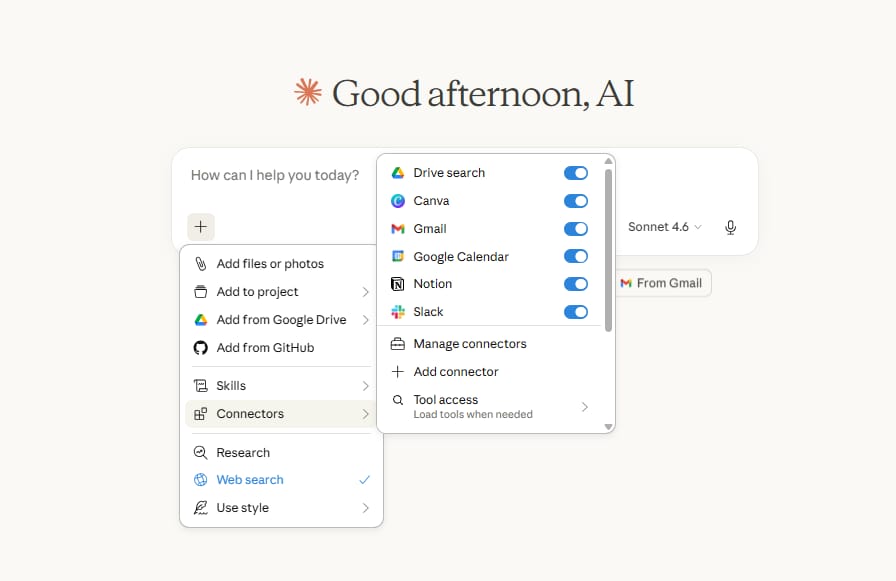
3. Connectors: Each skill uses different connectors (Apify, Notion, Canva, or NotebookLM, etc.). Setup steps are included inside each skill section below.
4. A Dedicated Workspace Folder: Create one folder on your computer just for Cowork work. Point Claude to that folder at the start of each session. This keeps your data organized and Claude's file access contained.
💡 Tip: Keep backups. Claude can write to your local files, a dedicated folder with a backup routine means mistakes are recoverable.
III. Claude Cowork Skill 1: Track Social Trends Every Morning
Most content creators write about topics that are already everywhere. By then, competition is high and the window is gone. This skill helps you catch topics a week or more before they spread widely.
1. How It Works
This skill connects Cowork to Grok through X via the Chrome browser extension. Claude hands off the task to Claude in Chrome, which takes control of your browser, opens Grok, searches for trending signals in your niche, and scores each result against rules you define.
The scoring system:
Factor | What It Measures | Default Weight |
|---|---|---|
Recency | Only posts from last 7 days | Required filter |
Velocity | How fast engagement is growing | Highest |
Niche fit | Relevance to your content area | Medium |
Authority | Source credibility | Lower |
You can adjust these weights. If catching fast-moving topics matters more than big-account validation, tell Claude to weight velocity higher than authority.

You’ve reached the locked part! Subscribe to read the rest.
Get access to this post and other subscriber-only content.
Already a paying subscriber? Sign In.
A subscription gets you:
- • Instant access to 700+ AI workflows ($5,800+ Value)
- • Advanced AI tutorials: Master prompt engineering, RAG, model fine-tuning, Hugging Face, and open-source LLMs, etc ($2,997+ Value)
- • Daily AI Tutorials: Unlock new AI tools, money-making strategies, and industry (ecommerce, marketing, coding, teaching, and more) transformations (with videos!) ($3,650+ Value)
- • AI Case studies: Discover how companies use AI for internal success and innovative products ($1,997+ Value)
- • $300,000+ Savings/Discounts: Save big on top AI tools and exclusive startup discounts
Reply