- AI Fire
- Posts
- 🤖 Detail Guide to Build a Personal AI Assistant for Any Work (No Code + Free Full Templates)
🤖 Detail Guide to Build a Personal AI Assistant for Any Work (No Code + Free Full Templates)
Stop building one-off automations. People overcomplicate AI agents. This AI assistant handles tasks, remembers context, and doesn’t fall apart. Free setup included.

Max Anh
March 20, 2026
TL;DR BOX
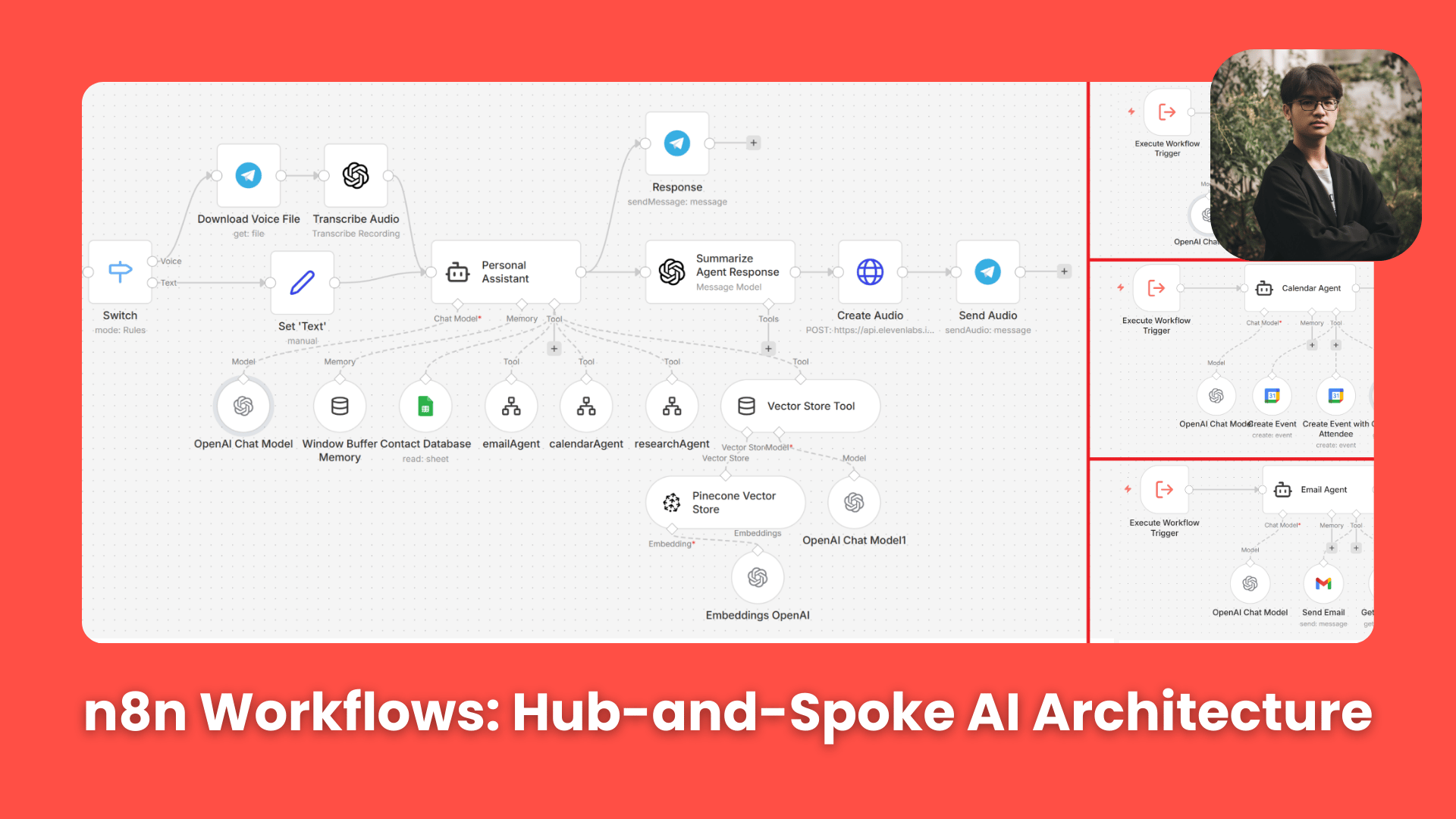
In 2026, reliable workflows are built with a hub-and-spoke structure. Instead of one large workflow, you use one main agent and several small sub-agents. Beginners often fail by building one "Giant Workflow" that breaks under the slightest change. The professional solution is an Orchestrator Model: a central brain (powered by GPT-5.4 Nano) that routes requests to specialized Sub-Agents (Email, Calendar, Research).
This system allows you to build once and reuse everywhere. By connecting your central agent to Telegram for voice/text input and Google Sheets for contact memory, you create a persistent digital employee that manages your inbox and schedule without you ever opening a browser.
Key Points
Fact: GPT-5.4 Nano (released early 2026) is the best model for n8n orchestrators due to its 300% faster tool-calling latency compared to older 4-series models.
Mistake: Letting an agent call multiple tools at once. In 2026, this still causes "Race Conditions". Always enforce the "One tool at a time" rule in your system prompt.
Action: Connect your AI to Telegram today. Use the "@BotFather" bot to get your secret key and start talking to your assistant.
Critical Insight
The real power of 2026 automation is Agentic Modularity. When you build an "Email Sub-Agent" as a standalone workflow, it becomes a reusable asset you can plug into your CRM, support bot or lead generator without rebuilding from scratch.
Table of Contents
I. Introduction
Most people ask the same question when they discover n8n: "Can I build an agent that actually runs my inbox and calendar so I can stop doing admin?"
The answer is yes but only if you avoid building one giant workflow that does everything at once.
Most beginners want to connect everything (email, calendar, research, voice or whatever tools they think about) into a single node chain. Okay, it might work for about 3 days but then, something breaks and debugging it feels like untangling Christmas lights in the dark.
There is a better way: the Hub-and-Spoke architecture. You build a central brain that stays smart and simple and you give it specialized helpers (called sub-agents) to handle specific jobs.
The brain decides what to do and sub-agents know how to do it.
*P.S. 1: To keep this post simple and easy to understand, I’ll skip most of the setup and focus on how the workflows actually operate. If you want the full workflow, don’t worry, I already put all of them in the Google Drive folder below. You just download and import them to your n8n workflows.
*P.S. 2: If you have any questions, please vote in the poll below and leave a comment. I’ll answer all of them to help you get the best result.

You’ve reached the locked part! Subscribe to read the rest.
Get access to this post and other subscriber-only content.
Already a paying subscriber? Sign In.
A subscription gets you:
- • Instant access to 700+ AI workflows ($5,800+ Value)
- • Advanced AI tutorials: Master prompt engineering, RAG, model fine-tuning, Hugging Face, and open-source LLMs, etc ($2,997+ Value)
- • Daily AI Tutorials: Unlock new AI tools, money-making strategies, and industry (ecommerce, marketing, coding, teaching, and more) transformations (with videos!) ($3,650+ Value)
- • AI Case studies: Discover how companies use AI for internal success and innovative products ($1,997+ Value)
- • $300,000+ Savings/Discounts: Save big on top AI tools and exclusive startup discounts
Reply