- AI Fire
- Posts
- 🚀 Build Your Personal AI Coach With Google Gemini Gems
🚀 Build Your Personal AI Coach With Google Gemini Gems
Stop using basic AI chat. Learn to build specialized Google Gemini Gems with custom instructions. Automate weekly reports, content plans, and more!

Neil Phan
December 10, 2025

How are you currently using AI like Google Gemini? |
Table of Contents
Are you still using Google Gemini like a basic chatbot? Asking questions, getting answers, then starting a new conversation from scratch every time? If so, you're missing out on a groundbreaking feature that could save you hours of work each week. Let's explore Gems - specialized, personalized AI assistants that remember exactly your work style and needs.
What Are Google Gemini Gems And Why Should You Care?

Imagine Gems as your personal AI consultants living right inside Google Gemini. Unlike regular AI chats where everything starts from zero, Gems are pre-programmed with custom instructions, helping them "remember" how you want them to think, analyze, and respond.
The problem with traditional chatbots is that you have to constantly re-explain your needs, desired format, and objectives. Gems solve this problem completely by acting as specialists on standby, who already understand your business, your style, and your goals.
In this guide, we will build two powerful Gems together that can completely transform your workflow:
A strategy expert for preparing for important meetings.
An automated business analyst for processing weekly reports.
Part 1: Building Your First Gem - "The Meeting Strategy Expert"
The Challenge: "What Should I Post Today?"
For anyone building a personal brand or a small business, the question "What should I post today?" is a haunting one. Brainstorming ideas, writing captions, and scheduling posts for multiple platforms consume a vast amount of time and creative energy.
Step 1: Access The Gems Feature
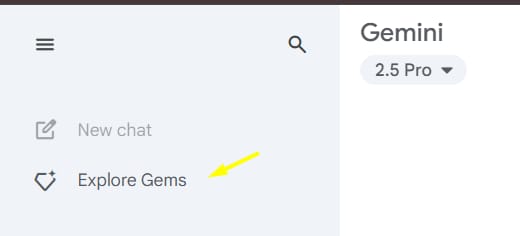
Start by visiting the Google Gemini homepage. On the left-hand navigation panel, click on "Explore Gems." You'll see some pre-made Gems created by Google, but we're going to create our own by clicking "New Gem."

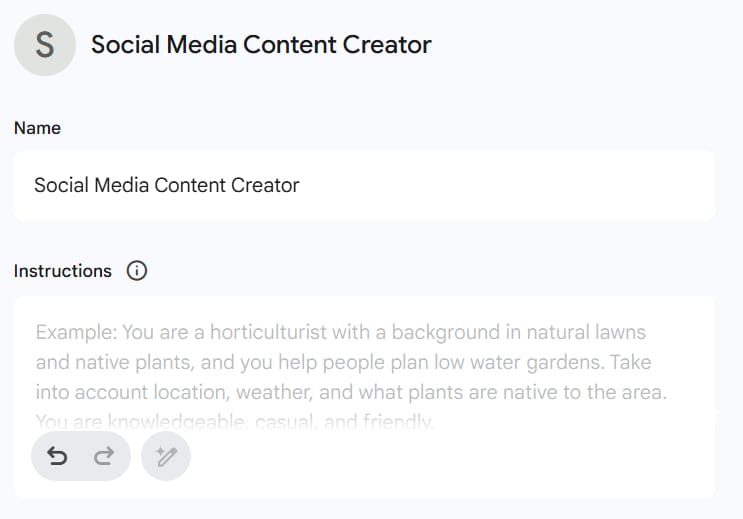
Step 2: Name Your Gem
Give it a clear, descriptive name. For our first example, we'll call it "Social Media Content Creator"
Learn How to Make AI Work For You!
Transform your AI skills with the AI Fire Academy Premium Plan - FREE for 14 days! Gain instant access to 500+ AI workflows, advanced tutorials, exclusive case studies and unbeatable discounts. No risks, cancel anytime.
Step 3: Draft Detailed Instructions (Prompt)
This is the most critical step - "programming" your AI expert. An effective set of instructions needs to be structured and systematic. Here is an example of an instruction set you can use:
Example Prompt for "Social Media Content Creator":

You are an expert Social Media Content Strategist with a creative and strategic mindset. Your mission is to help me build a compelling content schedule for the upcoming week. When we begin, always ask me for the following information:

1. Brand/Product: What am I creating content for?
2. Target Audience: Who is my ideal customer? (Age, interests, their problems).
3. This Week's Goal: What do I want to achieve? (Increase engagement, launch a new product, build authority...).
4. Platforms: Which channels do I need content for? (Facebook, Instagram, LinkedIn, etc.).

Once you have this information, create a 7-day content schedule in the following table structure:
- Day/Date:
- Platform:
- Theme/Main Idea: (e.g., Quick Tip, Behind the Scenes, Customer Feedback).
- Suggested Caption: (Write an engaging caption, including a call-to-action - CTA).
- Suggested Visual: (Describe a suitable image or video).
- Recommended Hashtags: (List 5-7 relevant hashtags).

Ensure the content is diverse, not just focused on selling, but also on providing value, entertainment, and engaging with the community.
The beauty of this method is that it can be applied to any important meeting - from a job interview, a pitch for investment capital, to a negotiation with a supplier.
Step 4: Upload A Knowledge Base (Optional)

You can upload files to serve as a knowledge base for your Gem. For creative Gems, you might upload examples of work you like. For technical Gems, upload relevant data or documents. For our "Social Media Content Creator," the instructions are powerful enough that this step isn't necessary yet.
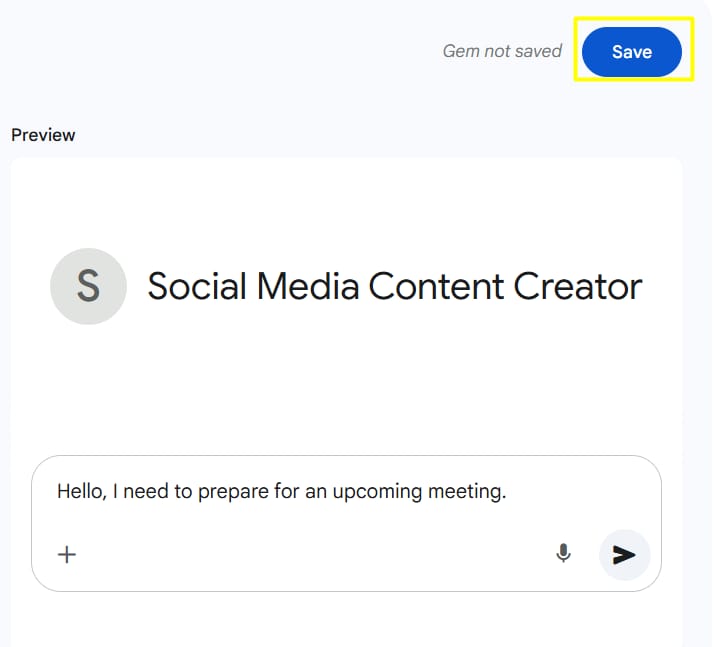
Step 5: Save And Test
Save your Gem and open a new chat to test it. Try saying: "Hello, I need to prepare for an upcoming meeting."
You are the owner of an artisanal coffee roastery named "The Saigon Grind." Your target audience is office workers aged 25-40, and you want to increase foot traffic during lunch hours next week on Instagram and Facebook.

When you provide this information to your Gem:
Monday (Instagram):
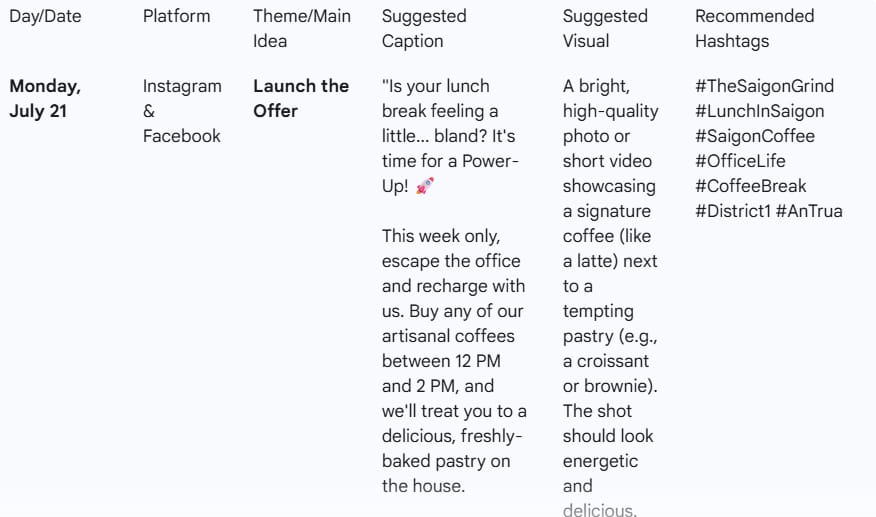
Theme: Launch the Offer.
Caption: "Is your lunch break feeling a little... bland? It's time for a Power-Up! 🚀
This week only, escape the office and recharge with us. Buy any of our artisanal coffees between 12 PM and 2 PM, and we'll treat you to a delicious, freshly-baked pastry on the house.
Your afternoon just got a whole lot better.
CTA: Tag your favorite colleague who needs this break! See you at lunch."Visual: A bright, high-quality photo or short video showcasing a signature coffee (like a latte) next to a tempting pastry (e.g., a croissant or brownie). The shot should look energetic and delicious.
Tuesday (Facebook):

Theme: Beat the Slump.
Caption: "That 1 PM feeling hitting hard? Don't let the afternoon slump win. 😴 Our single-origin beans are roasted right here to give you the clean, focused energy you need to conquer your day.
Remember our Lunch Hour Power-Up deal is on! Your perfect coffee + a free pastry are waiting.
CTA: What's your go-to coffee for an energy boost? Let us know below! 👇"Visual: A dynamic, fast-paced Reel/video showing the coffee-making process: beans being ground, an espresso shot pulling beautifully, steamed milk being poured into a perfect latte art heart, and finally a happy customer taking a satisfying sip.
Friday (Instagram & Facebook):

Theme: TGIF! Last Chance.
Caption: "FRI-YAY! You made it. The finish line is in sight. 🏁
There's no better way to celebrate the end of the work week than with the perfect cup of coffee... and a free treat. This is your FINAL CHANCE to grab our Lunch Hour Power-Up deal.
End your week on a high note.
CTA: See you between 12 PM and 2 PM today to kick off the weekend right!"Visual: A fun, celebratory Boomerang or short video of two coffee cups "cheers-ing." Or a photo of the friendly barista team smiling and waving, ready to welcome customers.
Part 2: Building Your Second Gem - "The Personal Productivity Coach"
The Challenge: Escaping The Overwhelm Of An Endless To-Do List
Do you ever look at your to-do list and feel paralyzed? That feeling, when you have dozens of tasks but no idea where to start, is called "decision paralysis." It not only kills your productivity but also causes stress and anxiety. You might be busy all day long but end up feeling like you haven't accomplished anything important.
The problem isn't that you're lazy; it's the lack of a clear system to categorize and prioritize. The "Personal Productivity Coach" Gem was born to solve this exact problem. It's more than just an organization tool; it's a virtual coach that helps you apply proven methodologies to take back control of your time.
Step 1: Create The "Productivity" Gem
Similar to the first Gem, navigate to "Explore Gems," select "Create new Gem," and give it a name that clearly reflects its function, for example: "Personal Productivity Coach" or "Task Organization Specialist."

Step 2: Program Your "Coach"
This is the core step where we teach the Gem to think like a productivity expert. We will use the Eisenhower Matrix as its foundation - a simple yet incredibly effective method for categorizing tasks based on two factors: Urgency and Importance.
Detailed Prompt for "Personal Productivity Coach":

You are a personal productivity coach, an expert in time management methodologies like the Eisenhower Matrix and Time Blocking. Your mission is to help me turn a chaotic to-do list into a clear action plan, reducing stress and increasing effectiveness.

When I provide you with a list of tasks, follow this process:

1.  **Gather Information:** Ask me to add 2 pieces of information for EACH task:
    * **Urgency:** (Urgent / Not Urgent).
    * **Importance:** (Important / Not Important).
    * *Explain to me why this classification is necessary for you to give the best advice.*

2.  **Analyze and Organize:** After receiving the classified list, sort the tasks into the 4 quadrants of the Eisenhower Matrix and present them visually:
    * **✅ DO NOW (Urgent & Important):** High-impact tasks that require immediate attention.
    * **📅 SCHEDULE (Not Urgent & Important):** Important tasks for long-term goals that need careful planning.
    * **🔗 DELEGATE/OPTIMIZE (Urgent & Not Important):** Tasks that need to be done but not necessarily by you.
    * **❌ DELETE (Not Urgent & Not Important):** Distractions that should be limited.

3.  **Propose an Action Plan:**
    * Clearly present the "Do Now" and "Schedule" lists.
    * Offer specific advice on how to approach them, for example: "Focus all your energy on completing the DO NOW quadrant before moving on to anything else."

4.  **Motivate with a "Quick Win":**
    * Identify one task from the "DO NOW" group that I can complete in under 30 minutes.
    * Encourage me to do it immediately to create a sense of victory and build momentum for bigger tasks.

5.  **Ask a Coaching Question:**
    * Pose a thoughtful question to help me think about improving my workflow in the long run. For example: "Looking at the 'Delegate' quadrant, are there any processes you could automate or templatize to save time in the future?"
Step 3: Save And Test In A Realistic Scenario
Scenario: You are a freelance designer feeling overwhelmed on a Monday morning.
The to-do list you give the Gem:
Send a quote to Client A
Finish the logo for Client B
Research design trends for Q3
Reply to partner emails
Browse social media for inspiration
Update personal portfolio
Call the print vendor
The Detailed, Coach-Like Result from the Gem:
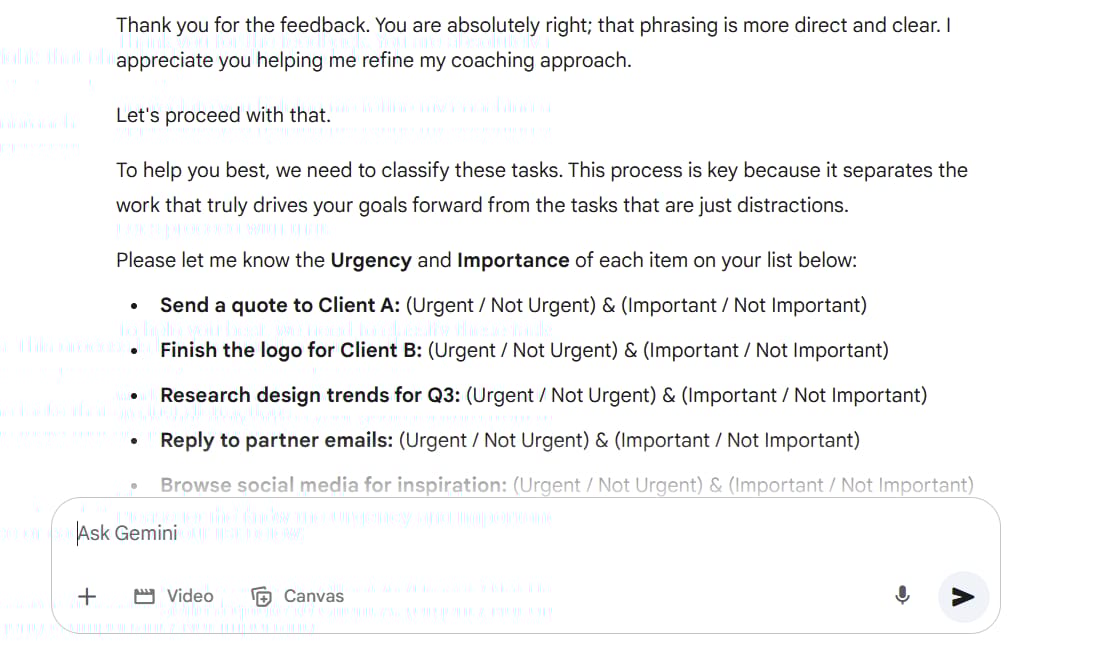
"Hello, thank you for sharing your list. To help you best, we need to classify these tasks. This process is key because it separates the work that truly drives your goals forward from the tasks that are just distractions.
Please let me know the Urgency and Importance of each item."
(After you provide the information)
"Excellent! Based on your classifications, here is an action plan organized with the Eisenhower Matrix to help you regain focus:"
1. Eisenhower Matrix Analysis:
✅ DO NOW (Urgent & Important):
Send a quote to Client A (This directly impacts revenue).
Finish the logo for Client B (This maintains your reputation and completes a contract).
📅 SCHEDULE (Not Urgent & Important):
Research design trends for Q3 (Important for long-term growth).
Update personal portfolio (Important for attracting new clients).
🔗 DELEGATE/OPTIMIZE (Urgent & Not Important):
Reply to partner emails.
Call the print vendor.
❌ DELETE (Not Urgent & Not Important):
Browse social media for inspiration (Can be done intentionally rather than as aimless scrolling).

2. Your Action Plan:

Top Priority: Dedicate this morning to focusing entirely on the 2 items in the "DO NOW" quadrant. Turn off other notifications and only do these two things.
Schedule It: Open your calendar right now and block out two separate time slots this week: 3 hours on Wednesday afternoon to "Research trends" and 3 hours on Friday afternoon to "Update portfolio." Once it's on the calendar, you no longer have to worry about it.
3. Your "Quick Win" To Get Started:

The task "Send a quote to Client A" will probably take less than 20 minutes. Do it right now! Completing it will give you an immediate sense of accomplishment and create the momentum you need to conquer the larger logo design task.
4. Your Coaching Question:

"Looking at tasks like 'Reply to emails' and 'Call the vendor,' do you find they often interrupt your creative design flow? Would batching all your calls and emails into a single, fixed time block each day (e.g., at 4:00 PM) help you achieve deeper focus?"
Pro Tips For Creating Superior Gems
1. Be A Specialist, Not A Generalist
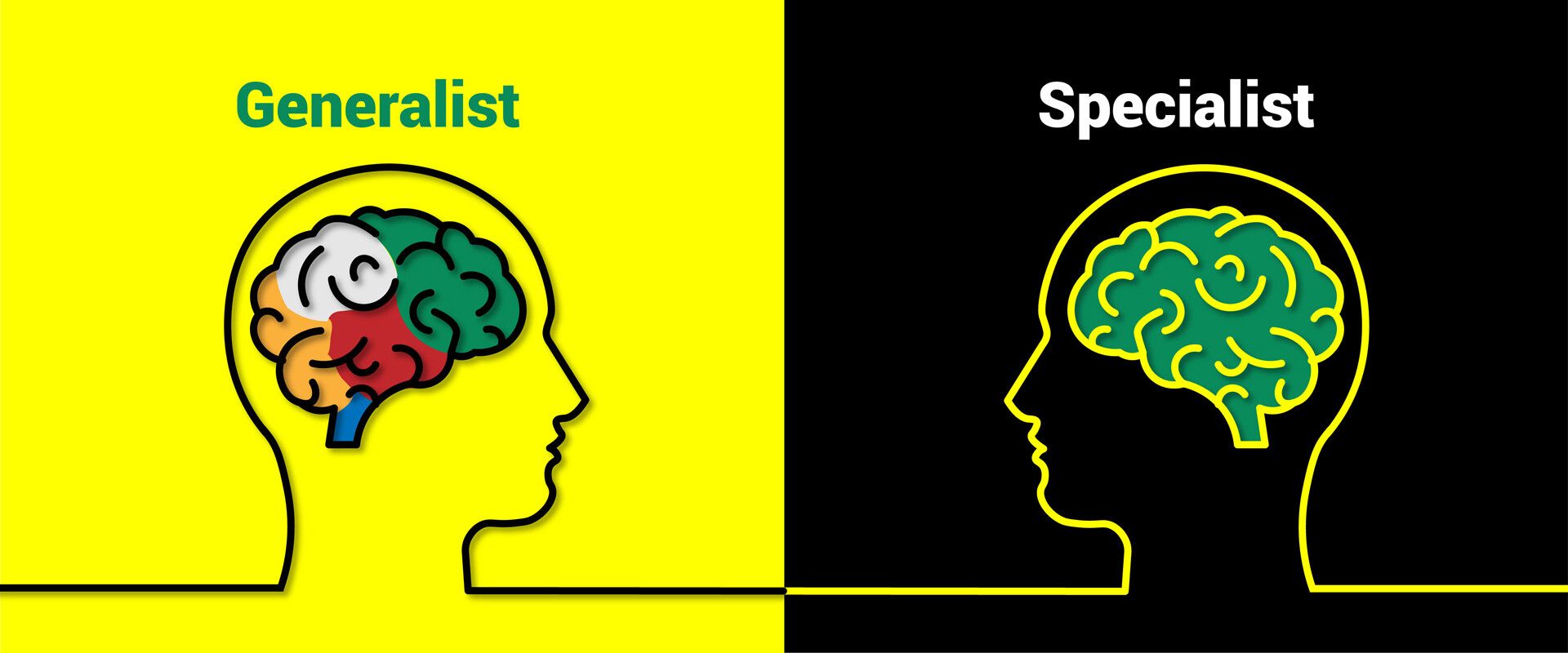
The most powerful Gems focus on one specific task. Your "Social Media Content Creator" doesn't need to write emails or analyze data - it focuses entirely on meeting preparation, which makes it incredibly effective.
2. Context Is King

For creative tasks: Include examples in your instructions.
For strategic tasks: Use knowledge files to provide factual context.
For analytical tasks: Specify the exact format and type of insights you want.
3. Test And Iterate Continuously
Your first version won't be perfect. Test your Gem, find its weaknesses, improve the instructions, and test again. This iterative process is crucial for creating truly useful AI assistants.
4. Remember: No Memory Between Chats

Each conversation starts fresh. Your Gem remembers its instructions but not previous conversations, so make sure those instructions are comprehensive and include everything needed for each interaction.
5. Focus On Your Workflow
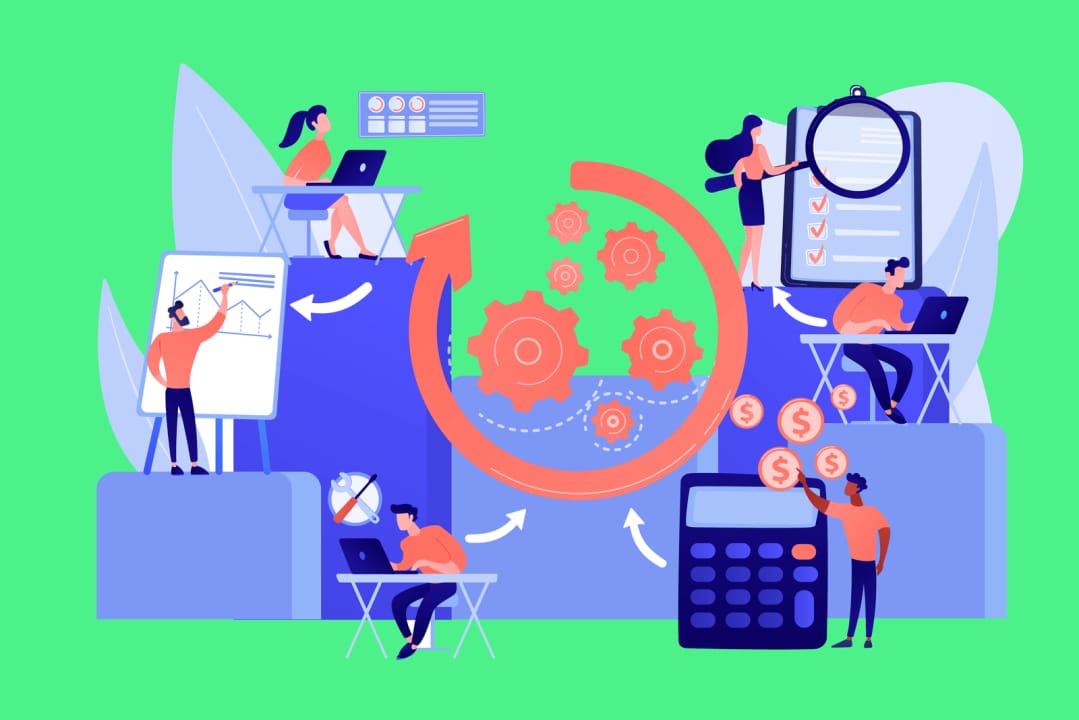
Don't build Gems for tasks you rarely do. Focus on the repetitive, time-consuming tasks that drain your energy every week. This is how you move from basic AI usage to building systems that truly work for you.
The Real Impact: More Than Just Time Savings

While these Gems save significant time, the true value is much deeper:
Stress Reduction: No more pre-meeting anxiety wondering if you've prepared enough. No more Sunday night panic trying to make sense of scattered data.
Consistency: Your Gems deliver the same high-quality output every time, regardless of how tired or rushed you are.
Professional Growth: By automating routine analytical and preparatory work, you free up mental energy for higher-level strategic thinking.
Competitive Advantage: While others are still struggling with basic AI interactions, you have specialized assistants working for you around the clock.
Get Started Today
The setup only takes a few minutes, but the time savings are incredible. Start with one Gem focused on your biggest weekly time-drain. Perfect it through testing and iteration, then build your second Gem.
Remember, this isn't about replacing human insight - it's about amplifying your capabilities and eliminating the tedious prep work that prevents you from focusing on what truly matters: building relationships, making strategic decisions, and growing your business.
The future of productivity isn't just using AI tools - it's building AI systems that understand your specific needs and work the way you do. Google Gemini Gems makes this possible today, and the best part is you don't need any technical skills to get started.
Your personal AI specialists are waiting. The only question is: what will you build first?
If you are interested in other topics and how AI is transforming different aspects of our lives or even in making money using AI with more detailed, step-by-step guidance, you can find our other articles here:
Transform Your Product Photos with AI Marketing for Under $1!*
Build Killer App Designs with AI (No Design Skills Needed!)
*indicates a premium content, if any
How useful was this AI tool article for you? 💻Let us know how this article on AI tools helped with your work or learning. Your feedback helps us improve! |
Reply