- AI Fire
- Posts
- 🤯 ChatGPT Hacks: 27 "God Mode" Features To Make You So Productive!
🤯 ChatGPT Hacks: 27 "God Mode" Features To Make You So Productive!
You are using AI wrong. I tested hundreds of features to find the 27 best shortcuts. Save 20+ hours a week with these simple, actionable tips inside.

Neil Phan
December 30, 2025

TL;DR
Most users treat ChatGPT like a basic calculator, missing out on powerful features that can save hours of work. By mastering 27 simple hacks like customizing the AI's personality, using voice mode for brainstorming, and connecting external apps like Google Calendar - you can transform ChatGPT into a personalized, proactive assistant. This guide breaks down these hidden tools step-by-step, helping you organize projects, conduct deep research, and visualize data without needing technical skills.
Key points
Hack: Use "Custom Instructions" to make ChatGPT direct and ruthless, cutting out polite fluff.
Tool: "Canvas Mode" acts as a built-in text editor for co-writing long documents.
Strategy: Use "Projects" to upload specific files (like a budget) so the AI always has context.
Critical insight
The people who get ahead with AI aren't the ones who know the most tricks; they are the ones who integrate one or two features into their daily habits to save actual time.
🫣 Be honest: Are you using ChatGPT the "boring" way? |
Table of Contents
Have you ever felt like you are doing things the hard way while everyone else is moving faster? You are not alone. Most people use AI like a basic calculator. They ask a question, get an answer, and stop there. But in a world where DeepSeek V3.2 is arguably challenging GPT-5.2's dominance, simply knowing the basics isn't enough anymore. After testing this tool for months, I have found the most powerful ChatGPT hacks that can save you hours every single week.
If you have been using ChatGPT just to write emails, you are using less than 10% of its power. In this guide, I am going to show you 27 hidden features. We will go through this together, step-by-step. I will explain everything like I am sitting right next to you.
These aren't complicated technical skills. They are simple changes that anyone can make. By the end of this article, you will have a personal assistant that knows exactly what you need.
Let’s get to work.
Part 1: Why Should You Start With These Setup ChatGPT Hacks?
Before assigning tasks, you must configure ChatGPT to act like a personalized assistant rather than a generic chatbot. By adjusting "Custom Instructions" to remove polite fluff and defining your specific role in the "About You" section, you ensure every future answer is direct and relevant to your needs. Mastering features like Memory and Appearance further tailors the experience, saving you from repeating context or instructions.
Key takeaways
Action: Set "Custom Instructions" to "Direct" to stop the AI from wasting time on polite intros.
Feature: The "About You" section lets you define your role (e.g., "Small Business Owner in Seattle") for tailored advice.
Tool: Use the Memory feature to let the AI remember long-term details like training schedules.
Benefit: Customizing your theme (Dark/Light) makes the daily workspace feel professional.
If you don't tell the AI who you are, it defaults to giving generic advice suitable for everyone but useful to no one.
1. Change The Personality (Stop The "Nice" Talk)
By default, ChatGPT is extremely polite. It acts like a customer service agent who is afraid of making you mad. It uses too many words to say simple things. It will say "Certainly! I would be happy to help you with that" before it gives you the answer. This wastes your time.
You can change this instantly. You can make it direct, funny, or professional.
How to do it:
Click on your profile icon in the top right corner.
Click Settings.
Select Personalization.
Look for the Custom Instructions section.
You will see different styles. I highly recommend choosing "Direct" or "Straight Shooting."
Copy this prompt for the best results (but feel free to tweak it to match your specific needs):
"I want you to be direct and ruthless. Do not sugarcoat things or agree with me just to be nice. If my idea is bad, tell me it is bad. Skip the polite intros and outros. Give me the answer immediately."
When you use this hack, the answers become shorter and much more useful. You stop reading fluff and start getting facts.
Learn How to Make AI Work For You!
Transform your AI skills with the AI Fire Academy Premium Plan - FREE for 14 days! Gain instant access to 500+ AI workflows, advanced tutorials, exclusive case studies and unbeatable discounts. No risks, cancel anytime.
2. The "Who Am I" Hack
Imagine you had to introduce yourself every time you walked into your own office. That would be annoying, right? But that is exactly what happens if you don't use this feature.
You need to tell the AI exactly who you are. This is one of the most important ChatGPT hacks because it changes every answer you get in the future.
How to do it:
Go to Profile → Personalization.
Find the About You section.
What to write (Example):
"I am David, a small business owner running a coffee shop in Seattle. I have 5 employees. My goal is to increase sales by 20% this year without working on weekends. I struggle with social media marketing. I prefer simple, practical advice, not corporate jargon."
Now, when you ask for marketing advice, it won't give you tips for a giant company like Starbucks. It will give you tips for a small shop in Seattle. It knows you have a small team. It knows you want to rest on weekends. The advice becomes 100% relevant to you.
3. Master The Memory Feature
This is where things get really cool. ChatGPT can remember details from your past conversations. It builds a long-term memory about your life.
For example, if you tell it you are training for a marathon next month, it will remember that. Two weeks later, if you ask for a dinner recipe, it might say, "Since you are training for the marathon, here is a high-protein pasta dish."
This shift from manual repetition to automated context is exactly one of the 5 AI habits you must build now to decide who wins & who falls behind in 2026.
How to manage it:
Go to Profile → Personalization.
Click Manage next to Memory.
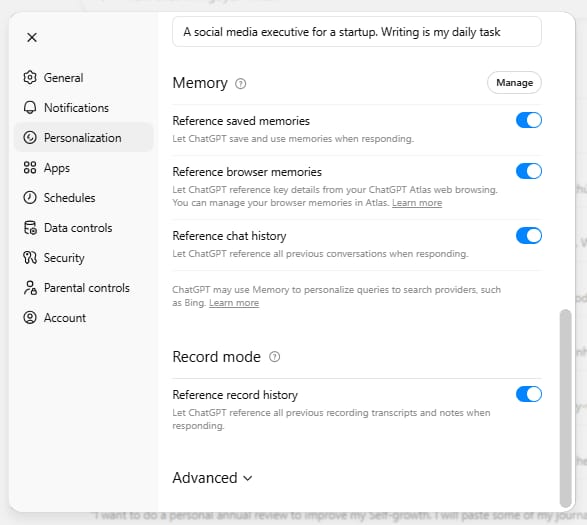
Pro Tip:
Check this section once a month. Sometimes it remembers things you don't want it to. I once told it I was looking for a gift for my niece, and it kept giving me toy recommendations for months.
I had to go in and delete that memory. Keeping this clean ensures the AI stays helpful.
4. Customize Your Theme
This sounds like a small detail, but it helps. If you are going to use this tool every day, you want it to look good. A comfortable workspace helps you focus.
How to do it:
Go to Settings → General.
Under Appearance, choose System, Dark, or Light mode.
Pick an Accent Color (I personally like Blue or Orange).
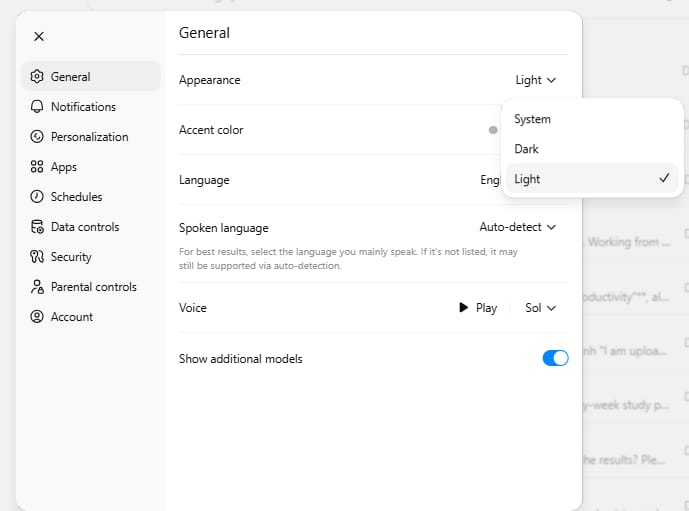
When your workspace looks professional, you feel more professional using it.
Part 2: How Can Voice And Visual ChatGPT Hacks Speed Up Your Work?
Typing is slow and describing complex visual problems is difficult, so use ChatGPT's voice and camera features to interact naturally. "Real-Time Voice" allows you to brainstorm or roleplay interviews while commuting, turning dead time into productive sessions. Meanwhile, the "Camera Hack" lets you snap photos of things like dying plants or car dashboards to get instant diagnoses without typing a single word.
Key takeaways
Feature: "Real-Time Voice" lets you talk to AI like a friend, perfect for practice interviews.
Action: Use the camera icon to show, not tell (e.g., photograph a menu to translate it).
Use Case: Diagnose a car warning light instantly by showing the dashboard to the AI.
Benefit: Voice interactions turn "dead time" (driving, walking) into productive brainstorming sessions.
A photo is worth a thousand words of typing; showing the problem is always faster than describing it.
5. Real-Time Voice Conversations
You can talk to ChatGPT just like you talk to a friend on the phone. This is perfect for when you are cooking, driving, or walking the dog. It is not like the old voice assistants that sounded like robots. This sounds like a real person.
How to use it:
Open the ChatGPT mobile app.
Tap the black wavy icon (or the headphones icon) at the bottom.
Wait for the bubble to appear and start talking.

Try this conversation:
"Hey, I have a job interview tomorrow for a sales manager role. Can you act as the interviewer? Ask me tough questions, listen to my answers, and then tell me how to improve."Why this is special:
You can interrupt the AI if it talks too long. Just say, "Okay, I get it, move on." It stops and listens. It turns "dead time" (like commuting) into productive time.
6. The Camera Hack (Show, Don't Tell)
Why type a long paragraph describing a problem when you can just take a picture? This feature uses the camera to understand the world around you.
How to activate it:
Enter Voice Mode first.
Tap the Camera Icon.
Point your phone at the object.
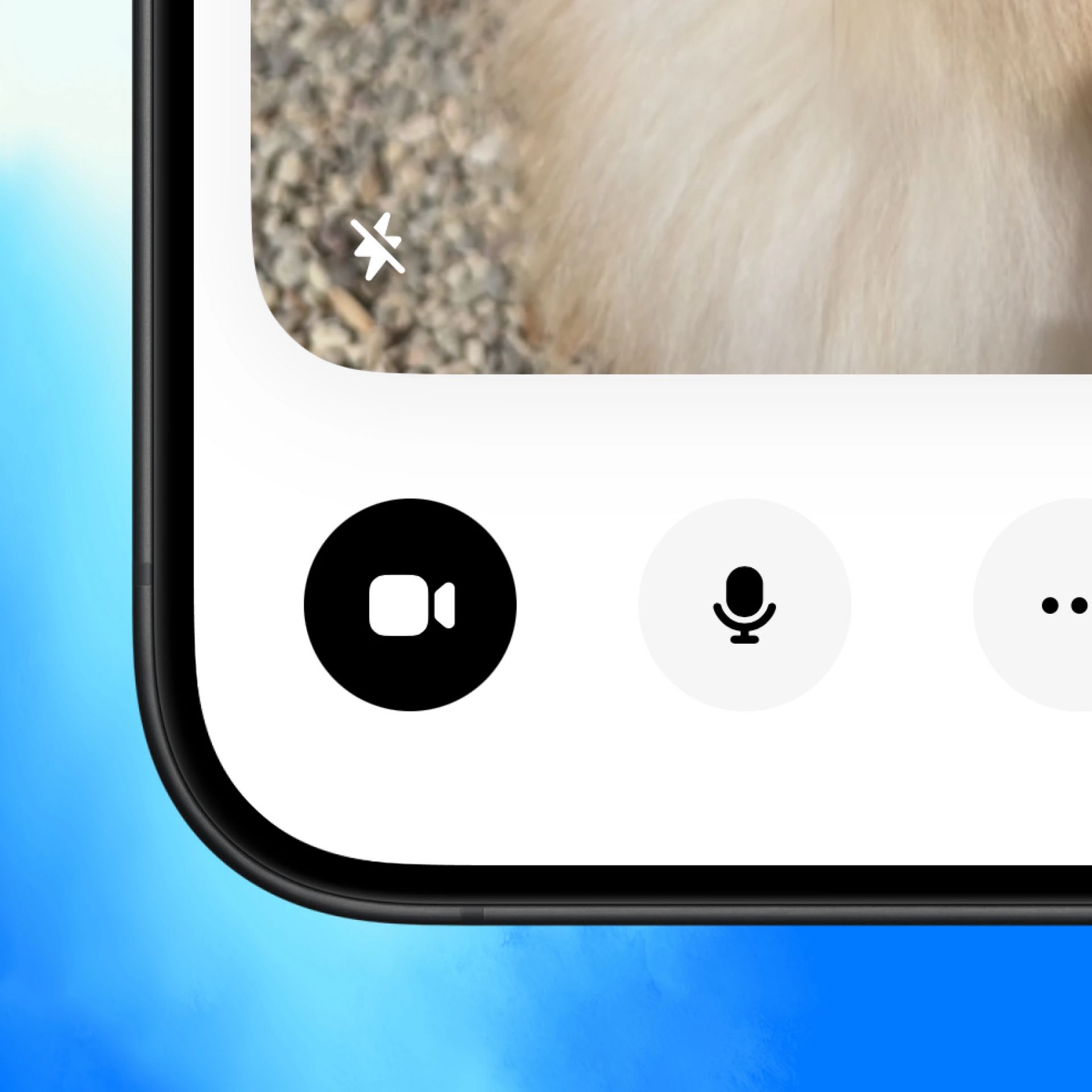
Real-life examples you can try today:
The Plant Doctor: Point your camera at a dying houseplant. Ask: "What is wrong with this plant? How often should I water it?"
The Mechanic: Show your car dashboard if a weird light comes on. Ask: "What does this warning light mean? Is it safe to drive?"
The Translator: Point your camera at a menu in a foreign language. Ask: "Which of these dishes are spicy? I don't eat pork."
Using these visual ChatGPT hacks saves you the mental effort of trying to describe complex things.
Part 3: What Are The Best Organization ChatGPT Hacks For Your Files?
If you use ChatGPT a lot, your chat history can become a disaster. It becomes hard to find that one good idea you had three weeks ago. These organization ChatGPT hacks help you keep everything tidy, focused, and easy to find.
7. Create "Projects" For Big Goals
Think of Projects like folders on your computer. Instead of having one long list of scattered chats, you create a specific space for a specific goal.
How to set it up:
On the left sidebar, click Projects.
Click New Project.
Give it a name (e.g., "Home Renovation 2025" or "Q1 Marketing Plan").

The superpower of Projects:
You can upload files to the Project. For a "Home Renovation" project, you could upload your budget spreadsheet, photos of your current kitchen, and a PDF of design ideas.
Now, every time you chat inside this project, the AI already knows your budget. It sees your kitchen. You don't have to explain the background information again. It saves you so much repetition.
At AI Fire, we use Projects to organize our team. We create a separate Project folder for each team member. This way, we never accidentally click on each other's chats or mess up someone else's workflow. It keeps our shared workspace clean and organized.
8. Canvas Mode (The Better Text Editor)
When you ask ChatGPT to write an article or an email, it usually puts the text in the chat bubble. This is fine for short messages. But for long documents, it is annoying to copy, paste, and format everything.
Canvas is a text editor built right inside ChatGPT. It looks like a Google Doc.
How to use it:
Select Canvas from the model dropdown menu (top left).
Or just say: "Open a canvas and write a blog post about..."
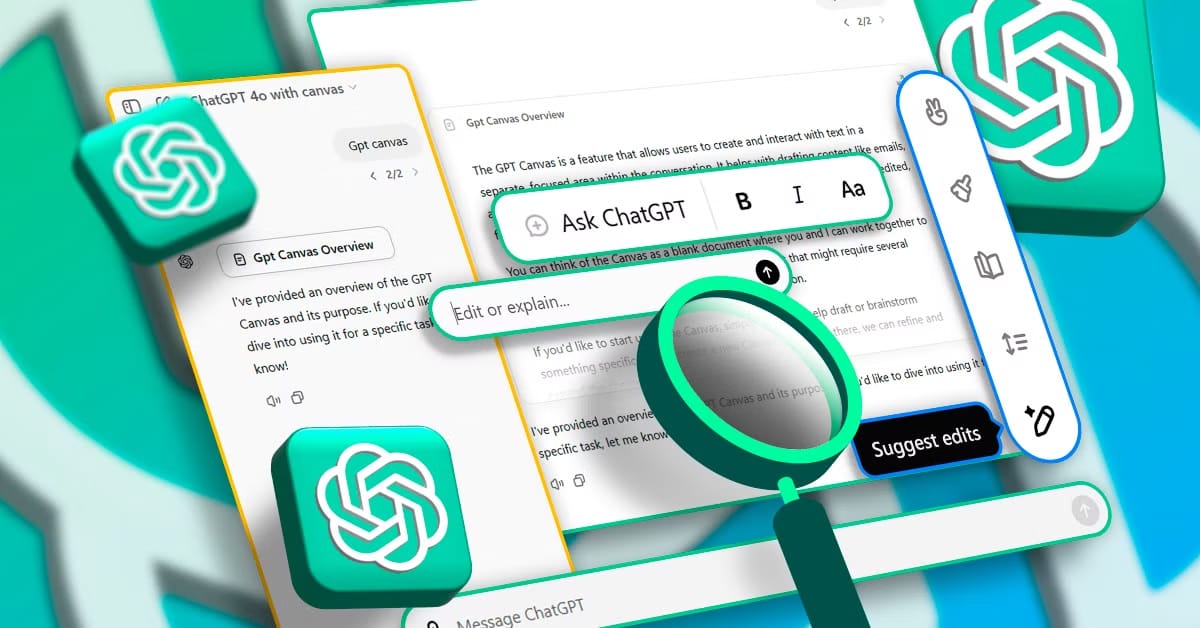
Why it is better:
You can highlight a specific sentence and ask the AI to change just that part. You can say "Make this paragraph funnier" or "Shorten this section to two sentences." You work with the AI on the document, rather than just taking what it gives you.
9. Automated Schedules
You can make ChatGPT work for you while you sleep. This is one of the newer ChatGPT hacks that many people miss because it is tucked away in the settings.
How to set it up:
Go to Profile → Personalization.
Click Schedules → Manage.
Create a new scheduled task.
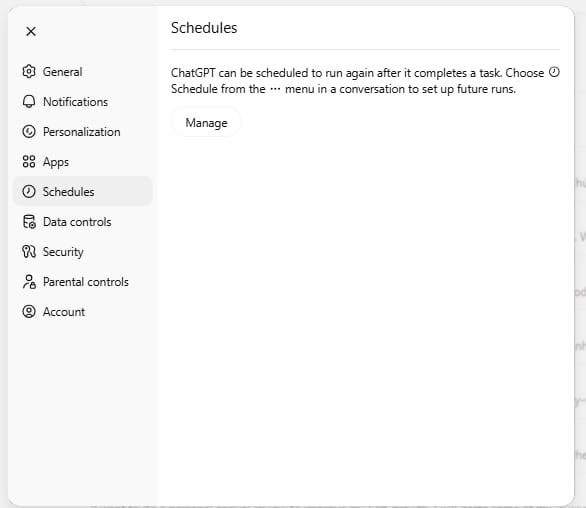
Now, you don't have to remember to do the research. The AI does it for you automatically. You wake up, and the work is already done.
Want to see exactly how to set this up? The settings can be a little hidden. Here is the best tutorial I found on YouTube that walks you through the process step-by-step: ChatGPT Scheduled Tasks tutorial
Part 4: How Do Research ChatGPT Hacks Give You Better Answers?
The standard version of ChatGPT is great, but sometimes it hallucinates (makes things up). If you need hard facts, numbers, or current events, you need to use these research tools. These ChatGPT hacks ensure you get accurate information.
10. Deep Research Mode
Sometimes a quick answer isn't enough. You need a deep dive. Deep Research tells the AI to stop guessing and actually browse the internet. This is exactly how smart entrepreneurs validate their ideas before diving into AI easy side hustles even for beginners.
How to activate it:
Click the + (Plus) icon next to the text bar.
Select Deep Research (or type
/deep).
Try this prompt:
"I want to buy a new laptop for video editing. My budget is $1500. Research the top 5 laptops released in the last 6 months. Compare their RAM, processor speed, and screen quality. Create a comparison table."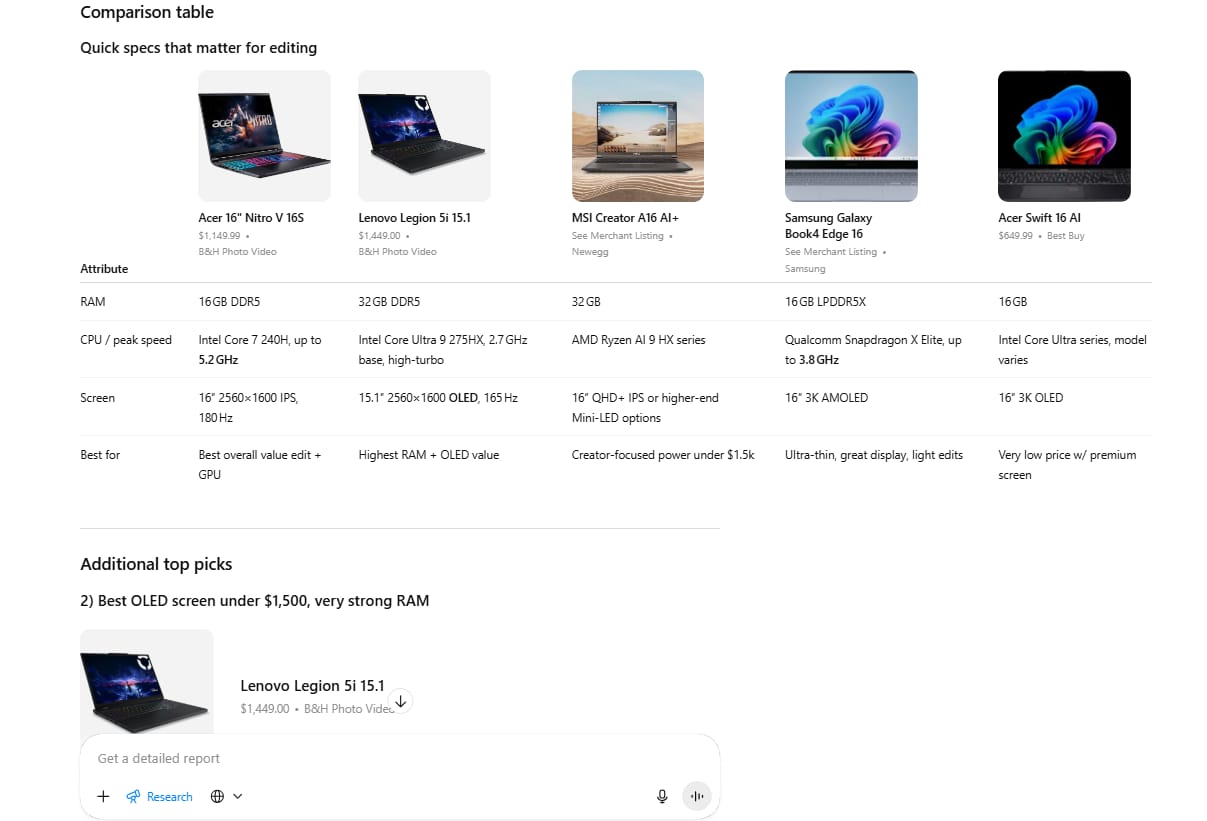
The AI will take 2-5 minutes. It will visit tech review sites, Amazon, and manufacturer pages. It reads multiple sources to verify facts. The result will be a detailed report, not just a quick guess.
11. Calendar Integration
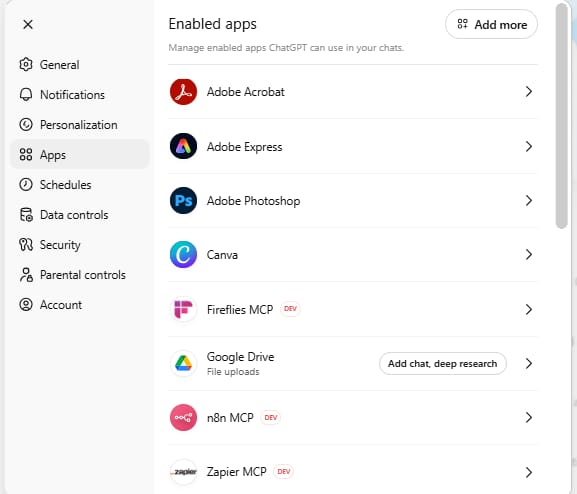
You can connect your Google Calendar to ChatGPT. This allows the AI to see your schedule and help you manage your time.
How to set it up:
Go to Settings → Apps & Connectors.
Connect Google Calendar.
Why use this:
You can ask questions like:
"Check my calendar. Based on last week, how much time did I spend in meetings versus doing deep work?"
"Where do I have a 2-hour gap next week to work on my project?"
"What meetings can I probably skip based on the descriptions?"
This acts like a personal secretary who knows your availability and helps you protect your time.
12. Email Summary (Never Miss A Message)
If you connect your Gmail account, ChatGPT can help you manage your inbox. This is a game-changer if you get hundreds of emails a day.
How to set it up:
Go to Settings → Apps & Connectors.
Connect Gmail.
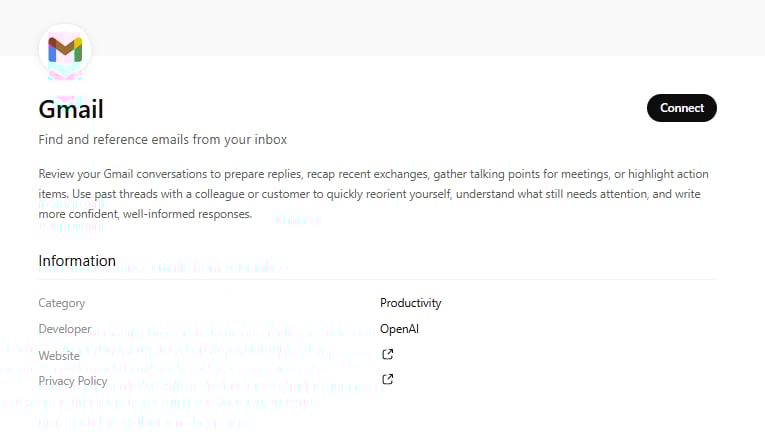
This saves you from digging through old threads. You get a clean list of tasks instantly.
13. Document Comparison
This is a lifesaver for business owners, students, and anyone dealing with contracts. You can compare two different files instantly.
How to do it:
Upload File A (e.g., the old contract).
Upload File B (e.g., the new contract).
Prompt:
"Compare these two documents. List every difference in bullet points. Tell me if any payment terms have changed."
I use this for checking revisions on articles and contracts. It spots tiny changes that human eyes might miss.
Part 5: Which Advanced ChatGPT Hacks Will Help You Learn Faster?
ChatGPT is the best tutor in the world. It never gets tired, it never gets frustrated, and it never judges you for asking "stupid" questions. These ChatGPT hacks turn the AI into a personalized education machine.
14. Model Switching
OpenAI updates its models often. Sometimes, an older model is faster, or a newer model is smarter at math. You need to know which brain to use.
GPT-5.2 Auto: Great for speed, voice, and general chat.
GPT-5.2 Thinking: Much better for math, coding, and complex logic problems.
In your chat window, look for the model name at the top (e.g., "ChatGPT 5.2"). Click it to open a dropdown menu and select a different model.
If you are trying to solve a hard budget problem, switch to the "Reasoning" model. If you just want a quick recipe, use the standard model.
15. Study Mode (The Interactive Tutor)
Don't just ask for the answer. Ask for a lesson. This feature forces you to actively learn.
How to start:
Click + (Plus) → More → Study and Learn.
Or use a prompt to set the behavior.
Try this prompt:
"I want to learn about basic economics. Act as a strict but fun teacher. Teach me one concept at a time, then stop and quiz me. Do not move to the next concept until I answer the quiz correctly."
This forces you to think. The AI will correct you if you are wrong and explain why. It is much more effective than just reading a Wikipedia page.
16. Agent Mode
This is a big step up from normal chat. An "Agent" can do multiple steps to finish a job without you holding its hand.
How to activate:
Click + (Plus) → Agent Mode.
Or type "Agent" in your chat.
Example prompt:
"Find 15 of the best Italian restaurants in Chicago. Go to their websites and find their menu prices, star ratings, and links to their Instagram. Compile all this data into a downloadable spreadsheet."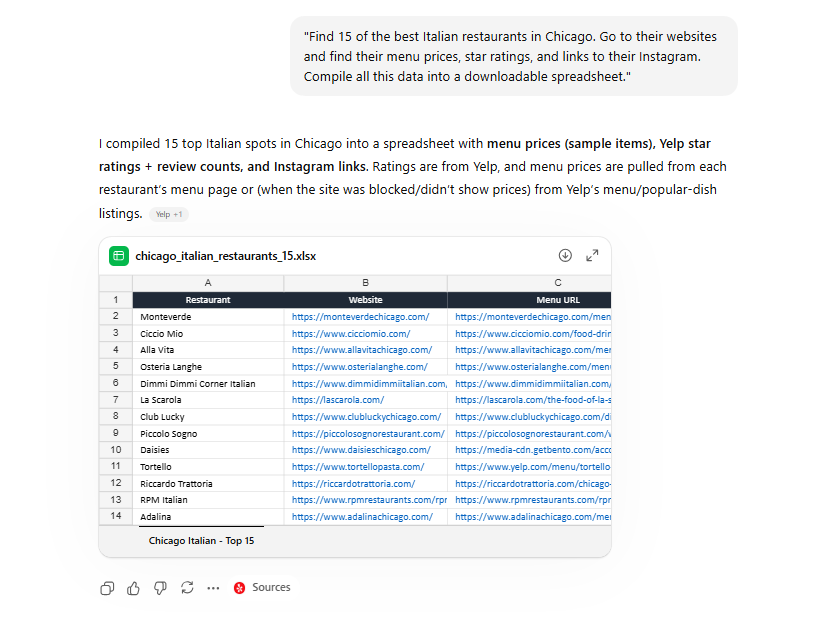
The AI will go out, browse the web, visit 15 different sites, organize the data, and give you a finished file. You didn't have to open a single tab.
Part 6: How Can App Integration ChatGPT Hacks Connect Your Tools?
You can connect external apps to ChatGPT. This means you don't have to keep switching tabs between your browser, your music player, and your design tools. These ChatGPT hacks bring your favorite tools into one conversation.
17. Canva Integration (Design Instantly)
You can create professional presentations and graphics simply by typing.
Connect: Go to Apps & Connectors and select Canva.
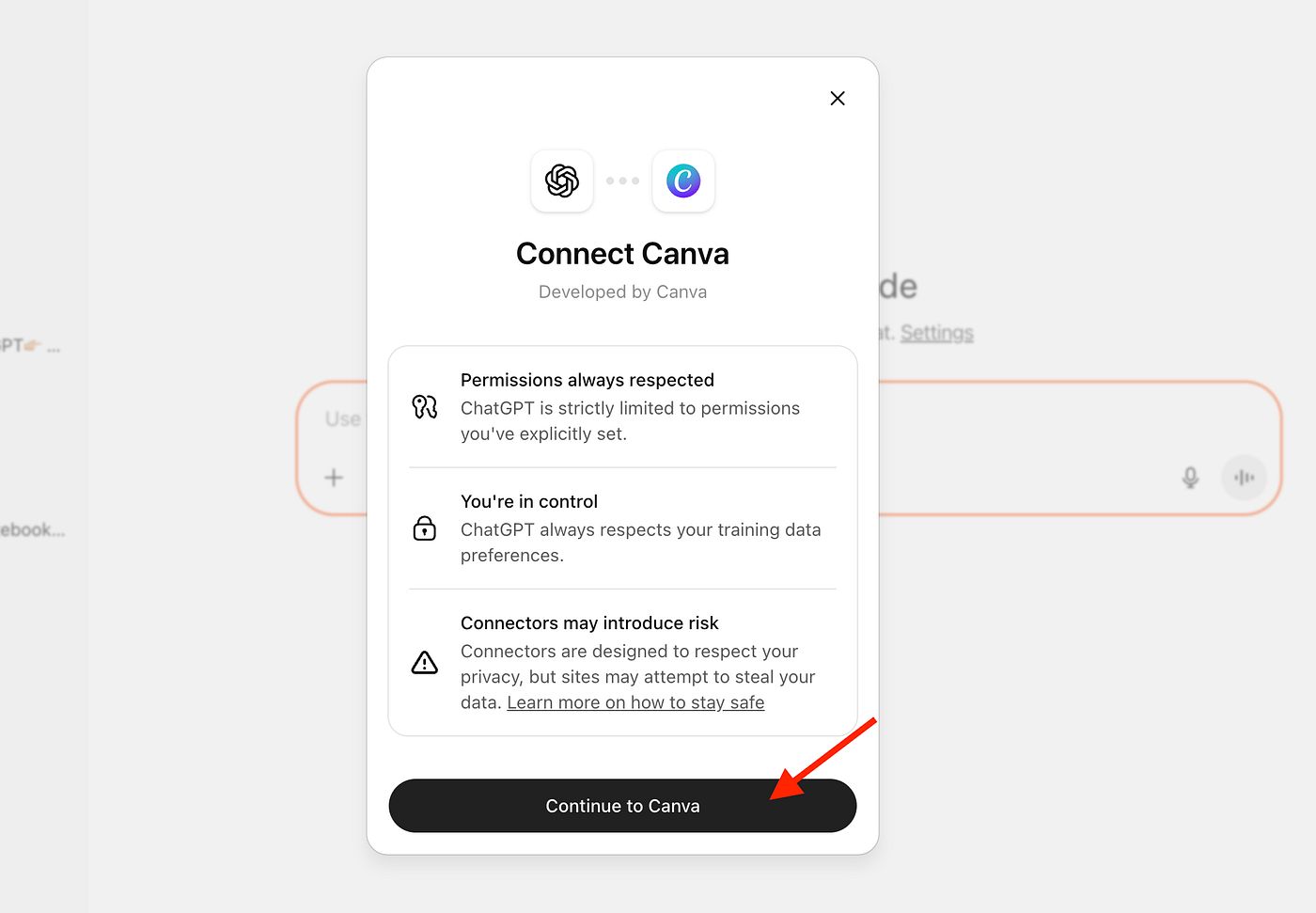
It will generate the slides. You can click on them, and it will open Canva so you can make final edits. This saves hours of formatting time.
18. Spotify DJ
If you struggle to find the right music for work, let AI be your DJ.
Connect: Spotify.

It creates the playlist and adds it directly to your Spotify account.
19. Coursera For Skills
If you want to learn a new skill properly, you can ask ChatGPT to find the best courses for you.
Connect: Coursera.
It will find the course and pin the video directly in the chat. You can watch the video, then ask ChatGPT questions about what you just watched. It is like watching a lecture with a private tutor sitting next to you.
Planning a holiday is stressful. There are too many hotels and flights to check. Let the AI do the heavy lifting.
Connect: Booking or Expedia.
Prompt:
"Plan a 3-day trip to Austin, Texas. My budget is $1500 total. I want a hotel near downtown with a pool. Find flights leaving Friday morning."
It filters through thousands of options and gives you the best 3 choices with direct links to book.
21. Figma For Designers
If you need to draw a flowchart, an org chart, or a website layout, connect Figma.
Connect: Figma.

It draws the boxes and arrows for you. You can then export this to Figma to make it look pretty. This is great for visualizing ideas quickly.
Part 7: Can Technical ChatGPT Hacks Help You If You Don't Code?
You might think, "I am not a programmer, I don't need technical features." But you are wrong. These ChatGPT hacks allow regular people to use the power of code and data analysis, even if you don't know how to write a single line of code.
22. Data Interpreter (Visualizing Your Numbers)
Do you have an Excel sheet full of sales data that you don't understand? Usually, you would have to spend hours creating Pivot Tables or squinting at rows of numbers to find a trend. But with the Data Interpreter, you can skip that entire process.
How to use it:
Upload your spreadsheet (CSV or Excel file).
Prompt:
"Analyze this data. Tell me which month had the highest sales and why. Give me a visual representation using a bar chart."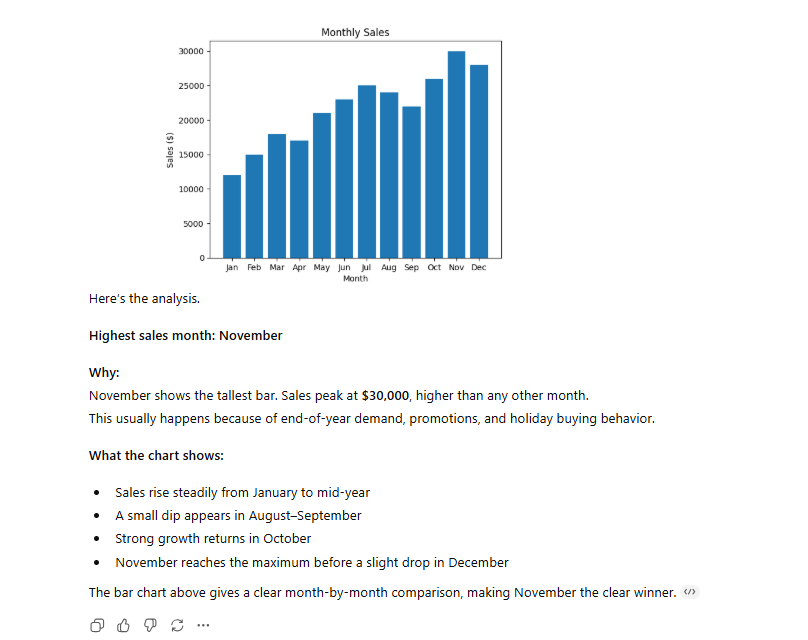
ChatGPT will read the file, do the math, and draw a chart for you right in the chat. You can then download that image and put it in your PowerPoint. It makes you look like a data genius in minutes.
23. Fixing Broken Formulas
We have all been there. You are working in Excel or Google Sheets, and your formula gives you a nasty ERROR message.
How to fix it:
Copy the broken formula.
Prompt:
"Here is my Google Sheets formula: =SUM(A1:A50). It is not working because column A has text mixed with numbers. Write a new formula that only sums the numbers."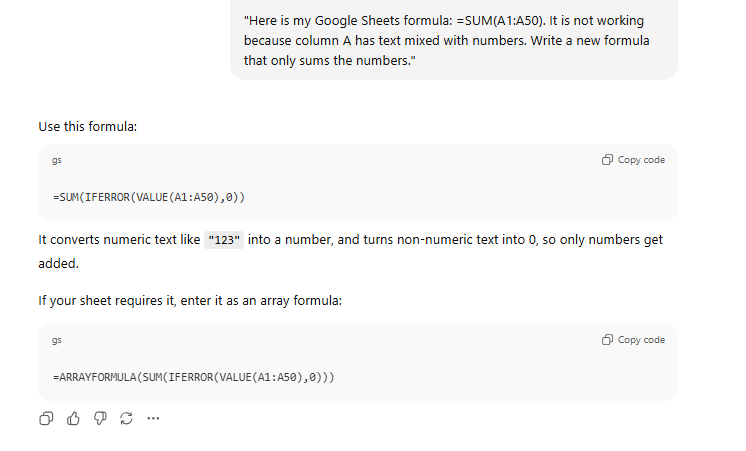
It will write the correct formula for you. You just copy and paste it back into your sheet.
24. Building Simple Websites
You can build a webpage in seconds. Yes, really.
Prompt:
"Write the HTML code for a simple landing page for my coaching business. Use warm colors like brown and cream. Include a 'Contact Me' section and a place for a photo."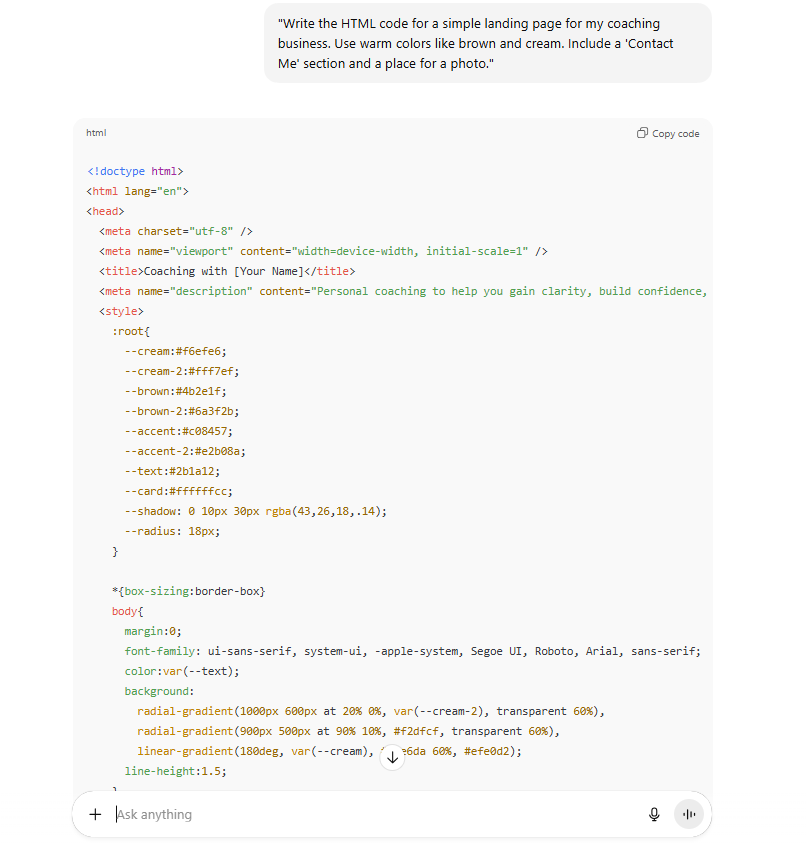
It will write the code. Often, you will see a Preview button. Click it, and you can see the live website. If you don't like the color, just say, "Change the background to blue." It updates instantly.
Part 8: What Are The Bonus ChatGPT Hacks You Probably Missed?
These last three tricks are the "illegal" ones I mentioned in the title. They are so powerful they feel like cheating. They connect different worlds, your phone, your computer, and the internet in ways we couldn't do before.
Bonus #1: Siri Integration (iPhone Users Only)
If you have an iPhone 15 Pro or newer (with Apple Intelligence), you can link Siri to ChatGPT.
Why this is huge:
Siri has always been a bit... limited. But now, you can use Siri as a gateway to ChatGPT's brain.
You can say: "Hey Siri, ask ChatGPT to write a bedtime story for my kids featuring a dragon named Bob, and save it to my Notes app."
Siri handles the voice part, ChatGPT handles the creative part, and your phone saves the result. It is a seamless experience.
Bonus #2: Connecting Any App With Rube (MCP)
There is a new technology called MCP (Model Context Protocol). It is a fancy name, but it just means "a way for AI to talk to apps." A tool called Rube.app helps you do this easily.

What it enables:
Remember how Hack #11 could only read your calendar? With Rube and MCP, ChatGPT can actually add things to it. Instead of just reading an email, it can send an email. This is the future of work. The AI becomes an agent that actually does the clicking and typing for you.
Bonus #3: ChatGPT Atlas
OpenAI is testing a new browser experience called Atlas. It is like Google Chrome, but with ChatGPT built into the engine.
The killer feature here is Agent Actions. You can ask it to do shopping for you.
Scenario: You are planning a beach day. You tell Atlas:
"I am going to the beach. Find the best price for sunscreen, a large towel, and a cooler on Amazon. Add them to my cart."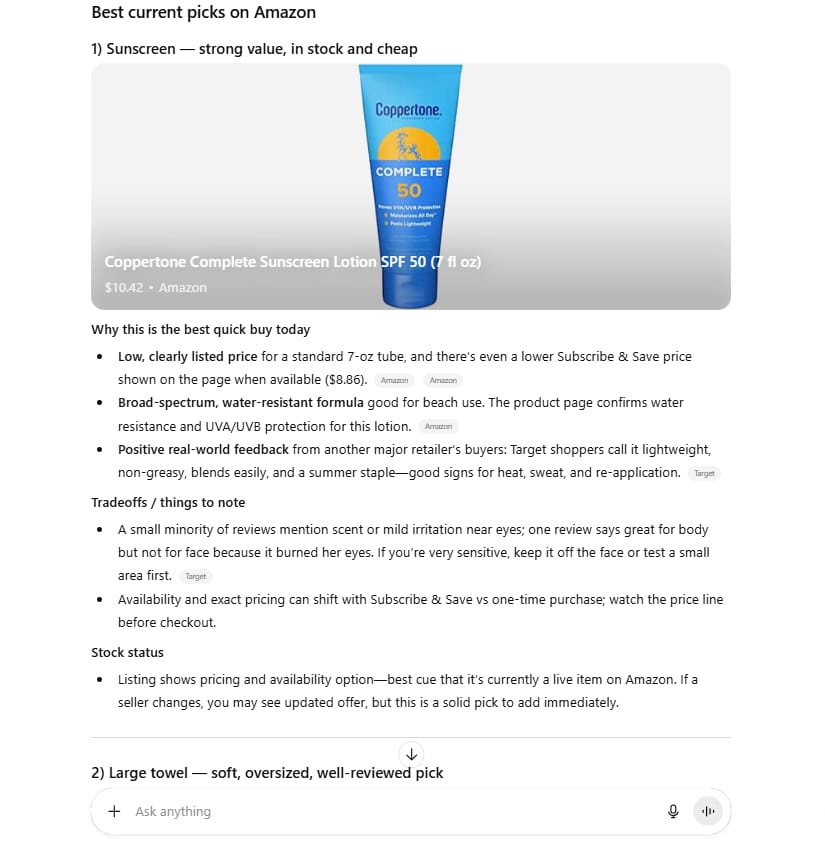
It navigates the website, finds the items based on your preferences, and puts them in the cart. You just review and click "Buy." It removes the friction of browsing ten different pages.
Conclusion: Just Pick One
We have covered 27 different ChatGPT hacks. That is a lot of information. If you try to do all of them today, you will get overwhelmed and stop using them.
Here is my advice: Pick just one.
Maybe you need the Voice Mode because you drive a lot. Maybe you need the Projects feature because your files are messy. Maybe you want to try the Excel formula fixer because you hate spreadsheets.
Choose one hack. Use it every day for the next two weeks. Make it a habit. Once it feels natural, come back to this guide and pick another one. The people who get ahead with AI aren't the ones who know the most tricks, they are the ones who actually use them to save time.
So, which hack will you start with today?
If you are interested in other topics and how AI is transforming different aspects of our lives or even in making money using AI with more detailed, step-by-step guidance, you can find our other articles here:
DeepSeek-V3.2 vs GPT-5 vs Gemini 3: Our Hands-On Test on Real Coding & Reasoning Tasks
6 Profitable AI Businesses to Start in 2026: Simple, Fast, and Still Underrated
Earn Money with MCP in n8n: A Guide to Leveraging Model Context Protocol for AI Automation*
Transform Your Product Photos with AI Marketing for Under $1!*
The AI Secret To Reports That Clients Actually Implement
*indicates a premium content, if any
How useful was this AI tool article for you? 💻Let us know how this article on AI tools helped with your work or learning. Your feedback helps us improve! |
Reply