- AI Fire
- Posts
- ⚠️ 512,000 Lines of Claude Code Just Leaked. Here're the 8 Most Critical Things You Must Do!
⚠️ 512,000 Lines of Claude Code Just Leaked. Here're the 8 Most Critical Things You Must Do!
We dug through the leaked source code to find the exact architecture secrets that turn Claude into an autonomous engineering partner without coding.

Max Anh
April 02, 2026

TL;DR BOX
In April 2026, a look at Claude Code's internal files showed that most people only use 10% of what this tool can really do. Claude Code is more than just a chatbot. It is a smart system that can do many jobs by itself across your codebase, including a Three-Layer Memory system, slash commands and a proactive background agent called “Kairos.” To unlock its true power, start focusing on environment setup, permissions and structured workflows using tools like CLAUDE.md and Plan Mode.
Key Points
Fact: On March 31, 2026, Anthropic accidentally exposed the full source code for Claude Code (512,000 lines), revealing exactly how it maps a local codebase.
Mistake: Treating CLAUDE.md as a dumping ground for long rules. Research shows that context files over 300 lines actually degrade performance. Pro Move: Keep it under 200 lines of operational instructions for your specific codebase.
Action: Audit your Permissions immediately. If the AI has to stop and ask you for permission every minute, you are working 40% slower than you should. Use the "allow" list to give the AI permission to use safe tools without asking you every time.
Critical Insight
The real 'holy shit' moment in the code? Agentic Persistence. It means Claude isn't just reacting, it's living inside your repo. Claude Code is not just listening to your text; it’s building a real-time graph of your codebase state, git history and local environment. A new feature called "Kairos" will soon let the AI work on its own. It won't wait for you to tell it what to do every time; it summarizes your work and manages schedules while you're idle.
Table of Contents
🤖 Are you still using Claude Code like a basic chatbot? |
I. Introduction
A while back, a public NPM package accidentally revealed readable TypeScript source code for Claude Code. Developers explored it, discussions appeared across forums and then the attention moved on.
It was what the code revealed about how Claude Code is actually designed to work.

Source: The Guardian.
When you dig into the source codebase, the gap is obvious: most devs are barely scratching the surface of what Claude Code can actually do. It means they’re using only about 10% of its real power.
Not because it is difficult to use and not because anything is missing but because many people still treat it like a simple chatbot inside a terminal, rather than a tool designed to index and manipulate a complex codebase.
This guide focuses on 8 practical lessons hidden in that architecture. By the end, you will use Claude Code less like a chatbot and more like the engineering tool it actually is.
Quick disclaimer before we begin: I won’t be sharing any actual source code in this post and I recommend exercising caution if you decide to download it yourself. While this leaked through a public NPM package, Anthropic still holds the copyright and has shown they’re willing to issue DMCA takedown notices. So, everything I’m discussing is based on how you can use the tool more effectively.

II. Lesson 1: Claude Code Is Not Just ‘Chat in a Terminal’
Let's start here because this is where almost every mistake begins.
Claude Code is not simply Claude placed inside a terminal window. It’s better than that; it is a full agent runtime. Inside the program, it has a CLI parser, a query engine, tool execution loops, memory handling, permission controls and coordination systems.
In other words, it was built to do work, not just have a conversation about it.
If you treat Claude Code like a chatbot, you tend to write long, vague prompts and hope the result is useful. But when you approach it as an agent environment, the focus shifts to workflows: plan the steps, control the context, manage permissions and divide the task into smaller parts.
That shift in mindset alone is where most of the real advantage comes from.
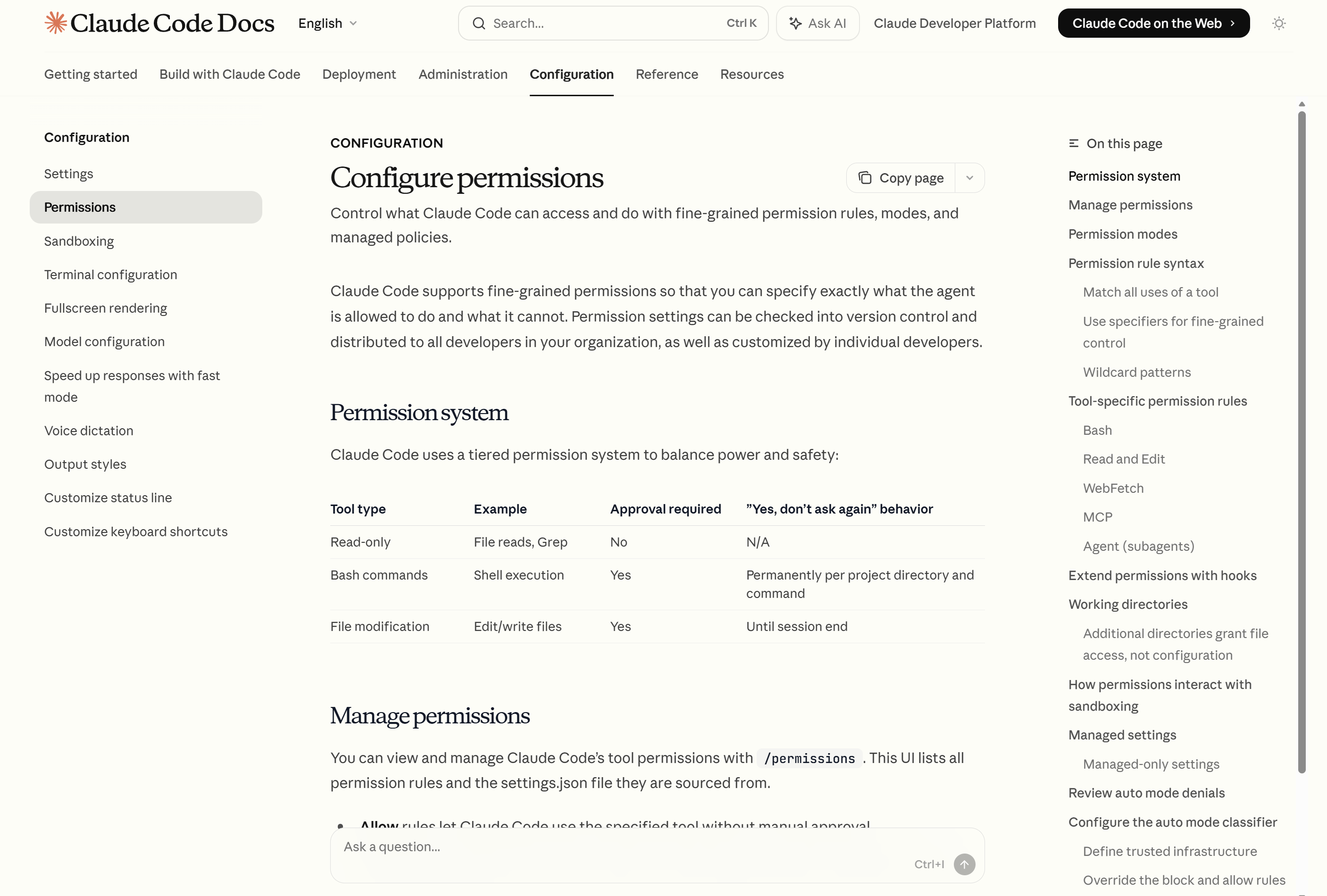
Source: Claude Code Docs.
Now that we’ve redefined Claude Code’s role, let’s explore some practical features to supercharge your workflows.
Learn How to Make AI Work For You!
Transform your AI skills with the AI Fire Academy Premium Plan - FREE for 14 days! Gain instant access to 500+ AI workflows, advanced tutorials, exclusive case studies and unbeatable discounts. No risks, cancel anytime.
III. Lesson 2: Useful Slash Commands
The leaked codebase reveals roughly 85 distinct slash commands built into the system. But most users only ever type /help or maybe /context.
However, power users use these commands as useful shortcuts to speed up their workflows.
Here are the most important commands you should know about:
/init: Sets up project context at the start of a session. Use it before anything else on a new project./plan: Puts Claude Code into planning mode. It reads and analyzes the codebase before making any changes, like "look before you leap"./compact: Reduces unnecessary conversation history, saving tokens and helping your wallet./review: Starts a structured code review workflow, instead of just freeform feedback./context: Manages the files currently in use, so you stay organized./cost: Shows you how much the current session has spent. Highly recommended if you enjoy not getting surprise invoices./summaryand/resume: Help you pick up right where you left off in previous sessions.

Hidden Slash Commands
Why /plan Deserves Special Attention
Plan Mode is a read-only phase where Claude Code analyzes the codebase and figures out the best approach before making any changes.
This step is essential for complex tasks because it minimizes risks by ensuring the AI understands the project thoroughly before making changes.

Plan Mode
IV. Lesson 3: CLAUDE.md is Your Most Powerful Setup File
If Claude Code were a new team member, CLAUDE.md would be its onboarding document.
It’s a persistent instruction file that Claude reads at the start of every session. Whatever you include in it stays consistent across sessions, so you don’t have to repeat yourself or explain your stack every time.
1. What to Put in CLAUDE.md
Keep it concise (under 200 lines) and specific. Here’s what to include:
Your tech stack and package manager.
File structure and where things live.
Code style preferences (indentation, naming conventions).
Testing requirements.
What Claude should ask before doing (like destructive changes).

Use the command /init to create your CLAUDE.md file.
2. A Starter Template You Can Use Today
Here’s a template to get you started:
# Project Rules

## Tech Stack
- TypeScript with strict mode enabled
- Package manager: pnpm (not npm)
- Frontend components: src/components/
- API handlers: src/api/handlers/

## Code Standards
- 2-space indentation
- Small, composable functions
- One responsibility per file
- Descriptive function and variable names

## Testing
- Update or add tests for any behavior change
- Place tests next to source files
- Run full test suite before marking work complete

## Database & Infrastructure
- Never modify schema files without a migration
- Do not touch production environment settings directly
- Ask before any destructive changes

## Workflow Preferences
- For large changes: plan before editing
- Summarize proposed changes before implementation
- On debugging: find root cause before suggesting a fix
Short, opinionated and operational. That’s the sweet spot for CLAUDE.md.
When Claude has all of this information, it’s like having a perfectly aligned team member who’s ready to work without second-guessing.

Here is an example of CLAUDE.md file.
V. Lesson 4: Permission Setup Determines Your Speed
If Claude Code keeps stopping to ask for your approval every 30 seconds, the issue is not your prompt. It’s how your permissions are set up.
By default, Claude Code plays it safe and asks for confirmation on nearly everything. While this is great for security, it can significantly slow down your productivity.
Permissions follow a simple rule: deny overrides everything and the first matching rule takes priority. You can set rules to:
allow: Claude Code performs the action automatically, no approval needed.
ask: Claude Code pauses and waits for your approval.
deny: The action is blocked, no questions asked.
Here’s a sample configuration:
{
  "permissions": {
    "defaultMode": "plan",
    "allow": [
      "Bash(git status)",
      "Bash(git diff *)",
      "Bash(pnpm test *)",
      "Read",
      "Edit(src/**)"
    ],
    "ask": [
      "Bash(git push *)",
      "Bash(rm *)"
    ],
    "deny": [
      "Read(.env)",
      "Bash(curl *prod*)"
The goal is simple: stop approving the same harmless actions over and over, while still forcing review for anything risky.
Make sure you treat Claude Code like a trusted junior developer, not an unchecked script with admin access.
What do you think about the AI Report series? |
VI. Lesson 5: Break Work Into Stages, Not One Giant Prompt
A common mistake that many Claude Code users make is writing a long, multi-part prompt and hoping everything will be perfect on the first try.
It rarely works that way. Claude Code works best when you break a big job into small steps. So, a better approach will look like this:
Search and inspect: Understand the relevant code first.
Plan the change: Use
/planto map the approach.Implement: Make the actual edits.
Verify: Run tests, review the output.


Coordinator Mode
This isn’t slower; it’s faster. By catching problems early, you avoid the mess of untangling everything at the end.
A good mental model: imagine handing a task to a sharp junior developer. You would not dump everything on them at once. You would walk through it together, step by step.
And Claude Code works the same way when you approach it with that mindset.
VII. Lesson 6: MCP and Extensions Are Where Real Leverage Lives
The model itself is powerful but the real magic of Claude Code happens when it’s connected to systems around it.
Through MCP (Model Context Protocol) and extensions, you can integrate Claude Code with:
Databases.
Documentation systems.
Repeatable custom workflows.
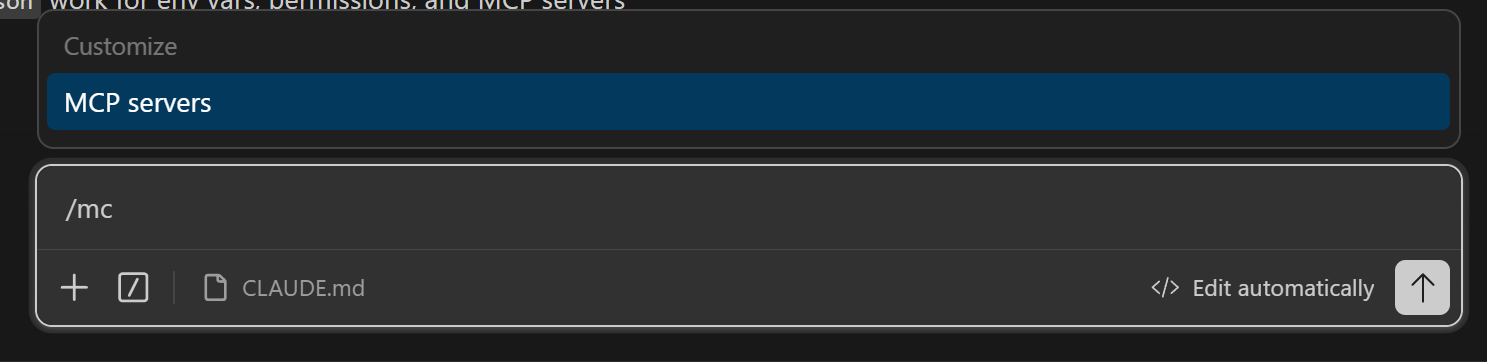

If you frequently perform tasks like running a specific test pipeline or querying a particular API, you can turn those into reusable skills in Claude Code instead of having to type out prompts each time.
If you’re doing repetitive tasks, like running test pipelines, generating boilerplate code or querying a specific API. You can turn those into reusable skills in Claude Code because those can eliminate the need to retype prompts, help you avoid retyping every time
Stop using Claude Code just for typing. Use it as a tool that connects all your work together. The real power lies not just in the model but in the systems connected around it.
While extensions and features enhance Claude Code's capabilities, there are still hidden gems we haven’t unlocked yet.
Creating quality AI content takes serious research time ☕️ Your coffee fund helps me read whitepapers, test new tools and interview experts so you get the real story. Skip the fluff - get insights that help you understand what's actually happening in AI. Support quality over quantity here!
VIII. Lesson 7: Best Features Are Still Behind Flags
The source code hinted at capabilities that are not yet publicly available: things like voice mode, coordinator-style multi-agent systems, a proactive agent (called Kairos) and other gated features still in development.
So, this means you don’t need to waste your time on hidden features. The practical lesson is simpler: pay attention to updates, because the architecture suggests Claude Code is evolving fast.
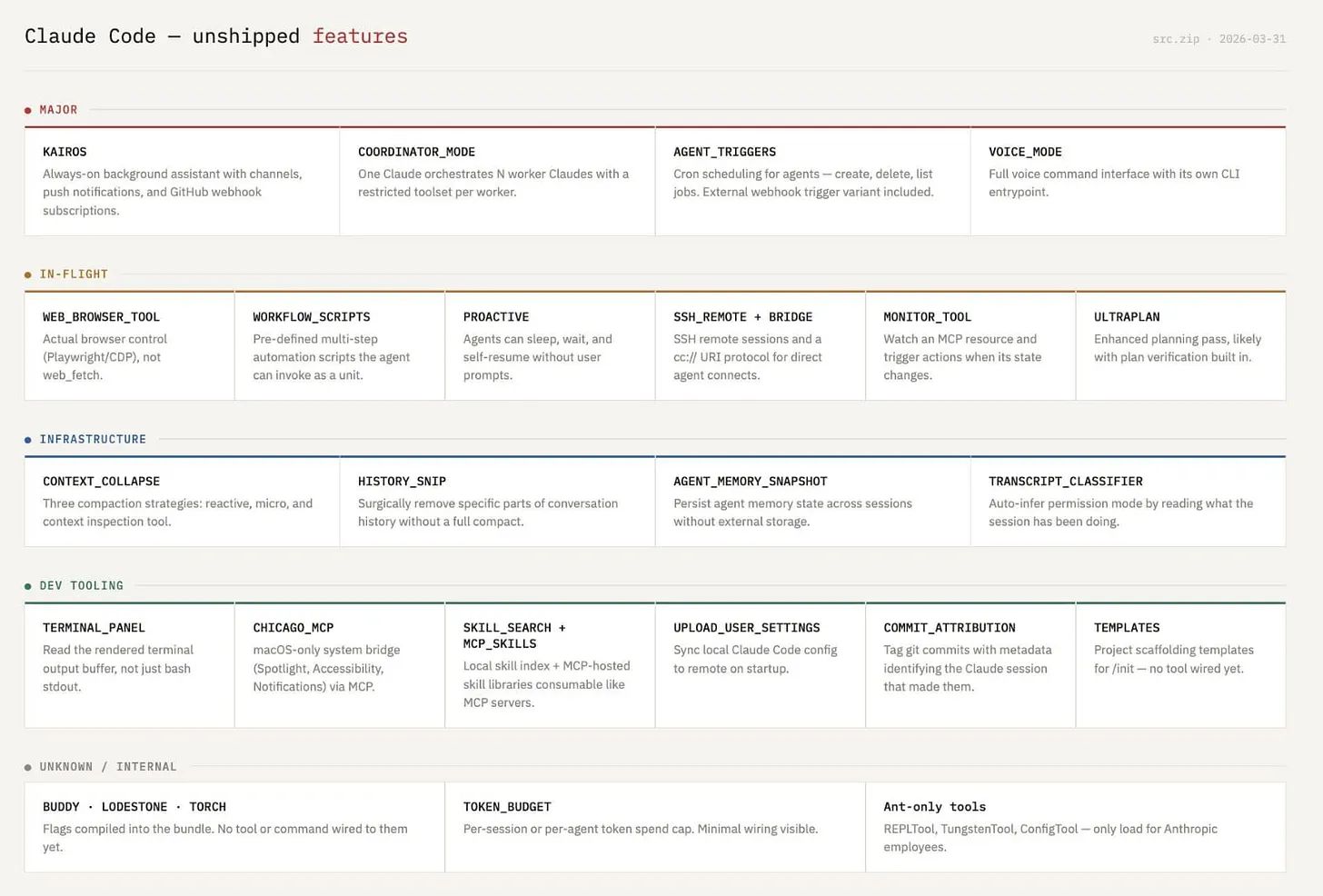
Hidden & Unreleased Features
If you understand planning, permissions, memory and extensions now, you’ll be ready to hit the ground running when new features are released. Meanwhile, others will still be struggling with approval prompts interrupting their workflow.
IX. Lesson 8: Build a Better System, Not Better Prompts
Here’s the mistake most users make with Claude Code: top performers don’t just write better prompts. They build a better operating environment for their codebase.
Here’s how to set yourself up for success:
Area | What to Do |
|---|---|
Memory | Keep CLAUDE.md sharp and current |
Commands | Use |
Permissions | Configure once, stop approving everything manually |
Context | Be deliberate about what files are in play |
Workflow | Break large tasks into stages |
Extensions | Connect the tools you actually use |
Claude Code works best when you stop using it reactively and start using it purposefully. The difference between "AI that occasionally helps" and "AI that feels like part of your engineering workflow" often comes down to one thing: setup, not capability.
The power is already in the tool. The real question is whether you’ve set up your environment to make the most of it.
For a detailed roadmap on building a more powerful and systematic Claude Code setup (focusing on memory management, permissions and workflow stages), take a look at our ultimate checklist for creating the ideal Claude Code environment.
X. Conclusion
The leak was interesting and the drama was entertaining. But the real takeaway is this: you'll see how much Claude Code can do when you use it the way it was designed.
That is the whole lesson. Everything else is just details.
If you want to build a more streamlined and effective AI engineering environment, where Claude Code works seamlessly with your tools, refer to these best practices for system setup.
If you are interested in other topics and how AI is transforming different aspects of our lives or even in making money using AI with more detailed, step-by-step guidance, you can find our other articles here:
Claude's "Agent Mode" Leaked: Why the Blank Chat Box Is About to Die
Why Claude Gets Worse the More You Explain. 5 Proven Fixes That Restore Accuracy
How to Attract High-Value Clients in 2026 with Just One Clear Positioning Move*
ChatGPT vs. Claude vs. Gemini vs. Grok vs. Perplexity: Tips to Make Use of Each One!*
*indicates a premium content, if any
Reply