

TL;DR: Gemini 4 Neon is a powerful AI model for creative coding, 3D modeling, game development, and complex reasoning. It shows strong potential to outperform GPT-6.2 Sol in creative coding tasks.
In this guide, you'll learn how to build a 3D dragon using mathematical functions and develop an interactive 3D survival game. You'll also explore real-world projects shared by the AI community on X.
What you'll learn:
How Neon's benchmark scores actually stack up, with the caveats you need to know
What the four thinking levels mean for your budget
Two hands-on 3D projects you can try yourself
Real community builds from X: pixel art, cycling animations, sailing ships
An honest side-by-side with Opus 5.5 and GPT-6.2 Sol
Table of Contents
🤔 What's stopping you from building with Gemini 4 Neon?
Introduction
There's a rumor that Gemini 4 Neon could take on GPT-6.2, OpenAI's latest model released on November 17.
That's interesting, especially since GPT-6.2 Astra and Sol just arrived with major improvements in coding, reasoning, and handling complex multi-step tasks.
So, how does Gemini 4 Neon really compare with GPT-6.2 and Claude Opus 5.5? Let's check it out together!
I. How Good Is Gemini 4 Neon? Benchmarks
Before we build anything, let's get the numbers straight. And I want to be clear about where these numbers come from, because it matters.
1. Gemini 4 Neon vs Other AI Models
Gemini 4 Neon scores 61 on the Artificial Analysis Intelligence Index, ahead of Claude Opus 5.5 (59) and GPT-6.2 Sol (57). It also leads several coding benchmarks, including CursorBench (65.4%) and SWE-sweep (39%).

However, Claude still scores higher on Terminal-Bench (65.8%) and FrontierCode (47.3%). GPT-6.2 Sol also leads Chartography with 75.1%.
And it's not a clean sweep across every benchmark either. Here's the fuller view:
Where Neon leads:
CursorBench 4.1: 65.4% vs. Opus 5.5 at 58.1%
SWE-sweep (Google's own harness): 39%, see the note below, because this one needs an asterisk
RiemannBench: 84.0% vs. 80.0% for both Opus 5.5 and GPT-6.2 Sol, so Neon actually leads here rather than ties
AutoBaxBench hard tier (cybersecurity): 76%, reported by Google as #1, see the note below
Where Neon trails:
Terminal-Bench 4.1: Neon 65.2% vs. Claude Opus 5.5 65.8%. Claude edges it, with GPT-6.2 Sol behind at 61.5%
FrontierCode 2.0: Neon 46.2% vs. Opus 5.5 47.3%. Another narrow Claude win, with Sol at 43.8%
Chartography: GPT-6.2 Sol leads at 75.1% vs. Neon's 73.5%, with Opus 5.5 behind at 66.3%
2. Gemini 4 Neon Performance by Thinking Level

You can dial in how hard it thinks based on the task. You set it with the thinking_level parameter, and Google rejects only the minimal setting.
Thinking Level | AA Index Score | Avg Time per Task | Best For |
|---|---|---|---|
Low | 44 | ~3.7 min | Simple, fast tasks: summarizing, quick drafts |
Medium | 55 | ~8.3 min | Moderate reasoning: standard coding, analysis |
High (default) | 60 | ~14.8 min | Most real-world tasks |
XHigh | 61 | ~21.5 min | Complex problems, creative builds |
But higher thinking means higher cost and much slower responses, note that XHigh averages around 21 minutes per task against under 4 for Low.
So for routine work, Low or Medium might be all you need. Save XHigh for the stuff that actually demands it, like the 3D projects below.
For reference on what that costs: Neon runs $3 per million input tokens and $15 per million output tokens, which is double the price of its smaller sibling Hydrogen but cheaper than the step up to Carbon.
It's live now for Google AI Pro and AI Ultra subscribers in the Gemini app and in Google Antigravity, where it replaces Argon.
Quick tip: The default thinking level is high. If you're running high-volume tasks and costs are creeping up, try medium first. You get a score of 55, it's significantly cheaper, and it's about half the wait.
Learn How to Make AI Work For You!
Transform your AI skills with the AI Fire Academy Premium Plan - FREE for 14 days! Gain instant access to 700+ AI workflows, advanced tutorials, exclusive case studies and unbeatable discounts. No risks, cancel anytime.
II. Building 3D Projects with Gemini 4 Neon
Let's put Gemini 4 Neon to the test with several hands-on projects. We'll explore how it handles 3D modeling, animation, interactive environments, and even game development.
Project 1: A 3D Dragon, Built Entirely With Math
Normally, you'd open Blender and start sculpting. But Gemini 4 Neon can build a 3D dragon using Signed Distance Functions (SDF), which are pure mathematical formulas, with no existing 3D model needed.
The result includes an interactive 3D viewer with controls for body shape and camera angles, plus an automated review system that checks the render against the original reference image and keeps improving it.
Here's the prompt to try it yourself. Upload a clear reference image of a dragon to your workspace first, then send this:
You are an expert in 3D graphics, mathematical modeling, and procedural generation.

Your task is to recreate the dragon in the uploaded reference image as a complete 3D model using Signed Distance Functions (SDF).

Follow these requirements:

1. Analyze the reference image and identify the dragon's main features, including its head, horns, neck, body, legs, wings, tail, and surface details.

2. Build the entire dragon using mathematical SDF functions. Combine primitive shapes and custom distance functions to create complex organic forms.

3. Do not use existing 3D models, mesh files, Blender, or external 3D modeling software. Generate the entire shape through code.

4. Preserve the original dragon's proportions, pose, silhouette, and recognizable details.

5. Add suitable materials, colors, and surface textures to make the final model visually detailed.

6. Create a working 3D viewer that allows me to rotate the dragon and inspect it from different angles.

7. Build an automated review system that:
   - Renders the dragon from five different viewing angles.
   - Compares the rendered silhouettes with the reference image.
   - Identifies incorrect proportions, missing details, and distorted shapes.
   - Uses these findings to improve the SDF functions.

8. Repeat the rendering, comparison, and improvement process for multiple rounds. Do not stop after the first version.

9. Show the final model alongside the reference image and provide a short summary of the improvements.

Write the actual code, run it, inspect the results, and fix any obvious issues before finishing.

Your goal is to create the closest possible 3D recreation of the reference image using mathematical functions alone.
What I find particularly clever here is the automated review loop.
Instead of you manually checking each version, Gemini 4 Neon renders the dragon from multiple angles, compares the silhouettes to the reference, identifies what's off, and iterates on its own.
That's a genuinely useful pattern you can adapt for other 3D projects too.
Project 2: A Playable 3D Survival Game, From a Single Prompt
Can Neon build a fully playable 3D game, with environment, enemies, mechanics, and UI, from one prompt? Let's find out.
This is a military survival game built with Three.js: a voxel battlefield, enemy waves, inventory, minimap, the works.
You are a senior game developer with expertise in Three.js, procedural 3D graphics, game design, and performance optimization.

Build a fully playable, browser-based 3D military survival game with a detailed voxel art style.

Game requirements:

1. Environment
- Create a large battlefield with forests, rivers, military bases, bridges, and abandoned buildings.
- Add military vehicles, watchtowers, bunkers, and supply stations.
- Include dynamic lighting, shadows, fog, and weather effects.

2. Player Controls
- WASD for movement.
- Mouse controls for aiming and looking around.
- Space to jump and Shift to sprint.
- Allow players to interact with objects and collect supplies.

3. Game Mechanics
- Create enemy units with patrol and attack behavior.
- Add health, ammunition, inventory, and a scoring system.
- Include increasingly difficult enemy waves.
- Create clear victory and defeat conditions.

4. User Interface
- Design a start menu, minimap, health bar, and mission tracker.
- Add pause, restart, and fullscreen controls.
- Include sound effects and visual feedback during gameplay.

5. Performance
- Use Three.js and procedural voxel geometry.
- Optimize rendering, collision detection, and memory usage.
- Target a stable 60 FPS on a standard desktop browser.

6. Testing and Verification
- Test player movement, enemy behavior, collisions, and game mechanics.
- Check frame rate during gameplay.
- Identify and fix visual errors and performance issues.
- Repeat testing after each major improvement.

Deliver a complete, playable game that runs directly in the browser without requiring external 3D assets.

Do not finish until the core gameplay mechanics have been implemented and tested.
🔥 I'm quite impressed with how Gemini 4 Neon handles the 3D environment and game design.
Looking at the result, I think Neon could even outperform GPT-6.2 in some game development tasks. I’ll test both models with the same prompt to see the difference.
📊 How helpful was this guide to building with Gemini 4 Neon?
III. What People Are Building With Neon on X
After testing a few projects of my own, I was curious to see what the AI community was building with Gemini 4 Neon. I came across some interesting examples on X that I think you'll enjoy too.
Build 1: Pixel Art City, Neon vs. Opus 5.5
If you care about visual quality and coding costs, check out this test by @notjazii. He gave Gemini 4 Neon and Claude Opus 5.5 the same prompt at their highest reasoning levels.
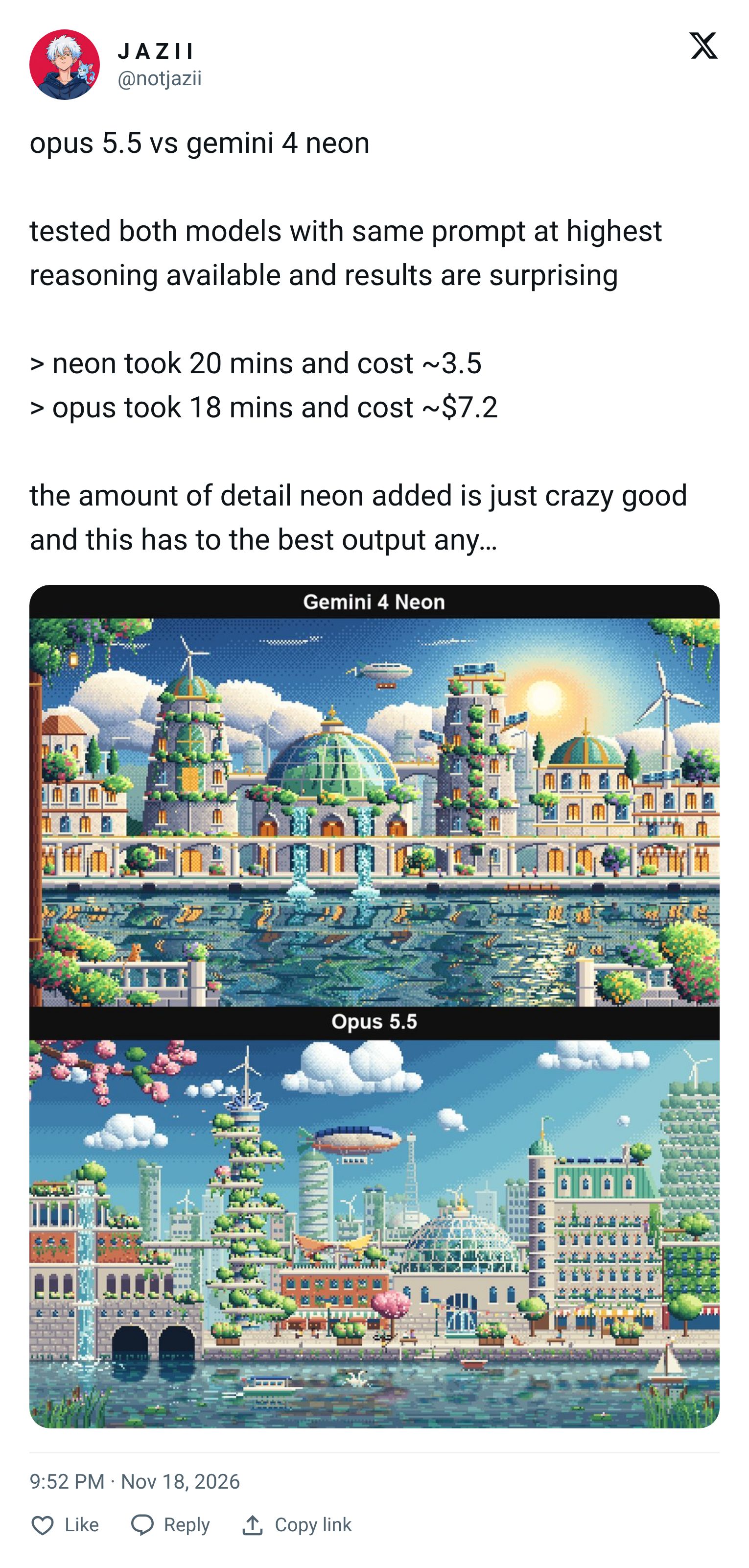
Here are the results:
Gemini 4 Neon: 20 minutes, around $3.5.
Claude Opus 5.5: 18 minutes, around $7.2.
I really like how Neon handles the building details and water reflections. Although it took two extra minutes, Neon created a detailed scene at less than half the cost of Claude.
Build 2: 3D Cycling Animation with Three.js
If you're interested in projects with moving characters, this example from @AI_Screening is worth checking out. He tested Gemini 4 Neon, Claude Opus 5.5, and Gemini 4 Carbon using Three.js.
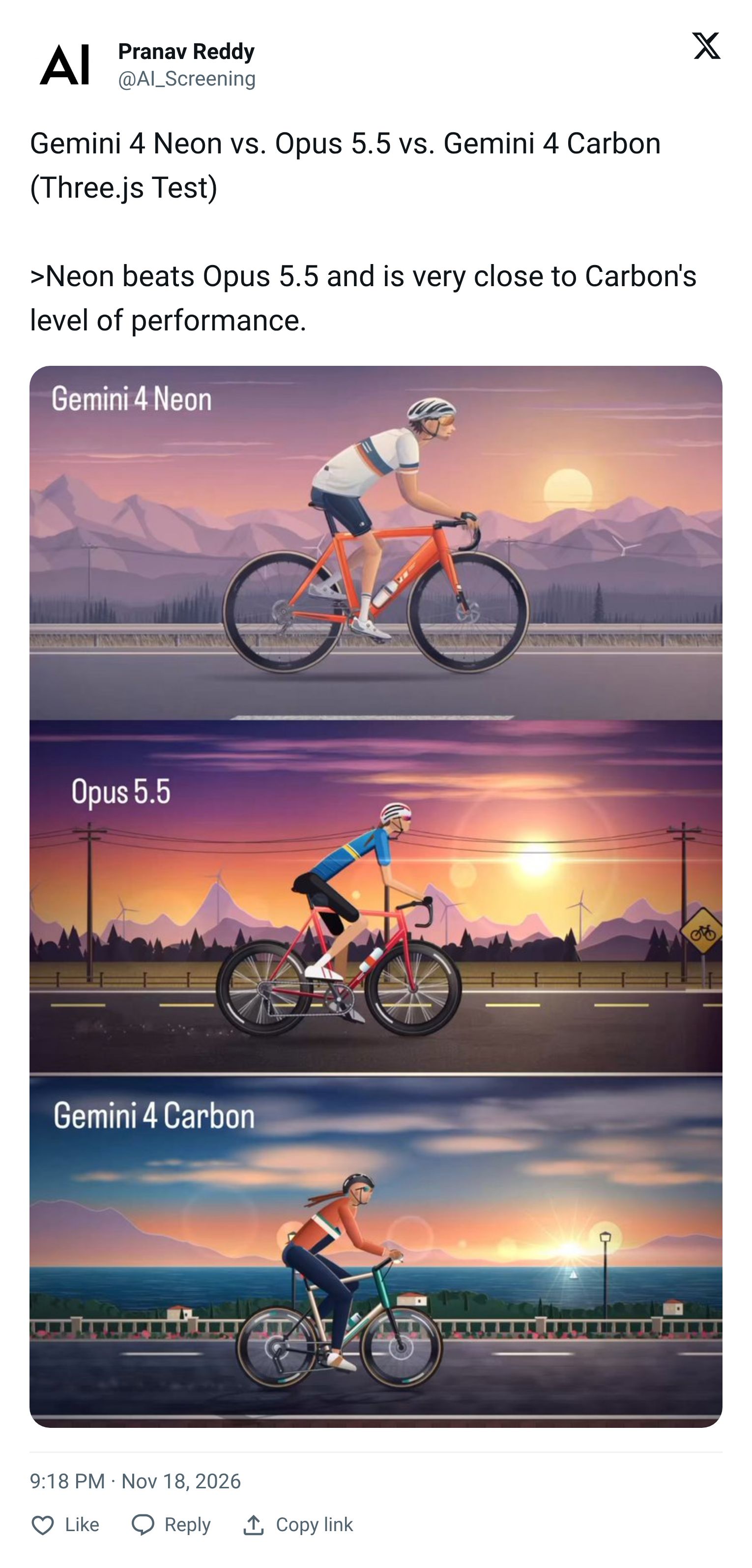
🚴 According to his review, Neon outperforms Opus 5.5 and comes close to Carbon's performance. I particularly like how Neon handles the character's body proportions and bicycle details.
3. Building an Interactive 3D Sailing Ship
Another project that caught my attention was an interactive 3D historical sailing ship by @abhinavflac. He built the entire scene with Gemini 4 Neon using a single prompt without providing any examples.
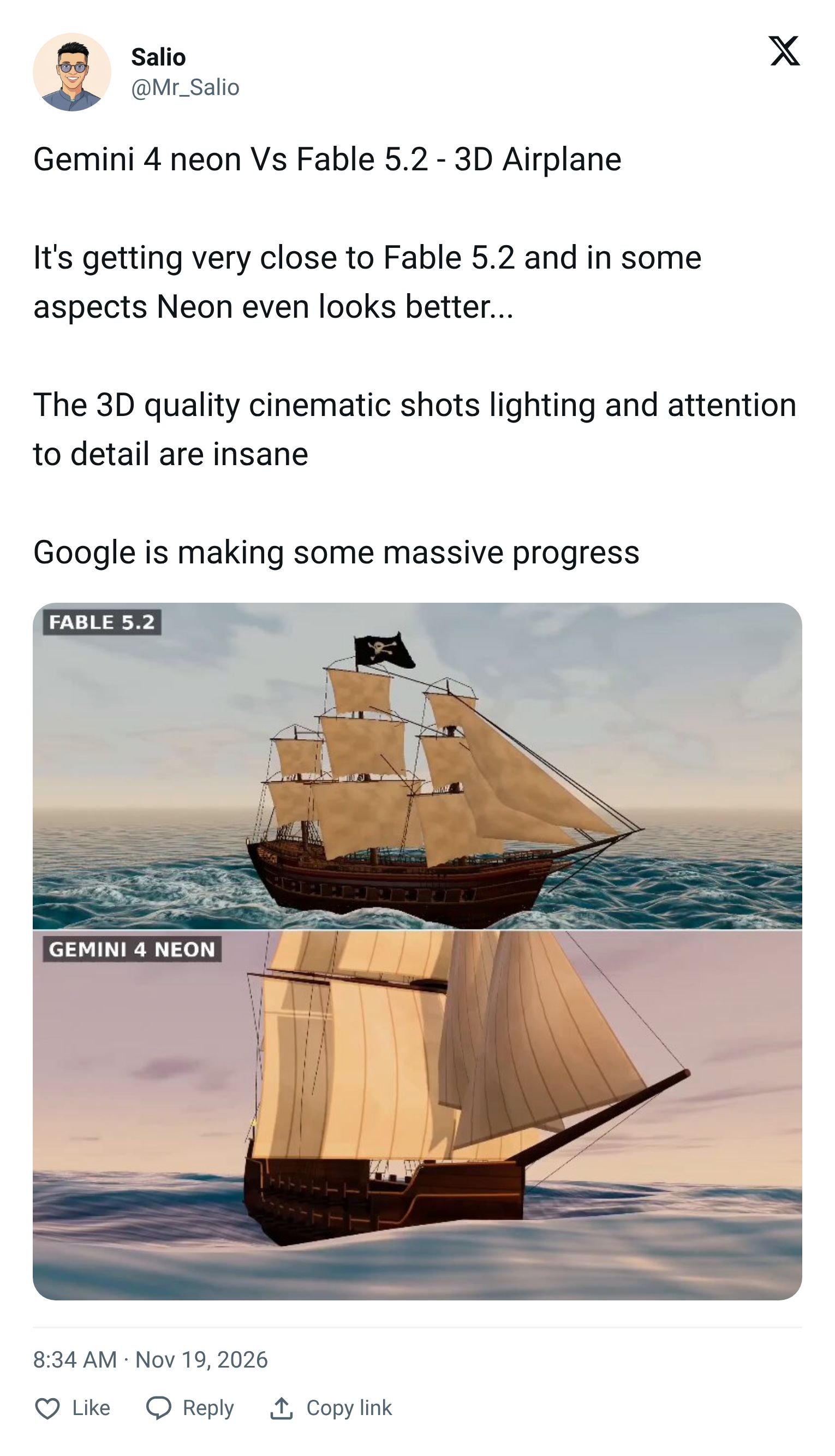
You can see the small details on the sails, the ocean waves, and the lighting on the water. The creator even rates Neon's performance above GPT-6.2 Sol in this test.
The more projects I see, the more I want to test Gemini 4 Neon with complex ideas. If you enjoy creative coding, this model is definitely worth trying.
IV. Neon vs. Opus 5.5 vs. GPT-6.2 Sol: Where Each One Wins
After the benchmarks and real builds, here's how I'd actually position these models. The stars mark where a model clearly leads.
Capability | Gemini 4 Neon | Claude Opus 5.5 | GPT-6.2 Sol |
|---|---|---|---|
3D modeling | ⭐ Excellent | Very good | Very good |
Creative coding | ⭐ Excellent | Very good | Very good |
Game development | ⭐ Excellent | Very good | Very good |
Complex coding | ⭐ Excellent | ⭐ Excellent | Very good |
Advanced reasoning | ⭐ Excellent | Very good | Very good |
Long-context understanding | ⭐ Excellent | Very good | ⭐ Excellent |
AI automation | ⭐ Excellent | Very good | Very good |
Cost efficiency | Very good | Moderate | ⭐ Excellent |
Agentic coding (Terminal-Bench) | Very good | ⭐ Slight edge | Good |
Data visualization (Chartography) | Good | Good | ⭐ Leads |
Personally, I think Gemini 4 Neon is starting to outperform GPT-6.2 Sol in creative coding and 3D development. I'm particularly impressed by the level of visual detail it can produce from a single prompt.
Claude Opus 5.5 is still a strong choice for complex coding, but if you're building visually rich projects or interactive games, I'd give Gemini 4 Neon a try first.
→ So: use Neon for creative builds. Use Opus 5.5 for deep agentic work. Use Sol when budget is the priority.
Conclusion
From what I've seen, Gemini 4 Neon has the potential to outperform GPT-6.2 in creative coding and 3D development. Google is making the AI race more exciting than ever.
If you've ever had an idea that seemed too difficult to build, give Gemini 4 Neon a try. You might be surprised by what you can create!
So, which model will you choose for your next project: Gemini 4 Neon, GPT-6.2, or Claude Opus 5.5?
If you are interested in other topics and how AI is transforming different aspects of our lives or even in making money using AI with more detailed, step-by-step guidance, you can find our other articles here:
*indicates a premium content, if any

