

TL;DR
Qwen 3.8 Max is a strong option for front-end development, 3D experiences, and browser-based apps. It performs well in visual coding tasks, but it doesn’t lead every benchmark or replace every premium model.
Qwen Max stands out in React interfaces, Three.js projects, multimodal work, and long-context tasks. Real tests include a black hole simulation, a solar system, a macOS-style browser experience, and other interactive web projects.
You’ll learn where Qwen 3.8 Max performs best, where it still falls behind, and which workflows fit the model. You’ll also see practical prompts and real examples that show what the model can build.
Key points
Qwen 3.8 Max supports a context window of up to 1 million tokens.
A common mistake is choosing Qwen Max only because of benchmark scores.
The practical takeaway is to test Qwen Max on your own front-end or 3D workflow.
Table of Contents
Introduction
Out there, the 2 giants Anthropic and OpenAI are still competing over every model, BUT closed models! But recently, there’s this Chinese honey badger → Alibaba’s Qwen 3.8 Max.
Qwen Max looks really strong when you first see what Alibaba is promising. You’ll get a much clearer picture once you see how Qwen 3.8 Max actually performs in real tasks.
In this article, I’ll break down the benchmarks, real-world tests, strengths, limits, and who Qwen Max is actually for.
🧠 Would you use Qwen Max for real projects?
I. What’s New with Qwen Max?
Qwen3.8-Max is a 2.4-trillion-parameter Mixture-of-Experts (MoE) model with ~95 billion active parameters, a 1-million-token context window, and native text, image, and video input.
Spec | Detail |
|---|---|
Official name | Qwen3.8-Max |
Launch date | August 3, 2026 (previewed July 19, 2026) |
Architecture | Sparse Mixture-of-Experts (MoE) |
Total parameters | 2.4 trillion |
Active parameters per token | ~95 billion |
Context window | 1 million tokens |
Input pricing | $2 per million tokens |
Output pricing | $6 per million tokens |
Cached tokens | $0.25 per million |
Multimodal | Text, images, video |
Open weights | Promised for week of August 10, 2026 |
What Alibaba Built It For
Qwen3.8-Max combines text, code, visual understanding, tool use, and long-horizon planning in one system designed to complete complex work from beginning to end.
The goal is to move the model toward "take this objective, build a plan, use the available tools, check the result, and continue until the work is done."
The Open Weights Situation
Open weights are promised for the week of August 10, 2026, alongside a smaller Qwen3.8-27B checkpoint, but nothing has shipped yet.
This is the first time Alibaba has committed to releasing open weights for a Max-class model, which is a big deal for developers and teams wanting to self-host or build within the Qwen ecosystem.
Just don't lock in your deployment plans until the weights and license are actually published.
II. Qwen 3.8 Max Benchmarks
Qwen 3.8 Max improves clearly over Qwen 3.7 Max across coding, agent workflows, and long-context tasks.
Qwen Max performs especially well in research, React development, visual reasoning, and multi-step professional work.
Qwen 3.8 Max competes closely with leading models, but it doesn’t rank first in every benchmark.

1. Where Qwen 3.8 Max Clearly Wins
PaperBench, the biggest standalone win:
On PaperBench, Qwen 3.8 Max posts the highest reported score, ahead of GPT-5.6 Sol and Fable 5.

PaperBench measures a model's ability to reproduce a research paper's experiments in code. If your work involves turning research papers into working pipelines, this is a strong signal.
OSWorld-Verified, strong for computer use: Qwen 3.8 Max scores 86.1 on OSWorld-Verified, ahead of GPT-5.6 Sol Max, Fable 5, and Gemini 3.1 Pro.
IFBench, instruction following: Qwen 3.8 Max leads IFBench at 82.8% by a wide margin, Claude Fable 5 scores 63.5% and GPT-5.6 Sol 72.7%.
Learn How to Make AI Work For You!
Transform your AI skills with the AI Fire Academy Premium Plan - FREE for 14 days! Gain instant access to 700+ AI workflows, advanced tutorials, exclusive case studies and unbeatable discounts. No risks, cancel anytime.
2. Where It's Competitive But Not the Leader
Terminal-Bench 2.1: Qwen 3.8 Max scores 86.6 on Terminal-Bench 2.1, ahead of Claude Opus 4.8 and Claude Fable 5, but behind GPT-5.6 Sol. So not a win, but comfortably in the top tier.
GPQA Diamond (hard science reasoning): GPQA Diamond lands at 92.6 for Qwen 3.8 Max, up only marginally from Qwen3.7-Max's 92.4. Strong score, but no meaningful leap forward.

3. Where It Still Falls Behind
Sad to say, but Qwen 3.8 Max isn't winning everywhere:
On SWE-bench Pro it posts 67.7 against Fable 5's 80.0, and 73.5 on FrontierSWE against Fable 5's 88.8.
On HLE (Humanity's Last Exam), Claude Fable 5 leads at 53.3%, then GPT-5.6 Sol at 47.2%, Claude Opus 4.8 at 45.7%, and Qwen 3.8 Max at 43.6%.

→ So on the hardest general knowledge and deep software engineering tests, it's still trailing the top two Western models.
4. Improvement Over Qwen 3.7 Max (Impressive)
Even with those caveats, the jump from the previous generation is large. Qwen 3.8 Max improves substantially over Qwen 3.7 Max across the board.
Against its predecessor, the agentic gains are especially striking: DeepSWE 1.1 moves from 21.6 to 56.6, FrontierSWE from 40.7 to 73.5, and JobBench from 31.3 to 53.4.
Benchmark | Qwen 3.8 Max | GPT-5.6 Sol | Fable 5 | Result |
|---|---|---|---|---|
PaperBench | 93.0 | 90.5 | 88.8 | ✅ Qwen leads |
OSWorld-Verified | 86.1 | 83.2 | 85.0 | ✅ Qwen leads |
IFBench | 82.8 | 72.7 | 63.5 | ✅ Qwen leads |
Terminal-Bench 2.1 | 86.6 | 88.8 | 84.6 | ⚠️ GPT leads |
SWE-bench Pro | 67.7 | — | 80.0 | ❌ Fable 5 leads |
HLE | 43.6 | 47.2 | 53.3 | ❌ Fable 5 leads |
III. Real-World Tests of Qwen Max
Benchmarks tell you how a model scores under fixed conditions. What I really want to show you is what Qwen 3.8 Max creates when you just hand it a complete prompt and let it run.
The three tests below each have a full, reusable prompt so you can run the same tests yourself.
Test 1: Black Hole Simulation
What this tests: Three.js, lighting, spatial depth, cinematic visual design, and interactive controls → all in one self-contained HTML file.
Build a complete interactive black hole simulation that runs in a web browser.

Use Three.js and create the entire experience in a single self-contained HTML file with embedded CSS and JavaScript.

The scene should include:

- A realistic black hole at the center
- A bright rotating accretion disk with layered orange, yellow, and white light
- A visible gravitational lensing effect that bends the surrounding starlight
- A dense animated star field with depth
- Subtle particles and light distortion near the event horizon
- Smooth orbit controls for rotating and zooming the camera
- A cinematic camera angle when the page first loads
- Responsive rendering for desktop and mobile screens

The visual result should feel atmospheric and polished rather than looking like a basic geometry demo.

Keep the interface minimal. Add only a small control panel that lets the user adjust the accretion disk speed, light intensity, and camera distance.

Don't use external assets. The final output must run immediately after I save it as an HTML file.
What Qwen 3.8 Max produced: A scene with a clear composition, strong lighting, and a convincing sense of space. The accretion disk lighting and depth work well out of the box.
Test 2: Interactive Solar System
What this tests: Managing multiple objects, different orbital speeds, layered interactions, and a clean information panel without the layout feeling cluttered.
Create a polished interactive solar system simulation using Three.js.

Build the complete project in one self-contained HTML file with embedded CSS and JavaScript.

The simulation must include:

- The Sun and all eight planets
- Planet sizes and orbital distances that are visually balanced for the browser
- Different orbital speeds for each planet
- Planet rotation around their own axes
- Saturn’s rings
- Jupiter’s Great Red Spot
- An asteroid belt between Mars and Jupiter
- A star field with visible depth
- Smooth orbit, zoom, and pan controls
- A side panel that shows the selected planet’s name, description, orbital period, and key facts
- Clickable planets with a clear selection state
- Pause, resume, and speed controls
- A button that resets the camera to the full solar system view

Use lighting, shadows, textures generated through code, and subtle animation to make the scene feel polished.

Don't use external image files or paid libraries. Make sure the result works immediately in a modern browser.
What Qwen 3.8 Max produced: It handled the large number of elements without the layout feeling crowded. Recognizable details like the asteroid belt, planetary rings, and Jupiter's spot all came through clearly. The interaction panel is clean and readable.
Test 3: macOS Desktop in a Browser
What this tests: Multiple windows, multiple apps, overlapping interaction states, animations, and consistent visual language, this is the closest to a real product prototype.
Build a functional macOS-style desktop experience that runs entirely in a web browser.

Use HTML, CSS, and JavaScript. You may use React if needed, but the final project must be complete and ready to run.

The desktop should include:

- A macOS-style top menu bar with the current date and time
- A dock with hover magnification
- Draggable, resizable, minimizable, and closable app windows
- A notification center
- Light mode and dark mode
- Several selectable wallpapers
- Smooth window opening and closing animations

Create functional versions of these apps:

- Safari with a simple browser-style interface
- Messages with sample conversations
- Mail with an inbox and readable sample emails
- Calendar with a monthly view
- Notes with editable and saved notes
- Music with playback controls and a sample playlist
- Terminal with several simulated commands
- Calculator with working calculations

The interface should stay visually consistent across every app. Users must be able to open several windows at once, switch between them, and use the dock to restore minimized windows.

Avoid placeholder buttons that do nothing. Every visible control should have a working interaction.

Make the layout responsive and keep all data inside the browser using local storage where appropriate.
What Qwen 3.8 Max produced: A prototype with several working elements, basic apps, and animations. Some small bugs can still appear, so think of this as a strong starting point rather than a finished product but the speed at which it generated a working multi-app prototype is genuinely impressive.
How useful was this AI tool article for you? 💻
IV. What People Are Building With Qwen 3.8 Max
Beyond the structured tests, here's what the community has actually been shipping:
1. Animated Front-End With 3D Elements
One of the strongest examples is this front-end interface created in a single attempt. Qwen 3.8 Max combines scroll triggers, 3D rendering, typography, and micro-interactions on the same page.
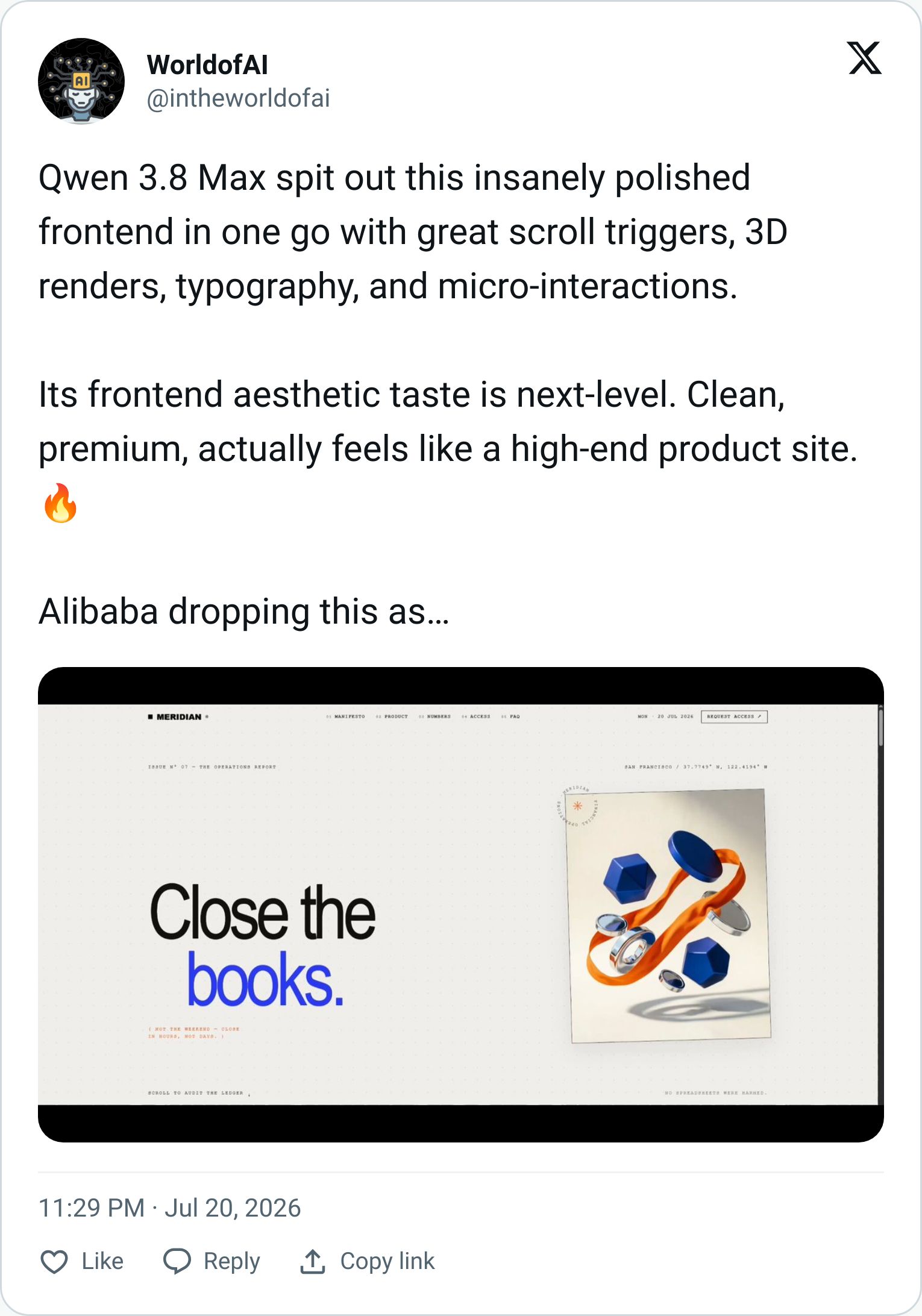
The visual result looks more polished than a typical model-generated landing page. Qwen 3.8 Max also kept the motion connected to the layout rather than just scattering animation everywhere.
However, an attractive demo isn't proof of production-ready code. You still need to check responsive layout, loading speed, and every interaction before shipping.
2. macOS in a Browser (Daniel Farina's Build)
Daniel Farina used Qwen 3.8 Max Preview with Qoder to build a macOS-style experience with HTML, CSS, and JavaScript.
According to the description, Qwen Max completed the first version in under 10 minutes, and the creator also provided the code and a live demo.
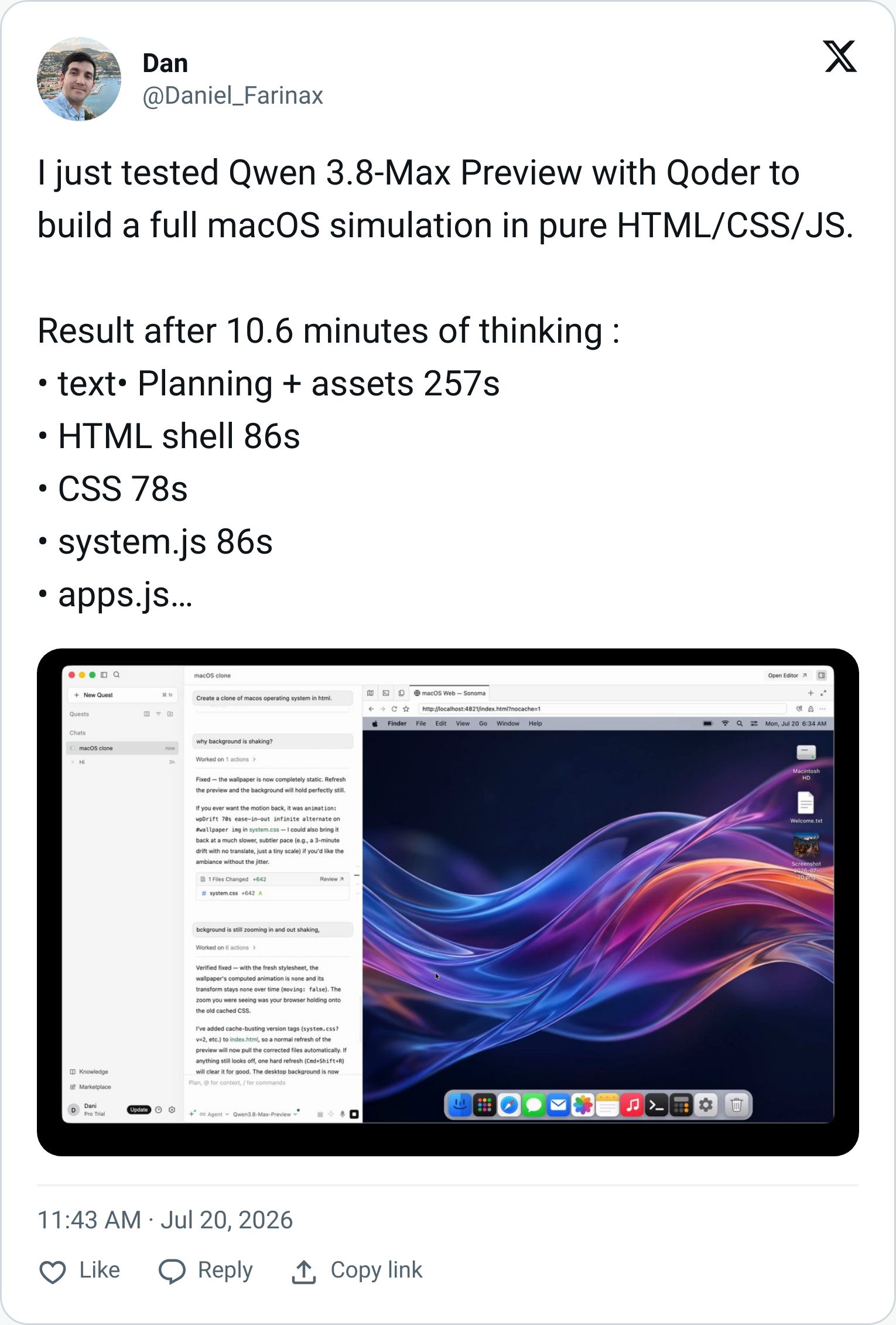
This example stands out because Qwen 3.8 Max didn’t only recreate the appearance of macOS. The model had to manage several connected elements inside one browser-based experience.
3. A 3D World From an Empty Repository
Another experiment began with an empty repository and one prompt. The creator didn’t choose a tech stack, split the task into smaller steps, or provide a reference for Qwen 3.8 Max to follow.
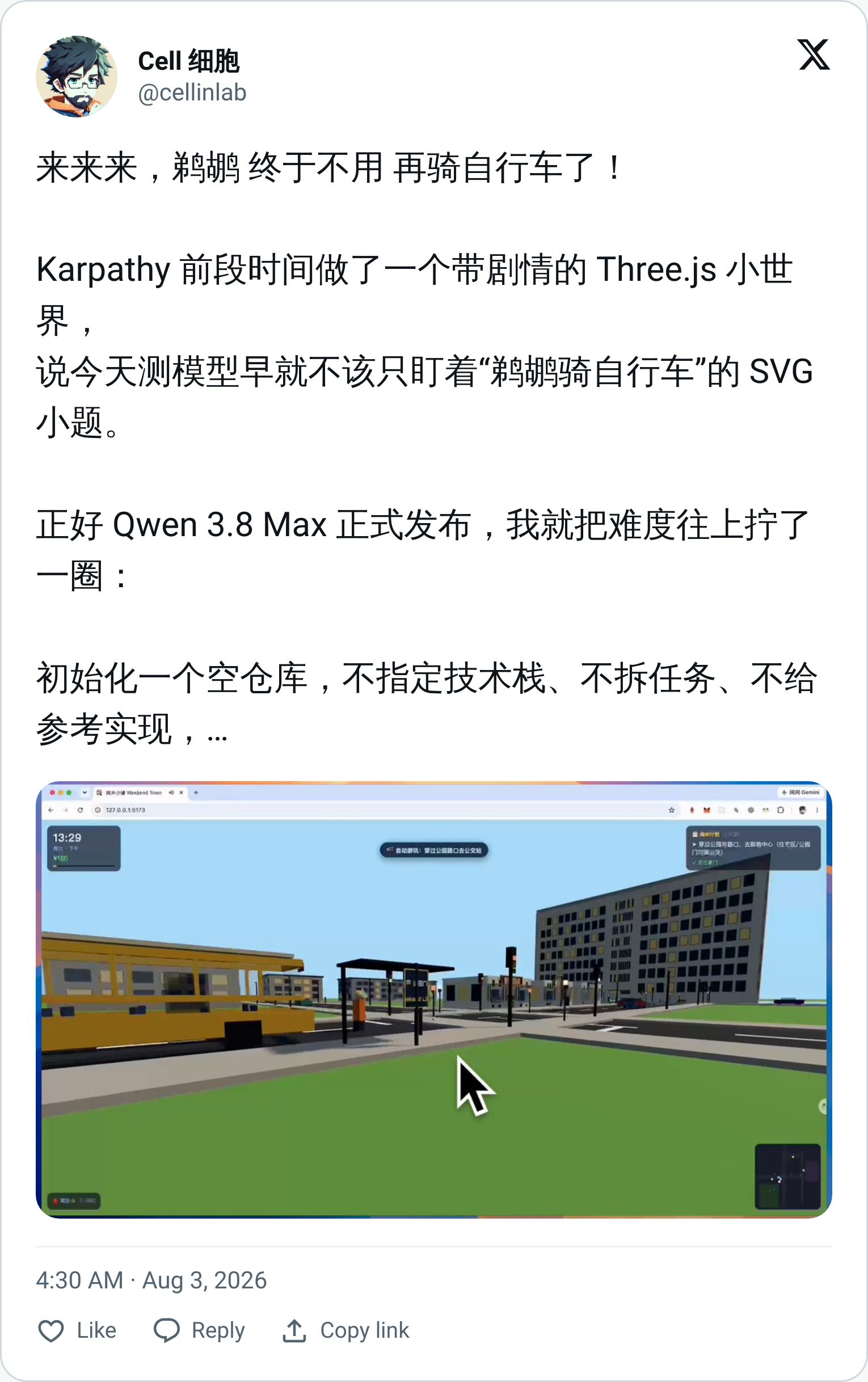
Qwen 3.8 Max chose the project structure itself and built a detailed Three.js world with multiple moving elements.
But the model ran for around 2 hours before completing. That tells you two things, it has strong planning ability, but it also has a real tendency to overthink and run long on complex tasks.
V. Strengths and Limitations: Our Honest Summary
Detail | |
|---|---|
✅ Front-end & 3D work | Genuinely strong on React interfaces, Three.js, and browser-based interactive builds |
✅ Multimodal input | Text, images, and video → first Qwen model above 1T parameters to go multimodal |
✅ Long context | 1M token window holds up well for large codebases and long agent sessions |
✅ API pricing | $2/$6 per million tokens is competitive against Fable 5 and GPT-5.6 Sol |
✅ Research tasks | PaperBench leader → strong at turning research into working code |
⚠️ Overthinking | Can run very long on complex tasks (two hours in one community test) |
⚠️ SWE-bench gap | Still trails Fable 5 significantly on deep software engineering benchmarks |
⚠️ Vendor-only benchmarks | All launch scores are self-reported; independent verification is still pending |
⚠️ Open weights pending | Promised for August 10 week, not yet available as of writing |
Conclusion
So, who should actually use this model?
Qwen 3.8 Max makes the most sense if you're a front-end developer, a Three.js creator, or someone building browser-based interactive experiences. This model has strong visual instincts for web work, and its multimodal support plus long context make it genuinely useful for research-heavy or document-heavy workflows.
The pricing is also fair. At $2/$6 per million tokens, you're getting a capable frontier-class model without the premium tier pricing.
But if your main work is deep software engineering, or anything where Fable 5 and GPT-5.6 Sol are the current benchmarks, Qwen 3.8 Max isn't the clear winner yet.
If you are interested in other topics and how AI is transforming different aspects of our lives or even in making money using AI with more detailed, step-by-step guidance, you can find our other articles here:
*indicates a premium content, if any

