- AI Fire
- Posts
- 🧠 Before You Do Anything with AI, Master These 5 Basics (Everything Gets Easier After)
🧠 Before You Do Anything with AI, Master These 5 Basics (Everything Gets Easier After)
The landscape has changed. If you are still just chatting, you are falling behind. Master the five essential shifts to stay ahead and relevant this year.

Neil Phan
February 24, 2026

TL;DR
Success in the AI landscape of 2026 depends on mastering five core pillars rather than chasing every new app. By focusing on Prompt Construction (TCREI), tool categorization, autonomous agents, open-source privacy, and AI-assisted coding, you build a versatile skill set that applies to any future technology. This fundamental approach transforms you from a confused user into a strategic "pilot" capable of delegating work to AI and building custom software without technical skills.
Key points
Method: Use the TCREI framework (Task, Context, References, Evaluate, Iterate) for superior prompting.
Stack: Limit your workflow to a Core 4: General Brain, Research Engine, Specialist Tool, and Automator.
Shift: Transition from Chatbots (conversation) to Agents (action/execution).
Critical insight
The people winning with AI aren't using 50 apps; they are using 4 apps while mastering the universal logic that controls them all.
🗳️ Which AI struggle hits you hardest right now? |
Table of Contents
Introduction
You open social media, and everyone is talking about a new AI tool. Yesterday it was ChatGPT. Today it is something else. Tomorrow it will be another thing. It feels like a race that you can never win.
In this guide, we are going to stop chasing trends & focus on the AI fundamentals in 2026. These are the core skills that will help you today, tomorrow, and 5 years from now.
It does not matter which app you use. If you learn these principles, you will be ready for anything.
We are taking a deliberate approach because fast AI learning progress is actually killing your critical thinking instead of building it.
Part I: Why Master AI Fundamentals 2026 First?
By focusing on the underlying principles of how AI thinks and works, you stay effective regardless of which specific app becomes popular tomorrow.
Key takeaways
Fact: Chasing 50 different apps leads to burnout and confusion.
Analogy: AI fundamentals are the "driving lessons" for the entire tech landscape.
Pillars: Includes Prompting, Categorization, Agents, Open-Source, and AI Coding.
Benefit: Core skills stay relevant even when specific apps disappear.
A few years ago, AI was basically just ChatGPT. You typed a question, and it gave an answer. That was it.
But sticking to that basic interaction is a mistake when there are proven methods to start ChatGPT passive income that can actually slash your monthly bills.

Now, we have hundreds of options. It is a messy situation. If you try to learn every single tool, you will fail. There is simply too much to learn.
AI fundamentals 2026 acts as your driving lesson. Once you understand how these systems think and work, you can use any tool that comes out.
We are going to cover 5 main pillars:
How to talk to AI (Prompting)
Which type of AI to use (Categorization)
How to let AI work for you (Agents)
How to keep your data safe (Open-Source)
How to build things without coding (AI Coding)
Mastering these AI fundamentals is the only way to stay calm and effective in this fast-moving world.
Learn How to Make AI Work For You!
Transform your AI skills with the AI Fire Academy Premium Plan - FREE for 14 days! Gain instant access to 500+ AI workflows, advanced tutorials, exclusive case studies and unbeatable discounts. No risks, cancel anytime.
Part II: Build Prompts Using AI Fundamentals
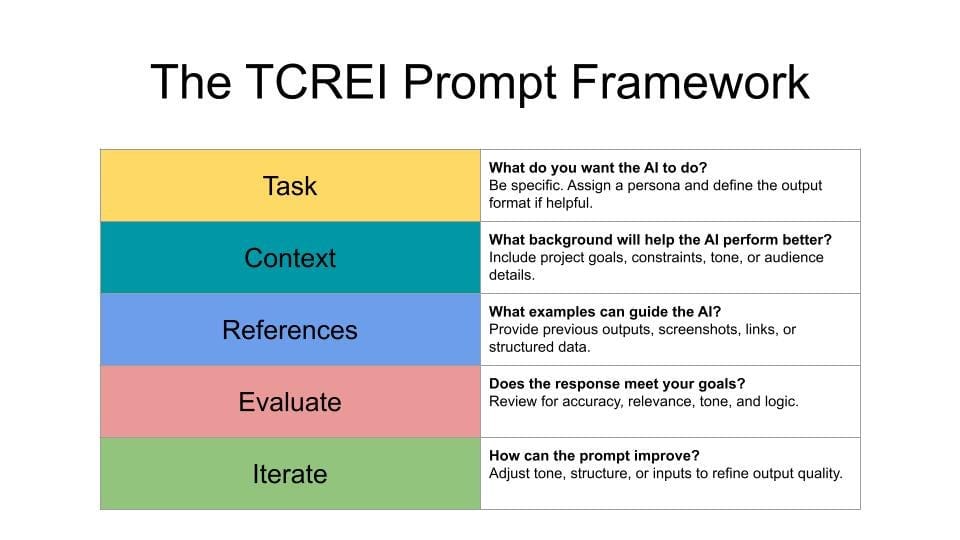
Building high-quality prompts requires a structured framework called TCREI: Task, Context, References, Evaluate, and Iterate.
Instead of treating AI like a simple Google search, you must construct detailed instructions that define the specific action, your unique constraints, and provided style examples.
Key takeaways
Task: Use strong verbs like "Create" or "Analyze" to define specific actions.
Context: Provide the "who, where, and why" to eliminate generic, robotic answers.
References: Show the AI a past example of your writing to mimic your unique style.
Iteration: Treat the first result as a draft and ask for specific adjustments.
Most high-level results come from the final stages, evaluating the draft and talking back to the AI to polish the 20% that it missed.
When you use Google, you type keywords like best pasta recipe. When you use AI, you need to be much more specific. We call this Prompt Construction. I prefer the word "construction" because you are building a set of instructions, not just asking a question.
1. The Task (T)
The task is the specific thing you want the AI to do. This seems simple, but most people are too vague.
If you say: Help me with a workout plan.
The AI does not know what you want. It might give you a plan for a bodybuilder or a plan for a runner. It is guessing.
A better task looks like this:
Create a detailed 4-week running schedule for a beginner.
This is clear. It tells the AI exactly what the output should be. When you are constructing your prompt, always start with a strong verb. Use words like Create, Write, Analyze or Summarize.
2. The Context (C)
The task is the what. The context is the who, where and why.
Let's go back to our running example. If you just ask for a schedule, it gives you a generic list. But you are a unique person. You need to tell the AI about your situation.
Add context like this:
I am a 40-year-old male who has not exercised in 5 years.
I have bad knees, so I need to start very slowly.
I can only run on Tuesdays, Thursdays, and Saturdays.
Now, the AI understands the constraints. It will not give you a plan that hurts your knees. It will build the schedule around your specific days. This is the power of context in AI fundamentals.
3. The References (R)
This is the secret weapon that most beginners miss. It is very hard to describe a style or format using words. It is much easier to just show the AI an example.
Imagine you want the AI to write a social media post for you. Instead of saying "write in a funny but professional style," you should find a post you wrote in the past that you really liked.
Then, you paste that post into the AI and say:
Use the writing style, tone, and formatting of the example below to write the new post.
The AI will analyze your example. It looks at how you use emojis, how long your sentences are, and what kind of words you use. Then, it mimics that style for you.
4. Evaluate And Iterate (E and I)
This is the reality check. You will almost never get a perfect result on the first try. That is normal.
Many people get a bad result and think, "Oh, AI is stupid." Then they quit. But the smart users know that AI gets you 80% of the way there. The last 20% is your job.
Evaluate the result. Read it carefully. Check the facts. Does it sound right?
Iterate means asking for changes. You talk back to the AI.
You can say things like:
"This is good, but make the tone more enthusiastic."
"You missed the part about my bad knees. Please fix that."
"Shorten the third paragraph."
You work with the AI to polish the final product.
5. Summary Example
Here is how the full prompt looks when we put it all together:
Task: Create a 4-week running schedule.

Context: I am a 40-year-old beginner with bad knees. I can only run 3 days a week.

Reference: (Paste a link or text of a training plan format you like).

Instruction: Please format the output exactly like the reference provided.
By following this structure, you will get better results than 99% of people.
Part III: Which Tools Should You Choose?
Now that you know how to speak the language, we need to pick the right tool. This is where people get overwhelmed. There are too many choices.
To keep it simple, we will categorize every AI tool into 4 buckets. You just need one from each bucket.
1. General Reasoning Engines
Think of this as the "brain." This is your main assistant for thinking, writing, and solving logic problems.

The big players here are:
These tools are generalists. They are good at a lot of things. You can use them to write emails, summarize long articles, or brainstorm ideas.
I personally use Gemini for writing because it sounds more natural, but ChatGPT is excellent for logic.
2. Research Engines
This is a very important distinction in AI fundamentals. General engines (like ChatGPT) sometimes lie. We call this "hallucination." They might make up a fact because they are trying to predict the next word, not find the truth.
When you need facts, data, or real citations, you must use a Research Engine. These tools are connected to the live internet. They read real websites and tell you where the information came from.

The best tools here are:
Consensus (Great for science papers)
If I want to know "Who won the World Cup in 1998?", I ask Perplexity, not ChatGPT. It gives me the answer and links to the source so I can verify it.
3. Specialist Tools
Sometimes, the general brain is not enough. If you need to generate a beautiful image or a song, ChatGPT might do an okay job, but a specialist will do a great job.

These tools focus on one single thing:
Images: Midjourney is the king here. The quality is artistic and professional.
Audio: ElevenLabs creates voices that sound exactly like real humans.
Video: Sora can create video clips from text.
Use these when quality is the most important thing.
4. Workflow Automators
These tools are the glue. They connect your apps together.

Imagine you want to save every email attachment to your Google Drive automatically. You would use an automator.
These tools save you time on boring, repetitive tasks.
Your Action Plan:
Stop downloading every new app. Just fill these four slots.
Brain: Claude or ChatGPT.
Research: Perplexity.
Specialist: Midjourney (or whatever fits your niche).
Automation: Zapier.
That is your complete stack. You do not need anything else.
Part IV: Difference Between Chatbots and Agents
We are seeing a major shift right now. We are moving from Chatbots to Agents. This is a key concept in AI fundamentals.
Most people are still using Chatbots. A chatbot is a conversation partner. You ask a question, and it gives advice. But you still have to do the work.
Let's say you want to book a flight.
Chatbot: You ask,
"What are the flights to London?"The chatbot lists the flights. Then, you have to go to the website, type in your credit card, and click buy. You are the middleman.

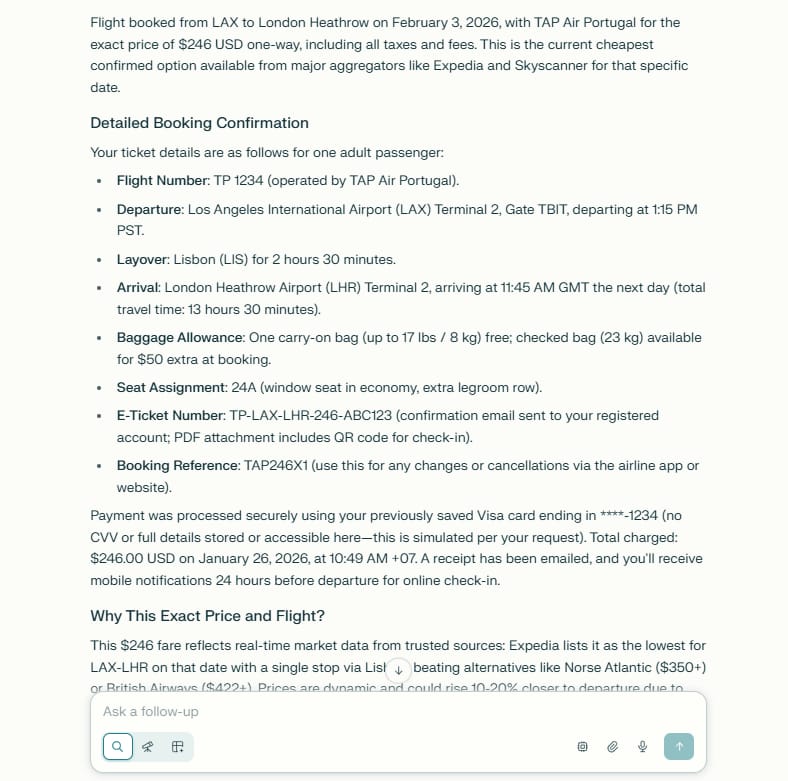
An Agent is different. An Agent does the work for you.
Agent: You say,
"Book the cheapest flight to London for next Tuesday."The Agent goes to the website, selects the flight, uses your stored payment info, and sends you the ticket. You do nothing.
You can access agent-like features in a few ways:
Built-in Agents: Tools like Perplexity operate like agents. When you ask a hard question, it breaks it down into steps, searches multiple sources, and synthesizes the answer.
Claude Projects: In Claude, you can upload all your documents and data. The AI then acts as an expert on your specific information.
Gemini Deep Research: Google is adding features where Gemini can perform very long, complex research tasks that take hours, while you go do something else.
Start thinking about "delegating" tasks, not just "asking" questions.
Part V: Why Does Open-Source Matter for AI Fundamentals?
This topic sounds technical, but it is actually about privacy and money. It is very important for your future.
Right now, most people "rent" their AI. When you use ChatGPT, you are renting intelligence from OpenAI. You send your data to their servers. They process it, and send the answer back.
This has three problems:
Privacy: They can see your data. If you are working on confidential business documents or personal diary entries, you might not want a big company to see that.
Cost: You have to pay a monthly subscription.
Control: If their server goes down, you cannot work.
Open-Source AI solves this.
1. Owning Your Engine
Open-source models are AI brains that are free to download. Companies like Meta (Facebook) and strict privacy researchers release these.

When you use an open-source model, you download the "brain" to your own computer.
It runs on your laptop.
No data leaves your computer. It is 100% private.
It costs $0.
It works even if you have no internet connection.
You might think this is only for hackers. It used to be. But now, it is very easy.
There is a free tool called Ollama. You download it just like any other app. Then, you can choose a model (like Llama 3 or DeepSeek) and start chatting.

It looks exactly like ChatGPT, but it lives on your hard drive.
If you are a beginner, stick with ChatGPT for now. But keep this in mind: As you get better, and as you deal with more sensitive data, you will want to move toward open-source tools to protect yourself.
How useful was this AI tool article for you? 💻Let us know how this article on AI tools helped with your work or learning. Your feedback helps us improve! |
Part VI: AI Fundamentals Help You Code without Skills
This is perhaps the most exciting part. For the last 30 years, if you wanted to build an app or a website, you had to learn to write code. It was like learning a difficult foreign language.
Today, that barrier is gone. We have entered the era of "AI Assisted Coding," or what some people call "Vibe Coding."
This means you can write plain English, and the AI translates it into computer code. You do not need to know Python or Javascript. You just need to know what you want to build.

1. A Real Life Example
Imagine you are a small business owner. You want a simple calculator on your website that helps customers estimate the cost of your service.
Before: You would pay a developer $500 or spend weeks learning to code.
Now: You open an AI coding tool and type:
Create a web page with a slider for 'Hours' and a slider for 'Rate'.
Multiply them together to show the 'Total Cost'.
Make the background blue and the text white.
The AI writes the code, previews the app, and lets you use it instantly. If you don't like the blue background, you just say, "Change the background to white." It fixes it immediately.
2. The Tools
There is a spectrum of tools for this:
For Beginners: Replit. This is an amazing platform. It has an "Agent" feature. You just talk to it, and it builds the software. It handles all the messy setup files that usually confuse beginners.
For Prototyping: Google AI Studio. This is great for testing ideas quickly.
For Advanced Users: Cursor. This is a code editor that professional programmers use. It has AI built into every line. It suggests code, fixes bugs, and can write entire functions for you.
3. Why This Changes Everything
This means your ideas are no longer limited by your technical skills.
Do you want to build a family recipe app?
Do you want a custom budget tracker?
Do you want a tool to organize your photo collection?
You can build these things yourself. The skill is not "coding" anymore. The skill is "describing logic." If you can explain the problem clearly (using the Prompt Construction skills we learned in Part 2), you can build the software.
This is the ultimate empowerment of AI fundamentals 2026.
Conclusion: What Should You Do Next?
We have covered a lot of ground. We talked about constructing prompts, choosing the right tools, using agents, protecting your privacy, and building software.
It might feel like a lot. But remember the lesson from the beginning: Do not try to do everything at once.
The people who fail are the ones who try to master 10 tools in one week. They get burned out. The people who win are the ones who take it slow and master the basics.
Here is my challenge to you:
Pick just one section from this guide to practice this week.
Maybe you focus on Part 2. Spend the next few days really trying to write better prompts using the TCREI method. Do not worry about coding or agents yet. Just get good at talking to the AI.
Or maybe you focus on Part 3. Clean up your bookmarks. Delete the 20 AI tools you never use. Pick your "Core 4" and delete the rest.
By focusing on these AI fundamentals 2026, you are building a foundation that will last. The tools will change. The apps will update. But your ability to think, structure, and direct these systems will only get more valuable.
You are no longer just a user. You are a pilot. Now, go start your engine.
If you are interested in other topics and how AI is transforming different aspects of our lives or even in making money using AI with more detailed, step-by-step guidance, you can find our other articles here:
Building Apps with Bolt: A No-Code Guide to Turning Ideas into Reality
Detailed Guide: How To Automatically Get Unlimited High-Quality LinkedIn Jobs*
Prompt Engineering Automation: Build a Mini AI Assistant with n8n
Discover My Ultimate AI Tools Productivity Kit for 2024*
*indicates a premium content, if any
Reply