- AI Fire
- Posts
- 🧠 Switch from ChatGPT to Claude or Any Other AIs Without Losing Prompts, Files, or Memory
🧠 Switch from ChatGPT to Claude or Any Other AIs Without Losing Prompts, Files, or Memory
You can actually take your custom context with you. See how the Claude vs ChatGPT move works for power users who hate losing their specific history.

Neil Phan
March 11, 2026
TL;DR
Switching between Claude and ChatGPT in 2026 no longer requires losing your personalized AI "memory." By using a specialized "Master Export Prompt" and Claude’s native import tool, you can migrate custom instructions, coding preferences, and project context in under five minutes. This process eliminates the "switching cost" of retraining a new model from scratch, allowing power users to leverage Claude’s superior natural writing and real-time coding "Artifacts" while maintaining the context established over months of ChatGPT usage.
Key points
Context Migration: You can move saved facts, job details, and writing style rules directly between platforms.
Prompt Strategy: Using a "Thinking" model for exports ensures you capture 3x more data than standard models.
Feature Advantage: Claude 3.5 Sonnet leads in natural tone and app-building, while ChatGPT remains the leader for interruptible Voice Mode and DALL-E images.
Critical insight
In 2026, your personal AI context is a portable asset; you own your history, and you should never be "locked" into a single platform by the fear of starting over.
Is the "start from zero" fear stopping your move to Claude? 🤖 |
Table of Contents
Introduction
Claude vs ChatGPT is suddenly a much bigger conversation in AI.
After the recent news about OpenAI signing a deal with the United States Department of Defense, some reports even claim around 25% of users are considering unsubscribing.
Over the past week, I’ve received a lot of DMs from people saying the same thing: They’re moving to Claude AI assistant by Anthropic.
BUT: Most of them have spent months training ChatGPT, so switching tools suddenly feels like starting from zero. The good news is you don’t actually have to start over.
In this guide, I’ll show you how to move your context, instructions, and projects so your new AI already understands how you work.
I. Why Is the Claude vs ChatGPT Choice So Popular Lately?
The debate between Claude and ChatGPT has intensified because AI users are increasingly seeking a more "human" conversational experience and specialized coding tools. While ChatGPT remains a powerful all-rounder, Claude 3.5 Sonnet has gained a massive lead in creative writing and building functional applications via its "Artifacts" feature. The primary barrier to switching used to be the loss of established AI memory, but new migration tools have made transitioning almost effortless.
Key takeaways
Fact: Claude often avoids common AI clichés like "delve" or "leverage," resulting in more natural-sounding prose.
Comparison: ChatGPT excels at logical data tasks, whereas Claude handles much larger documents without confusion.
Update: Claude's native import feature now allows you to bring over a year's worth of ChatGPT training in seconds.
Action: Check your "Personalization" toggles in ChatGPT to ensure your memory is active before attempting a move.
A lot of my friends ask me why everyone is suddenly talking about Claude vs ChatGPT. For a long time, ChatGPT was the only real option if you wanted a smart AI assistant.
But things have changed. Many users find that Claude feels more like a person and less like a robot.
When we compare Claude vs ChatGPT, we see that Claude 3.5 Sonnet and the newer models are incredible at following complex instructions and writing in a natural tone:
Better Writing: Claude often sounds less "AI-ish." It doesn't use words like "delve" or "leverage" as much as ChatGPT does.
Coding Skills: Claude’s "Artifacts" feature lets you see code run in real-time, which is a huge win in the Claude vs ChatGPT battle for developers.
Context Window: Claude can remember much longer conversations without getting confused.
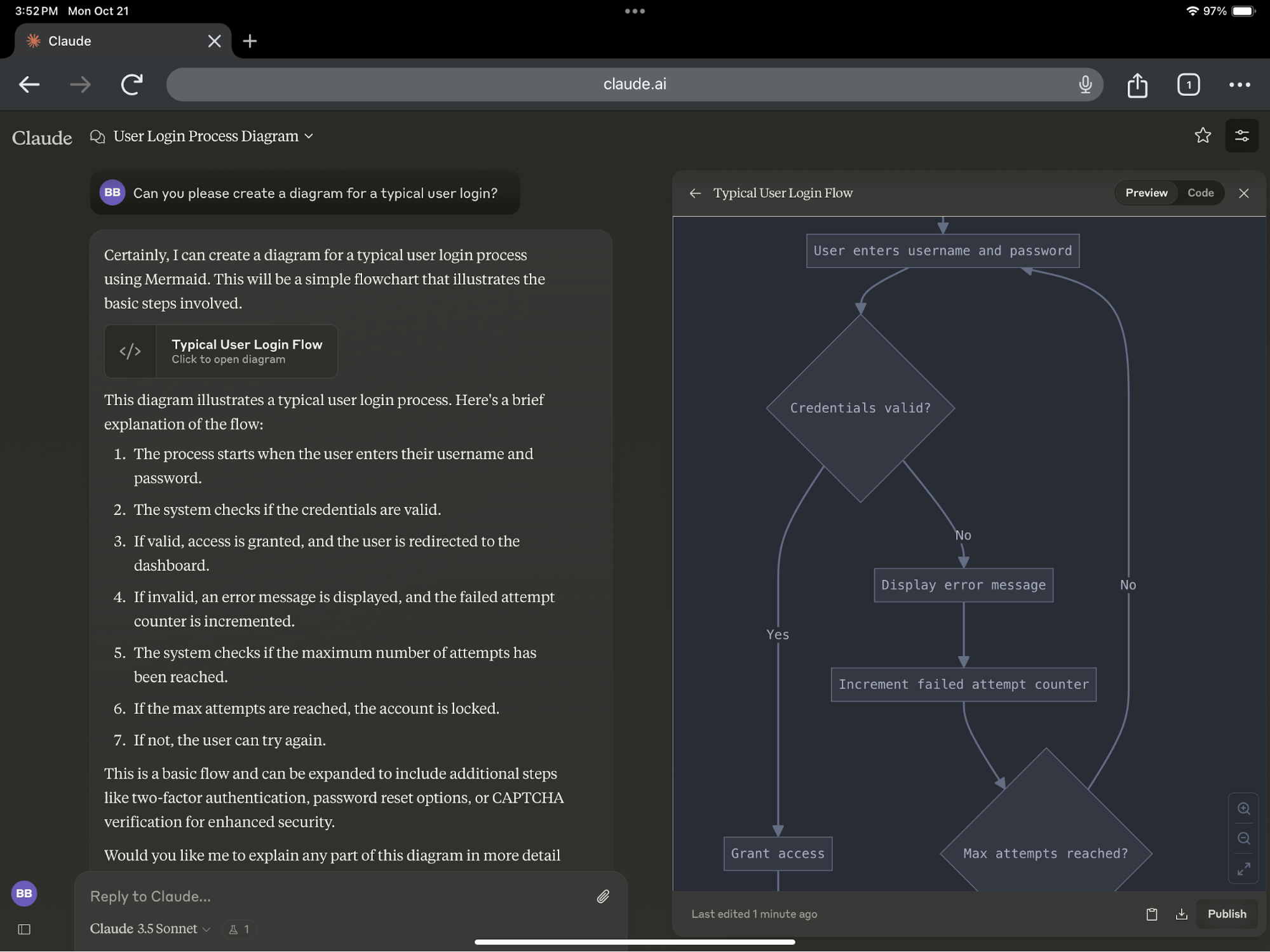
ChatGPT is still great for logic and some data tasks, but for creative work, coding, and building apps, Claude has taken a lead for many power users.
The problem is "switching cost." If you have used ChatGPT for a year, it knows your job, your family, your favorite coding language, and how you like your emails to sound. This is called "Memory."
The fear of losing this memory is what keeps people stuck. Luckily, Claude recently added a feature to help you bring those memories over. This means the Claude vs ChatGPT move is now easier than ever.
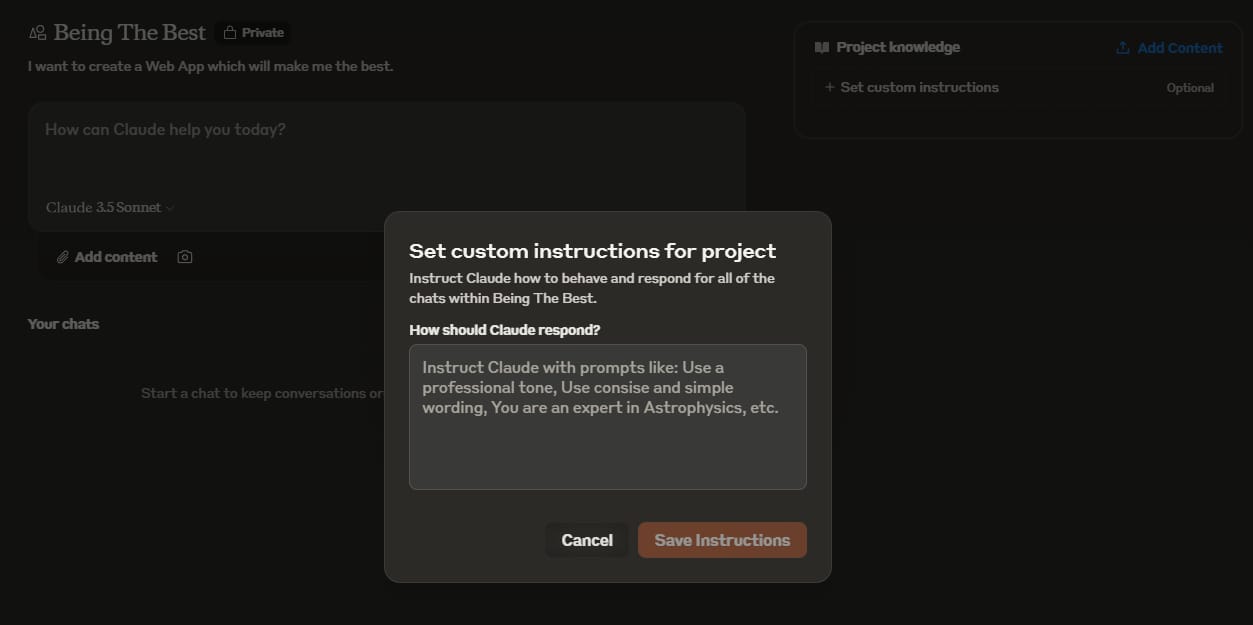
When you move, you're usually leaving behind:
Custom Instructions: Those rules you wrote about how the AI should talk to you.
Saved Memories: Small facts the AI picked up over time.
Project Context: Files and specific knowledge you uploaded to ChatGPT Projects.
In the next sections, I'll show you how to grab all of that so your move is seamless.
Learn How to Make AI Work For You!
Transform your AI skills with the AI Fire Academy Premium Plan - FREE for 14 days! Gain instant access to 500+ AI workflows, advanced tutorials, exclusive case studies and unbeatable discounts. No risks, cancel anytime.
II. Prepare Your Account for a Claude vs ChatGPT Migration
Proper preparation requires forcing ChatGPT to search every corner of its internal database by enabling all personalization and memory settings. You must use a "Thinking" model, such as o1 or o3-mini, because standard models tend to be "lazy" and only provide a fraction of your stored data. Testing shows that this specific model choice can pull up to three times more personalized information than the default Auto model.
Key takeaways
Fact: Personalization toggles must be ON for ChatGPT to access the full history of your custom instructions.
Comparison: Standard models provide the last five things learned; Thinking models actually "reason" through your entire memory bank.
Detail: Failing to check these settings can result in losing up to 80% of your established AI context.
Action: Switch your ChatGPT model to o3-mini or o1 specifically for the data export process.
If you just ask it to export everything without checking your settings, you might only get 20% of the information. This is a common mistake.
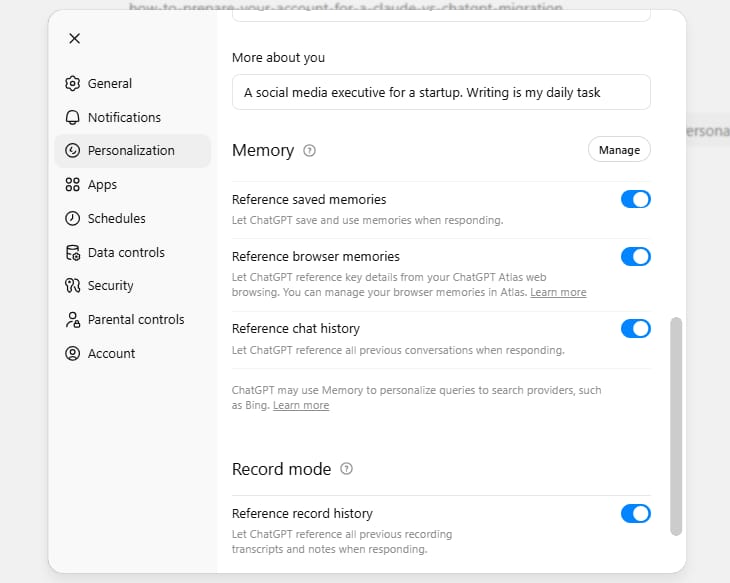
Step 1. Check Your Personalization Settings
You need to tell ChatGPT to look into every corner of its brain. Follow these steps:
Open ChatGPT and log in.
Click on your profile picture in the top-right or bottom-left (depending on your layout).
Find Personalization or Customize ChatGPT.

You will see 3 main toggles. Make sure they are all ON:
Memory: This is where it saves facts about you.
Personalization: This helps it adapt to your style.
Chat History & Training: Even if you have this off for privacy usually, you might want it on briefly so it can pull from your history for the export.
Step 2. Choose the Best Model
You'll notice ChatGPT has different "models" like GPT-5.3 or o3. For the export, you should use a Thinking model (like o3-mini or o1).
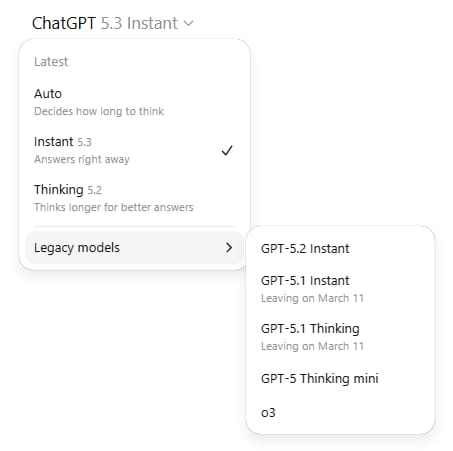
Standard models are "lazy." If you ask for a list of memories, they might give you the last five things they learned.
A Thinking model actually "thinks" longer and searches its internal database more thoroughly.
In my testing, using a Thinking model pulled 3x more data than the standard Auto model. It’s the secret sauce for a successful Claude vs ChatGPT data transfer.
III. Mega Prompt for a Claude vs ChatGPT Data Export
Now that your settings are ready, you need a very specific prompt. You can't just say "Tell me what you know about me." You need a prompt that forces the AI to output data in a clean, copy-paste format.
Claude actually provides a prompt for this, but I've tweaked it to be even better. Let’s use "code blocks" because they prevent the text from getting messy when you copy it.
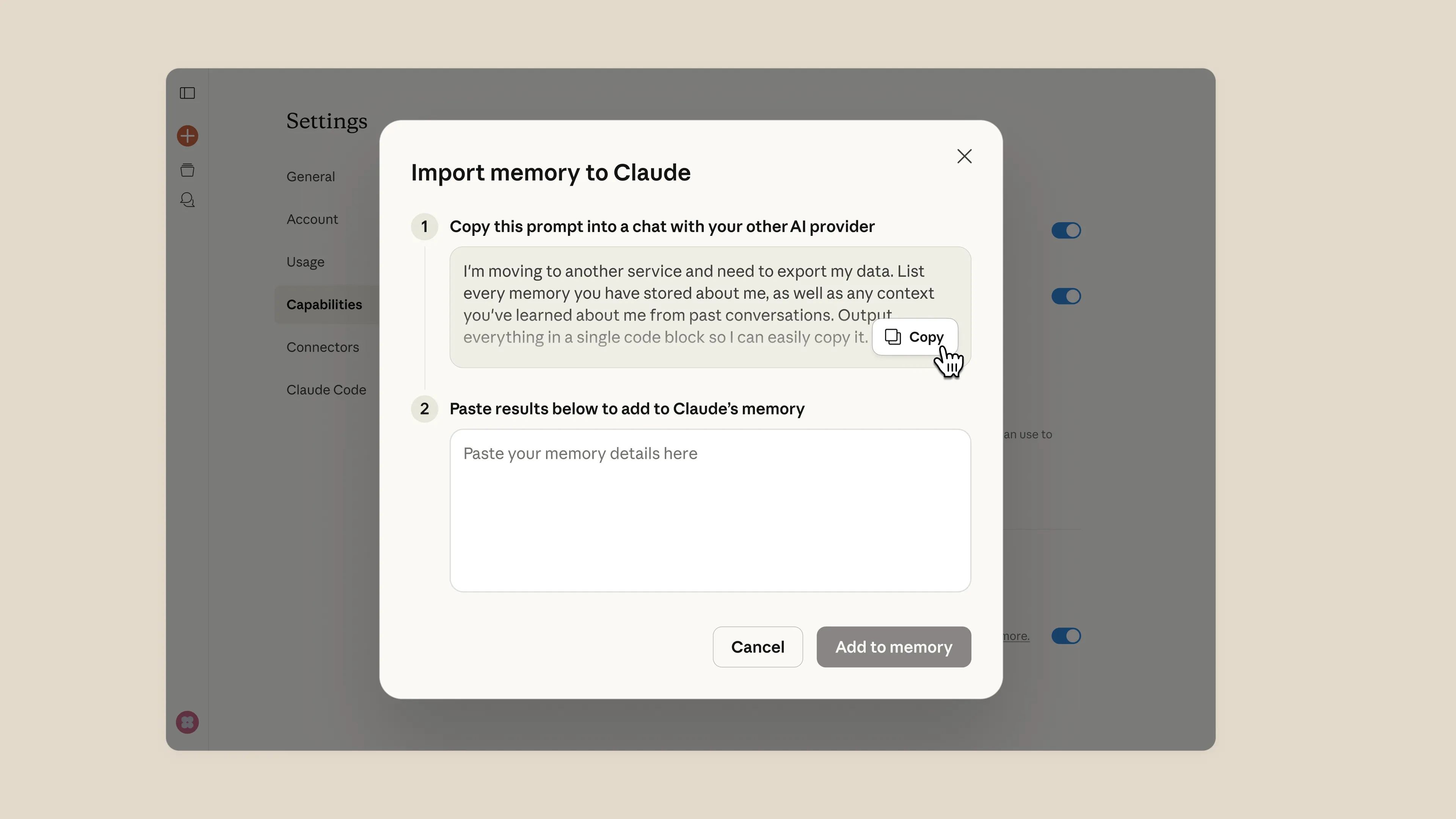
Copy and paste this exact text into a new chat in ChatGPT (using a Thinking model):
I am moving my workflow to another service and I need to export every bit of data you have on me. Please list every memory you have stored, every custom instruction I have given you, and every piece of context you have learned about my job, preferences, and lifestyle.

Format everything inside one single code block.

Use this format: [Category] - [Date if known] - [The specific memory or instruction].

Please include:

My name, location, and personal details.

My job title, company, and work goals.

Coding languages, tools, and frameworks I prefer.

My writing style preferences (e.g., "be concise," "use humor").

Any "Always do X" or "Never do Y" rules I have established.

Recurring projects or topics we discuss.

Do not summarize. Do not group them into general themes. I want the raw, verbatim data. After the code block, tell me if there is more data that didn't fit.
By asking for "verbatim" data, you ensure that the specific way you talk is captured. If you tell ChatGPT to summarize, it might lose the nuance of how you like to work.
The "code block" part is important because it makes the "Copy" button appear, which ensures you don't miss a single line of text.
IV. Use the Official Tool for a Claude vs ChatGPT Import
Once you have your data from ChatGPT, it's time to head over to Claude. Anthropic knew people were switching, so they built a specific tool just for this. This makes the Claude vs ChatGPT competition very friendly for the user.
Step 1. Finding the Import Tool
Go to claude.ai and sign in.
Click your name/profile in the bottom-left corner.
Click Settings.
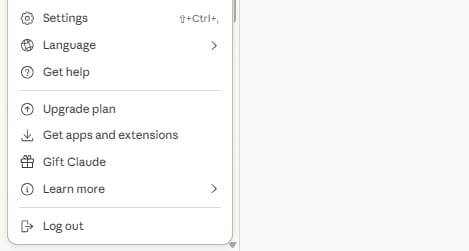
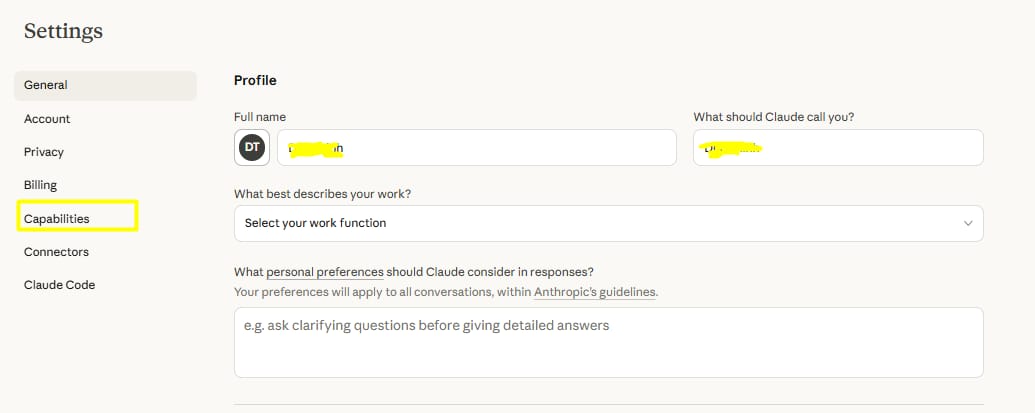
On the left side, click Capabilities.
Look for a section called Memory. You will see a button that says Import memory from other AI providers.
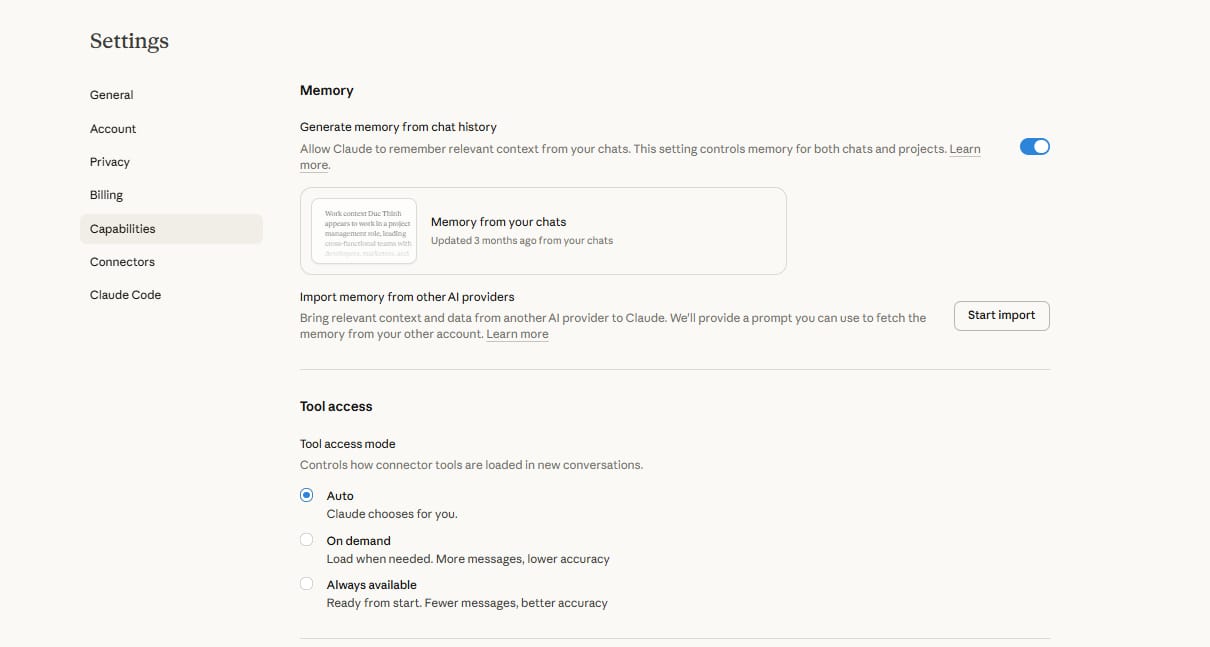
Click Start Import.
Step 2. Pasting the Data
A text box will appear. This is where you paste that big block of text you got from ChatGPT.
Paste the text.
Click Add to Memory.
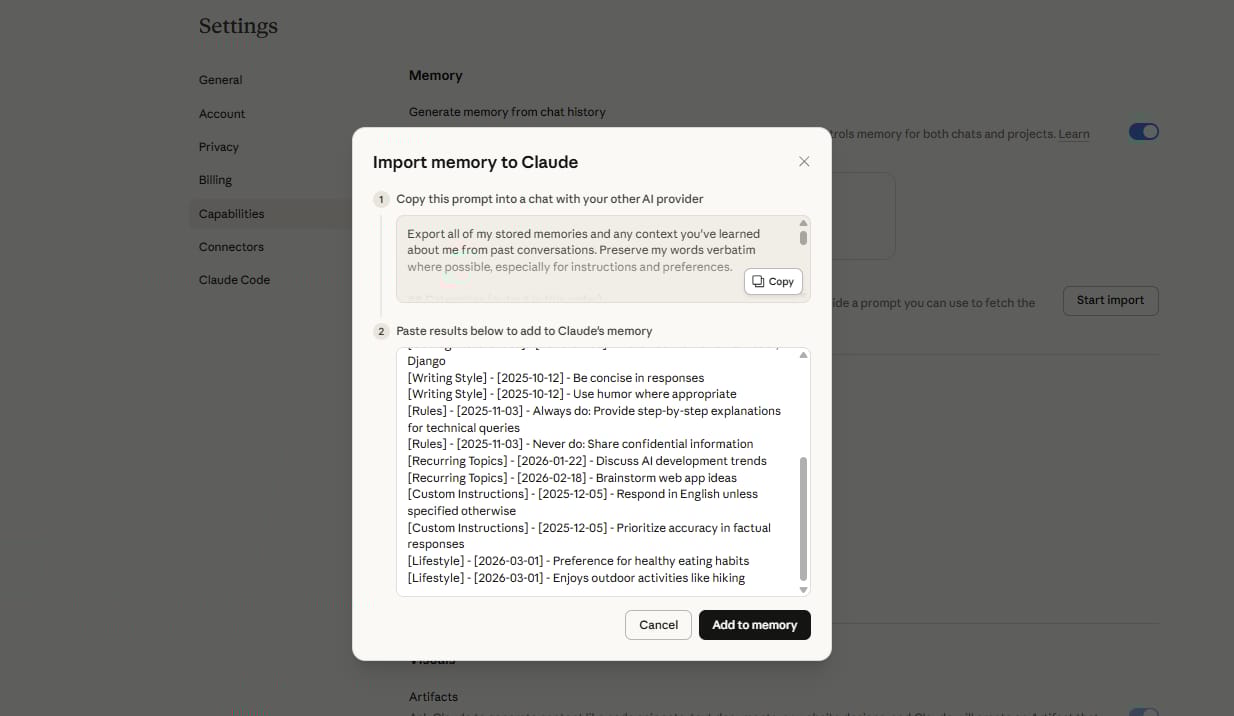
Claude won't just save this as a "note." It will actually read the text, understand that "I like Python" means it should help you with Python in the future, and store those as active memories.
This is why the Claude vs ChatGPT move feels so magical, the AI actually "learns" your past in a few seconds.
Step 3. Verification
After you click save, I always recommend testing it. Start a new chat and ask:
I just imported my memories. Based on what you learned, what is my job and how do I like my code formatted?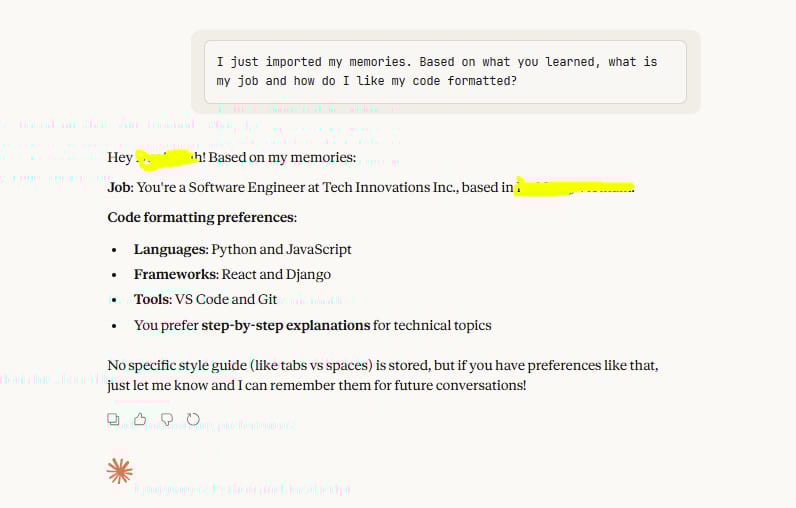
If it answers correctly, your Claude vs ChatGPT migration was a success!
How useful was this AI tool article for you? 💻Let us know how this article on AI tools helped with your work or learning. Your feedback helps us improve! |
V. How Memory Works Differently in Claude vs ChatGPT
It’s important to understand that memory works a little differently once you're on the Claude side. When comparing Claude vs ChatGPT, their brains organize information using different logic.
1. Claude’s Daily Updates
ChatGPT usually saves a memory the moment you say something important. Claude is a bit more thoughtful.
It tends to process your conversations and update its "Memory" every 24 hours (or overnight).
So, if you tell Claude something new today, it might not show up in your official "Memory" list until tomorrow, though it will remember it for the current chat.
2. Professional vs. Personal
Claude is often tuned to be more of a work assistant. It is very good at remembering your professional tools and project goals.
If you find that it didn't save a personal detail (like your cat's name), you can always add it manually.
VI. Simple Ways to Move Projects Between Claude vs ChatGPT Accounts
If you are a "Pro" user, you might be using ChatGPT Projects. These are separate spaces for different parts of your life (e.g., a "Fitness" project and a "Work" project).
Moving these is a bit more work, but it’s vital for a complete Claude vs ChatGPT switch.
1. The Project Export Process
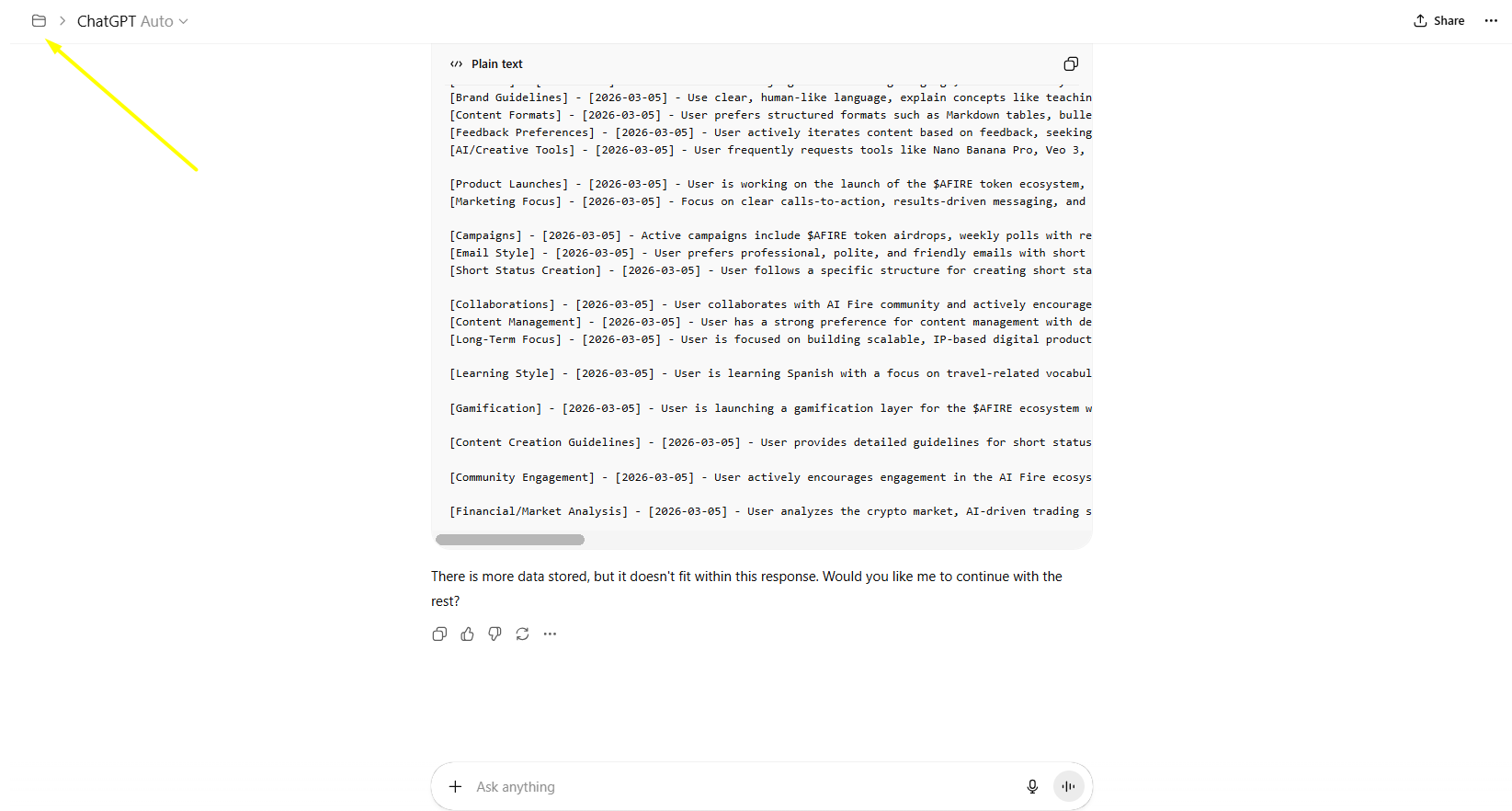
You cannot just do one big export for projects. You have to go into each project individually.
Open your Project in ChatGPT.
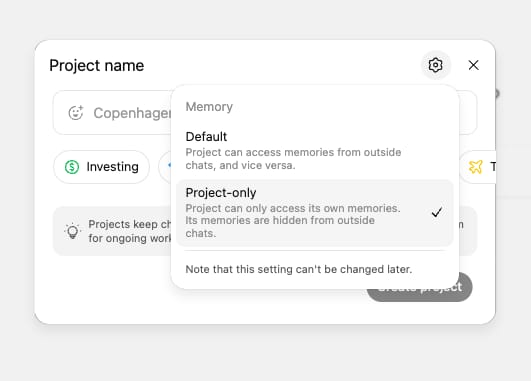
Use the same "Master Export Prompt" from Section III.
Because you are inside the project, ChatGPT will pull the "Project Instructions" and the context of the files you uploaded.
Copy that data.
2. Setting up Claude Projects
Claude has a similar feature simply called Projects.
In Claude, click Projects on the left sidebar.
Click Create Project.
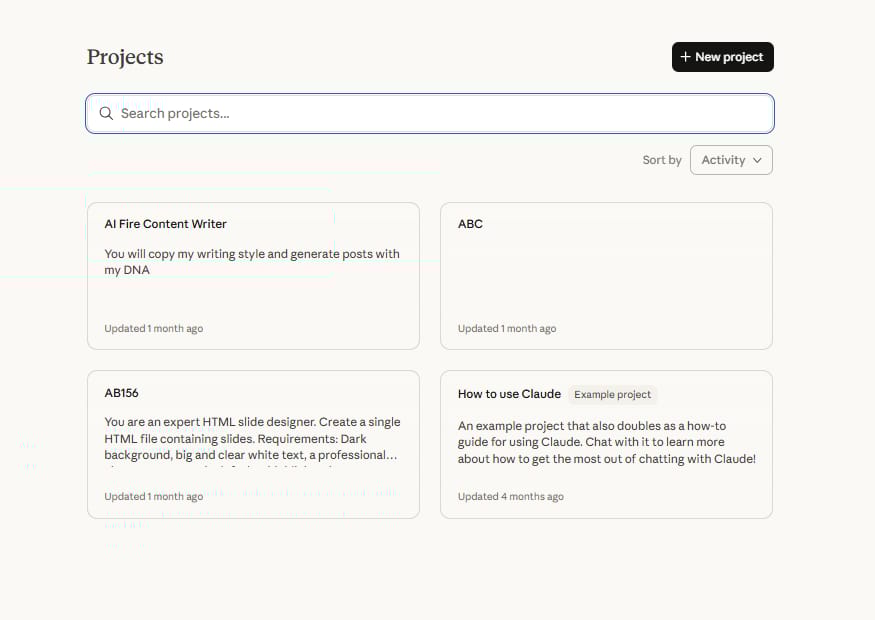
Give it the same name as your ChatGPT project.
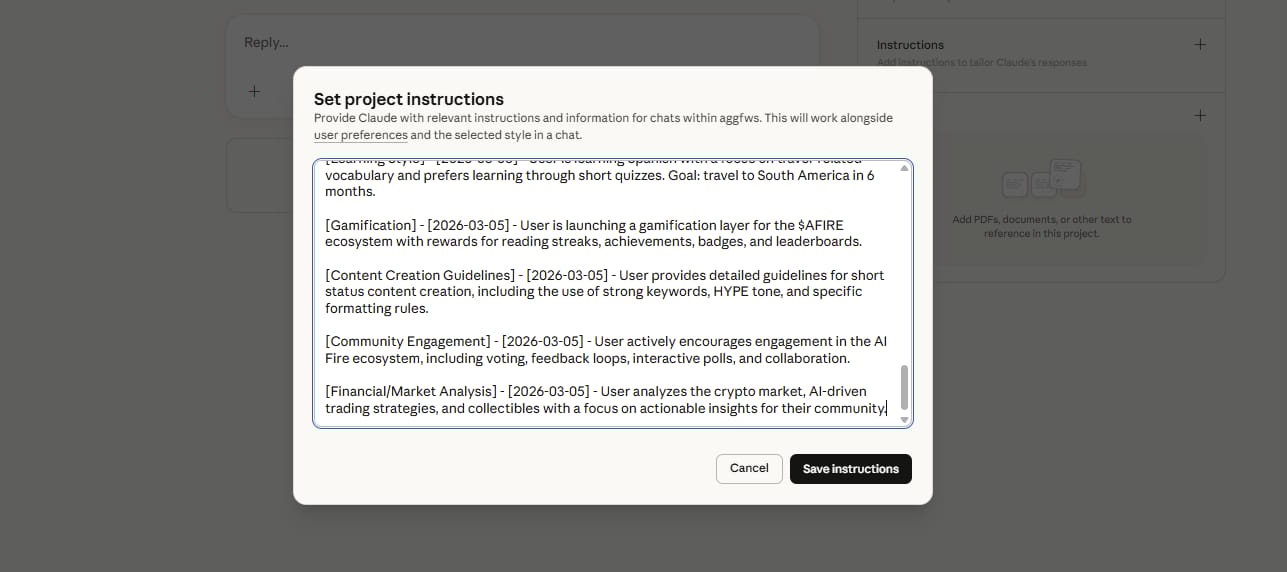
In the Project Instructions area, paste the data you exported.
You should also re-upload any core files (PDFs, spreadsheets) to the Claude project.
Comparing Claude vs ChatGPT projects, I find Claude’s version much more powerful because of "Artifacts." You can ask it to build a dashboard based on your project data, and it will show you the working app right there.
VII. Which Model Is Better for You?
Now that you know how to move your data, you might still be wondering if the switch is worth it. Let's look at a direct comparison to help you decide.
Feature | ChatGPT | Claude |
Writing Tone | Direct, sometimes repetitive | Natural, human-like, nuanced |
Memory System | Instant, but can get messy | Structured, updates daily |
Coding | Very strong logic, good for debugging | Best for building full apps (Artifacts) |
Privacy | Offers "Temporary Chat" | Known for strong safety/privacy focus |
Mobile App | Excellent, includes Voice Mode | Good, but focuses more on text/files |
Price | $20/month for Plus | $20/month for Pro |
1. When to Stay with ChatGPT
You should stay if you rely heavily on the Advanced Voice Mode (the one that sounds like a real human you can interrupt) or if you use it for image generation every day. Claude does not generate images directly in the chat like ChatGPT does.
2. When to Move to Claude
You should move if you spend most of your day writing, coding, or analyzing long documents. Claude's ability to "understand" 200,000 words at once is a game-changer for researchers and lawyers.
VIII. Common Mistakes During a Claude vs ChatGPT Switch
I have helped dozens of people do this, and I see the same three mistakes over and over. Avoid these to make your life easier.
Mistake 1: Using the wrong model for export. If you use "GPT-4o mini" to export your memories, it will be lazy. It will give you a list of 5 things. Use the Thinking model (o1 or o3) to get the full list of 50+ memories.
Mistake 2: Not checking the 24-hour sync. People often paste their memories into Claude and then immediately get frustrated when Claude says "I don't know who you are" in a new chat. Give it a few hours. The system needs time to index your data.
Mistake 3: Forgetting Custom Instructions. ChatGPT has a specific box for "How would you like ChatGPT to respond?" Make sure you copy that text specifically, as it’s the most important part of making Claude feel like your old assistant.
Conclusion
Making the move from Claude vs ChatGPT doesn't have to be a "breakup" where you lose all your history. By using the import tool and the right prompts, you can take your digital life with you.
I recommend trying Claude for one week. Use the import tool today, set up one project, and see if the writing and coding experience feels better for you. If it doesn't, you can always go back and now you know that you can even move your Claude memories back to ChatGPT using the same logic!
The AI you use should work for you, not the other way around. Don't let your data be "locked" in one place. You own your preferences and your history.
If you are interested in other topics and how AI is transforming different aspects of our lives or even in making money using AI with more detailed, step-by-step guidance, you can find our other articles here:
Building Apps with Bolt: A No-Code Guide to Turning Ideas into Reality
Detailed Guide: How To Automatically Get Unlimited High-Quality LinkedIn Jobs*
Prompt Engineering Automation: Build a Mini AI Assistant with n8n
Discover My Ultimate AI Tools Productivity Kit for 2024*
*indicates a premium content, if any
Reply