- AI Fire
- Posts
- 🤯 Claude Sonnet 4.6: Best AI Coding Ever! 1M Context, Cheap, & More! (Honest Review)
🤯 Claude Sonnet 4.6: Best AI Coding Ever! 1M Context, Cheap, & More! (Honest Review)
Claude Sonnet 4.6 is the fast, smart, and very cheap AI you need. See real tests, learn how to build cool games, and automate boring tasks in minutes now.

Neil Phan
February 25, 2026

TL;DR
Claude Sonnet 4.6 has emerged as a disruptive force in the AI market, offering elite-level coding and automation capabilities at half the cost of the heavy Opus model. In early 2026, it stands out for its 1-million-token context window and a groundbreaking "computer use" feature that allows the AI to navigate web browsers and perform manual clicking tasks. With a coding accuracy score of 80.2% on SWE-bench, it effectively bridges the gap between high-end intelligence and mid-tier pricing, making it the premier choice for developers and business owners looking to scale their workflows.
Key points
Performance: Beats the Opus model in coding benchmarks while running twice as fast.
Capability: Can build complex 3D games, automate data scraping via Selenium, and design modern landing pages.
Pricing: Costs $3 per million input tokens and $15 per million output tokens, maintaining the same price as previous versions for significantly smarter logic.
Critical insight
In 2026, the value is no longer in how much a model "knows," but in how well it can "act" on your computer to finish the job for you.
What is your biggest daily work headache? 🤯 |
Table of Contents
Introduction
Claude Sonnet 4.6 is making a lot of noise right now. If you want a smart tool that helps with coding, clicking around your browser, and managing big tasks, this is it. Anthropic just gave us this new model, and it brings a lot of power without costing too much money.
This is a very big update. We’re looking at a system that can write code, look at long files, and build apps from nothing.
The best thing about it is the price. It costs half the price of the heavy Opus model, but it runs 2 times faster.
I will show you everything you need to know about this tool from what makes it special to where to find it and its real-world capabilities. Just save these actual test cases and prompts to get the best results for yourself.
Grab a cup of coffee, and let's learn how to use this together.
I. What Is Claude Sonnet 4.6 and How Does It Work?
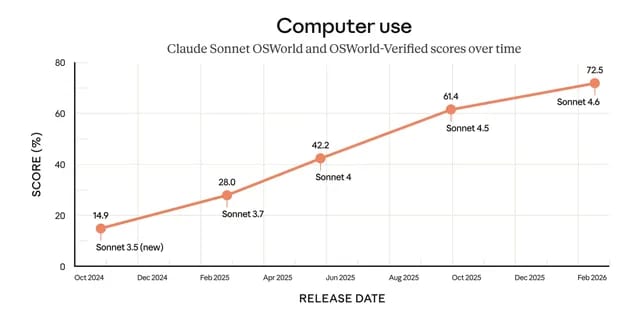
Claude Sonnet 4.6 is Anthropic’s newest high-speed assistant designed for deep coding, task management, and browser-based automation. It features a massive 1-million-token context window, allowing it to remember thousands of lines of code or entire books without losing context. Its standout "computer use" capability enables the AI to interact with web elements, fill out forms, and navigate spreadsheets almost like a human operator.
Key takeaways
Fact: The 1-million-token window is currently in beta and allows for the processing of massive folders of project data.
Comparison: It is two times faster than the Opus model while offering superior logic for step-by-step development.
Detail: The "computer use" feature can be used to automate repetitive administrative clicking and data entry tasks.
Tool: Use it for "architectural" tasks where the AI builds a project and self-corrects errors in real-time.
Think of it as a very fast helper that is really good at reading code, following long steps, and doing tasks that take a lot of time.
1. The Huge Memory Space
This model comes with a 1 million token context window. Right now, this feature is in beta testing. In simple words, this means the AI can remember a giant amount of information all at once.

It can read all of it and remember the first page when it is working on the last page. You don’t have to remind it about things you said earlier in the chat.
2. Things It Does Best
The model is very strong in a few specific areas. It is great at step by step development. This means it can build a project, look at what it made, and fix errors as it goes. It’s also very good at reading complex code.
If you have a messy project, it can find its way around it, manage tasks from start to finish. It also writes very clean and professional text documents.
3. Controlling Your Computer
One of the coolest new things is the computer use feature. This means the AI can actually control a web browser to do tasks for you.
People who use it say it acts almost like a real person. It can read hard spreadsheets, fill out long forms on websites, and do boring clicking tasks over and over again without getting tired.
Learn How to Make AI Work For You!
Transform your AI skills with the AI Fire Academy Premium Plan - FREE for 14 days! Gain instant access to 500+ AI workflows, advanced tutorials, exclusive case studies and unbeatable discounts. No risks, cancel anytime.
II. The Official Pricing and Test Scores for Claude Sonnet 4.6
Claude Sonnet 4.6 is priced at an affordable $3 per million input tokens and $15 per million output tokens, offering high-level smarts at a mid-tier price point. It has achieved a record-breaking 80.2% on the SWE-bench coding test, outperforming major competitors and its own "big brother," the Opus model. These numbers prove that the model is ready to handle enterprise-grade software engineering and complex logic audits.
Key takeaways
Stat: Sonnet 4.6 scored 80.2% on the SWE-bench, identifying it as a top-tier model for fixing real-world code.
Difference: The cost remains identical to previous versions, providing a "brain upgrade" without a price hike.
Timeframe: The model's speed allows for rapid iteration, which is essential for businesses with high-volume coding needs.
Result: It consistently beats other big names in the market for developer-focused reliability.
Let us talk about the numbers. It is important to know how much things cost and how well they perform in standard tests.
1. The Exact Costs
Here is the math for the new model.
Input costs: $3 for every 1 million tokens you send to the AI.
Output costs: $15 for every 1 million tokens the AI writes back to you.
This is the exact same price as the older version, but the brain inside is much smarter. You get top level smarts at a middle level price.
For people who run businesses or write code all day, this saves a lot of money.
2. Standard Test Results
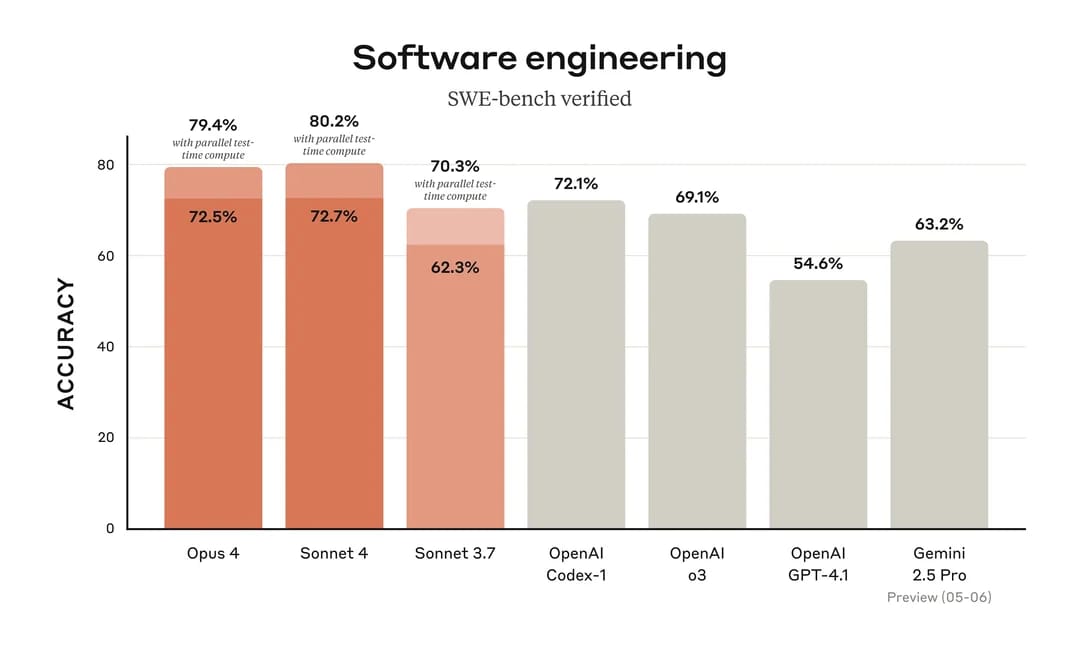
Numbers do not show everything, but they give us a very clear starting point. In a famous test for coding called SWE-bench, this AI really shows its power. This test checks how well an AI can fix code like a real software engineer.
Looking at the chart above, you can see Sonnet 4 gets a very high score of 80.2%.
It even beats its big brother, Opus 4, and does much better than other big names in the market. This is a very high number. It shows that this AI is ready to handle hard projects for you.
III. How to Access Claude Sonnet 4.6 Right Now
Getting started is very easy. You have a few different ways to use it, depending on how much you want to spend and what you need to do. Let’s look at the best options.
1. The Official Chat Website

You can use it on the main Claude website. This is free to use. However, there is a limit. You can only send a few messages before the site asks you to wait for a few hours.
This is great for a quick test, but it is hard to use for a long workday.
2. Pay as You Go Tools
If you know how to write code, you can use the Anthropic API. This lets you connect the AI directly to your own apps. You only pay for what you use based on the prices I listed above.

You can also use OpenRouter. This is a bridge that lets you connect to many different AI models, including this new one, using one simple account.
3. Free Credits and Testing Platforms
LMSYS is a fun website where you can test different AI models side by side for free. It is a nice way to try it out if you do not want to set up an account.

Another great option is Kilo Code. This is an open source platform that gives you $25 in free credits when you sign up. You can use these credits to test the model for a long time before you have to pay anything.
IV. Real Website Design Tests Using Claude Sonnet 4.6
Let us look at what the AI can actually build. I want to show you real examples of web design.
1. Building a Local Service Website
I tested the AI by asking it to build a landing page for a local business. Let’s say we are building a site for Locksmith NY. I wanted to see if it could make a clean, modern layout using HTML and Tailwind CSS.
Here is the exact prompt you can use:
Create a modern HTML and Tailwind CSS landing page for a business called Locksmith NY.

Make the background white and use dark blue for the buttons to build trust.

Include a hero section with a big headline.

Below that, add a pricing section.

Make sure to list the emergency service price as exactly $99. Add a contact form at the bottom.
The result was very good. The AI picked nice fonts and laid out the page perfectly. It remembered the exact $99 price I asked for.
The colors looked professional. Compared to other models, it created a layout that looked like a real human designer made it.
2. Mimicking a Computer Screen
This was a very hard test. I asked the AI to build a fake MacOS screen using only web code.
The first try gave me a desktop with a top bar, some app icons, a fake Safari window, a notes app, and a calculator. It looked right, but the buttons did not do much.
I asked it to improve the code. The second try was amazing. I could click and drag folders. I could change the background picture. It added a music player that actually showed a moving time bar.
I could even change the volume slider. The AI understands how different visual parts need to work together on a screen.
3. Drawing Shapes with Code
Scalable Vector Graphics are pictures made out of code. I asked the AI to draw a butterfly. It gave me a simple butterfly with nice color mixing. Then I asked for a robot and a video game controller.

The pictures were okay, but they were not amazing. The more expensive Opus model draws better code pictures. But for simple icons, this model does a fine job.
V. Claude Sonnet 4.6 Creates Complex Web Games Perfectly
Now, we’ll move past simple web pages. Let's see together how Claude Sonnet 4.6 handles a game with real physics and clear rules. Its coding skills will really surprise you.
1. Making a Marble Board Game
I asked it to make a game where you roll a marble on a wooden board. You tilt the board by moving your computer mouse. To make this work smoothly, I had to describe the game rules very clearly.
Here is the exact prompt that you can copy to try right now:
Write HTML, CSS, and JavaScript code to make a marble rolling game on a web browser.
The screen shows a wooden board with a marble on it. The player will move the computer mouse to tilt the board and control the marble.
Add real physics so the marble rolls fast or slow based on how much the mouse tilts.
Add some black holes on the board as obstacles. If the marble falls into a hole, the game will automatically restart from the beginning.
The result was very impressive. The AI wrote the code with real physics. The marble rolled fast when I moved my mouse fast. I had to carefully avoid the holes on the board. If the marble fell into a hole, the game restarted instantly just as I asked.
Playing this game was actually very fun. The AI understood how to connect my hand movement to the math of the rolling ball.
2. Building a Block Mining Game
In the next test, we used the Kilo Code platform to try building a survival game similar to the famous Minecraft. The amount of code for a 3D game like this is huge.
I used this detailed prompt to start the project:
Build a first-person 3D survival game that runs on a web browser. The game must have a main menu screen that lets players create a new world or load an old one.
Add a health bar and a food bar for the character on the screen. The player can walk around, break natural blocks, and place new blocks. The land needs hills and must have deep caves under the ground.
After running the code, the AI named the game Boxelcraft by itself. First, the AI built a very nice start menu.
This is very rare because most other AIs just drop you straight into the game without any preparation. This model gave me a proper screen to click a button and make a new world.
Inside the game, I saw a health bar, a food bar, and hills made of blocks. I could walk around and break them. In the first version, the game ran a bit slow because the graphics were too heavy for a normal web browser.

One super cool detail is that the AI even created underground caves exactly as I asked in the prompt. It calculated and built the full world, not just a thin layer of grass on top.
Even though there were a few tiny errors when placing the blocks, the full massive system worked together extremely well overall.
VI. Browser Automation and Testing with Claude Sonnet 4.6
This is where the model really shows its muscle. It can write scripts that open a browser and do things for you.
1. The Big Data Task
I gave the AI a very long list of instructions. I asked it to create a folder, write a Python script to open a browser, search Google for news, save the news to a file, and build a web dashboard to show the news.
The AI started writing the files instantly. It did not get lost in the long instructions.
2. How The Script Worked
The Python code used a tool called Selenium. When I ran the code, my computer opened a browser by itself. It typed in the search bar, found the top five news links, and saved them.
Then, I opened the HTML dashboard the AI made. The dashboard read the saved file and showed the news on my screen nicely. Everything connected perfectly.
This is very useful if you need to copy data from websites every morning or test if your own website is working.
How useful was this AI tool article for you? 💻Let us know how this article on AI tools helped with your work or learning. Your feedback helps us improve! |
VII. Should You Choose Claude Sonnet 4.6 Over Others?
After all these tests, we can clearly see what the AI does well and where it struggles.
1. The Best Parts
The biggest win is the value. You get very high intelligence for a low price. It is great for tasks where the AI works alone, like searching websites or fixing long code files.
It follows rules very strictly. Other models sometimes get lazy and stop halfway through a long list of steps. This one finishes the job.
The large memory space is amazing. You can give it a whole book of rules, and it will read all of them. Also, the speed makes a big difference when you are waiting for answers.
2. The Weak Points
It is not perfect. As we saw, the code pictures (SVG) are just average. In very big game projects, it still makes small logic errors, like the block placing issue in the mining game.
For highly sensitive or massive company projects, the bigger Opus model might still be safer. You have to pick the right tool for your specific job.
VIII. Helpful Tips for Using Claude Sonnet 4.6 Every Day
If you want to get the best out of this AI, you need to know how to talk to it. Here are simple rules I use to get great results.
1. Give Exact Details
Do not just say "write an ad." You have to be specific. Let us say you run a marketing campaign for a newsletter called AI Fire. You want to run ads on Meta.
Here is a good prompt:
Write three short Facebook ad copies for the AI Fire weekly newsletter. The target audience is busy office workers.
Include a short hook to grab attention. Explain that the newsletter saves them 5 hours a week.
End with a clear call to action to click the link below.
When you give exact rules, the AI gives you exactly what you need.
2. Fix Things Step by Step
Do not expect a perfect result on the first try. The AI is very good at taking feedback. If you build a website and the colors look wrong, just tell it to change the colors.
For big tasks, build one small piece at a time. Make the login screen first. Make sure it works. Then ask it to build the next page. This stops the AI from getting confused.
3. Use The Big Memory
Do not be shy. Paste your long documents into the chat. If you have a long list of weekly tasks or a big meeting summary, give it all to the AI. It can handle it easily.
Claude Sonnet 4.6 gives you a lot of power for a very fair price. It works fast, it follows your rules, and it can do real work on your computer.
Conclusion
Overall, Claude Sonnet 4.6 is a really great helper. For the first time, we have an AI tool that is super smart but comes with a very cheap price. Through real tests, from writing web code to clicking around the browser, you can see it handles big tasks very smoothly.
Of course, this model still has a few small weak points, like drawing pictures with code. But if you know how to talk to it and give clear instructions, this tool will help you finish your work much faster. You will not have to sit and do boring clicking tasks again and again, or get a headache reading every line of code anymore.
Technology changes every day, and knowing how to use tools like this will help us work with less stress. I hope you have a fun time and get great results with this new assistant! If you have any questions when you test it out, we will talk about them together.
If you are interested in other topics and how AI is transforming different aspects of our lives or even in making money using AI with more detailed, step-by-step guidance, you can find our other articles here:
Building Apps with Bolt: A No-Code Guide to Turning Ideas into Reality
Detailed Guide: How To Automatically Get Unlimited High-Quality LinkedIn Jobs*
Prompt Engineering Automation: Build a Mini AI Assistant with n8n
Discover My Ultimate AI Tools Productivity Kit for 2024*
*indicates a premium content, if any
Reply