- AI Fire
- Posts
- 🤫 10 Claude Code Tricks Most Still Don’t Know, Shared by Core Claude Insiders
🤫 10 Claude Code Tricks Most Still Don’t Know, Shared by Core Claude Insiders
Most developers use AI wrong. Here is exactly how I use Claude Code to handle complex projects, automate boring tasks, and learn new skills fast.

Neil Phan
February 23, 2026

TL;DR BOX
Working effectively with an AI coding assistant like Claude Code requires shifting from a "user" mindset to a "partner" mindset. By implementing strategies like parallel worktrees, forced architectural planning, and a dedicated rules file (CLAUDE.md), developers can eliminate repetitive errors and speed up production. The ultimate goal is to leverage AI for "boring" tasks like debugging and data analysis, freeing up human energy for high-level strategy and deep learning.
Key points
Efficiency: Use Git worktrees or multiple browser tabs to process 3–5 coding tasks in parallel.
Planning: Always force the AI into "Plan Mode" to create a blueprint before generating any code.
Persistence: Maintain a CLAUDE.md file to store project-specific rules, tech stacks, and style preferences.
Critical insight
An AI assistant is only as good as the instructions it follows; treat it like a senior intern who needs a clear roadmap and a set of house rules to succeed.
😫 What’s your biggest headache with AI coding tools? |
Table of Contents
Introduction
Coding should be fun, but sometimes the hard parts take away all the joy. Recently, I found a new way to work that changed everything for me. I started using Claude Code, a powerful tool that helps me write software.
Using an AI coding assistant effectively is not just about asking questions. It is about working together with the AI as a partner.
However, executing these strategies effectively relies on a strong foundation, so before diving in, make sure you are avoiding outdated software and using the right AI tools for your skill level.
In this guide, we will explore 10 practical tips that I have learned. Let’s look at how to organize your work, how to fix errors instantly, and how to learn new skills.
Whether you use the command line tool or the web version, these tips will help you become a better developer today.
I. Tip 1: Do More Work in Parallel
To increase productivity, you should move away from linear tasks and adopt a parallel working mindset. By using Git worktrees or multiple browser tabs, you can have separate AI sessions focusing on new features, bug fixes, and log reading simultaneously. This approach keeps the AI's context clean and prevents different tasks from confusing the model's memory.
Key takeaways
Concept: Git worktrees allow you to have 3–5 different active environments on one project.
Contrast: Normal branches require "clearing your desk," while worktrees are like having multiple desks.
Action: Open separate browser tabs for writing code, fixing errors, and asking general questions.
Tool: Use the terminal or multiple Claude instances to separate feature development from debugging.
When we work on a big project, we often wait. We wait for the code to compile, we wait for tests to run, or we wait for the AI to finish writing a long function. This waiting time adds up.
To be faster, we need to change how we work. The best developers do not do just one thing at a time. They do many things at once.
The team behind Claude Code recommends a technique called parallel working. If you are using the terminal, this involves using Git worktrees.

Let me explain what a worktree is in simple words. Imagine you have a desk where you are building a Lego castle. If you want to build a Lego car, you usually have to clear the desk or break the castle. That is how normal Git branches work.
A worktree is like buying a second desk. You can keep the castle on desk one and build the car on desk two at the same time.
1. Setting Up Your Workspace
You should try to spin up 3 to 5 different environments at once.

Environment A: You ask your AI coding assistant to create a new login screen.
Environment B: You have another session running to fix a bug in the database.
Environment C: You use this one just to read logs or ask questions about the code.
Learn How to Make AI Work For You!
Transform your AI skills with the AI Fire Academy Premium Plan - FREE for 14 days! Gain instant access to 500+ AI workflows, advanced tutorials, exclusive case studies and unbeatable discounts. No risks, cancel anytime.
2. How to Apply This If You Use the Web Version
If you do not have the technical setup for Git worktrees, you can still use this mindset. Open your browser. Instead of having just one tab for Claude, open 3 tabs.
Tab 1: Focus only on writing new code.
Tab 2: Use this tab to paste error messages and ask for fixes.
Tab 3: Use this tab to ask "stupid questions" or learn concepts.
By separating your tasks, you keep the memory of the AI coding assistant clean. It won't get confused between the bug fix and the new feature. This simple change makes you feel like you have a whole team of helpers, not just one.
II. Tip 2: Start in Plan Mode
Jumping straight into coding often results in messy, unorganized logic that is difficult to fix later. "Plan Mode" forces the AI to act as a Senior Architect, creating a blueprint that includes file structures, libraries, and security risks. Reviewing this roadmap first ensures that you catch foundational mistakes before a single line of code is ever written.
Key takeaways
Mindset: You are the architect and boss; the AI is the builder following your blueprint.
Step: Demand a file structure, database schema, and security risk assessment before any implementation.
Update: It is 100 times easier to fix a text-based plan than to debug 500 lines of generated code.
Example: Ask a second AI session to review the architect's plan for any missing logical steps.
I used to make a big mistake. I would tell the AI: "Make a snake game for me." Then I would wait. The result was usually bad. The code was messy, or it didn't look like what I imagined. I realized that the AI needs a roadmap before it starts driving.

You need to use "Plan Mode." This is the most important step for any big task. Before you let your AI coding assistant write a single line of code, you must force it to think.
1. The Architect Mindset
Think of yourself as the boss, and Claude is the builder. You don't tell the builder to "build a house." You give them a blueprint.
2. Step-by-Step Example
Let's say you want to build a "Task Manager App." Do not say "Build a Task Manager." instead, use this prompt:
I want to build a Task Manager application using React and Node.js. Do not write any code yet. Act as a Senior Software Architect. I need you to create a detailed, step-by-step plan.

Your plan must include:

1. The file structure of the project.
2. The list of necessary libraries we need to install.
3. A description of the database schema.
4. A list of potential security risks we might face.

Please switch to Plan Mode and write this down.
3. Reviewing the Plan
Once the AI coding assistant gives you the plan, read it carefully. If you see a mistake, fix it now. It is much easier to fix a plan than to fix 500 lines of code later.
If you want to be very safe, open a new chat window. Copy the plan from the first window and paste it there. Ask: "Review this plan. Are there any missing steps?" This way, you have a second opinion before you start the real work.
III. Tip 3: CLAUDE.md File for Your AI Coding Assistant
Imagine you hire a new assistant every single day. Every morning, you have to explain: "I like my coffee black," "I use blue pens, not red ones," and "File these papers in the top drawer." That would be exhausting, right?
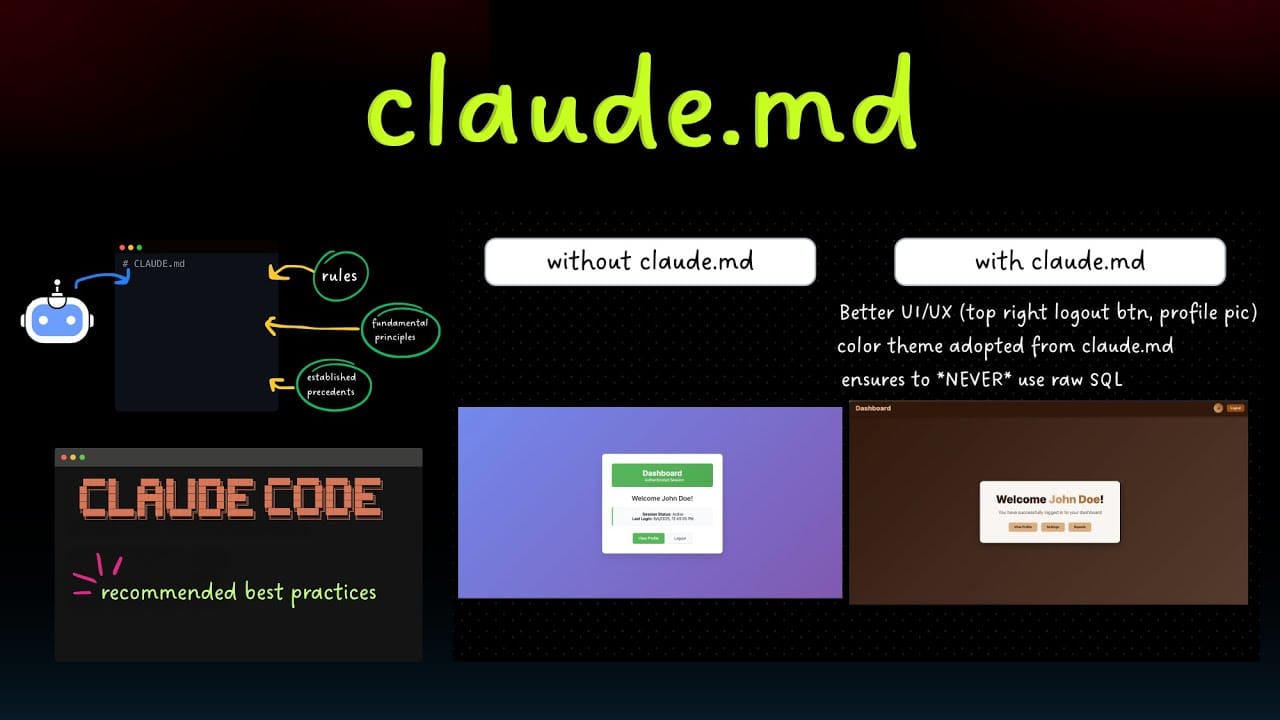
This is what happens when you start a new chat with an AI. It forgets your preferences. To solve this, Claude Code uses a special file called CLAUDE.md.
1. What is CLAUDE.md?
This is a simple text file that lives in your project folder. It acts like a "long-term memory" for your AI coding assistant. You write your rules in this file, and Claude reads it before answering you.
2. What to write in this file?
You should include things that you always have to repeat. Here is a template you can use:
# My Project Rules

## Tech Stack
- We use Python 3.9.
- We use the Django framework.
- We use PostgreSQL for the database.

## Coding Style
- Always put comments above complex functions.
- Use 'snake_case' for variable names.
- Never use hard-coded passwords; use environment variables.

## Lessons Learned
- The payment API fails if the date format is wrong. Always use YYYY-MM-DD.
- Do not use the 'requests' library, use 'httpx' instead.
3. The Loop of Improvement
Here is a pro tip. Every time your AI coding assistant makes a mistake, do not just fix it and move on. Tell it to update the rules.

Say this: "You used the wrong date format again. Please update the CLAUDE.md file so you never make this mistake in the future."
If you do this every day, after a few weeks, your assistant will know exactly how you like to code. It will feel like it can read your mind.
IV. Tip 4: Build Custom Skills for Your AI Coding Assistant
We all have boring tasks that we do every day. Maybe you have to check if the server is running, or you have to clean up old files. You should not do these things manually. You can teach your AI coding assistant new "skills" to do them for you. Once mastered, you can apply this logic to turn messy numbers into high-ticket assets.
In Claude Code, you can create custom commands. Think of these as magic spells. You say a short word, and a big action happens.

1. The "Tech Debt" Skill
"Tech debt" is when your code gets messy because you were rushing. You can create a skill called /techdebt.
You can set it up so that when you type /techdebt, the AI automatically scans your recent files. It looks for variables you created but never used. It looks for code that is copied twice. Then, it gives you a report or fixes it for you.
2. The "Context Dump" Skill
Sometimes, a bug is really hard to understand. You might need information from your team chat, your email, and your code history. You can build a skill that collects the last 7 days of summary from your team's Slack channel and GitHub issues.
When you run this skill, your AI coding assistant suddenly knows everything that happened in the team recently. It can say, "Oh, this bug is happening because John changed the API settings yesterday."
3. How to Do This on the Web
If you use the web version, you can create a text file on your computer named "My_Prompts.txt". Write down your best prompts there.
For example, save this prompt:
Review my code for 'Clean Code' principles. Look for duplicated logic, unclear variable names, and large functions. List 3 improvements.When you need it, just copy and paste. It is a manual way to have custom skills.
V. Tip 5: How Does an AI Coding Assistant Fix Bugs Automatically?
Debugging is painful. You stare at an error message, copy it, search on Google, click on three links, and try to understand the answer. It takes a long time. Claude Code changes this workflow completely.
1. Zero Context Switching
The team uses a tool called "MCP" (Model Context Protocol). It connects Claude to other apps like Slack.

Imagine you see a bug report in your team chat. Usually, you have to switch windows many times. With MCP, you just paste the chat thread into Claude and say one word: "Fix."
Because the AI coding assistant can read the chat and see your code, it understands the problem instantly. It writes a plan and fixes the code.
2. Fixing the "Red Tests"
In coding, we write tests to check if our software works. When a test fails, we see red text. It is annoying.
Next time this happens, do not read the logs yourself. Just copy the entire error log - even if it is 100 lines long. Paste it into Claude and say: "Go fix the failing tests."
Do not try to tell it how to fix it. Let it analyze the logic. It is surprisingly good at finding the small detail you missed, like a missing semicolon or a wrong number.
3. Troubleshooting with Logs
If you use complex systems like Docker (which puts your code in containers), finding errors is hard. You can point your AI coding assistant to the log files.
It acts like a detective. It reads through thousands of lines of text in seconds and points to the exact moment the error happened.
VI. Tip 6: Better Prompting Tips for Your AI Coding Assistant
Many people say, "The AI wrote bad code." Often, the problem is not the AI. The problem is how we asked. Prompting is like giving instructions to a human intern. If you are vague, the work will be bad.
Here are three advanced techniques to get better results.
1. The "Grill Me" Technique
After Claude writes some code for you, do not trust it immediately. You should challenge it. Type this:
Grill me on these changes. Don't let me accept this code until I pass your test. Act as a strict code reviewer.
The AI coding assistant will then switch roles. It will look at its own code and your requests, and it might say: "Wait, you forgot to handle the error if the user loses internet connection." This saves you from shipping broken code.
2. The "Scrap It" Method
Sometimes, the conversation goes in circles. The code gets messy. You try to fix it, but it gets worse.
When this happens, stop. Take a deep breath. Then say:
Knowing everything you know now, scrap this and implement the elegant solution."Scrap this" means "throw it away." This tells the AI to forget the messy code it just wrote, keep the lessons it learned, and write a fresh, clean version. The second version is almost always better.
VII. Tip 7: Best Environment Setup for Your AI Coding Assistant
The tools you use around the AI matter. If you are comfortable, you work better.
1. The Terminal Choice

The experts recommend using a terminal called Ghostty. I know, "terminal" sounds scary if you are a beginner.
But this one is special. It supports beautiful colors and text. When you are reading a lot of code generated by AI, having clear text and good contrast helps your eyes.
2. Organize Your Tabs
If you follow the advice in Section I about doing things in parallel, you will have many windows open. You need to organize them.
Name your tabs: Don't leave them as "Untitled." Rename them to "Login Fix," "Database," "Testing."
Color code them: If you can, make the "Database" tab red and the "Design" tab blue. This helps your brain switch context faster.
3. Use Your Voice
This is my favorite tip. Typing is slow. Speaking is fast.
When you need to explain a complex problem to your AI coding assistant, try using voice dictation.
On a Mac, you can usually press the fn key twice. On Windows, press Windows + H.

Talk to the AI like it is a person sitting next to you. "Hey, I need to create a function that takes a list of users, sorts them by age, but removes anyone who hasn't logged in for 30 days."
When you speak, you naturally give more detail than when you type. You will find that the answers get much better because you provided more context.
VIII. Tip 8: How Can Subagents Help to Solve Big Problems?
Imagine you want to build a whole house. You cannot do it alone. You need a plumber, an electrician, and a painter. "Subagents" are like these specialists.
1. Throwing More Power at the Problem

If you have a very difficult task, you can tell Claude Code: "Use subagents for this."
This tells the AI to not just try to guess the answer in one go. It creates smaller, separate AI workers. One worker might look for files. Another worker might read the documentation. They work together to solve your problem.
2. Keeping the Main Chat Clean
If you talk to one AI for too long, it gets "tired." Its memory gets full, and it starts forgetting the beginning of the conversation.
By using subagents (or simply opening new tabs for small tasks), you keep your main AI coding assistant focused.

Main Chat: "Plan the game architecture."
Sub-task (New Tab): "Write the code for the jumping mechanic."
Sub-task (New Tab): "Write the code for the score counter."
You then copy the finished code back to the main project. This keeps everything organized and clean.
IX. Tip 9: Data Analytics with Your AI Coding Assistant
Coding is not just about building apps. It is also about looking at data. I haven't written a complex SQL query in months because I let the AI do it.
1. Connecting to Databases

If you manage a database, you do not need to leave your workspace to check the data by hand. You can just ask Claude Code to get the information for you directly.
Your AI coding assistant will automatically write the necessary code, run it, and show the results right on your screen. You do not even need to type a single line of SQL code.
2. Understanding the Logic
Even if you do not use the command line tool, you can still use the web version. Just copy your database structure and paste it into the chat. Then, simply tell the AI what kind of data you are looking for and ask it to explain the solution.
Your AI coding assistant acts just like a data analyst. It will write the SQL code for you and explain exactly how it works. This is very safe because you can check the code yourself before you use it on your real database.
X. Tip 10: How Can You Use Your AI Coding Assistant to Learn Faster?
The final tip is about you. Don't just use AI to do the work for you. Use it to teach you.
1. Explain the "Why"
When Claude gives you a solution, do not just copy and paste. Ask: "Why did you choose this method? Why is this better than the other way?"
You can enable a "Learning" style in your settings. This makes the AI coding assistant explain every change it makes. It is like having a senior teacher looking over your shoulder.
2. Visual Learning
Code is abstract. Pictures are easy.
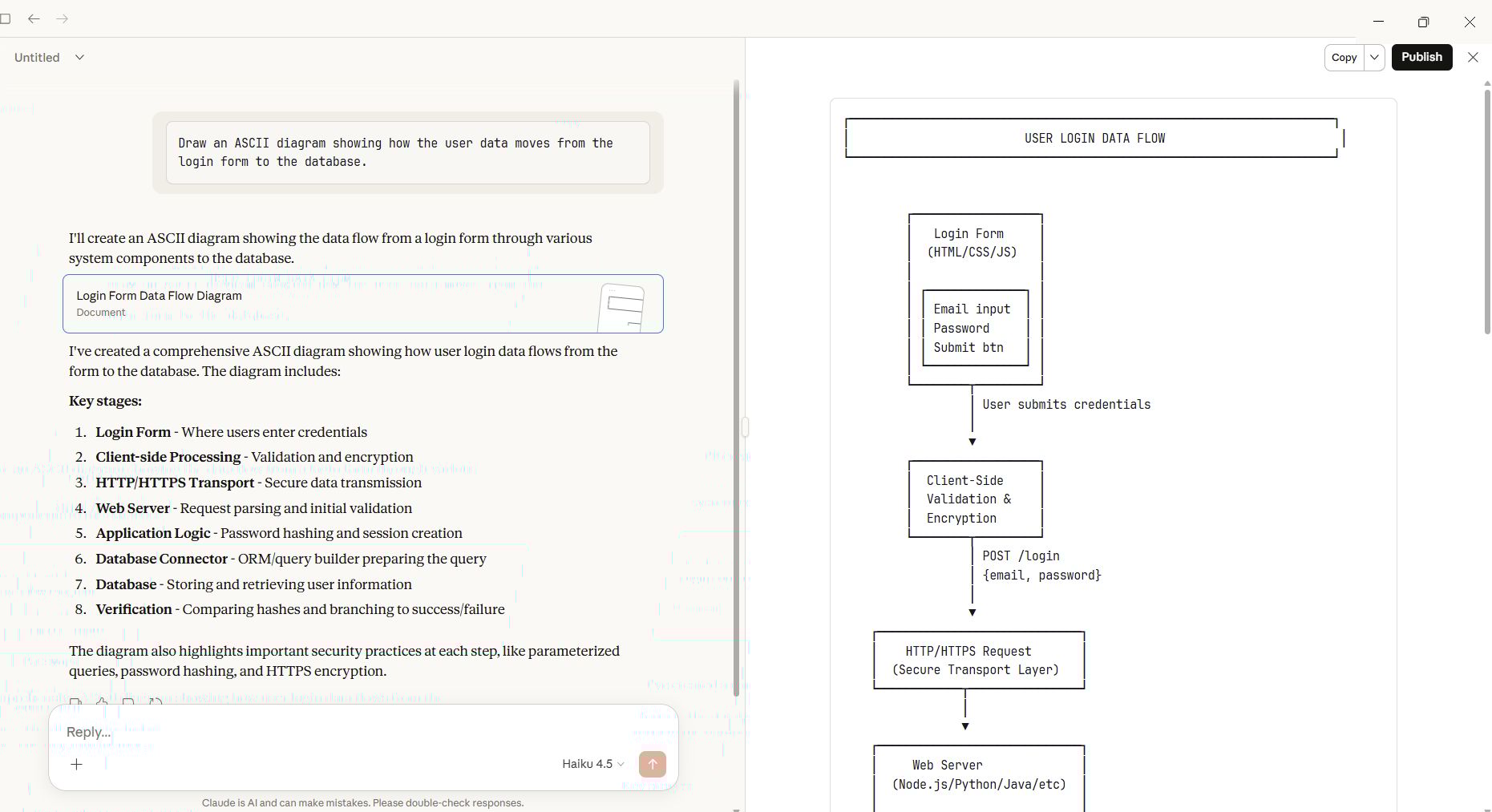
If you are struggling to understand how a new system works, ask for a diagram.
Draw an ASCII diagram showing how the user data moves from the login form to the database.It will draw a picture using text characters that looks like this:
3. Spaced Repetition
You can use the AI to quiz you. Say: "I am trying to learn React Hooks. Quiz me on them. Ask me a question, wait for my answer, and then correct me if I am wrong."

This turns your AI coding assistant into a study buddy. It helps you remember things for a long time.
Conclusion
There is no "perfect" way to use an AI coding assistant. My setup might look different from yours. But the principles are the same. We want to work smarter, not harder.
By using worktrees or multiple tabs, we stop waiting. By writing clear plans and rules in CLAUDE.md, we stop repeating ourselves. And by challenging the AI to "grill us," we ensure our code is high quality.
I encourage you to pick just one tip from this list and try it today. Maybe try the "Plan Mode" on your next task. You will be surprised at how much calmer and faster your coding becomes. Let's start building amazing things together.
If you are interested in other topics and how AI is transforming different aspects of our lives or even in making money using AI with more detailed, step-by-step guidance, you can find our other articles here:
AI Generalist: How To Make 2026 The Best Year of Your Life With GPT/Gemini
The New Way to Build Profitable AI Websites With Gemini 3 (It Starts With One Page)
Earn Money with MCP in n8n: A Guide to Leveraging Model Context Protocol for AI Automation*
Transform Your Product Photos with AI Marketing for Under $1!*
The AI Secret To Reports That Clients Actually Implement
*indicates a premium content, if any
Reply