- AI Fire
- Posts
- 🔥 AI Generalist: How To Make 2026 The Best Year of Your Life With GPT/Gemini
🔥 AI Generalist: How To Make 2026 The Best Year of Your Life With GPT/Gemini
Forget complex tech stacks. Use ChatGPT and Gemini to become an AI Generalist. This plan shows you how to automate and build software without coding.

Neil Phan
December 31, 2025
TL;DR
Working harder is no longer the key to success in 2026; the real advantage lies in becoming an AI Generalist who uses "leverage" to do the work of ten people. By mastering four key powers - Automation, Building without coding, Creative media generation, and Connection, you can bypass traditional specialization and achieve huge results with small efforts. This guide provides a practical 4-week plan to transform from an overworked specialist into a versatile, high-leverage generalist using tools like ChatGPT, Claude, and Midjourney.
Key points
Concept: Leverage means using AI as a "long stick" to move heavy tasks easily.
Trend: The future belongs to generalists who can stack skills (write + code + design) using AI.
Tool: Use Lovable or Bolt to build simple apps in minutes without knowing code.
Critical insight
You don't need to be a master coder or artist anymore; you just need to know how to ask the AI to be one for you.
How will you win in 2026? 🏆 |
Table of Contents
Do you feel like you are working harder every day but not getting the results you want? Most people think the answer is to grind more. But I’m here to tell you that in 2026, working harder is the wrong path. The real secret is becoming an AI Generalist.
I used to be just like everyone else. I thought if I sat at my desk for 12 hours, I would be successful. But I watched people with half my experience making ten times more money and having more free time. How? They weren't smarter. They just had leverage.
In this guide, I will share the exact 2026 Strategy I used to change my life. We will explore the "4 Powers" that will help you become an AI Generalist - someone who is pretty good at many things using AI.
Whether you are a student, an employee, or a business owner, this guide is for you. We will go through this together, step by step.
Part I: Why Is Becoming An AI Generalist The Best 2026 Strategy?
The old rule of specializing in one skill for 10 years is dead; today's winners are AI Generalists who stack multiple skills to solve complete problems. By using AI as leverage, a single person can now write, code, and design at a 70% proficiency level, effectively doing the work of an entire team. This "cross-domain" ability allows you to move faster and adapt to market changes instantly, unlike rigid specialists.
To successfully transition into this powerful role, you need to start practicing specific daily routines, which is why we broke down the 5 AI habits you must build now to ensure you become the orchestrator of these tools rather than the one being replaced.
Key takeaways
Definition: Leverage is getting massive results from minimal effort (like using a lever).
Shift: Success moved from "deep specialization" to "broad competence" via AI.
Quote: Marc Andreessen says the future belongs to those who can "cross domains."
Benefit: An AI Generalist operates as a one-person team of ten.
You don't need to be the best writer or coder; you just need to be good enough at using AI to do both.
1. What Is "Leverage" And Why Do You Need It?
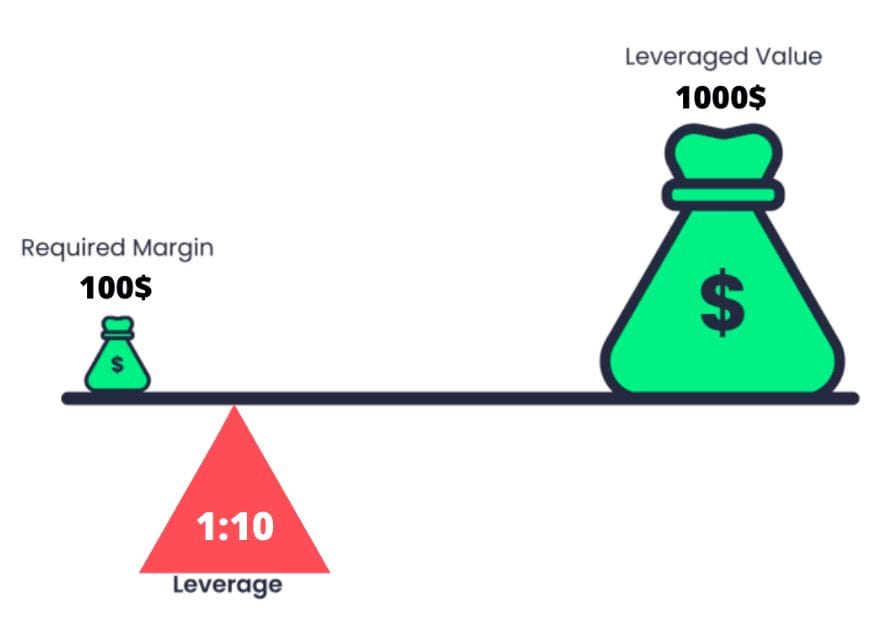
Leverage is a fancy word for getting a huge result from a small effort. Imagine trying to lift a heavy rock.
Without leverage: You use your bare hands. It is heavy. You get tired. You might hurt your back.
With leverage: You use a long stick (a lever). You push down gently, and the rock moves easily.
AI is that long stick. For a monthly cost that is cheaper than a lunch, you can have:
A writer who never sleeps.
A coder who fixes bugs in seconds.
A designer who makes art instantly.
When you become an AI Generalist, you are not just one person anymore. You are a team of ten people.
Learn How to Make AI Work For You!
Transform your AI skills with the AI Fire Academy Premium Plan - FREE for 14 days! Gain instant access to 500+ AI workflows, advanced tutorials, exclusive case studies and unbeatable discounts. No risks, cancel anytime.
2. The Trap Of "Specialization"
Marc Andreessen, a famous billionaire investor, said that the future belongs to people who can "cross domains". This means you shouldn't just be a writer. You should be a writer who can also code a simple website and design a nice image.
With AI, you can reach 70% proficiency in almost any skill in a few weeks.
You don't need to be a master coder; you just need to know how to ask the AI to build a tool.
You don't need to be a master artist; you just need to know how to prompt for a logo.
When you stack these skills, you become unstoppable. This is the core of our 2026 Strategy.
Part II: How Can An AI Generalist Use The Power To Automate? (Power 1)
Automation is the first power of an AI Generalist, allowing you to reclaim time by letting robots handle boring, repetitive tasks. By identifying predictable workflows like summarizing meetings or saving email attachments, you can build simple AI systems using tools like Claude or Zapier to execute them instantly.
This shifts your role from doing the work to managing the systems that do the work. Mastering this automation is essentially the technical foundation of a broader business strategy designed to ignore trivial setup work like building websites and focus strictly on the high-value problems that generate revenue.
Key takeaways
Action: Audit your week for repetitive, hateful tasks to automate.
Workflow: Use Claude to summarize long reports and extract stats in seconds.
Tool: Zapier or Make connects different apps to run on autopilot.
Result: Turning a 45-minute research task into a 10-second prompt.
If you are spending 5 to 10 hours a week copying and pasting data, scheduling emails, or summarizing notes, you are wasting your life. An AI Generalist lets robots do the boring work.
1. Identify The Boring Tasks
I want you to look at your week. What tasks do you hate doing? Usually, these are tasks that follow a pattern but eat up your energy.
To prove how much time we waste, I actually sat down and tracked this myself. Here is my real-life 'Boring Audit' on Notion:
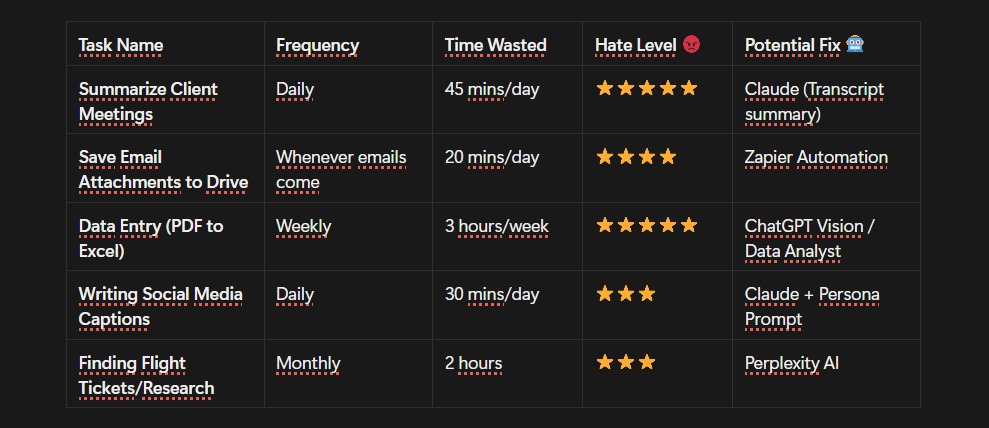
As you can see in the list above, simple things like saving email attachments or summarizing meetings were costing me nearly 10 hours a week.
The Golden Rule: If a task happens the same way every time (like the ones in my list), AI can do it for you.
2. How I Saved 5 Hours A Week On "Research"
I used to spend hours reading news articles to find ideas for my content. It was boring and slow. So, I built a simple automation using Claude and a tool called "Projects" (or you can use the MCP feature).
Here is exactly how you can do it:
Step 1: Gather your sources (newsletters, websites).
Step 2: Open Claude.
Step 3: Use a prompt that turns Claude into your personal research assistant.
"You are my expert Research Assistant. I will paste a long article or a report below. I want you to do three things for me:
Summarize the main point in 3 simple sentences.
Find any statistics or numbers mentioned.
Suggest 3 unique angles I could use to write a blog post about this topic.
Here is the text: [Paste Text Here]"
Now, instead of reading for 45 minutes, I get the result in seconds. But an AI Generalist takes it one step further by choosing the right "brain" for the job:
For Deep Analysis: I switch to ChatGPT (o1/Thinking models). Unlike standard AI that just guesses the next word, this model actually "thinks" and reasons before answering, making it perfect for finding hidden insights in complex reports.
For Seamless Workflow: I use Gemini Pro. Since it belongs to Google, it connects directly to my Drive and Docs. I don't even need to copy-paste; I just type "@Google Drive read the Q3 Report PDF" and it extracts the data instantly.
This is how an AI Generalist thinks: We don't just use AI; we use the best AI for the specific task.
3. Taking It To The Next Level With "Connectors"

If you want to get fancy, you can use tools like Zapier or n8n. These tools connect your apps together.
Action Step: Pick ONE boring task this week. Just one. And find a way to make AI do it for you.
Part III: How Does an AI Generalist Build Tools Without Coding? (Power 2)
This is my favorite part. This is where you feel like a wizard. For years, if you wanted a computer program or an app, you had to learn "Python" or "Javascript" or pay someone $10,000. Now, as an AI Generalist, you can build software using plain English. We call this "Vibe Coding."
In fact, this shift toward natural language programming is a prime example of the 7 radical trends that are rapidly emerging to dismantle traditional workflows and redefine what it means to be a creator.

1. What Can You Build?
You might think, "I don't need software." But think again. If you are:
Student: Build a quiz app that helps you study for your specific exam.
Office Worker: Build a dashboard that turns your messy Excel sheet into pretty charts automatically.
Small Business: Build a simple calculator for your website so customers can estimate prices.
2. My Example: The "Daily Habit Tracker"
I tried many habit apps, but none fit my specific needs. I wanted one that tracked my water intake and my reading pages.
Instead of complaining, I went to Google AI Studio.
Here is the exact process I used:
Step 1: Write the "Brief"
"I want to create a simple web app. It is a Daily Habit Tracker.
It should have a clean, white background.
In the center, there are three checkboxes: 'Drank Water', 'Read 10 Pages', 'Walked Dog'.
When I check a box, it should play a happy sound and show a confetti animation.
Can you write the HTML, CSS, and Javascript code for this single file?"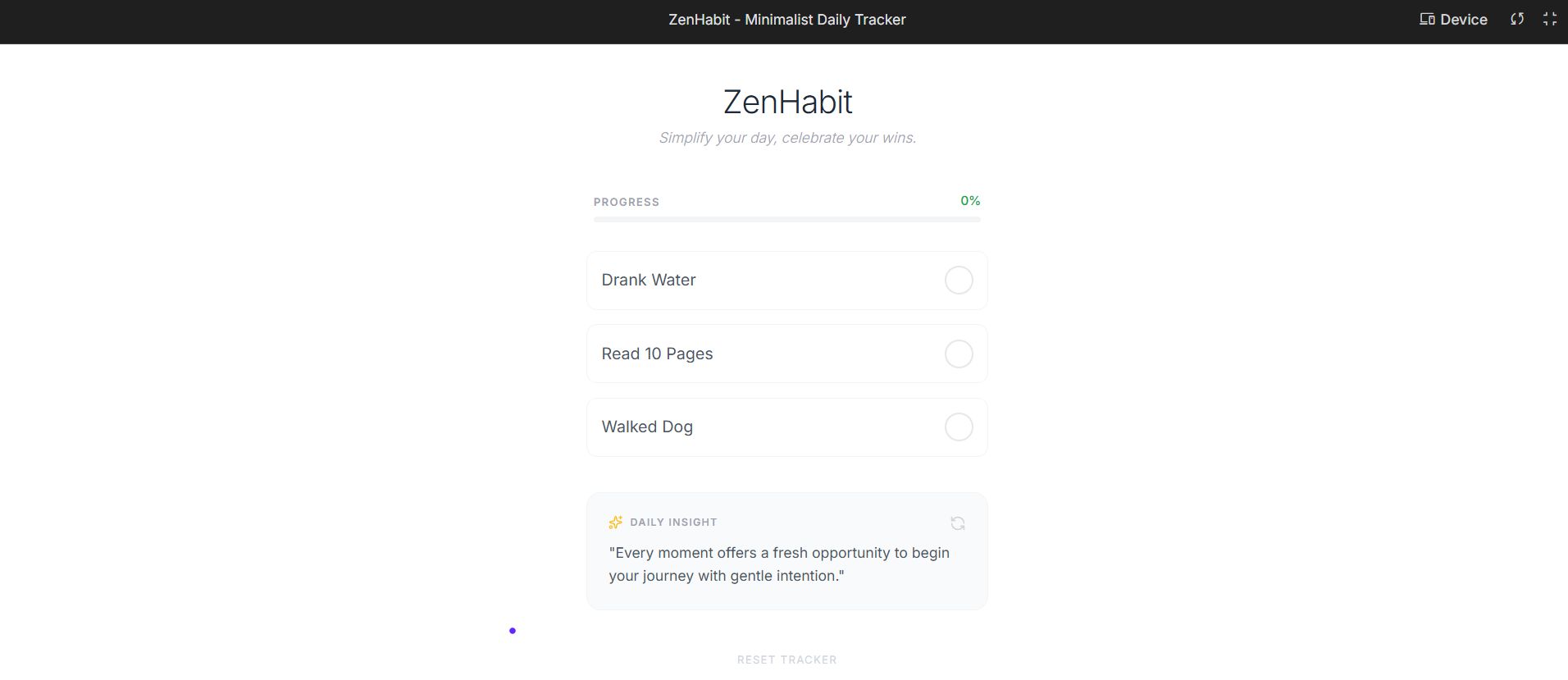
Step 2: Copy and Run
The AI gave me the code. I didn't understand the syntax, and that's okay! Here is exactly how I opened it:
I copied the code from the AI.
I pasted it into Notepad (on Windows) or TextEdit (on Mac).
I saved the file and named it
tracker.html(make sure to add the.htmlat the end).The Critical Step: I found that file on my computer, right-clicked it, selected "Open with", and chose Google Chrome.
Boom. Suddenly, that text file transformed into a real, working app right in my browser.
Step 3: Refine
I wanted to change the color to blue. I just asked the AI: "Change the background to light blue and make the buttons bigger." It updated the code instantly.
3. Tools You Should Use
If you are a beginner AI Generalist, start with these:
Google AI Studio: Great for getting the raw code.
Lovable or Bolt: These are amazing. You just type what you want, and you can see the app being built on the right side of the screen in real-time.
The next time you say "I wish there was an app for this," stop. Open one of these tools and build it. It takes 15 minutes. That is the power of an AI Generalist.
Part IV: What Can an AI Generalist Create With AI Media Tools? (Power 3)
The third power is Creativity.
They say "A picture is worth a thousand words." In the world of social media and marketing, a video is worth a million words.
As an AI Generalist, you are now a creative director. You can produce music, images, and videos that look professional, even if you can't draw a stick figure.
1. Creating Images That Sell
Let's say you are selling coffee. You need a photo of your coffee bag on a table in Paris.
Old Way: Buy a plane ticket to Paris. Hire a photographer. Hope the weather is good. Cost: $5,000.
New Way: Use Nano Banana or GPT-1.5. Cost: $0.
My Prompt for a Coffee Brand:
"A professional product photography shot of a rustic brown coffee bag sitting on a marble table in a Parisian cafe. Morning sunlight streaming through the window, creating soft shadows. 35mm film style, high resolution, delicious atmosphere. --ar 16:9"
In 60 seconds, I have 4 options. I can use these for my website, my Instagram, or my ads.
2. Making Music Without Instruments
Imagine you need background music for a video you made, but you don't want to worry about annoying copyright strikes from YouTube.
Instead of searching for hours, just use Suno. Simply type: "A lo-fi hip hop beat, relaxing, chill vibes, no lyrics, for studying."
It gives you a full 2-minute song that is completely original. You own it. You can use it wherever you want without fear.

3. The Future: Video Generation
This is getting crazy good. Tools like Veo or Luma Dream Machine can make videos from text. You can type: "A drone shot flying over a futuristic city at sunset." And it makes a video clip. While it's not perfect for a full movie yet, it is perfect for social media clips (B-roll) to make your content look expensive.
🎁 Bonus: The "Master Prompt" for Cinematic Video. Copy this prompt to test any video tool. It works because it combines Subject, Action, and Camera Movement:
"Cinematic drone shot flying fast over a futuristic Tokyo city at night, neon lights glowing in the rain, camera tilts down to street level showing heavy traffic, photorealistic, 4k, smooth motion."Why this matters for your 2026 Strategy:
If you can create high-quality media fast, you can test ideas faster. You don't have to wait for a designer. You just do it. This speed is your advantage.
Part V: How Should An AI Generalist Connect And Influence People? (Power 4)
The final power is Connection. This is about writing, speaking, and persuading. You might have the best idea (Power 2) and the best images (Power 3), but if you cannot explain it clearly, nobody will care. An AI Generalist uses AI to write better, not just faster.
1. The "AI Whiteboard" Method
Many people make a mistake. They say to ChatGPT: "Write me a blog post about marketing."
The result? It sounds robotic and boring. It sounds like AI.
To connect with people, you need to use the "AI Whiteboard" method. This means you give the AI context about YOU.
Here is the "Persona Prompt" I use every time I write:
"You are an expert copywriter. But more importantly, you are writing as ME.
About me: I am a friendly, direct person who hates jargon. I use simple words. I like to use short sentences.
My Audience: Beginners who are scared of technology.
The Goal: I want to persuade them to try one new AI tool today.
Please draft a LinkedIn post based on this. Do NOT use words like 'unleash', 'harness', or 'game-changer'. Keep it human."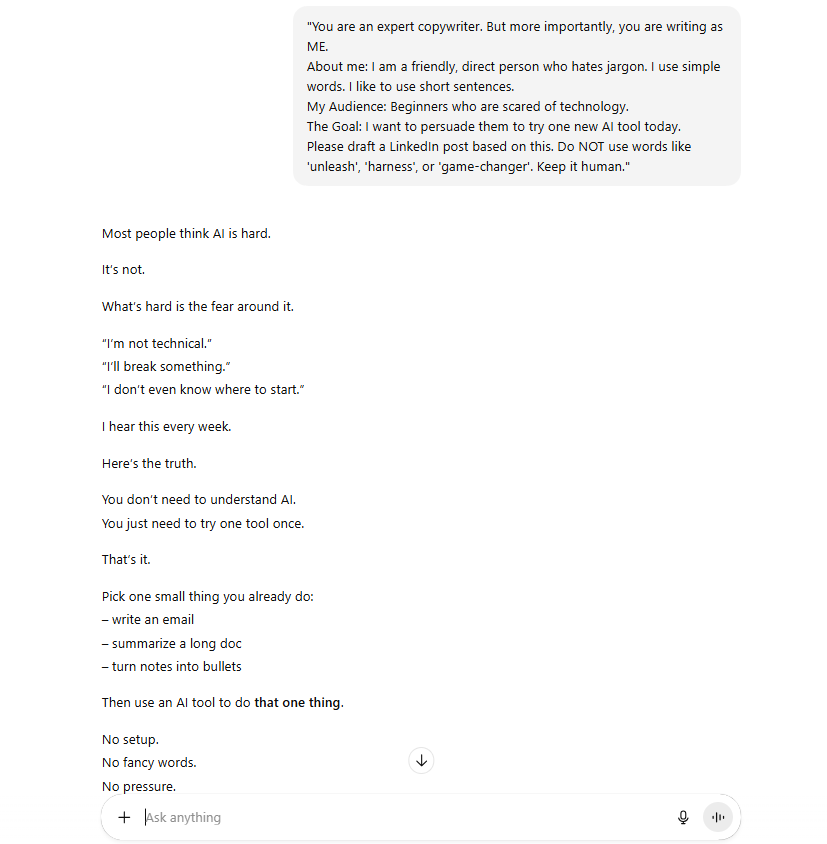
When you feed the AI your "voice," the output becomes 10 times better.
2. Improving Your Communication At Work
You can use this for emails too. If you are angry at a coworker, do not send that angry email. Paste your angry draft into AI and say: "Rewrite this to be professional, calm, but firm." It will save your reputation.
3. Tools For Writers
Claude: It is generally better at creative writing and sounding natural than GPT.
Perplexity: Use this to fact-check your writing so you don't say things that are wrong.
Part VI: What Is The Action Plan For Your AI Generalist Journey?
Okay, we have covered a lot. You might feel overwhelmed. That is normal. You don't need to learn all 4 Powers today. Here is a simple 4-week plan to kickstart your 2026 Strategy.
Week 1: The Automation Week
Goal: Save 2 hours of work.
Task: Identify one weekly report or email you write. Create a prompt in ChatGPT or Claude that does it for you.
Success: You run the prompt, and it works. You feel a sense of relief.
Week 2: The Builder Week
Goal: Create your first "app".
Task: Go to Lovable.dev. Ask it to build a simple "To-Do List" or a "Budget Tracker".
Success: You have a working link to an app you built yourself. Share it with a friend.
Week 3: The Creator Week
Goal: Make something beautiful.
Task: Use Ideogram to make a new profile picture for your social media or a wallpaper for your phone.
Success: You realize you don't need to be an artist to make art.
Week 4: The Connector Week
Goal: Share your story.
Task: Use the "Persona Prompt" I gave you in Part V. Write a post about what you learned this month.
Success: You publish it.
Common Pitfalls To Avoid
Don't chase every shiny tool. There are 100 new AI tools every day. Ignore them. Stick to the big ones (ChatGPT, Claude, Gemini) until you master the basics.
Don't copy-paste without reading. AI makes mistakes. If you post something wrong, you lose trust. Always read and edit what the AI gives you.
Don't forget the human element. AI is the tool, you are the pilot. Your personal stories and feelings are what make people connect with you.
Conclusion
So, are you ready to stop grinding and start leveraging?
The world in 2026 will be divided into two groups. Group 1 will still be trying to work harder, complaining that they are tired, and worried about losing their jobs.
Group 2 will be the AI Generalists. They will be calm. They will have time for their families. They will be building businesses and projects in record time because they learned to use the 4 Powers: Automate, Build, Create, and Connect.
You have the roadmap. You have the tools. The only thing missing is your action. Don't wait for New Year's Eve to make a resolution. Start today. Pick one power. Try one prompt. Make 2026 the year you finally get the results you deserve.
I believe in you. Now, let's get to work - smart work.
If you are interested in other topics and how AI is transforming different aspects of our lives or even in making money using AI with more detailed, step-by-step guidance, you can find our other articles here:
Master AI Marketing: Build Your 24/7 Digital Assistant Without Code!
Earn Money with MCP in n8n: A Guide to Leveraging Model Context Protocol for AI Automation*
Transform Your Product Photos with AI Marketing for Under $1!*
The AI Secret To Reports That Clients Actually Implement
*indicates a premium content, if any
How useful was this AI tool article for you? 💻Let us know how this article on AI tools helped with your work or learning. Your feedback helps us improve! |
Reply