- AI Fire
- Posts
- 💰 9 Gemini 3 Pro Hacks to Help You Easily Become a Pro in Minutes (I Promise)
💰 9 Gemini 3 Pro Hacks to Help You Easily Become a Pro in Minutes (I Promise)
ChatGPT just lost 12 million users. This guide reveals why and shares 9 tricks (from "Vibe Coding" to "Nano Banana Pro") to master Google's new AI king

Max Anh
December 25, 2025

TL;DR BOX
Gemini 3 Pro brings better reasoning and seamless integration of text, audio, video and images, leading to a reported drop of 12 million ChatGPT users. Key features include "Thinking Level" controls for complex analysis and "Vibe Coding" that builds functional apps from natural language prompts.
This guide outlines nine specific tricks to maximize Gemini's utility, such as the "Raw Problem Drop" for instant strategy creation and a 6-element prompting framework for superior image generation with Nano Banana Pro. Users can now analyze audio/video files directly and turn YouTube links into professional infographics or short-form clips automatically.
Key points
Fact: Gemini 3 Pro can generate a fully functional HTML app from a single "Vibe Coding" prompt or even a napkin sketch photo.
Mistake: Using standard prompts for complex tasks; instead, use the High Thinking Level setting in Google AI Studio for deep strategic analysis.
Action: Upload a YouTube URL and ask Gemini to "generate an infographic explaining these concepts" to repurpose video content instantly.
Critical insight
The shift from ChatGPT to Gemini is driven by the latter's ability to handle "multi-step workflows" chaining analysis, reasoning and generation (like auditing a channel and designing a banner) in one go.
Table of Contents
I. Introduction: The Shift Nobody Saw Coming
A few weeks ago, Gemini 3 Pro was released. And since then, ChatGPT has lost 12 million daily users, a drop of about 6%.
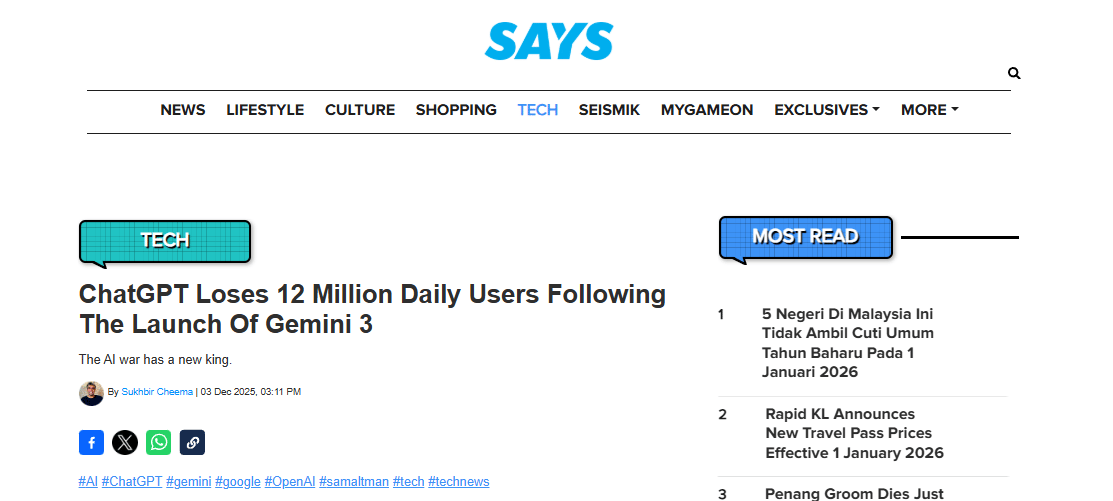
Source: Says.
If you've been using ChatGPT as your go-to for AI tasks, this matters. ChatGPT was the go-to AI for two years but Gemini 3 Pro is now shaking things up. This isn’t just a small update; this is a real shift.
Why? Gemini 3 Pro changes the way you think about what AI can do. It brings better reasoning, handles more complex problems and integrates text, images, audio and video seamlessly in one flow.
In this post, you’ll see the 9 Gemini 3 Pro tricks I use the most that make Gemini 3 Pro the new AI king. They don’t just save you time. They open up new ways to run and grow your business.
Of course, there are plenty more tricks out there and not every one fits every situation. This is just the start. I’ll keep sharing what works as I test more, so you can pick what fits your own use case and ignore the rest.
Let’s get started.
II. Trick #1: Think BIGGER with Your Prompts (The Reasoning Revolution)
If you've used other AI tools (including earlier versions of ChatGPT) before, you've probably spent a lot of time carefully crafting each prompt. You broke down your tasks step-by-step and micromanaged the AI to avoid bad outputs. But with Gemini 3 Pro, you can stop doing that.
The enhanced reasoning here means you don't need to structure prompts perfectly anymore. It can ask the right questions and solve complex problems on its own, like a top consultant.
Real-World Example: The $15K Lead Generation Strategy
Here's what I did: I created a lead generation strategy for a hypothetical company, InnoPath, a project management tool for remote teams. Usually, I would have to use 10 different prompts for this. But I gave Gemini 3 Pro one massive prompt.
The Prompt Structure:
Goal: Generate 250 qualified leads/month in 120 days.
Context: Teams of 5-20 remote professionals (designers, developers, marketers).
Constraints: Budget ($15,000), team (PMM, content creator, designer, ops), channels (LinkedIn, Facebook, YouTube, email).
Must-Haves: Strategy with trade-offs, week-by-week plan, messaging hierarchy, content drafts (landing page, emails, social posts), analytics KPI tree and automation workflows.
And this is my complete prompt (you could adjust it based on your business):
**Goal:** Generate 250 qualified leads/month in 120 days for "InnoPath", a project management tool for remote teams.
**Context:**
- **Audience:** Teams of 5-20 remote professionals (designers, developers, marketers).
- **Pains:** Disorganized project workflows, lack of visibility, communication breakdown.
- **Desired outcomes:** Streamlined workflows, clearer deadlines, better team communication.
- **Positioning:** Category = Project Management Tool; Differentiator = real-time collaboration with pre-configured templates for remote teams; Proof points: 50 pilot users, 25% increase in productivity, 15 case studies.

**Inputs:**
- Landing page baseline metrics: CVR 2.1%, bounce 55% (assumption)
- Testimonials themes: "collaboration ease", "productivity gains", "organization"
- Pricing: Basic $39, Team $99, Enterprise $299
- Tools used: Webflow, Slack integration, Airtable; CRM: "HubSpot"; Email: "Mailchimp"
- Constraints: Budget $15,000 for 120 days; Team: PMM, content creator, designer, ops; Channels: LinkedIn, Facebook, YouTube, email; Geo: Global; Compliance: GDPR-compliant; avoid regulated PII.

**Guardrails:** Follow instructions strictly; do not write code; mark "assumption" where data is inferred.
**Must-Haves:**
- **Strategy:** Provide 3 GTM options with tradeoffs; recommend one via decision matrix (Reach, Speed, Cost, Lead Quality, Ops Complexity).
- **Plan:** 120-day weekly plan with owners, milestones, risks mitigations.
- **Messaging:** Full hierarchy one-liner, tagline, value pillars, RTBS, FAQ, objections.
- **Content drafts:**
  - Landing page: hero, subhead, social proof, "how it works", pricing, FAQ, CTA
  - Email sequence: 7 emails (subject, body, CTA, primary KPI per email)
  - Social: 3 posts each for LinkedIn and Facebook with hooks and CTAs
  - Offers: Two test offers - "Free Productivity Assessment" and "Template Pack"; KPIs and A/B variants.
- **Analytics:** KPI tree with targets - CTR 3.0%, LP CVR 3.5%, MQL->SQL 40%, CPL ≤ $30, CAC $150, LTV $1,500; specify dashboards.
- **Automation:** 3 workflow compressions using Webflow/Slack/Airtable with trigger actions success checks.
- **Report:** Executive summary ≤250 words, assumptions, next 5 actions.

**Style:**
- Concise, senior PMM tone.
- Use tables for the decision matrix, weekly plan and KPI targets.
- Numbered outputs, no fluff or repetition.
**Boundaries:** Prioritize: Goal -> Must-Haves -> Constraints. If the information does not match, tell me and use your best guess.
The Result (in ~2 minutes): Gemini 3 Pro generated an Executive Summary, a Strategy Decision Matrix, a detailed Week-by-Week Plan, full Content Drafts and an Analytics KPI tree.
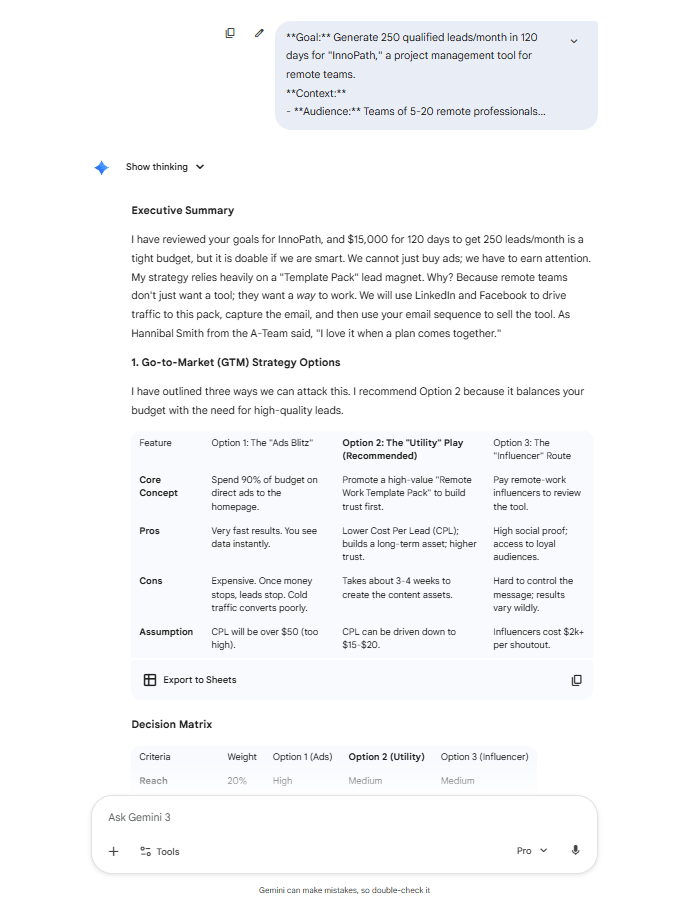
I couldn’t have asked ChatGPT to handle this in one go but Gemini 3 Pro? No problem. That’s what I mean by thinking bigger with Gemini 3 Pro.
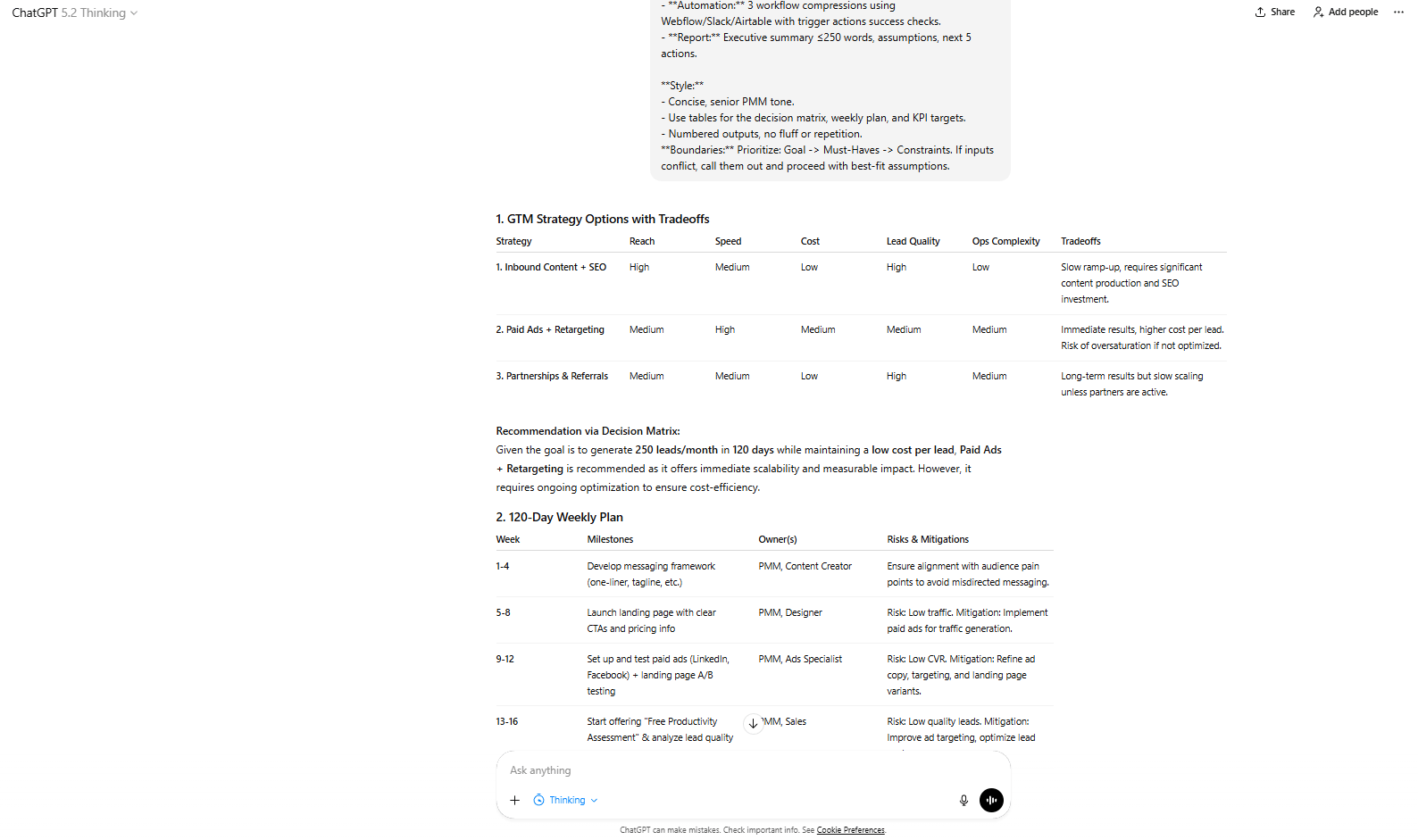
Here is my test in ChatGPT-5.2 Thinking.
Tool Note: For this kind of heavy lifting, use Google AI Studio (aistudio.google.com) instead of the standard Gemini interface for better control over settings.
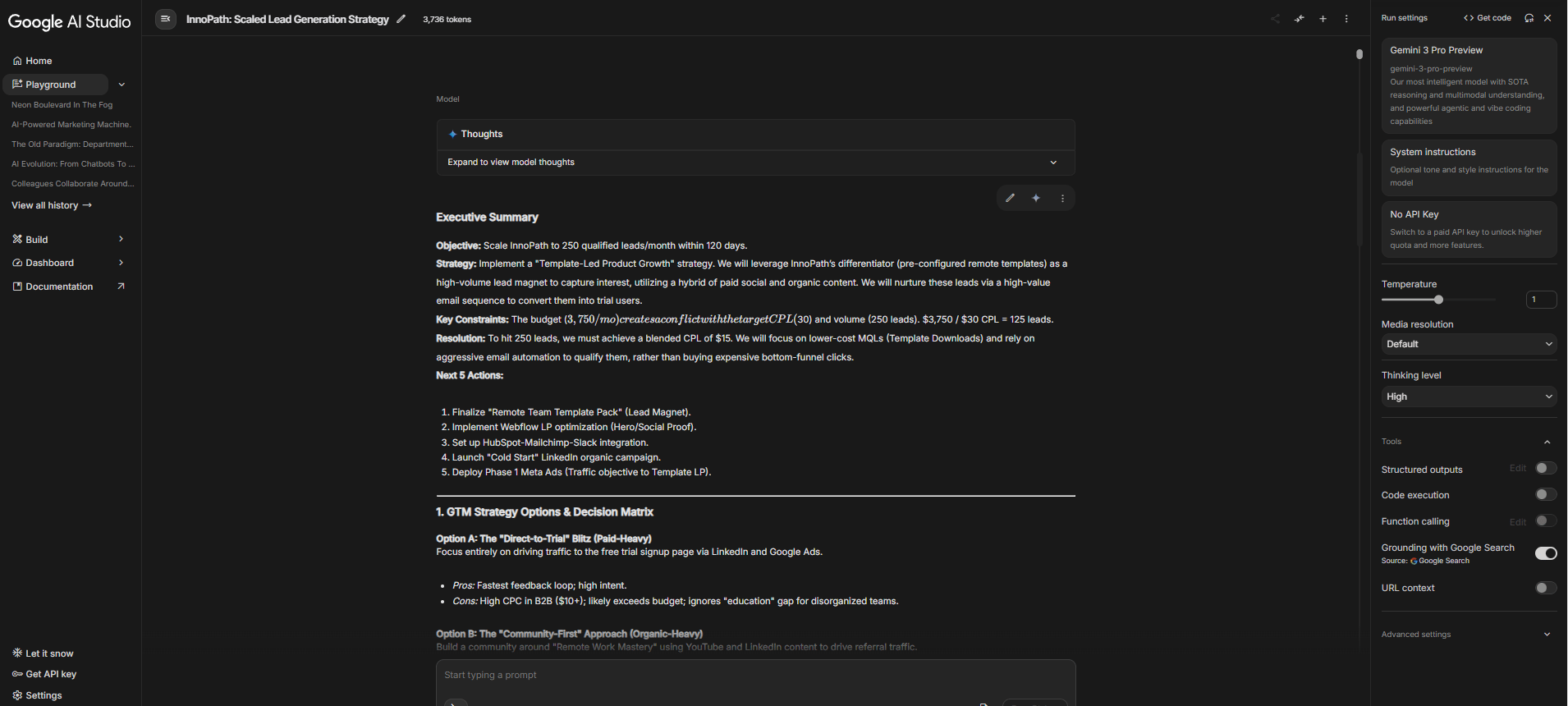
Once you’re thinking bigger, you’ll want to adjust the AI’s thinking power. That’s where the “Thinking Level” setting comes in.
Learn How to Make AI Work For You!
Transform your AI skills with the AI Fire Academy Premium Plan - FREE for 14 days! Gain instant access to 500+ AI workflows, advanced tutorials, exclusive case studies and unbeatable discounts. No risks, cancel anytime.
III. Trick #2: Master the "Thinking Level" Setting (High vs. Low)
Did you know? Google AI Studio's Gemini 3 Pro includes a "Thinking Level" setting, controlling how deeply the AI thinks before answering. It’s a small thing but it makes a big difference in how the model responds.
Here are 2 levels you should know to get the best result:
Low Thinking Level
Use this for simple tasks or when you need a fast answer. If you're doing basic tasks or running through quick iterations, the Low Thinking Level is a good fit.
Let me give you an example: here is the prompt I used to test this level:
Summarize this blog post in 3 bullet points.
[Insert Your Post]
Here, the task is straightforward and you don’t need deep analysis. The AI can give you a summary quickly.
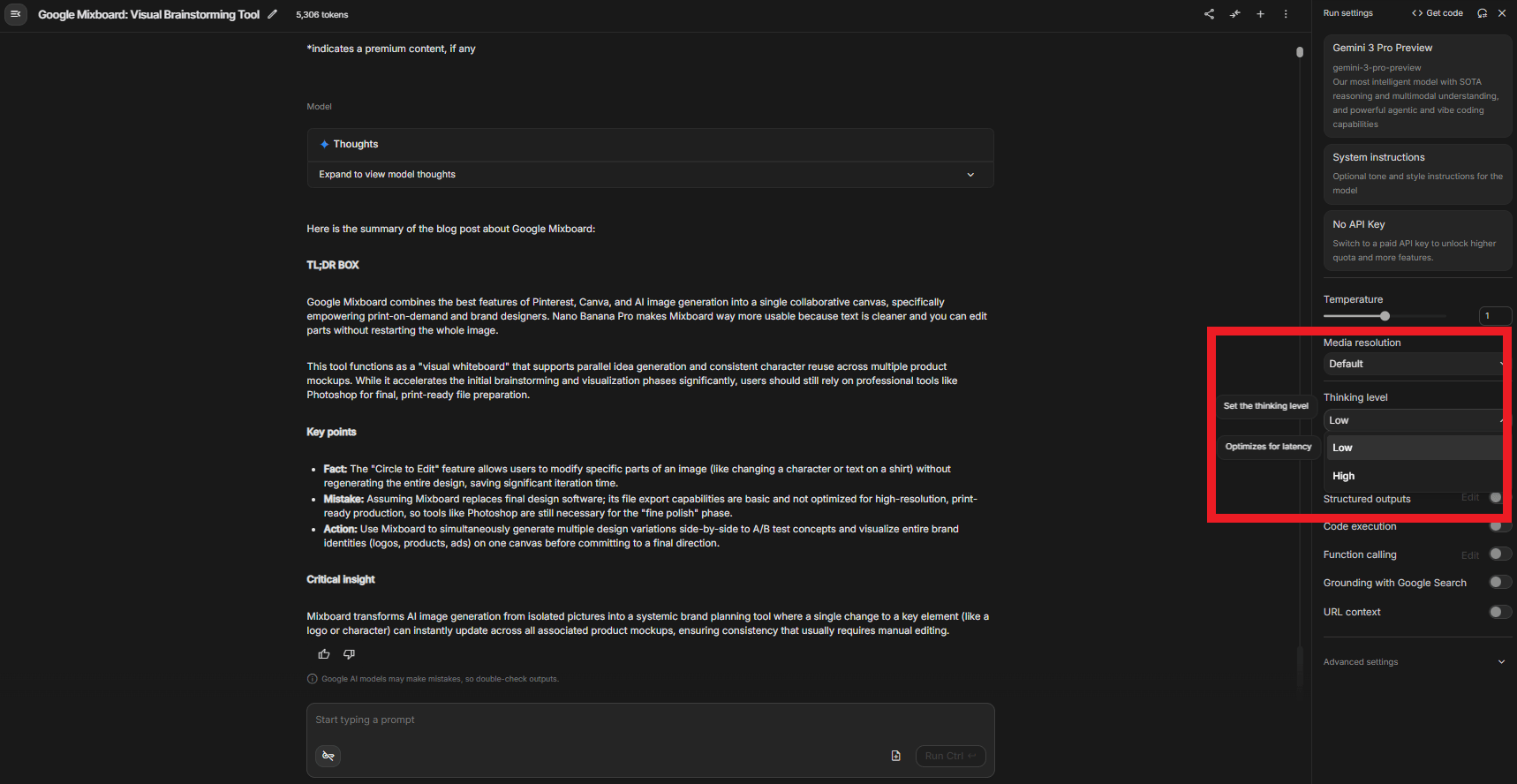
High Thinking Level
This one is the best if your task is more complex and you need the AI to give a thoughtful, reliable response. It’s great for strategic thinking or when you're analyzing multiple factors and need the AI to work through them.
Okay, so if you have a business model but you want to level it up, just paste in Gemini and ask it:
Analyze this business model, compare it to 3 competitors, identify weaknesses and propose 5 strategic pivots with ROI estimates.This type of request requires the AI to reason through a lot of details and give you a high-quality, comprehensive answer.

Pro Tip: I recommend defaulting to High Thinking Level for important tasks. Yes, it may take a few more seconds but trust me, that extra time is worth the accuracy and quality boost you get.
By understanding when to use High or Low Thinking Level, you can make the most of Gemini 3 Pro’s capabilities, depending on whether you need speed or thoroughness.
Now that we've covered how Gemini’s thinking power can take your prompts to the next level, let’s see how Gemini stacks up against ChatGPT in a few key areas. Check out the comparison below to get a clearer picture of why so many users are switching over to Gemini 3 Pro.
Feature | Gemini 3 Pro | ChatGPT |
|---|---|---|
Reasoning Depth | High-level, multi-step workflows | Primarily focused on single-step outputs |
Multi-Modal Integration | Text, images, audio, video, code | Text-only (though GPT-4 can generate code) |
Image Generation | Nano Banana Pro: High-quality, detailed | Basic image generation (less text accuracy) |
App Building | “Vibe Coding” for no-code app creation | Requires coding or third-party tools |
Thinking Level | Adjustable between low and high thinking | Fixed response structure |
Video/Audio Analysis | Direct analysis of video/audio files | Requires transcription before analysis |
Customization | Highly customizable with Google AI Studio | Limited customization, fixed responses |
Workflow Automation | Multi-step workflows combining reasoning, generation and analysis | Primarily handles one task at a time |
Cost Efficiency | $20/month for powerful results | Generally requires more tools (and costs) for the same outcomes |
User Experience | Requires advanced settings for best results | More beginner-friendly but less powerful |
🥊 Ready to ditch ChatGPT for Gemini? |
IV. Trick #3: The "Raw Problem Drop" (No Perfect Prompt Required)
One of the best features of Gemini 3 Pro is how it handles problems without needing perfectly crafted prompts.
Instead of structuring your thoughts perfectly or breaking the problem into sub-tasks, you can simply describe the issue and let the AI figure it out.
Real Example: Time Management Overload
Here’s what I requested:
I run a one-person coaching business and spend 12-15 hours a week managing emails, client scheduling and invoicing. I’m using Google Workspace, Notion and Slack but I’m overwhelmed with the administrative tasks. Can you analyze my current setup and recommend a detailed automation strategy with ‘Zapier’ or another tool? I’m hoping to reclaim at least 8-10 hours a week. What automations should I implement first for the best ROI?Here's what happened next: Gemini 3 Pro provided a detailed automation strategy, a recommendation for my stack, an estimated ROI analysis and a short comparison between n8n and Zapier.

The Takeaway: This is what makes the "Raw Problem Drop" so powerful. You don’t need to give the AI a step-by-step plan. Just drop the problem and let Gemini figure out the solution. It’s like having a personal assistant that knows how to get straight to work.
V. Trick #4: Vibe Code Entire Apps (No Coding Skills Required)
I have a question for you: What if you could build an app by simply describing it in plain words? Sounds impossible, right? With Gemini 3 Pro, it’s totally possible. You can use “vibe coding” to build entire apps.
Vibe coding means describing what you want in natural language and the AI builds a fully functional, interactive app for you, even if you know nothing about code.
Real Example: Building "Zen Flow" Productivity Web App
I think the easiest way to describe this feature is by testing it. Here’s the prompt I used:
Build me a productivity web app called 'Zen Flow'.
The Vibe: Tranquil nature setting, flowing river, bamboo trees. Think serene, calm and peaceful vibes, like a Zen garden.
The Logic: It needs to track tasks, set reminders and categorize them by urgency.
The Constraint: The app should be simple, no complex backend or database setup. Pre-load the app with dummy tasks to immediately demonstrate functionality.
The Tech: Provide a single HTML file with inline CSS/JS. Use smooth CSS transitions for the task notifications and make completed tasks gently fade away with a soft animation.
Oh, make sure you turn on the Canvas mode in your chat before you run the prompt.
What Gemini 3 Pro Built: Gemini took that simple description and created a full productivity web app in a single HTML file. It even added dynamic theme switching and smooth animations for tasks fading out like burning paper.
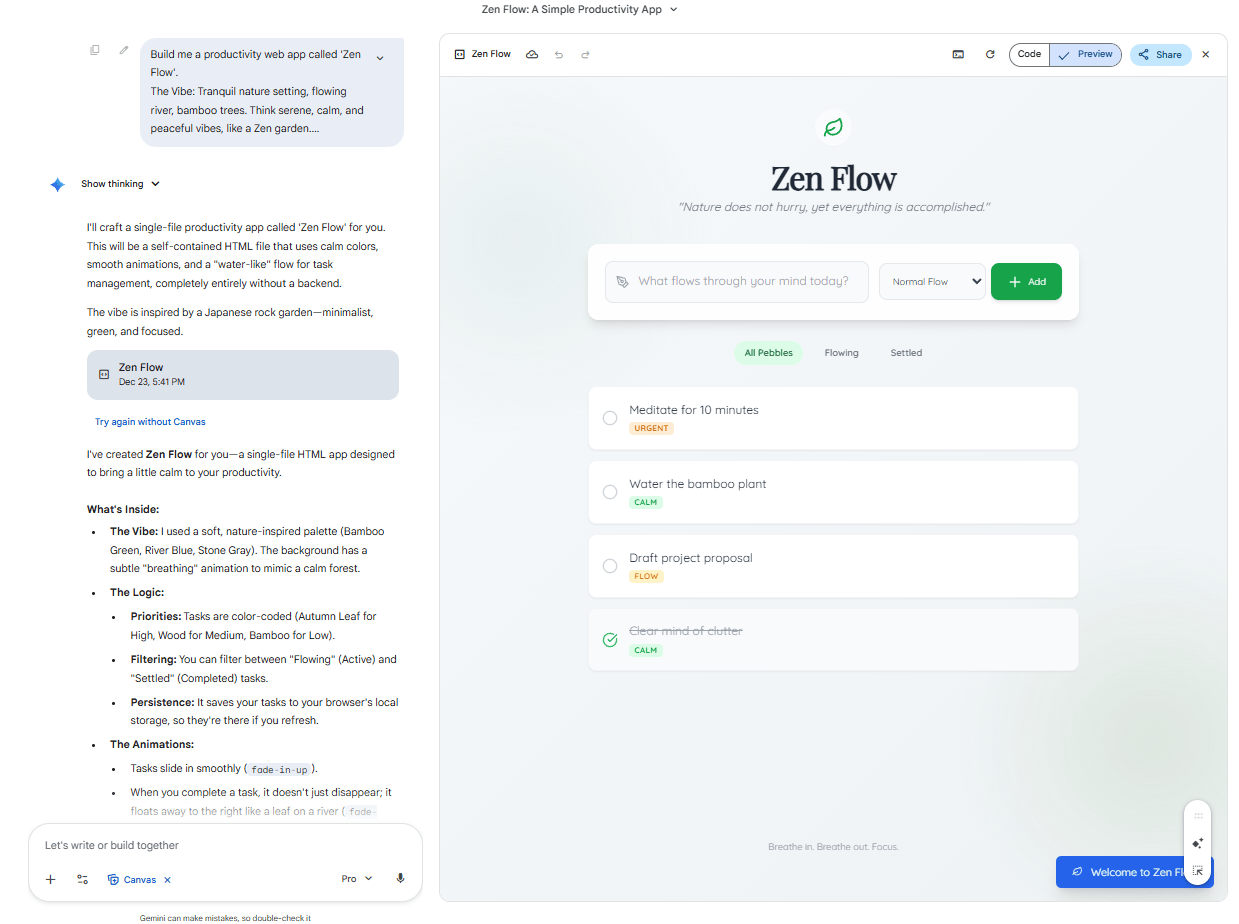
Then I added AI Features: Gemini’s "Canvas" feature made it even easier. I clicked “Add Gemini features” and asked it to add AI-powered project suggestions (“Zen Breakdown” and “Nature's Wisdom”). It integrated these features right into the app's code without me touching a single line of code.

“Add Gemini features” button.

VI. Trick #5: How Can You Turn a Sketch into a Working App?
Gemini 3 Pro can transform a simple sketch into a functional app by using its visual reasoning capabilities. Upload a photo of your sketch and the AI translates it into working code. This feature is ideal for quickly turning concepts into real apps or websites.
Key takeaways
Upload a sketch and Gemini converts it into a working app.
This process uses visual reasoning, so no coding is needed.
It’s useful for UI/UX mockups, dashboard designs and more.
You can turn rough ideas into digital products instantly.
A simple sketch is all you need for Gemini to generate a real app, streamlining the design process.
One of the most impressive updates to Gemini 3 Pro is its ability to understand and work with visual input. Now, you can simply snap a photo of a sketch (yes, even something on a napkin) and ask Gemini to turn it into a working app.
So, I want to create an app but the only thing I have is a sketch of my idea. With Gemini 3 Pro, my idea can become true.
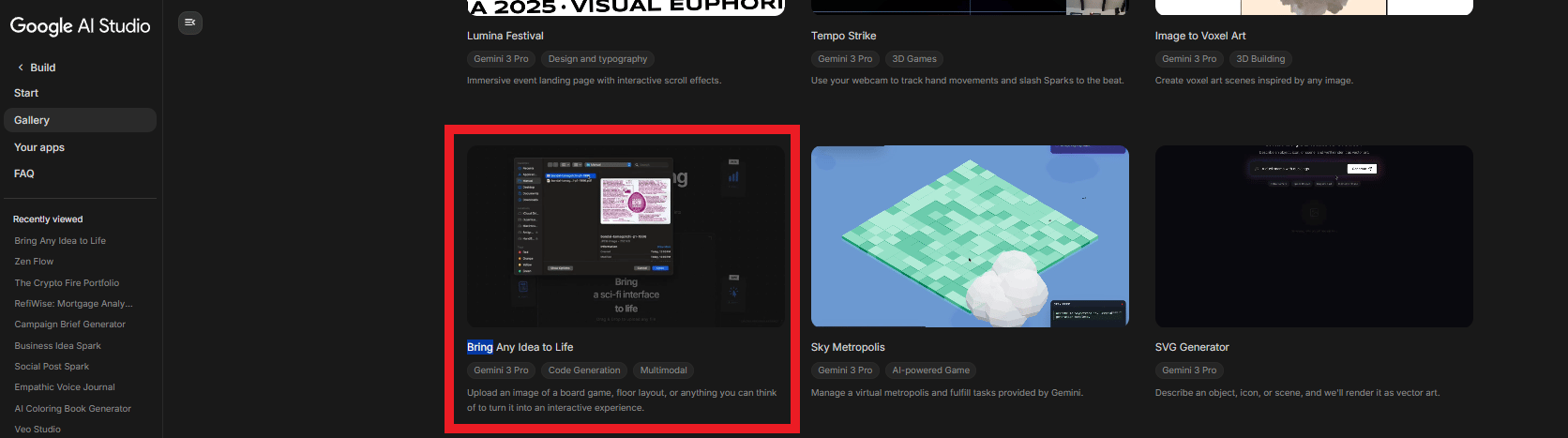
I used Google's "Bring Anything to Life" tool in AI Studio. I sketched a rough travel blog with sections for "Latest Trips" and "Discounts". I uploaded the photo; I didn’t even need to prompt it. The AI automatically built the new app for me.
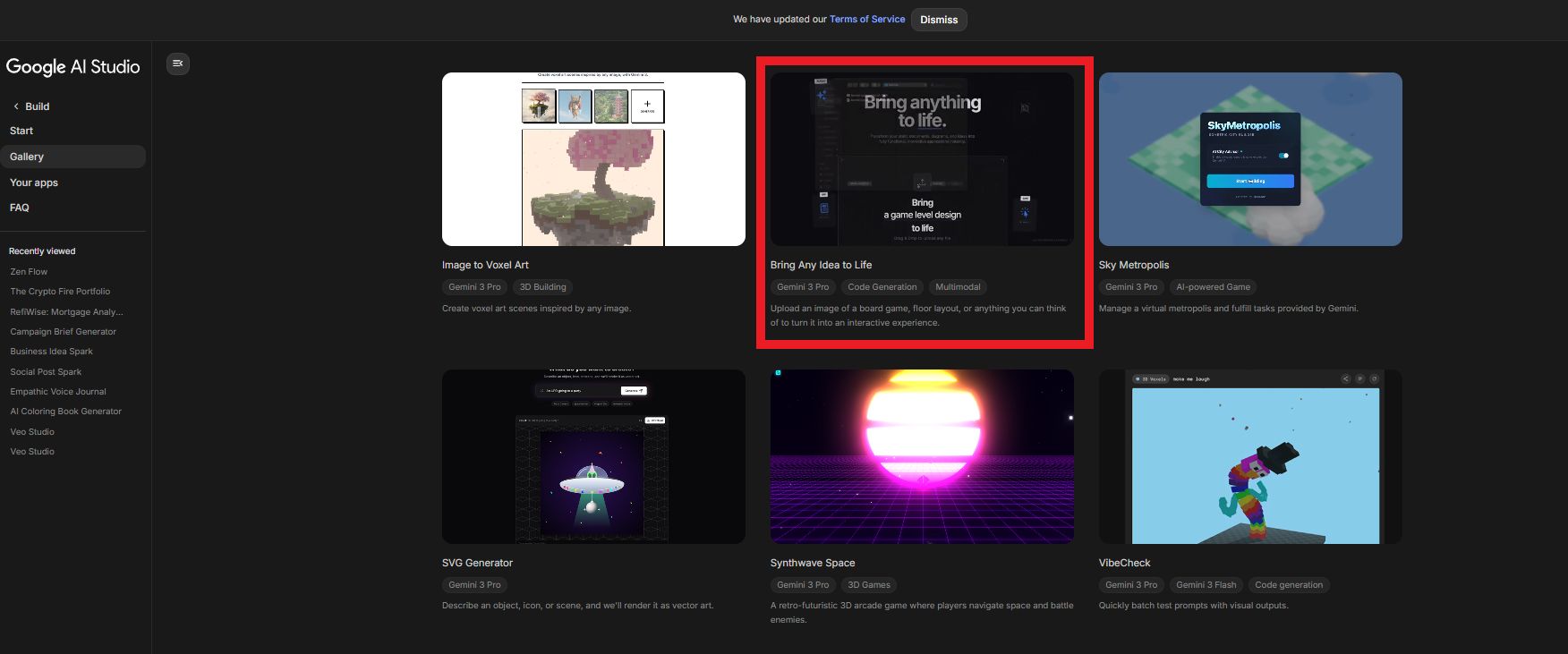
Bring Anything to Life tool
Result: Gemini generated a clean, modern website with the exact layout from the sketch, fully styled with CSS and a responsive design. This is perfect for mocking up dashboards, forms or UI ideas instantly.

This tool is a game-changer for turning a quick sketch into a real, functional website for anyone working on mockups or UI design. You don’t need a team of designers or developers, only a simple sketch and a clear idea. Gemini does the rest, making your vision come to life instantly.
VII. Trick #6: Master Nano Banana Pro Prompting (Image Generation That Actually Works)
You're looking to generate high-quality images with realistic details, then Nano Banana Pro in Gemini 3 Pro is a huge upgrade. This model has leveled up, making it a serious competitor to Images 1.5 and Midjourney, especially when it comes to rendering text accurately.
To unlock its full potential, here’s the framework you should follow.
The 6-Element Prompting Framework
You need to structure your prompts in a specific way. Here's how I’ve been using it:
Subject: Define who or what you want to appear in the image. The more specific you are, the better the result.
Composition: This means how the picture is framed. Do you want a close-up, a wide shot or something in between? The framing will set the mood.
Action: Describe what is happening. What is the subject doing? This helps set the context.
Location: Include details about the environment. Where is this happening? Is it indoors, outdoors, in a café or on a beach? Providing location details helps add depth and realism.
Style: The overall look of the image is crucial. Are you going for photorealistic, cinematic or an artistic style? This can dramatically change the tone of the image.
Editing: If there’s something specific you want to adjust, like adding or changing elements, include that here. This allows the AI to make those final tweaks.
I tested this framework by asking for a poster for a hipster coffee shop with the headline "MORNING BREW". This is the result I got:
The image was spot on. Cinematic lighting, the cozy vibe of a coffee shop and most importantly, the text on the menu board was spelled correctly, which has been a huge issue with previous AI image tools.
The model nailed the composition, action and style of the shot, giving me a polished, professional look without any manual edits.
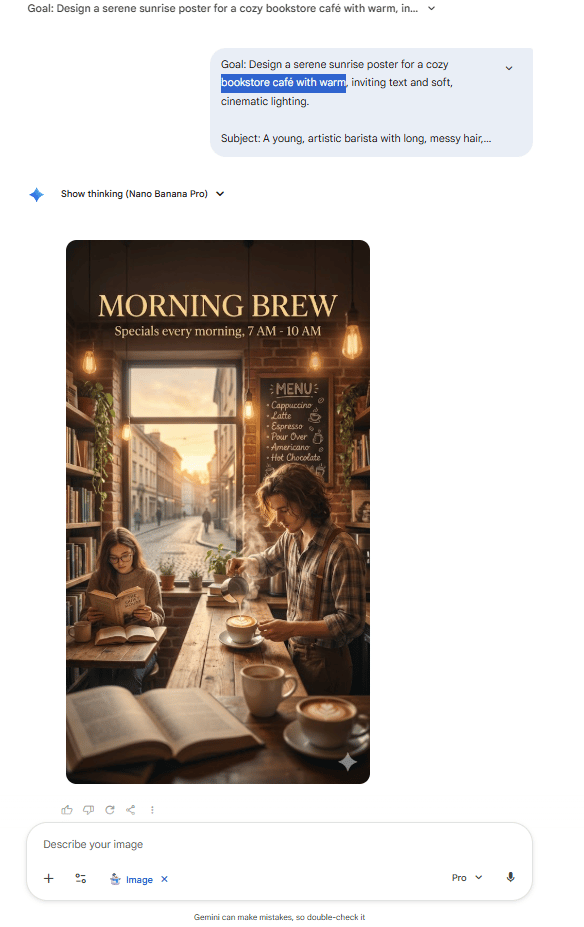
This is a huge step forward, especially if you’re looking to create marketing materials, social media posts or product mockups that require both text and imagery. Nano Banana Pro has leveled up its text rendering ability, making it a reliable choice for all kinds of projects, whether you're designing an ad or crafting visual content for your website.
With this 6-element framework, you can ensure your prompts are clear, concise and optimized for stunning results. It’s a small tweak but it makes a big difference in the quality of the output you get.
VIII. Trick #7: How Can You Analyze Audio and Video Content with Gemini 3 Pro?
Gemini 3 Pro can analyze audio and video directly by processing content without needing transcription. You can upload MP3 files or YouTube URLs and it will extract the key points or generate actionable summaries. This feature saves time by removing the need for manual note-taking.
Key takeaways
Gemini 3 Pro analyzes audio and video files directly.
It saves time by summarizing content without transcribing it first.
This feature works well for podcasts, webinars and YouTube videos.
It provides summaries with timestamps and actionable insights.
By analyzing audio and video, Gemini accelerates content repurposing and insight extraction, saving hours of work.
I find this feature very useful because it can analyze audio and video directly. No need to transcribe anything first; just upload an MP3 file or a YouTube URL and it processes the content straight away.
To make sure this feature works, I tested it with 3 different use cases.
Use Case A: Podcast Summarization
Imagine having a 45-minute podcast and needing the key points without listening to the whole episode. Here’s how you can do it:
Upload the MP3 file or paste the podcast link into Gemini.
Prompt: "Listen to this audio... give me a list of the main takeaways with timestamps".
Result: In about 30 seconds, you will get a detailed list with timestamps and quotes, making it easy to reference the key points.
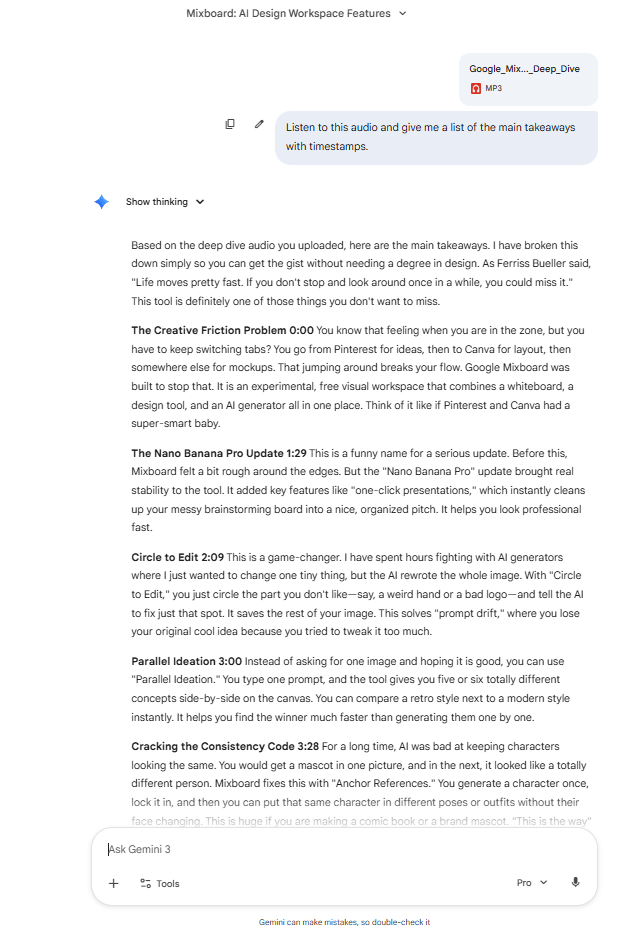
This saves you time and effort and is especially helpful when you're dealing with long episodes. I've used it to turn podcasts into quick summaries for content repurposing.
Use Case B: YouTube Video Analysis
If you’ve ever wanted to quickly get the key points of a YouTube video without watching the entire thing, Gemini’s got you covered. Here’s what you do:
Provide the YouTube URL.
Prompt: "Summarize this video and give me a list of the biggest takeaways along with how to implement each takeaway".
Result: You get a comprehensive summary with specific actionable steps for each point, saving hours of watching and note-taking.

This is fantastic if you need to pull ideas from long-form video content without wasting time. I’ve used this trick to quickly gather insights from webinars and tutorials
Use Case C: Generate Short-Form Clip Ideas
Ever wanted to create Shorts or Reels from a long YouTube video? This is a great way to repurpose content for social media. Here’s how it works:
Provide the YouTube URL.
Prompt: "Analyze this YouTube video and suggest short-form video social media clips... Ensure all clips are 30 seconds or less".
Result: You get 5 specific clip ideas with hooks, viral reasoning and exact timestamp ranges, making it super easy to extract content for social media.

I’ve used this to quickly pull out viral moments from interviews and tutorials, turning them into shareable clips for social platforms. This is a game-changer for content creators looking to maximize reach without spending hours editing.
In short, Gemini 3 Pro is not just about generating text; it can break down audio and video, making your workflow faster and more efficient.
IX. Trick #8: Auto-Create Infographics from YouTube Videos
If you’re looking for an easy way to turn YouTube videos into engaging visual content, Gemini 3 Pro has a neat trick for you. You do not need to design infographics by hand. Gemini can do it for you.
How It Works
Find a YouTube Video: Pick a video that has valuable content you want to turn into an infographic. It could be a tutorial, a presentation or any video with clear, structured information.
Create the Prompt: Simply tell Gemini, "Generate an image of an infographic explaining the concepts presented in this video: [YouTube URL]".
What Happens Next: Gemini analyzes the video, breaks down the key concepts and then uses Nano Banana Pro to generate a professional-looking infographic that summarizes the content in a visually appealing way.
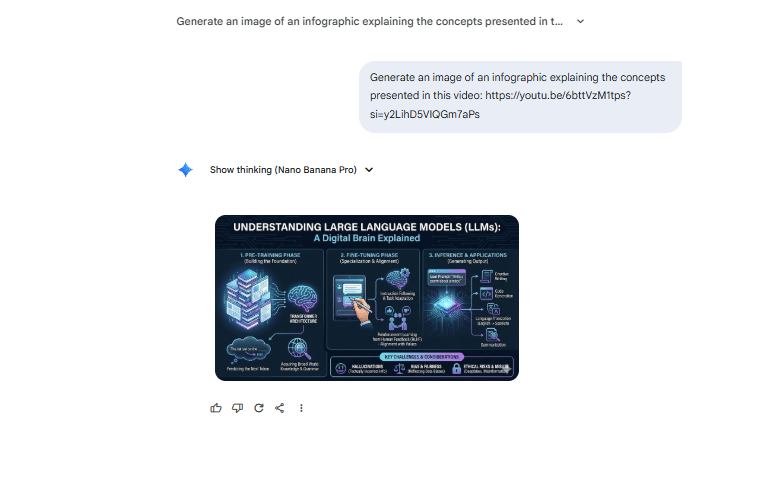
Why It’s Awesome
This is a huge time-saver for anyone looking to repurpose YouTube content into easy-to-share visuals. Whether you’re creating posts for LinkedIn, Pinterest or other platforms, Gemini does the hard work of transforming videos into infographics in seconds.
I’ve used this feature to turn long video presentations into bite-sized visual content, which makes it super easy to engage my audience without having to start from scratch every time. Plus, you get a neat and professional-looking infographic ready to post in minutes.
It’s a great way to boost your content strategy with minimal effort.
X. Trick #9: Multi-Step Workflows (Chain Multiple Capabilities)
Finally, this is the last trick (maybe not) I want to show you. The real magic of Gemini 3 Pro lies in its ability to combine multiple tasks into one request, using analysis, reasoning, creativity and generation all at once.
Let’s take this ultimate prompt as an example:
I would like you to create me a new YouTube channel banner for my YouTube channel. Please analyze my channel. Here is the URL:[Your URL]. Understand what the channel is all about. And then look at my thumbnails from the past three weeks as of today. And then I want you to design me a new YouTube channel banner that aligns with my channel, talks about what it is, represents what it is that my channel is all about and use the aesthetic of the thumbnails from the last four weeks. You should follow best practices for dimensions of YouTube channel banners.With this prompt, you could have the full strategy to create your own YouTube Channel Banner. This is what Gemini did:
Analyzed the Channel: It identified key themes like AI and productivity.
Analyzed Thumbnails: Recognized visual patterns like colors and typography.
Developed a Concept: Figured out the right messaging for the banner.
Generated the Banner: Using Nano Banana Pro, it created a professional banner that matched my brand and had the right dimensions.
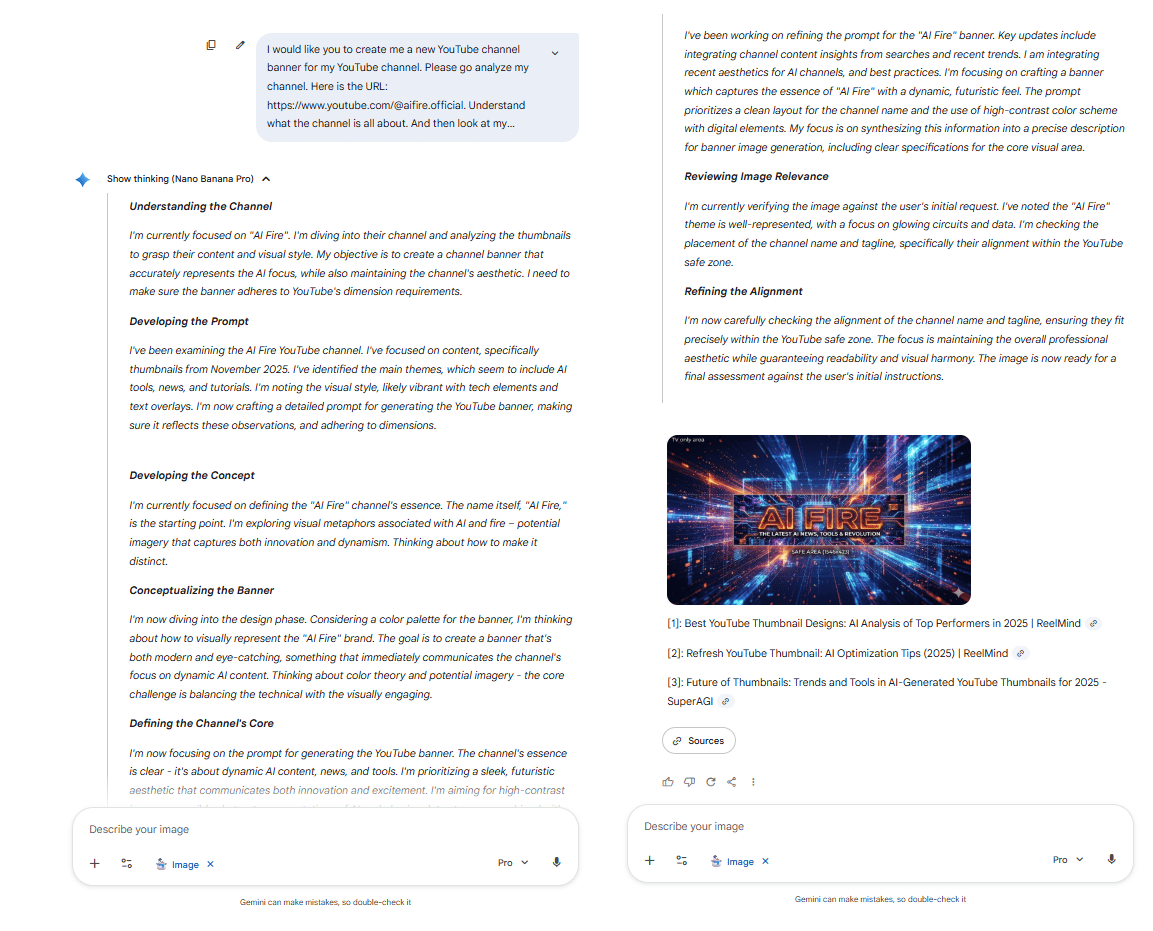
And it did all of this in under 3 minutes. Try doing that with just ChatGPT alone; it would take multiple tools and manual steps. This is the power of multi-step workflows in action.
Creating quality AI content takes serious research time ☕️ Your coffee fund helps me read whitepapers, test new tools and interview experts so you get the real story. Skip the fluff - get insights that help you understand what's actually happening in AI. Support quality over quantity here!
XI. Bonus: How Do You Access the Full Gemini 3 Pro Ecosystem?
To access the full Gemini 3 Pro ecosystem, use both the standard Gemini interface and Google AI Studio. The Studio offers advanced features like system instructions, higher-level reasoning and vibe coding for app building. It’s also where you can handle large documents and complex analysis.
Key takeaways
Google AI Studio unlocks advanced features for power users.
The standard Gemini interface is good for simpler tasks.
Studio access provides more control over settings and AI behavior.
You can build apps without code using vibe coding in the Studio.
Google AI Studio offers more control and advanced capabilities, making it the best choice for power users working on complex tasks.
You don't just "use Gemini". You need to know which interface unlocks the specific capabilities we just covered. Here is your access map:
1. The Interfaces
Standard Gemini (gemini.google.com):
Best for: Quick chats, drafting emails and basic image generation.
Key Feature: Canvas (for iterative writing and light coding).
Cost: Free tier available; Advanced required for Gemini 3 Pro.

Google AI Studio (aistudio.google.com):
Best for: Power users, complex reasoning chains and "Raw Problem Drops".
Key Features:
Thinking Level Controls: Manually toggle between "Low" (speed) and "High" (deep reasoning).
System Instructions: Pre-program the AI's behavior and persona.
Token Count: Read very long documents (up to 2M tokens) without forgetting information.
Vibe Coding: You don't write code here; you manage agents that write code for you; you manage agents that write code for you. This is where you build the "Zen Flow" app from Trick #4.
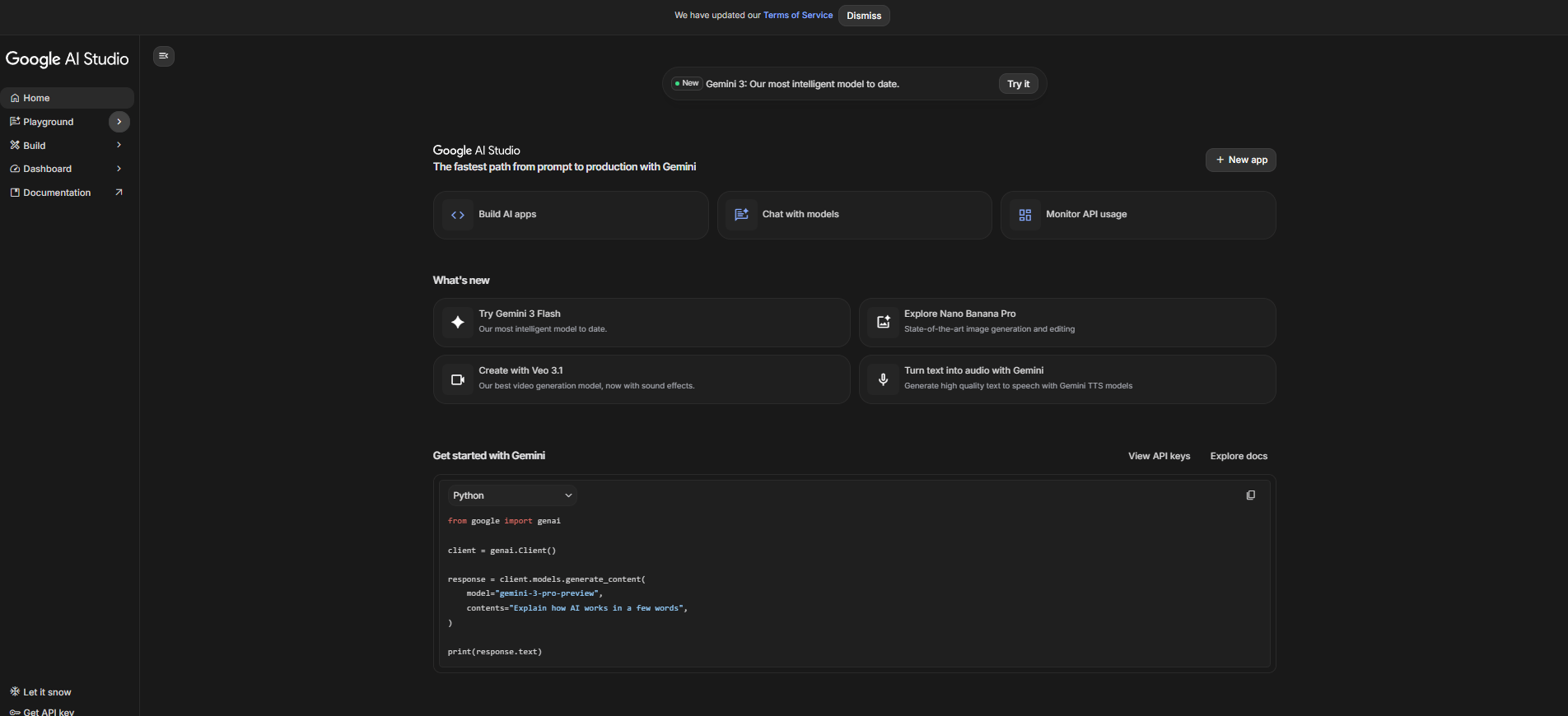
NotebookLM (notebooklm.google):
The Superpower: "Deep Dive" Audio Overviews. Upload your PDFs, Google Docs or slides and it auto-generates a two-host podcast discussing your material. Perfect for learning on the go.
Bring Anything to Life (in AI Studio):
The Superpower: Visual Reasoning. Upload a napkin sketch, wireframe or whiteboard photo and Gemini 3 Pro turns it into working code or a structured project plan instantly.
XII. Real-World Business Applications (The ROI)
If you implement just three of these tricks, here is the tangible impact on your business:
Profession | The Play | Time Saved | Revenue Unlock |
|---|---|---|---|
Solopreneurs | Automate admin with Raw Problem Drops (Trick #3) + Build tools with Vibe Coding (Trick #4) | 10-15 hours/week | Use your extra time for sales calls or making new products. |
Content Creators | Repurpose long-form video with Auto-Infographics (Trick #8) + Generate clips with Video Analysis (Trick #7) | 8-12 hours/week | Double posting frequency without needing an editor. |
Agencies & Consultants | Build strategies in minutes with Trick #1 + Generate visuals with Nano Banana Pro (Trick #6) | 15-20 hours/week | Handle 2x the clients with the same headcount. |
XIII. Conclusion: Why Gemini 3 Pro Is Winning
ChatGPT losing 12 million users isn't a fluke. It is a signal that Gemini 3 Pro has closed the gap and, in some areas, surpassed ChatGPT.
Here is why:
Enhanced Reasoning: You can ask for more in a single prompt.
Multi-Modal Native: Audio, video and images are processed seamlessly.
Vibe Coding: Build apps without knowing code.
Nano Banana Pro: Image generation that actually works (including text).
If you only use ChatGPT, you are missing out on a lot of helpful tools. Try these 9 tricks. See which ones fit your workflow. And watch how much faster you can move.
If you are interested in other topics and how AI is transforming different aspects of our lives or even in making money using AI with more detailed, step-by-step guidance, you can find our other articles here:
Only 7 Prompt Rules You Need to Master Any AI Video Tool (Veo, Sora, Even 2026 Ones)
The "AI Dream" Is Finally Here (Build A RAG Agent In 5 Mins)*
*indicates a premium content, if any
🔥 How would you rate this AI Fire 101 article? |
Reply