- AI Fire
- Posts
- 💎 The New Way to Build Profitable AI Websites With Gemini 3 (It Starts With One Page)
💎 The New Way to Build Profitable AI Websites With Gemini 3 (It Starts With One Page)
Most websites fail in seconds. I show you how to fix your layout so people actually stay and pay. Simple steps for beginners with zero tech skills.

Neil Phan
January 10, 2026
TL;DR
A beautiful design is useless if your website is slow or offline. This guide covers the essential technical steps to launch a professional landing page for free using the DDD system (Design, Data, Deploy). By using GitHub for safety, Vercel for free hosting, and AI for SEO, you can turn a local file into a live, fast, and trustworthy business asset without needing advanced coding skills.
Key points
Tool: Use GitHub to save code safely and Vercel to host it for free.
Benefit: Vercel's "Auto-Update" feature publishes changes instantly when you edit code.
SEO: Use AI to write Meta Tags and Alt Text so Google can rank your site.
Critical insight
The technical foundation is trust; a slow load time or a messy URL makes customers leave before they even read your offer.
What is your biggest fear when launching a website? 💸 |
Table of Contents
In Part 1, we learned how to plan a beautiful layout and write words that sell. But having a great Landing Page Design on your computer is not enough. You need to put it on the internet so people can actually buy from you!
I know that the "technical stuff" like hosting and servers sounds scary, but I promise it is very easy today. I have spent a lot of time testing the fastest and cheapest ways to go live, and I found a system that works even if you have zero tech skills.
In this guide, we will work together to move your site from a simple file to a live business. We will talk about how to save your code safely, how to get a professional name for your site, and how to make sure Google likes your page.
By the end of this article, you will have a real link to share with your customers. Let’s get your business started right now! And since putting your site online is only half the battle, I’ve also analyzed the marketing trends that fix zero-click issues so you can keep getting visitors even when social platforms try to hide your links.
Part I. Why Is The Technical Stage Of Landing Page Design Important For Your Profit?
The technical setup acts as the foundation of your business; a weak foundation causes the site to crash or load slowly, driving customers away instantly. Speed and a professional custom domain (like .com) build immediate trust, signaling that you are a legitimate business rather than a scam. Using professional-grade hosting ensures stability, so you don't lose revenue when traffic spikes from ads.
Key takeaways
Impact: Slow loading speeds cause users to close tabs immediately.
Trust: A custom domain (yourname(.)com) is essential for credibility.
Stability: Professional tools prevent crashes during traffic spikes.
Metaphor: Technical setup is the foundation; if it's weak, the house falls.
If you have a slow website or a link that looks like a scam, nobody will buy from you. The technical part is like the foundation of a house. If it is weak, everything else falls down.
1. Speed And Trust
People are busy. If your page takes more than a few seconds to load, they will close the tab. A good technical setup makes your Landing Page Design fast. Also, having your own name (like www.yourname.com) makes people trust you more than a long, messy link.
2. Stability
Imagine you run an ad and thousands of people click it, but your website crashes. That is a lot of money lost! We will use professional tools that are used by big companies but are free for us. This ensures your site stays up 24/7.
Part II. How Can You Save And Manage Your Landing Page Design Code Safely?
Use GitHub as a "digital vault" for version control, acting like a specialized Google Drive for your code. This allows you to save your progress and instantly revert to a previous working version if you make a mistake that breaks the site. Keeping files organized, such as putting images in a separate folder, ensures your code remains clean and easier for AI tools to edit later.
Key takeaways
Tool: GitHub is free and essential for saving code versions.
Benefit: "Version control" is an undo button for your entire website.
Action: Create a repository and upload
index.htmlandstyle.css.Tip: Separate images into their own folder to avoid messy code.
Before we put the site on the internet, we need a place to keep the files. We call this "version control."
1. Using GitHub As Your Digital Vault

I always use github to save my code. Think of it like a Google Drive but specifically for website files. It is great because if you make a mistake and break your site, you can go back to a version that worked with just one click.
First, create a free account.
Create a new "repository" (this is just a folder for your project).
Upload your index.html and style.css files there.
Learn How to Make AI Work For You!
Transform your AI skills with the AI Fire Academy Premium Plan - FREE for 14 days! Gain instant access to 500+ AI workflows, advanced tutorials, exclusive case studies and unbeatable discounts. No risks, cancel anytime.
2. Keeping Things Organized
When you work on your Landing Page Design, keep your images in a separate folder called "images." This makes the code cleaner and easier for AI tools to read when you want to make changes later. I learned this the hard way after losing files in a messy folder!
Part III. How Do You Put Your Landing Page Design On The Internet For Free?
Vercel is the ideal hosting platform for beginners because it connects directly to your GitHub repository and puts your site online for free. Its standout feature is "Auto-Updates," which monitors your GitHub code and automatically refreshes the live website whenever you make a change. This eliminates the need for manual file uploads, saving hours of maintenance time.
Key takeaways
Tool: Vercel offers free, high-speed hosting connected to GitHub.
Feature: Auto-Updates publish changes instantly without manual uploads.
Setup: Simply select your GitHub repository in Vercel to go live.
Efficiency: Update your code once, and the live site updates itself.
Now, we need a "host." This is a computer that stays on all the time so people can see your site.
1. Connecting To Vercel
I highly recommend Vercel. It is the best tool I have found for beginners. It connects directly to your GitHub.
Sign up for free.
Click "Add New" and then "Project."
Select your GitHub repository.

2. The Magic Of "Auto-Updates"
The coolest thing about Vercel is that whenever you change your code on GitHub, Vercel sees it and updates your website automatically. You don't have to upload files manually every time you change a word or a color. This saves me so much time every week.
Part IV. How To Choose A Professional Name For Your Landing Page Design?
Right now, your link probably looks like project-name.vercel.app. This is fine for testing, but if you want people to give you their credit card info, you need a real name. A custom domain like YourName.com makes your AI website look legitimate.
1. Buying Your Domain
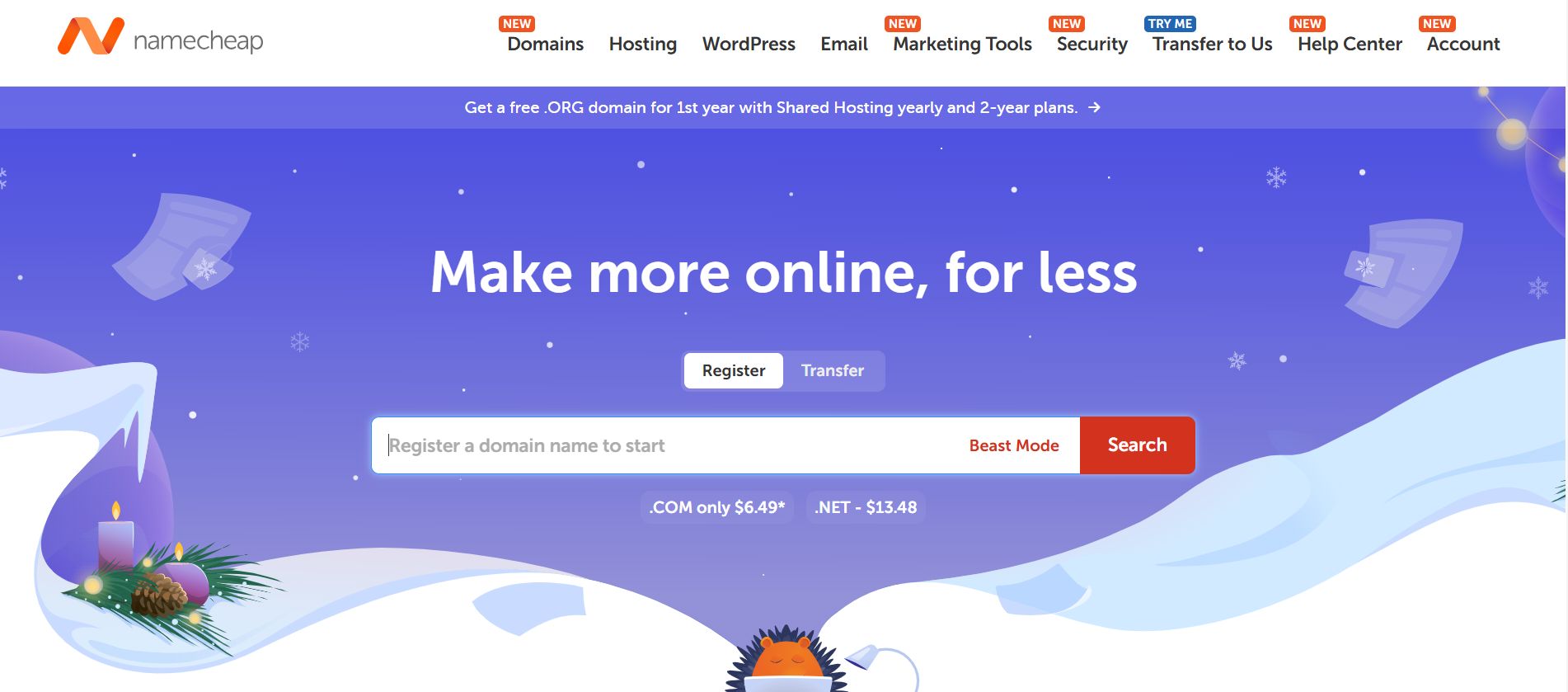
I recommend using Namecheap because it is often cheaper and easier to manage than buying directly through hosting platforms. Let's try searching for a name together right now to see what happens. I went to Namecheap and typed in a generic idea: bigcloud.org.

Here is the result:
The Bad News: As you can see,
bigcloud.orgis a "Premium" domain costing thousands of dollars. This happens with almost all short, generic names.The Fix: I adjusted my search slightly to be more specific. I tried:
FastAIWebsiteLaunch.com.The Good News: This one is available and costs only $10.48/year.

My Advice:
Stick to the price: You should pay around $10-$15 per year. If you see a price tag of $2,000, just change the name.
The ".com" rule: Stick to
.comif possible. It is still the most trusted. If your name is taken, try adding small words like "The", "Official", or "App" (e.g.,TheFastAIWebsite.com).Avoid hyphens: Don't buy
Fast-AI-Website.com. It looks spammy and is hard to tell people over the phone.
2. Connecting The Name To Your Site
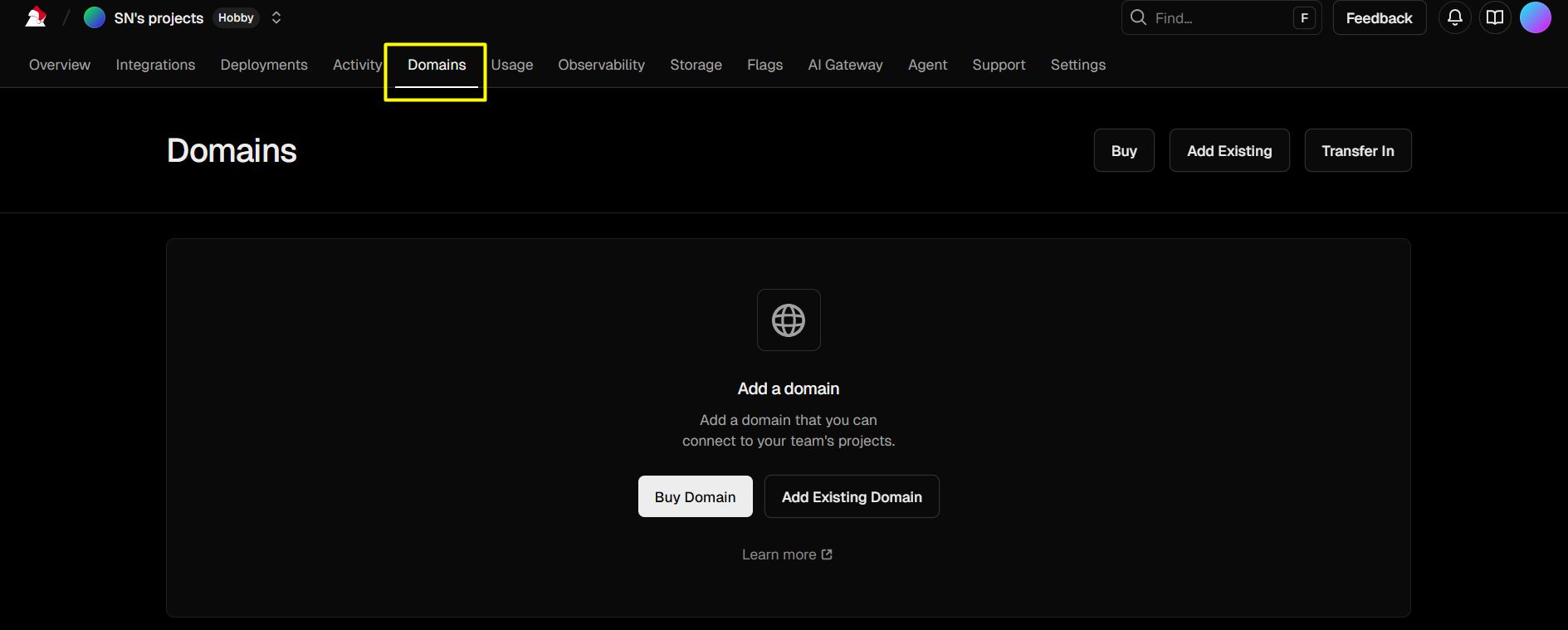
In Vercel settings, look for "Domains" Type your new name there. You might need to change some settings in your domain provider (called DNS), but Vercel gives you very clear instructions on what to copy and paste. Once this is done, your Landing Page Design looks like a million-dollar business.
Part V. How Can You Use AI To Boost The SEO Of Your Landing Page Design?
SEO stands for Search Engine Optimization. It just means making Google happy so you show up when people search for your service.
1. Creating An SEO "Sitemap"
Google needs a map to understand your site. You can use Gemini to help you write the tags for this. Using Gemini for SEO is a smart move, and it's part of a bigger plan I use to make 2026 the best year ever with GPT and Gemini by letting AI handle the heavy technical lifting while I focus on growing my brand and making sales.
Example prompt for SEO tags:
"I have a Landing Page Design for a 'Digital Marketing Agency'. Write the Meta Title and Meta Description for me. The title must be under 60 characters and the description under 160. Use words that make people want to click, like 'Results-driven' or 'Free Consultation'."
2. Adding "Alt Text" To Images
Google cannot "see" pictures. You have to tell it what is in the photo. This is called Alt Text.
Bad:
<img src="pic1.jpg">Good: <img src="office-meeting.jpg" alt="Team having a marketing meeting in a modern office">
Doing this for every image helps your Landing Page Design rank higher in image searches.
Part VI. How To Track If Your Landing Page Design Is Actually Working?
You cannot improve what you do not measure. You need to know how many people visit and where they come from.
1. Simple Analytics With Vercel
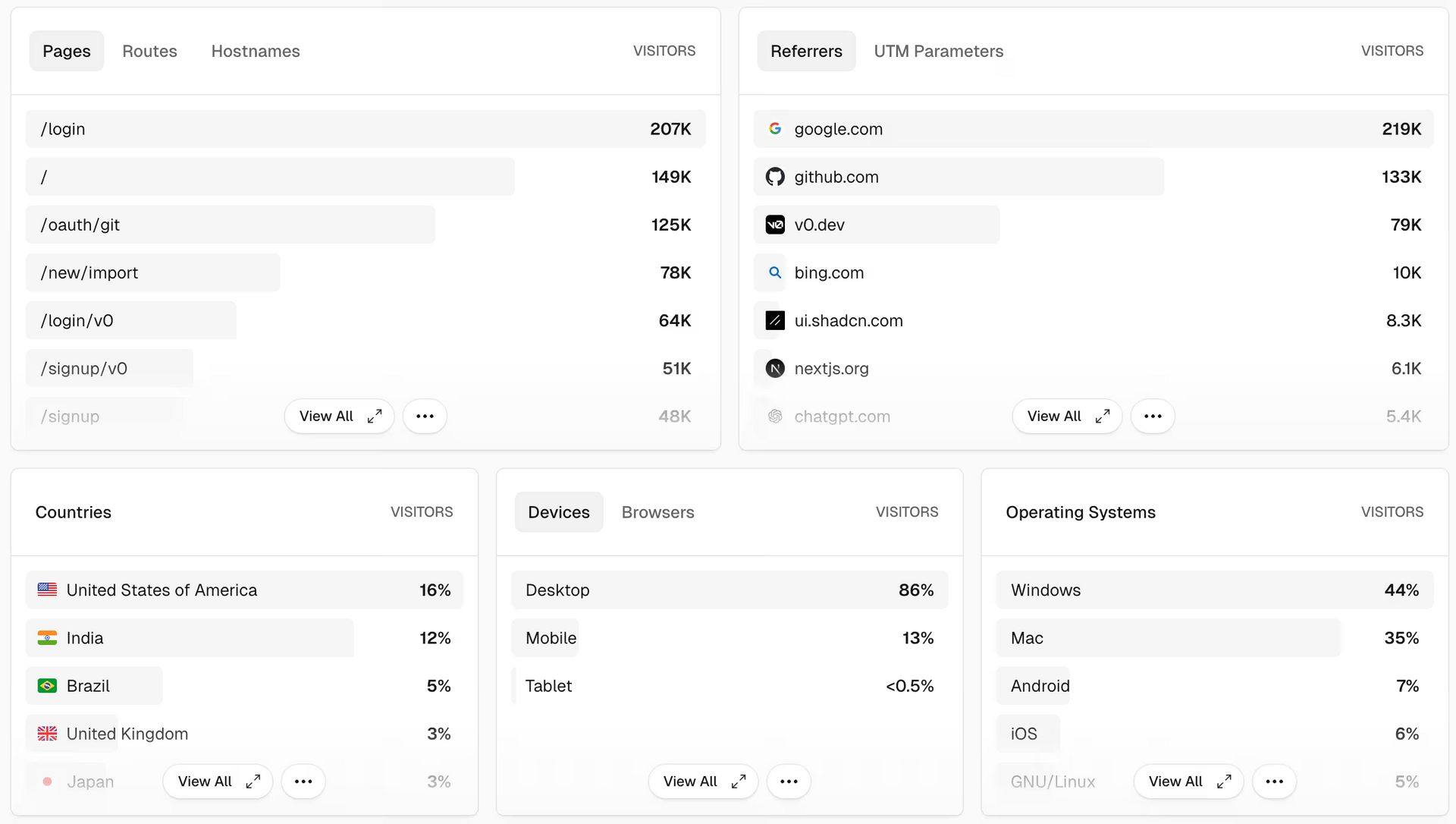
Vercel has a built-in "Analytics" tab. You just click one button to turn it on. It shows you how many "Unique Visitors" you have. If you see 1,000 visitors but 0 sales, you know your Landing Page Design has good traffic but the words are not convincing enough yet.
2. Using Speed Insights
There is another tool in Vercel called "Speed Insights." It gives you a score from 1 to 100. If your score is low, it usually means your images are too big. I always use Tinypng to make my photos smaller before uploading them. This keeps the site fast and the customers happy.
Part VII. Comparison: Free Hosting Vs. Paid Hosting for Landing Page Design
Feature | Vercel (Free Plan) | Traditional Paid Hosting |
Cost | $0 per month | $5 - $20 per month |
Setup Time | 2 minutes | 30 - 60 minutes |
Security | Included for free | Often costs extra |
Skill Level | Very Easy | Hard (Needs technical knowledge) |
For almost every Landing Page Design project I start, the free plan on Vercel is more than enough. You only need to pay when you get a huge amount of traffic.
Part VIII. FAQ: Common Technical Mistakes In Landing Page Design
What if my site looks broken on my friend's phone? This usually happens because of "Responsiveness." When you ask Gemini or Claude to write code, always say: "Make this mobile-friendly and responsive." This ensures your Landing Page Design fits every screen size perfectly.
Do I need to pay for an SSL certificate (the green lock)? No! Vercel gives you an SSL certificate for free. This is very important because browsers like Chrome will show a "Not Secure" warning if you don't have it, which scares away customers.
How often should I update my site? I check my analytics once a week. If I see people leaving quickly, I use claude.ai to help me rewrite the headline. Your Landing Page Design is never "finished" - it is always growing.
Summary Of Our Technical Journey Together
We have covered a lot of ground today! Let's look at what you have achieved:
You learned how to save your files safely on GitHub.
You discovered how to launch your Landing Page Design for free using Vercel.
You learned how to get a professional domain name to build trust.
You used AI to make your site friendly for Google.
You set up tools to track your visitors and speed.
Setting up a business online can feel big, but when you break it down into these small steps, it becomes easy. You now have the skills to build, write, and launch a real selling machine.
Next Step: Your homework is to create your GitHub account and upload your first file. If you feel stuck on any step, just ask me! I am here to help you finish your Landing Page Design and get your first sale. You can do this!
If you are interested in other topics and how AI is transforming different aspects of our lives or even in making money using AI with more detailed, step-by-step guidance, you can find our other articles here:
Forget Film School! THIS Is The Future Of AI Video Creation!*
5 AI Habits You Must Build Now to Decide Who Wins & Who Falls Behind in 2026
n8n Wizard Secrets Pt 2: 12 Tricks For EPIC Automation Workflow!*
8 AI Tools That Will Completely Change How You Work (Not Just Hype)
Business Strategy: If We Started A Business in 2026, We'd Ignore all the Noise & Do This Instead
*indicates a premium content, if any
How well did this guide cover the topic of "making money with AI"? |
Reply