- AI Fire
- Posts
- 🧠 3 Habits That Separate AI Native Professionals From Any Other AI Users
🧠 3 Habits That Separate AI Native Professionals From Any Other AI Users
Most professionals stop at being “AI-literate.” I’ll show you the exact habits I use (from AI breadcrumbs to swipe files) to make AI part of my daily workflow.

Max Anh
December 22, 2025
TL;DR BOX
I learned that becoming AI-native isn’t about using AI more often. It’s about rebuilding your workflow as if an AI collaborator is always sitting next to you. This requires habits like anchoring chat links into docs.
"AI-Native" work assumes an intelligent collaborator exists 24/7 and designs workflows around that assumption. Most users remain stuck treating AI as a separate utility. Transitioning requires saving "breadcrumbs" by hyperlinking AI chats into project documents and building "swipe files" of quality examples to guide output.
Key points
Fact: If an AI chat lasts over 10 minutes, anchor the link immediately for future reference.
Mistake: Treating AI conversations as temporary threads that are impossible to retrieve later.
Action: Build a "swipe file" of best-in-class examples to teach the AI your specific style patterns.
Critical insight
True mastery involves organizing AI outputs based on where they will be applied, rather than leaving them isolated in chat history.
😤 What’s your biggest frustration with using AI? |
Table of Contents
I. Introduction: The Three Levels of AI Mastery
I see the same pattern everywhere. Smart people pay for AI tools, know the features, even write decent prompts, yet still feel like AI isn’t fully clicking for them.
The problem isn’t intelligence. It’s workflow.
From what I’ve seen, working with AI falls into three levels and most professionals are stuck at level two without realizing this.
Level | Mindset | How They Use AI | Main tradeoff |
|---|---|---|---|
Level One: AI-Curious | Curious but inconsistent | Uses free tools. Opens chatbots only when stuck or reminded. Tries things sometimes. | AI is optional. No habit, no leverage, no compounding benefit. |
Level Two: AI-Literate | Skilled tool user | Pays for AI subscriptions. Keeps prompt libraries. Knows which model or feature to use. | AI is still a tool inside old workflows. Gains efficiency but not transformation. |
Level Three: AI-Native | System builder | Redesigns workflows assuming an AI collaborator exists. Builds processes around AI from day one. | AI becomes a force multiplier. Work gets done faster with less effort. |
The jump from AI-Literate → AI-Native is not about better prompts. It’s about changing how you work.
In this guide, I'll share the specific strategies (ordered from simple to advanced) that will get you to level three.
This is the easiest habit to start, yet it has a huge impact on how effectively you build an AI-native workflow over time.
1. The Problem with Temporary AI Chats
Most people treat AI conversations as temporary, one-off threads that become almost impossible to find again.
You have a productive 20-minute chat with ChatGPT, get great output, then three weeks later, when you need to reference that conversation, you spend 15 minutes scrolling through chat history trying to find it.

This is my ChatGPT chat history screenshot.
Learn How to Make AI Work For You!
Transform your AI skills with the AI Fire Academy Premium Plan - FREE for 14 days! Gain instant access to 500+ AI workflows, advanced tutorials, exclusive case studies and unbeatable discounts. No risks, cancel anytime.
2. The Solution: Anchor AI Conversations to Your Work
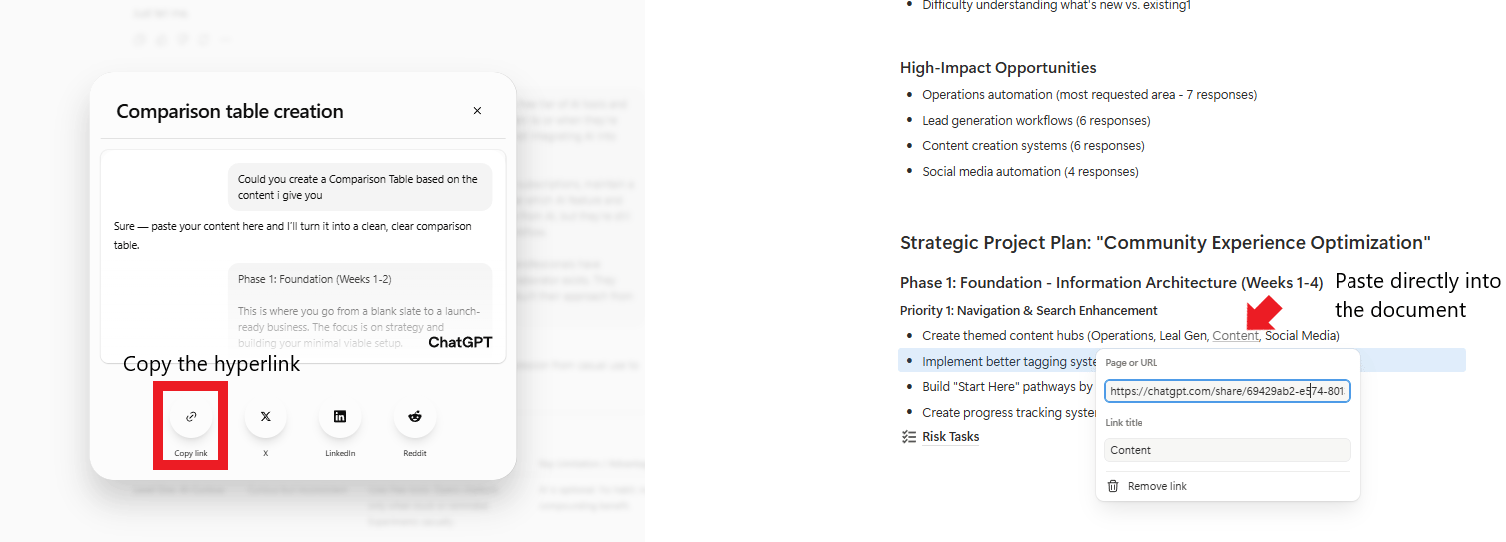
Instead of letting AI chats exist in isolation, create a hyperlink to the conversation and paste it directly into the document where you're actually using the output.
I know this sounds almost too simple to matter. I thought it was pointless at first. But after losing the same great AI work over and over, this habit completely changed how I work. Always organize your information by where you will use it, not where you found it.
3. Real-World Example: Presentation Preparation
Here's how this works in practice. When preparing for a work presentation, I create a Google Doc with two tabs:
Final Outline - All my content
Helpful Hints - Hyperlinks to my AI conversations

Here is my Presentation Workspace Template.
Let's walk through the process step-by-step:
Step 1: You ask AI to rewrite your initial rough prompt so it's optimized for the specific model you are using. After the chat starts, you copy the shared link.
Step 2: Copy the link (Command/Ctrl + L), return to the Google Doc and anchor it (Command/Ctrl + K).

Step 3: You copy the optimized prompt, paste it into a new chat, make adjustments as needed, then go back and forth with the AI to brainstorm and refine your presentation outline.
Step 4: You save your new chat link in the Google Doc as well, so you can easily pick up where you left off a day or even a week later.

This is something I do every week without thinking.
4. Pro Tip: Add Context to Your Links
Don't just paste raw links. Add brief context next to each hyperlink so you remember why it matters:
"Gemini conversation - brainstorming outline structure".
"Claude chat - applying storytelling principles to outline".
"ChatGPT - refining final talking points".
My Rule: If an AI conversation took more than 10 minutes or produced something you'll reference again, anchor it to your workspace immediately.
III. Habit 2: Build an AI Swipe File System
This habit requires more effort than leaving breadcrumbs but it greatly improves the quality of AI output.
1. What Is a Swipe File?
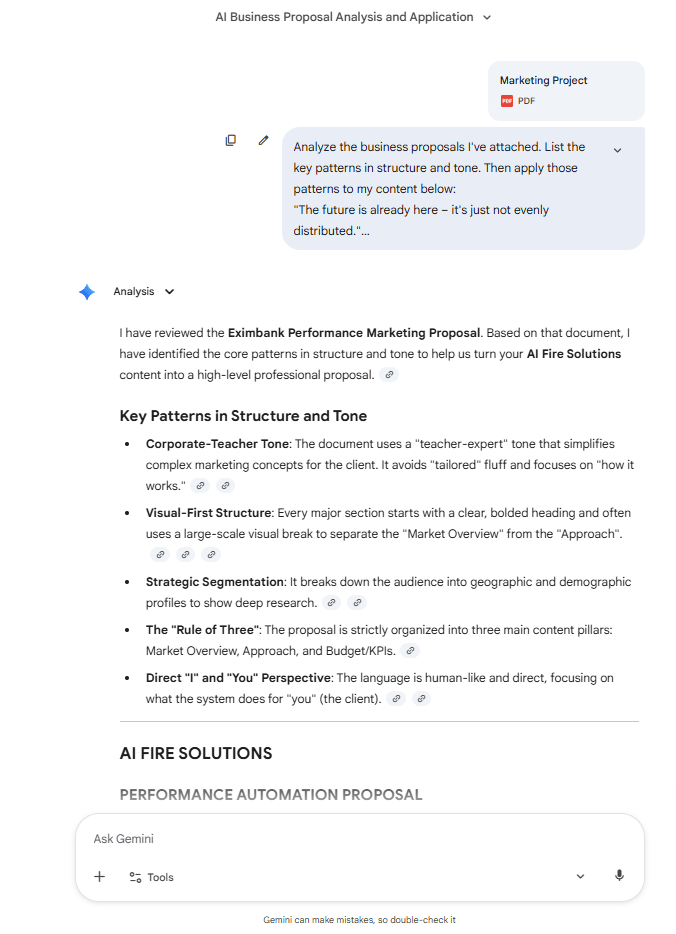
A swipe file is a collection of excellent examples in your field and it’s one of the fastest ways to teach AI what “good” actually looks like to you. Instead of prompting AI with basic instructions like "write a business proposal", you provide a specific example from your library and ask the AI to:
Analyze what makes it effective.
Apply those patterns to your new content.

Save the PDF/screenshot + a 1-sentence note on why it’s good.
2. How It Works in Practice
Let's say you need to write a business proposal. Instead of starting from scratch:
Open your AI swipe file folder.
Find examples of excellent business proposals you've previously saved.
Share them with AI.
Use this prompt structure: "Analyze the business proposals I've attached. List the key patterns in structure and tone. Then apply those patterns to my content below: [paste your draft]".
The initial output will be much stronger than any initial draft you could have written yourself and you save a lot of time.
3. Building Your Swipe File System
The actual habit you want to develop: Whenever you encounter excellent work in your field, immediately save it to your swipe file system.
Start Narrow: Begin with just 2-3 use cases you do repeatedly (Presentations, Emails, Strategy documents).
Organization: Structure your folders by use case, not by source or date. This makes it easy to find the right examples when you need them.
This is the first step in making your Google Drive AI-ready, preparing your existing work library so AI can learn from your best examples and replicate that quality consistently.

My Google Drive for this habit.
Creating quality AI content takes serious research time ☕️ Your coffee fund helps me read whitepapers, test new tools and interview experts so you get the real story. Skip the fluff - get insights that help you understand what's actually happening in AI. Support quality over quantity here!
IV. Habit 3: AI-First Task Planning
This habit is the hardest one to keep consistently but just like the gym, it quietly compounds in the background and pays off later.
1. What Is AI-First Planning?
AI-first task planning means planning your AI use before you start a big piece of work. This involves:
Breaking down complex projects into small, concrete tasks.
Marking which ones AI can and should help with.
Specifying which AI tool is best suited for each task.
Here is my example of AI-first planning. At the start, we chunk a complex project into 5 small tasks. Then, based on each specific task, we decide which ones AI can help with. Finally, we decide which AI tool is the best for that task. For example, I decided Task 3 was about voice cloning, so I chose ElevenLabs.

When I was responsible for sending weekly newsletters to Google Ads customers, here's how I approached it:
Step 1: Clarify the goal and audience.
Task 1.1 - Write down key information (Manual). What's the new feature? What are the benefits? Who should use it? This is manual because I want to inject my point of view.
Task 1.2 - Fact-check my notes (AI-assisted with NotebookLM). NotebookLM is easier to keep accurate because it stays inside your uploaded sources. Upload brain dump and source documents to verify rollout dates and policy details.
Task 1.3 - Turn fact-checked notes into a structured brief (AI-assisted with Gemini). Using Gemini is fast for drafting and restructuring.
Step 2: Draft the newsletter. (Broken down into specific microtasks with AI tool assignments).
Step 3: Refine copy for brand voice. (Broken down into specific microtasks with AI tool assignments).

This approach gives three main advantages:
Cuts Mental Tiredness: AI usage is planned beforehand. You don't waste mental energy figuring out whether to use AI mid-task.
Increases Quality and Speed: You match the right AI tool to the right kind of work instead of forcing one tool to do everything.
Creates Reusable Templates: Once you've mapped a workflow, you can reuse it every time.
My rule: For any project that will take more than an hour, spend 5-10 minutes mapping the steps and tagging which ones are AI-assisted or manual. This is how you transition to being AI-native.
V. Bonus: The Habit That Multiplies All Three
This habit ties everything together and compounds the value of all the other practices.
1. The Core Concept
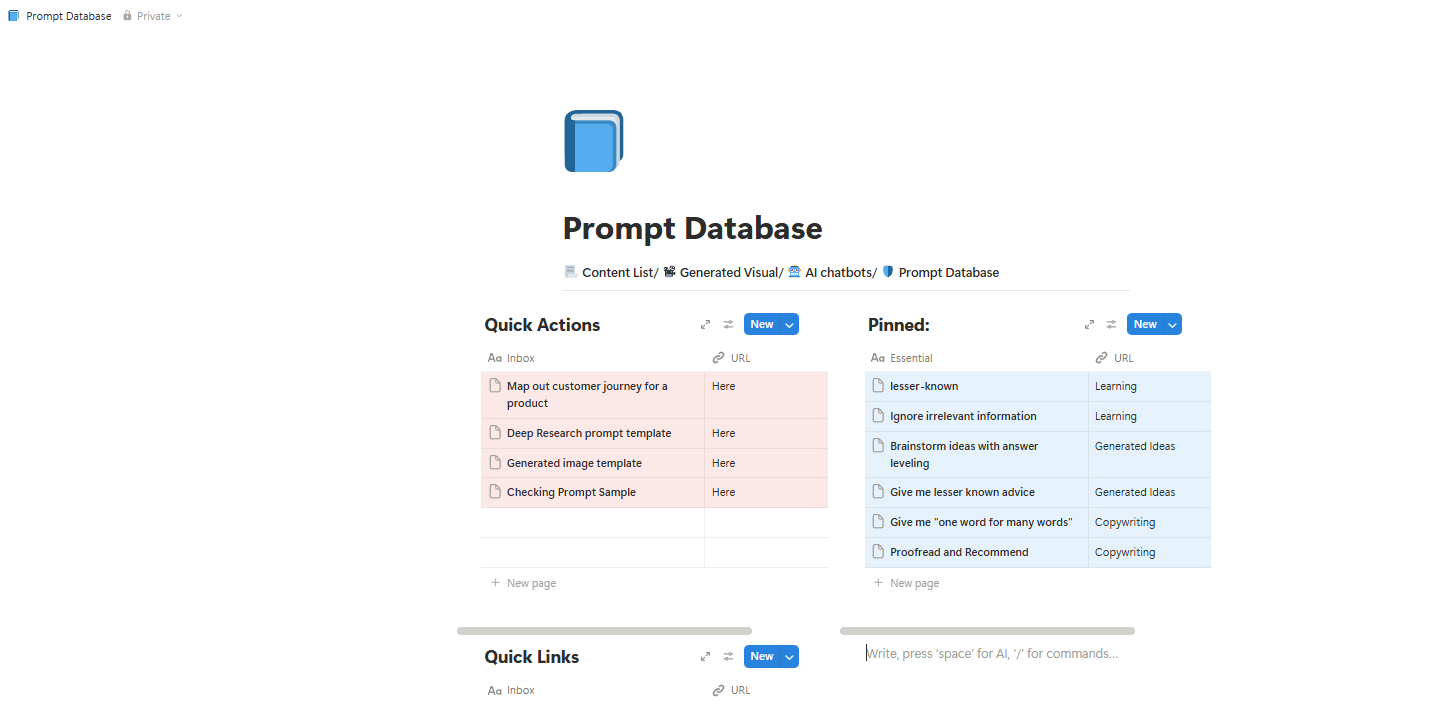
Whenever you write a prompt that works well, save it to a central library organized by use case so you can reuse that prompt whenever you face that task again.
2. The Problem This Solves
The worst feeling is knowing you already wrote the perfect prompt weeks ago that generated perfect output but today you can't find it. So you try to rewrite it from memory and the result is just... okay. You know it was better before but you can't recreate it.
3. How to Build Your Database
You don't need a thousand random prompts. You need 10-15 proven ones that you can use every day. Organization Structure:
Category: Use case (e.g., "Email responses", "Presentation outlines").
Prompt Text: The exact prompt that worked.
Context: When to use it and any notes about what makes it effective.
Example Output: Link to a conversation where it worked well.
Start simple. Begin with prompts you use repeatedly, like rewriting rough drafts or analyzing documents. Every time you write a prompt that generates excellent output, save it immediately.
VI. Conclusion: The Mindset Shift
For me, the real gap isn’t between people who use AI and people who don’t. It’s between those who add AI on top of old habits and those who rebuild how they work with AI in mind.
Some people (AI-literate professionals) ask, “How can AI help with this task?” And others (AI-native professionals) ask, “If I had a smart partner working with me all day, how would I do this differently?”
That small shift changes everything.
You don’t need to overhaul your life overnight. You could be like me, start simple: open one active project you’re working on, copy the link to your most useful AI chat and paste it directly into the document where the work lives.
Do this once. That’s your first step toward working in an AI-native way.
If you are interested in other topics and how AI is transforming different aspects of our lives or even in making money using AI with more detailed, step-by-step guidance, you can find our other articles here:
Overall, how would you rate the AI Workflows Series? |
Reply