- AI Fire
- Posts
- 🚨 GPT 5.3 Codex Review: I Tested It For 48 Hours & It Totally Broke My Brain
🚨 GPT 5.3 Codex Review: I Tested It For 48 Hours & It Totally Broke My Brain
We pushed OpenAI's new model to the absolute limit. From building 3D printer sims to skating games, discover why this changes everything for coders.

Neil Phan
February 10, 2026

TL;DR
OpenAI’s GPT 5.3 Codex represents a significant shift in AI-assisted development, moving from "one-shot" answers to an iterative, human-like coding partner. While its initial visual drafts often look dated, its underlying logic handling everything from browser-based operating systems to complex 3D printer simulations is remarkably precise. By using fewer tokens to achieve higher accuracy (77.3% in terminal tests), it offers a more cost-effective and powerful solution for building professional software and games.
Key points
Efficiency: GPT 5.3 uses significantly fewer tokens than predecessors while delivering a 13% jump in coding accuracy.
Iterative Logic: The model prefers to plan, test, and self-correct, behaving more like a senior developer than a basic chatbot.
Versatility: Successfully handles difficult languages like C++ and complex physical simulations like 3D slicing.
Critical insight
In 2026, logic is king; use GPT 5.3 to build the "brain" of your app first, and worry about the "beauty" of the interface second.
Which AI coding headache do you hate the most? 🤯 |
Table of Contents
Introduction
OpenAI has released a new model called GPT 5.3 Codex. It came out on the same day as another big model, Opus 4.6. Everyone on the internet is saying this is a huge step for computer programming. But is it really that good?
I decided to stop reading the news and start testing it myself. I spent many hours sitting at my computer, running this model through very hard tests. I wanted to see if it could build real software, games, and complex tools.
In this article, we will go through every single test I ran. I will show you what worked perfectly, what failed, and the funny things that happened along the way.
We have a lot to cover, so let’s get started.
I. What Makes GPT 5.3 Different From Previous Models?
GPT 5.3 Codex is a highly efficient model designed to deliver superior accuracy while using significantly fewer tokens than older versions. Unlike previous models that focus on a single answer, this version is built to iterate, meaning it plans and tests its own code like a human developer. This self-correcting nature allows it to solve complex logic errors that would typically cause other AIs to fail.
Key takeaways
Efficiency: The model achieves 77.3% accuracy in terminal tests, a massive 13% jump over version 5.2.
Comparison: Older versions require double or triple the tokens to match the performance of GPT 5.3.
Workflow: It acts as a partner that prefers to build, test, and fix rather than providing a "one-shot" response.
Action: This model is optimized for building larger, more complex software projects at a lower cost.

According to OpenAI, this model is special because it helped create itself. That sounds a little scary, right? But for us, there are two main things that matter.
1. It Uses Fewer Tokens
When you use AI, you often pay for "tokens." You can think of tokens like words. The more words the AI uses, the more money it costs.
GPT 5.3 is designed to be very smart but use fewer words to get the result. This means you can build bigger projects without spending too much money.

As you can see in the image above, the white line (GPT-5.3-Codex) shoots up much higher in Accuracy, even when using fewer tokens (look at the horizontal axis).
Meanwhile, the older versions (the blue lines) need to use double, or even triple the tokens just to get close to that same level of performance. This is the perfect proof of 'doing more with less'.
2. Superior Accuracy
Besides saving money and changing the workflow, GPT-5.3 is also much smarter than its predecessors. You can see this improvement most clearly when it handles complex coding tasks in the Terminal.

Note: As you can see in the chart above, GPT-5.3 Codex hits 77.3% accuracy in the Terminal tests.
→ This is way ahead of the 64.0% from the previous GPT-5.2 Codex version. This 13% gap is a huge jump. It explains why this new model can handle tricky logic errors that the old versions used to give up on
3. It Loves to Iterate
Most AI models are designed for a "one-shot" answer. You ask a question, and it gives an answer. GPT 5.3 is different. It wants to plan. It wants to build a little bit, test it, see if it works, and then fix it. It acts more like a real human developer than a robot.
So, the big question is: Can GPT 5.3 handle real work? Let's find out.
Learn How to Make AI Work For You!
Transform your AI skills with the AI Fire Academy Premium Plan - FREE for 14 days! Gain instant access to 500+ AI workflows, advanced tutorials, exclusive case studies and unbeatable discounts. No risks, cancel anytime.
II. Can GPT 5.3 Really Build a Browser Operating System?
GPT 5.3 successfully built a functional browser-based operating system featuring a Start Menu, taskbar, and working window management. While the initial visual design was simple, the underlying logic handled complex tasks like "Local Storage" for notes and a sophisticated "Time Capsule" feature. This allows users to save and restore the state of their entire digital desktop, a task traditionally very difficult to code.
Key takeaways
Function: The OS included a working calculator, a notes app, and even playable mini-games like Snake.
Innovation: The "Time Capsule" feature successfully remembered the exact position and data of every open window.
Iterative Fix: When told the design was "ugly," the AI added modern features like Dark Mode and a right-click menu.
Outcome: The model prioritizes working logic first, allowing design to be refined through subsequent feedback.
For my first test, I wanted to try something very difficult. I asked the model to create a "Browser Operating System."
Imagine your computer screen with Windows or MacOS. Now, imagine that whole experience running inside a website (Chrome or Safari). It needs a Start Menu, windows that you can drag around, and apps that actually work.
1. The First Attempt
I gave it a prompt to build this system. Here is an example of the prompt I used:
Create a comprehensive browser-based operating system. It should have a desktop interface, a start menu, a taskbar, and functional window management.

Please include apps like a text editor, a calculator, and a settings panel. Use HTML, CSS, and JavaScript.
I waited for the code. When I opened the result, I have to be honest with you. I was a little sad.
a. The Visuals

It looked ugly. The icons were very simple squares. The background image was not nice. There was no menu when I right-clicked the mouse.
It looked like a project from a beginner student in 1999.
b. The Functionality

But then, I started clicking around. And this is where GPT 5.3 surprised me.
The Start Menu: I clicked the button, and a real menu popped up. It had many apps: a browser, Notes, a Terminal, a Snake game, and even a Tic-Tac-Toe game.
The Calculator: I tested it with a math problem. I typed 77 times 7. It gave me 539. It worked perfectly.
The Notes App: This was my favorite part. It looked like the old Notepad on Windows 7. I typed "Hello world," and it saved my text. I closed the app and opened it again, and my text was still there. This means the AI understood "Local Storage" - a way for websites to remember data.
2. The Time Capsule Feature
There was one feature that blew my mind. The AI built something called a "Time Capsule."
This feature allows you to save your entire desktop. Imagine you have a game open, a note with some text, and a calculator. You click "Save Time Capsule." Then you close everything. When you click "Restore," everything comes back exactly where it was.
This is very hard to code. The AI has to remember the position of every window and the data inside every app. GPT 5.3 did this on the first try.
3. Fixing the Ugly Design
Since the logic was good but the design was bad, I asked GPT 5.3 to fix it.
The logic is great, but the design is very ugly. Please give it a major visual overhaul. Add a right-click menu and make it look modern.The model went back to work. The second version was much better. It added a "Dark Mode" which looks cool. It changed the wallpaper to a nice orange and blue sky called "Sunset." It added the right-click menu I asked for.

This shows us that GPT 5.3 is great at listening to feedback. It might not be perfect the first time, but it fixes mistakes quickly.
III. Simulates 3D Printing Using GPT 5.3
After the operating system, I wanted to test its knowledge of the physical world. I asked GPT 5.3 to build a simulation of a 3D printer. This is not just coding. The AI needs to understand how a machine moves in real life.
1. The Realistic Movement
I asked it to create a CoreXY printer simulation. This is a specific type of fast 3D printer that requires complex math to control its motors.
The result was impressive because of the logic. Instead of just drawing a random picture, the AI calculated the exact path of the print head based on real coordinates.

Absolute Precision: As you can see in the image, the Target Points (the red dots) at coordinates like (0,0) and (10,10) are connected perfectly by the blue line.
Mechanical Understanding: The text at the top says "Final motor positions: A=0, B=0". This shows the AI isn't just drawing a square; it is actually simulating the state of the stepper motors inside the machine.
Even though this is a simple 2D chart, it proves GPT 5.3 truly understands the math behind how a 3D printer moves, rather than just making art.
2. The Advanced Challenge: STL Files
I wanted to push GPT 5.3 harder. I asked it to update the simulation so I could upload a real "STL file."
An STL file is the standard format for 3D objects. To do this, the AI needs to write a "Slicer." A Slicer is a complex piece of software that cuts a 3D model into thin layers and tells the printer where to move.
I used this prompt:
Update the simulation to accept an STL file upload. Parse the file and generate the G-code to print the object layer by layer in the simulation.I uploaded a file called "Benchy." This is a famous little boat that everyone prints to test their machines.
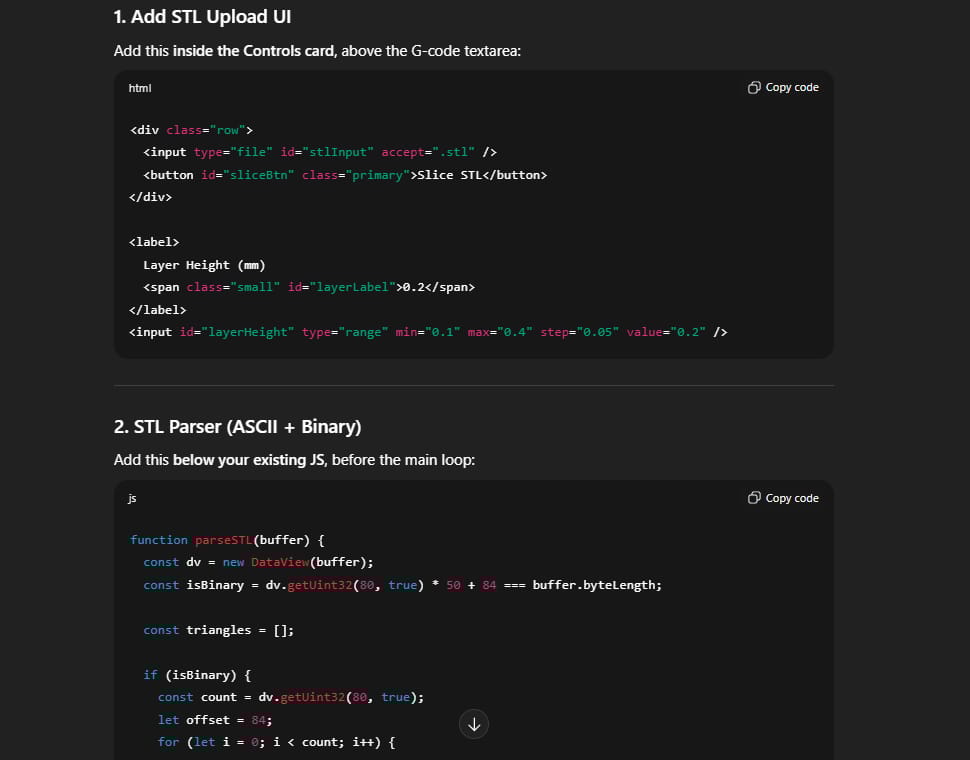
GPT 5.3 did it. It read the file, sliced it, and the little nozzle started printing the boat on my screen, layer by layer. This proves that GPT 5.3 understands complex geometry and math, not just simple website code.
IV. GPT 5.3 Builds Playable Web Games
Next, I wanted to make a game. I switched the AI to a mode called "Develop Web Game." I asked for a flight combat simulator (a dogfight game) where planes shoot at each other.
1. The Waiting Game
Here is a tip: GPT 5.3 is slow. It takes its time. When I asked for this game, it kept checking its own code. It would say "Checking physics..." then "Verifying controls..."
I actually got a little impatient. I typed: "Just give me the file, please!"

The AI replied with a little bit of attitude, telling me it was just making sure everything was correct. I actually liked that. It felt like working with a real partner.
2. The Gameplay
When I finally got the game, the graphics were once again very bad. The planes looked like paper triangles. The sky was just an empty color.

But the game was fun!
The AI Enemies: The bad guys actually tried to shoot me. They didn't just fly in circles.
The Radar: There was a little circle in the corner showing where the enemies were. It worked perfectly.
Damage: When I shot a plane, smoke started coming out of it.
3. Polishing the Game
I told GPT 5.3:
The game is fun, but it looks like a demo. Make it look like a real flight simulator.
The next version was beautiful. The planes had a unique artistic style. When an enemy plane exploded, pieces of it fell off realistically. This confirms that logic comes first, beauty comes second with this model.
V. GPT 5.3 Writes Complex C++
Most AI models are good at Python or JavaScript because those languages are easy. C++ is a very hard language. It requires strict rules and memory management.
If you prefer a practical path to build functional apps instead of battling complex code, Google's new workflow is a better fit.
But for this test, I asked GPT 5.3 to make a skateboarding game using C++
1. The Physics Engine
The code it gave me was clean. I ran it, and I saw a character on a skateboard.
The most impressive part was the "Grinding" logic. In skateboarding, grinding is when you slide your board along a rail. This is hard to program because the computer has to know exactly when the board touches the rail and "lock" it in place.
GPT 5.3 nailed it. I could jump (Ollie), land on a rail, slide along it, and jump off.

2. The Combo System
It also built a scoring system. If I did three tricks in a row without falling, my score went up faster. If I fell, the score reset. This logic was perfect.
3. Visuals vs. Animation

I asked for better animations. The AI made the rider move more like a human (ragdoll physics). When I did a trick, the arms swung around naturally. However, it made a mistake with the skatepark floor, making it look a bit glitchy.
This shows that while GPT 5.3 is powerful, it can still introduce bugs when you ask for complex changes in difficult languages like C++.
VI. GPT 5.3 Plan Mode Organizes Apps
There is a special feature called "Plan Mode." I used this to build a First-Person Shooter (FPS) game called "Neon Arena."
1. It Asks Questions
In Plan Mode, the AI does not start coding immediately. It acts like a project manager. I said: "I want to build an FPS game in Python."
It asked me:
"What kind of enemies do you want?"
"Should it be one file or multiple files?"
"How do you want the player to move?"
This is very helpful for beginners. Sometimes we don't know exactly what we want. The AI helps us clarify our ideas.

2. Modular Coding
Because I chose "multiple files," the AI created a very organized project. It had a file for the main game, a file for the player, and a file for the enemies.
This is how professional developers work. It makes the code easier to read and fix. If you want to learn how to code properly, watching GPT 5.3 structure a project is a great lesson.
VII. GPT 5.3 Turns Sketches into Websites
For a quick test, I drew a very ugly picture on a piece of paper. It was a wireframe for a portfolio website for a made-up person named "Stevie Slappis." I drew boxes for "Skills," "Projects," and "Contact."
I took a photo of the drawing and uploaded it to GPT 5.3 with this prompt:
Look at this wireframe. Build a beautiful, responsive website based on this layout. Make it have a 'wow' factor.1. Precision

The result was amazing. The website looked exactly like my drawing. It put the "Skills" section where I drew it. It put the "Projects" where I drew them.
2. The "Wow" Factor
It added cool hover effects. When I moved my mouse over the project cards, they glowed. The background had a subtle animation.
What I learned here is that GPT 5.3 is very faithful. It did not try to change my design. It respected my drawing but made it professional. If you are a designer who can't code, this tool is perfect for you.
How useful was this AI tool article for you? 💻Let us know how this article on AI tools helped with your work or learning. Your feedback helps us improve! |
VIII. Pros and Cons of Using GPT 5.3
After all these tests, we can summarize the good and the bad points.
1. The Pros
Logic is King: In every test (Browser OS, 3D Printer, Games), the backend code worked. The math was right. The physics were right.
Deep Understanding: It understands things outside of code, like how a 3D printer works or how a skateboard grinds on a rail.
Great at Iteration: It doesn't get angry if you tell it the code is ugly. It fixes it.
Project Management: The Plan Mode helps you organize big ideas.
2. The Cons
Ugly First Drafts: Do not expect a beautiful result on the first try. It focuses on making it work, not making it pretty.
It is Slow: It thinks a lot. If you are in a rush, this might be annoying.
Over-Thinking: Sometimes it spends too much time checking simple things.
IX. How Does GPT 5.3 Compare to Opus 4.6?
I know many of you are asking about Opus 4.6. I have tested that model too. Here is a simple table to help you see the difference between them:
Feature | GPT 5.3 Codex | Opus 4.6 |
Visuals & Beauty | It often looks ugly at first. You usually need to ask it to fix the design later. | Very good. It creates beautiful code and nice-looking interfaces immediately. |
Hard Logic | Very strong. It is great for complex math, game rules, and long conversations. | It is good, but GPT 5.3 is better for deep thinking and hard tasks. |
Cost | Cheaper. It uses fewer words (tokens) to finish the job, so you save money. | It costs more money to get the same result. |
Best used for... | Building real software, big apps, and complex games that need to work perfectly. | Making landing pages, quick designs, and beautiful demos to show clients. |
Conclusion
So, is GPT 5.3 worth your time?
Yes, absolutely.
If you are a person who wants to build real software, GPT 5.3 is a powerful partner. It is not a magic wand that does everything instantly. You have to work with it. You have to guide it. You have to say, "Hey, that looks ugly, fix it."
But the fact that it can simulate a 3D printer slicing a file, or build a whole operating system in a browser, is incredible. It closes the gap between "having an idea" and "having a product."
My Advice for You
If you have access to GPT 5.3, try this:
Start with a functional idea (like a calculator or a simple game).
Don't worry about the looks at first.
Test the code. Find the bugs.
Tell the AI exactly what is wrong.
Watch it improve.
We are entering a new era where the computer is not just a tool, but a co-worker. And based on my testing, GPT 5.3 is a co-worker that works very hard. Go ahead and try it. You might be surprised by what you can build.
If you are interested in other topics and how AI is transforming different aspects of our lives or even in making money using AI with more detailed, step-by-step guidance, you can find our other articles here:
Building Apps with Bolt: A No-Code Guide to Turning Ideas into Reality
Detailed Guide: How To Automatically Get Unlimited High-Quality LinkedIn Jobs*
Prompt Engineering Automation: Build a Mini AI Assistant with n8n
Discover My Ultimate AI Tools Productivity Kit for 2024*
*indicates a premium content, if any
Reply