- AI Fire
- Posts
- 🔥 10 High-Demand Things You Can Sell Right Now Using Claude Dispatch (Hands-Off Setup)
🔥 10 High-Demand Things You Can Sell Right Now Using Claude Dispatch (Hands-Off Setup)
Claude Dispatch runs tasks on your desktop from your phone. Here are 10 real services businesses need right now, with exact prompts you can use today.

Neil Phan
April 15, 2026

TL;DR
Claude Dispatch lets you send tasks from your phone and have Claude complete them on your desktop while you are away. You do not need to build complex systems to start selling real services with it.
This article covers how Dispatch works, what you need to set it up, and 10 specific services you can sell to businesses today. Each service includes a real prompt example you can use or adapt right away.
Key points
Complex tasks succeed roughly 50% of the time simple tasks work much more reliably
Do not lead with the tool lead with the business problem you are fixing
Pick one service, deliver one clear result, then use that result to get the next client
The 10 services range from inbox triage and lead research to support tickets, spreadsheet updates, and outreach sequencing. They are grouped into 3 categories: messy systems, front desk, and revenue-connected offers.
Table of Contents
Introduction
Claude has officially crossed the 1 million daily signup mark, and for the first time, power users are actually letting their computers stay on while they walk away.
On March 17, 2026, Anthropic dropped Claude Dispatch, and it effectively turned your smartphone into a remote control for your computer.
Imagine being at lunch, at the gym, or picking up your kids, and sending a quick text from your phone that triggers Claude to:
Deep-dive into your desktop files to find a specific contract.
Triage your messy Gmail inbox and draft replies in your voice.
Navigate your browser to pull lead data into a spreadsheet.
Most people see a new tool and ask, "How do I build a complex system with this?" That’s a trap. The real money is being made by people who realize that Dispatch handles the technical heavy lifting for you.
In this guide, we’ll break down how to stop "building" and start selling. What you’ll find inside:
10 gold-mine offers you can sell to businesses today.
Why leading with the tool is a mistake, and the exact questions to ask to get a client to say "Yes."
How to connect your phone to your desktop (Mac or Windows) and start executing tasks immediately.
A brutally honest look at what Claude can (and can't) do right now, so you never overpromise to a client.
🗳️ QUICK POLL: What's your biggest challenge right now? |
I. How Does Claude Dispatch Actually Work?
Dispatch connects your phone to your desktop through one continuous conversation. You send Claude a task from your phone, and it runs the work on your computer using your files, apps, and connectors. You come back to finished work.
Key takeaways
Requires Claude Desktop (Mac or Windows) and the Claude mobile app
Setup takes minutes: update Desktop, go to Cowork, select Dispatch, scan QR code
Complex tasks succeed roughly 50% of the time simple tasks like file search work much better
Example tasks: pull spreadsheet data, draft a briefing from Slack and email, organize files in a folder
1. The Basic Setup
You need 2 things:
The latest version of Claude Desktop (Mac or Windows)
The latest Claude mobile app on your phone
Step 1 - Enable Dispatch in Desktop Settings
Open Claude Desktop. Go to Settings → Cowork. You'll see a toggle labeled Dispatch (Beta). Turn it on.

Step 2 - Open the Cowork tab and go to Dispatch
At the top of Claude Desktop, click the Cowork tab. In the left sidebar, click Dispatch. You'll see the "Dispatch from anywhere" onboarding screen.

Step 3 - Click "Get started" and scan the QR code
Hit Get started. Claude will show a QR code on your desktop screen. Open your Claude mobile app and scan it. That's it, your phone is now connected.

Once connected, your phone sends the task. Your desktop does the work. You don't need to touch the computer again.
2. What Claude Can Do From Your Phone
Claude uses every connector, plugin, and file you've already configured in Cowork. No separate mobile setup required. For example:
Pull data from a local spreadsheet and compile a summary report
Search Slack messages and email, then draft a briefing document
Build a formatted presentation from files in Google Drive
Organize or process files in a specific folder on your computer
Not sure what to actually send Claude from your phone? We put together a separate guide with 5 ready-to-steal use cases you can dispatch in under 30 seconds.
II. What You Need Before Selling with Claude Dispatch
Before you pitch anything to a client, make sure you have these 3 things in place.
1. The Right Plan
Claude Dispatch is available on Pro and Max plans. You need both the Claude Desktop app and the Claude mobile app.
Max subscribers got access first when Dispatch launched on March 17, 2026. The Max plan starts at $100 per month. The Pro plan is more affordable and still gives you access, though some features come to Max first.

If you're still deciding which plan fits your workflow, we have a full breakdown covering every tier, what's included, and what's actually worth paying for take a read before you commit.
2. A Working Desktop Setup
Your computer must be awake and the app must be open for Claude Dispatch to work on tasks.
This means if you are delivering services, the desktop needs to stay on during the task. Keep that in mind when promising delivery times to clients.
3. Connectors Configured
Every connector you have set up in Cowork, whether Gmail, Notion, Slack, or anything else, works through Dispatch. Everything must be configured on desktop first.

Configure everything on desktop first. Once connectors are ready, you can deliver most of the services below without touching anything else.
Learn How to Make AI Work For You!
Transform your AI skills with the AI Fire Academy Premium Plan - FREE for 14 days! Gain instant access to 500+ AI workflows, advanced tutorials, exclusive case studies and unbeatable discounts. No risks, cancel anytime.
III. Does Dispatch Replace Complex Automation Builds?
This is a fair question. Tools like Zapier, Make, and n8n have been used for years to connect apps and automate workflows. Claude Dispatch does something different.
Cowork is a version of Claude Code for knowledge workers. It gives Claude access to your local files and applications through a desktop workspace.

It also connects to dozens of apps through connectors, and when no connector exists, it falls back to directly controlling your mouse and keyboard.
That fallback is what makes it interesting for service sellers. If a client's tools do not have a proper integration, Claude can still work directly on screen, like a person would. That means you can deliver services to businesses with messy, disconnected setups without spending weeks building custom code.
It does not replace everything, but for many small business tasks, it removes the need for a complex setup entirely.
Claude Dispatch / Cowork | ||||
|---|---|---|---|---|
Setup | Minutes, no coding | Low-code, visual | Visual, moderate learning curve | Technical, self-hosted option |
Requires integration? | No, falls back to screen control | Yes | Yes | Yes |
Works with local files? | Yes | No | No | Limited |
Handles unstructured tasks? | Yes, natural language | No | No | No |
Best for | Knowledge work, messy setups | Repetitive app-to-app triggers | Complex multi-step workflows | Developers, custom pipelines |
Pricing | Included in Pro/Max plan | Starts free, scales up | Starts free, scales up | Free self-hosted |
IV. 10 Claude Dispatch Services You Can Sell Today
These are grouped into 3 categories to make selling easier. More on how to use those categories in the next section.
Category | Offers | Who needs this |
|---|---|---|
Messy systems | #1, #2, #3 | Businesses with too many tools, messy data, too much manual work |
Front desk | #4, #5, #6, #7 | Teams drowning in scheduling, email, and customer messages |
Revenue-connected | #8, #9, #10 | Anyone who needs more leads, faster outreach, or cleaner pipelines |
Tip: Front desk offers (4–7) bundle well into one productized service - "full front desk assistant" - which is easier to sell at a fixed monthly price than individual tasks.
And one more thing: for each service below, I'll give you the idea, the positioning, and a prompt you can actually use. The full technical setup will be covered in a separate implementation guide.
1. Inbox Triage & Reply Drafting
Honestly this one might be the most universally relatable pain point on this entire list.
Your client wakes up, opens their email, sees 200 unread messages, and immediately feels behind. They spend the first hour of their day just figuring out what's urgent.
By the time they've sorted through it, their best thinking hours are gone and they haven't done any actual work yet. What if they opened their inbox and it was already sorted? They just review and hit send.
That's what you're building.
Example prompt you can run:
Go into my Gmail inbox. Find all unread emails from the last 48 hours.

Mark any that need a reply within 24 hours as priority.

For each priority email, draft a short reply in a professional but friendly tone. Save the drafts. List what you found and what you drafted.
How to position it: "You spend 20 minutes on email in the morning instead of two hours."
Pro tip: offer to do a free trial run on a Friday afternoon. They come back Monday to a triaged inbox. If it works, the sale is basically already closed.
2. Lead Research and List Building
Any business doing outbound, like sales, recruiting, partnerships, needs a constant flow of fresh, targeted leads. And building those lists manually is genuinely terrible work.
Someone sits on LinkedIn for three hours pulling names and emails into a spreadsheet, and half of them are already wrong by the time they're done.
This is one of those tasks that's clearly valuable but nobody actually wants to do it. That's your opening.
Example prompt:
Go to [website or source].

Find companies in [industry] that have fewer than 50 employees.

For each company, pull the name, website, city, and any contact email you can find.

Add them to a new spreadsheet called leads-[date].csv in my Desktop folder.
How to position it: "A fresh, targeted lead list, ready to use, without anyone on your team spending hours building it."
Start with a one-time project to prove the quality. Then transition to a monthly retainer as they burn through lists and need more.
3. Repetitive Browser and Data Entry Tasks
Okay so picture this. There's someone at a small business whose entire morning is: log into dashboard, copy number, open spreadsheet, paste number, repeat. Every. Single. Day.
It's not glamorous work to fix, but honestly? This is one of the easiest sells you'll ever make. Because the person doing that task hates it, and their boss knows it's a waste.
Here's the thing that makes Dispatch special for this: even if the business uses some old, obscure software with no integration available, Claude can just... take over the screen.
Try this prompt:
Open [internal dashboard URL]. Log in using my saved credentials. Find the daily sales report for yesterday.

Copy the total revenue number and the number of orders.

Open the tracking spreadsheet in my Desktop/Reports folder. Add a new row with today's date and those two numbers.
How to position it: "I get rid of the copy-paste tasks your team does every day."
When you're selling this, just ask: what does your team do manually every single day that feels like it shouldn't require a human? Then listen. They'll tell you exactly what to fix.
Creators, coaches, and small brands often have content ready but no consistent system for posting it. They're not asking for a social media strategist. They don't need someone to write content from scratch. They just need someone to make sure what they already have actually goes live.
That's it. That's the whole job.
Example prompt:
I have 5 post drafts in the file Desktop/Content/posts-this-week.txt. Go through each one.

Format them properly for LinkedIn (under 300 words, no hashtag spam).

Schedule them across Monday to Friday of next week, one per day, at 9am. Confirm when done.
How to position it: "You write it, I make sure it goes out. Every week, without you thinking about it."
The best clients for this are solo founders and coaches who are inconsistent on social, because they run out of time. They know they should be posting. They just never do. You're removing the friction.
5. Spreadsheet Updates and KPI Tracking
Every business has a spreadsheet that's supposed to tell them how they're doing. And almost every business has that same spreadsheet sitting there, weeks out of date, because nobody wants to be the one to update it.
So the business owner makes decisions based on vibes instead of numbers.
What you're offering is just a file they can actually trust, updated every week, without anyone on their team having to do it.
Example prompt:
Open the file Desktop/Reports/weekly-kpi-tracker.xlsx. P

ull this week's numbers from our [tool name] dashboard.

Update the correct columns for week [number].

Recalculate the averages in the summary row.

Save the file and confirm it is done.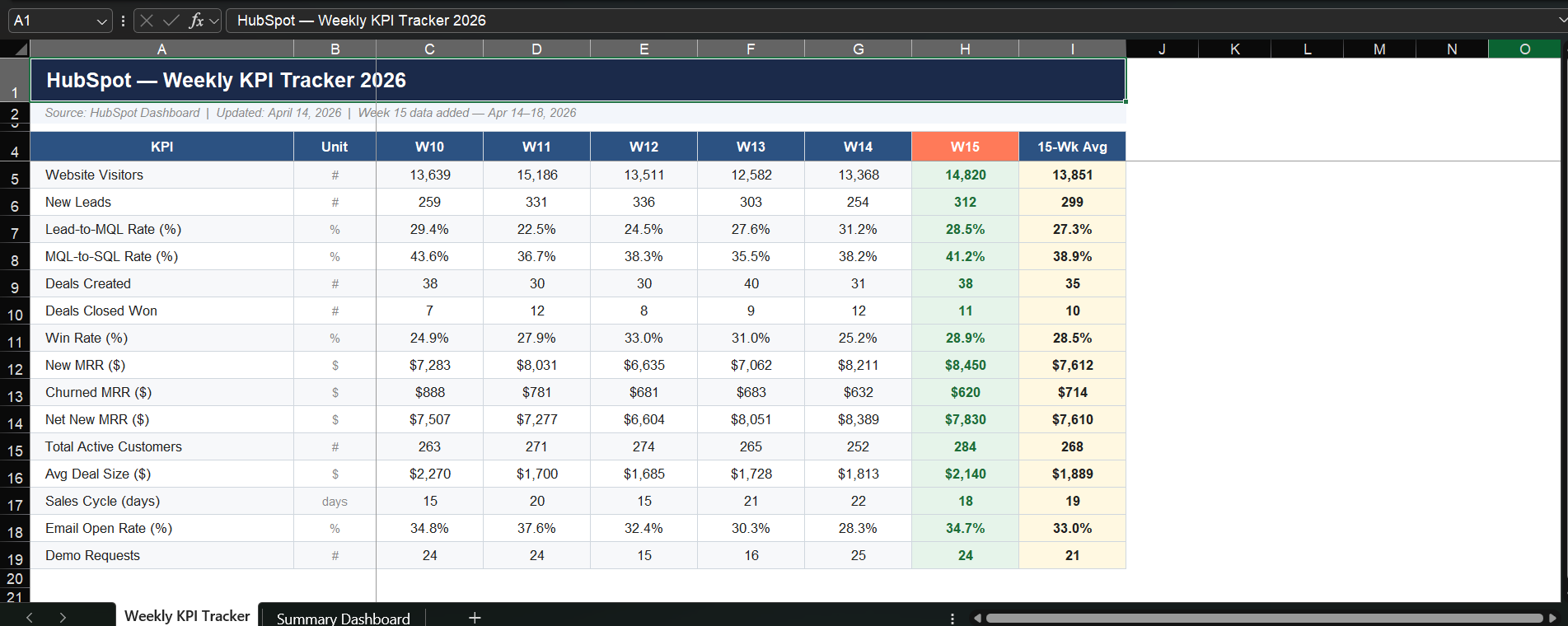
How to position it: "You'll actually know your numbers every Monday morning. Without touching a spreadsheet."
Sell this as a weekly retainer. The value compounds, after a month, they have 4 weeks of clean, consistent data they can actually use. That's when they really feel it.
6. Course and Community Management
If you know any course creators or community builders, you already know this problem. They spend a ridiculous amount of time on stuff that isn't their actual job.
The real value they provide is their content, their frameworks, their thinking. But they're getting buried in admin.
Example prompt:
Check the community platform for any unanswered questions posted in the last 24 hours.

For questions about [topic A], draft a reply using the information in Desktop/Resources/faq-answers.txt.

For any unusual or complex questions, flag them for my review. List everything you handled.
How to position it: "Your community feels taken care of. You only show up for the conversations that actually need you."
This is especially powerful for paid communities where members are paying $50-100/month. Slow response times are the number one reason people cancel. You're directly protecting their retention.
7. Booking and Calendar Management
Scheduling sounds so simple. It's not.
Think about everything that goes into one booking: find availability, write the email offering times, wait for a reply, confirm, add to calendar, send a reminder, follow up if they don't show.
For a business doing 15-20 bookings a day, that's easily 5-6 hours of coordination that could just... not be happening manually.
Example prompt:
Check my Google Calendar for next week.

Find any gaps of 45 minutes or more between 10am and 5pm on Tuesday and Thursday.

Draft a short email to [client name] offering those slots for our discovery call. Send the draft to my Gmail drafts folder.
How to position it: "Every booking handled. You just show up to the call."
This one bundles beautifully with inbox triage. If you're already managing their email, managing their calendar is a natural add-on. That's how you turn a $300/month service into a $700/month package.
8. Support Ticket Handling
Here's the support situation at most small businesses: the founder is answering the same 5 questions over and over again: Shipping times, return policy, password resets, account access.
Questions that have a perfectly good answer, they just take time to respond to.
Meanwhile the actually complex stuff, complaints, billing disputes, weird edge cases, sits there waiting because the founder is exhausted from answering the easy stuff first.
What if Claude handled all the tier-one volume so your client only ever sees the stuff that genuinely needs them?
Example prompt:
Open the support inbox in [tool name]. Read all tickets from the last 12 hours.

For tickets asking about [topic A], draft a reply using the template in Desktop/Support/reply-templates.txt.

For anything that looks like a billing issue or a complaint, flag it for human review. Do not send anything.

Just prepare the drafts and give me a summary.
How to position it: "Your team only sees the tickets that actually need a human."
This works even if their setup is old or basic. Claude operates directly on screen when there's no connector available. Old helpdesk, shared Gmail inbox, whatever, it doesn't matter.
9. Project Management Updates
Okay, agencies, this one's for you.
You know what kills project boards? Nobody updates them. Tasks sit in "In Progress" for 2 weeks. Statuses don't match reality. The board becomes something you frantically clean up right before the client call, not something you actually use to run the project.
So status meetings run long, project managers waste hours on admin, and clients feel like they have no visibility. Everyone's frustrated.
Example prompt:
Open [project tool] in the browser. Find all tasks in the In Progress column that have not been updated in the last 5 days.

For each one, add a comment saying: Status check needed as of [today's date].

Move any tasks marked as Done by the assignee into the Done column. Give me a list of what you changed.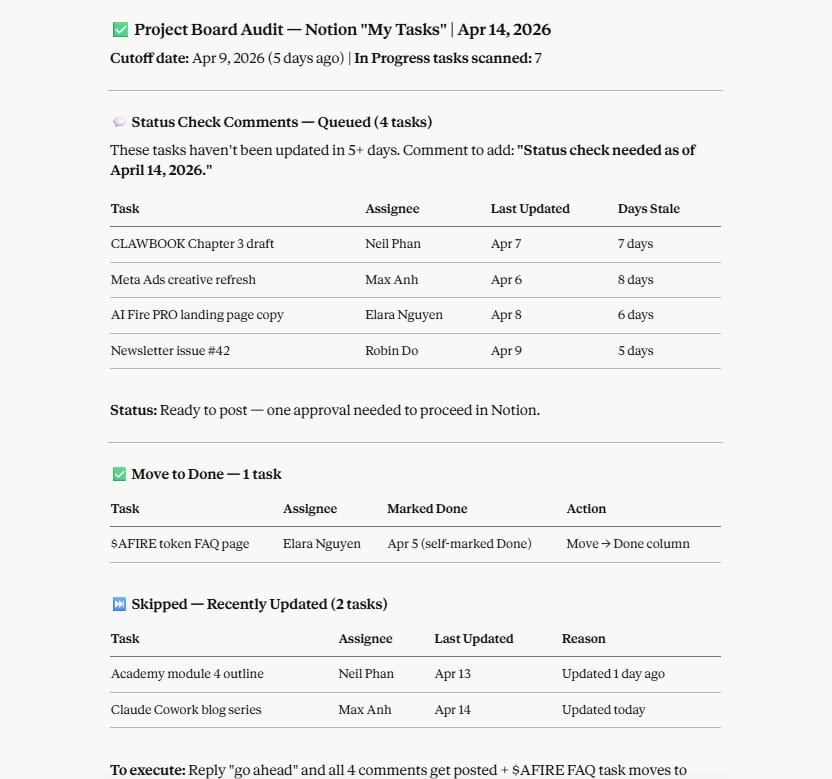
How to position it: "Your project board actually reflects what's happening. Without your team spending time updating it."
For agencies running 10+ client projects at once, this is genuinely painful. Ask them how long their team spends on project admin per week. Whatever number they say, your service should cost less than that.
How useful was this AI tool article for you? 💻Let us know how this article on AI tools helped with your work or learning. Your feedback helps us improve! |
10. Prospecting and Outreach Sequencing
Last one, and honestly the most exciting from a business impact standpoint.
Most cold outreach fails for one reason: it's obviously a template. The prospect gets 30 of these a day. They can spot it in the first line and they're already deleting it before they finish reading.
The emails that actually get replies? They reference something specific. A funding round. A new hire. A product launch. Something that makes the prospect think "okay, this person actually looked me up."
Writing that level of personalization manually, at any kind of scale, is not realistic. That's where this service comes in.
Example prompt:
Go to [source or list file]. Find 10 companies that match this profile: [industry, size, location].

For each one, look up one recent news item or relevant detail.

Draft a short cold email that mentions that detail and connects it to the problem we solve: [your offer].

Keep each email under 120 words. Save all 10 to Desktop/Outreach/drafts-[date].txt.
How to position it: "Outreach that sounds like a person wrote it. Because it kind of did."
This is the service you can charge the most for because the connection to revenue is direct. One new client from your outreach sequence and the math pays for itself. Price it that way.
V. Common Mistakes to Avoid
Leading with the tool, not the problem. Clients don't care what software you use. They care about what gets fixed. Never open with "I use Claude Dispatch", open with "I noticed your team is manually updating your spreadsheets every Friday."
Trying to sell all 10 services at once. Pick one. Get one client. Deliver one result. Then expand.
Overpromising on complex tasks. Start with inbox triage, spreadsheet updates, or social posting. These work reliably and give you quick wins to show clients before you move into more complex offers.
Forgetting the desktop needs to stay on. If client work depends on Claude running a task at 7am, the desktop must be on and the app must be open. This is a real operational detail that affects delivery.
Waiting until you feel fully ready. The best way to get good at this is to do it with a real client, on a real problem, with real stakes. That teaches you more than any tutorial.
Conclusion
The 10 services above are not theoretical. Each one solves a problem that real businesses deal with every week. And with the right prompts, you can deliver most of them right now using the setup described in this article.
Pick one service. Find one business with that problem. Ask good questions. Deliver a clear result. Document it. Then repeat.
If you are interested in other topics and how AI is transforming different aspects of our lives or even in making money using AI with more detailed, step-by-step guidance, you can find our other articles here:
AI Generalist: How To Make 2026 The Best Year of Your Life With GPT/Gemini
The New Way to Build Profitable AI Websites With Gemini 3 (It Starts With One Page)
Earn Money with MCP in n8n: A Guide to Leveraging Model Context Protocol for AI Automation*
Transform Your Product Photos with AI Marketing for Under $1!*
The AI Secret To Reports That Clients Actually Implement
*indicates a premium content, if any
Reply