- AI Fire
- Posts
- 🤯 Stop Posting Daily: This AI System Gave You 30 Days of Content in Just 30 Mins
🤯 Stop Posting Daily: This AI System Gave You 30 Days of Content in Just 30 Mins
Most creators fail because they assume too much. Learn the data-driven system to generate 33 high-quality posts from scratch using free tools like Gemini.

Neil Phan
December 30, 2025
TL;DR
Posting daily on social media is exhausting, but AI content creation tools can help you produce a month's worth of content in just 30 minutes. This guide details a proven system using ChatGPT, Google Gemini, and Canva to generate 33 high-quality posts including Reels, Carousels, and Images by analyzing winning patterns and automating production. Stop guessing what to post and start using data-driven strategies to build consistency and grow your audience effortlessly.
Key points
Strategy: Use ChatGPT to analyze your top-performing posts and find the "winning" patterns.
Tactic: Repurpose one YouTube video into 10 viral Reels using Gemini and CapCut.
Tool: Use Canva's "Bulk Create" feature to generate 15 carousels in 5 minutes.
Critical insight
The creators who win aren't working harder; they are using systems to do the boring work so they can focus on engagement.
😫 What stops you from posting daily? |
Table of Contents
Let’s be honest with each other. Posting on social media every single day is really hard. You sit down at your computer, stare at a blank screen, and think, "What should I say today?" It is exhausting. You might spend three hours making one video, and then only 50 people see it. That feels terrible.
But what if you could change that? Imagine if you could finish all your work for the whole month in just 30 minutes.
This is not a magic trick. It is a real system. We are going to use AI Content Creation tools to do the hard work for us.
In this guide, I will walk you through a proven method. We will use tools like ChatGPT, Google Gemini, and Canva to automate the heavy lifting. To ensure your visuals match this speed without losing quality, you can even turn one image into a pro video library to keep your character consistent across every single post."
We are going to build a system together. By the end of this article, you will have a plan to make 33 pieces of content: 12 Reels, 15 Carousels, and 6 Image Posts. You will save time, and you will finally be consistent.
Let’s get started.
Part 1: Why Is AI Content Creation The Secret To Consistency?
Most people fail at social media because they rely on guesswork instead of data. AI content creation fixes this by analyzing your best past posts to identify exactly what your audience loves, such as specific topics or formats. Tools like ChatGPT can scan your top-performing content and reveal the hidden patterns like "personal stories" or "short lists" that drive engagement, giving you a proven blueprint for future success.
Key takeaways
Mistake: Posting random content like coffee photos without a strategy leads to failure.
Method: Analyze your top 5 posts to find your "Winners" before creating new content.
Tool: Upload screenshots to ChatGPT to uncover why certain posts went viral.
Benefit: Moves you from guessing to a data-driven strategy that guarantees better engagement.
To succeed with AI Content Creation, we first need to know what your audience likes. We call this finding your "Winners."
1. Analyzing Your Past Success
Before we make anything new, we need to look at what worked before. Go to your Instagram or TikTok or any other channels you are operating. If you are new, look at a competitor’s account in your niche.
This tells you what people want. We are not going to reinvent the wheel. We are going to do more of what works.
2. Using AI To Find Patterns
Sometimes it is hard to see the pattern yourself. This is where we use AI. Take screenshots of your top 5 best-performing posts.
Go to ChatGPT and type this prompt:
"I am uploading screenshots of my most popular social media posts. Please analyze them. What common themes, colors, or structures do you see? Why did people like these posts? Tell me the specific elements that made them successful."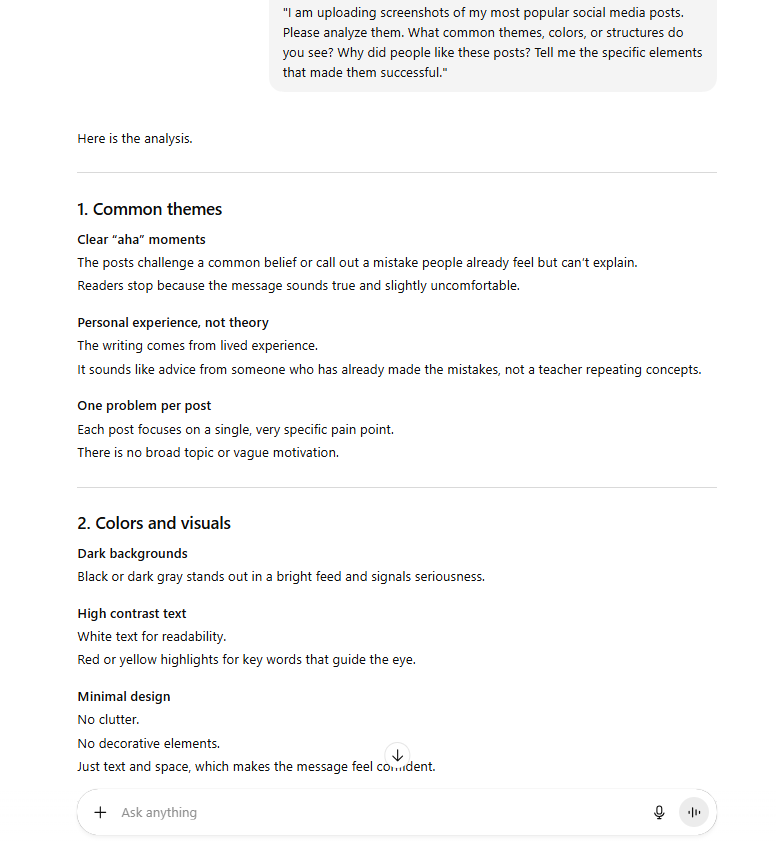
The AI will tell you the truth. It might say, "People like when you share personal stories," or "People prefer short lists." Now, you have a blueprint. We will use this blueprint for the rest of our AI Content Creation process.
Learn How to Make AI Work For You!
Transform your AI skills with the AI Fire Academy Premium Plan - FREE for 14 days! Gain instant access to 500+ AI workflows, advanced tutorials, exclusive case studies and unbeatable discounts. No risks, cancel anytime.
Part 2: How Do Content Pillars Organize Your AI Content Creation Strategy?
To grow effectively, you need a structured mix of content formats, not just random posts. This system uses three pillars: Reels for growth (finding new people), Carousels for value (building trust), and Image Posts for attention (stopping the scroll). By balancing these formats, you ensure you attract new followers while nurturing existing ones, and AI tools can generate all three types rapidly.
Mastering this efficient workflow is essentially the first step toward exploring AI side hustles to earn extra money, as businesses are constantly paying for this exact type of content strategy."
Key takeaways
Structure: Use a mix of 12 Reels, 15 Carousels, and 6 Image Posts.
Role: Reels find new followers; Carousels build trust with deep value.
Role: Single images are for quick attention and debunking myths.
Result: A balanced strategy that grows your audience and keeps them engaged simultaneously.
We call these "Content Pillars." Think of pillars as the main topics you talk about.
For this system, we will use three specific formats. This mix helps you grow followers and keep them interested.
1. The Growth Format: Reels (Video)
Short videos are the best way to find new people. We will create 12 Reels. These will be short clips from podcasts or interviews that share "Insider Secrets."
Example: Look at Alex Hormozi. He takes long business interviews and cuts them into 60-second clips with dynamic captions.
2. The Value Format: Carousels (Slides)
Carousels are posts with multiple slides that you swipe through. These build trust. We will create 15 Carousels. These will be educational lists or step-by-step advice.
Example: Look at Justin Welsh or Chris Do (The Futur). They break down complex systems into 7-10 swipeable slides.
3. The Attention Format: One-Page Images
These are simple images that stop people from scrolling. We will create 6 Image Posts. These will clear up misconceptions or show a simple truth.
Example: Look at Visualize Value (Jack Butcher) or Dan Koe. They use high-contrast black and white images or simple tweet screenshots to explain one powerful idea.
If you only post videos, you might get views but no connection. If you only post images, you might not grow. This mix gives you the best of everything.
Part 3: How Can AI Content Creation Generate Viral Reels Fast?
Making videos usually takes the longest time. You have to film, edit, and add captions. But we are going to cheat a little bit. We are going to use existing content from podcasts to make our Reels.
1. Finding Great Source Material
We need content that is already good. Let's say you are in the "Productivity" niche.
Go to ChatGPT (ensure web search is on) or open Google Gemini.
Note: I personally use ChatGPT, but feel free to use Gemini (especially the latest version). It is free, and since Google owns YouTube, it has excellent native access to video data. Ultimately, both tools will give you very similar high-quality results.
Use this prompt:
"Please find me 5 YouTube links to recent podcasts or interviews where experts talk about productivity hacks for busy professionals. The videos should be popular and have high engagement."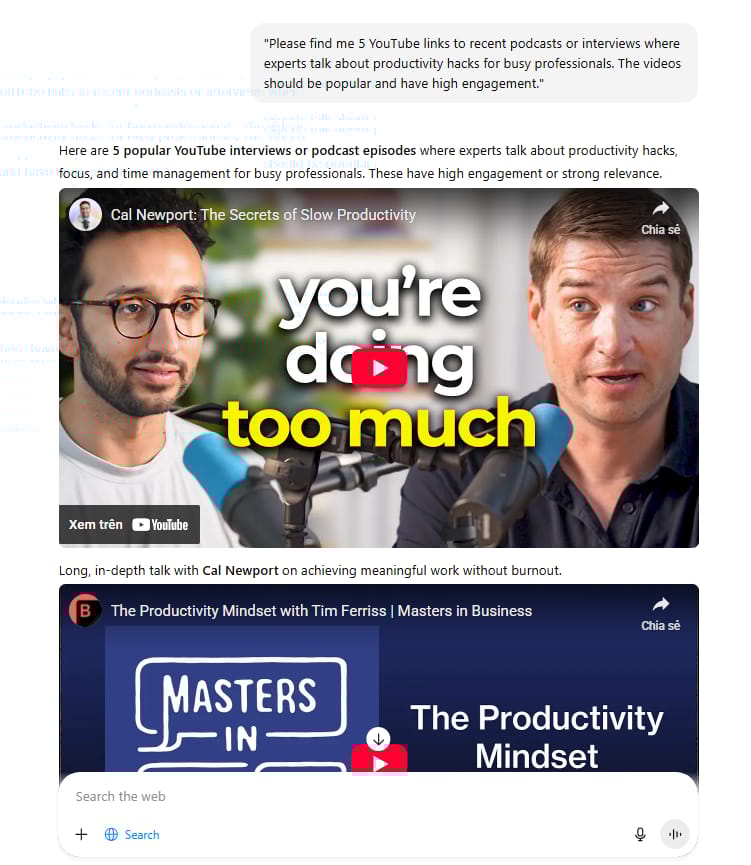
Copy the link of the best video.
2. Getting The Transcript With Gemini
Now we need the text from that video. We will use Google Gemini because it can watch long videos easily. It is essentially a free assistant that handles complex tasks for you, much like how a simple 4-step system beats hiring designers by allowing you to prototype professional-grade apps entirely on your own."
Paste the YouTube link into Gemini and ask:
"I am sharing a YouTube video link. Please read the video and write out the full transcript for me. Also, suggest a catchy headline for this video content."
Gemini will give you the full text of the video.
We don't want the whole hour. We only want the best 30 seconds. Copy the transcript from Gemini.
Go back to ChatGPT and paste the transcript. Then use this specific prompt:
"Act like a social media manager. Read this transcript. Find 5 distinct segments that are 30 to 50 seconds long. These segments must be interesting and have a clear 'hook' at the start. For each segment, give me the exact start and end timestamps and a title that makes people want to watch."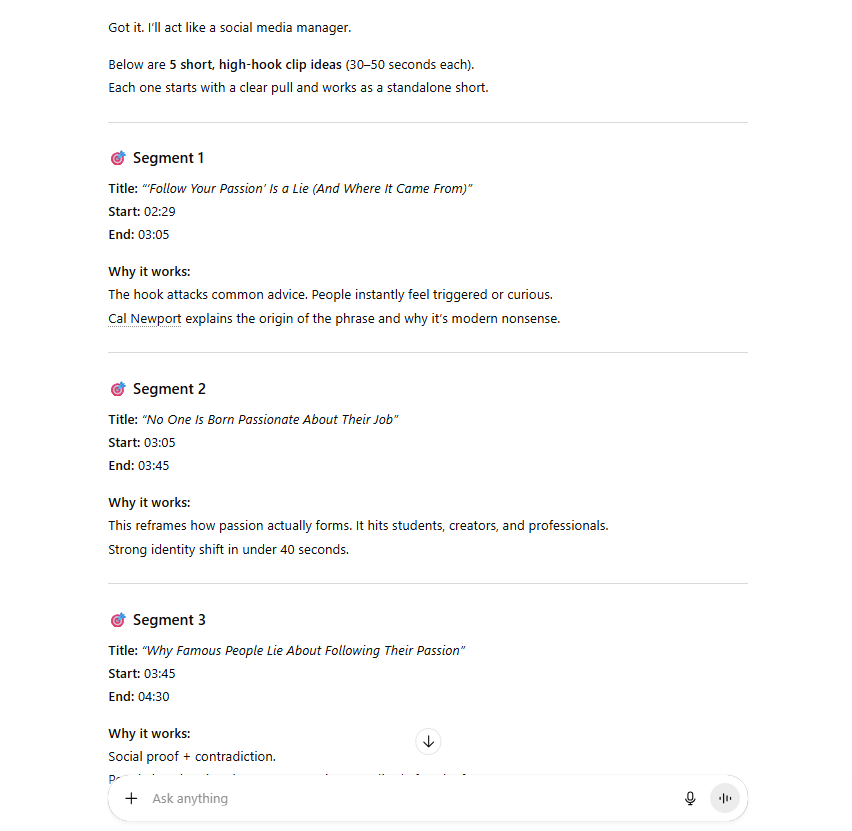
Now, you have a list of exactly where the good parts are.
4. Editing The Clips
You can use a tool like CapCut on your phone or computer.
Import the original video.
Cut the video using the timestamps ChatGPT gave you.
Use the "Auto Captions" button in CapCut to add text on the screen.
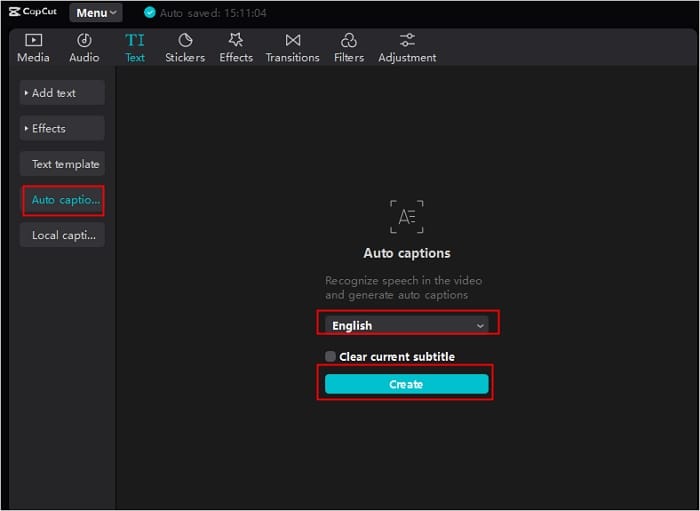
Result: Repeat this process for one or two more videos. Within minutes, you will have 12 high-quality Reels exported and saved in your folder. (Progress: 12/33)"
Part 4: What Is The Best AI Content Creation Method For Carousels?
Carousels are great for teaching, but designing 15 of them one by one takes forever. We will use a "Bulk Create" method to make them all in 5 minutes.
1. Reverse Engineer A Winner
Find a carousel style you like. Maybe it has a big title on the first page, advice in the middle, and a question on the last page. Take screenshots of it.
Ask ChatGPT to analyze it:
"Look at this carousel. Describe the structure of every slide. What is on Slide 1? What is on Slide 2?"ChatGPT will explain the pattern. For example:
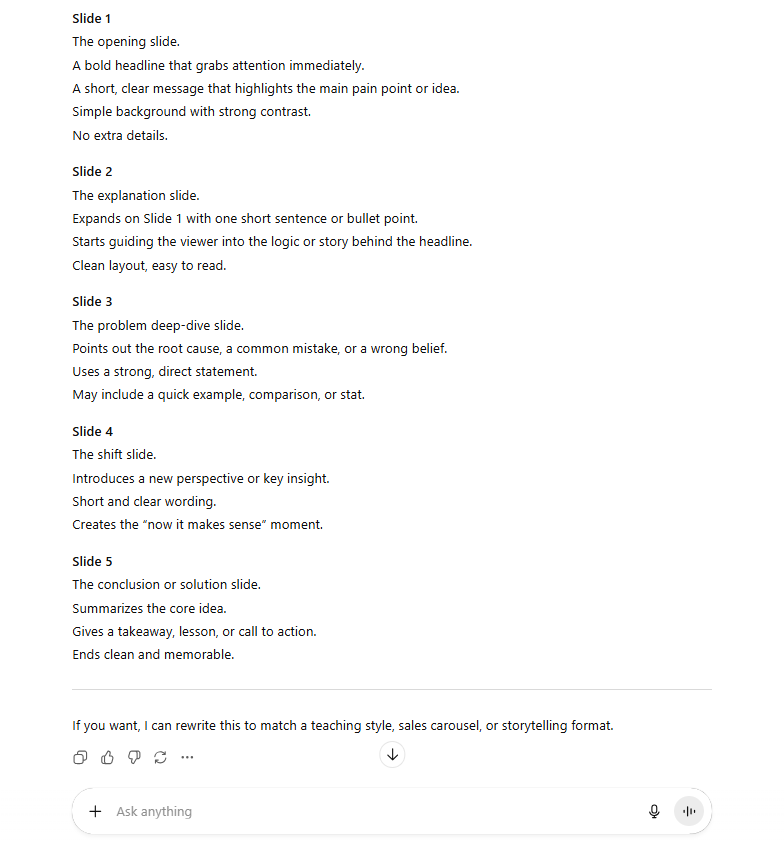
2. Generate The Data
Now, we will ask ChatGPT to write the content for 15 new carousels using that same pattern.
Use this prompt:
"I want to create 15 educational carousels about 'Healthy Eating Habits'. Use the structure we just analyzed. Please output the data in a Markdown Table. The columns should be: Title, Problem, Solution, Example. Make the advice short and punchy."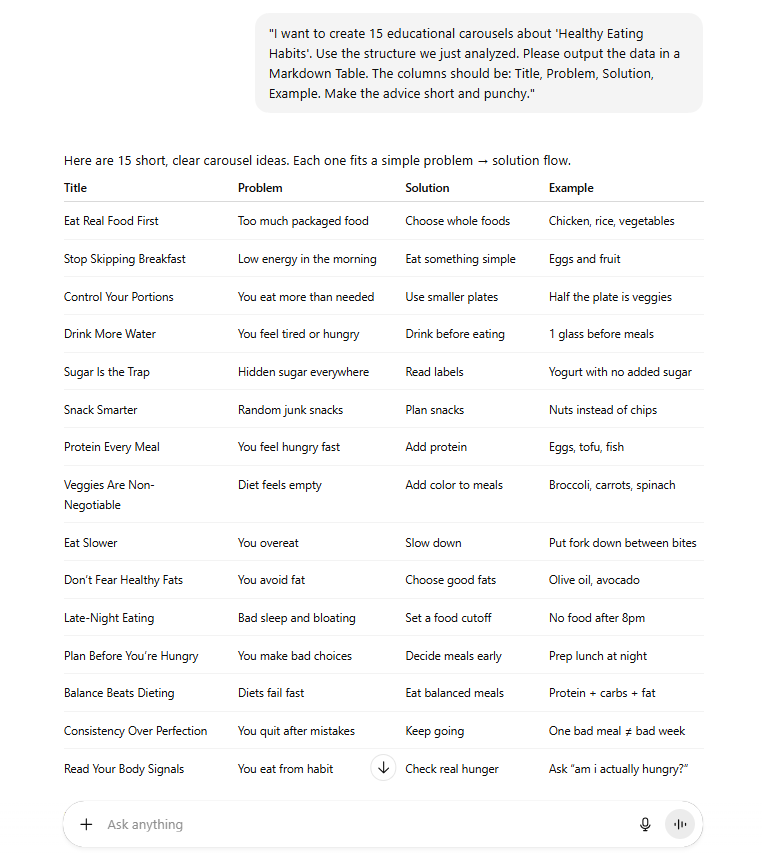
ChatGPT will give you a table with all the text you need.
3. Bulk Create In Canva
This is the magic step.
Go to Canva.
Open a Carousel Template.

Look at the menu on the left side. Scroll down to "Apps" and search for "Bulk Create".

Click "Enter Data Manually".

Paste the table from ChatGPT into Canva.
Right-click on the text elements in your design and select "Connect Data". Connect the Title to the Title column, the Problem to the Problem column, etc.
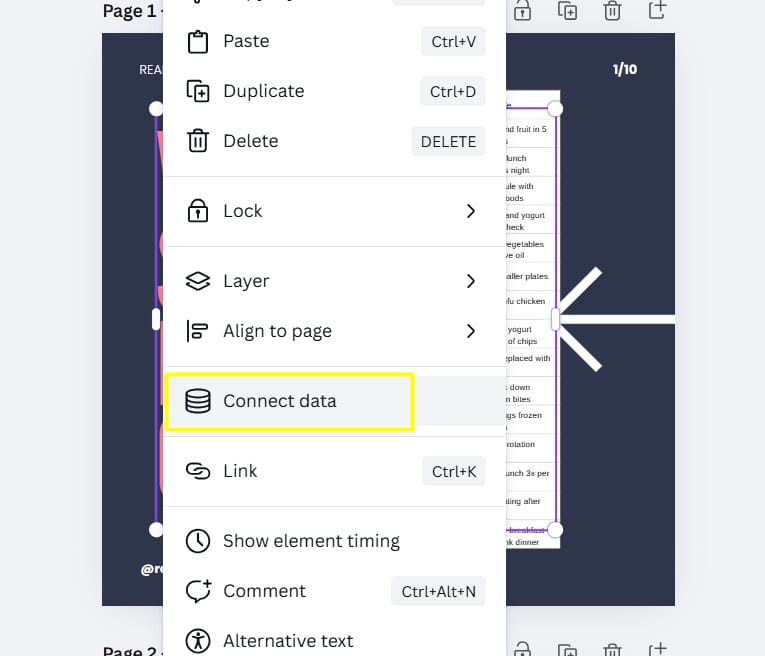
Click "Continue" and then "Generate".
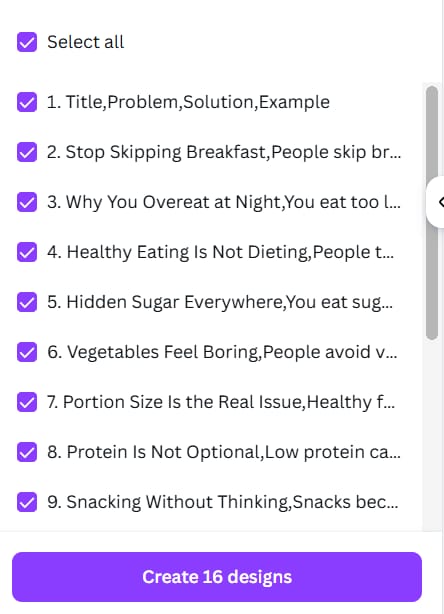
Result: Canva will instantly create pages for all your topics. Download them as PDF or Images. Just like that, you have 15 educational Carousels ready to go. (Progress: 27/33)
Part 5: How Does AI Content Creation Simplify Image Posts?
Sometimes, a single image is enough. We want to make simple "Infographics" that compare two things. For example: "What people think success looks like vs. What it actually looks like."
1. Brainstorming Ideas
Ask ChatGPT for ideas:
"I need 10 ideas for 'Expectation vs. Reality' image posts about working from home. Focus on the common struggles people face."
2. Writing The Image Prompts
Once you pick the best ideas, ask ChatGPT to write a prompt for an image generator.
"Write a detailed image generation prompt for the idea: 'Working from home looks relaxing vs. Working from home is chaotic'. The style should be minimal, flat vector art, with soft colors."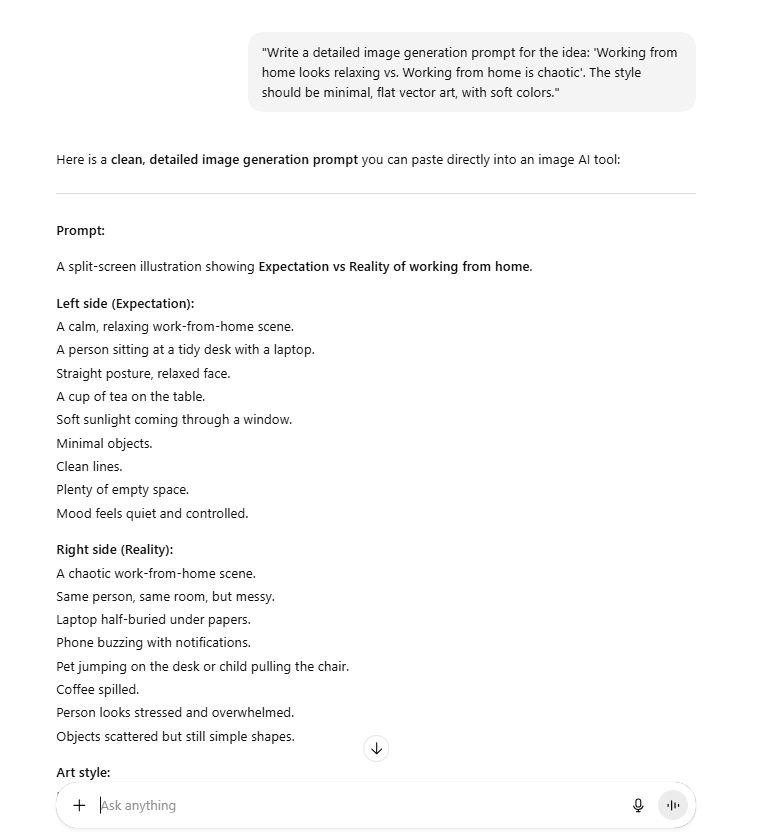
3. Creating The Art
Copy that prompt and paste it into an AI art tool. You can use:
DALL-E 3 (Inside ChatGPT Plus)
The Magic Media tool inside Canva.
Result: You will get unique, professional graphics in seconds. Generate 6 variations that match your brand style. Now, you have your final 6 Image Posts. (Progress: 33/33 - Complete!)
Part 6: Why Is Scheduling Vital For AI Content Creation Success?
Congratulations! You have officially crossed the finish line. Look at your folder now, it is full of 33 pieces of content created in record time.
12 Reels
15 Carousels
6 Image Posts
But if you stop here, you will fail. You must schedule them. Do not try to post manually every day. You will forget.
Create a folder on your computer. Name your files clearly.
Day 01 - Reel - Productivity Hack.mp4Day 02 - Carousel - Morning Routine.pdfDay 03 - Image - Home Office Reality.png
You need a tool that posts for you automatically. There are many good options:

Vista Social (Great features)
Buffer (Simple to use)
Later (Good for Instagram)
Feature | Vista Social | Buffer | Later |
Best For | Power Users & Agencies (Maximum features) | Beginners (Simplicity first) | Visual Creators (Instagram/TikTok focus) |
AI Features | Deep AI integration (Captions, ideas, translation) | AI Assistant (Rephrasing, basic ideas) | AI Caption Writer (Simple helper) |
Bulk Publishing | Excellent (Supports CSV bulk upload - Best for this workflow) | Good (Manual queue system) | Visual drag-and-drop focus |
Key Strength | All-in-one platform with advanced analytics | Clean, minimalist interface that is easy to learn | Visual Planner (Preview your grid before posting) |
Free Plan | Limited features | Generous (Up to 3 channels) | Limited (Focus on paid tiers) |
Upload all 33 files. Drag and drop them onto the calendar. Set them to post at the same time every day.
Pro Tip: Mix them up. Do not post 5 Reels in a row. A good pattern is:
Monday: Reel
Tuesday: Carousel
Wednesday: Image
Thursday: Reel
Friday: Carousel
Saturday: Reel
Sunday: Carousel
Part 7: What Common AI Content Creation Mistakes Should You Avoid?
Even with these powerful tools, you can still make mistakes. Here is how to stay safe.
1. Don't Be a Robot
AI is a tool, not a human. Sometimes ChatGPT sounds stiff or boring. Always read the text before you use it. If it sounds robotic, change a few words. Make it sound like you.
2. Quality Over Speed
I promised you speed, and that is important. But quality is more important. If a Reel looks blurry, or if a Carousel has bad advice, do not post it. It is better to have 20 great posts than 30 bad ones.
3. Check the Facts
AI can sometimes make things up. If ChatGPT gives you a statistic or a quote, quickly check on Google to make sure it is real. You want to be a trusted expert.
Final Thoughts: Start Your AI Content Creation Journey Today
You now have the exact roadmap. You know how to find winning ideas, how to make three types of content, and how to schedule them.
In 2025, the creators who win are not the ones working the hardest. They are the ones working the smartest. By using this AI Content Creation system, you free up your time. You can spend that time talking to your followers, building your business, or just relaxing.
Do not overthink it. Just try it for one month.
Open ChatGPT.
Find your pillars.
Make the content.
You have the plan. Now, go create.
If you are interested in other topics and how AI is transforming different aspects of our lives or even in making money using AI with more detailed, step-by-step guidance, you can find our other articles here:
Business Strategy: If We Started A Business in 2026, We'd Ignore all the Noise & Do This Instead
GPT-5.2 Cheat Sheet: 10 Mega Prompts That Make You Outsmart Every Other OpenAI User
Detailed Guide: How To Automatically Get Unlimited High-Quality LinkedIn Jobs*
Prompt Engineering Automation: Build a Mini AI Assistant with n8n
Discover My Ultimate AI Tools Productivity Kit for 2024*
*indicates a premium content, if any
How useful was this AI tool article for you? 💻Let us know how this article on AI tools helped with your work or learning. Your feedback helps us improve! |
Reply