- AI Fire
- Posts
- 🤖 Ultimate Guide to New "Ralph Wiggum" Agent Tricks Making Claude 10x Better
🤖 Ultimate Guide to New "Ralph Wiggum" Agent Tricks Making Claude 10x Better
Automated coding is here. Learn how the Ralph agent builds features overnight using a simple loop. No more staring at screens all day long, try it.

Neil Phan
January 16, 2026

TL;DR
The "Ralph Wiggum" Agent introduces a new method for automated coding where AI acts as a junior developer, tackling one small task at a time in a loop. By breaking projects into specific "User Stories" stored in a JSON file and enforcing rules via an "agents.md" handbook, the AI writes, tests, and saves code automatically while you sleep.
This approach solves the common issue of AI forgetting context by resetting its memory after each task, ensuring cleaner, bug-free code for both founders and experienced developers.
Key points
Concept: Treat AI as a "Junior Developer" that completes one small task, forgets it, and moves to the next.
Tool: Use Visual Studio Code to run the Ralph script, which connects to models like Claude or GPT-5.
Method: Define clear tasks in JSON and project rules in agents.md for consistent results.
Critical insight
If your plan (PRD) is messy, the code will be messy; specific instructions are the only way to prevent AI from guessing wrong.
If an AI agent could code while you sleep, would you hire it? 🌙 |
Table of Contents
Introduction
Recently, a developer named Ryan Carson shared a concept that is going crazy on the internet. He calls it the "Ralph Wiggum" Agent. It is a new way to use automated coding to build apps without you staring at the screen all day.
People are talking about this because it changes how we work with AI. Usually, when we use AI to code, we have to babysit it. We have to correct its mistakes constantly.
But this new method is different. It treats the AI like a real worker. It gives the AI a list of small jobs, and the AI does them one by one.
In this guide, I will show you exactly how this works. We will look at how to set it up, how to write the instructions, and how to get the best results.
Whether you are a business owner or a coder, automated coding can help you move faster. Let's dive in.
Step 1: Understanding Automated Coding and Why It’s Going Viral
Automated coding is going viral because it solves the "context window" problem where AI gets confused by large, complex requests.
Ryan Carson's "Ralph Wiggum" Agent treats the AI like a junior developer, assigning it one small task at a time in a loop: pick a task, write code, test it, save it, and reset. This method ensures the AI stays focused and produces cleaner code without the constant need for human babysitting.

Key takeaways
Problem: AI gets confused when asked to build an entire app at once.
Solution: The "Junior Developer" method assigns one small task at a time.
Process: The loop is Pick -> Code -> Test -> Save -> Reset.
Benefit: Reseting memory after each task prevents confusion and bugs.
To understand this method, we first need to look at why normal AI coding can be frustrating. Usually, you might go to ChatGPT and paste a huge request.
You might say, "Build me a website for my coffee shop." The AI tries its best, but it often gets confused. It might forget things you said at the beginning. The code might break.
This happens because the 'context window' (the amount of information the AI can hold at once) gets full. This is a classic trap that keeps most people stuck, whereas the real pros are learning to stop being normal GPT users to unlock actual results, whether in coding or cash flow.
1. The "Junior Developer" Idea
Ryan Carson’s approach to automated coding solves this problem. Instead of asking for everything at once, we treat the AI like a "Junior Developer." Imagine you hire a new person who is smart but needs clear instructions.
You would not tell them, "Build the whole app." You would say, "First, build the login button. Then, build the profile page."
The Ralph Wiggum Agent does exactly this. It works in a loop:
It picks one small task.
It writes the code for that task.
It tests the code.
It saves the work.
It forgets the details of that specific task and moves to the next one.
Learn How to Make AI Work For You!
Transform your AI skills with the AI Fire Academy Premium Plan - FREE for 14 days! Gain instant access to 500+ AI workflows, advanced tutorials, exclusive case studies and unbeatable discounts. No risks, cancel anytime.
This loop is the secret sauce of effective automated coding. Because the agent "resets" after every task, it always has a fresh mind.
It does not get confused by old conversations. It focuses 100% on the current task. This means fewer bugs and better code. When I saw this process, I realized it is much more reliable than just chatting with a bot.
Step 2: How to Start a Good Plan with Automated Coding
You cannot simply ask a computer to "do magic"; you need a Product Requirements Document (PRD) that clearly defines what to build. Vague instructions lead to bad code, so you must write specific rules, like detailing exactly what happens when a "Save" button is clicked.
You can even use another AI to help you draft this plan to ensure it covers all edge cases before coding begins.
Once you master this disciplined planning process, you can apply the exact same logic to build your automated digital empire from zero, turning simple automated tasks into a complete ecosystem.
Key takeaways
Rule: "Garbage In, Garbage Out" - vague plans create messy code.
Document: A PRD outlines exactly what the feature must do.
Detail: define user actions and error states explicitly.
Tip: Ask an AI to help you write the detailed requirements first.
For automated coding to work, you need a plan. In the software world, we call this a PRD (Product Requirements Document). Do not worry about the fancy name. It is just a document that says what you want to build.
1. Writing Your Requirements
The biggest reason automated coding fails is bad instructions. If you are vague, the AI will guess, and it often guesses wrong. You need to be specific.
Here is an example.
Bad Instruction: "Make a user profile page."
Good Instruction:
Create a user profile page. It must show the user's name, email, and photo. There must be an 'Edit' button. When the user clicks 'Save,' the data must update in the database.
Ryan suggests you can even use another AI to help you write this plan. You can tell an AI, "I want to build a feature for uploading images. Please help me write a detailed PRD for this."
2. The "Garbage In, Garbage Out" Rule
If your plan is messy, the code will be messy. You must take time to write down exactly what you want. Think about:
Who is using this feature?
What happens when they click a button?
What happens if there is an error?
When you have a clear plan, automated coding becomes a powerful tool. It takes your words and turns them into real software.
Step 3: Why JSON is Crucial For Automated Coding Success
Once you have your written plan, you need to translate it into a language the computer loves. This language is called JSON. It is a way to organize data. For automated coding, JSON acts as the "To-Do List" for the agent.
1. Breaking It Down Into User Stories
You need to break your big feature into tiny pieces called "User Stories." A user story describes one small action.
For example:
Story 1: User can see the login form.
Story 2: User can type in their email.
Story 3: User sees an error if the password is wrong.
2. The Magic Of Acceptance Criteria

This is the most important part. For every user story, you need "Acceptance Criteria." These are the rules that tell the automated coding agent if it did a good job.
If you just say "Make the button work," the agent doesn't know what "work" means.
But if you say: "Acceptance Criteria: When the button is clicked, it sends a POST request to /api/login and returns a 200 OK status," the agent knows exactly what to test.
Here is what the JSON file might look like for a simple task. You do not need to be a pro coder to understand this structure:
{
  "tasks": [
    {
      "id": 1,
      "story": "As a user, I want to see a navigation bar so I can move between pages.",
      "status": "pending",
      "acceptance_criteria": [
        "The navbar is visible on the top of the page.",
        "It contains links to Home, About, and Contact.",
        "The current page link is highlighted in blue."
      ]
    }
  ]
}
When you feed this file into the automated coding tool, it knows exactly what to do. It reads the criteria, writes the code, and checks if the navbar is blue and has the right links. If you skip this step, the agent will fail.
Step 4: How to Make Your Automated Coding Loop Work
Now we get to the fun part. We have our plan (PRD) and our list (JSON). We are ready to run the script. Ryan has shared a repository on GitHub that contains the code to run this agent. When you run it, the automated coding process begins.

To use automated coding, you do not chat on a website. You work directly on your own computer. Specifically, you will use software called Visual Studio Code (VS Code) to open your project folder and run the Ralph script (a file ending in .py).
Here is what actually happens on your computer screen:
#1: Picking The Task
You open VS Code and turn on the Terminal window. You type a simple command, for example: python ralph.py.

As soon as you hit Enter, this script file (which is the Agent) starts running. It automatically opens the tasks.json file sitting inside your computer folder.
It looks for any line that says "pending" (not done yet). At this point, it reads the request you wrote and puts on "blinders" to focus only on that one specific task.
#2: Writing And Testing
Now, you do not need to type anything. The script on your machine silently sends a request to the Claude or GPT-5 API (using the key you set up).
The Agent reads the existing code files in your folder to understand the context.
Then, it automatically creates new files or writes more code into old files right inside your VS Code. You will see the code files change right before your eyes without touching the keyboard.
It also runs checks (tests) right on your machine to see if the button works or if the color has the correct hex code you asked for. If it is wrong, it fixes the file itself.
#3: The Agent Saves The File (Git Commit)
This is the cool part. After the Agent sees the code is running well on your machine, it automatically runs a Git Commit command (a command to save the version).
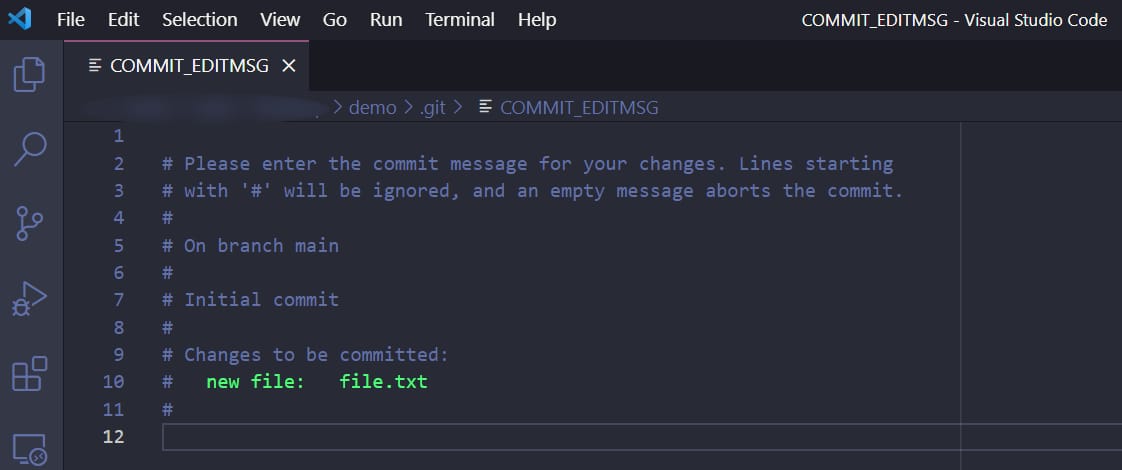
This means the Agent has packed that work up neatly. If the Agent breaks something later, you just use Git to go back in time to this exact moment. Everything happens automatically in the background.
#4: The Loop And The Reset
After saving, the Script opens the tasks.json file on your machine again and changes the status of the task just done to "completed".
Most importantly: The Script will turn off its short-term memory about the old task. It returns to a blank slate state to prepare for the next task.
This loop keeps going on your computer: Read JSON file → Write Code into file → Save Git → Forget → Do next. You can leave your computer running, go to sleep, and the Script will just keep running until the list in the JSON file is finished.
Step 5: Memory Systems You Need For Automated Coding
You might wonder, "If the agent forgets everything after each task, how does it know how to code in my style?" This is a great question. Ryan explains that successful automated coding requires two types of memory.
1. Long-Term Memory (agents.md)
You need a file in your project called agents.md. Think of this as the "Employee Handbook." It contains rules that never change.
Inside this file, you write things like:
"We use Python for the backend."
"Always add comments to your code."
"Use this specific library for styling."
"Do not delete user data."
Every time the agent starts a new task, it reads this handbook first. This ensures that even though it has a "fresh mind," it still follows your company rules.
2. Short-Term Memory (progress.txt)
There is also a file called progress.txt. This is like a sticky note on the desk. After the agent finishes a task, it writes a quick summary here.
"I just finished the login button."
"I noticed the database connection is set up."
"Next, I need to work on the logout function."
When the agent starts the next task, it reads this note. It helps the agent connect the dots between the last job and the current job. This combination of long-term rules and short-term notes makes automated coding feel seamless.
Step 6: How to Set Up Automated Coding On Your Computer
You are probably excited to try this. The good news is that you can start today. You do not need a fancy computer, but you do need access to an AI model like Claude (by Anthropic) or GPT-5 (by OpenAI).
Ryan released the code for the Ralph agent on GitHub. You will need to download this code. It is a script that connects your computer to the AI.
Then just set up your environment:
Get an API Key: You need to sign up for an API key from Anthropic or OpenAI. This allows the script to "talk" to the smart AI models.
Install the Script: Follow the instructions in the GitHub repository. You will usually run a command in your terminal.

Prepare Your Files: create your
agents.mdfile with your rules. Create your JSON file with your tasks.
I should mention that automated coding is not free. Every time the agent reads your code and writes new code, it costs "tokens." A token is a small unit of text.
Ryan says that building a simple feature might cost a few dollars. Compared to hiring a human developer, this is very cheap. But be careful, if you have a massive project, the costs can add up. Start with something small to test it out.
Step 7: Avoid Common Mistakes In Automated Coding
I have tried using agents like this, and I have made mistakes. I want to help you avoid them so you can have a better experience with automated coding.
Mistake 1: Being Lazy With Criteria
Do not write "Make it look good." The AI does not know what "good" means. It might make your website bright pink. You must be specific: "Use the color hex #336699 for the background." If you are lazy with your instructions, the result will be poor.
Mistake 2: Making Tasks Too Big
If a single task in your JSON file is "Build the entire dashboard," the agent will fail. It is too much information for one loop. You must break it down.
Task A: Build the header of the dashboard.
Task B: Build the sidebar.
Task C: Build the chart widget.
Small tasks are easy for automated coding agents to handle.
Mistake 3: Not Reviewing The Code
Ralph is like a junior developer. He works hard, but he is not perfect. You should not just deploy the code to your customers immediately. You need to review it. Look through the changes. Test it yourself. Automated coding creates a great "first draft," but you are still the manager. You need to give the final approval.
Step 8: Use Automated Coding to Improve Your Daily Work
You might think, "I am not a coder, is this for me?" Or "I am a pro, do I need this?" The answer is yes. Automated coding is helpful for everyone because it handles the boring stuff.
For Founders And Entrepreneurs
If you have an idea for an app but cannot code well, this is a superpower. You can focus on the business logic. You decide what the app should do. Then, you let the agent handle the how. It allows you to build prototypes very quickly. You can test your ideas without spending thousands of dollars on a development agency.
For Experienced Developers
If you are already a coder, you know that some tasks are boring. Writing form validations, setting up database tables, or creating basic API endpoints is repetitive. Automated coding can take these tasks off your plate.
You can write the specs for the boring stuff and let Ralph build it while you sleep. When you wake up, the boring work is done, and you can focus on the hard, interesting problems. Ryan uses this method himself to speed up his own startup work.
Step 9: See the Future Of Automated Coding (Optional)
We are just at the beginning of this technology. Right now, we have agents like Ralph that follow a list. In the future, automated coding will get even smarter.
Self-Correcting Agents
Soon, agents will be better at finding their own bugs. If the code does not work, the agent will search the internet, read documentation, and fix the problem without you asking.
Collaborative Agents

Imagine having a team of agents. One agent writes the code. Another agent reviews the code for security. A third agent designs the interface. This "team" of automated coding bots could build complex software much faster than a single human.
However, humans will always be needed. We are the ones with the vision. We understand what users want. The AI is just a tool to help us build that vision.
Conclusion
The Ralph Wiggum Agent and the concept of automated coding are exciting developments. They turn the complex, messy process of coding into a structured, manageable workflow. By breaking big projects into small stories, using clear acceptance criteria, and leveraging the power of loops, we can build software faster and with less stress.
It requires some work upfront. You have to write good plans. You have to learn how to structure your JSON files. But the payoff is huge. Imagine going to bed with a to-do list and waking up with a finished product. That is the power of this method.
I encourage you to try it. Start with a very small project. Maybe build a simple calculator or a personal website. See how it feels to have an AI partner working for you. The future of building software is here, and it is automated.
If you are interested in other topics and how AI is transforming different aspects of our lives or even in making money using AI with more detailed, step-by-step guidance, you can find our other articles here:
Master AI Marketing: Build Your 24/7 Digital Assistant Without Code!
Earn Money with MCP in n8n: A Guide to Leveraging Model Context Protocol for AI Automation*
Transform Your Product Photos with AI Marketing for Under $1!*
The AI Secret To Reports That Clients Actually Implement
*indicates a premium content, if any
How would you rate the quality of this AI Workflows article? 📝 |
Reply