- AI Fire
- Posts
- 🚀 Step-by-Step Guide to Build Your Automated Digital Empire From Zero with Google AIs
🚀 Step-by-Step Guide to Build Your Automated Digital Empire From Zero with Google AIs
Google AI Tools are quietly replacing expensive software. Learn the exact process to launch high-demand digital assets without spending any money.

Neil Phan
January 13, 2026

TL;DR
Online business moves fast, but you can catch up by leveraging free Google AI tools to build a digital store from scratch. This guide replaces guesswork with data using NotebookLM for research, creates a 24/7 marketing team with Gemini Gems, and designs pro-level visuals with Google Flow. By following a structured 7-day plan from niche selection to launching on Gumroad, you can build a validated, automated business without needing advanced coding or design skills.
Key points
Research: Use NotebookLM to analyze negative competitor reviews and find profitable market gaps.
Marketing: Create specialized Gemini Gems to write on-brand emails and scripts automatically.
Creation: Build interactive web apps (not just PDFs) using Google AI Studio to capture leads.
Critical insight
Most beginners fail because they guess what people want; success comes from using AI to validate the "Big Gap" in the market before building anything.
Stuck doing the "robot's work" manually? 🤔 |
Table of Contents
Do you ever feel like the world of online business is moving too fast? You see people making thousands of dollars selling simple PDFs or spreadsheets, and you think, "I could do that, but I don't have the time or the skills."
Well, I have good news for you. We spent months testing a suite of Google AI tools that most people don't even know exist. These aren't just your standard search engines.
These are high-level business tools that can plan, create, market, and even code for you. The best part? They are free.
In this deep-dive guide, I am going to walk you through the exact system I used to launch a digital store from scratch. We aren't just going to talk about ideas; we are going to build a real business using Google AI tools.
The best part is that you don't need a developer background anymore, as it's now possible to create entire software systems with zero technical debt using the same advanced AI agents that are reshaping how digital entrepreneurs operate today.
Part 1: How Can You Plan A Profitable Niche Using Google AI Tools?
Stop guessing what products will sell and use NotebookLM to analyze real market data. By uploading "prime research" such as negative competitor reviews from Amazon and trend articles - into the AI, you can identify the exact complaints customers have.
This allows the AI to generate a "Million Dollar Blueprint" that targets specific gaps in the market, ensuring you build a product people are actually begging for.
Once you learn to dominate your niche with data, you’ll realize that upgrading to elite AI skills is the fastest way to skip the traditional career path and make your digital operations even more profitable this year.
Key takeaways
Tool: NotebookLM is "source-grounded," meaning it relies only on the data you feed it.
Strategy: Copy negative reviews to find what is missing in the current market.
Prompt: Ask the AI to "stress test" your idea to find failure points early.
Outcome: A validated 30-day launch plan based on facts, not guesses.
The biggest mistake most beginners make is "guessing." They guess what people want to buy. They guess what the price should be. Most of the time, they guess wrong. You don't have to make that mistake. By using NotebookLM, you replace guesswork with data, ensuring you build exactly what the market is asking for.
1. What Is NotebookLM And Why Is It Your Secret Weapon?

NotebookLM is different from other AI because it is "source-grounded." This means it only knows what you tell it. If you feed it bad information, it gives bad advice. But if you feed it high-quality market research, it becomes the smartest business consultant you’ve ever met.
Using this specific tool in the Google AI tools family allows you to organize thousands of pages of research in seconds. It can find patterns that a human would miss in a week of reading.
2. How To Gather Prime Research For Your AI
To start, you need to feed the brain. Go to NotebookLM and create a new notebook. Let’s find three things:
Competitor Reviews: Go to Etsy or Amazon, find a product like the one you want to make, and copy the negative reviews. Paste them into a Doc. Why negative? Because they tell you what is missing in the market.
Industry Trends: Find a recent blog post about your niche (e.g., "Digital Planning Trends 2026").

Upload these as "Sources" in NotebookLM. This grounds the AI in actual market data, allowing it to pinpoint specific customer pain points immediately.
Learn How to Make AI Work For You!
Transform your AI skills with the AI Fire Academy Premium Plan - FREE for 14 days! Gain instant access to 500+ AI workflows, advanced tutorials, exclusive case studies and unbeatable discounts. No risks, cancel anytime.
3. Creating The "Million Dollar Blueprint" (Prompt Included)
Now, let's talk to the AI. Use this detailed prompt to get a plan that actually works:
"I have uploaded research about the digital planning niche. Based only on these sources, identify the 'Big Gap' in the market. What is one product that customers are begging for but no one is making well?

Then, create a 30-day launch plan. Include 4 weekly goals, a suggested product name, and a 'Value Proposition' that explains why my product is better than the competition."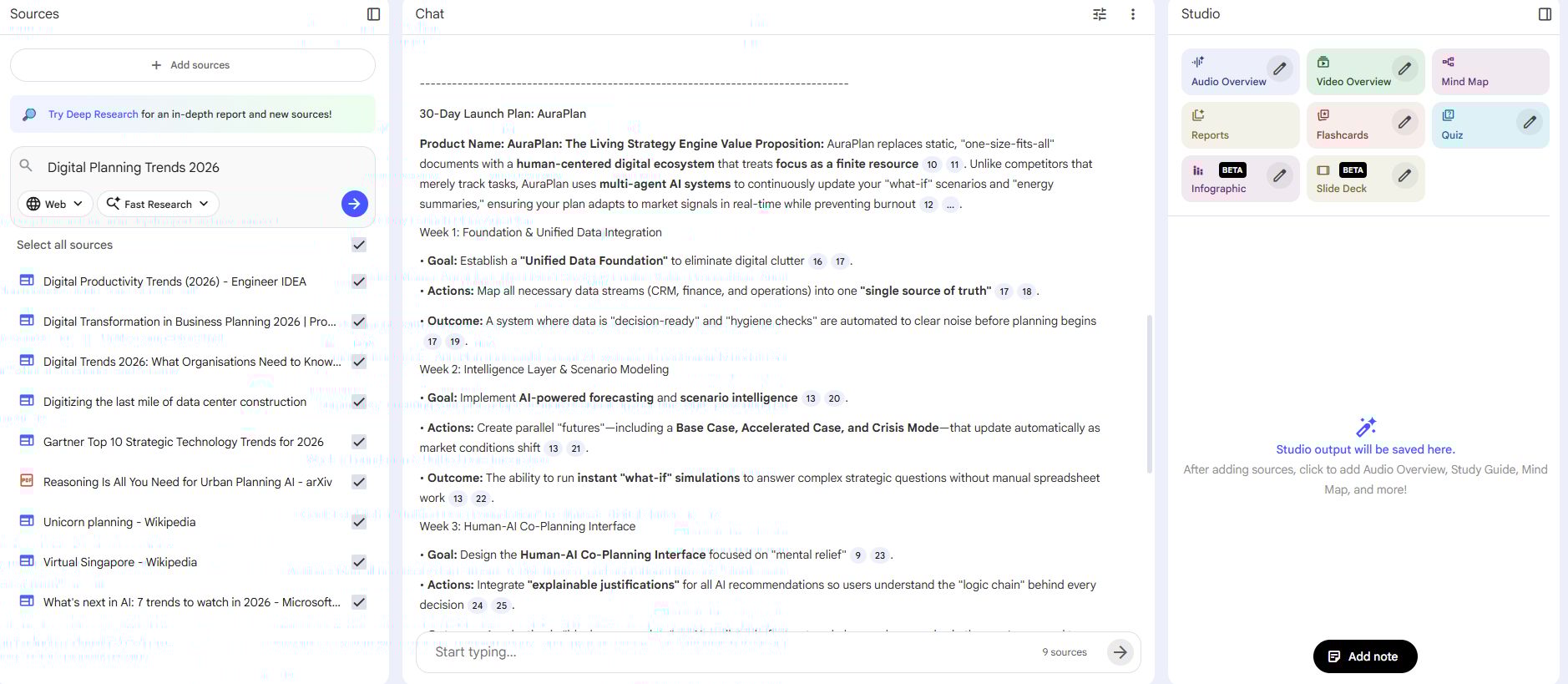
4. Refining Your Business Goals
Once the AI gives you a plan, don't stop there. Ask it to "stress test" the idea. I often ask: "What are the three biggest reasons this product might fail, and how can I prevent them?"
This step has saved me hundreds of hours of wasted effort. By the time you finish this section, you walk away with a fully validated business plan powered by Google AI tools.
Part 2: How Do You Create A 24/7 Marketing Team With Google AI Tools?
Instead of writing every email yourself, use Gemini’s "Gems" feature to build dedicated AI employees, such as an "Email Marketing Gem" or "TikTok Script Gem." By uploading your Business Blueprint into the Gem's knowledge base, you ensure the AI understands your specific product and audience.
This allows you to generate a month's worth of on-brand, high-quality content in just 10 minutes without the generic "robot voice." This seamless consistency is only possible when you move beyond basic prompts and start using context engineering hacks that force the AI to think logically and mirror your specific human style in every single response.
Key takeaways
Feature: Gems are custom AI assistants with specific roles and knowledge.
Setup: Upload your business plan so the AI knows exactly what it is selling.
Efficiency: Create weeks of Instagram captions and emails in one sitting.
Benefit: You maintain a consistent brand voice without hiring a human team.
You’ve got your plan. Now you need to sell. But writing marketing emails and social media captions is boring and time-consuming. This is where Gemini and the new "Gems" feature comes in.
1. The Power Of Personalized AI Assistants
Think of a "Gem" as a dedicated employee. You can create a Gem that only does one thing. For example, I have an "Email Marketing Gem" and a "TikTok Script Gem." They are part of the Google AI tools ecosystem designed to keep your brand voice consistent.
2. Step-By-Step: Building Your First Marketing Gem
Go to the Gemini website and look for the "Gems" button. Click "Create New Gem." You need to give it a "System Instruction." This is the "brain" of your assistant.
System Instruction Example:
You are an expert Direct Response Copywriter. Your job is to help me sell my 'Ultimate Stock Market Journal.'

You write in a style that is urgent but trustworthy. You never use corporate jargon. Every piece of content you write must focus on the benefit of 'Financial Freedom.'

When I give you a topic, always provide:
1. A catchy headline
2. A short story
3. A strong Call to Action (CTA).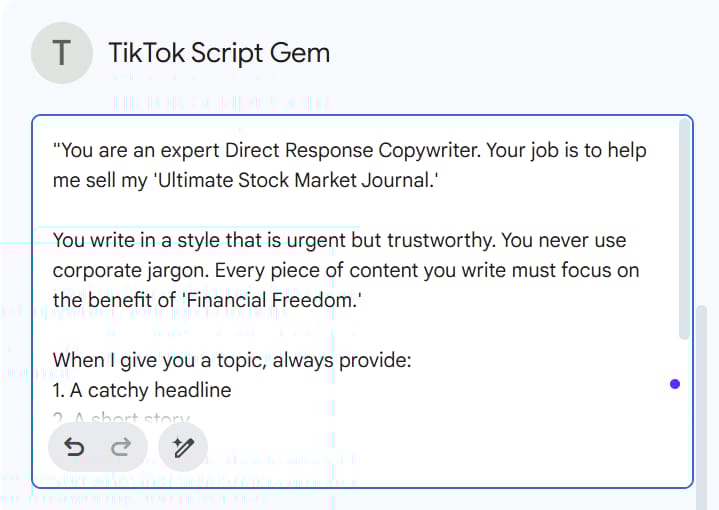
3. Connecting Your Knowledge For 10x Better Results
In the Gem settings, look for the "Knowledge" section. This is where the magic happens. You can upload the Business Blueprint you made in Part 1.
Now, your marketing assistant knows exactly what your product is and who you are selling to. It won't give you generic "marketing-speak." It will give you content that actually sells your specific product.

4. Scaling Your Content Production
With your Gem set up, you can now generate a month's worth of content in 10 minutes.
Monday: "Write 5 Instagram captions about why traditional budgeting fails."
Wednesday: "Write a 3-part email sequence for my product launch."
Friday: "Create a script for a 15-second TikTok showing the inside of my spreadsheet."
Using Google AI tools like this ensures you are always "present" on social media without actually having to be there.
Part 3: How Can You Design Pro-Level Ads Using Google AI Tools?
You can have the best product in the world, but if your ad looks like it was made in 1995, no one will click it. For a long time, I struggled with graphic design. Then I found Google Flow and the Nano Banana Pro model.
1. Why Nano Banana Pro Is Different From Other AI
While Nano Banana Pro serves as the powerhouse for high-end graphic design with superior lighting and texture control, the newly released ChatGPT Image 1.5 is also an excellent contender for quick, on-the-fly edits. To help you choose the right engine for your needs, we have published a detailed comparison breakdown of both models.
2. The "Mirror Method" For Successful Ads
Don't try to reinvent the wheel. Go to the Facebook Ad Library and look for "Winner Ads." These are ads that have been running for a long time.

Step 1: Save a screenshot of a winning ad in your niche.
Step 2: Take a screenshot of your own digital product (the cover of your eBook or a page of your spreadsheet).
Step 3: Upload both to Nano Banana.
3. The "Perfect Ad" Prompt
Use this prompt to combine your product with a winning layout:
"I have provided two images. Image A is a successful ad layout. Image B is my actual product. Please generate a new marketing image that uses the professional layout of Image A but features my product from Image B. Ensure the lighting is bright and modern. Add text that says 'Start Your Journey Today' in a clean, sans-serif font."
4. Optimizing For Different Platforms
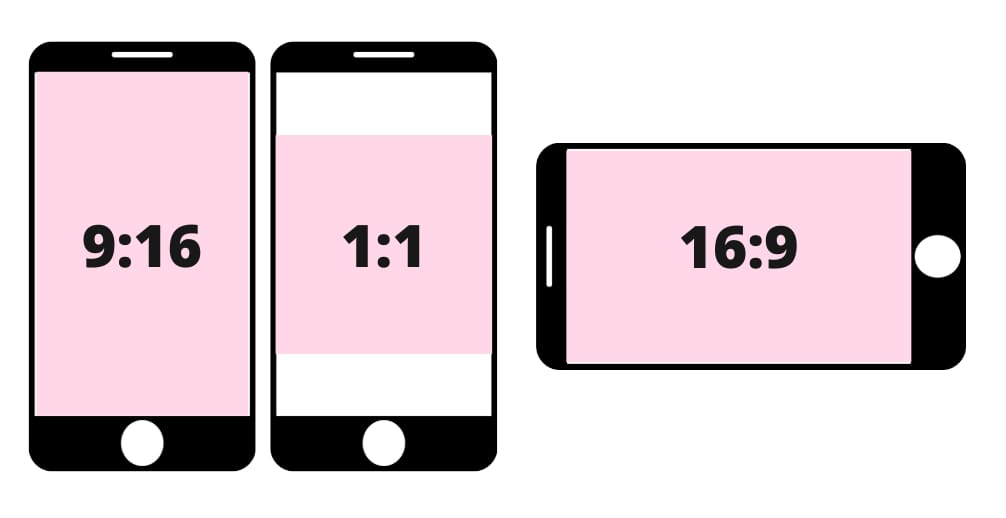
Nano Banana Pro allows you to choose your resolution.
Square (1:1): Perfect for Instagram and Facebook feeds.
Portrait (9:16): Essential for TikTok, Reels, and YouTube Shorts.
Landscape (16:9): Best for YouTube thumbnails and website banners.
I always create at least three versions of every ad. Testing is the only way to know what works. With these Google AI tools, you can create a year's worth of ad variations in an afternoon.
Part 4: Can You Automate Your Brand "DNA" With Google AI Tools?
One of the hardest parts of running a business is staying "on brand." If your Instagram is pink, your website is green, and your emails are blue, your customers will get confused. Confusion is the enemy of sales. Pomelli is the answer. Click the link for the full step-by-step guide, or read on for a quick workflow summary.

1. Creating Your "Business DNA"
Pomelli is an experimental tool in the Google AI tools suite. It doesn't just create posts; it learns your "DNA." When you give it your product description or website URL, it analyzes your:
Colors: It picks the exact hex codes that match your brand.
Fonts: it identifies which fonts look best for your audience.
Voice: It understands if you are "funny and casual" or "serious and professional."
2. Generating A "Smart Campaign"
It will generate a series of images that all look like they belong to the same family. This creates a "Brand Presence" that makes you look like a much larger company than you actually are.
Part 5: How To Build Custom Apps (Without Coding) Using Google AI Tools?
This is where we go from "Digital Product Creator" to "Tech Entrepreneur." Most people sell PDFs. That's fine. But if you want to charge more and rank higher on Google, you need interactive tools. Google AI Studio makes this possible for anyone.
1. Why An App Is Better Than An eBook
A PDF is static. An app is a solution. If I give you a PDF about how to save money, you might read it. If I give you a "Savings Goal Calculator" that tells you exactly when you can buy a house, you will use it. Useful things get shared. Shared things get sales.
2. The "Vibe Coding" Revolution
Google AI Studio uses a concept called "Vibe Coding." You describe the "vibe" and the function, and the AI builds it. You don't need to know Python or Javascript. You just need to be good at describing things.
3. Building A "Lead Magnet" App
Let's build a tool to get people's email addresses. Go to Google AI Studio and use this prompt:
"I want to build a simple web tool called 'The Debt-Free Countdown.' The user should enter their total debt, their interest rate, and how much they can pay per month. The app should then display a big, bold number showing exactly how many months until they are debt-free. It should also show a bar chart of their progress. Use a clean, 'Apple-style' design with white backgrounds and green buttons. Give me the code in a single HTML file."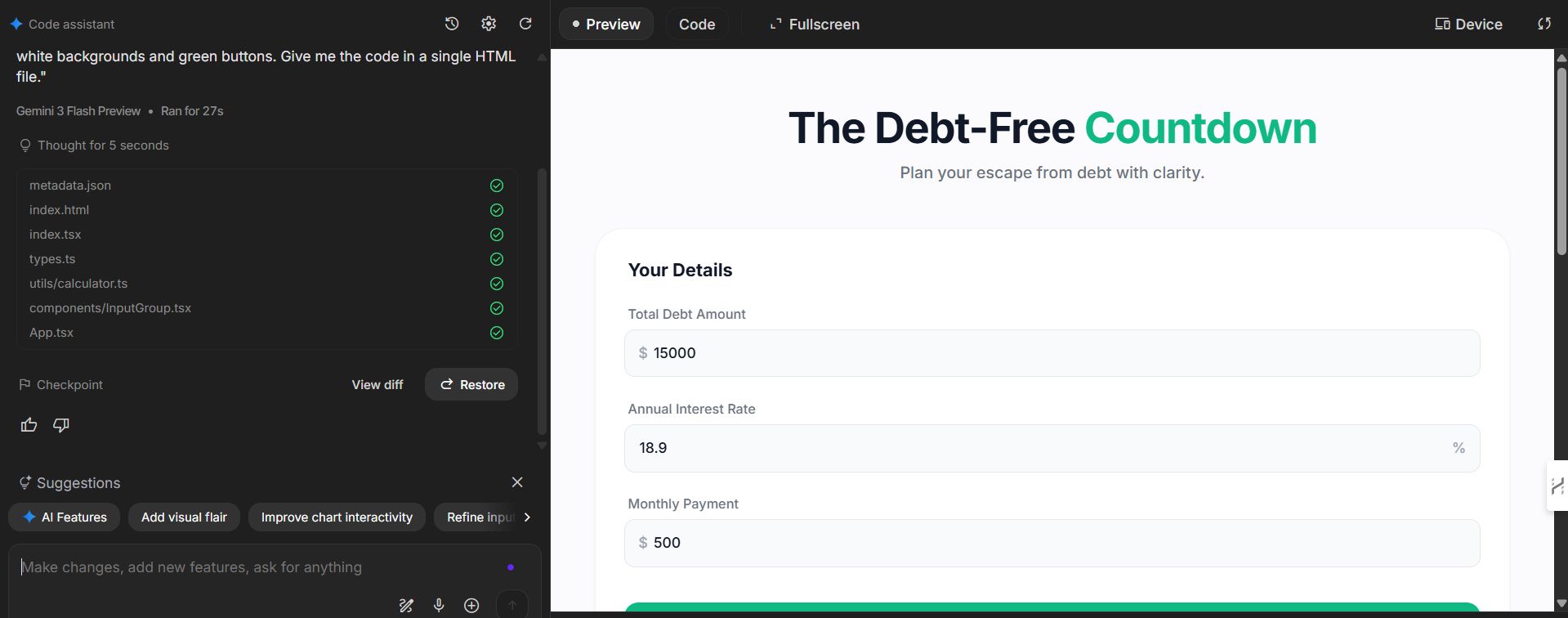
4. How To Use Your New Tool
Once the AI gives you the code, you have a functional app. You can:
Embed it on your website: This keeps people on your site for 5–10 minutes, which is amazing for SEO.
Use it as a 'Lead Magnet': "Use my free Debt Calculator (Link in bio!)"
Sell it: People will pay for access to high-quality, specialized calculators.
This is the most advanced way to use Google AI tools to dominate your niche.
Part 6: Where Should You Host and Sell Your Products?
You have the product, the marketing, and the tools. Now, where do you put them? Choosing the right platform is like choosing the right location for a physical store.
1. The "Big Three" Selling Platforms
Platform | Pro | Con | Best For |
Etsy | They send you customers for free. | They take a lot of fees. | Physical-style digital goods (Printables). |
Gumroad | Very fast to set up (under 5 mins). | You have to find your own customers. | eBooks, software, and spreadsheets. |
Shopify | You own everything. You look professional. | Monthly cost ($39+). | Building a long-term brand. |
2. My Recommendation For Beginners
If you are just starting, start on Etsy or Gumroad. Use the Google AI tools we discussed to make your store look amazing, but don't worry about building a complicated website yet. Focus on making your first $100. Once you have $100, you know your product works. Then you can scale to Shopify.
3. Pricing For Profit
Don't undersell yourself. Many people price their products at $1. Don't do that.
Small (The "Taster"): $9 - $14. This is for a single checklist or a small guide.
Medium (The "System"): $27 - $47. This is for a full spreadsheet system or a multi-part guide.
Large (The "Transformation"): $97 - $197. This is for a course with videos and interactive tools.
Pro Tip: These tiers are just a starting point. To pinpoint the perfect price, you need to analyze competitor rates and calculate your exact costs. We recommend using Perplexity to automate this market audit. Check out our guide 🚀 10 Free Perplexity Agents Are Here. They Do Your Tasks For You to learn how to deploy these agents for deep research.
Part 7: Mastering The "Advanced Workflow" For Long-Term Success
Success doesn't happen overnight, but it happens much faster if you have a system. Here is the exact workflow I recommend you follow every single week.
1. Monday: The "Deep Search": Spend 1 hour in NotebookLM. Look at new sources. What are people talking about this week? Use the Google AI tools to find one new "content gap" you can talk about.
2. Tuesday: The "Creative Sprint": Use your Gemini Gems to write your content. Don't just do one day. Do seven days. Get it all done while you are in the "flow."
3. Wednesday: The "Visual Polish": Head over to Google Flow. Create your ads. Make sure you have at least one video (animated in Pomelli) and one static image (from Nano Banana Pro).
4. Thursday: The "Tech Update": Check your interactive tools. Are they working? Can you add a new feature? Maybe your "Debt Calculator" needs a "Savings Tip" button at the bottom.
5. Friday: The "Analysis": Look at your numbers. Which ad got the most clicks? Which email got the most opens? Feed these numbers back into NotebookLM and ask: "Why did this work, and how can I do it again?"
Part 8: Common Pitfalls And How To Avoid Them
Even with Google AI tools, you can still fail if you make these common mistakes.

1. The "Robot Voice" Trap
If you just copy and paste what the AI says, people will know. AI is great at facts, but it's bad at "soul." Always read what the AI writes and add a personal story. Tell them about the time you struggled with money or the time you failed at a project. People buy from people, not from robots.
2. The "Shiny Object" Syndrome
There are thousands of AI tools. Don't try to use all of them. Stick to the ones in this guide: NotebookLM, Gemini, Flow, and AI Studio. Master these first. Once you are making $1,000 a month, then you can explore other tools.
3. Ignoring The "Customer Journey"
You can't just yell "BUY MY PRODUCT" at people. You have to lead them.
Awareness: They see your cool animated ad on TikTok.
Interest: They use your free calculator to solve a small problem.
Desire: They read your email about how your full product solved your problem.
Action: They click the link and buy.
If you have read this far, you are serious. But reading isn't enough. You have to act. Here is what I want you to do over the next week.
Day 1: Pick your niche. Don't overthink it. Just pick something you know a little bit about.
Day 2: Set up your NotebookLM and upload 5 sources of research.
Day 3: Generate your product idea and 30-day plan.
Day 4: Create your Gemini Marketing Gem and write your first 5 posts.
Day 5: Use Google Flow to create your first product ad.
Day 6: Build a simple "Lead Magnet" tool in AI Studio.
Day 7: Upload your product to Gumroad or Etsy and post your first ad.
Conclusion: The Future Is Yours To Build
The barrier to entry for starting a business has never been lower. In the past, you needed a team of designers, writers, and coders. Today, you just need a Google account and the willingness to learn these Google AI tools.
I’ve spent months testing these tools because I believe they are the future of the "Solopreneur." You can run a global business from your kitchen table. You have the map, the tools, and the plan. All that's left is for you to take the first step.
Remember: The best time to start was last year. The second best time is today.
If you are interested in other topics and how AI is transforming different aspects of our lives or even in making money using AI with more detailed, step-by-step guidance, you can find our other articles here:
Master AI Marketing: Build Your 24/7 Digital Assistant Without Code!
Earn Money with MCP in n8n: A Guide to Leveraging Model Context Protocol for AI Automation*
Transform Your Product Photos with AI Marketing for Under $1!*
The AI Secret To Reports That Clients Actually Implement
*indicates a premium content, if any
How useful was this AI tool article for you? 💻Let us know how this article on AI tools helped with your work or learning. Your feedback helps us improve! |
Reply