- AI Fire
- Posts
- 🤖 Quit Using AI Like Google: 5 Stanford Hacks For 10x Better Answers
🤖 Quit Using AI Like Google: 5 Stanford Hacks For 10x Better Answers
Most people use AI wrong. Learn the 5 context engineering tricks that force ChatGPT to think logically and write in your unique human voice today.

Neil Phan
December 11, 2025
TL;DR BOX
You can improve AI outputs by treating the tool like a junior employee rather than a search engine. Success requires context engineering and specific prompting techniques that force the AI to think logically.
Most users receive generic results because they write vague prompts without sufficient background. This guide explains how to fix that using methods like Chain of Thought reasoning and Few-Shot prompting. You will learn to control output by providing examples and constraints rather than just asking questions. These strategies help you generate personalized writing, solve complex problems, and simulate difficult conversations before they happen.
Key points
Chain of Thought reasoning forces AI to plan its answer before generating text.
Using adjectives to describe tone is less effective than providing actual writing samples.
Ask the AI to interview you for missing information before it attempts to solve a problem.
Critical insight
AI prioritizes helpfulness over honesty, so you must explicitly request harsh feedback or it will validate poor ideas just to please you.
😤 What’s your biggest frustration with AI? |
Table of Contents
Introduction
Have you ever tried to use AI and felt disappointed? You open ChatGPT or Claude, you type in a question, and the answer comes back looking boring. It sounds like a robot wrote it. It does not sound like you.
I used to feel the same way. I would ask AI to write an email, and it would use strange words I never use. I would ask it to solve a problem, and it would give me a wrong answer. I thought the technology was not ready yet.
But I was wrong. The problem was not the AI. The problem was me.
I realized I was talking to AI like it was a search engine, like Google. But AI is not a search engine. It is more like a new person on your team. It is like a very smart, very fast, but very eager intern who wants to make you happy.
To fix this, I decided to test 5 specific strategies developed by researchers at Stanford. At first there was skepticism, but the results were shocking. The quality of the answers didn't just improve, it multiplied. This guide shares those exact Stanford hacks, refined with practical experience, so you can stop searching and start solving.
Let’s start.
Part I: Why Does AI Give Bad Answers?
AI acts like an eager intern who wants to please you, not a factual search engine. It prioritizes being "helpful" over being honest, which often leads it to guess or "hallucinate" answers to fill the silence. To fix this, you must use Context Engineering, which involves providing all necessary background information before assigning the actual task.
Key takeaways
Fact: AI tools are programmed to prioritize user satisfaction over strict factual accuracy.
Comparison: Treat the AI like a new employee on your team, not like Google.
Update note: Hallucinations often occur because the AI is guessing your intent from a vague prompt.
Action: Give the AI the "who, what, and why" inside your head before asking it to write.
AI will unconsciously gaslight you with incorrect information simply because it is programmed to avoid saying "I don't know."
Before we look at the tricks, we need to understand the problem. Why does AI sometimes lie or write bad text?
The only way to stop this 'eager intern' from making things up is to give it a strict framework to work within. You must transition from being a requester to being an architect of information.
If you are ready to stop leaving room for interpretation and start commanding precision, check out Stop Guessing, Start Building: A Guide To Context Engineering. I explain exactly how to build the perfect context so the AI has no choice but to be accurate.
1. The "Eager Intern" Problem
Imagine you hire a new intern. Let's call him Bob. Bob is very nice. He wants you to like him. He wants to keep his job.
If you ask Bob, "Can you finish this big project by tomorrow?" Bob will say, "Yes, absolutely!" even if it is impossible. Bob does not want to say no. Bob does not want to disappoint you.
AI is exactly like Bob.
Tools like ChatGPT or Claude are programmed to be helpful. Even their creators, OpenAI and Anthropic, admit that these models prioritize being 'helpful' over being 'honest’. If you ask a vague question, the AI will guess the answer because it wants to give you something. It hates silence.
This is why AI "hallucinates" (makes things up). It is gaslighting you because it wants to please you.
The real danger lies in the fact that we often believe that fake confidence. Instead of letting AI lead you astray, you need to take control with clearer and tighter commands. To help you avoid these hallucination traps and harness the true power of AI at work, I have written a detailed guide called ChatGPT For Data: From Raw Data To Insight In Minutes. This is your chance to learn how to turn complex spreadsheets into smart business decisions without worrying about accuracy.
2. What Is Context Engineering?
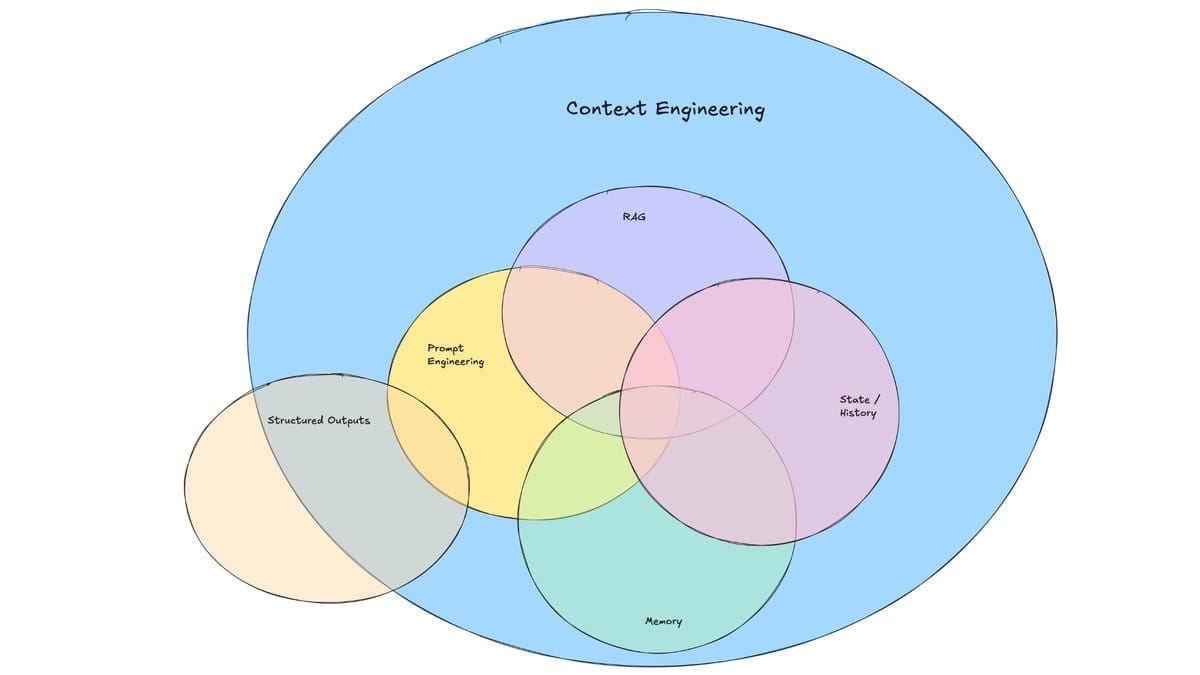
You might hear people talk about "prompt engineering." That sounds hard. I prefer to call it Context Engineering.
Context is the background information.
If I walk up to you and say, "Write a note," you will look at me with confusion. You will ask:
"To who?"
"About what?"
"Should it be angry or happy?"
But if I say to AI, "Write a note," it will just write a generic note because it does not want to ask questions. It guesses your context.
Context Engineering just means giving the AI the background info before you ask it to do the work. You need to tell it what is inside your head. If you do not tell it, it cannot know.
Understanding this difference is the key to scaling your AI usage effectively. If you rely only on prompts, you get lucky once. If you build context, you win every time. To see exactly how these two concepts fight for dominance in your workflow, read Prompt Vs Context Engineering: The AI Battle You Need To Know. It explains why context ensures long term success while prompting only handles the immediate task.
Learn How to Make AI Work For You!
Transform your AI skills with the AI Fire Academy Premium Plan - FREE for 14 days! Gain instant access to 500+ AI workflows, advanced tutorials, exclusive case studies and unbeatable discounts. No risks, cancel anytime.
Part II: How Can I Make AI Think Logically?
AI predicts text one word at a time without planning the full response, which causes it to rush into incorrect answers. You can fix this by using "Chain of Thought" reasoning to force the model to show its work. Simply instruct the AI to walk through its thought process step-by-step before it generates the final solution.
Key takeaways
Fact: Writing out a plan helps the AI predict better subsequent words effectively.
Comparison: It is like asking a student to show their math work rather than shouting a random answer.
Detail: Use the phrase: "Before you answer, please walk me through your thought process step by step."
Action: Review the "thought process" output to catch logic errors before reading the final result.
Forcing the AI to slow down and "think out loud" drastically reduces logical errors and hallucinations.
1. Why Does AI Rush To The Answer?
When AI writes, it predicts one word at a time. It does not plan the whole essay before it starts. It is like speaking without thinking.
If you ask a fast thinker a hard math question, they might shout out the wrong answer. But if you tell them, "Show your work," they will slow down. They will solve step 1, then step 2, then step 3. They will get the right answer.
AI is the same. You need to force it to slow down.
Once you master the art of forcing the AI to show its work, you unlock its true potential for complex business tasks. It is no longer just a chatbot but a reliable engine for productivity. To see how you can apply this disciplined approach to automate heavy workloads like market research or content creation, check out my guide Triple Your Results Without Hiring. 5 Easy AI Use Cases. This is where you move beyond the basics and start using AI to outperform ninety nine percent of your competitors.
2. The Technique
You do not need to learn code. You just need to add one magic sentence to your prompts:
"Before you answer, please walk me through your thought process step by step."When you do this, the AI writes out its plan first. It "thinks out loud." Because the AI uses the words it just wrote to predict the next words, writing out the plan actually makes the final answer smarter.
3. A Real-Life Example
Let's say you want to plan a budget trip to Japan.
Bad Prompt: "Plan a 5-day trip to Japan for me cheap."
The Result:
The AI will give you a generic list of tourist spots. It might list hotels that are actually expensive because it is guessing what "cheap" means.
Good Prompt (Chain of Thought):
"I want to plan a 5-day trip to Tokyo on a tight budget. I like food and history. Before you create the itinerary, please think through the constraints step-by-step. Consider transport costs, cheap food options, and free activities."The Result:
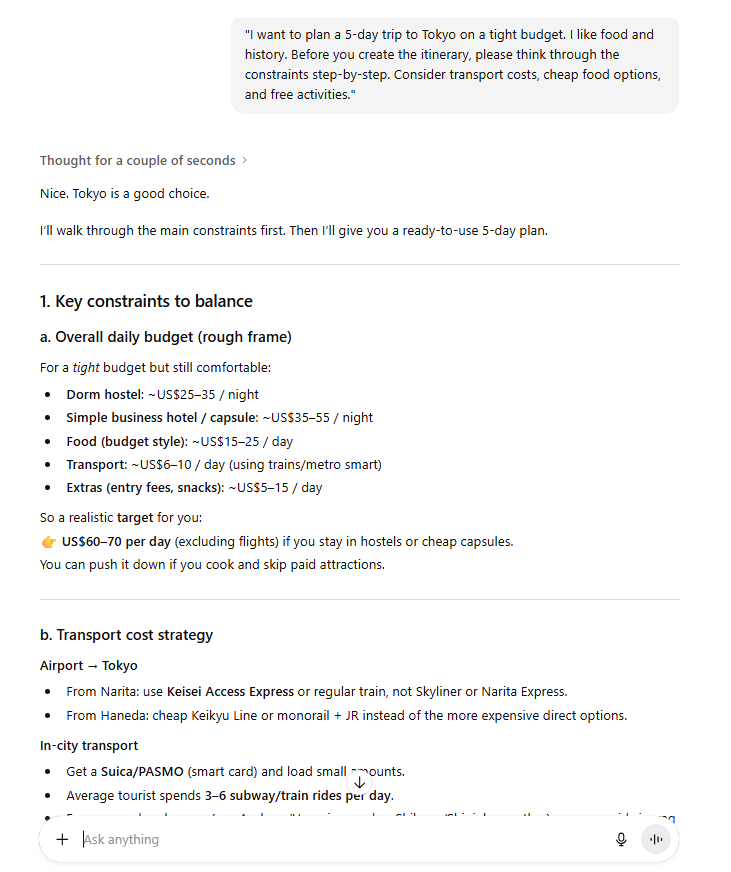
The AI will start by writing:
"Okay, let's look at the budget. Transport is the biggest cost, so we should use a subway pass. For food, convenience stores are high quality and cheap. For history, shrines are usually free..."
After it thinks about this, it gives you a plan that actually fits your budget. It is much smarter because you asked it to think first.
4. Common Mistake
Do not just look at the final answer. Read the "thought process" part too. Sometimes the AI will make a bad assumption in the thinking part. If you see that, you can correct it before it finishes the work.
Part III: How Do I Get AI To Write Like Me?
This technique is called Few-Shot Prompting. It sounds technical, but it just means "giving a few examples."
1. Stop Using Adjectives
I see people do this all the time. They say: "Write a professional, engaging, funny, smart email."
What does "funny" mean? "Funny" to a teenager is different from "funny" to a CEO. "Professional" to a lawyer is different from "professional" to a startup founder.
Adjectives are weak. Examples are strong.
AI is a copycat machine. It is great at copying. If you want it to write like you, you must show it what you sound like.
2. The technique
Find 3 to 5 examples of your best work.
If you want a blog post, find 3 posts you wrote that you love.
If you want a sales email, find 3 emails that got a reply.
Paste them into the AI and say:
"Here are 3 examples of my writing style. Please analyze them. Then, write a new email about [Topic] using the same style, tone, and format."3. A Real-Life Example
Imagine you need to write a difficult apology letter to a customer who received a broken product.
Bad Prompt: "Write an apology email to a customer for a broken product. Be polite."
The Result:
"Dear Valued Customer, We are deeply sorry for the inconvenience..." (This sounds like a robot).
Good Prompt (Few-Shot):
"I need to write an apology email. Here are 3 examples of how I usually talk to my customers:
Example 1: 'Hey Sarah, I saw your order was late. I am so sorry. I’m fixing it myself right now.'
Example 2: 'Hi Mike, I noticed a mistake on your bill. That is my fault. I refunded it immediately.'
Example 3: 'Hello Jenny, I heard the package arrived wet. I sent a new one today. So sorry about that.'
Using the style of these examples, write an email to Dave, whose chair arrived with a scratched leg."
The Result:

“Hey Dave, I heard your chair showed up with a scratched leg. I’m really sorry about that. I’m sending you a new one today and will make sure it’s packed right. Let me know if you want me to pick up the damaged one too.”
See? It learned that you like short, direct sentences. It did not use fancy words like "inconvenience" because your examples did not use them.
4. Advanced Tip: The "Bad Example"
This is a secret trick. Sometimes it is hard to explain what you want. It is easier to explain what you hate.
You can give AI a "Negative Example."
You can say:
"Do NOT write like this example below. This example is too formal and stiff. Avoid this style."
[Paste a super formal corporate email]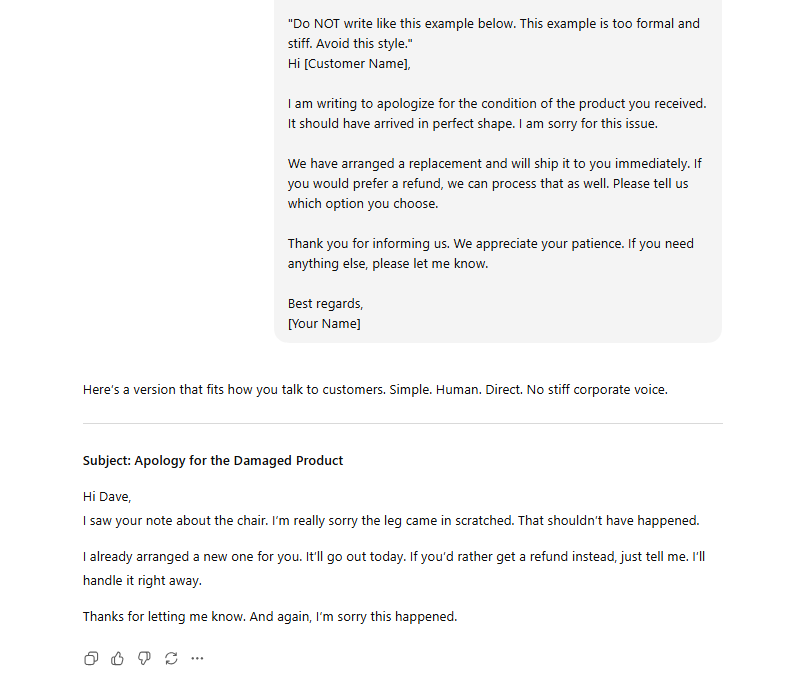
When you show AI what makes you angry or bored, it learns very quickly what to avoid.
Part IV: What If I Don't Know What To Ask?
Sometimes you have a problem, but you do not know what information is important. This brings us to Reverse Prompting.
1. The Guessing Game
Remember the "Eager Intern"? If you do not give the intern enough info, they will guess.
If you say, "Create a gym workout plan for me," the AI does not know:
Are you male or female?
How old are you?
Do you have injuries?
Do you have equipment?
So it guesses. It gives you a plan that might hurt you.
2. The Technique
Instead of hoping you gave enough info, tell the AI to ask you for it. Flip the script. Make the AI the interviewer and you the interviewee.
Add this to the end of your prompt:
"Before you generate the response, please ask me any questions you need to know to do the best job possible."3. A Real-Life Example
Let's look at gardening.
Bad Prompt: "Tell me what to plant in my garden."
The Result:
"You should plant tomatoes and roses." (The AI does not know you live in a cold climate where tomatoes will die).
Good Prompt (Reverse Prompting):
"I want to start a garden in my backyard. Before you recommend plants, ask me 5 questions about my location and preferences so you can give me the best advice."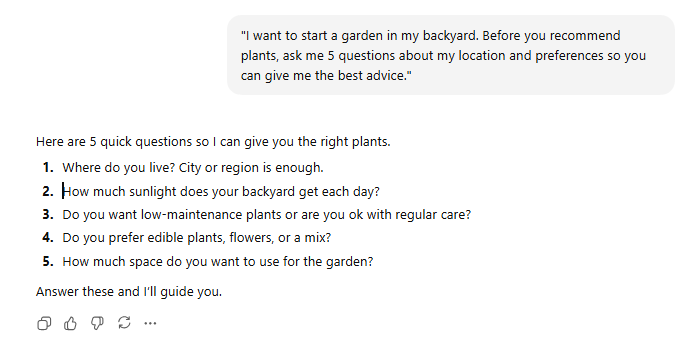
The Result:
The AI will pause. It will ask:
Where do you live? City or region is enough.
How much sunlight does your backyard get each day?
Do you want low-maintenance plants or are you ok with regular care?
Do you prefer edible plants, flowers, or a mix?
How much space do you want to use for the garden?
You answer these questions. Then the AI gives you a plan. Now the plan is perfect for you. You saved time because you did not get a bad answer first.
Part V: How Do I Get Expert Advice?
This technique is called Assigning a Role or Persona Adoption.
1. The Library Analogy
Imagine the AI is a library with every book in the world.
If you ask a question, it looks at every book - comic books, cookbooks, textbooks, and blogs. The answer is an average of everything.
But you don't want an average answer. You want an expert answer.
When you give the AI a role, you tell it which "section" of the library to look in. You tell it to ignore the comic books and look at the PhD textbooks.
2. The Technique
Start your prompt by telling the AI who it is.
"You are an expert [Job Title] with 20 years of experience. You think like [Famous Person]."3. A Real-Life Example
Let's say you are writing a resume.
Bad Prompt: "Check my resume for mistakes."
The Result:
It will check for spelling errors. That is basic.
Good Prompt (Role Assignment):
"You are a strict Hiring Manager at a top Tech company like Google. You read thousands of resumes and you reject 99% of them. Look at my resume. Tell me why you would reject it. Be critical."
The Result:
The AI changes completely. It will say things like:
"I would reject this because your bullet points are too vague. You did not list numbers. This shows a lack of focus on results."
This is much more valuable than a spell check.
You can get creative. You can say:
"Act like a Sleep Coach."
"Act like a tough Negotiation Expert."
"Act like a friendly Kindergarten Teacher."
The AI has read books by all these people. When you assign the role, it uses that specific knowledge.
Part VI: How Can I Practice Difficult Conversations?
This is the most powerful way to use AI. It is called Roleplaying.
1. The Flight Simulator
Pilots use flight simulators to crash planes safely so they don't crash real planes. You can use AI as a "conversation simulator" to practice hard talks so you don't mess up the real one.
This is great for:
Asking for a raise.
Breaking up with someone.
Firing an employee.
Saying "no" to your boss.
2. The 3-Window System
This is a specific method I use to do this. It requires opening 3 different chats.
Step A: The Profiler (Chat 1)
In the first chat window, you need to build the character. Use Gemini or ChatGPT. Tell the AI about the person you need to talk to.
Prompt:
"I need to negotiate my rent with my landlord, Mr. Smith. He is very stubborn, talks loudly, and always complains about costs. He is 60 years old. Help me build a psychological profile of him so I can roleplay a negotiation."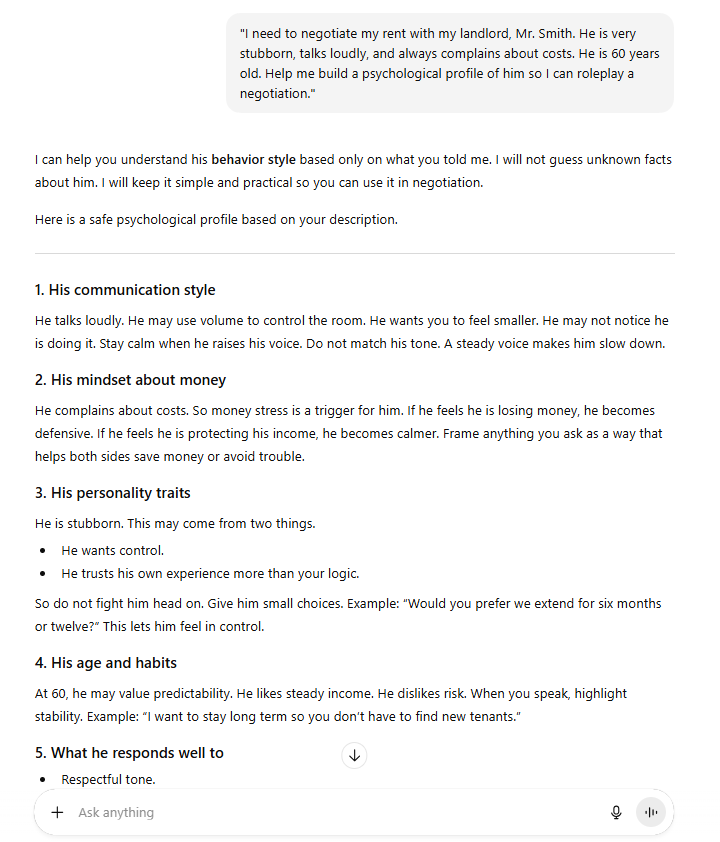
The AI will ask you questions to build "Mr. Smith."
Step B: The Simulator (Chat 2)
Take the description from Chat 1. Open a new chat window. Paste the description.
Prompt:
"You are Mr. Smith. I am your tenant. I am going to call you to ask to lower my rent. Stay in character. Do not be nice unless I give you a good reason. Let's start. Ring ring."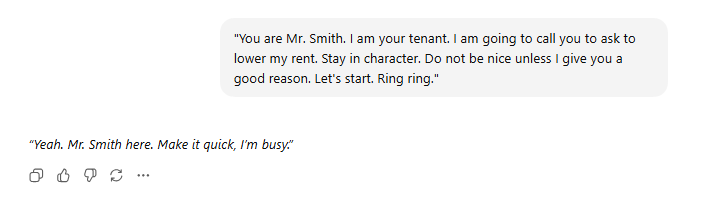
Now, you actually have the conversation. You type, the AI responds as Mr. Smith. It might yell at you. It might say no. It feels real.
Step C: The Coach (Chat 3)
When you finish the roleplay, copy the whole text. Open a third chat window.
Prompt:
"Here is a transcript of a negotiation I just did. You are a Negotiation Coach. Grade my performance. What did I do wrong? What should I have said when he got angry?"
3. Why This Matters
Usually, we only get one chance at a hard conversation. If we fail, we lose money or damage a relationship.
With this method, you can practice 10 times before you do it for real. You can try different strategies. You can see what makes "Mr. Smith" angry and what makes him happy.
By the time you make the real phone call, you are calm. You have heard all his objections already. You are ready.
Part VII: Important Bonus Tips
1. The "Russian Judge" Method
I mentioned that AI tries to be nice. Even when you ask for feedback, it often says, "You did a great job! Maybe change one small thing."
That is not helpful. You need the truth.
I use a trick I call the "Russian Judge" (like in the Olympics).
Add this instruction:
"Be brutal. Do not be polite. I want you to find every single mistake. Grade me on a scale of 1 to 10, but you are a very strict grader. If it is not perfect, give it a low score."When you give AI permission to be mean, it becomes incredibly helpful. It will point out logic holes and weak arguments that a "nice" AI would hide from you.
2. The "New Chat" Rule
This is a small technical tip.
If you have a long conversation with AI, and then you want to change the topic, start a new chat. AI gets confused if the conversation history is too long and has too many different topics. It is like trying to use the same notebook for Math, History, and Cooking. It gets messy.
Keep your chats clean. One task, one chat.
Conclusion
We covered a lot of ground here. Let's look at the list one more time:
Chain of Thought: Ask AI to "think step by step" to get smarter logic.
Few-Shot Prompting: Give 3 examples of your work so AI copies your style.
Reverse Prompting: Ask AI to interview you so it gets the right info.
Assign a Role: Tell AI it is an expert to get expert advice.
Roleplaying: Use the simulator to practice hard talks.
Here is my challenge to you.
Do not just read this article and close the tab. Do not try to memorize all 5 techniques right now. That is too much.
Pick one technique. Just one.
Maybe you have an email to write today. Use the Few-Shot technique. Find an old email, paste it in, and ask AI to write the new one in that style.
Maybe you have a problem to solve. Use Chain of Thought. Ask AI to walk you through the solution step by step.
Open the AI tool right now. Try it once. Once you see the result, you will realize that the AI is not just a robot. It is the best teammate you have ever had, waiting for you to give it the right instructions.
Go try it.
If you are interested in other topics and how AI is transforming different aspects of our lives or even in making money using AI with more detailed, step-by-step guidance, you can find our other articles here:
*indicates a premium content, if any
How useful was this AI tool article for you? 💻Let us know how this article on AI tools helped with your work or learning. Your feedback helps us improve! |
Reply