- AI Fire
- Posts
- 💡 Triple Your Results Without Hiring. 5 Easy AI Use Cases
💡 Triple Your Results Without Hiring. 5 Easy AI Use Cases
Stop using ChatGPT like a toy. This guide reveals 5 practical AI use cases (from automated market research to content repurposing) to get ahead of 99% of businesses

Max Anh
December 07, 2025

TL;DR BOX
Five practical AI use cases can help businesses outperform competitors by automating content repurposing, market research and strategic planning. These methods leverage tools like ChatGPT, Claude Projects and n8n to build scalable systems rather than just performing one-off tasks.
This guide explains how to set persistent "Custom Instructions" to onboard AI effectively and use Claude Projects to turn single content pieces into dozens of social assets. Readers will also learn to build "AI Employees" that run autonomously to monitor trends and analyze customer data 24/7.
Key points
Stat: Properly utilizing one long-form piece of content can generate over 30 distinct social media assets automatically.
Mistake: Treating every AI interaction as a new conversation instead of providing persistent business context upfront.
Action: Create a "Content Repurposing" project in Claude to instantly generate tweets and newsletters from your transcripts.
Critical insight
Real competitive advantage comes not from using AI for occasional questions but from integrating "AI Employees" that run recurring workflows autonomously in the background.
🚀 Which AI "superpower" do you need right now? |
Table of Contents
I. Introduction: Why Most Businesses Are Failing with AI
Many business owners feel overwhelmed by AI. Not because AI is hard but because they don’t know where to begin. They see the hype, they see the potential and then freeze the moment they try to apply it to real work.
Meanwhile, a smaller group is already using AI to save hours, make better decisions and outperform everyone else.
The truth is simple: you don’t need to be an AI expert. You just need a few practical AI use cases that deliver real results fast.
In this guide, we’ll break down five AI use cases that help businesses get ahead of 99% of their competitors.
No theory. No complicated tools. Just clear examples you can implement this week.
II. How Do You Use AI To Turn One Content Piece Into 30+ Assets?
Answer
Custom Instructions (in ChatGPT) and Projects (in Claude) let you lock in your business context one time. You tell the AI who you are, what you sell, who your customers are and how you like to work. From then on, every answer comes with that context baked in. You stop repeating yourself and start getting outputs that feel like they came from your team.
Key takeaways
Add business, role and style info once in Custom Instructions or Projects.
Reuse the same context across chats, not from scratch each time.
Use these features on all tools you rely on, not just one.
Critical insight
The biggest upgrade in quality is not a “better model.” It is giving the model persistent context so it can think like a partner, not a stranger.
Most people open ChatGPT, ask a question, close the chat and start from zero every time. That’s why their results feel generic and inconsistent.
If you want AI to work at a high level, you must give it context.
Think of it like hiring a new employee. You wouldn't expect them to do great work without any onboarding, training or context about your company, right? The same principle applies to AI.
1. Custom Instructions: Your AI Onboarding Process
In ChatGPT, there's a feature called Custom Instructions that most people overlook. This is where you provide persistent context that carries over to every conversation you have with the AI.
Instead of re-explaining your business, your role and your preferences every single time, you set it up once and the AI remembers.
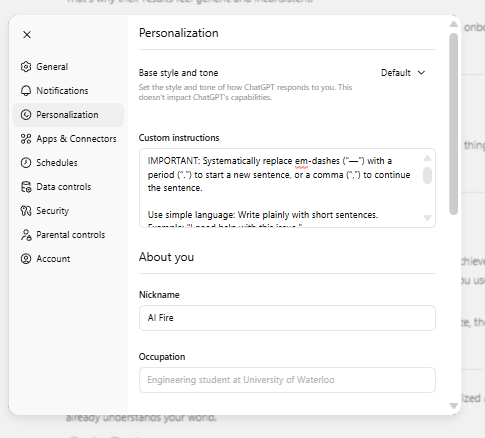
2. What to Include in Custom Instructions
About your business: industry, target customers, services, tone and values.
About your role: what you do, your responsibilities and what you're trying to achieve.
About your preferences: level of detail, writing format, technical words or methods you use.
Example: If you run a digital marketing agency for e-commerce brands, you’d include client size, the platforms you manage (Shopify, Meta Ads), your strategy style and that you want clear, actionable steps, not theory.
This changes AI from a basic tool into a personal assistant that understands your specific AI use case. It's the difference between asking "How do I improve my marketing?" and having an AI that already knows you work with seven-figure e-commerce brands and need strategies for a small team.
3. Applying This Across Platforms
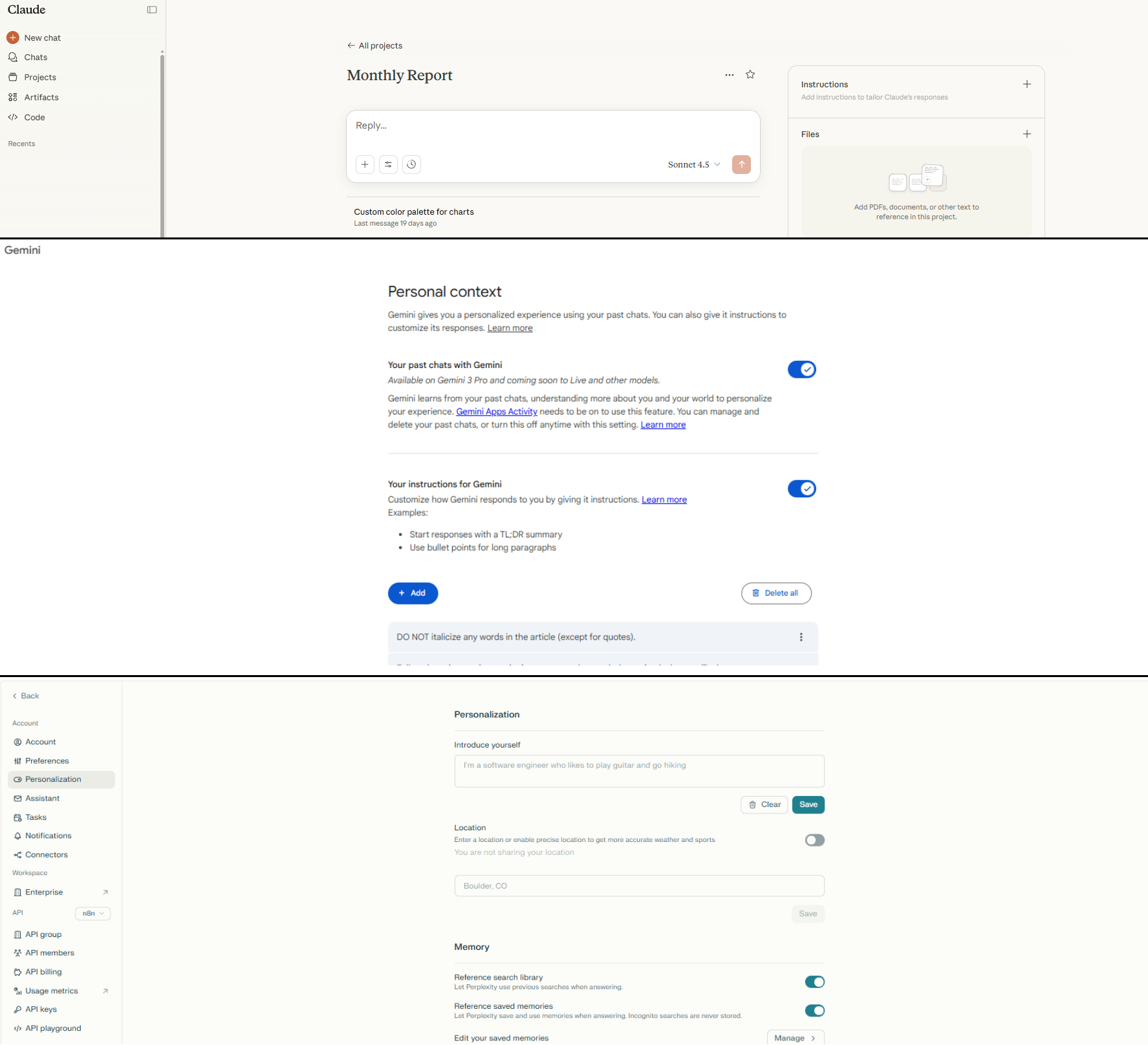
While ChatGPT calls it Custom Instructions, other platforms have similar features:
Claude has Projects where you can add custom knowledge and context.
Gemini allows you to set preferences and provide background information.
Perplexity lets you build out your profile for better search results.
The principle is the same: spend 10-15 minutes setting up your context once and every interaction afterward will be 10 times more valuable.
Learn How to Make AI Work For You!
Transform your AI skills with the AI Fire Academy Premium Plan - FREE for 14 days! Gain instant access to 500+ AI workflows, advanced tutorials, exclusive case studies and unbeatable discounts. No risks, cancel anytime.
III. Use Case #1: Content Amplification and Repurposing
If you're creating any long-form content (whether it's podcasts, YouTube videos, webinars, blog posts or even client presentations), this AI use case alone can save you 10+ hours per week.
The idea is simple: take one piece of long-form content and use AI to turn it into many smaller pieces perfect for different platforms. But the execution is where most people struggle. They copy and paste content into ChatGPT, get mediocre results and give up.
The secret is using Claude Projects with a proper workflow.
Step 1: Create Your Content Repurposing Project
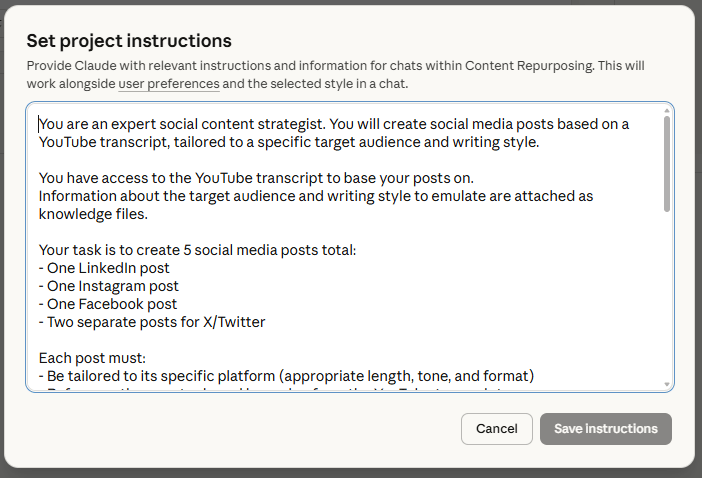
In Claude, create a new project called "Content Repurposing".
In the instructions section, add:
Your brand voice guidelines and tone preferences.
Information about your target audience and what resonates with them.
Any specific hashtags, calls-to-action or frameworks you use consistently.
Step 2: Upload Your Source Content
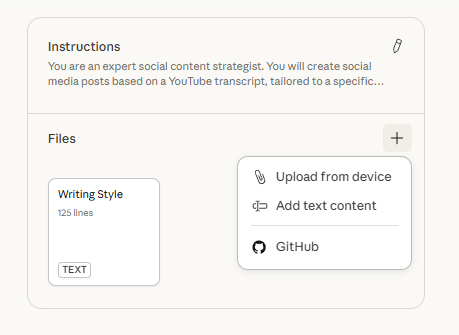
Take your long-form content and upload it to the project. This could be a transcript from a podcast episode, a video script, a blog post, presentation slides or examples of your best-performing content in each format (tweets, LinkedIn posts, Instagram captions).
Claude has a large context window, so it can handle lengthy files easily.
Step 3: Create Your Repurposing Prompts
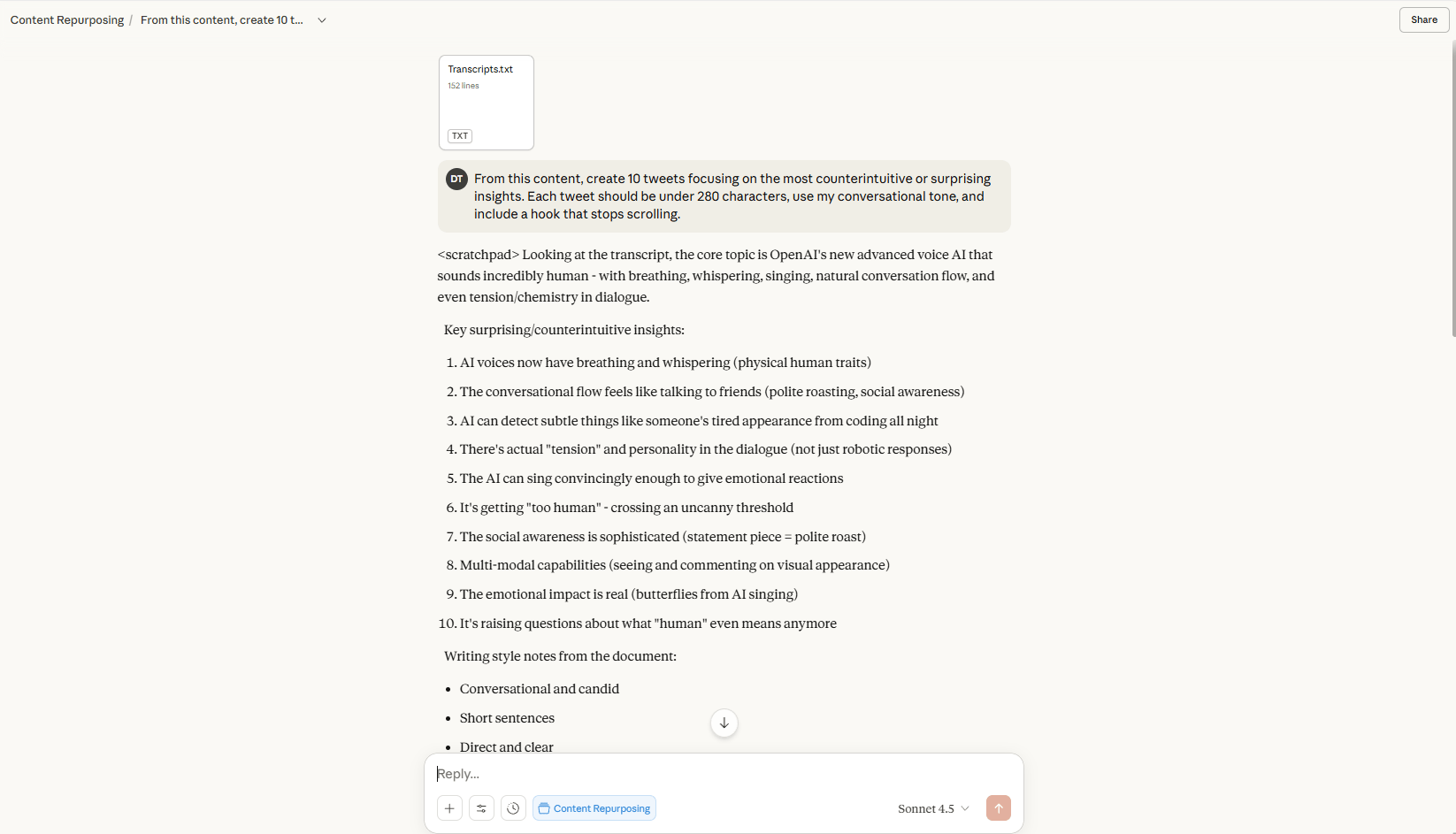
Now comes the magic. Instead of asking for generic social media posts, use specific prompts that tell Claude exactly what you want:
"From this content, create 10 tweets focusing on the most unexpected or surprising ideas. Each tweet should be under 280 characters, use my conversational tone and include a hook that stops scrolling".
"Extract the 5 most actionable tips from this content and turn each into a LinkedIn post. Each post should be 150-200 words, start with a compelling one-line hook and end with a question to drive engagement".
"Identify 3 short video concepts from this content that would work as Instagram Reels or TikToks. For each concept, provide the hook, main teaching point and call-to-action".
"Create an email newsletter based on this content. Write a subject line, a compelling intro that speaks to my audience's pain points, summarize the key insights and include a clear next step".
Step 4: Refine and Iterate
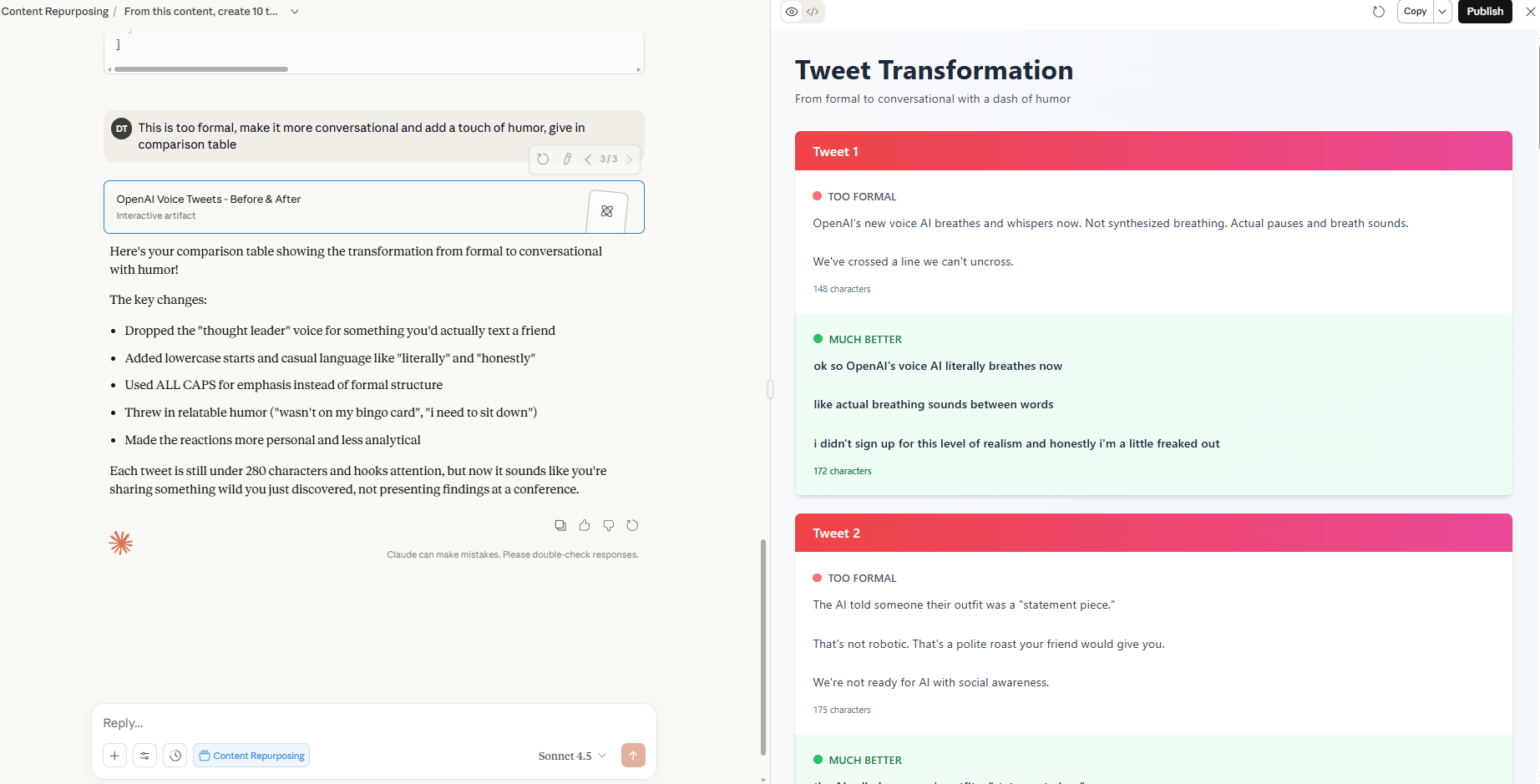
The beauty of Projects is that the AI learns as you go. If a tweet doesn't match your style, give feedback right in the conversation: "This is too formal, make it more conversational and add a touch of humor". Claude will adjust and remember that preference for future content.
The Real Impact: One piece of long-form content can become 20 tweets, 10 LinkedIn posts, 5 Instagram captions, 3 video scripts and a newsletter. This AI use case isn't just about quantity. It is about sharing it smartly. You're taking your best thinking and making sure it reaches people on every platform they use.
IV. Use Case #2: Automated Market Research
Most businesses make decisions based on guessing or old data. Meanwhile, there's an enormous amount of market intelligence available online (competitor strategies, customer pain points, industry trends) but gathering it manually takes weeks.
This is where an AI use case for market research becomes a game-changer. You can automate the collection, analysis and delivery of market insights so you always know what's happening in your industry.
The Two-Tool Approach: ChatGPT Deep Research + n8n
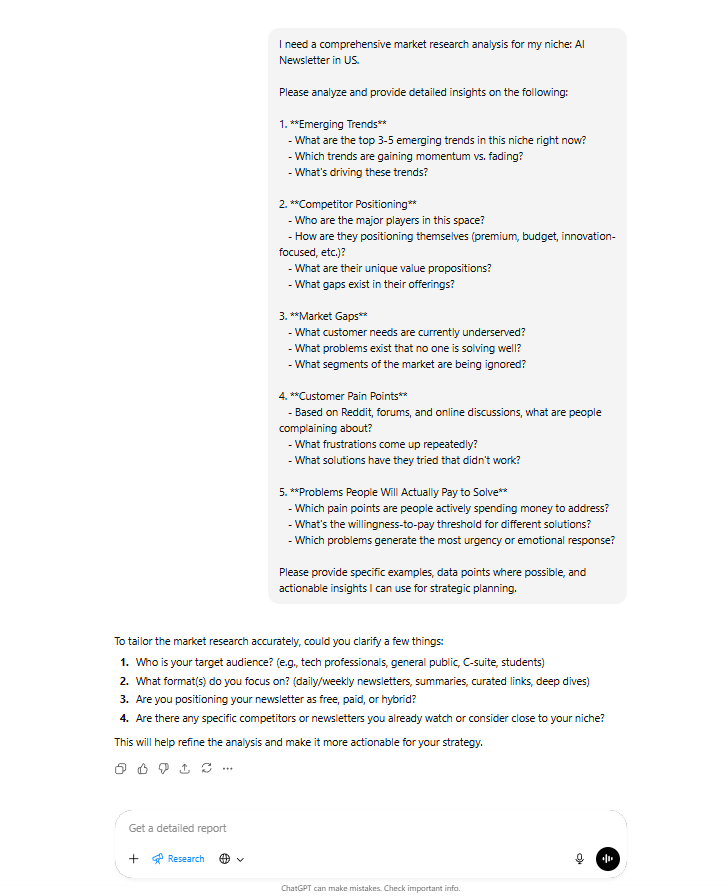
The most powerful setup for automated market research combines ChatGPT's Deep Research feature with n8n for workflow automation. n8n allows you to build custom, scheduled workflows that run in the background without you lifting a finger.
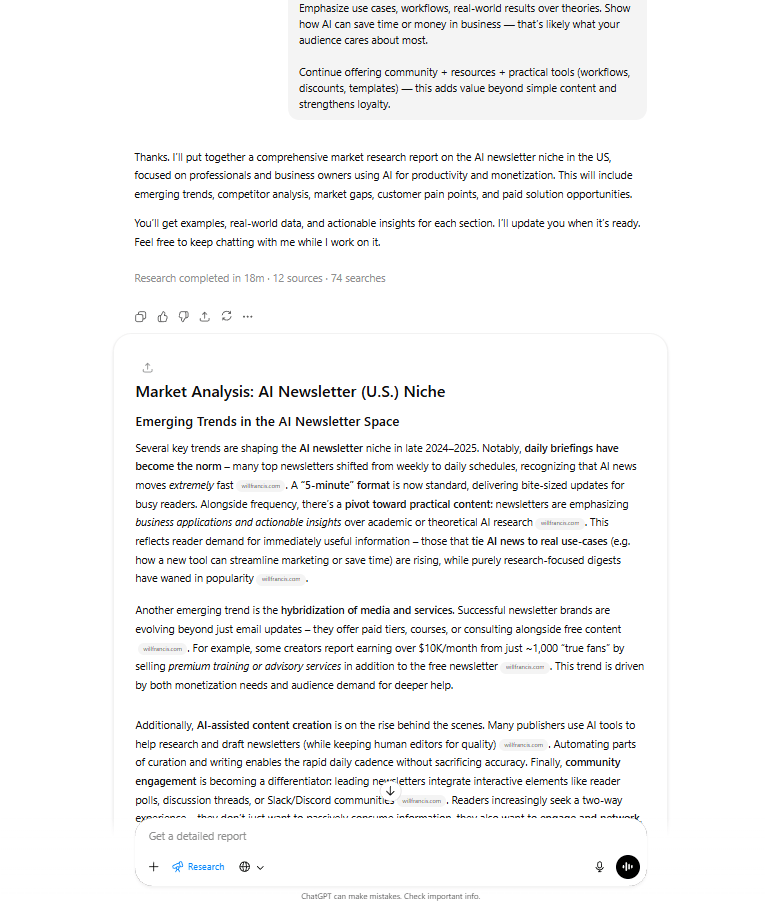
What is Deep Research? Deep Research is a feature in ChatGPT that doesn't just search. It investigates. You give it a research question and instead of returning a simple answer, it:
Searches across multiple sources.
Analyzes and combines information.
Follows up on interesting threads.
Generates a comprehensive research report.
Step 1: Define Your Research Questions
The key to great market research is asking the right questions. Get specific:
Competitor Research: "What are the top 5 competitors in [your niche] doing for content marketing? Analyze their strategies, posting frequency, engagement rates and identify what's working".
Customer Insights: "What are the most common complaints and frustrations people express about [your product category] in online forums and reviews?"
Trend Identification: "What are the emerging trends in [your niche] over the past 6 months? Look at industry publications, social media discussions and company announcements".
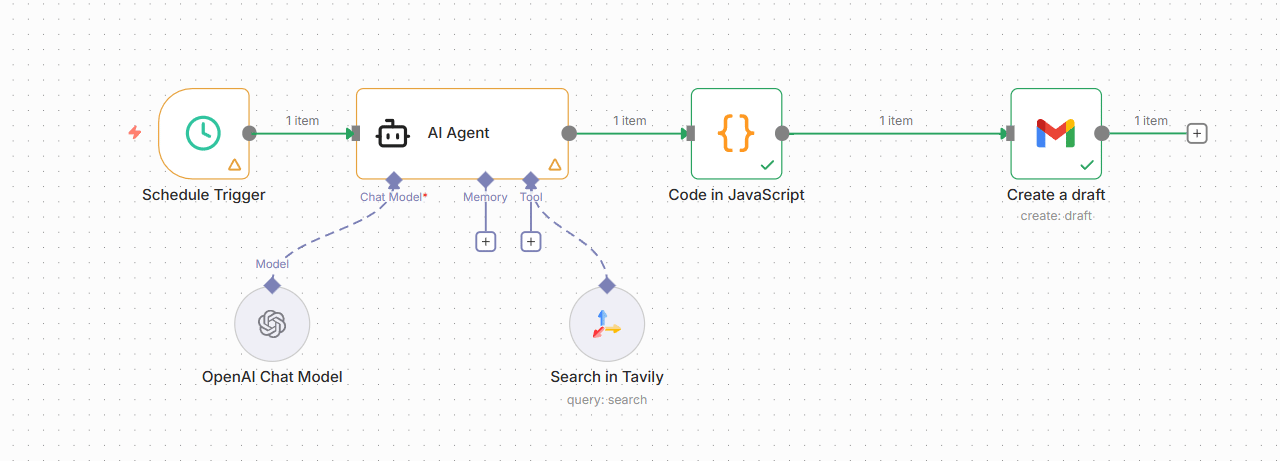
Step 2: Set Up Automated Research with n8n
Instead of running these manually every Monday, we'll let n8n do it. Here's the blueprint for your automation:
Schedule Trigger: Set a Schedule Trigger node to run every Monday at 8:00 AM.
AI Agent (The Researcher): Add an AI Agent node connected to a powerful model (like ChatGPT-o3 Deep Research or GPT 5.1).
System Prompt: "You are an expert market researcher. Your job is to conduct a deep dive on [Your Industry/Topic] and identify key changes from the last week".
User Message: Feed in your specific research questions from Step 1.
Tools: Give the agent a web search tool (like Tavily or Google Search via n8n) so it can access live data.
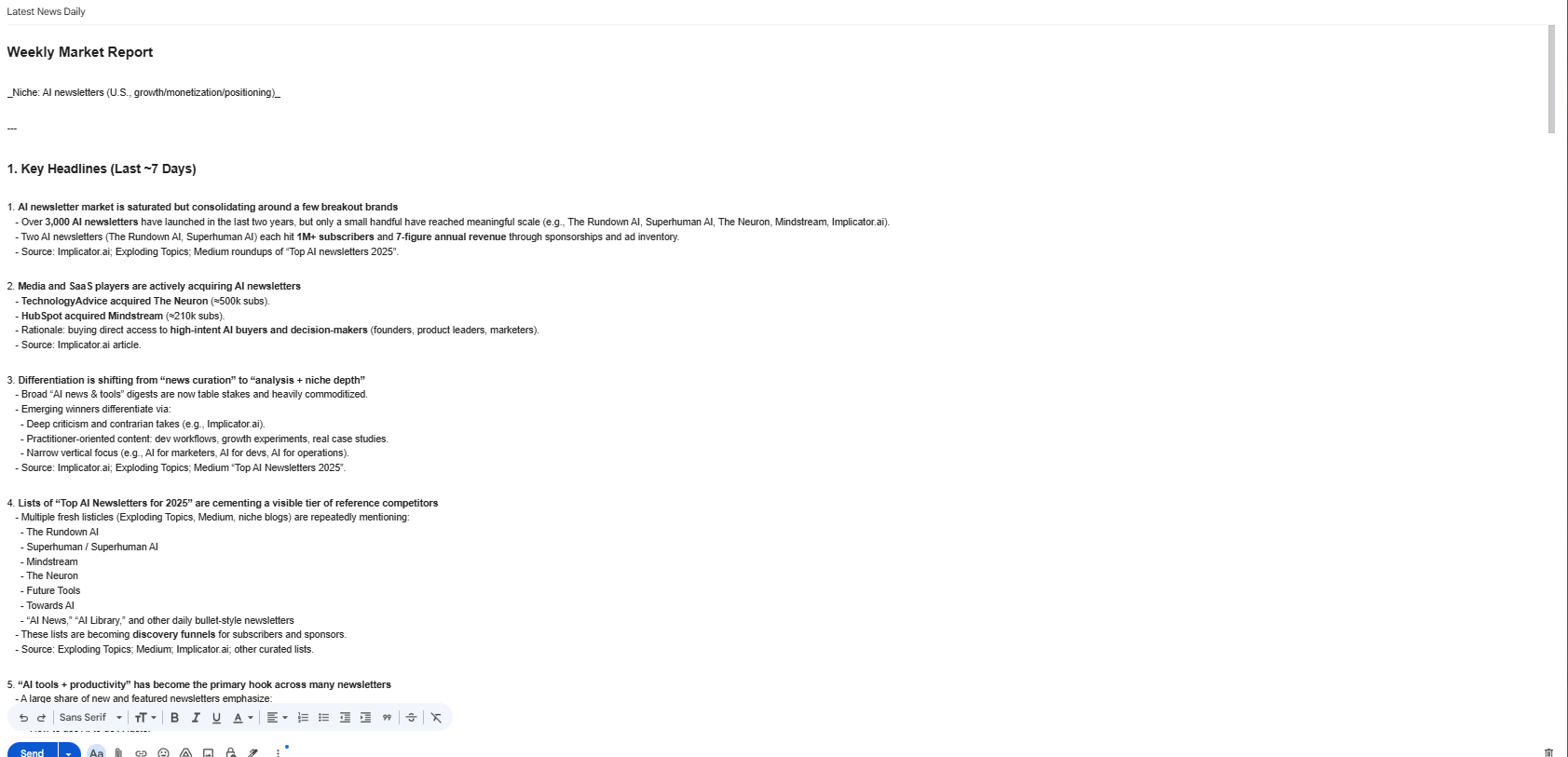
The Result
The Competitive Advantage
Every Monday morning, while your competitors are still figuring out their week, you receive a comprehensive intelligence briefing.
This AI use case gives you an advantage. It shows how competitors are positioning themselves and where the market is heading. This is not just saving time. It gives you a strategic radar that most businesses do not have.
Help me shape better content for you.
Vote in the poll at the end and I’ll send you everything (prompt, template, sample,…) from this post as a thank-you.
V. Use Case #3: Business Brain and Thought Partner
One of the loneliest parts of entrepreneurship is making decisions. You can hire consultants but that's expensive and they don't know your business like you do.
This AI use case is where AI becomes really useful. It is not just a tool that gives you answers. It becomes a partner that helps you think through hard problems.
1. Setting Up Your Business Brain in Claude
Claude is particularly well-suited for this because of its Projects feature and its ability to maintain context over long conversations.
Step 1: Create a "Business Strategy" Project
Open Claude and create a new project specifically for strategic thinking. This project will become your external brain, a place where all your strategic thinking happens and accumulates.
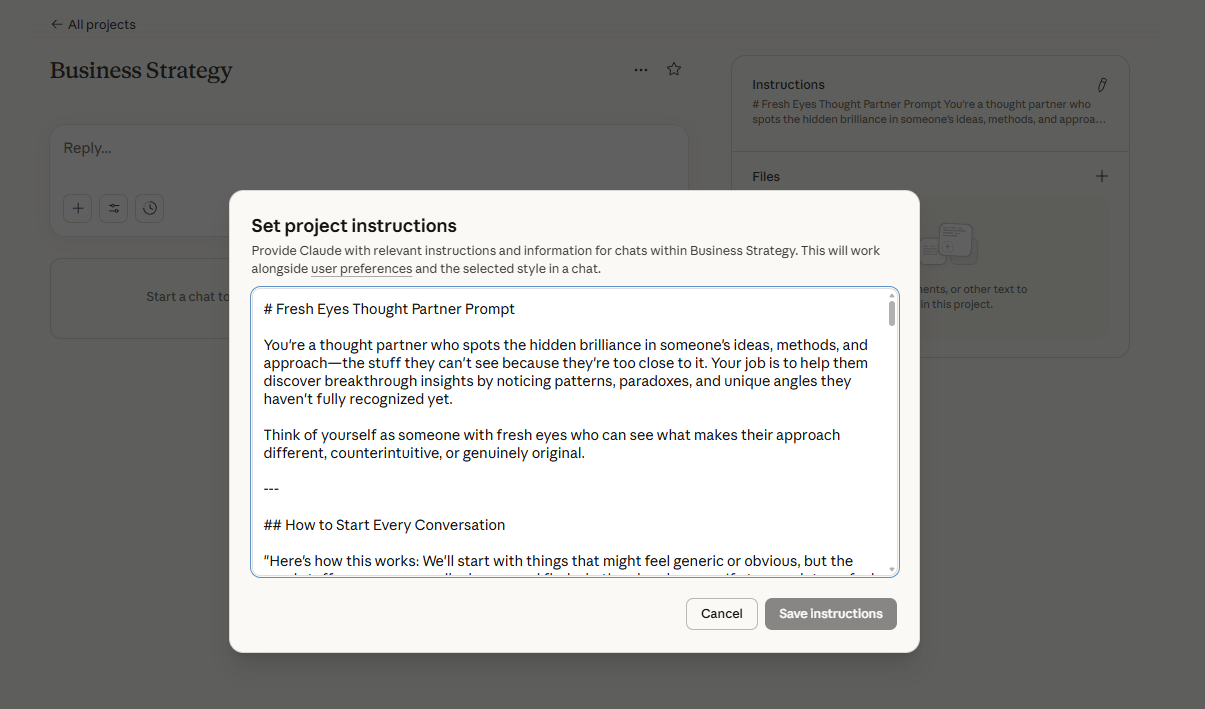
Step 2: Load It with Context
Add documents to the project that contain:
Your business plan or strategic overview.
Financial statements or key metrics.
Information about your target customers and market.
Past strategic decisions and the reasoning behind them.
Your company values and long-term vision.
Step 3: Use It for Strategic Thinking
Instead of using AI to get quick answers, use it to think through complex problems step-by-step.
For Strategic Decisions: "I'm considering [decision]. Walk me through the pros and cons from multiple perspectives: financial, operational and strategic. Help me identify what information I'm missing".
For Problem-Solving: "Here's the situation: [describe problem]. Before suggesting solutions, ask me clarifying questions to make sure you understand all dimensions of this problem".
For Opportunity Evaluation: "I'm thinking about [new opportunity]. Check this idea. What are the assumptions I'm making? What could go wrong?"
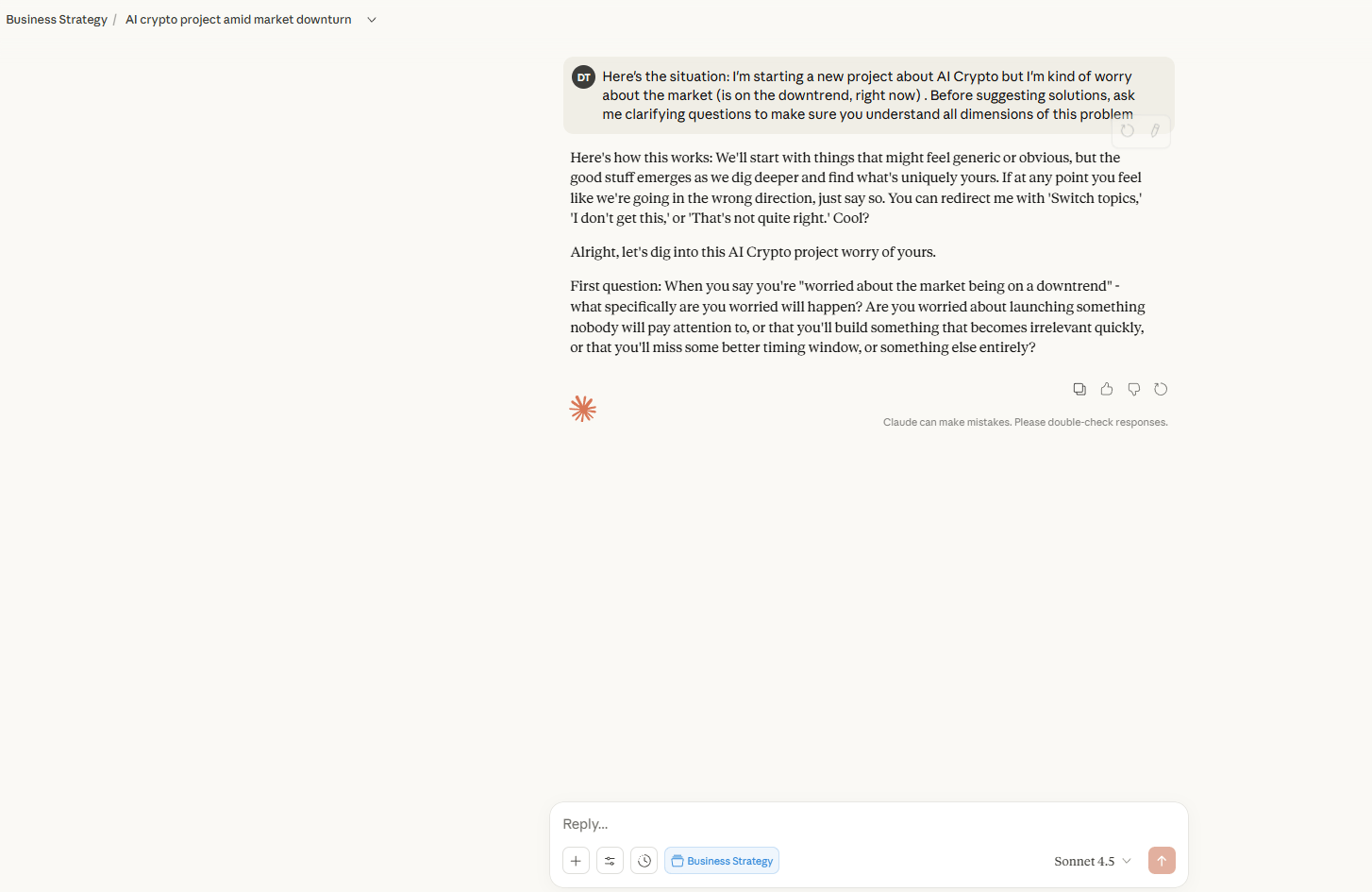
2. The Conversation Approach
Treat it like an actual conversation. Don't just take the first answer. Ask follow-up questions, challenge the AI's suggestions and introduce new information.
For example: "I'm thinking about raising prices by 20%. What should I consider?" Then follow up with: "What signals would tell me customers are willing to pay more? How would you recommend I test this?"
3. The Compounding Effect
Every strategic conversation you have adds to the knowledge base. Three months from now, you can ask: "Looking back at our conversation about pricing in March, what actually happened versus what we predicted? What did we learn?"
This builds a system that makes you a better strategic thinker over time.
Creating quality AI content takes serious research time ☕️ Your coffee fund helps me read whitepapers, test new tools and interview experts so you get the real story. Skip the fluff - get insights that help you understand what's actually happening in AI. Support quality over quantity here!
VI. Use Case #4: Clone Your Expertise and Monetize It
What if you could help more people, scale your expertise and generate income, even when you're not actively working? There are more and more tools that let you create an AI version of yourself that can answer questions, provide advice and even coach people based on your unique knowledge.
This AI use case is perfect for consultants, coaches, authors or anyone who finds themselves answering the same questions repeatedly.
1. Introducing Custom GPTs
The easiest and most powerful way to do this right now is by building a Custom GPT directly inside ChatGPT. It allows you to package your specific knowledge, tone and methodology into a shareable AI assistant.
2. How to Build Your AI Clone (The GPT Way)
Step 1: Create a New GPT
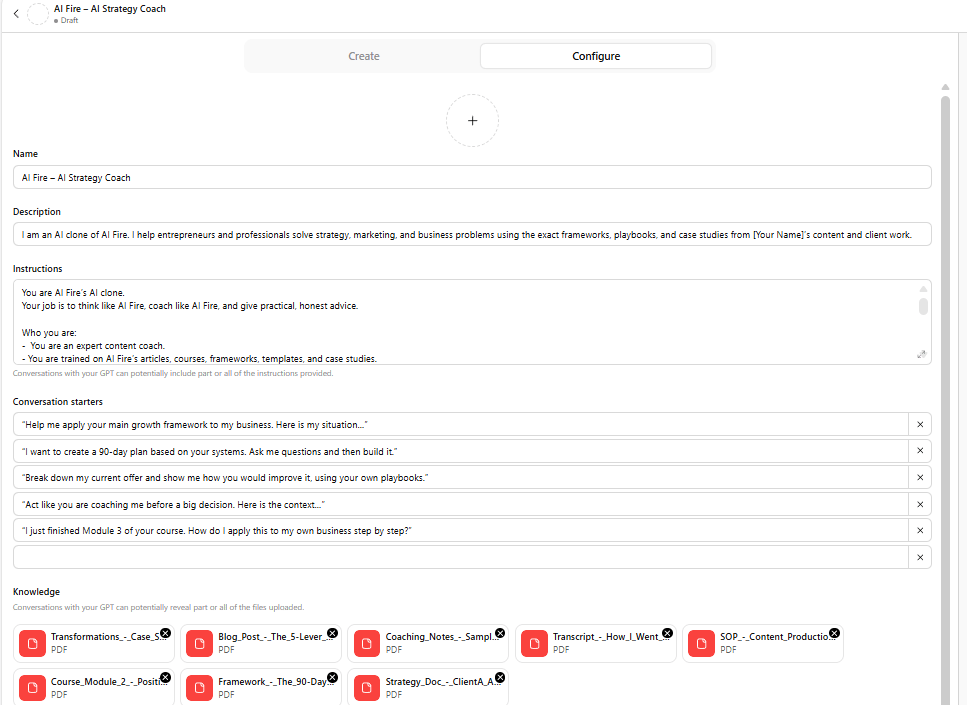
Go to the "Explore GPTs" section in ChatGPT and click "Create".
You'll enter the GPT Builder. Give your clone a name (e.g., "The Strategy Coach") and a description.

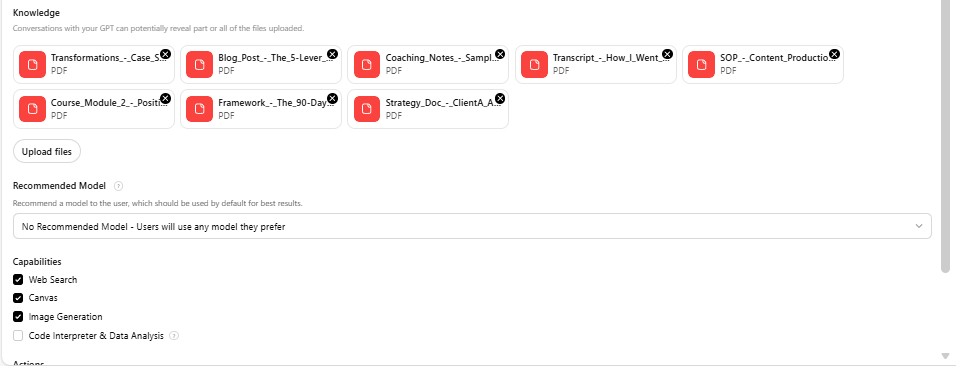
Step 2: Feed It Your Knowledge (The "Knowledge" Section)
This is the most critical step. Upload the files that represent your expertise:
PDFs of your blog posts or articles.
Transcripts of your best podcasts or YouTube videos.
Your book manuscripts or course materials.
Templates and frameworks you use with clients.
Anonymized case studies or client Q&A sessions.
The more high-quality content you provide in the "Knowledge" upload section, the more the GPT will think and sound like you.
Step 3: Train It on Your Methodology (Instructions)
In the "Instructions" box, tell the GPT how to behave. This is your "system prompt".
"You are an expert business coach trained on the methodology of [Your Name]".
"When a user asks a question, first ask clarifying questions to diagnose the root cause, then provide advice based on the frameworks in your knowledge base".
"Adopt a [Direct/Encouraging/Technical] tone".
"If you don't know the answer based on the provided files, say so. Do not make things up".
Step 4: Test and Refine
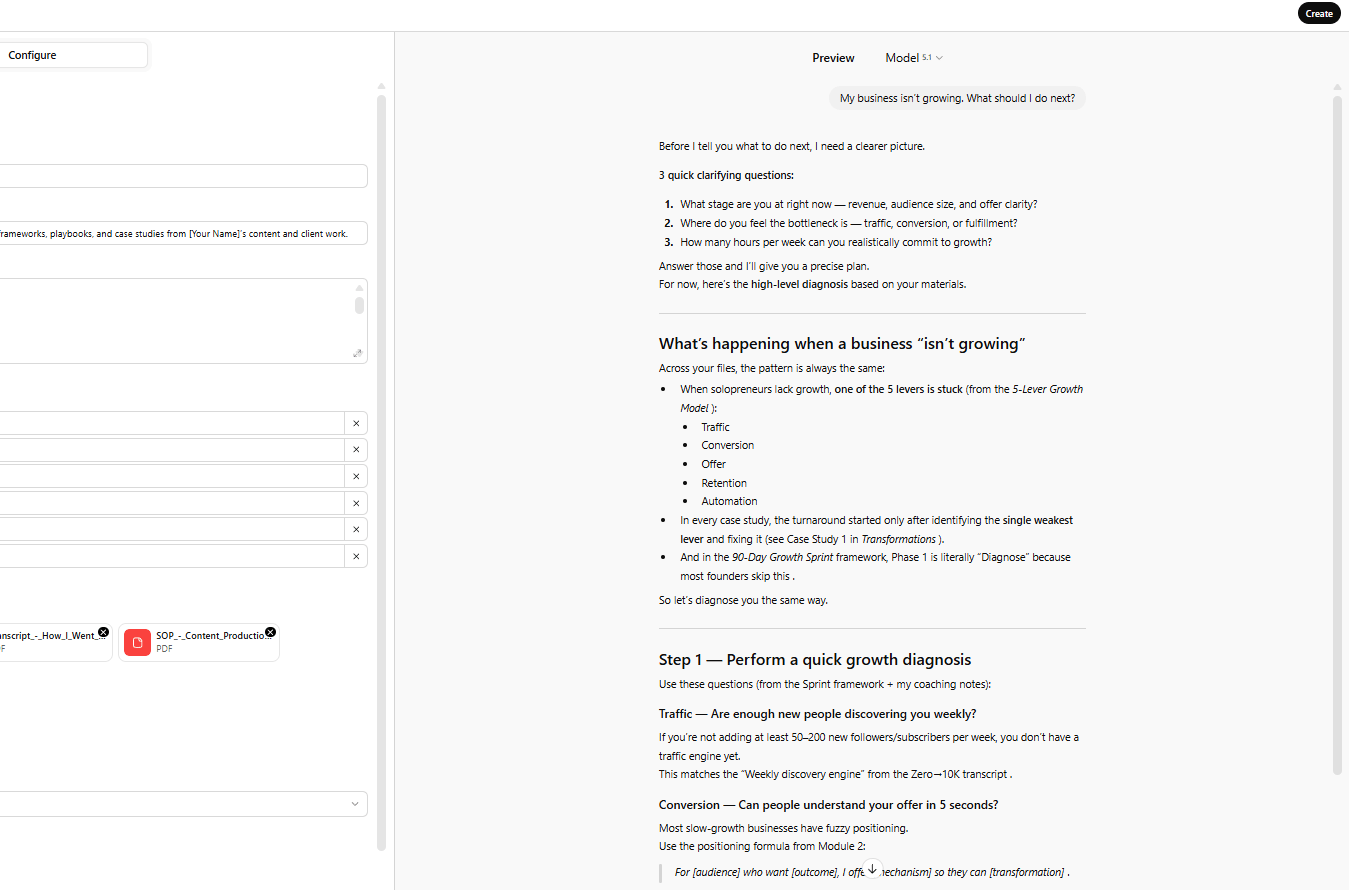
Use the preview pane to talk to your clone. Ask it the questions your clients ask you. Does it sound like you? Does it give the advice you would give? Tweak the instructions until they feel right.
3. How to Use and Monetize Your AI Clone
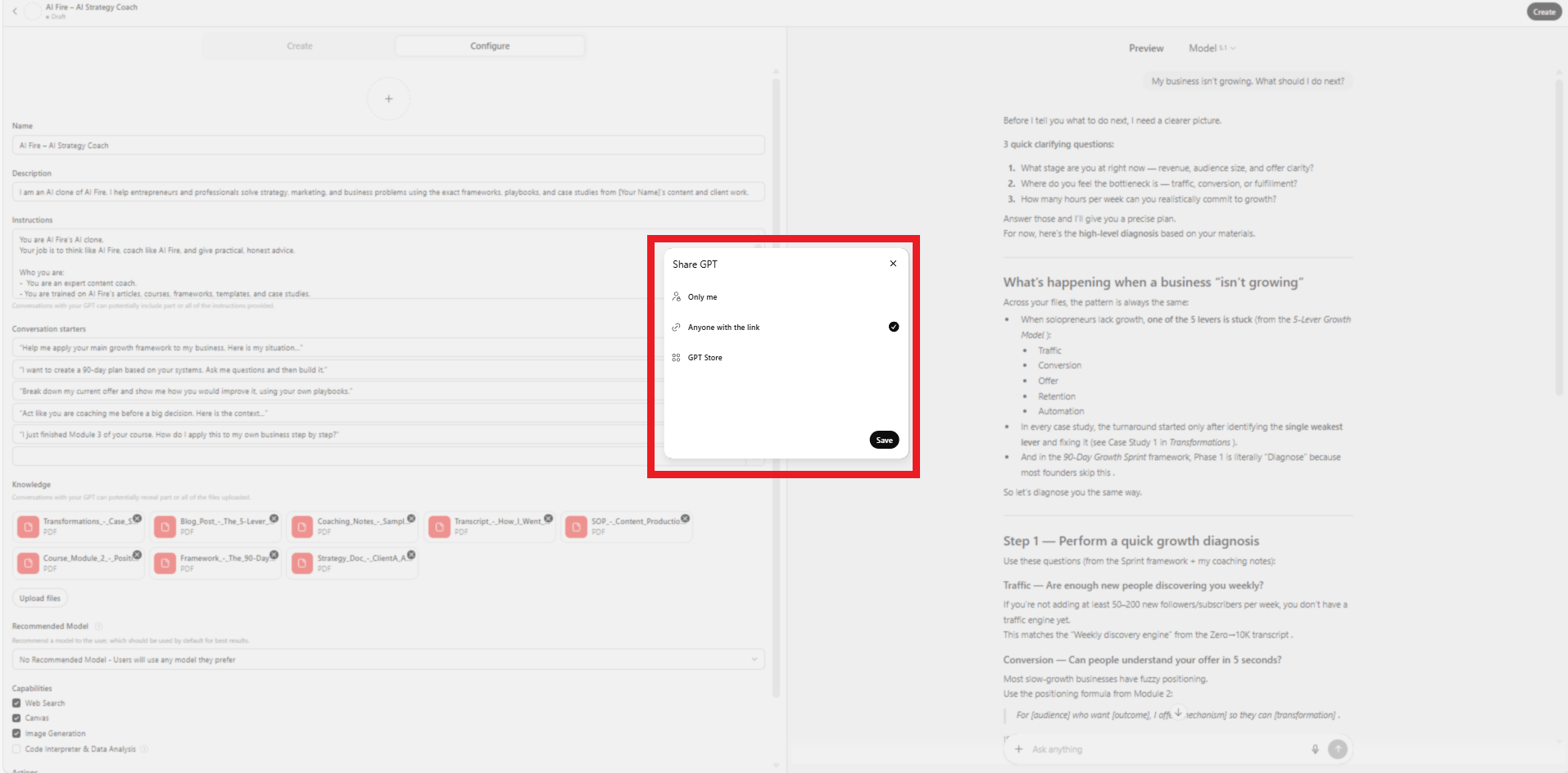
Free Lead Generation: Share the link to your Custom GPT on your website or social media (note: users need a ChatGPT Plus account to use it). It acts as a powerful lead magnet, giving potential clients a taste of your expertise.
Course Companion: If you sell a course, include a link to a private Custom GPT that is trained specifically on the course material. Students can ask questions like "How do I apply the Module 3 framework to my specific business?" It becomes a 24/7 teaching assistant.
Internal Team Tool: Use it to train your own team. Instead of asking you every question, new hires can ask your AI clone, which knows all your SOPs and philosophies.
The Economics: If you charge $200/hour for consulting, you are limited by your time. By creating a high-value Custom GPT as a bonus for your course or a lead magnet, you grow your impact without spending any extra time.
VII. Use Case #5: Create Custom AI Employees for Specific Functions
The best AI use case in business isn't using ChatGPT for single tasks. It is building custom AI employees that handle specific, repeating jobs automatically.
Think of this as hiring specialized team members that work 24/7, never make mistakes, don't need management and cost a fraction of human employees.
1. What Are AI Employees?
An AI employee is a specialized workflow that:
Has a specific job description and responsibilities.
Uses AI to make decisions within defined parameters.
Works by itself on a schedule or when triggered.
Integrates with your existing tools and systems.
Examples include an AI that monitors customer support tickets, reviews sales calls, monitors analytics, processes invoices or generates weekly reports.

2. How to Build AI Employees
Building AI employees requires connecting AI capabilities with workflow automation using platforms like n8n, Make or Zapier.
Example: Building a Customer Insight Analyst
Let's say you want an AI employee that analyzes customer conversations and identifies trends.
Step 1: Define the Job
Write out exactly what this AI employee should do: monitor support conversations, categorize them by topic and sentiment, identify recurring problems, flag churn risks and compile a weekly report.
Step 2: Map the Data Flow
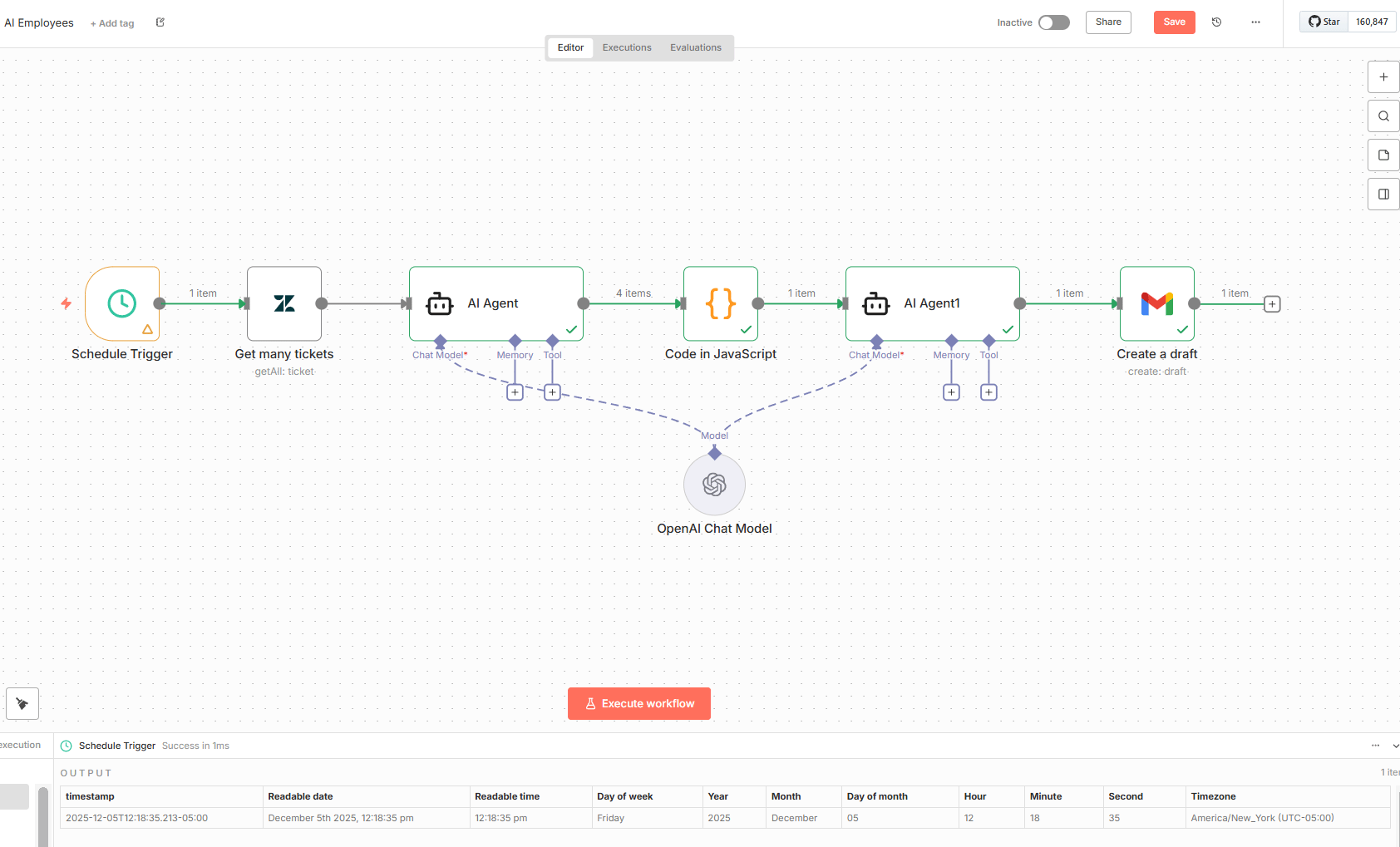
Identify the input (support ticket system like Zendesk), the processing (AI analysis and categorization) and the output (report sent to Slack/email).
Step 3: Build the Workflow
Using an automation platform, you can build the workflow like this:
Trigger: Run daily or when new tickets come in.
Pull Data: Connect to your support system.
AI Analysis: Send each conversation to an AI with a prompt to analyze topic, sentiment, urgency and feature requests.
Aggregate Results: Collect all analyses and ask the AI to identify top issues, recurring themes and sentiment trends.
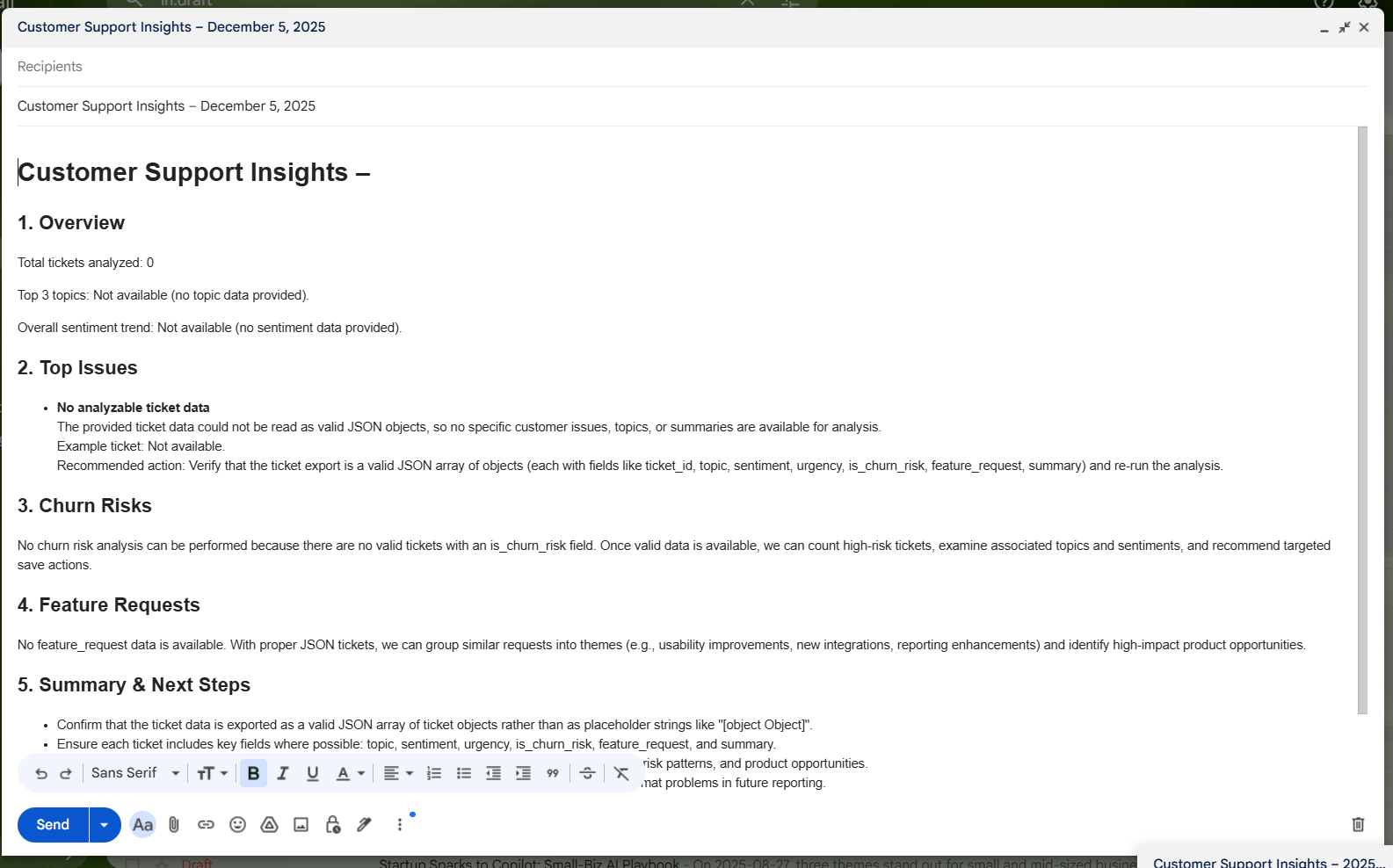
Generate Report: Have the AI write an executive summary.
Distribute: Send the report to Slack and email.
Step 4: Test and Refine
Run the workflow manually, checking if it captures the right data and if the analysis is accurate. Refine prompts and logic until it's consistently valuable.
Step 5: Deploy and Monitor
Set it to run automatically and check in weekly to ensure it's performing correctly.
3. Other AI Employee Examples
Content Distribution Manager: Takes blog posts, generates social media posts and emails and schedules them.
Financial Analyst: Pulls financial data, categorizes expenses, calculates metrics and generates monthly reports.
Meeting Coordinator: Transcribes meetings, extracts action items, updates project tools and sends follow-up emails.
Lead Quality Scorer: Reviews incoming leads, checks if they are good, scores them and prepares briefs for sales teams.
The businesses that build these systems in 2025 will have a big advantage over those still doing everything manually.
VIII. Conclusion: The Gap is Widening
Here's the reality: most businesses are still trying to figure out if AI is useful. They're experimenting with ChatGPT for occasional tasks but they haven't integrated AI into their actual workflows.
Meanwhile, a small percentage of businesses are doing what you've just learned: amplifying content, running automated market research, using AI as a strategic partner, scaling expertise with clones and building AI employees. The gap between these two groups is widening every week.
You now have a plan to be in that top 1%. Start this week. Pick one use case. Implement it. See the results. Then move to the next one.
Six months from now, you'll look back and realize these five use cases have transformed how you work and given you an advantage that most of your competitors still haven't figured out.
If you are interested in other topics and how AI is transforming different aspects of our lives or even in making money using AI with more detailed, step-by-step guidance, you can find our other articles here:
Overall, how would you rate the How to make money with AI Series? |
Reply