- AI Fire
- Posts
- 🤖 How To Build A Full Business Without Spending A Cent (Using Google AI)
🤖 How To Build A Full Business Without Spending A Cent (Using Google AI)
Stop paying for expensive tools. This guide shows how to combine NotebookLM, Firebase, Pomelli & Veo 3.1 to build a research-backed business in 1 day

Max Anh
December 03, 2025
TL;DR BOX
Google’s ecosystem of free AI tools now allows a single person to launch a full business in one day, from market research to automated marketing. By linking NotebookLM, Firebase Studio, Pomelli and Google Flow, entrepreneurs can research niches, deploy websites, create brand assets and generate video ads without coding.
This guide provides a step-by-step workflow for building a complete business infrastructure using only text prompts. It demonstrates how to cross-reference strategy documents with performance data to validate ideas before spending money.
Key points
Stat: Over 85% of participants on Polymarket predict Google will lead the AI race with Gemini 3.0 Pro by the end of 2025.
Mistake: Publishing the first AI-generated version of a website or ad; always generate multiple variations for A/B testing.
Action: Import your NotebookLM research summary directly into the Firebase Studio prompt to ensure your website copy is grounded in verified market data.
Critical insight
The true power of this system is not just speed but the ability to A/B test entire business strategies (pivoting branding, messaging and site layouts instantly based on real-time feedback) at zero cost.
⏳ What’s your biggest business bottleneck right now? |
Table of Contents
I. Introduction: How Big Is Google’s New Free AI Wave?
This year, Google has quietly dropped one of the biggest waves of free AI tools ever. I'm talking about tools that can write your marketing copy, design your visuals and even test which version performs best, all automatically. And this is only the beginning.
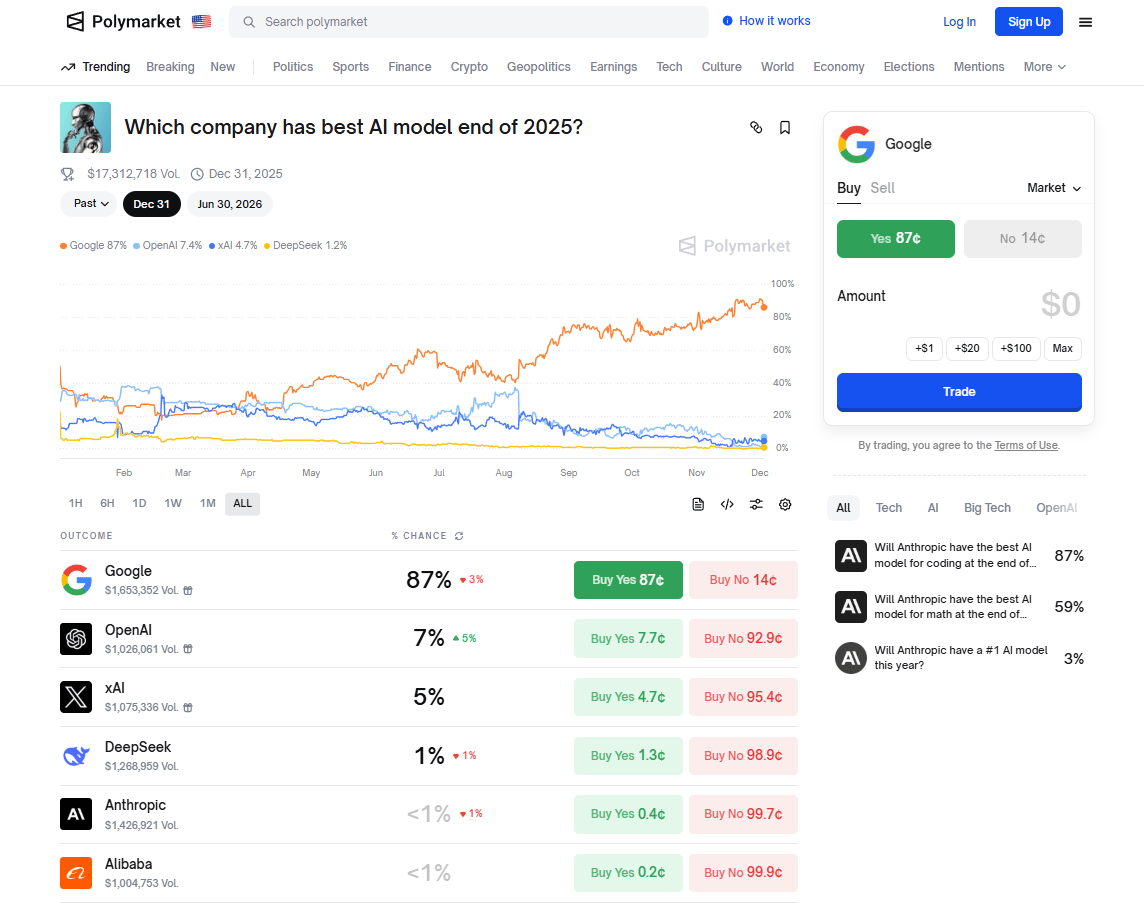
By the end of 2025, Gemini 3.0 Pro is projected to be the best AI model in the world on Polymarket, a real-money prediction platform where traders bet on future events.
Over 85% of participants believe Google will lead the AI race by then. And that isn't just speculation. It is where people literally put their money behind their conviction.
The implications for entrepreneurs are massive.
Source: Polymarket
II. The Old Way vs. The New AI-Powered Approach
For most founders, creating every piece of marketing material (content, branding, full websites) sounds impossible without significant resources.
Category | Traditional Grind | New AI-Powered Reality |
|---|---|---|
Workflow | Writing copy manually. Designing pages one by one. Launching without solid data. Testing each version by hand. | Generate multiple variations instantly. Test different styles, wording and layouts. Iterate in minutes. |
Speed | Weeks just to see what worked. | One afternoon to build, test and refine. |
Iteration | Slow, expensive and limited. | Fast, low-cost and nearly unlimited. |
Outcome | High time cost. Limited testing capacity. | Massive acceleration in creation and optimization. Strategic automation replaces manual grind. |
III. The AI Agency in Your Browser
In this guide, I will show you exactly how to connect four free tools to build a complete business:
NotebookLM for research.
Firebase Studio for instant website deployment.
Pomelli for automated marketing assets.
Google Flow (Veo 3.1) for creative strategy.
This isn't just automation; it is like having an entire AI agency behind your browser. By the end of this article, you will see how one person can build a full team without writing a single line of code using the right free AI tool.

Learn How to Make AI Work For You!
Transform your AI skills with the AI Fire Academy Premium Plan - FREE for 14 days! Gain instant access to 500+ AI workflows, advanced tutorials, exclusive case studies and unbeatable discounts. No risks, cancel anytime.
IV. Why Does This Workflow Fit Google’s Core Business?
Answer
Google makes money on attention and ads. Tools that help you research markets, build sites and create campaigns directly feed that engine. So this stack is aligned with their core business. Better targeting, better creatives, more campaigns.
Key takeaways
All tools push toward better marketing outcomes.
Workflow matches Google’s ad and data priorities.
Strong incentives mean these products will keep improving.
Critical insight
When your workflow matches the platform’s business model, you can expect deeper features and tighter integration over time.
At the heart of Google's business is advertising, making sure every tool, product and service feeds the idea of helping brands reach people and making that process smarter with AI.
In this workflow, each free AI tool is not used in isolation. They are aligned with what Google is focusing on now:
Better delivery.
More automation.
Seamless marketing asset generation.
Deeper brand-to-audience connections.
V. The Four-Tool Ecosystem: An Overview
Here is the stack we will be using.
Tool #1: NotebookLM - The Research & Validation Engine
What It Does: This is where everything begins. NotebookLM is your research and validation engine, a powerful free AI tool for strategy.
Key Functions: Analyze market data, identify profitable niches, understand what your target audience actually wants and validate ideas before spending a single dollar.
Think of It As: Your strategist making sure the blueprint is solid before you build.

Tool #2: Firebase Studio - The Infrastructure
What It Does: Once your idea is validated, Firebase Studio becomes your website builder and deployment platform.
Key Functions: Turns strategy into a live, hosted website instantly. No coding required. No plugins needed. No technical barriers.
Think of It As: Your infrastructure that brings the vision to life fast and clean.

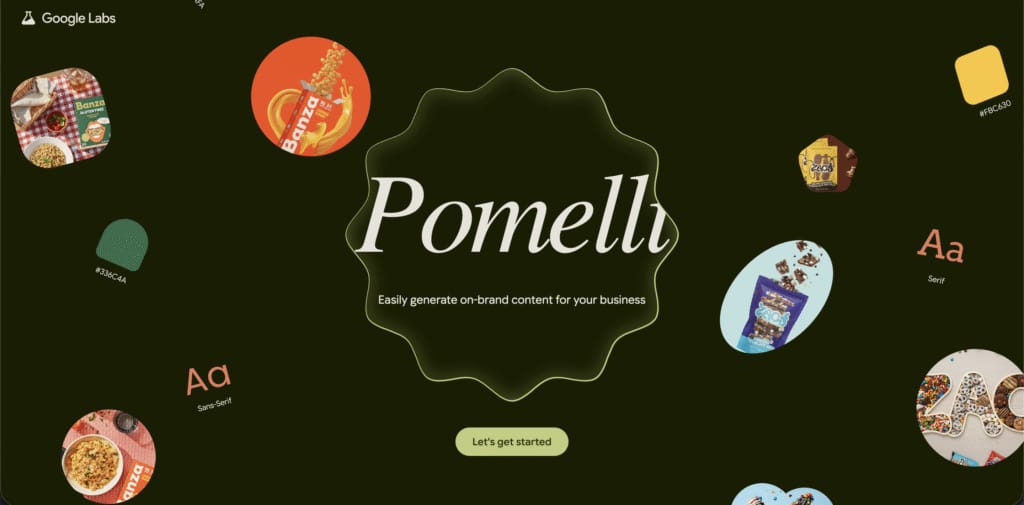
Tool #3: Pomelli - The Brand Identity Designer
What It Does: This is where your business gets its personality.
Key Functions: Define color tone and visuals, create messaging and copy that actually connect with your audience and establish how your business looks, feels and speaks. It aligns you digitally and visually with Google's ecosystem (ads, visuals, branding).
Think of It As: Your brand strategist and creative director combined.
Tool #4: Google Flow (Veo 3.1) - The Marketing Powerhouse
What It Does: Takes everything you have built and generates marketing assets at scale.
Key Functions: Generates ad variations, creates social posts, builds campaign workflows ready for A/B testing and iterates fast.
Think of It As: Your full-scale marketing engine.

VI. The Complete Workflow
The flow is simple: NotebookLM (Research) → Firebase Studio (Website) → Pomelli (Brand Identity) → Google Flow Veo 3.1 (Marketing).
Why this works: By using each tool for what it is best at, you are not just working faster. You are building like a full team of specialists powered entirely by AI.
VII. What Example Business Are We Building With These Tools?
Answer
The example is a hot dog restaurant. You use NotebookLM to study fast food trends, build a restaurant site in Firebase, let Pomelli shape the brand and ad creatives for that concept, then use Google Flow Veo 3.1 to create food ads and restaurant videos.
Key takeaways
Concrete demo: a simple restaurant idea.
All steps are repeatable for other niches.
The system is about process, not just this one business.
Critical insight
If the stack can handle a real-world, physical business like food, it can handle most online and hybrid models too.
To demonstrate the workflow, we will create a fictional project: a Hot Dog Restaurant Business.
We will create:
A live website.
Full brand identity.
Ready-to-launch marketing assets.
This is a repeatable AI-powered system to launch and promote any business idea from research to marketing, all using free Google AI tools.
VIII. Step-by-Step: Building Your Business
Phase 1: Market Research with NotebookLM
Most people skip this part and end up building something nobody wants. NotebookLM is like your architect's blueprint; it helps you validate ideas, research your market and shape your strategy before you build a single page.
Step 1: Create New Notebook
Head over to NotebookLM and click "Create new notebook". This opens a clean workspace for all your research and notes.

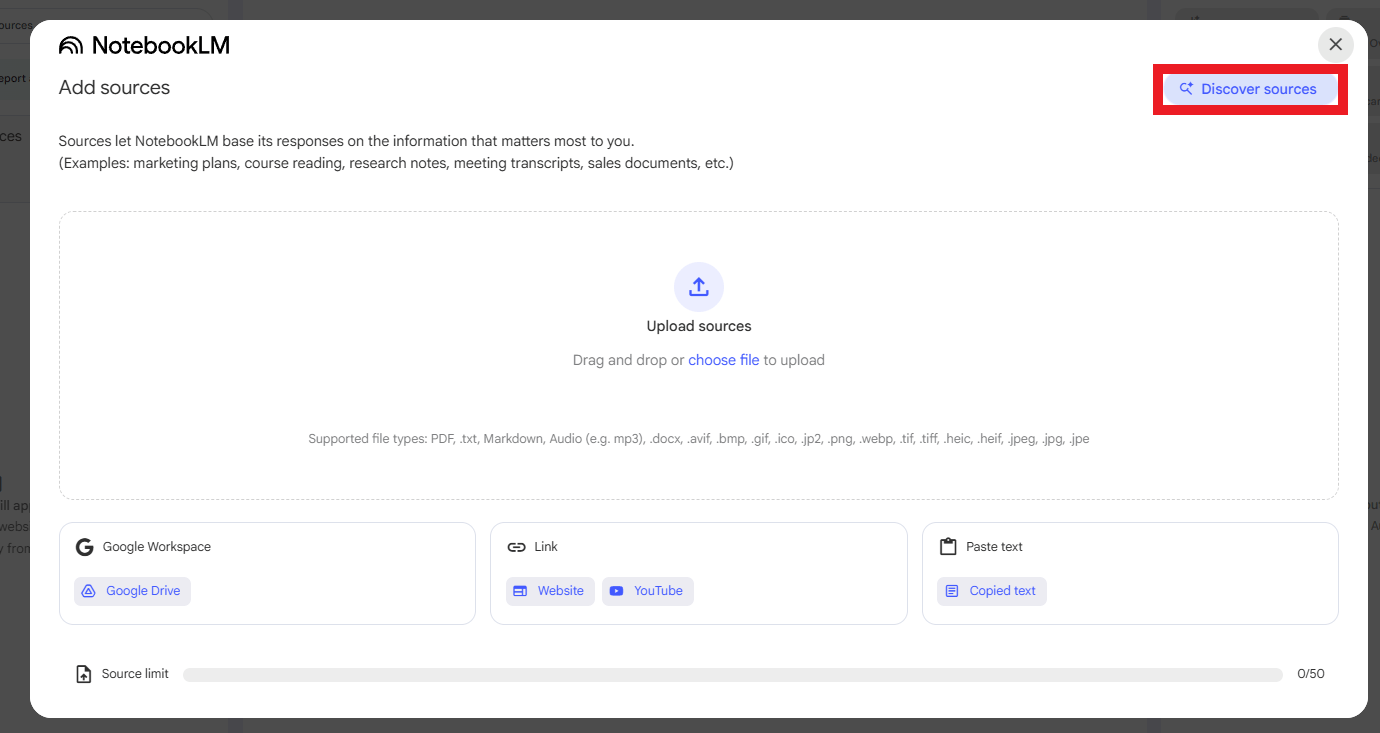
Step 2: Discover Sources
A pop-up appears asking for your sources. Click "Discover sources". NotebookLM automatically finds relevant insights for your topic.
Step 3: Input Your Research Query
Paste your query into the discover bar.
For example: "Fast food industry trends and opportunities for a hot dog business". Click submit.
Here is the prompt I used:
I am an entrepreneur exploring a new business idea. I need to conduct initial market validation to determine if this is a legitimate and profitable venture.

Please research and provide detailed sources with the following data points, statistics and insights for the business concept defined below:

Business Concept (Modifiable Parameter):
- Business Idea: [Enter the core product or service. E.g., "An AI-powered newsletter writing service", "A subscription box for artisanal coffee", "A mobile app for local garden sharing"]
- Target Niche: Come up with an appropriate target niche.

Research Requirements:
1. Overall Market Analysis:
- The current size and projected growth (CAGR) of the global market for the [Business Idea].
- An overview of key market trends (e.g., new technologies, consumer behavior shifts, e-commerce impact)

2. Profitability and Competition:
- Average profit margins for this industry/business model.
- Key challenges, risks and common failure points (e.g., market saturation, customer acquisition costs).
- Identify key competitors in the broader market.

3. Target Audience and Niche:
- Provide specific insights on the Target Niche. (e.g., what are their demographics, key pain points, interests and spending habits?)
- Are there any existing players specifically serving this Target Niche? If so, who?
- List successful examples of similar businesses that have thrived by targeting a specific niche.

Additional Context:
- Sources must be recent (2023-2025 data, if available) and reference credible market research firms or industry reports.
- The information must directly address the viability and potential of this business model for a new entrant.
Step 4: Import Sources
NotebookLM pulls in relevant sources. Click "Select all" and then "Submit" to add everything to your notebook.
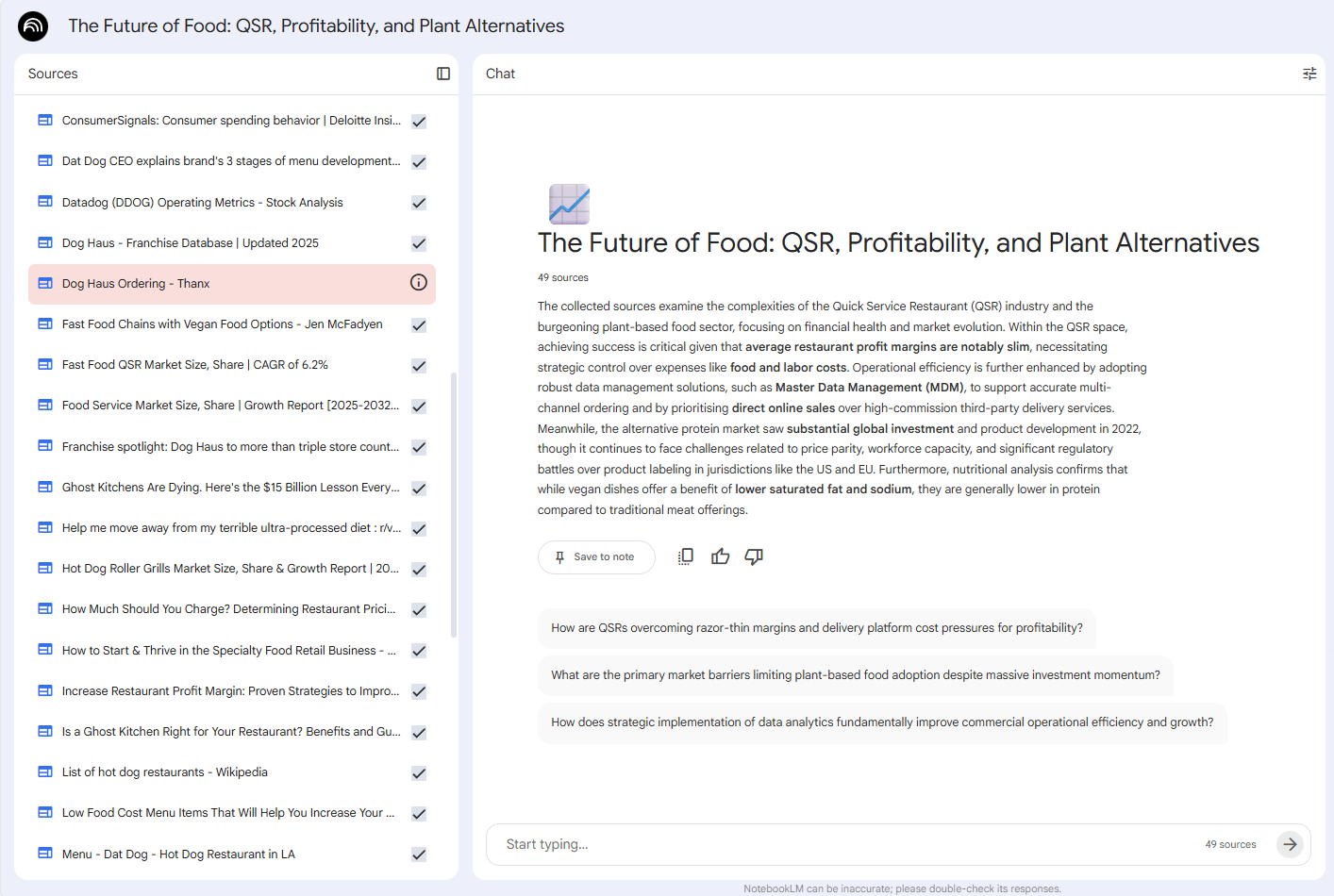
Step 5: Generate Research Report
Now, ask it to analyze the data. Paste this prompt into the chat box:
You are an expert business analyst. Using only the sources provided in this notebook, analyze the business viability of the concept defined below.

Business Concept (Modifiable Parameter):
- Business Idea: [Enter the core product or service. E.g., "An AI-powered newsletter writing service", "A subscription box for artisanal coffee", "A mobile app for local garden sharing"]

Analysis Task:
Please conduct a business viability analysis for this idea. Your analysis must include a rating from 1 to 10 (10 being best) for each of the following five factors. You must justify each rating with data or insights from the provided sources.

1. Market Size & Growth:
- Rating (1-10):
- Justification: Based on the data, is the market for [Business Idea] large and growing? Is there enough room for a new player?
2. Profitability:
- Rating (1-10):
- Justification: What are the typical profit margins? Is it a high-volume, low-margin business or low-volume, high-margin?
3. Competition:
- Rating (1-10):
- Justification: How saturated is the general market? How difficult will it be to stand out from existing competitors?
4. Niche Viability:
- Rating (1-10):
- Justification: How active, engaged and reachable the [Target Niche] is? Are there existing competitors in this specific niche?
5. Barriers to Entry:
- Rating (1-10):
- Justification: How easy or difficult is it to start this business (e.g., startup costs, technical skills, regulations)?

Final Recommendation:
Based on your analysis and the ratings, provide a final, concise recommendation on whether this is a viable and good business idea for a new entrepreneur.
Result: In a few minutes, you have gone from a blank page to a validated business strategy backed by real data using this free AI tool.

Phase 2: Website Creation with Firebase Studio
Now that you know what to build, it is time to turn that strategy into a live, hosted website.
Step 1: Access Firebase Studio
Navigate to Google Firebase Studio. Register an account if it is your first time (takes one minute).
Step 2: Prepare Your Prompt
You need a prompt that gives Firebase full instructions: layout, sections and design.
You are an expert Firebase Studio website generation assistant. You are a master at parsing unstructured research data and transforming it into a cohesive, professional and high-converting website.

Your task is to:
1. Carefully analyze the Core Business Research provided below.
2. Extract the target audience, unique value proposition, key services and company mission.
3. Generate a complete, modern and responsive website structure with all necessary copy.
-------------------
Core Business Research (Modifiable Parameter)
[PASTE YOUR NOTEBOOKLM RESEARCH SUMMARY HERE]
-------------------
Detailed Website Generation Instructions
Based only on the Core Business Research provided above, generate the following:
1. Website Identity:
- Company Name: Extract or infer a logical company name from the research.
- Core Slogan/Tagline: Create a short, powerful tagline that captures the main value proposition.

2. Website Structure & Pages (Generate all 4):
- Home: The main landing page
- Services: A page detailing the core offerings.
- About Us: A page explaining the company's mission and audience.
- Contact: A simple contact page.

3. Page-by-Page Content Requirements:
- Page 1: Home
+ Hero Section: A strong, attention-grabbing headline and a sub-headline that directly addresses the target audience's main pain point (identified from the research).
+ Call-to-Action (CTA) Button: A primary CTA (e.g., "Get Started", "Book a Demo").
+ Services Overview: A 3-column section briefly introducing the main services.
+ Value Proposition: A short section on "Why Choose Us?" that highlights the unique benefits.
- Page 2: Services
+ Create a detailed section for each key service identified in the research.
+ For each service, write a short paragraph explaining:
* What it is.
* What problem it solves.
* The benefit to the customer
- Page 3: About Us
+ Our Mission: A section that expands on the company's mission/vision from the research.
+ Who We Help: A section that clearly describes the ideal customer/target audience.
- Page 4: Contact
+ A simple header (e.g., "Let's Build Together").
+ A contact form with fields for: Name, Email and Message.

4. Design and Style:
- Theme: Professional, modern and clean.
- Color Palette: Suggest a primary color palette that feels appropriate for the industry (e.g., tech-focused blue, e-commerce-friendly green).
- Tone: Authoritative and expert but also approachable and clear. Avoid excessive jargon.
-------------------
Generate the complete website structure and all copy based on these instructions.
Step 3: Integrate NotebookLM Research
Go back to your research report from Phase 1. Copy the key insights. Paste them into the modifiable parameter section of your Firebase prompt.
This ensures your website is built on data, not guesses.
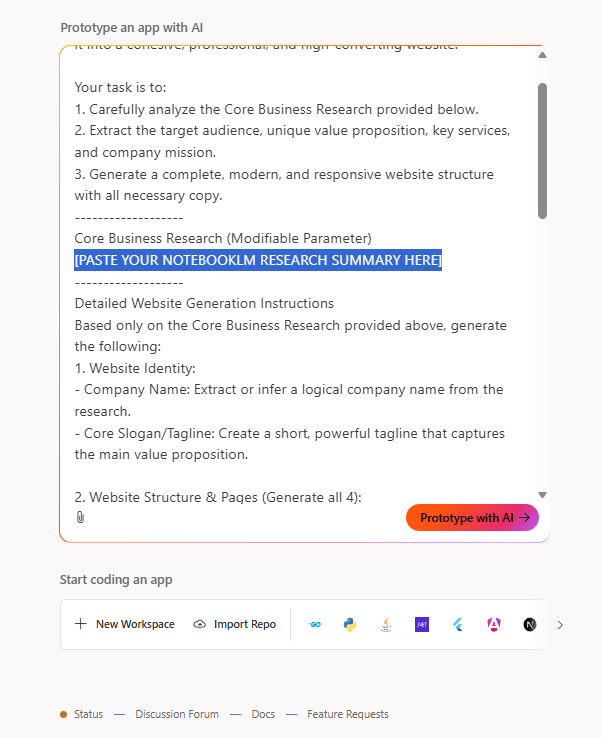
Step 4: Generate Website
Hit enter. Firebase Studio analyzes your prompt. Click the "Prototype" button when ready. Firebase writes the code and generates the site in real time.
Step 5: Review and Refine
Explore the generated website. Check the UI elements. Identify parts you want to change or add. Make changes simply by typing inputs in the prompt box.
Key Point: Firebase Studio helps you create the website while you do quality control.

Step 6: Creating Version B for A/B Testing
Click "Firebase Studio" in the top left to return to the homepage. Use a second prompt to generate a variation of the site. Compare both versions. Choose your preferred version, click that project and click "Publish".
Result: A fully working website, live and ready to explore. No coding, no setup headaches.

New site with my second prompt.
Phase 3: Brand Identity & Campaigns with Pomelli
A website alone isn't enough to attract attention. We need to answer: How do we make people actually notice it? The solution is branding and campaigns, refining your business voice and message into graphic ads that instantly connect with your audience.
Step 1: Access Pomelli
Open Pomelli (Google's AI-powered brand and ad generator in Google Labs). Click "Let's go".

Step 2: Input Your Website
Paste the URL of the website you just created with Firebase. Pomelli instantly scans and analyzes it to extract your Brand DNA, color tone and messaging style.

Step 3: Confirm Brand Analysis
Review the extracted brand elements. Click "Looks good" when satisfied.

Step 4: Generate First Campaign
Input a prompt for your campaign concept. This tells Pomelli exactly what kind of ad ideas you want.
This is my sample prompt:
A [Image Style], [Composition] focusing on [Main Subject(s)]. The scene is set [Setting/Environment]. Key supporting elements include [Key Elements/Props/People]. The lighting is [Lighting Style] to create a [Desired Mood/Atmosphere] that highlights the [Specific Restaurant Experience/Dish].Step 5: Review Campaign Concepts
After a few seconds, Pomelli presents three different campaign concepts. Each has its own visuals, copy and tone. Choose the right one.

Step 6: Generate Campaign Materials
Wait for Pomelli to generate the materials. Preview everything and tweak copy as needed.
Step 7: Creating Variation B for A/B Testing
Generate a second campaign set with a different approach. This gives you two sets of ad materials ready to A/B test, like having your own creative team brainstorming, producing and optimizing ads for testing, all in minutes.
Outcome: Complete campaign toolkit from visuals to ad copy, ready for launch.

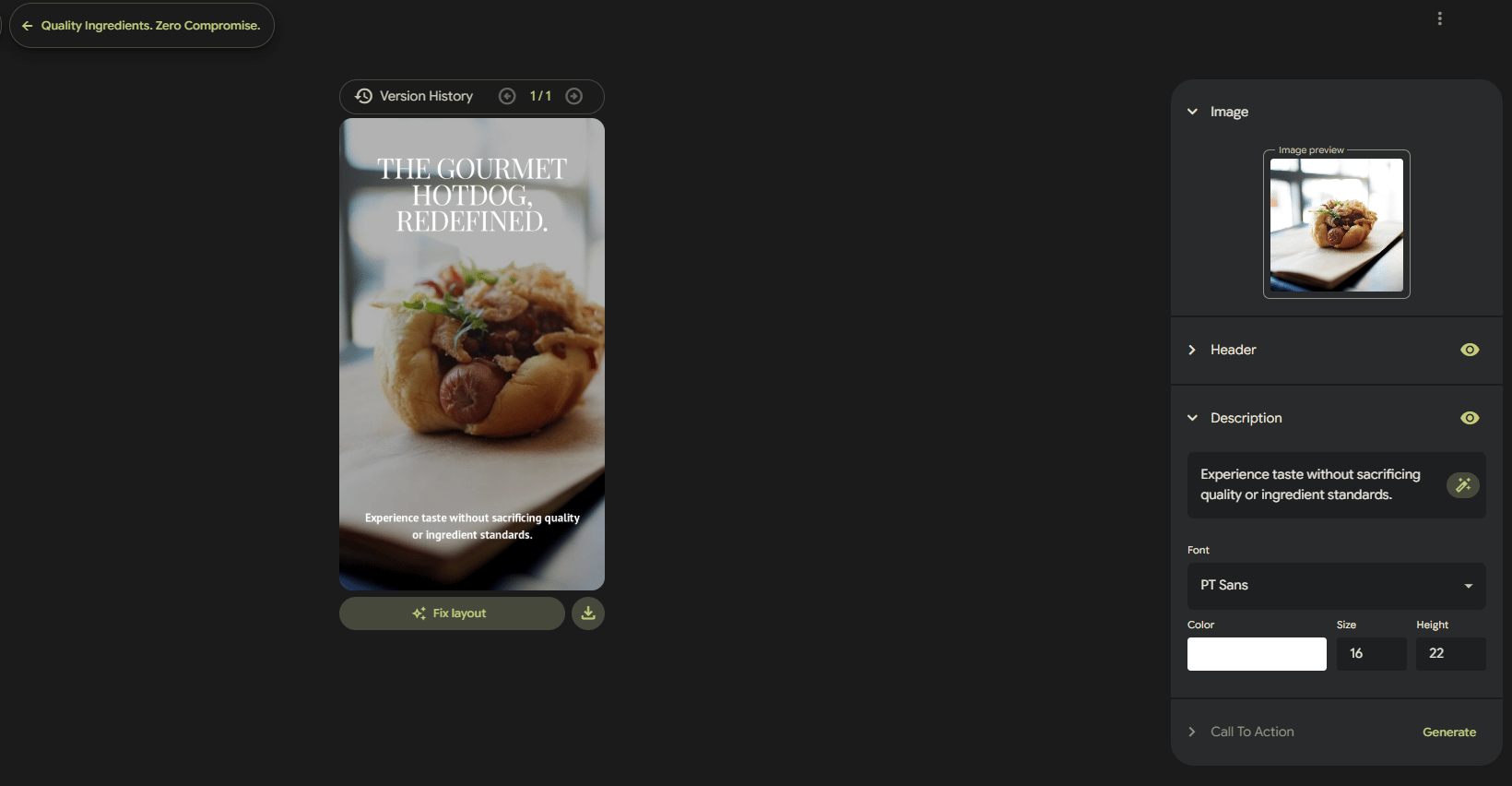
If you want all the prompts I used. templates and examples included. just vote in the poll at the end and I’ll send everything to you.
Phase 4: Video Ads with Google Flow (Veo 3.1)
Before going live, make the campaign smarter by taking assets into Google Flow's Veo 3.1 to generate and test multiple video ad variations. The goal is to create scroll-stopping video ads that feel premium but take just minutes to make.
Step 1: Start New Project
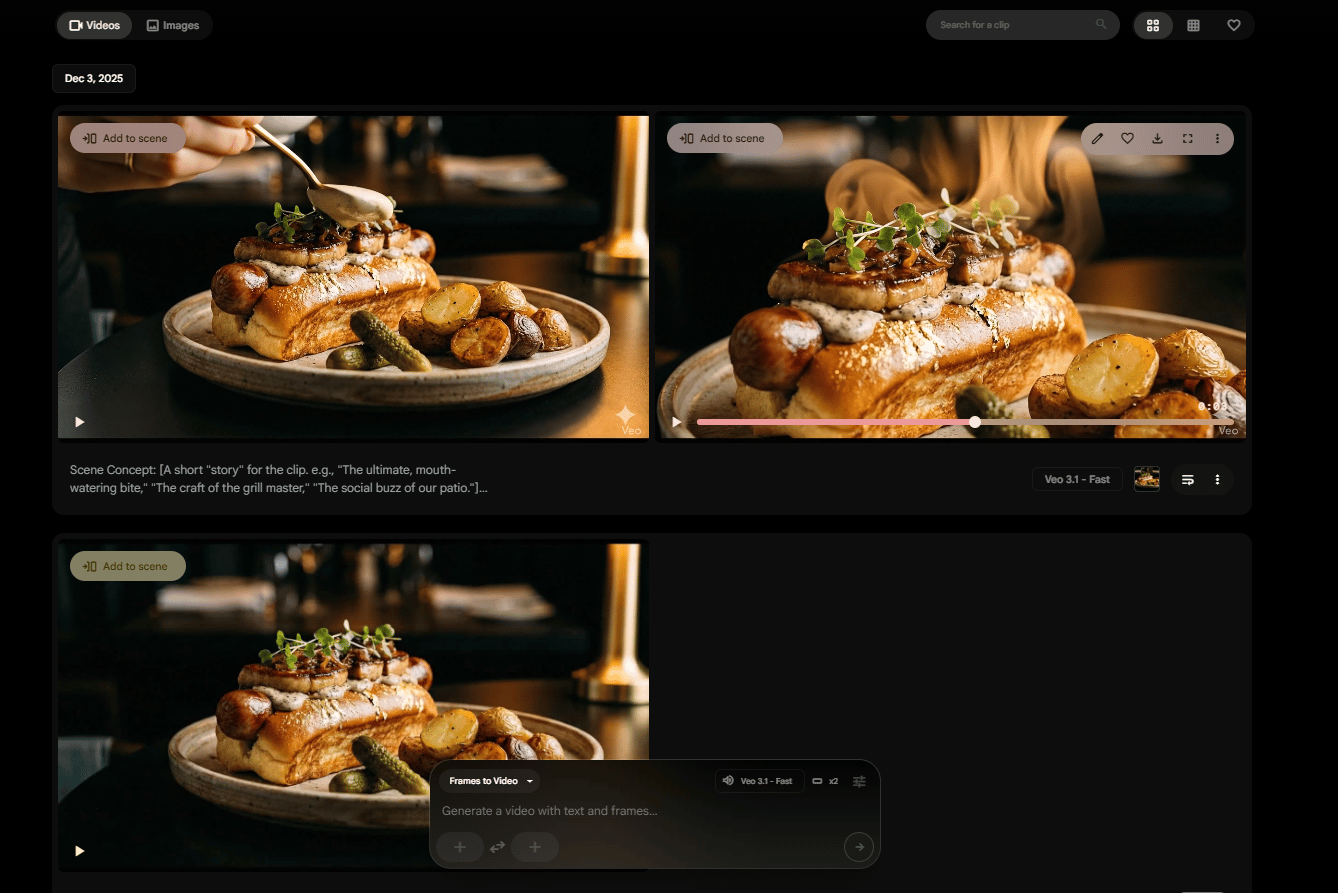
Open Google Flow. Click "New project". You will see two options: Text to video and Frames to video.

Step 2: Choose Frames to Video
Select "Frames to video" since we already have a strong visual direction from our prompts.
Step 3: Generate Starting Frame
Go to Gemini first. Ask it to generate the starting frame image for your video. Be creative about what you want your product to look like. Download the generated image.
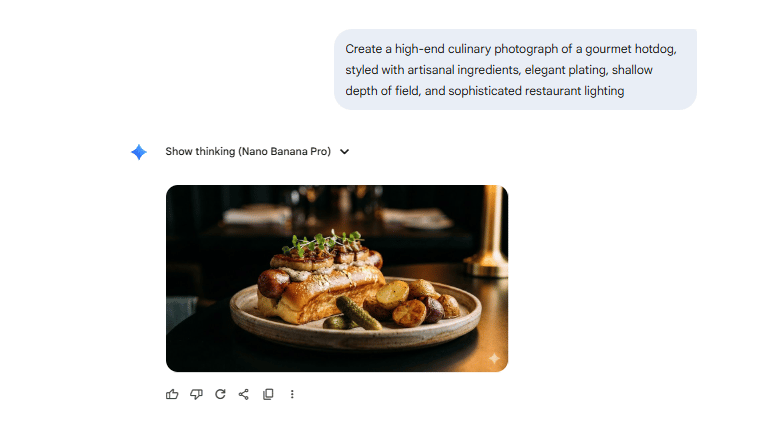
Step 4: Upload to Google Flow
Return to Google Flow and upload the generated image into the frames.
Step 5: Input Video Prompt
Input a prompt describing the motion and action you want. You could use my guide prompt to create your own (Choose one in each element to use):
* [Camera Shot & Movement]:
- Extreme close-up, slow-motion, smooth dolly push-in (Great for texture)
- Cinematic medium shot, gentle orbital pan (arcing) left-to-right (Great for showing the full dish)
- Dramatic low-angle shot, pushing up towards the subject (Makes the hotdog look heroic)
- Overhead (flat lay) shot, with a slow clockwise rotation (Good for a "recipe" or "ingredients" feel)
- Medium shot with a fast rack focus (Changes focus from background to foreground)

* [Visual Style]:
- Hyperrealistic, high-end food commercial
- Cinematic, shallow depth of field
- Vibrant, high-saturation, sharp focus
- Warm, nostalgic, 35mm film grain

* [Lighting Style]:
- Dramatic, warm backlighting (Highlights steam)
- Soft, diffused studio lighting (Clean, minimalist)
- Magical, golden hour sunlight (For lifestyle/patio shots)
After choosing your motion and action, hit enter.
Step 6: Generate First Video
In a few moments, Veo 3.1 generates your ad, complete with motion, transitions and marketing-ready polish.

Step 7: Creating Variation B for A/B Testing
Make two variations with two different prompts (small differences in tone, pacing and visuals). This enables A/B testing to determine which version performs better.
Result: From static images to full motion video ads, all powered by Google's free AI tools.
Creating quality AI content takes serious research time ☕️ Your coffee fund helps me read whitepapers, test new tools and interview experts so you get the real story. Skip the fluff - get insights that help you understand what's actually happening in AI. Support quality over quantity here!
IX. The Complete System: Summary
Let's recap what you have built.
Research & Validation (NotebookLM): Analyzed niche, validated market demand, identified audience needs.
Live Website (Firebase Studio): Created a hosted website with no coding required and multiple versions for A/B testing.
Brand & Campaigns (Pomelli): Shaped brand identity, generated campaign materials, created multiple variations.
Video Ads (Google Flow Veo 3.1): Produced professional video ads with multiple versions for testing.
Every step connected seamlessly, proving how simple it is to build, A/B test and launch a full AI-powered business from scratch.
The Competitive Advantage:
Speed: Launch in hours vs. weeks.
Cost: Zero vs. thousands.
Testing: Multiple variations easily.
Iteration: Real-time adjustments.
X. Where Else Can You Use This Stack Beyond Restaurants?
Answer
You can reuse this flow for e-commerce, service agencies, creators, SaaS and local businesses. Anywhere you need research, a landing site, a clear brand and repeatable ads, this stack fits with only small prompt changes.
Key takeaways
Works for physical and digital products.
Fits solo creators and small teams.
Scales to many parallel experiments.
Critical insight
Once you build one business with this stack, launching the second or third is mostly copy-and-paste plus new research.
This system works for almost any business type.
E-commerce: Product validation, store setup, brand identity, marketing campaigns.
Service Businesses: Market research, professional websites, brand positioning, lead generation ads.
Content Creators: Niche validation, portfolio sites, brand development, promotional content.
SaaS Products: Market analysis, landing pages, brand identity, demo videos.
Local Businesses: Competition research, business websites, local branding, social media ads.
XI. Advanced Strategies
Once you have the basics down, here is how to optimize.
1. Optimization Techniques
Research Phase: Input multiple niche variations to compare market opportunities. Cross-reference trends.
Website Phase: Generate 3-5 variations. Test different value propositions. Analyze which converts better.
Brand Phase: Create campaigns for different audiences. Test various messaging angles. Refine based on the response.
Marketing Phase: Produce multiple video lengths. Test different hooks. Measure performance metrics.
2. Scaling Your AI Agency
Client Services: Offer rapid business launches. Provide complete brand packages using this free AI tool workflow. Create marketing campaigns. Charge a premium for speed.
Internal Projects: Launch multiple businesses. Test various niches. Keep winners, pivot losers. Build a portfolio of businesses.

XII. Common Questions & Troubleshooting
1. "Is this really free?"
Yes. All four tools have free tiers that provide substantial functionality.
NotebookLM: Free.
Firebase Studio: Free hosting included.
Pomelli: Free in Google Labs.
Google Flow: Free in Google Labs.
(Note: Some tools may have usage limits or require credits for advanced features but the core functionality is free.)
2. "Do I need technical skills?"
No. This entire workflow is no-code. No programming required. No design skills needed. No technical setup. It is point-and-click simplicity.

No coding, just plain text.
3. "How long does it actually take?"
Research: 30-60 minutes.
Website: 1-2 hours (including revisions).
Branding: 1-2 hours.
Video ads: 30-60 minutes.
Total: 3-6 hours for a complete business launch.
4. "What if I don't like the results?"
Easy fix. Regenerate with different prompts. Adjust parameters. Iterate quickly. Test multiple versions. The beauty is that iteration costs nothing but time.
XIII. Limitations & Considerations
1. What to Expect
AI-Generated Content: May need human refinement. Review for brand consistency. Check factual accuracy. Polish copy and messaging.
Design Outputs: Professional but not always perfect. May require adjustments. Style can be hit-or-miss. Multiple generations are recommended.
Technical Aspects: Free tiers have limits. Heavy usage may require credits. Processing time varies (not instant but very fast).
2. Best Practices
Always: Review all AI-generated content. Test multiple variations. Refine based on results. Maintain brand standards.
Never: Publish without review. Assume the first version is perfect. Skip A/B testing. Ignore audience feedback.
XIV. The Future: Why Google May Lead
Over 85% of traders on Polymarket believe Google will lead AI by the end of 2025, specifically with Gemini 3.0 Pro.
What This Means: Better models are coming. More powerful tools. Enhanced integration. Greater capabilities.
Strategic Position: Google has advertising infrastructure, search dominance, cloud computing power, massive data access and an existing user base.
For you, this means free AI tools getting better, more features added, a seamless ecosystem and a first-mover advantage for early adopters.

XV. Final Thoughts: The Integration Advantage
The power of AI is not just about speed or automation. It’s about integration. When your tools actually work together, you stop just using AI and start building with AI.
The Transformation:
Old Way: Team of specialists, weeks of work, thousands of dollars, complex coordination.
New Way: One person, one afternoon, zero dollars, four connected tools.
The Competitive Reality: By 2026, AI tools will be even more powerful, integration will be tighter and your competition will be using these tools. Early adopters will have a massive advantage.
The tools are ready. The methodology is proven. The only question is: will you build your AI marketing team using the incredible power of free AI tools?
If you are interested in other topics and how AI is transforming different aspects of our lives or even in making money using AI with more detailed, step-by-step guidance, you can find our other articles here:
⭐ How would you rate this article on AI Tools?If you want the full template, just vote. I’ll send everything to you. Your vote helps us improve future content. |
Reply