- AI Fire
- Posts
- 🤯 OpenAI COOKED with GPT-5.4: 1M Token Memory Makes GPT-5.4 a Productivity Beast!
🤯 OpenAI COOKED with GPT-5.4: 1M Token Memory Makes GPT-5.4 a Productivity Beast!
OpenAI just leaked the ultimate reasoning machine. GPT-5.4 Thinking crushes GPT-5.2 in spreadsheets and coding. Get the full breakdown of every change.

Neil Phan
March 06, 2026

TL;DR
The GPT-5.4 update, released on March 5, 2026, introduces a powerful family of models: 5.3 Instant, 5.4 Thinking, and 5.4 Pro. Key breakthroughs include native "computer use" capabilities with 75% accuracy, a massive 1M token context window for coding, and specialized "agentic web search." These tools significantly reduce operational costs for developers while outperforming human benchmarks in professional knowledge tasks like accounting and data analysis.
Key points
Model Diversity: Choose "Instant" for speed, "Thinking" for logic, and "Pro" for high-stakes research.
Autonomous Action: GPT-5.4 can now navigate desktops, move cursors, and interact with web browsers directly.
Developer Efficiency: The new "Tool Search" feature reduces token usage by up to 47%, cutting API costs nearly in half.
Critical insight
In 2026, the real productivity gain isn't in how fast the AI writes, but in how effectively it can execute digital tasks on your behalf as an autonomous agent.
Which new GPT-5.4 superpower will save your day? 🚀 |
Table of Contents
Introduction
OpenAI just released a massive ChatGPT update, and it is not just a small fix. They launched a whole new family of models called GPT-5.4. If you use AI for your daily tasks, this is the news you have been waiting for.
For the past few months, we have heard many rumors. Some people said it would be faster, others said it would be smarter.
Well, now that I have spent time testing it, I can tell you that both are true. This update brings together 3 different versions of the model: GPT-5.3 Instant, GPT-5.4 Thinking, and GPT-5.4 Pro.

In this guide, I will walk you through every single detail: what these models are, how they performed in my real-world tests, and give you specific prompts so you can try them yourself.
I. What Are New Models in This ChatGPT Update?
The new update features three distinct models: GPT-5.3 Instant for immediate speed, GPT-5.4 Thinking for deep reasoning, and GPT-5.4 Pro for high-end research. Users can also utilize an "Auto" mode that intelligently switches between these "brain powers" based on the complexity of the prompt. This family of models ensures that simple fact-checks remain fast while complex reports receive the necessary processing time.
Key takeaways
Fact: GPT-5.4 Thinking displays a visual box to show it is actively reasoning through a multi-step logic problem.
Comparison: Instant provides answers immediately, whereas Pro is built for extreme accuracy in enterprise-level tasks.
Update Note: Standard ChatGPT Plus users get Thinking and Instant, while Pro requires a higher-tier subscription.
Actionable Detail: Use "Thinking" mode for any task involving math, coding bugs, or extensive document analysis.
When you log in to ChatGPT today, you might see a few new names. It is a bit confusing because the numbers jump around. OpenAI did not release a 5.3 Thinking model; they went straight to 5.4.

GPT-5.3 Instant: This model is all about speed. It gives you an answer as soon as you hit enter. I use this for quick questions, like asking for a recipe or checking a fact. It does not spend time thinking deeply, so it is very fast.
GPT-5.4 Thinking: This is the star of the update. When you ask it a hard question, it stops and reasons. You will see a small box that says it is thinking. It takes a few more seconds, but the answer is much better for complex work.
GPT-5.4 Pro: This is the most powerful version. It is built for researchers and people doing very heavy tasks. It is only available if you have a Pro or Enterprise plan. It takes the longest to answer but is the most accurate.
If you don't want to choose every time, you can just leave it on Auto.
II. How Does This ChatGPT Update Help with Professional Work?
This update is optimized for "knowledge work," showing a massive 83% success rate on the GDPval benchmark for accounting and sales tasks. It introduces a direct Microsoft Excel plugin, allowing the AI to manipulate data and find trends without requiring manual copy-pasting. Furthermore, it can now generate downloadable, professional PowerPoint presentations complete with modern designs and citations in just a few minutes.
Key takeaways
Stat: GPT-5.4 beats or matches human professionals in 83% of standard business data tasks.
Comparison: Unlike older models, the new update can generate full, downloadable files rather than just text drafts.
Detail: The Excel plugin allows the model to work inside your spreadsheets to predict growth rates.
Actionable Detail: Ask the AI to "Turn this research into a 10-slide PowerPoint" to save hours of formatting work.
Many of us use AI for our jobs. OpenAI knows this, so they focused heavily on "knowledge work." This means things like managing data, writing emails, and creating presentations. In my experience, this is where the ChatGPT update shines the most.
1. Handling Spreadsheets and Data
OpenAI ran a test called GDPval. It checks how well the AI does jobs that humans do, like accounting or sales. GPT-5.4 beat or matched human pros 83% of the time.

I tried this with a complicated task. I gave it a messy list of sales data and asked it to find the trends.
Look at this data and create a summary table.

I need to see the total sales per month, the best-selling product, and a prediction for next month based on a 5% growth rate.

Format it as an Excel-ready table.
It handled the math perfectly. There is also a new ChatGPT for Excel plugin. You can now use the model directly inside your Microsoft Excel sheets. You don't have to copy and paste back and forth anymore.

Learn How to Make AI Work For You!
Transform your AI skills with the AI Fire Academy Premium Plan - FREE for 14 days! Gain instant access to 500+ AI workflows, advanced tutorials, exclusive case studies and unbeatable discounts. No risks, cancel anytime.
2. Creating Presentations in Minutes
One of the most impressive parts of this ChatGPT update is how it handles visuals.
Step-by-step guide:
Ask it to research a topic (e.g., The future of solar energy).

Once it gives the info, say:
Turn this into a 10-slide PowerPoint presentation. Use a professional tone and include citations.
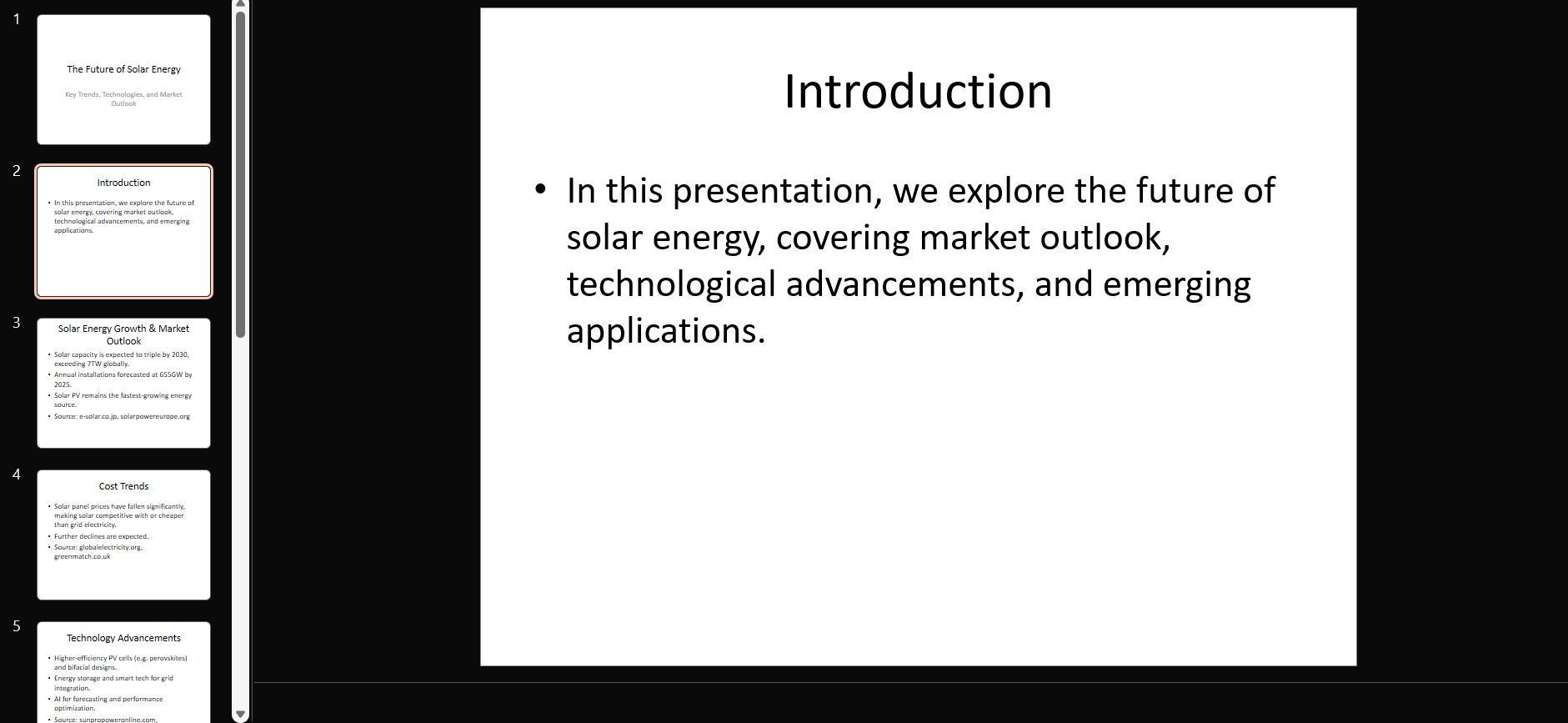
GPT-5.4 will generate a file you can download.

The designs are much better now. They look cleaner and use better colors.
If you don't like the look, you can just say, Make it more modern and minimalist, and it will rebuild the whole thing in a few minutes.
III. Use the Computer Through This ChatGPT Update
If you ever wanted a helper to open a website, fill in boxes, and do chores for you, this ChatGPT update is what you need. GPT-5.4 is the first model that has "computer use" built right inside of it.
It does not just give you advice; it can actually do things on websites and inside different software for you.
1. How the AI Sees and Acts Like a Person
I think the way GPT-5.4 works is very cool. It can write code to run your computer, or it can "look" at screenshots of your screen to decide where to move the mouse or what to type on the keyboard.
Easy to guide: You can send messages to the AI to tell it exactly how you want it to behave for your specific task.
Safety controls: If you are worried about the AI doing something risky, you can set up rules so it has to ask you for permission first.
2. The Numbers That Show Its Power
I want to show you some scores from real tests. These tests compare the new ChatGPT update to humans and older models:

Better than humans on a desktop (OSWorld-Verified): This test checks how well the AI moves around a computer screen. GPT-5.4 got a 75.0% score. This is better than the human score of 72.4% and much higher than the old GPT-5.2, which only got 47.3%.
Mastering the web (WebArena-Verified): When using a web browser, GPT-5.4 got a 67.3% success rate.
Very high accuracy (Online-Mind2Web): Just by looking at screenshots of a browser, it finished tasks correctly 92.8% of the time.IV. Testing the coding skills in the latest ChatGPT update
3. Better Web Search for Hard Questions
Searching for information is a big part of using a computer. In this ChatGPT update, OpenAI has made the search feature much smarter. It is now called "agentic web search".

State-of-the-art accuracy: On the BrowseComp test, which checks how well AI can find hard-to-locate information, GPT-5.4 Pro reached a score of 89.3%. The standard GPT-5.4 scored 82.7%, which is a 17% improvement over GPT-5.2.
Deep research: The AI is now better at "needle-in-a-haystack" questions, meaning it can find a tiny piece of info hidden deep on a website and synthesize it into a clear answer.
4. Better Vision for Harder Tasks
The reason this ChatGPT update is so good at using a computer is because its "eyes" are much better. It can now see small details and read documents with almost no mistakes.

MMMU-Pro Test: This checks how well the AI understands complex photos and charts. GPT-5.4 scored 81.2%, which is a nice jump from GPT-5.2 at 79.5%.
Reading Documents: On the OmniDocBench test, GPT-5.4 had a very low error rate of 0.11, compared to 0.14 for the older model. This means it reads your PDFs and files much more accurately.
Full Fidelity Images: You can now upload very high-quality images. The new "original" detail level supports up to 10.24M pixels (or 6000-pixel dimensions). This allows the AI to see tiny text or small buttons on your screen that it used to miss.
IV. Hands-On Testing with Coding Skills for GPT-5.4
If you are a coder or even just a hobbyist, this ChatGPT update is a big deal. OpenAI used to have a separate model for coding called Codex. Now, the main GPT-5.4 model is just as good as that specialized tool.
1. Higher Accuracy in Less Time

Beside having higher scores, this is also much faster. As you can see in the graph above, GPT-5.4 reaches a higher accuracy in much less time compared to older models.
Faster Results: While GPT-5.2 takes nearly 2,000 seconds to reach its best accuracy, GPT-5.4 reaches a better result in about half that time.
Efficiency: GPT-5.4 starts at a higher level of accuracy even in its fastest mode and stays ahead of GPT-5.3-Codex as it thinks longer.
2. Building Apps from Scratch
I tried to build a simple game using a single prompt. I wanted a 3D highway racing game.
Prompt used:
Write a complete HTML and JavaScript file for a 3D highway racing game.

Include a car selection screen with 3 colors, traffic cars that move, a nitro boost, and a damage system. Make it look professional with street lamps and trees.
The code was long and complex, but it worked. The car selection was smooth, and the physics of the driving felt real. This is great for "vibe coding".
3. The New /Fast Mode
If you use the API for coding, there is a new feature called /fast. It makes the code generation 1.5x faster without losing any quality.
This is helpful when you are building large apps and don't want to wait for the AI to type out hundreds of lines of code.
4. A Massive 1M Context Window in This ChatGPT Update
The context window is like the AI's short-term memory. In this ChatGPT update, that memory has become much larger. While the standard size is 272K tokens, you can now try an experimental version in Codex that goes all the way up to 1 million (1M) tokens.

What does this mean for you in real life?
Handle entire projects: You can give the AI an entire book or a whole folder of code files. It will remember everything from the very first line to the last.
Better debugging: This is perfect for fixing errors in big projects. The AI can "see" all your files at the same time, so it can find a mistake even if it is hidden in a file you mentioned an hour ago.
Usage tip: I should tell you that if your request goes over the standard 272K limit, it will count against your usage limits at 2x the normal rate. So, use the full 1M window when you really need to process something huge.
How useful was this AI tool article for you? 💻Let us know how this article on AI tools helped with your work or learning. Your feedback helps us improve! |
We often compare ChatGPT to other tools like Claude by Anthropic or Gemini by Google. After this ChatGPT update, the race is very close.
1. Where ChatGPT Wins
Knowledge Work: For spreadsheets and business documents, GPT-5.4 is currently the leader. It understands professional tasks better than the others.
Computer Use: The way it interacts with your desktop is very advanced and built right into the main chat.
Speed: Especially with the Instant model, it is hard to beat how fast you get a response.
2. Where Claude and Gemini Are Still Good
3. The Benchmark Comparison
In official tests, GPT-5.4 is technically at the top of the list, but only by a little bit. It is a constant back-and-forth between these companies.
For you, the user, this is great because they keep making the tools better and cheaper to stay competitive.
Feature | GPT-5.4 | Claude 4.6 | Gemini 3.1 |
Reasoning | Excellent | High | High |
Speed | Very Fast | Fast | Fast |
Computer Use | Built-in | Limited | In-progress |
Writing Tone | Professional | Natural | Creative |
VI. Pricing and Safety for the New ChatGPT Update
You might be wondering if this ChatGPT update will cost you more. The answer depends on how you use it.
1. For ChatGPT Plus Users
If you pay the $20 monthly fee, you get access to GPT-5.4 Thinking and GPT-5.3 Instant. If you want the Pro version, you need a higher-tier plan.
During the launch, some people saw "message limit" errors. I saw this too, but it usually goes away if you wait a bit. It is likely just a bug from so many people trying the new model at once.
2. For API Users (Developers)
The price per million tokens is a bit higher for the new models. However, because the model is smarter, it actually uses fewer tokens to solve a problem.
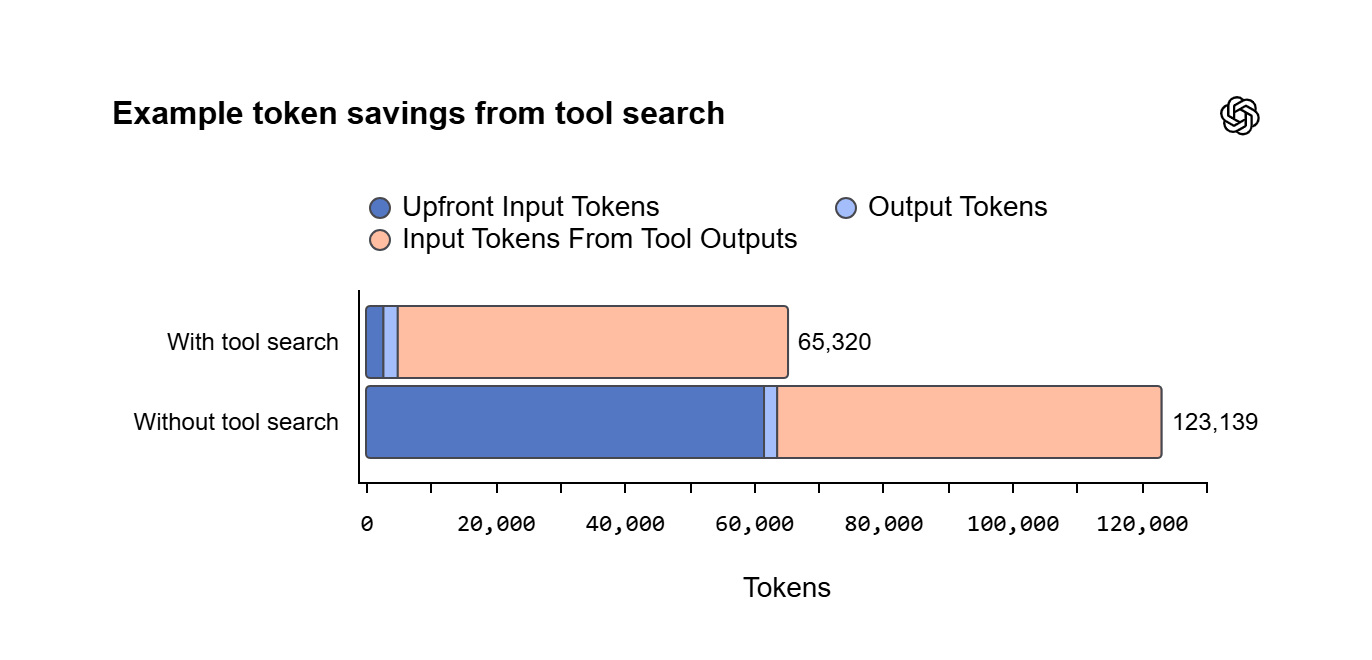
A great example of this is the new Tool Search feature. In the past, the AI had to "read" the definitions of every tool you gave it for every single request. Now, it only looks up the specific tool it needs at that moment.
Huge Token Savings: As you can see in the graph below, using Tool Search can reduce token usage from 123,139 tokens down to just 65,320 tokens.
47% Cost Reduction: This means you can save up to 47% on your total costs, even if the price per token is higher.
To help you plan your budget, here is the official pricing for the new models compared to the older ones:
API Model | Input Price (per 1M) | Cached Input Price | Output Price (per 1M) |
GPT-5.2 | $1.75 | $0.175 | $14.00 |
GPT-5.4 | $2.50 | $0.25 | $15.00 |
GPT-5.2 Pro | $21.00 | - | $168.00 |
GPT-5.4 Pro | $30.00 | - | $180.00 |
Note: Batch and Flex pricing are also available at half the standard API rate if you don't need instant responses.
3. Is It Safe?
OpenAI spends a lot of time on safety. They tested if the model could hide its "thoughts" from humans. The good news is that it can't.
It is very transparent about its reasoning, which makes it easier for OpenAI to make sure it is following safety rules. They also have systems to block high-risk requests, like asking for help with cyberattacks.
VII. Tips for Getting the Most Out of This ChatGPT Update
To really see the power of GPT-5.4, you need to change how you talk to it. Here are a few things I have learned from my tests.
1. Use Mid-Response Redirection

This is a game-changer. If the AI starts writing a long report and you realize you forgot to tell it something, you don't have to stop it. Just type your new instruction while it is still writing.
Example: If it is researching a topic, you can say: Actually, focus more on the environmental impact rather than the cost. It will adjust its work instantly.
2. Adjust the Thinking Effort
In the settings for GPT-5.4 Thinking, you can choose between Standard and Heavy.
Standard: Use this for 90% of your work. It is fast and smart.
Heavy: Use this for math, coding bugs that you can't solve, or very deep research. It takes longer (sometimes 5 to 8 minutes), but the quality is much higher.
VIII. Frequently Asked Questions About the ChatGPT Update
Q: Do I need to pay to use GPT-5.4?
A: Most features of the ChatGPT update are for paid users (Plus, Team, Enterprise, Pro). Free users might get limited access to the Instant model, but for the best experience, a subscription is usually required.
Q: Can it really move my mouse?
A: Yes, if you use the computer use features. It works by looking at your screen and figuring out where buttons are. You have to give it permission first for safety reasons.
Q: Why does it take so long to "think"?
A: This is because the model is using a process called reinforcement learning. It is checking its own work and trying different paths to find the best answer. It is like a human taking a moment to think before speaking.
Q: Is my data safe with the computer use feature?
A: OpenAI says they have strong privacy rules. However, I always recommend not showing sensitive info like passwords or bank details while the AI is watching your screen.
Final Thoughts
After testing GPT-5.4 for several days, I can honestly say it is a big step forward. The biggest difference is that the AI feels more like a partner and less like just a search engine. Whether it is building a 3D simulation of a printer or writing a 1,000-line C++ game, it does it with more detail and fewer mistakes than before.
It is not perfect - it still makes mistakes sometimes. You should always check the numbers in a spreadsheet or the links in a research report. But the time you save is real. I can now do in 10 minutes what used to take me an hour.
The best thing you can do is just start playing with it. Try a task you do every week. See if GPT-5.4 Thinking can do the first draft for you. You might be surprised at how much it has improved in just a few months.
If you are interested in other topics and how AI is transforming different aspects of our lives or even in making money using AI with more detailed, step-by-step guidance, you can find our other articles here:
Building Apps with Bolt: A No-Code Guide to Turning Ideas into Reality
Detailed Guide: How To Automatically Get Unlimited High-Quality LinkedIn Jobs*
Prompt Engineering Automation: Build a Mini AI Assistant with n8n
Discover My Ultimate AI Tools Productivity Kit for 2024*
*indicates a premium content, if any
Reply