- AI Fire
- Posts
- 🤖 Gemini Free or Pro or Ultra Ultimate Comparison: Stop Wasting Your Money!
🤖 Gemini Free or Pro or Ultra Ultimate Comparison: Stop Wasting Your Money!
Most users pay too much for AI features they never touch. Read this breakdown to find which subscription actually fits your workflow and your wallet.

Neil Phan
February 25, 2026

TL;DR
Choosing the right Gemini AI plan in 2026 depends on your specific data needs and professional integration. The Free plan is a capable virtual assistant for casual users, while the $20/month Pro plan is the "sweet spot" for office workers and students due to its massive 1-million-token memory and deep Google Workspace integration. For power users, the $250/month Ultra plan offers 30TB of storage and specialized multi-agent "Deep Think" features, though its high cost is only justified for high-level research or massive data management.
Key points
Tiering: Gemini offers three distinct levels: Free (Basic), Pro (Professional), and Ultra (Enterprise/Luxury).
Memory: The jump from Free to Pro increases context memory from 32,000 tokens to 1 million tokens.
Storage: Pro includes 2TB of Google One storage, while Ultra provides a massive 30TB for heavy data users.
Critical insight
Don't pay for raw power you won't use; for 99% of people, the Pro plan provides the best balance of speed, memory, and everyday utility.
🤔 Which Gemini plan actually fits you? 💸 |
Table of Contents
Introduction
Are you thinking about spending $20 every month for Google’s AI? Or maybe even $250 for the Ultra version? I understand how you feel.
With so many Gemini AI plans, choosing the wrong one can waste your money or make you feel frustrated when the tool doesn't work the way you want.
In this guide, we’ll look at every part of these plans together. I have spent many months testing all 3 versions from asking it to write code to planning my holidays. So trust me.
I. Is the Free Plan of Gemini AI Plans Good Enough?
The Free plan is an excellent entry point for casual users who need a daily virtual assistant for simple tasks like email drafting or basic homework help. It provides unlimited standard chat and access to high-quality image generation via the Nano Banana Pro model, though with a limited daily quota.
Key takeaways
Fact: Even Free users get 5 "Deep Research" reports per month that include charts and web sources.
Contrast: The "Thinking" model is the smartest brain, but Free users only get a few turns per day.
Limit: The 32,000-token context window is roughly equivalent to a small drawer compared to a library.
Tool: Use Gemini 3 Fast for quick, simple questions when speed is your top priority.
Many people think free things are not good. But with Google, they are quite kind. If you just need a virtual assistant for simple questions, this plan might be perfect for you.
1. Chat as Much as You Want
The best thing is that you can chat with Gemini almost all day. It is not like other tools that make you wait or limit you to 10-20 messages.
You can ask it to write an email to ask for a day off, help your kids with math homework, or ask what to cook with the food in your fridge.
2. Create Images for Free With Limits
You can still make beautiful pictures for Facebook or school slides. Right now, the free plan uses a high-quality model called Nano Banana Pro to make about 3-4 images per day.
Small note: When you use up your "good" turns, Gemini will switch to a weaker model. The pictures might look a bit blurry or have less detail, but they are still okay to use.
3. Understanding the “Models” Inside
At the bottom of your screen, you will see choices: Gemini 3 Fast, Thinking, and Pro.

Fast: Always ready, answers very quickly but sometimes a bit simple.
Thinking: This is the "smartest" brain. It thinks carefully before answering. The free plan only gives you a few turns per day.
Pro: For people who do coding and math. The free plan is very strict and limits this part a lot.
4. Memory limits (Context Window)
The free plan has a limit of about 32,000 tokens. Imagine it like a small drawer. If you give it a 500-page book and ask for a summary, it might "forget" the beginning by the time it reaches the end.

This is why it can give strange answers if the conversation is too long.
5. Deep Research Reports
Even on the free plan, you get 5 Deep Research reports every month. I love this feature! Instead of a short answer, the AI will search the internet, make charts, show sources, and write a very long report for you.
Example prompt for you to try:
Please write a Deep Research report about the electric motorbike market in USA in 2026. Analyze the big companies and show a price comparison table.
Learn How to Make AI Work For You!
Transform your AI skills with the AI Fire Academy Premium Plan - FREE for 14 days! Gain instant access to 500+ AI workflows, advanced tutorials, exclusive case studies and unbeatable discounts. No risks, cancel anytime.
II. Pro Option: The Top Pick for Gemini AI Plans?
The Pro plan is considered the best value because it increases your daily "Thinking" prompts to 300 and offers a massive 1-million-token memory. This tier allows you to upload 200-page PDFs or entire project folders for instant analysis, saving hours of manual skimming.
It also features "Personal Intelligence," which lets Gemini read your Gmail, Calendar, and Drive to act as a highly efficient personal secretary.
Key takeaways
Stat: Pro users can generate up to 100 high-quality images and 3 AI videos every single day.
Difference: The 1-million-token window allows the AI to find tiny details on page 87 of a massive manual effortlessly.
Feature: "Personal Intelligence" enables Gemini to summarize Gmail threads and check your Calendar schedule.
Action: Use the "Thinking" mode for complex requests to ensure fewer logic errors and better reasoning.
If you feel the free version is a bit too "tight," the Pro plan is a massive upgrade. For about $20 a month, it’s like moving from a small desk to a whole private office.
But what exactly makes people open their wallets for this?
1. The Power of Thinking AI
The biggest difference you’ll notice right away is the access to the "Thinking" model. On the free plan, the AI often gives quick, short answers. But when you use the Pro plan:
You get around 300 "Thinking" prompts every single day.
The AI takes its time to "reason" through your request.
It makes fewer mistakes and handles complex logic much better.
I usually keep this mode on all day. It doesn't just give an answer; it explains its logic and even asks you follow-up questions to make sure the result is perfect.
2. Reading Huge Documents and Files
Moving from the model's brain to its memory, we need to talk about "tokens." While the free version has a small memory, the Pro plan has a massive 1-million-token window.

This is a total game-changer for anyone who works with a lot of information:
You can upload a 200-page PDF, and it won't break a sweat.
You can drop in a whole folder of business contracts at once.
You can ask it to find a tiny detail hidden on page 87 of a huge manual.
It reads everything in seconds. For me, this saves hours of manual searching and skimming through boring documents.
3. Better Photos and Videos for Your Projects
Now, if you like creating visual stuff, the Pro plan feels like a playground. You aren't stuck with just 3 or 4 photos a day anymore.
With this tier, you get much more freedom:
You can generate up to 100 high-quality images every day.
It uses the top-tier Nano Banana Pro model for every single prompt.
You also get to try video generation with the Veo 3.1 Fast model.

Even though you only get about 3 videos a day, it is incredible to watch. You just type a sentence, and suddenly you have a moving clip for your social media or presentation.
4. Connecting to Your Google World
This is the part that feels like living in the future. We call it Personal Intelligence. This feature allows Gemini to talk to your Gmail, Google Calendar, and Google Drive.
Imagine you have a busy week coming up. Instead of checking 5 different apps, you just talk to Gemini:
It looks into your Gmail to find your flight or hotel details.
It checks your Calendar to see when you are free for a meeting.
It scans your Drive for the latest version of your project files.
It connects all these dots for you instantly. It’s like having a personal secretary who already knows your whole schedule and where all your files are hidden.
Check my Gmail for any recent messages about "Project X" from this week. Please summarize the 3 most important things I need to do and put them into a checklist for me.
Wait, there's more! While the Pro plan is great for daily work, some people wonder if they should go even higher.
Is the most expensive plan actually worth the jump? Let's talk about the "big boss" of the family: the Ultra plan.
III. Ultra Is the Top Tier of Gemini AI Plans
To be honest, the price of $250 every month is very high. After testing it myself, I can say one thing clearly: 99% of us DON’T need it.
However, "you get what you pay for." It still has special features. If you are in the 1% of people who work with very hard tasks, you will see its value.

1. Luxury Benefits Only for Ultra Users
When you pay 12 times more than the Pro plan, you are buying total freedom and Google’s most powerful tools.
First, let's look at images and storage:
Clean photos: There are no logos or small watermarks in the corner. You can use these photos for professional work right away without editing.
Huge 30TB storage: This is a very big number. If you are a photographer or filmmaker who needs to save a lot of data, 30TB on Google One is a great deal.
Free YouTube Premium: You can watch videos and listen to music without ads. This is a small gift from Google to its VIP customers.

Next, tools for super difficult problems:
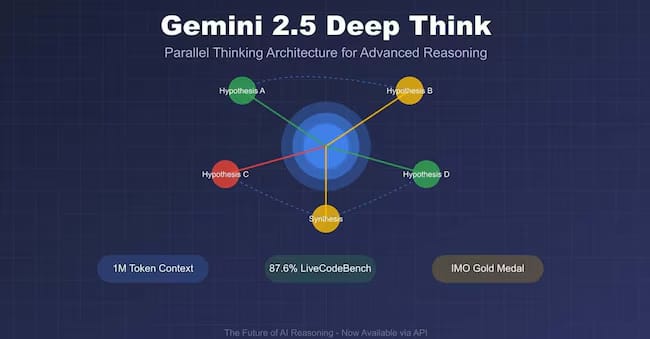
Deep Think feature: This is a special mode. It lets the AI use many "agents" at once to solve hard problems in science or high-level coding.
If you do not work at a big research center, you probably do not need this feature for daily life.
2. The Truth About Getting New Features First
Google promised that Ultra users would use new features before everyone else. But I have watched this for many months, and it is a bit different.
Here are some points to remember:
Google usually tests new things with small groups (beta versions) first.
Many times, Pro users also get new features at the same time, or just a few days after Ultra users.
So, paying several extra millions of VNĐ every month just to use things a few days early is not a smart move.
3. AI Agents and Great Multi-Tasking
The Ultra plan gives you access to "Agents." These are AI assistants that can plan and do many steps of work by themselves.
You can ask it to do very complex things:
It can search the web, compare prices, make bookings, and summarize everything into a plan.
But in my experience, other tools like ChatGPT or Perplexity for only $20 can already do this very well.
The Ultra plan is like a luxury supercar. It is very powerful and prestigious. But for driving to work or going to the market every day, a normal car (the Pro plan) is more than enough for you.
IV. Detailed Comparison of Gemini AI Plans
To help you see clearly, I made this quick table:
Feature | Gemini Free | Gemini Pro ($20) | Gemini Ultra ($250) |
Thinking Model | Very limited | ~300 prompts/day | ~1500 prompts/day |
Image Creation | 3-4 images/day | ~100 images/day | ~1000 images/day |
Video Creation | No | Yes (limited) | Yes (priority) |
Memory (Tokens) | 32,000 tokens | 1,000,000 tokens | 1,000,000+ tokens |
Google Workspace | Help with emails | Inside Docs, Sheets | Full integration |
Storage | 15GB | 2TB | 30TB |
Price | $0 | $20/month | $250/month |
V. How to Use Gemini AI Plans for Your Daily Work
No matter if you choose the free or paid version, the most important thing is not the tool. It is how you "give orders" to it (we usually call this a prompt). I often think of Gemini as a very smart intern, but sometimes this intern is a bit... forgetful.
Because of that, to work effectively, you need to give very clear and detailed directions. Let’s look at some specific ways you can "tell" this assistant to do things for you.
1. Writing and Creating Content
If you are using the Pro plan, try opening a new Google Docs page right now. You will see a small Gemini icon on the side of the page. This is where the magic starts.
Instead of looking at a blank screen for an hour, you should try this:
You just type your request directly into Docs:
"Help me write a detailed outline for a blog post about how to take care of succulent plants for beginners."

After a few seconds, Gemini will automatically write it inside the document for you.
Your job is just to read it again, change a few things you like, and finish it.
In this way, you will save at least 50% of your time compared to typing every word from the beginning. It is very helpful for writers or people who often make reports.
2. Automatic Planning with Scheduled Actions
This is a "secret weapon" that very few people notice when using the paid plans. You can set up Gemini to work for you at a fixed time every day or every week.
Imagine every Monday morning, you don't need to search through your inbox because everything is ready:
You can give an order:
"Every Monday morning, go into my Gmail and summarize all customer feedback from the past week."

Then, tell it:
"Save that summary into a new Google Docs file and name it with the date."

When you wake up and open your computer, the report is already there waiting for you to check.
This is a great way to free yourself from small but time-consuming tasks. It helps you focus on more important things.
How useful was this AI tool article for you? 💻Let us know how this article on AI tools helped with your work or learning. Your feedback helps us improve! |
3. Learning With NotebookLM
If you are a student or someone who needs to study a new topic, you must try it. The good news is that even with the free version, you can use this feature very well.

The way to use it is very simple and easy to understand:
You just upload all your documents, lectures, or websites you need to research into the system.
Now, Gemini will become an "expert" that only understands your specific documents.
The most interesting thing is the Podcast feature: The AI will create an audio conversation to summarize the knowledge. You can listen and learn anywhere.
Learning this way helps the knowledge enter your mind more naturally than sitting and reading dry pages, right?
VI. Pick the Right Option Among Gemini AI Plans
After looking at every version, I have some honest advice for you. No plan is "the best" for everyone. You should choose the one that fits your work and your budget.
Stay with the Free plan if: You only use AI sometimes to ask for directions, translate a few English sentences, or write fun Facebook posts. Don't waste money if you don't use it every day.
Upgrade to the Pro plan if: You are an office worker, freelancer, teacher, or student. Having 2TB of storage and the ability to read long PDF files is very much worth it. Especially if you are a college student, Google often gives 1 year of Pro for free, don't miss it!
Choose Ultra only if: You really need 30TB of storage and you work in high-level research or create massive amounts of content for work.
VII. Frequently Asked Questions (FAQ)
Even after looking at all the features, you might still have a few small worries before you decide to pay. Here are the most common questions explained in a very simple and clear way.
1. You Can Cancel Your Pro Subscription at Any Time
One of the biggest worries is being "locked" into a contract. But with Google, you have total control over your money:
You can sign up for a 1-month trial (usually free) to test all the best features.
If you don't like it, you can cancel immediately with just a few clicks.
After you cancel, you can still use all the Pro features until the end of that month.
So, don't be afraid to try it! It is a safe way to see if the AI actually helps your work before you spend money.
2. Choosing Gemini Pro or ChatGPT Plus Depends on Your Habits

This is the most popular question today. It is hard to say which one is "better" because they have different strengths:
Pick Gemini Pro if: You use Google tools every day (Gmail, Drive, Docs). The 2TB storage and the way it works inside your emails is a huge advantage.
Pick ChatGPT Plus if: You like building your own "Custom GPTs" or want a more creative feeling in the conversation.
My advice? If you already live in the Google world, Gemini Pro will feel much smoother and more helpful for your daily tasks.
3. You Do Not Need to Know Coding to Use Advanced Features
Don't let words like "Advanced" or "Ultra" scare you. You do not need to be a computer expert or know how to write code to use these tools.
Everything is controlled by normal, everyday language.
You just talk to the AI exactly like how you are talking to me right now.
Even if your grammar is not perfect, Gemini will still understand and help you very well.
The more you talk to it naturally and give details, the better the results will be. It is designed for everyone to use easily.
Conclusion
I hope you now have a clear choice for your work. Choosing the right plan saves you money and makes your daily life much easier. If you only need quick answers or basic writing help, the Free plan is enough for you.
However, if you are an office worker, teacher, or student who works with long files and wants AI inside Gmail and Docs, the Pro plan is the best value. You should only choose Ultra if you need massive 30TB storage or professional photos without logos.
My final advice is to take the 1-month free trial of the Pro plan to see how much time it saves you before you pay. Let the AI do the boring tasks so you have more time for your own creative ideas and personal life!
If you are interested in other topics and how AI is transforming different aspects of our lives or even in making money using AI with more detailed, step-by-step guidance, you can find our other articles here:
Building Apps with Bolt: A No-Code Guide to Turning Ideas into Reality
Detailed Guide: How To Automatically Get Unlimited High-Quality LinkedIn Jobs*
Prompt Engineering Automation: Build a Mini AI Assistant with n8n
Discover My Ultimate AI Tools Productivity Kit for 2024*
*indicates a premium content, if any
Reply