- AI Fire
- Posts
- 🦾 How to Use N8N Better than 99% of People: All from Beginners to Advanced Users
🦾 How to Use N8N Better than 99% of People: All from Beginners to Advanced Users
Adopt the framework used by elite experts to build reliable machines. This detailed breakdown explains the architecture of data movement for users.

Neil Phan
March 05, 2026

TL;DR
Building a marketing team in 2026 no longer requires a massive payroll. By utilizing ten specialized AI "expert" personas ranging from conversion optimizers to programmatic SEO strategists - business owners can automate high-level tasks like psychological sales critiques, PAS-based copywriting, and automated email nurturing. These digital employees operate 24/7, allowing a single founder to conductor a full-service marketing department using simple markdown skills or API integrations.
Key points
Specialized Personas: Generic AI outputs fail; specialized marketing "skills" use specific frameworks like PAS or AIDA.
Friction Reduction: AI "optimizers" act as psychologists to find website elements that confuse or lose customers.
Scaling Growth: Programmatic SEO allows businesses to generate thousands of targeted pages using templates and databases.
Critical insight
The future of marketing isn't about working harder; it's about shifting from being a creator to being the conductor of an AI-powered expert team.
🤯 Tired of guessing why your n8n workflows keep breaking? |
Table of Contents
Introduction
If you have been playing with n8n for a few weeks but still feel like you are just guessing, you are in the right place.
The best n8n users do not simply know more tricks. They look at the screen in a different way. You might see a mess of icons that look confusing.
However, top users see a clear path for their data. In this guide, we’ll look at 5 main secrets to help you use n8n well.
We'll build smooth systems for your work together. This way, you don't have to guess anymore when you connect the nodes.
I. New Mindset for Your Very First Step
The Page Conversion Optimizer acts as a digital psychologist to identify "friction" that causes visitors to leave your site. Instead of focusing on aesthetics, it analyzes your value proposition to ensure headlines are benefit-driven and trust elements are positioned correctly. By providing a ruthless "tear-down" of your landing page, it helps you convert more skeptical visitors into paying customers.
Key takeaways
Fact: Conversion Rate Optimization (CRO) consultants typically charge thousands for a single page review.
Contrast: A generic AI might say "great job," but a Conversion Optimizer looks for reasons why a user will quit.
Update: 2026 workflows focus on "FOMO" triggers and specific pain points rather than generic descriptions.
Tool: Use the expert to identify missing trust badges or social proof elements "above the fold."
When I first started, I thought n8n was just a way to connect apps. I would drag a Google Sheets node and try to connect it to Slack. It felt like playing with Legos, but the pieces did not always fit.
The secret to how to use n8n better than anyone else is to stop looking at the nodes as "actions." Instead, you need to see n8n as a system that moves data through time.

Every workflow follows these simple steps:
Something tells the factory to start (The Trigger).
Data enters the building.
The data gets its shape changed.
You make decisions about where the data goes.
You send the data to the final destination.
Once you see this pattern, you will not get confused by new nodes. You will just ask, "How is this node changing my data?"
II. How to Use n8n Triggers to Start Your Data Journey?
A professional AI copywriter is trained on a century of successful advertising campaigns and uses proven psychological frameworks. Instead of generating "fluffy" text with robotic words like "unleash," it structures arguments using models like PAS (Problem, Agitation, Solution). This ensures your marketing copy connects emotionally with the reader and drives them toward a specific action.
Key takeaways
Stat: Generic AI text often includes repetitive "bot" words; professional personas avoid corporate jargon.
Difference: Standard AI writes sentences; a Copywriter AI builds sales arguments based on human psychology.
Framework: Use the PAS (Problem-Agitation-Solution) framework to make customers feel your product is the hero.
Example: Target busy parents by calling out the stress of 6 PM hunger before introducing your meal service.
A lot of people think the trigger is just a "start" button. But in the world of how to use n8n, the trigger is actually the most important part because it decides what your data looks like at "Step Zero."
1. The Three Main Types of Triggers

There are many triggers, but you will mostly use these 3:
Schedule Trigger: This is for tasks that happen every hour, day, or week. It sends "time data" into your workflow.
Webhook Trigger: This is like a doorbell. Another app (like a payment processor) rings the bell and hands n8n a package of data.
Form Trigger: This starts when someone fills out a form. It sends exactly what they typed into the boxes.
2. Why You Must Check Your Output Early
Before you build a long workflow, I want you to run the trigger once. Click on it and look at the "Output" tab. This is your foundation. If you do not know what the data looks like here, you will struggle later.

For example, if you use a Google Sheets trigger, it might give you a list of rows. If you use a Webhook, it might give you a complex mess of text. You need to see this "shape" before you can move to the next step.
Learn How to Make AI Work For You!
Transform your AI skills with the AI Fire Academy Premium Plan - FREE for 14 days! Gain instant access to 500+ AI workflows, advanced tutorials, exclusive case studies and unbeatable discounts. No risks, cancel anytime.
III. Why Are Nodes Just Tools for Data?
This is the biggest lesson I can teach you. Every single node in n8n does the exact same 3 things. If you understand this, you can use any node, even ones you have never seen before.
Thing #1. The Input, Config, and Output Pattern
When you open a node, you see three main sections:

The Left Side (Input): This is the data that came from the node before it.
The Middle (Configuration): This is where you tell the node what to do. This is like the "instructions" for the factory worker.
The Right Side (Output): This is what the data looks like after the worker is done with it.
Thing 2. Changing the Shape of Data
I often use a node called Edit Fields. It does not send emails or post to social media. All it does is take messy data and make it clean.

Let's say a trigger gives you a user's full name, address, and phone number. But you only need their email and their first name. You use the Edit Fields node to "map" those specific pieces.
Thing 3. A Quick Word on JSON

You might see people talking about JSON. Do not let that scare you. JSON is just a way for computers to write a list.
Imagine a shopping list:
Item: Apple, Price: $1
Item: Bread, Price: $2
That is basically all JSON is. n8n uses this format to keep things organized. You do not need to be a coder to understand it; just think of it as a list of "Keys" (like "Email") and "Values" (like "[email protected]").
IV. How to Use n8n Execution Logs to Fix Errors?
Most people get angry when a workflow fails. I used to feel the same way. I would change 10 different settings trying to fix it. But pro builders love failures because the "Execution Log" tells you exactly what went wrong.
1. Mismatches, Not Bugs
Usually, n8n is not "broken." Instead, there is a "data mismatch." This means the node expected one thing, but you gave it something else.

Maybe you told a node to send an email, but the email field was empty. That is not a bug in n8n; it is a problem with your data.
2. How to Debug Like a Teacher
When I help my team with how to use n8n, I tell them to follow these steps:

Open the failed execution.
Start at the trigger.
Click each node one by one.
Look at the output of Node A and the input of Node B.
Find the exact spot where the data looks "weird" or disappears.
Once you find that spot, you fix the problem before it happens. Do not try to fix the node that failed. Fix the node that sent the wrong data to it.
V. How to Use n8n Self-Hosting to Save Money and Time?
Where you run n8n is just as important as how you build the workflows. You have three main choices, and one is much better than the others if you want to be a pro.
1. The Cloud Option

You can pay a monthly fee to n8n.io. It is easy to start, but they limit how many times your workflows can run. If you have a successful business, those costs can get very high, very fast.
2. The Local Option

You can run n8n on your own laptop. It is free, but if you close your laptop or lose your internet, your automations stop. I do not recommend this for anything important.
3. The VPS Option (The Pro Way)
A VPS is a "Virtual Private Server." It is a computer in the cloud that stays on 24/7. This is the best way for how to use n8n because you have no limits and you only pay a small flat fee for the server.
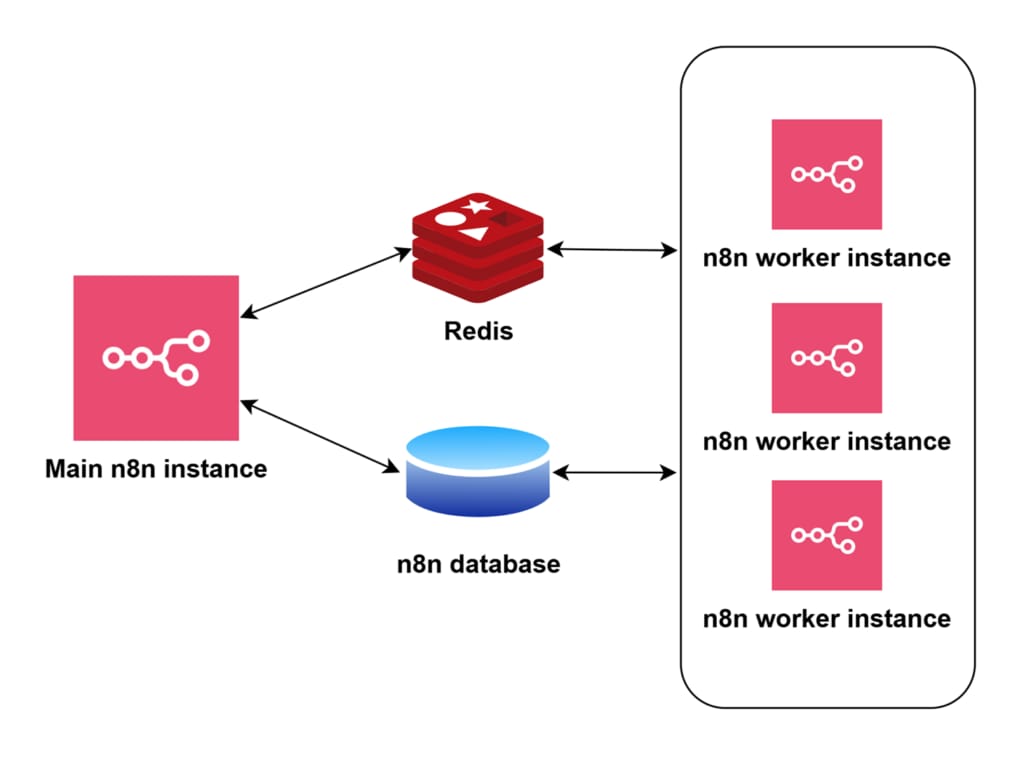
I personally like using Hostinger for this. They have a special setup that installs n8n for you with just a few clicks.
You pick a VPS plan (KVM 2 is usually plenty).
You choose n8n from their list of apps.
They give you a URL, and you are ready to go.
This gives you "freedom." You can run 1,000 or 100,000 executions, and the price stays the same.
VI. How to Use n8n Data Flow and Logic for Big Projects?
Once you have the basics down, you need to learn how to guide your data through different paths. This is called "Control Logic."
1. Using Filters as Gatekeepers
A Filter node is like a security guard. It looks at the data and says, "Are you allowed to pass?"

Example: If you are building a lead generation workflow, you might only want to process leads from people in the USA.
You set a filter: Country equals USA. If it matches, the data moves forward. If not, it stops right there.
2. Using Routers for Different Paths
A Router is like a fork in the road. You can send high-value customers down one path and low-value customers down another. Like this:
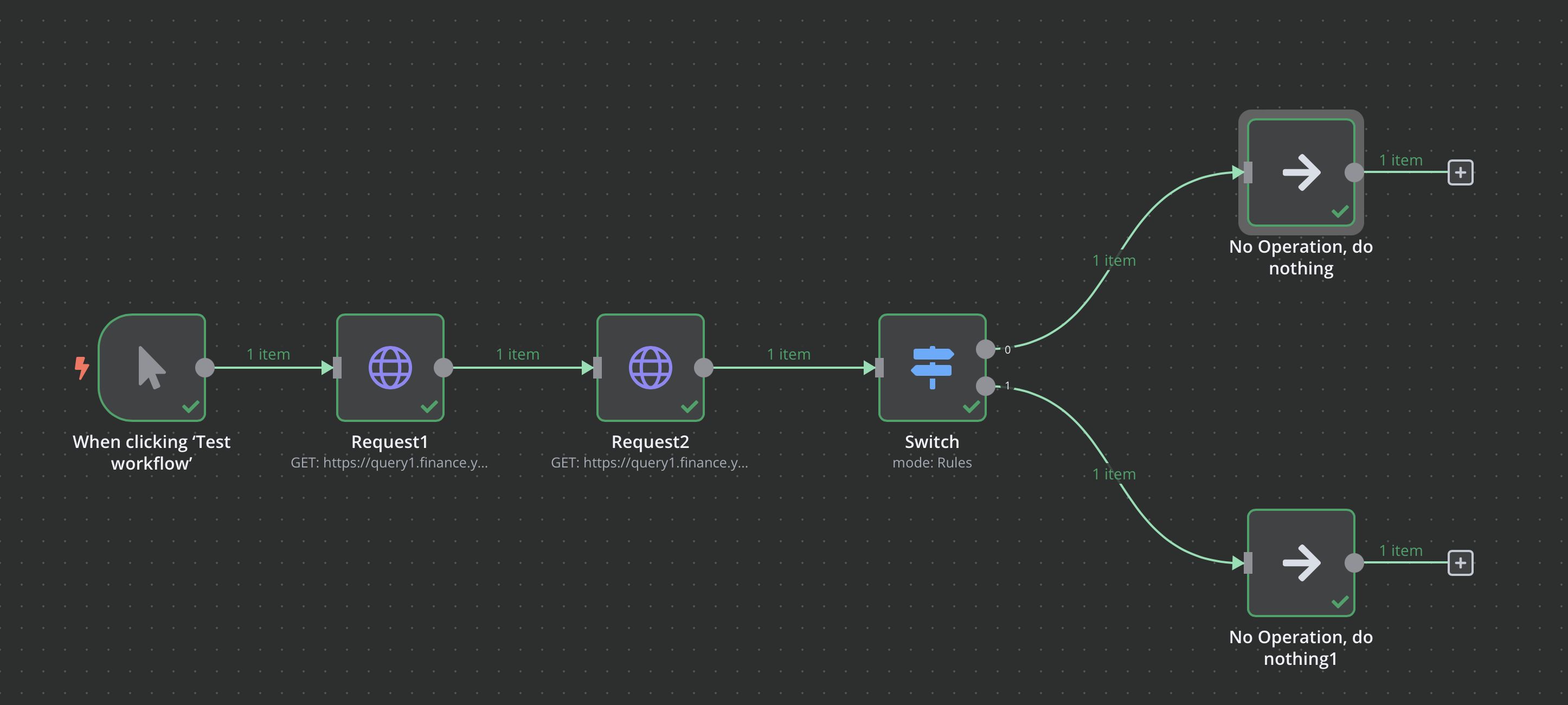
Path A: Send an immediate Slack alert to the sales team.
Path B: Just add them to a mailing list in mailchimp.
3. Merging It All Back Together
Sometimes you split your data to do different things, but then you want to bring it back into one list. The Merge node does this.

It takes different streams and combines them so you can send one final report at the end of the day.
How useful was this AI tool article for you? 💻Let us know how this article on AI tools helped with your work or learning. Your feedback helps us improve! |
VII. How to Use n8n AI Nodes to Make Your Workflows Smart?
This is the most exciting part of how to use n8n in 2026. But most people use AI the wrong way. They try to make the AI do everything, which makes the workflow slow and messy.
Do not treat AI like a magic brain. Treat it like a worker who is good at reading. The best place for AI is at the end of a workflow, once your data is already clean and organized.
1. Four Parts of an AI Node
When you set up an AI node, you need to look at these 4 pieces:

The Model: This is where you connect to openai or anthropic. I usually use GPT for complex tasks and Gemini for faster, cheaper ones.
Memory: This helps the AI remember what it said before. If you are just processing one piece of data at a time, you can usually turn this off.
Tools: These are extra powers you give the AI, like searching the web or reading a specific file.
Output Parser: This is the most important part. It tells the AI, "Do not give me a long paragraph. Give me a structured list."
2. How I Talk to The AI
When you use AI in n8n, never give short or lazy orders. Always tell the AI exactly what you want it to look for in the data.
For example, in the image below, I list clear points that it needs to check and I ask it to organize the answer in a neat way:

Since I already made the data clean in the previous steps, the AI can focus on its job. It gives me back the important information I need. This way, the result is ready for you to use in the next steps of your workflow without any errors.
VIII. FAQ About How to Use n8n?
1. Is n8n Better Than Zapier for My Work?

I think the answer depends on how much data you have. Zapier is very easy to start, but it uses a "pay-per-task" system. This means if you have a lot of work to do, your bill becomes very expensive every month.
When you learn how to use n8n, you see that it is much more powerful. You can build paths that go in many different directions at the same time. Also, because you can host it on your own server, you do not have to pay for every single task. This gives you the freedom to build big systems without worrying about high costs.
2. Do I Really Need to Know How to Code?
You do not need to be a programmer to build great things. Most of the time, you just drag and drop nodes. However, you do need to understand "logic." If you know how to use basic formulas in Excel, you already have the right mindset.
Knowing a little bit about JSON is also helpful. You do not need to write it, but you should know how to read it. It is just a way to label information so the computer knows which piece of data is the "Email" and which is the "Name." If you can understand that, you can map data between any two apps easily.
3. Can I Run AI Models on My Own Server?
Yes, you can, and this is a great way to keep your data private. When you use big AI companies, you send your data to their servers. But with how to use n8n on a strong VPS, you can keep everything inside your own "house."

You can use a tool called Ollama to put an AI model directly on your server. This means the AI reads your data and gives you answers without that information ever leaving your control. This is a very smart choice if you work with private information or if you want to avoid paying for every AI request.
Conclusion: You Are Now In The Top 1%
Learning how to use n8n is not just about memorizing where to click. It is about a new way of thinking. Most people just want to connect two apps and hope for the best. But you now know that you are building a real system.
I want you to always look at your data like a moving object. You must know its shape when it starts and how it changes at every step. If you keep your nodes small and simple, your workflow will not break easily. When a problem happens, the execution logs will show you the truth immediately. You do not have to guess anymore because you understand the logic.
By adding AI at the very end to read your clean data, you give your system a brain. This makes your work much more reliable than what most people build. You are now an architect of data. You are not just an automation user; you are someone who builds machines that work for you day and night.
If you are interested in other topics and how AI is transforming different aspects of our lives or even in making money using AI with more detailed, step-by-step guidance, you can find our other articles here:
AI Generalist: How To Make 2026 The Best Year of Your Life With GPT/Gemini
The New Way to Build Profitable AI Websites With Gemini 3 (It Starts With One Page)
Earn Money with MCP in n8n: A Guide to Leveraging Model Context Protocol for AI Automation*
Transform Your Product Photos with AI Marketing for Under $1!*
The AI Secret To Reports That Clients Actually Implement
*indicates a premium content, if any
Reply