- AI Fire
- Posts
- 🚀 n8n 2.0 Serious Update: What Changed and Why Your Workflows Get Easier?
🚀 n8n 2.0 Serious Update: What Changed and Why Your Workflows Get Easier?
The new n8n update 2.0 changes how subworkflows handle data. Learn why your automation logic needs a quick check before these silent shifts affect results.

Neil Phan
January 10, 2026

TL;DR
The n8n 2.0 update introduces a sleek flat design, instant saving, and critical fixes for AI agent subworkflows. While visuals are improved with interactive connection points and a flexible sidebar, the most important changes are technical: subworkflows must now be "Published" to run, and the new Focus Panel allows for pinning prompts during editing. This guide covers how to migrate safely using the Migration Report and why these updates lay the groundwork for better stability in 2026.
Key points
Design: 3D nodes are gone; the new flat UI is cleaner and less cluttered.
Speed: Saving is now instant, preparing for auto-save features coming in 2026.
Logic: AI agents can now wait for human approval in subworkflows without losing data.
Critical insight
Before updating, check your subworkflows; if they aren't marked "Published," your entire system will break.
Scared of broken n8n workflows? 📉 |
Table of Contents
If you use n8n for your business or personal projects, you know how much it helps to automate boring tasks. Well, a big n8n update just dropped. It is called n8n 2.0. At first, you might think it just looks a bit prettier, but there are some deep changes that will change how you build and run your workflows.
I have spent a lot of time testing this new version to see if it actually makes life easier. In this guide, I will walk you through the new look, the speed improvements, and a very important change to how subworkflows work. But remember, a fast interface won't fix a messy logic.
If you really want to build resilient systems that run while you sleep, you should also check out how I’d learn n8n from zero in 2026 to fix 90% of common mistakes before diving into these new features.
Part I: What Is New In The n8n Update Regarding Visuals?
The n8n 2.0 interface has been modernized with a flat, cleaner design, removing the old 3D shadow effects to reduce visual clutter on large canvases. Connection points now interactively "pop out" when hovered over, making it easier to link nodes without mistakes. Additionally, the sidebar is now collapsible and resizable, giving you more screen real estate to focus on complex workflows.
Key takeaways
Style: Nodes are now flat with glowing status outlines (Red = Running, Green = Success).
UX: Connectors pulse on hover, reducing missed clicks.
Layout: Sidebar can be hidden or resized to widen the workspace.
Feature: Settings are now directly accessible in the sidebar, saving clicks.
The new glowing outlines make debugging huge workflows instantly easier because you can see exactly where the process is stuck.
1. A Cleaner And Flatter Design
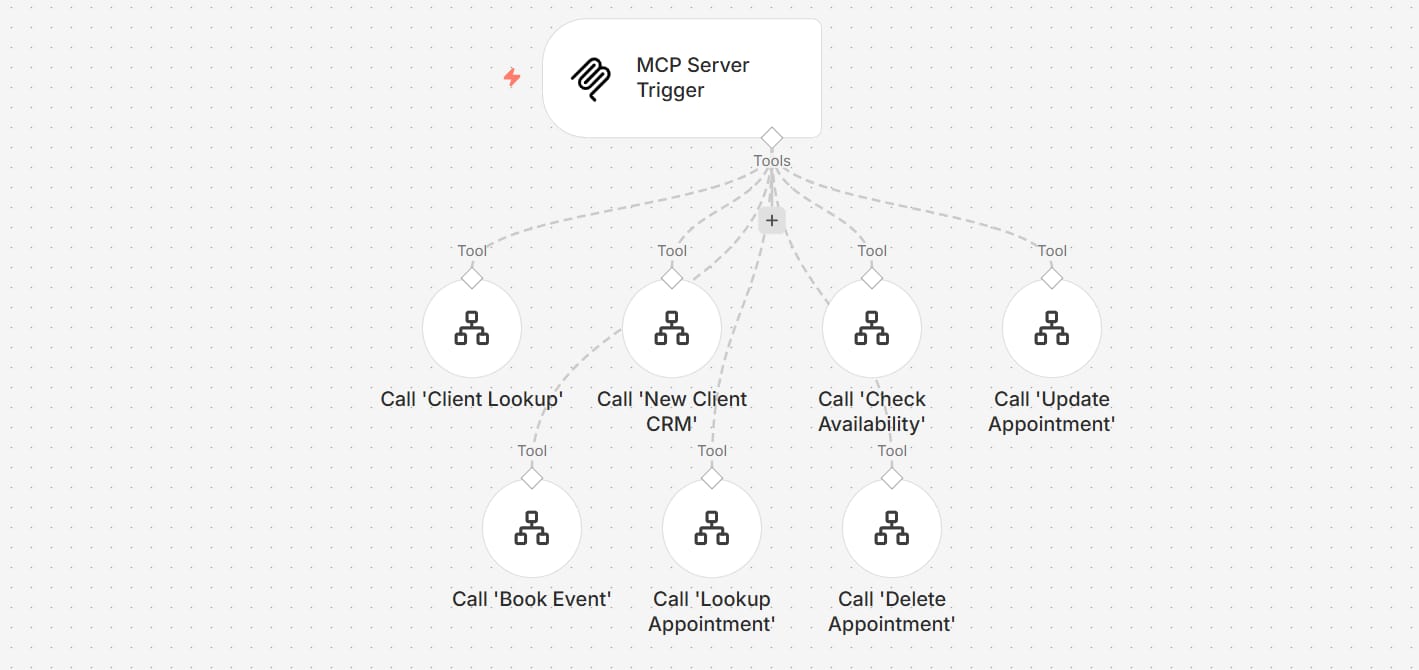
The first thing you will see in this n8n update is that the nodes look different. In version 1, nodes had a 3D shadow effect that made them look like they were floating. Now, they are flat and look like they are part of the canvas. This makes the whole screen feel less cluttered.
When you run a workflow, the indicators have changed too. Instead of a spinning circle inside the node, you now see a glowing outline.
It turns red while the node is working and green when it finishes successfully. This is much easier to see when you have a giant workflow with 50 nodes.
2. Interactive Connection Points
I really like what they did with the connectors. When you hover your mouse over the little diamonds (for AI agents) or circles (for regular nodes), they "pop out" and pulse slightly. This small detail helps a lot when you are trying to link nodes quickly. You won't miss the connection point as often as before.
Learn How to Make AI Work For You!
Transform your AI skills with the AI Fire Academy Premium Plan - FREE for 14 days! Gain instant access to 500+ AI workflows, advanced tutorials, exclusive case studies and unbeatable discounts. No risks, cancel anytime.

The sidebar on the left is now flexible. You can click a small arrow to hide it completely if you want more room to build.
Or, you can click and drag the edge of the sidebar to make it wider or narrower. This is great when you are reading long logs or searching for a specific node in the list.
4. Direct Access To Settings

Finding settings used to take too many clicks. In this n8n update, they added a dedicated settings panel right in the sidebar. You can change your environment variables or check your execution limits without leaving the main editor.
Part II: Is The n8n Update Actually Faster?
Yes, the update significantly improves speed, primarily by making the "Save" function instant instead of blocking the editor for several seconds. This change is a precursor to a full background auto-save feature arriving in January 2026, which will prevent data loss during browser crashes.
Navigation within node settings is also faster, with new arrows allowing you to jump between nodes without closing the configuration window.
Key takeaways
Speed: Saving is instant; no more spinning wheels.
Future: The instant save architecture enables upcoming auto-save features.
Workflow: Switch between nodes using navigation arrows without closing windows.
Benefit: Saves minutes of waiting time per day for heavy users.
Instant saving isn't just a convenience; it removes the friction that stops you from saving often, protecting your work.
1. Saving Is Now Instant
One of the most annoying things in the old version was waiting for the "Save" button to finish spinning. If your workflow was large, it could take 3 to 5 seconds. In n8n 2.0, saving is almost instant. You click it, and it's done.
2. Preparing For Auto-Save
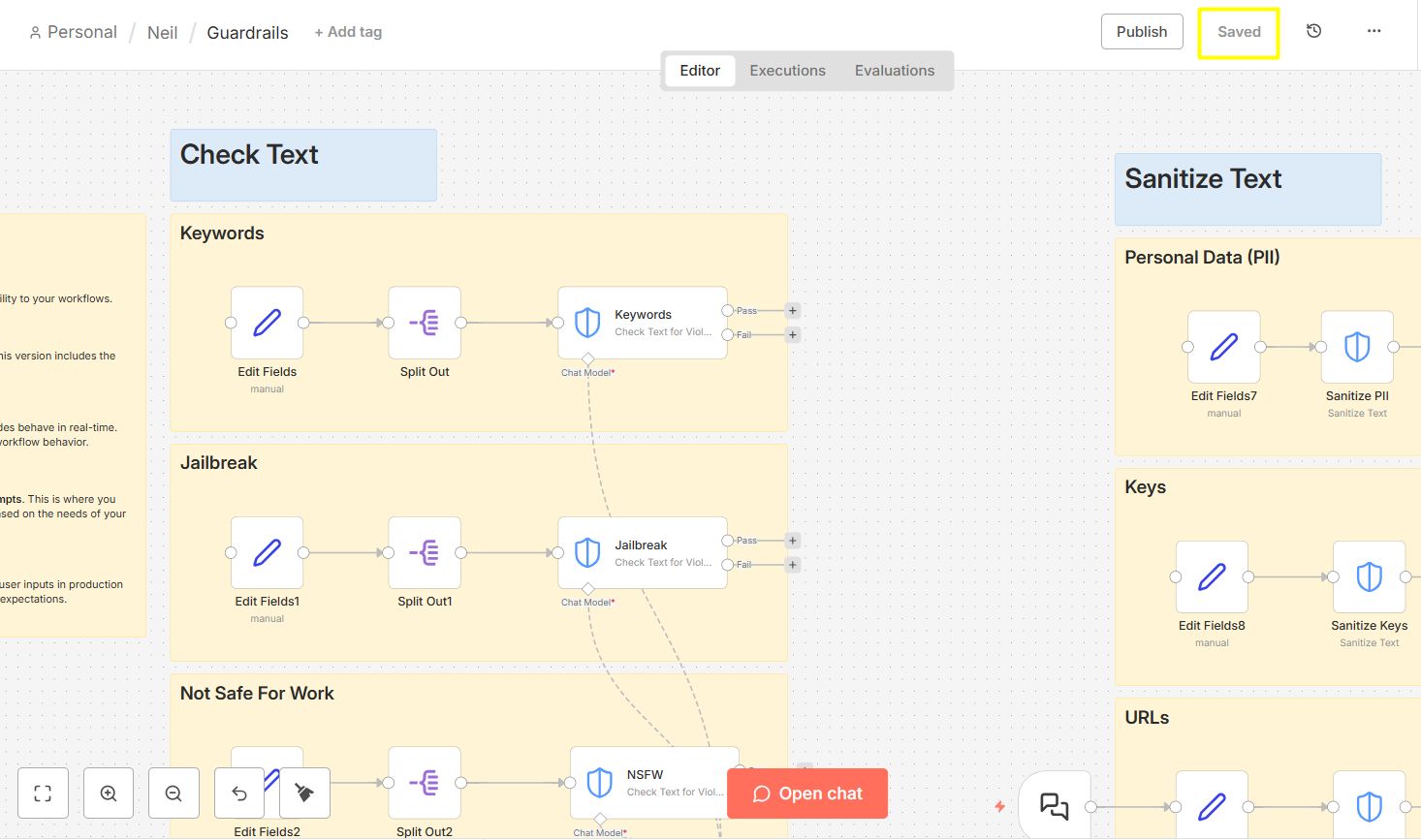
The reason they made saving so fast is because auto-save is coming in January 2026. Because the saving process no longer pauses the editor, n8n will soon be able to save your work every few seconds in the background.
You won't have to worry about losing your progress if your browser crashes.
3. Faster Node Navigation
Inside the node configuration window, there are now navigation arrows at the top. You can jump to the next or previous node without closing the window. If you are setting up an AI agent, you can switch between the Model, Memory, and Tools very quickly. It saves a lot of clicking.
Part III: How Does The n8n Update Change Subworkflows?
This update fixes a critical bug where AI agents would lose data when waiting for a subworkflow (like human approval) to complete. However, it introduces a strict new rule: a parent workflow can now only trigger a subworkflow if that subworkflow is toggled to "Published." In the previous version, "Inactive" workflows could still be called, so you must update these settings immediately to prevent errors.
Key takeaways
Fix: AI agents now correctly receive data after a subworkflow "Wait" node finishes.
Rule: Subworkflows MUST be "Published" to run; "Inactive" no longer works.
Terminology: Changed from Active/Inactive to Published/Unpublished.
Risk: Failing to publish helper workflows will break your main automations.
This is the most important part of the n8n update. If you don't pay attention here, your old workflows might stop working correctly.
1. The Big Fix For AI Agents
In the old version, if an AI agent called a subworkflow that had a "Wait" node (like waiting for a human to approve something in Slack), the agent would get confused. It would wait, but when the subworkflow finished, the agent wouldn't get the data. It was like a dead end.
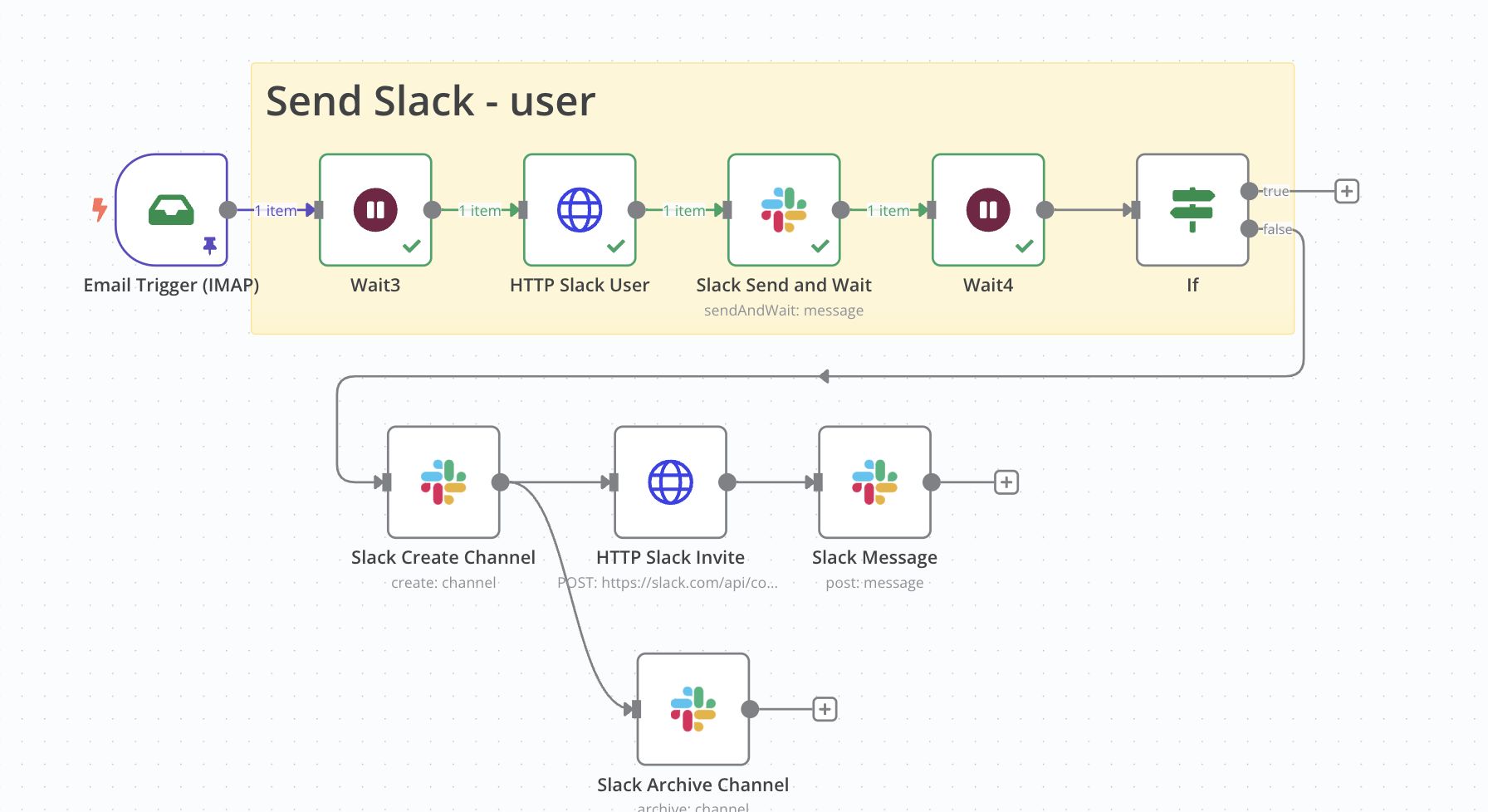
In n8n 2.0, this is fixed. Now, an AI agent can trigger a subworkflow, wait for a human to do something, and then receive the final result.
In the past, the agent would fail after the manager clicked "Approve." Now, it will see the "Yes" and continue its job.
2. The "Published" Requirement

n8n has changed the words they use. We no longer use "Active" and "Inactive." Now we use "Published" and "Unpublished." There is a new rule: A parent workflow can only call a subworkflow if that subworkflow is Published. In version 1, you could call an inactive workflow and it would still run. Now, if you forget to publish your subworkflow, your main process will throw an error. Before you update, go through your list and make sure all your "helper" workflows are toggled to "Published."
Part IV: Why Is The Focus Panel The Best Part Of The n8n Update?
If you build complex AI workflows, you will love the Focus Panel.
1. Pinning Important Fields
When you are working on a long "System Prompt" for an AI node, you usually have to open the node, write, close it to check the canvas, and repeat. With the Focus Panel, you can "pin" that prompt field to the side of your screen.
2. Real-Time Editing
Now you can edit your prompt or your Slack message text while still seeing the whole map of your workflow. It makes it much easier to see how a change in your prompt might affect the data flowing into the next node.
Try this example:
Open an OpenAI node.
Find the "System Prompt" field.
Click the pin icon.
Now move around your canvas. The prompt stays open on the right. You can now copy variable names from other nodes and paste them directly into your prompt without flipping back and forth.

Part V: How To Migrate To The New n8n Update?
You might be worried about your current workflows. Don't worry, n8n has a tool to help you.
1. The Migration Report
In your settings, you will find a "Migration Report." This tool scans all your workflows and gives you a score. It will tell you:
Critical Issues: Things that will definitely break (like the subworkflow issue I mentioned).
Medium Issues: Things that might act differently.
Low Issues: Small things like deprecated nodes.
Each issue comes with a link to a guide. I recommend fixing the "Critical" ones first before you do anything else.
2. Copy And Paste
If you want to move a workflow from an old version of n8n to a new one, you can still just use Ctrl+C and Ctrl+V. The code (JSON) that runs the nodes is mostly the same, so it will paste in perfectly. You just might need to refresh a few connections.
Part VI: Comparison Table: v1 vs v2
To give you a clear snapshot of how these changes affect your daily workflow, I’ve broken down the key differences below. Use this quick reference to compare the operational shifts in speed, design, and logic side-by-side.
Feature | n8n Version 1.0 | n8n 2.0 Update |
Workflow Status | Active / Inactive | Published / Unpublished |
Saving Speed | Slow (3-5 seconds) | Instant |
AI Subworkflows | Data often lost after waiting | Data is passed back correctly |
Design | 3D, bulky nodes | Flat, modern, glow effects |
Sidebar | Fixed width | Resizable and collapsible |
Editing | Open/Close node windows | Focus Panel for pinning fields |
Part VII: Frequently Asked Questions About The n8n Update
Will my old workflows stop working? Most will work fine. The only one that might break is if you have a main workflow calling a subworkflow that is currently "Inactive." You must change it to "Published."
Is n8n 2.0 free? Yes, if you are self-hosting the community edition or using the cloud version, this update is included in what you already pay (or for free if you host it yourself).
Where can I find the Migration Report? Go to your Settings (the gear icon) and look for the tab labeled Migration. It will show you a list of every workflow that needs a checkup. Once you've cleaned up your tech, remember that tools are only half the battle. To truly win this year, you should learn how to become an AI Generalist in 2026 and use ChatGPT or Gemini to automate your entire life without writing a single line of code.
Conclusion: Are You Ready To Try The n8n Update?
Moving to a new version can feel a bit scary, especially when you have business workflows running every hour. However, after playing with this n8n update for a while, I can tell you that the benefits far outweigh the small effort of migrating.
The speed of the new saving system and the way AI agents now talk to subworkflows are massive time-savers that you will appreciate every single day.
If you are currently self-hosting your instance, please don't skip the safety steps. Before you click that update button, make sure you create a full backup of your database. It is always better to be safe than sorry.
Once you are on version 2.0, your first stop should be the Migration Report. Don't let a "Published" status error trip you up—take ten minutes to review the report, fix the critical red flags, and enjoy the smoother, faster interface.
I believe this n8n update is a solid foundation for what is coming later in 2026. The platform is becoming more stable, more professional, and much more friendly for building complex AI systems. If you have been waiting for a reason to clean up your old, messy workflows, this is the perfect moment to do it.
If you are interested in other topics and how AI is transforming different aspects of our lives or even in making money using AI with more detailed, step-by-step guidance, you can find our other articles here:
Master AI Marketing: Build Your 24/7 Digital Assistant Without Code!
Earn Money with MCP in n8n: A Guide to Leveraging Model Context Protocol for AI Automation*
Transform Your Product Photos with AI Marketing for Under $1!*
The AI Secret To Reports That Clients Actually Implement
*indicates a premium content, if any
How useful was this AI tool article for you? 💻Let us know how this article on AI tools helped with your work or learning. Your feedback helps us improve! |
Reply