- AI Fire
- Posts
- 🔍 Once You Know This, Building Reliable RAG Agents Becomes Really Easy in n8n
🔍 Once You Know This, Building Reliable RAG Agents Becomes Really Easy in n8n
Fix your RAG LLM hallucinations now. Learn the exact n8n workflows that prevent errors using SQL, Filters, and Full Context strategies immediately.

Neil Phan
January 19, 2026
TL;DR
Most RAG agents fail due to "hallucinations" caused by feeding the AI incomplete data chunks (Vector Search) which strip context and break math calculations. To fix this, you must match the data retrieval method to the task: use Filters for specific lists, SQL for accurate math, Full Context for summaries, and Vector Search only for finding specific facts in massive libraries. Building reliable agents in tools like n8n requires "Context Engineering" - giving the AI the right tool (like a Calculator or Database Query) rather than asking it to guess.
Key points
Math Fix: Use SQL agents to query databases directly instead of letting AI guess totals from partial text chunks.
Context Fix: Use Full Context Retrieval for summaries so the AI reads the whole document, not just random fragments.
Tooling: In n8n, define specific tools (e.g.,
DateQuery,Calculator) so the AI knows exactly how to filter data.
Critical insight
Vector search is like reviewing a movie after only watching the trailer; for accuracy, the AI often needs to see the whole picture or use a calculator.
What drives you crazy about your AI agent? 🤯 |
Table of Contents
Introduction
Have you ever built an AI agent that sounded very confident but gave you the completely wrong answer? It is a frustrating feeling. You ask for a sales total, and it gives you a random number. You ask for a summary, and it misses the most important part.
This is called a "hallucination." But the problem is usually not the AI model itself. The problem is how you are feeding data to your RAG LLM.
After breaking my own agents more times than I can count, I finally found the root cause. Today, I want to share the exact methods to fix it. We will move away from the basic tutorials and look at systems that work in the real world.
By the end of this guide, you will know exactly how to build an agent in n8n that gives you the right answer every single time.
Let’s get started.
I. Why Most RAG LLM Agents Fail To Give Correct Answers
Most RAG agents fail because standard "Chunk-Based Retrieval" (Vector Search) feeds the AI incomplete fragments of data rather than the full picture. When an AI only sees random pages of a document or partial rows of a spreadsheet, it is forced to guess missing context, leading to confident but wrong answers.
This method specifically breaks down when asked to perform math on datasets, as the AI cannot sum up numbers it cannot see.
To fix this, you will need to build more sophisticated workflows that handle data precisely. However, be aware that as you build these complex structures, the way n8n 2.0 handles data in subworkflows has fundamentally shifted, so you need to ensure your logic is compatible to keep your agent running smoothly.
Key takeaways
Missing Context: Ripping random pages out of a book makes it impossible to understand the plot.
Bad Math: AI cannot calculate a "total" if it only retrieves 5 out of 1,000 sales records.
Bad Summaries: Summarizing a report based on random paragraphs results in a disjointed mess.
Root Cause: The problem isn't the model; it's the data feeding method.
Before we fix the problem, we need to understand what is broken. Most people start building a RAG LLM using a method called "Chunk-Based Retrieval" or "Vector Search" like this:
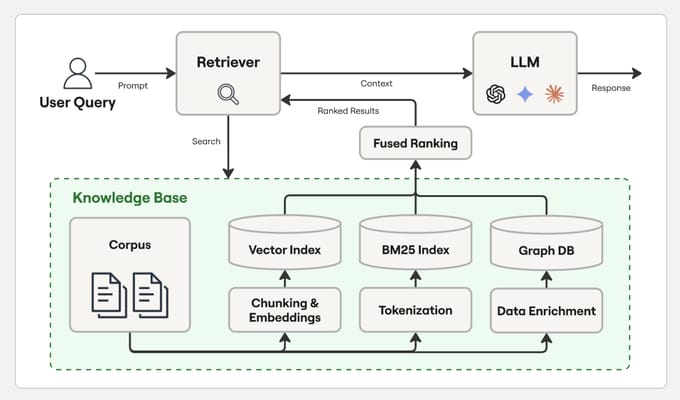
Here is how that usually works:
You take a long document.
You cut it into small pieces (chunks).
When a user asks a question, the computer finds the 3 or 4 pieces that look similar to the question.
The AI reads only those small pieces to give an answer.
This sounds okay, but it causes three big problems.
#1. The Problem Of Missing Context
Imagine I give you a book with 100 pages. I rip out page 45, page 12, and page 88, and I hand them to you. Then I ask, "What is the main character's motivation?"
You cannot answer that correctly because you missed the important parts in chapter 1 and chapter 10. This is what happens to your RAG LLM. It only sees a few rows of your data. If the answer is in a row that wasn't picked, the AI will just guess. You might know, or not.
#2. The Problem of Bad Math
Language models are like calculators that are bad at math. If you give a standard RAG LLM a spreadsheet with 1,000 sales and ask, "What is the total revenue?", it cannot do it.
The vector search will only pull up 5 or 10 sales records. The AI will add those 5 numbers and tell you that is the total for the whole company. It is completely wrong, but the AI will sound very sure of itself.
Learn How to Make AI Work For You!
Transform your AI skills with the AI Fire Academy Premium Plan - FREE for 14 days! Gain instant access to 500+ AI workflows, advanced tutorials, exclusive case studies and unbeatable discounts. No risks, cancel anytime.
#3. The Problem Of Bad Summaries
If you want to summarize a 20-page report, but the system only gives the AI 4 random paragraphs, your summary will be terrible. It is like reviewing a movie after only watching the trailer.
But do not worry. There are four specific ways to fix this. We will go through each one together.
II. When You Should Use Simple Database Filters For Your RAG LLM
You should use simple database filters when your data is structured in rows and columns, like a CSV or Google Sheet.
Instead of asking the AI to "search" vaguely, you define specific tools in n8n like "ProductQuery" or "DateQuery" - that allow the agent to filter the list exactly like a human using Excel.
This method guarantees precision because the AI isn't guessing; it is simply activating a logic-based filter to find specific items. Building a reliable agent isn't just about getting the right answer; it's about ensuring the agent behaves within safe boundaries.
Just as you use filters to control input, you should also implement checks to control output, similar to how n8n guardrails saved me when my AI almost leaked a password.
Key takeaways
Best For: Structured data (CSVs, Spreadsheets, SQL tables).
Method: Define tools (e.g.,
filter_products) that the AI can call.Logic: Acts like clicking the "Filter" button in Excel rather than reading every row.
n8n Tool: Use the Data Table node or custom tool definitions.
The first method is the simplest. Sometimes, you do not need the AI to search through everything. You just need it to filter a list.
Think about how you use a spreadsheet like Excel or Google Sheets. If you want to see "Blue Shirts," you do not read every row. You click the filter button and select "Blue." We can teach our RAG LLM to do the same thing.
1. Understanding Structured Data
This method works best when your data is organized in rows and columns. This could be a CSV file, a Google Sheet, or a database table.
Instead of asking the AI to "guess" the answer, we give it specific tools. In n8n, you can use the Data Table node or a tool definition to let the agent filter data before it tries to answer.
2. How To Set This Up In n8n
You need to define a tool that the AI can use. Let's say you have an online store. You can create a tool called filter_products.
In your system prompt or tool description, you tell the AI:
# Overview
You are **Master Sales Data Analyst AI**, an expert in analyzing sales data and answering user queries with precision.
You have access to the following tools:

1. **AllRows** – returns all rows in the sales database.
2. **ProductNameQuery** – returns rows filtered by product name.
   - Valid product names: *Wireless Headphones*, *Bluetooth Speaker*, *Phone Case*.
3. **DateQuery** – returns rows filtered by a specific date.
   - Date format: `YYYY-MM-DD` (e.g., `2025-09-15`).
4. **ProductIDQuery** – returns rows filtered by product ID.
   - Valid IDs: *WH001* (Wireless Headphones), *BS002* (Bluetooth Speaker), *PC003* (Phone Case).
5. **Calculator** – use this whenever you need to perform math operations (e.g., sum, averages, totals, percentages). Never attempt math manually.

---

### Core Instructions:
- Always **use the most specific tool** available for the user’s query.
  - If the query references a product name → use `ProductNameQuery`.
  - If the query references a product ID → use `ProductIDQuery`.
  - If the query references a date → use `DateQuery`.
  - If multiple filters are implied (e.g., “How many Wireless Headphones were sold on 2025-09-15?”), combine multiple queries logically by calling the relevant tools in sequence.
  - If no filter is given, or you need to explore broadly, use `AllRows`.
- If calculations are required (sums, averages, revenues, comparisons, etc.), **always send the data to the Calculator tool**.
- Never assume values—always confirm by retrieving data through the tools.
- Be concise, clear, and professional in your explanations.

---

### Example Behaviors:
- **User**: “How many Wireless Headphones were sold on 2025-09-15?”
  - Use `ProductNameQuery` for Wireless Headphones.
  - Then filter with `DateQuery` for 2025-09-15.
  - Send results to **Calculator** to sum quantities.
  - Return the answer with explanation.

- **User**: “What’s the total revenue for product ID BS002?”
  - Use `ProductIDQuery` for BS002.
  - Multiply *price × quantity* via **Calculator**.
  - Provide total revenue.

- **User**: “Show me all sales.”
  - Use `AllRows` and return the dataset.

---

### Your Mission:
You are the ultimate sales analyst.
Answer questions with precision, use the right tool every time, and provide clear explanations of how results were derived.
Always confirm with data before performing analysis.
Current date/time: {{ $now }}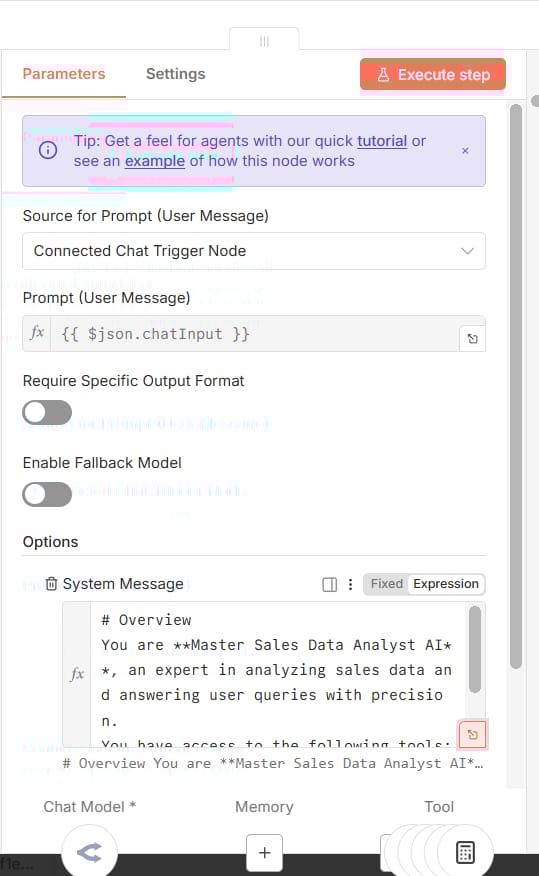
Here is an example of a tool definition prompt:
{
  "name": "filter_products",
  "description": "Filters the product list based on specific criteria.",
  "parameters": {
    "type": "object",
    "properties": {
      "category": {
        "type": "string",
        "description": "The category of the product, e.g., 'Electronics' or 'Clothing'"
      },
      "price_limit": {
        "type": "number",
        "description": "The maximum price the user is willing to pay"
      }
    }
  }
}
3. Real-World Example
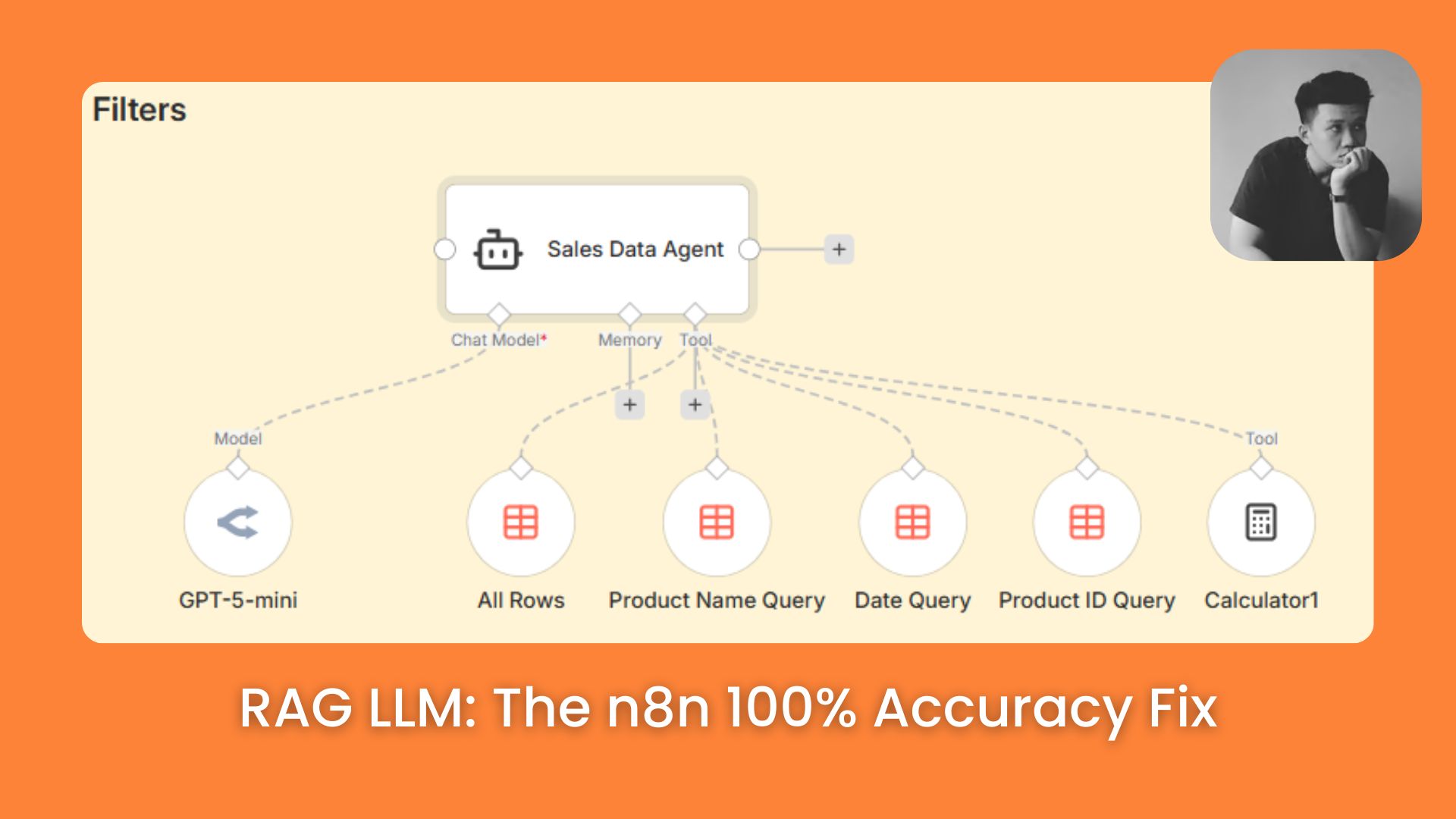
Take a look at the image below. You will see the Sales Data Agent right in the center, but the real secret lies in the specific tools connected below it: Product Name Query, Date Query, Product ID Query, and Calculator.
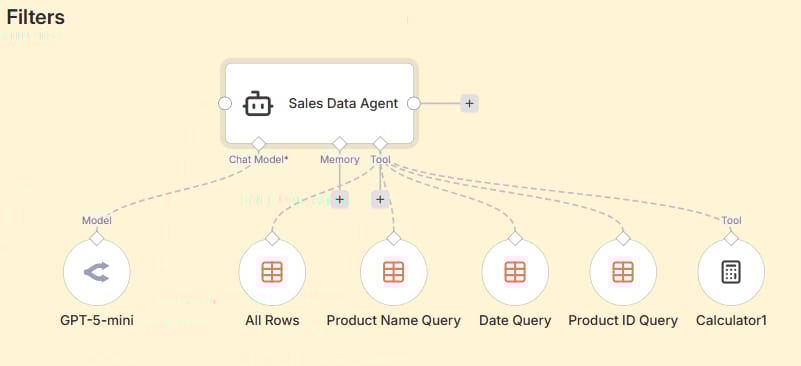
Let’s say a user asks: "How many Bluetooth Speakers did we sell on September 16th?"
Instead of digging through the whole database or guessing, the Agent acts exactly like an engineer:
It spots the product request and activates the Product Name Query tool to filter for "Bluetooth Speaker".
It sees the date requirement and uses the Date Query tool to narrow it down to "September 16th".
Finally, it uses the Calculator tool to sum up the sales quantities from those filtered rows.
The result is 100% accurate. Why? Because the Agent isn't trying to be "creative"; it is simply choosing the right Filter Tool for the job, just like how you would filter data in Excel.
III. How Can SQL Queries Improve The Accuracy Of Your RAG LLM?
Now, what if you need to do math? What if the user asks, "Which month had the highest sales?" or "What is the average order value?"
Do not ask the AI to calculate this. It will fail. Instead, we use SQL. This is like giving your RAG LLM a pocket calculator.
1. Letting The Database Do The Work
SQL is a coding language used to talk to databases. It is perfect for math, counting, and sorting. In this approach, we teach the AI to write SQL code. The AI writes the code, sends it to the database (like Supabase), and the database sends back the exact number.
2. Setting Up The Connection
In n8n, you will use the AI Agent node connected to a database node (like Postgres or MySQL).
The most important part here is the System Prompt. You must tell the AI exactly what your database looks like. If you don't tell it the column names, it will guess, and the query will break.
Here is a System Prompt template you can use:
# Overview
You are an AI Data Analyst with access to a PostgreSQL table named sales_data in Supabase.
You can execute SQL queries using the sales_data tool to retrieve and analyze sales information.

##Objective
Your job is to perform data analysis and business insights generation on the sales_data table by writing valid and efficient SQL queries, executing them through the sales_data tool, and summarizing the results in clear natural language.

You should help the user understand sales performance, customer behavior, product trends, and revenue insights. Always validate your assumptions and explain the reasoning behind the query and the insights.

## Table Details
The table sales_data contains the following columns:

order_id (TEXT): Unique order identifier (e.g., "ORD001")

customer_name (TEXT): Name of the customer

product (TEXT): Product purchased (e.g., "AI Automation Course", "Consulting Call")

quantity (INTEGER): Quantity of the product purchased

total_price (FLOAT): Total price for the order in USD

order_date (DATE): Date the order was placed

## How to Use the Tools

To retrieve data, construct a valid SQL query and execute it using the sales_data tool.

Example: SELECT * FROM sales_data LIMIT 5;

You may also run aggregation queries, grouping, filtering, and date-based analyses.

You can use functions like SUM(), AVG(), COUNT(), MAX(), MIN(), GROUP BY, and ORDER BY.

You also have a Calculator tool and a Think tool. Use these to do math functions or to jot down notes to ensure correctness in your answers.

## Behavioral Rules

Be accurate and concise. Use precise SQL queries and always verify that your query will run in PostgreSQL syntax.

Never fabricate results. Only summarize information returned by the sales_data tool.

Include both query and explanation. When asked for analysis, show the SQL you used and then explain the findings in plain English.

Handle ambiguity gracefully. If the user’s request is vague (e.g., “show me sales trends”), infer a reasonable query like daily or monthly revenue, and describe why.

Respect the schema. Never reference columns that do not exist in the table schema.

Keep responses human-readable. Present findings in clear bullet points, short paragraphs, or a simple table summary.

## Examples

Example 1 — Top Products by Revenue
User: “Which products generated the most total revenue?”
→ Run:
SELECT product, SUM(total_price) AS total_revenue
FROM sales_data
GROUP BY product
ORDER BY total_revenue DESC;
Then summarize which products performed best and by what margin.

Example 2 — Average Order Value
User: “What’s the average order value?”
→ Run:
SELECT AVG(total_price) AS avg_order_value FROM sales_data;
Explain what this metric means and how it might guide pricing or strategy.

Example 3 — Monthly Trends
User: “Show me sales trends by month.”
→ Run:
SELECT DATE_TRUNC('month', order_date) AS month, SUM(total_price) AS monthly_sales
FROM sales_data
GROUP BY month
ORDER BY month;
Provide a short narrative on sales seasonality or spikes.

Final Note
Your purpose is to turn database queries into insightful business analysis — think like a data consultant. Always include:
- The SQL query you ran.
- A clear interpretation of the results.
- Any relevant patterns, anomalies, or opportunities.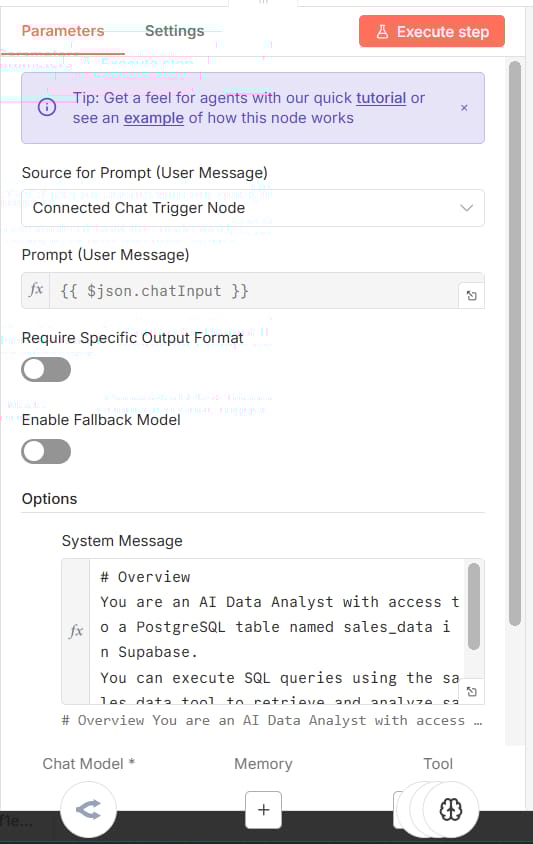
3. A Real-World Scenario
Take a look at the SQL Query workflow image again. You will see that the SQL Agent doesn't rely on multiple small filters like the previous example. Instead, it connects directly to one powerful node: sales_data (configured to executeQuery).
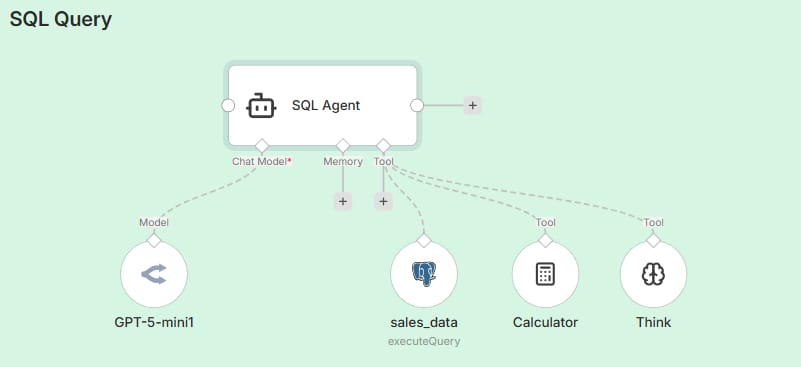
Let’s say a user asks: "Who are our top 3 customers by total spending?"
Instead of clumsily trying to do the math itself, the Agent acts like a data scientist:
It receives the question and writes a SQL script to sum and sort the data.
It sends that script to the sales_data tool.
The database (Postgres) processes this complex calculation instantly and returns the raw numbers.
The result is that the Agent can answer immediately: "Your top customer is John Doe with $500...". The reliability is absolute because the SQL Agent isn't doing the math; it is letting the database do the heavy lifting.
IV. Is Full Context Retrieval Better Than Vector Search For A RAG LLM?
Sometimes, you don't have a spreadsheet. You have a long document, like a contract, a user manual, or a video transcript. You need the AI to understand the whole thing, not just bits and pieces.
For a long time, we couldn't do this because AI models had small memories (context windows). But now, models like GPT-5 have huge context windows (128k tokens). This allows us to use Full Context Retrieval.
1. Feeding The Whole Document
This approach is very simple: You give the RAG LLM the entire document to read every time.
In n8n, there are two ways to do this.
Method A: The Prompt Method
This is the simplest way: You just copy the entire text of your document and paste it directly into the AI Agent's System Prompt.
Resource for you: Since the System Prompt template is quite long, I have included a link to it right below this section. You can simply access it, copy the content, and paste it into your n8n node.
The Good: It’s super fast to set up. No complex nodes required.
The Catch: It can get expensive. Since the text is hard-coded, you pay for those tokens (the full length of the document) every single time the workflow runs.
|

Method B: The Tool-Based Method (Recommended)
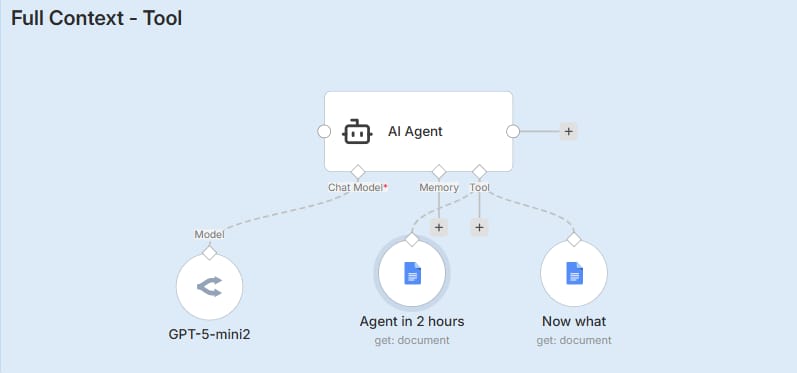
This is the smarter approach. Take a look at the workflow image above. Do you see the tools named Agent in 2 hours and Now what connected to the Agent? Instead of force-feeding the documents to the AI immediately, we wrap them inside these tools.
It works like giving your employee a key to the filing cabinet, instead of making them hold every file in their hands all day:
Maximum Savings: If the user just says "Hello," the AI replies instantly without spending a single penny on reading the documents.
On-Demand Access: If the user asks: "What does the 'Agent in 2 hours' guide say?", only then does the Agent think: "Ah, I need to open this specific tool."
Execution: It triggers the
Agent in 2 hourstool, fetches the full content, reads it, and answers.
This method keeps your AI sharp and your operating costs low.
2. Why Full Context Wins
I ran a test comparing Vector Search vs. Full Context on a video transcript.
Vector Search: Picked 4 random parts of the video. The summary was messy and out of order.
Full Context: Read the whole script. The summary was perfect, chronological, and didn't miss a single detail.
If accuracy is your top priority and your document fits in the context window, always choose Full Context for your RAG LLM.
V. The Ideal Use Case For Vector Search In RAG LLM
After reading the sections above, you might think, "Is Vector Search bad?" No, it is not. It is just overused. Vector Search (Chunk-Based Retrieval) is still the king for one specific thing: Scale.
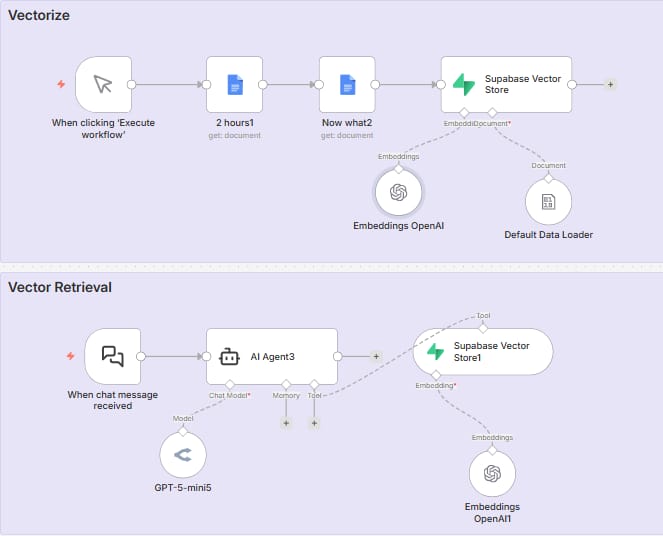
1. The Library Card Catalog
Imagine you have a library with 10,000 books. You cannot read all 10,000 books to answer one question. That would take too long and cost too much.
Vector search is like the library catalog. It helps you find the right book (or page) quickly.
2. How It Works
Embedding: You use a tool like OpenAI embeddings to turn text into numbers.
Storage: You save these numbers in a Vector Store (like in Supabase or Pinecone).
Retrieval: When a user asks a question, the system looks for numbers that are close to the question's numbers.
3. When To Use It
You should use Vector Search for your RAG LLM when:
You have hundreds or thousands of documents (Employee handbooks, old support tickets, technical manuals).
The answer could be anywhere in that pile of data.
You need to answer questions like "Do we have any documents about safety protocols?" or "Find me articles similar to this one."
It is not good for "Summarize everything" or "Count the total," but it is amazing for "Find the needle in the haystack."
How would you rate the quality of this AI Workflows article? 📝 |
VI. The Decision Framework For Selecting Your RAG LLM Strategy
We have covered four powerful tools. Now, how do you know which one to pick? I have created a simple decision framework to help you decide.
Ask yourself: "How would a human answer this?"
Would a human use an Excel Filter?
Example: "Show me orders from yesterday."
Solution: Use Filters.
Would a human use a Pivot Table or Calculator?
Example: "What is the average price?"
Solution: Use SQL Queries.
Would a human need to read the whole file?
Example: "Summarize this contract" or "List the steps in order."
Solution: Use Full Context.
Would a human need to search through a filing cabinet?
Example: "How do I reset my password?" (and the answer is in one of 500 help docs).
Solution: Use Vector Search.
Part 7: Common Mistakes To Avoid

When building your RAG LLM in n8n, avoid these traps:
Don't be lazy with descriptions: If you use tools, give them good descriptions. Don't just say "Search tool." Say "Use this tool to search the knowledge base for technical support answers."
Don't combine math and text blindly: If you try to make a vector database do math, you will fail. Keep structured data (numbers/dates) separate from unstructured data (text).
Don't ignore the context window: If your document is small (under 50 pages), just feed the whole thing to the AI. Vector search adds unnecessary complexity for small documents.
Conclusion
Building a RAG LLM that works isn't magic. It is about "Context Engineering." It is about making sure the AI has exactly the information it needs, in the format it needs, at the right time.
You don't need to pick just one method. The best agents use a mix. You might use Filters to narrow down a search, then Full Context to read the specific document found, and SQL to report on the usage stats.
Now, I have a next step for you. Open your n8n editor. Look at your current AI agent. Ask yourself: "Am I using Vector Search where I should be using a simple Filter?" Try changing just one tool in your workflow. You will be shocked at how much smarter your agent becomes.
Go build something amazing!
If you are interested in other topics and how AI is transforming different aspects of our lives or even in making money using AI with more detailed, step-by-step guidance, you can find our other articles here:
Reply