- AI Fire
- Posts
- 🤖 AI Agents + Claude Skills Fully Explained: How to Build Your First Agentic Workflow
🤖 AI Agents + Claude Skills Fully Explained: How to Build Your First Agentic Workflow
See how AI agents actually work beyond prompts. Learn Claude Skills, context management, and build effective agentic workflows with proven techniques.

Neil Phan
May 07, 2026

TL;DR
An Agentic Workflow is the system of rules, tools, and context management that enables AI to execute tasks. Success depends on architecture rather than the raw power of the underlying model.
Models face quality degradation when context usage exceeds 150,000 tokens. This guide explains how to prevent context rot by using modular skills instead of giant instruction files.
Key points
Fact: Quality degrades between 50,000 and 150,000 tokens on a 200k window.
Mistake: Using giant instruction files that burn tokens on every turn.
Takeaway: Perform tasks manually twice before converting processes into skills.
Table of Contents
Introduction
There's a fight happening right now across every AI community, every Reddit thread, every LinkedIn post: Claude vs ChatGPT. ChatGPT vs Gemini. Gemini vs Claude. Which model is best? It's the wrong fight entirely.
Companies that deploy AI agents see 40–60% automation rates regardless of which model they use. The orchestration layer, not the model, determines ROI.
You're not getting a dumb answer because you picked the wrong model. You're getting a dumb answer because your context is quietly rotting while you're not looking.
The fix is a tighter Agentic Workflow. And most people don't even know what that means yet. Here's everything inside:
What context rot actually is, why it hits between 50,000 and 150,000 tokens on a 200K window
Why 95% of users don't need a giant instruction file
The progressive disclosure mechanism that lets skills load only when needed, cutting per-turn token cost by nearly 18x
A step-by-step competitor tracking build
A ready-to-copy skill template with the exact structure, description length, error handling, and save format that makes agents production-ready instead of demo-ready
Tired of your AI getting "dumb"? 🤖 |
I. Understanding Agentic Workflow
An Agentic Workflow is the complete loop an AI agent runs to finish a real-world task. It's not just one prompt. It's the entire system around that prompt:
The context you feed in
The tools the agent can call
The rules you set
The skills it loads when needed
Where it saves the results

You can see it as a small assembly line. The model is one machine on the line. The workflow is the line itself. A good machine on a broken line still produces broken parts.
1. Why Most People Get This Wrong?
Most people treat the model like a magic box. They paste in a vague request and wait for a clean result, and when the result is bad they blame the model, switch tools, switch providers, and never look back at the workflow.
The problem was in the workflow the whole time, but they never looked there.
2. The Right Mindset
If you hired a smart new employee on Monday, you wouldn't say "handle everything" and walk out. You'd explain the work, set standards, give examples, edit their first few drafts, and define clearly what good looks like.
Your agent needs the same thing. It knows a lot of public information, but it knows nothing about how you specifically want the work done.
A model doesn't think the way you think, it just predicts the next likely chunk of text, so vague input gives you vague output. The Agentic Workflow is the training plan for that new hire.
II. Context: What Actually Limits Your Agent
1. What Context Actually Is
Context is everything the agent can see while it's working, including your messages, the system prompt, instruction files, skills, tools, the codebase, and the chat history. They all sit together in one shared workspace, and that workspace has a ceiling.
Most current Claude models have a 200,000-token window, with some beta versions reaching 1M tokens, according to Anthropic.
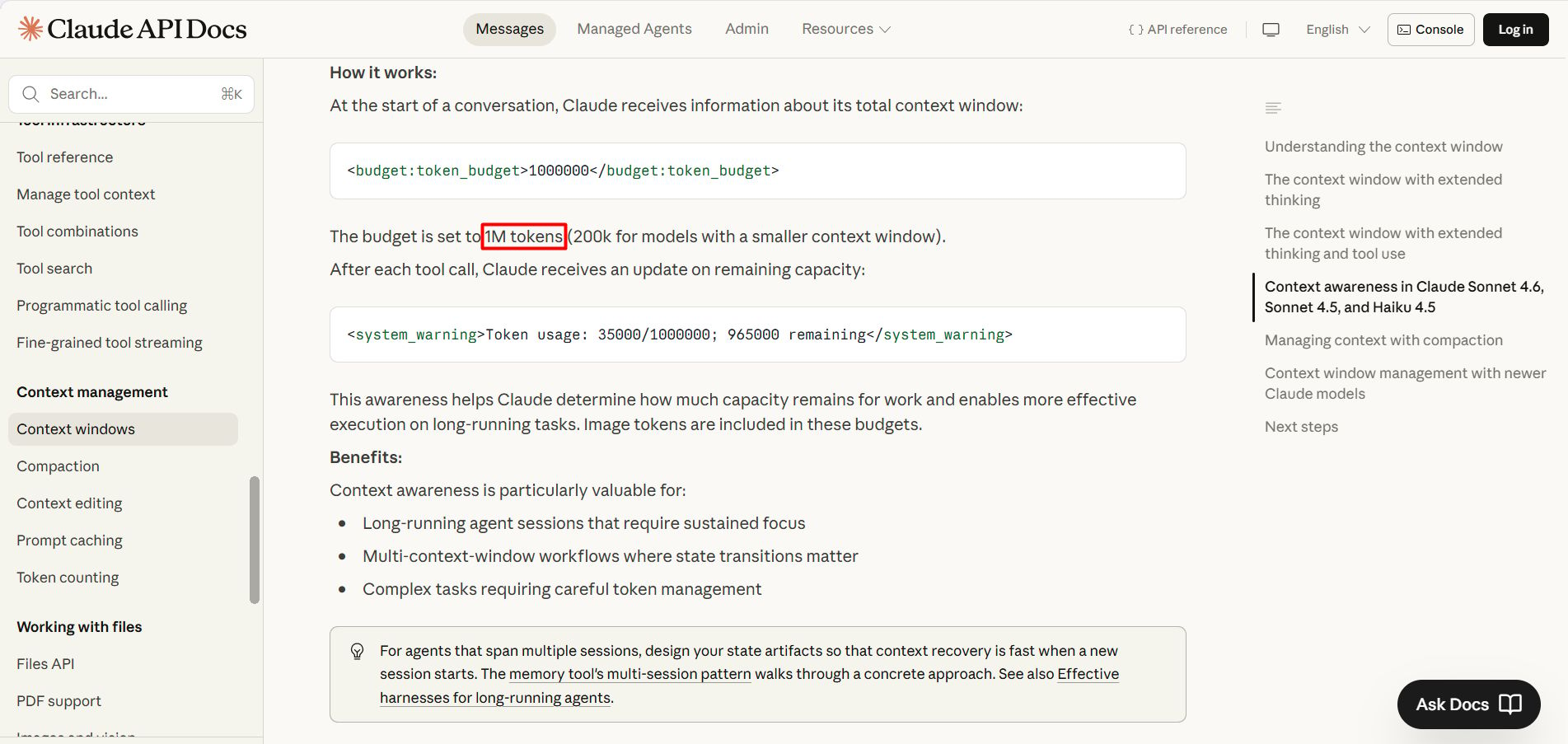
A token is a small piece of text, a short word is usually one token, a long word can be two or three. The more you stuff in, the closer you get to the wall.
2. What Happens When the Window Fills uP
There's a phenomenon called context rot. Research from Chroma tested 18 leading models, and all of them dropped in quality as context got longer, even when the model could still find the right information.
On a 200K window, quality starts to clearly degrade somewhere between 50K and 150K tokens, an area the community calls the "dumb zone".

You can read more in Anthropic's piece on context engineering.
In practice, the agent gets sloppy. It forgets the original instructions, mixes up details, and starts compressing information its own way, losing the parts that mattered.
You'll feel it before you can measure it, because an agent that was sharp at message 5 becomes visibly dumber by message 30.
3. Why Adding More Text Makes Things Worse
When the agent weakens, most people react by adding more text. More instructions, more rules, more examples, because they think more is safer.
The reality is the opposite, every extra line eats into the context window, the signal gets buried under noise, and the agent gets one step weaker. The fix is subtraction, not addition. This is why skills exist.

Roughly 95% of users don't need a long claude.md or agent.md file. It sounds harsh, but it's true. Look at the numbers, a 7,000-token instruction file gets injected into every single chat turn, and if you run 20 turns in a session, you've burned 140,000 tokens just repeating the rules.
Most large files repeat things the model already knows or can see for itself, like saying the project uses React when package.json already says so, explaining what TypeScript is, or listing every endpoint when the routes folder is one click away.
You're paying tokens for information the agent can read on its own, and you should stop.
4. When a Large File Still Makes Sense
There's a small slice where it does make sense:
Company-specific rules that must appear on every single turn
Legal compliance language already approved by lawyers
Brand voice rules for a content-writing agent where consistency is non-negotiable
If a sentence has to show up every single turn without being missed, keep it, otherwise turn it into a skill.
III. Skills: The Heart of a Tight Agentic Workflow
1. How a Skill Works
A skill is a small file with 3 parts:
Only the name and description live in context at the start. The body stays dormant until the agent decides it's needed. This mechanism is called progressive disclosure.
The agent reads the description, decides whether the skill fits the task, and only then loads the full instruction body. If the skill isn't needed, that heavy body never enters the window.
2. Skills’ Token Math
What loads | Token cost |
|---|---|
Skill name + description | ~50 tokens |
Scanning metadata to decide if relevant | ~100 tokens per skill |
Full skill body (only when triggered) | Under 5,000 tokens |
Giant instruction file (every turn) | 7,000+ tokens, always |
The savings ratio is nearly 18-to-1 on turns where the skill isn't needed. Across a full week of work, you save tens of thousands of tokens without losing any capability.
3. Build Your First Agentic Workflow by Hand
We’ll build an agent that tracks competitors daily. This agent checks 5 competitor websites every morning, looks for product changes, pricing changes, and new blog posts, then writes a short summary and saves it to Notion.
A lazy prompt looks like this.
Every day check these five competitor websites and tell me what's new.
You won’t get a report at all. Instead, the agent will respond with a list of technical options and a series of questions back at you. It will suggest you choose between using an RSS reader, a change-detection service (like Visualping), writing a Scraper, or using Claude CoWork.
Now you give the agent a real structure.
For each website in this list of five competitors, check four sources:
1. The pricing page
2. The blog (last 7 days only)
3. The changelog or release notes
4. Their X account (last 10 posts)

Only flag a change as important if it matches one of these:
- Price moves up or down by more than 10%
- A new paid tier appears or disappears
- A blog post mentions a new product, integration, or funding round
- An X post gets more than 200 likes

Ignore everything else. No UI tweaks. No old posts.

Save as a Notion page titled "Competitor Brief - [date]" with each
competitor as its own section. If a site has no important changes,
write "no changes" on one line.
Instead of just nodding, it identifies 5 specific gaps you need to close before it can build: competitor URLs, Notion workspace credentials, X handles, timezones, and your pricing baseline.
Finally, it proposes a professional run that fetches data, compares it against the stored state, applies your rules, and updates Notion.
4. Warnings & Tips For Your Best Skills
First, read public skills as inspiration. Write your own version based on your own successful runs.
A skill file you download from a random source can contain hidden instructions, prompt injection commands, calls to unknown endpoints, or data exfiltration steps wrapped in normal-looking text. So only use skills from trusted sources.
Even a safe third-party skill was written for someone else's workflow: their tools, their voice, their data. When you drop it into your setup, the seams show fast.
Second, operate 2 clean runs before saving as a final Skill.
Don't rush the automation step. Run the workflow on Monday. Fix what breaks. Run it again on Tuesday. Fix more. Once you have 2 clean back-to-back runs, you have something worth saving.
Before that, everything is still a draft.
Next, let the agent write the Skill for you.
After 2 clean runs, don't write the skill by hand. The agent just finished the task correctly, the steps are still fresh in context. Ask it directly:
Review the two competitor-tracking runs we just finished.

Create a skill file based on those two runs.

Include the four sources to check, the importance rules, the exclusion rules, and the Notion save format.

Keep the description under 30 words so it stays light in context. Put the long instructions in the body so they only load when the skill is triggered.
The skill is created from a real success, not from a guess, and that's the only kind of skill worth keeping long term.
How useful was this AI tool article for you? 💻Let us know how this article on AI tools helped with your work or learning. Your feedback helps us improve! |
5. When Skills Break. How to Make Them Smarter
A skill is not a fix-everything-forever button, it's a starting point. Edge cases will show up, a website changes layout, an API returns a 503, a blog moves URLs, a tool times out. The skill will trip, and that's completely normal.
When the skill breaks, don't throw it out, run this loop:
Each loop makes the skill a little smarter. After 5 loops, your workflow starts to feel ready for real work. This is recursive improvement, the backbone of any mature Agentic Workflow.
The Error Handling Prompt: This prompt forces the agent to diagnose rather than guess. "Show me old and new side by side" means you review the change before it gets saved.
Today's competitor-tracking skill broke at the third site.

Walk me through exactly which step failed and why.

Then propose the smallest possible edit to the skill that would catch this case. Show me the old and new versions side by side before saving.
IV. Code Context: Don't Explain What the Files Already Show
Context (the previous part) is the active workspace, including your prompts, rules, and chat history. Code Context is the environment the agent can observe directly through your file structure, libraries, and logic.
The most common mistake is burning tokens by manually re-explaining the Code Context inside your General Context.
If your project uses Next.js, Supabase, and Tailwind, the agent can see that from the files themselves, so you don't need a paragraph repeating it. Save your tokens for things the code doesn't show on its own.
Before adding anything to your setup, ask: Could the model figure this out from public information or from the files it can already read?
Yes → skip it
No → add it
The high-value inputs are the things that are genuinely yours:
Customer personas with specific language from real calls
Pricing logic and discount rules
Brand voice, including what you never say
Your weekly standup format
Decision-making rules (what you say yes to, what you say no to)
This is the information the agent can't infer from public sources. This is what makes your workflow yours.
V. Complete Method in One View
The order is the method. Do it by hand first. Save it as a skill second. Scale third.
BONUS: One Skill Template to Use For Other Jobs
To move your AI from theoretical prompting to actual execution, you need a Skill structure that’s strict enough for accuracy but lean enough to protect your context window.
Here is a "skeleton" you can copy and customize for your own workflow immediately:
name: weekly_revenue_review

description: Pull last week's revenue numbers, compare against the prior week, write a 5-line summary, and save to Notion. Use when asked for a weekly revenue review.

instructions:
1. Pull data from these sources: Stripe, the finance database in Notion, the Sheet titled "Weekly P&L".
2. Calculate week-over-week deltas for: total revenue, new-customer revenue, revenue lost to churn.
3. If any number moves more than 15%, flag it.
4. Write a 5-line summary in this order: total, new customers, churn, flags, one suggested action.
5. Save to Notion under "Weekly Reviews" with the title "Revenue Review - [week-end date]".
6. If a data source fails, log the error at the bottom of the page and never make up numbers.
Why this skeleton works
The description is short, so it's cheap in context, and the body has clear sources, clear math, clear flags, clear output, and clear error handling. Every line has a reason to exist, and that's the standard you should aim for.
Conclusion
The model isn't your problem. The workflow is. You can keep switching between Claude, ChatGPT, and Gemini for another year and your output won't move. The difference was never the model, it was the system around it.
Pick one weekly task tomorrow morning. Run it by hand. Fix what breaks. Save it as a skill. That's the whole method.
If you are interested in other topics and how AI is transforming different aspects of our lives or even in making money using AI with more detailed, step-by-step guidance, you can find our other articles here:
3 Simple Yet Proven Claude Prompts to Activate Claude's GENIUS Mode (Use Daily)*
Why I Switched From ChatGPT to Claude Without Losing a Single Thing (Full Migration Guide)
GPT-5.5 vs Opus 4.7: Most Detailed Real-World Test Yet. Real Costs, Real Tasks, Real Winner!*
90% of People Have No Idea What Autonomous AI Agents are Already Doing...
ALL Free AI Hacks with 8 AI Productivity Tools We Use Daily (Save 10+ Hours Every Week)*
*indicates a premium content, if any
Reply