- AI Fire
- Posts
- 🤖 90% of People Have No Idea What Autonomous AI Agents are Already Doing...
🤖 90% of People Have No Idea What Autonomous AI Agents are Already Doing...
Autonomous agents execute full workflows while you sleep. Master the 3 hidden tiers of AI implementation and build a lethal digital organization today.

Neil Phan
April 24, 2026
TL;DR
Autonomous agents are systems that execute multi-step workflows independently based on specific goals. Most users remain at Level 1 assistants while true leverage lies in Level 2 operators and Level 3 organizations.
This article outlines the shift from manual prompting to building autonomous agent systems. It classifies AI implementation into three distinct levels based on agency and the frequency of human interaction.
Readers will learn to identify repetitive tasks and apply frameworks like n8n or CrewAI to their business. This transition removes human bottlenecks from digital processes and scaling operations.
Key points
Fact: The autonomous agent market is projected to grow 30 percent annually through 2034.
Mistake: Attempting to build complex multi-agent teams before successfully automating a single task.
Takeaway: Replace manual daily prompts with goal-based logic in automation tools.
Are you still working for AI, or is AI finally working for you? 🤖 |
Table of Contents
Introduction
The autonomous agent market is projected to grow by 30% annually through 2034, but 99% of users are already falling behind. Why? Because they are treating AI like a chatbot when they should be treating it like a digital workforce.
If you are still copying and pasting from a chat window, you’re just a highly-paid bridge for a system that’s waiting for you to get out of the way.
Currently, most users are stuck at Level 1. A small group has moved to Level 2, while almost nobody has reached Level 3 yet.
This article walks you through all 3 levels with specific examples, tools, and prompts you can use right now. By the end, you will have a clear picture of where you stand and what you need to do next.
I. Understanding Autonomous Agents in 2026
A regular AI tool, like ChatGPT, waits for you to ask something. You type a question, it gives you an answer, and then it stops. It does nothing on its own. You are doing all the driving.
Key takeaways:
Decision-Making: Agents don't just provide text; they choose which tools to use to get a job done.
Goal-Oriented: You provide the "destination" (e.g., "Find 5 leads"), and the agent creates the "map."
Tool Integration: Agents connect LLM "brains" to real-world actions like searching the web or updating a CRM.
Scaling: Because they run independently, agents can handle volumes of work that would be impossible for a human to manage manually.
An autonomous agent is different. According to IBM, an AI agent is a system that can perform tasks by designing its own workflow with available tools, going beyond just answering questions to include decision-making, problem-solving, and taking actions in the real world.

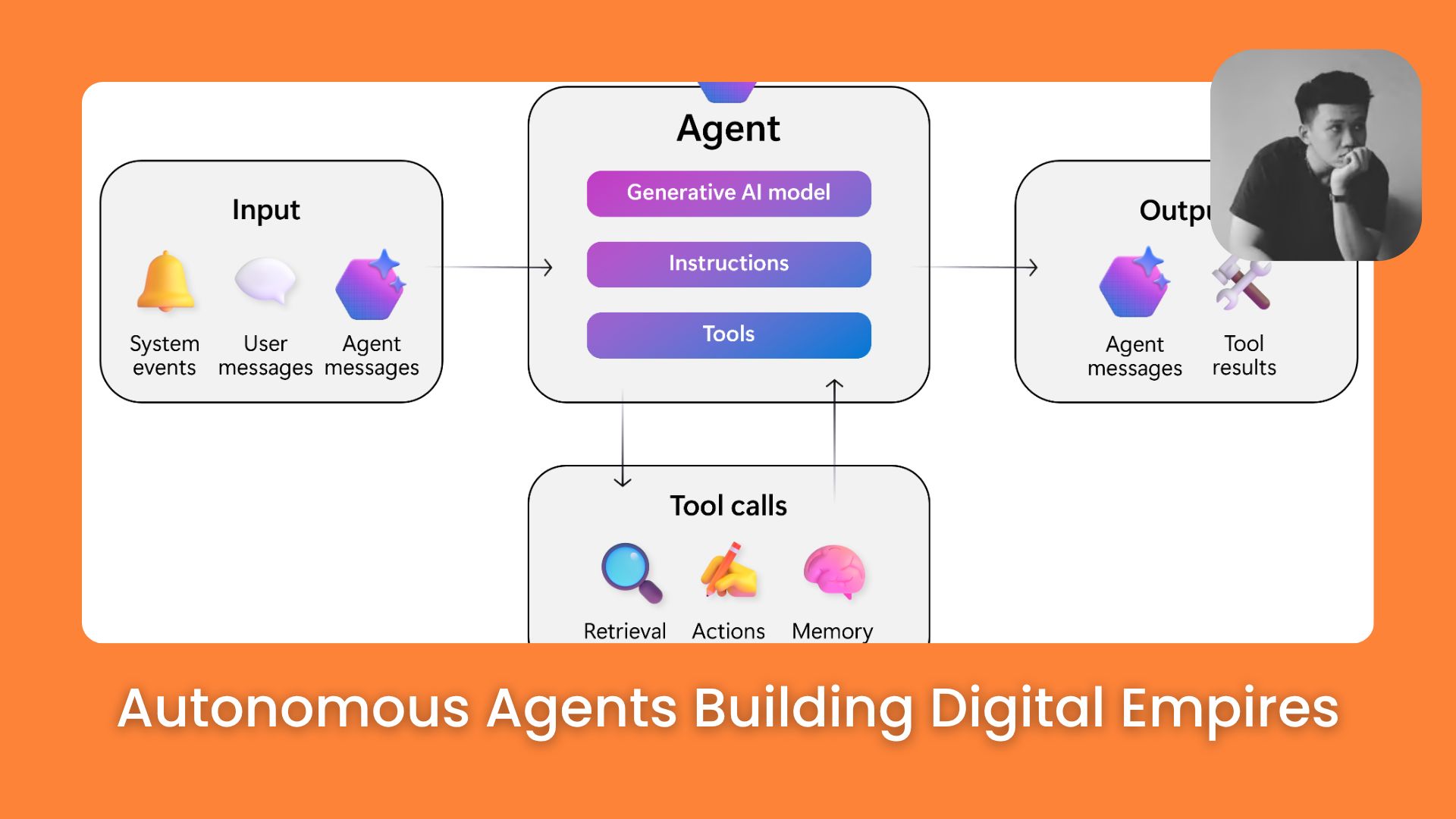
As shown in the diagram, an agent connects Input (system events, user messages) to Tool calls (retrieval, actions, memory) to produce a final Output. Or just look at this table:
Chatbot | Autonomous agent | |
|---|---|---|
Trigger | You type a prompt | A goal or event |
Behavior | Responds once | Plans and executes multiple steps |
Tools | Text only | Web search, CRM, email, databases |
When it stops | After one response | When the goal is complete |
In simple words: you give it a goal, and it figures out the steps by itself, does those steps, checks the results, and keeps going until the job is done.
II. Autonomous Agents Level 1: AI Assistant
At Level 1, AI is a high-speed tool for isolated, one-off tasks. Useful, but limited in a specific way: you are the connector between every step.
1. What Level 1 looks like in practice
Pasting text into ChatGPT to shorten or rephrase it
Asking Claude to draft a response to a client email
Using Grammarly to polish a report
Summarizing a long article to save reading time
Generating social media content ideas from a brief
Each of these saves minutes. But do you notice the pattern: you copy, you paste, you prompt, you edit, you hit send. If you stop moving, the work stops.
2. Core limitation of Level 1
The main issue with Level 1 is that it doesn't scale. You are the "CPU" connecting every piece of the workflow. This creates a High-Touch environment where AI only works as fast as you can type. For example, I type this prompt inside ChatGPT:
Write a follow-up email to a lead who hasn't replied to my last message from 5 days ago.

Keep it professional, mention our last meeting about the 'YDNEW' project, and suggest a 15-minute call next Tuesday.
That prompt is fine. It saves me 10 minutes. But it is still just one step of one task. I still have to copy it, paste it into your email app, check the name, and hit send.
Level 1 is not bad. It is just limited. It does not scale. And many people stop here without realizing there is more.
Learn How to Make AI Work For You!
Transform your AI skills with the AI Fire Academy Premium Plan - FREE for 14 days! Gain instant access to 500+ AI workflows, advanced tutorials, exclusive case studies and unbeatable discounts. No risks, cancel anytime.
At Level 1, you are working inside one tool at a time. These are the ones worth knowing:
You probably use 3 or 4 of these already. That is not the problem. The problem is each one runs in its own window, with you as the only connection between them.
Whether you are generating a single image or planning a full product launch, if the human is still the glue between every step, it is Level 1.
III. Autonomous Agents Level 2: AI Operator
At Level 2, autonomous agents don’t just help you with one step. They handle the full task, from start to finish, with just a little guidance from you at key moments.
Your role changes from worker to manager. You set the goal. The agent handles the process. You check the output.
1. How the flow works at Level 2
The loop looks like this:
You give a goal
The agent breaks it into steps
The agent runs those steps
The agent shares a result
You review and approve (or ask for changes)
This sounds like a small upgrade. It's actually a structural shift. You're no longer writing prompts for every micro-task. You're setting direction once and letting the system execute.
2. What Level 2 Looks Like in a Real Workflow

Look at the n8n workflow image above. This is a perfect example of Level 2 in action. Instead of a human manually reading every email and asking ChatGPT for a reply, the system handles the entire lifecycle of a customer ticket.
Here's how that n8n workflow operates:
Trigger: A new email arrives in Gmail, the process starts automatically, no human input needed.
Evaluation: An AI node reads the message and classifies it → support request, general inquiry, or something else.
Processing: If it's a support issue, a specialized agent takes over. It searches a connected knowledge base (like Pinecone) for relevant company information and past context before composing a response.
Output: The agent either sends a Telegram notification or creates a Gmail draft ready for your final review.
Your role in this setup: You aren't writing emails anymore. You are the Operator who monitors the dashboard. The research, data lookup, and drafting happen entirely in the background. You only step in to hit "Send" on the pre-written drafts.
💡 Quick Tip: If you are looking at n8n and feeling a bit overwhelmed, don’t worry. I’ve put together a step-by-step guide right here. I promise this guide will clear things up and show you exactly how to make your daily tasks much simpler.
3. Popular AI tools for Level 2
At Level 2, the tool is not a chat window. It is a workflow builder. You connect triggers, logic, and actions into a system that runs without you.

n8n: the most powerful option if you are slightly technical. Built-in AI nodes, connects to hundreds of apps, full control over every step. The workflow image above was built in n8n.
Make: same job, cleaner visual interface. If n8n feels overwhelming, start here. Multi-step flows by dragging and dropping.
Zapier: the simplest entry point. Less flexibility than n8n or Make, but the fastest way to connect your existing apps and add basic AI logic between them.
Pick one. Build one workflow. The tool matters less than the habit of thinking in triggers and rules instead of prompts.
To help you level up from level 1 to level 2, here are step-by-step guides for the two most popular tools:
Getting started with n8n: How to Use N8N Better than 99% of People: All from Beginners to Advanced Users
Getting started with Zapier: [AI Mastery AZ] Zapier: Automating Workflows Without Writing Code
These are just starting points. Our AI Fire community has dozens of guides covering different use cases, from lead generation to content workflows to CRM automation. If you need something specific, head to the community and type your keyword into the search bar.

4. Start with a Repeated Task
The jump from Level 1 to Level 2 is not about picking a new tool. It is about changing how you think about tasks.
The best place to start is any task you do more than twice a week. If you do it regularly, it is probably a good candidate for a workflow. Some ideas:
Summarizing new articles or newsletters in your inbox
Drafting social media posts from a content calendar
Researching new leads from a LinkedIn search
Pulling weekly data from a spreadsheet and writing a short report
5. Strategy Tip: Think in "Triggers" and "Rules"
Instead of thinking about what to "ask" AI today, start thinking about the rules of your business.
You are not chatting anymore. You are setting up a system where Action A (a new email arrives) always triggers Action B (AI summarizes it) and ends with Action C (the summary is saved to Notion). Build it once, and let it run forever.
6. Maintain "Human-in-the-Loop" Control
Moving to Level 2 is not about delegating all thinking. Smart automation requires you to become the system's gatekeeper. You are not doing the manual work, but you are providing the high-level quality control.

Build deliberate pauses into your workflow. You must retain the final checkpoint for high-stakes actions, such as authorizing a large purchase, finalizing a complex strategy, or sending a critical client email.
As shown in Figure 4, the human in the "Smart Drink Monitoring System" does not manually monitor the drinks.
However, the human provides direct feedback to the core personalization and user management engines. This feedback is essential to ensure the personalized outcome meets a human standard.
This design pattern is the key to scaling without sacrificing quality. Leverage AI to do 90% of the heavy lifting like researching a market or drafting 20 emails.
But you retain the final, high-impact 10%: reviewing the data and providing the final instruction that personalizes the outcome.
IV. Autonomous Agents Level 3: AI Organization
Level 3 is where things get genuinely different. At this level, you’re running a system of agents, each with its own job, working together toward bigger goals.
Think of it like a company org chart. There's a manager agent at the top coordinating specialized agents below. You sit above the whole system, setting direction and approving high-stakes decisions.
1. What a Level 3 setup looks like
In a Level 3 setup, you have a Manager Agent at the top. You give a high-level direction, and this manager coordinates specialized agents below it:
Research Agent: Scans the web for real-time data.
Analyst Agent: Filters the data to find insights.
Writer Agent: Creates content based on those insights.
Quality Agent: Reviews everything before it reaches you.
You're not involved in any of those steps. You define the mission, set the guardrails, and review the final output.
At Level 3, your job is system design, not task management. Instead of telling AI what to do each day, you're designing how the system behaves at scale across 3 areas:
Governance - the rules and guardrails for what agents can and can't do (spending limits, approval requirements, data access boundaries).
Objective alignment - making sure agent behavior tracks toward actual business KPIs, not just task completion.
Human-in-the-loop design - deciding deliberately where you need to step in. Not for everything. Only for the decisions where human judgment is genuinely required.
At this stage, you're the CEO of an AI organization. The system runs 24/7. Your job is to set strategy and handle the exceptions.
2. Tools for building Level 3 systems
To reach Level 3, you need frameworks that let agents coordinate with each other. Not just one agent doing one job, but multiple agents passing work, checking output, and making decisions together.
CrewAI: the most accessible starting point. You define a crew of agents with specific roles, goals, and working relationships. Best for structured workflows where each agent's responsibility is clear.

Microsoft AutoGen: focuses on multi-agent conversation. Agents can debate, check each other's work, and iterate before producing a final result. Best when quality verification matters.

LangGraph by LangChain: granular control over agent logic and sequencing. Best for systems that need precise, conditional behavior at every step.

These 3 frameworks do not replace each other. They solve different parts of the same problem. CrewAI defines who does what. Roles, responsibilities, handoff rules. LangGraph defines how each agent thinks. Decision logic, branching, execution order. AutoGen adds a peer review layer. Agents check each other's output before passing it forward.
In practice, most Level 3 systems start with one framework, not three. The realistic path:
Pick one Level 2 workflow that already runs well (e.g., your lead research + email drafting pipeline).
Split it into agent roles. One agent researches, one writes, one reviews.
Build it in CrewAI first. Lowest barrier, most documentation, no deep coding required.
Add complexity only when the simple version breaks. Need tighter logic control? Layer in LangGraph. Need agents to debate outputs? Add AutoGen patterns.
Most common mistake: trying to architect a 5 agent system on day one. Start with 2 agents and 1 handoff. Get that working. Then scale.
V. Comparing All 3 Levels of Autonomous Agents
According to researchers at MIT Sloan, true AI agents are systems that can execute multi-step plans and use external tools independently.
This means that while Level 1 is a helpful tool, Level 2 and Level 3 are where AI actually starts working for you. Moving up the levels means moving from "doing the work" to "directing the system."
Level 1: Assistant | Level 2: Operator | Level 3: Organization | |
|---|---|---|---|
AI's role | Helps with single steps | Completes full tasks | Manages multiple agents and roles |
Your role | Worker (90% of effort) | Manager (set goals, approve) | Architect (set strategy, monitor) |
Human touchpoints | High: constant back-and-forth | Medium: goal → result → feedback | Low: set mission → monitor system |
Example | Writing one email draft | Researching 20 leads and drafting all emails | A system handling all outreach, scheduling, and CRM updates automatically |
How useful was this AI tool article for you? 💻Let us know how this article on AI tools helped with your work or learning. Your feedback helps us improve! |
FAQs
What is the difference between an AI chatbot and an autonomous agent? A chatbot responds to one question at a time and stops when you stop.
An autonomous agent takes a goal and works through multiple steps on its own, using tools, making decisions, and checking its own work along the way.
Do I need to know how to code? No. Tools like AgentGPT, Make, and Zapier are built for non-technical users. You get more flexibility with LangChain or AutoGPT, but they are not required to get started.
Is Level 3 AI something I can build today? Partially. Multi-agent systems are buildable today with tools like CrewAI and n8n.
But fully autonomous systems that run entire operations with very little human input are still in early stages outside of large tech companies. The right approach is to build toward it step by step.
How do I stop an agent from doing something I did not want? Add approval checkpoints before any action that is hard to reverse.
Start with agents that only read data, not write or send anything. Expand permissions slowly as you see how the system behaves.
What is the best tool to start with if I am completely new? Start with AgentGPT to get a feel for how agents work with no setup. Once comfortable, move to Make or n8n to build your first real workflow.
Conclusion
The transition from a basic AI user to an AI Director is the most important career shift of the next decade. AI is no longer just a window where you type questions; it is a system that can run your business while you focus on high-level strategy.
Whether you are just starting at Level 1 with simple prompts, building your first automated workflows at Level 2, or architecting a full team of agents at Level 3, the goal remains the same: to move from doing the work to directing the system.
Start with one repeated task this week, and don't stop until the system is working for you.
If you are interested in other topics and how AI is transforming different aspects of our lives or even in making money using AI with more detailed, step-by-step guidance, you can find our other articles here:
Claude + Nano Banana Workflow for Premium Social Content Fast
How I Copied a $1K/Day YouTube Channel With AI. Here’s the Automated System!*
How Professionals Create Better AI Images Every Time with Simple Workflows (Copy This)
SIMPLEST Way to Make Money with AI Using the Silhouette Method & Nano Banana Pro*
*indicates a premium content, if any
Reply