- AI Fire
- Posts
- 📔 Google Gemini Released a Hidden Superpower with NotebookLM for Free!?
📔 Google Gemini Released a Hidden Superpower with NotebookLM for Free!?
Learn how to build self-updating AI assistants using Google Gemini and NotebookLM. Step-by-step workflow with free prompts included.

Max Anh
March 02, 2026

TL;DR BOX
In early 2026, Google connected its two best tools. Now, Gemini can "remember" everything you have saved in NotebookLM. You can now link your whole folder of research (NotebookLM) to Gemini. This lets the AI answer questions using your specific files and the live internet at the same time.
This combination creates a "Digital Twin", an AI that reasons with your specific data (transcripts, PDFs, analytics) while simultaneously cross-referencing the live web. By turning these connections into Gems (saved AI assistants), you build auto-syncing "Specialized Brains" that get smarter every time you add a new document to your notebook, eliminating the need to re-upload files or restate context for every new chat.
Key points
Fact: NotebookLM now supports up to 300 sources per notebook, which can all be accessed by Gemini in a single prompt for massive-scale synthesis.
Mistake: Building one "Giant Notebook" for everything. For high-precision results, create Domain-Specific Notebooks (e.g., "Market Research" vs. "Brand Voice") to prevent "vague reasoning" and context pollution.
Action: Take your best work (like reports or scripts) and put them into NotebookLM. Then, create a Gemini Gem that uses that folder to learn your style.
Critical insight
The defining advantage of this integration is Persistence. You are moving from disposable chats to a persistent knowledge infrastructure that remembers your entire documented history across months of work.
Table of Contents
I. Introduction
Most people use Google Gemini for quick answers and NotebookLM for organizing research. They treat them as two separate tools, open one, close it, open the other.
That's leaving a lot on the table.
Last month, Google rolled out a direct integration between the two and most people missed how powerful it is.
On the surface, it sounds like a minor quality-of-life update but it actually bridges a critical gap: it combines the persistent, grounded knowledge of NotebookLM with the creative reasoning and live web search of Gemini.
In this guide, I’ll walk you through how to set up specialized AI "brains" that auto-sync, remember your entire context and get smarter every time you add new information.
🛑 What is your biggest frustration with AI right now? |
II. What Gemini and NotebookLM Actually Do?
Before getting into the integration, you need to understand what each tool is good at and where each one completely falls apart.
1. NotebookLM: The Grounded Research Engine
NotebookLM is Google's AI tool for working with your own documents. Every answer it gives is grounded in your uploaded sources, with inline citations showing exactly where the information came from.
That means fewer hallucinations and increased trust, as long as your source material is reliable.
You can load it with almost anything: PDFs, Word docs, spreadsheets, YouTube video links (it auto-transcribes them), website URLs, Google Docs or plain text. NotebookLM can hold up to 300 sources per notebook on the Ultra plan.

Beyond answering questions, it can transform your sources into completely different formats: audio podcast-style overviews, mind maps, infographics, study guides, briefing documents and awesome slide decks (new feature).
For research and knowledge organization, it’s extremely strong.
But it has clear limits:
It can't search the web. Everything must be in your uploaded sources.
You can only work inside one notebook at a time, so cross-referencing across notebooks isn’t possible.
NotebookLM excels at grounded synthesis within its sources but lacks live web reasoning and cross-notebook analysis.
It doesn’t offer Canvas-style editing, coding features or interactive tools.
It is strong in structured knowledge, not dynamic thinking.
2. Gemini: Powerful but Forgetful
Gemini is one of the most capable large language models available right now.
It handles complex reasoning, creative writing, coding tasks and real-time web research. It works across text, images, audio and video. It’s flexible and broad, right?

But the problem is that it forgets everything the moment you start a new chat.
You must re-upload files, restate context and rewrite instructions. Even inside saved assistants, file limits restrict how much knowledge you can store (usually a 10-file limit).
That makes building a durable knowledge base harder.
Gemini also struggles when:
No persistent memory between sessions.
Must manually re-upload files for every single conversation.
Higher risk of hallucination because it's creative and eager to help; sometimes too eager.
Building a proper knowledge base inside Gems is painful and limited.
It excels at thinking and synthesis but not at long-term memory or structured knowledge storage.
3. The Problem: They're Perfect For Each Other But Completely Disconnected
Look at these two tools side by side and the gap becomes obvious:
Capability | NotebookLM | Gemini |
|---|---|---|
Grounded, cited answers | ✅ | ❌ |
Web search / live data | ❌ | ✅ |
Complex reasoning | ❌ | ✅ |
Creative output | ❌ | ✅ |
Persistent knowledge base | ✅ | ❌ |
Cross-topic synthesis | ❌ | ✅ (with integration) |
Canvas, code, apps | ❌ | ✅ |
Massive source capacity | ✅ | ❌ |
While one tool has memory, the other has the brain. Individually, each feels limited but together, they solve each other’s weaknesses.
Learn How to Make AI Work For You!
Transform your AI skills with the AI Fire Academy Premium Plan - FREE for 14 days! Gain instant access to 500+ AI workflows, advanced tutorials, exclusive case studies and unbeatable discounts. No risks, cancel anytime.
III. How Does the Integration Actually Work?
You attach a NotebookLM notebook inside Gemini as a source. Gemini then reasons on top of that knowledge base. It can also search the web to fill gaps.
Key takeaways
Entire notebooks attach at once
Combines grounding and web search
Works inside normal Gemini chats
Available to most users in 2026
This turns static research into an active reasoning layer. The setup is surprisingly simple.
Inside any Gemini conversation, there's now an option to add a NotebookLM notebook as a source (just like attaching a file) but instead of uploading documents one by one, you connect an entire curated knowledge base.

Once connected, Gemini uses that notebook as its grounding layer. It reasons on top of your sources, applies its own intelligence and can search the web to fill any gaps, all in the same response.
Gemini now reasons with your knowledge, not just its training data.
This rolled out to Google's paid plans in December 2025 and reached free plans in mid-January 2026, so it's available to virtually everyone right now.
If you want this working today, use this 5-Minute Setup Checklist and set it up step by step.
Now here’s what changes when you connect them.
IV. 3 Ways to Use the Integration (Each More Powerful Than the Last)
Most people connect NotebookLM to Gemini once, try a simple query and stop there. That’s the shallow layer.
Used properly, this integration changes how you research, think and create and each level builds on the last.
1. Knowledge + Real-Time Web Intelligence
Here's the most straightforward use case and the one that immediately shows why this combination is so valuable.
Imagine you run a YouTube channel and you want new video ideas. You want something grounded in what's actually worked on your channel before, not generic advice from the internet.
Building the knowledge base (takes about 2 minutes):
Go into YouTube Studio and export your analytics spreadsheet. Then, sort by views and download the file as a Google Sheet document.

After that, you open the sheet and grab the URLs of your top 25 videos.
*Note: if you open the sheet and don’t see the “Full YouTube URL” column. That’s normal. All you need to do is create a new column and use this command: ="https://www.youtube.com/watch?v=" & (source identifier in the A column). (for example: if you are in row 4, your command will be ="https://www.youtube.com/watch?v=" & A4

Next, open a new NotebookLM notebook, paste all 25 URLs at once and click Insert. NotebookLM auto-pulls the full transcripts for every video simultaneously. Finally, upload your analytics PDF as an additional source.

Done. You now have a notebook with your 25 best-performing video scripts plus your performance data, all searchable, all cited.
What NotebookLM alone can do with this:
On its own, NotebookLM can analyze what made those videos successful. It can tell you what themes, hooks or formats performed well. That part works.
But the moment you ask it what’s trending in AI right now, it completely fails. Because NotebookLM only knows what’s inside the notebook, not the live context.

What the integration unlocks:
Now you attach that notebook to Gemini and ask both questions at once:
Identify the key patterns that made these 25 videos successful. Then find current AI developments that fit those same patterns.
Then, Gemini analyzes your scripts and analytics through the grounded knowledge base, simultaneously searches the web for what's trending in AI right now and surfaces ideas that weren't mentioned in a single one of your 25 videos.
The result is a content strategy built from proven performance and updated with what’s happening now, a workflow that previously required manual copying, exporting and re-uploading across tools.
Taking it further with Gemini's creative side:
Once the notebook is connected, you can push Gemini's creativity directly against your grounded data:
"Give me 10 hooks for a video about AI agents". - It generates options informed by what's previously resonated on your channel.

"Build a 30-day content strategy.” - Multi-step planning that NotebookLM can't do but grounded in your actual channel data.
"Critique this script against my previous successful ones". - Iterative editing with a performance benchmark, not just vibes.
And inside Gemini's Canvas feature, you can edit, refine, build dashboards and create planning tools without leaving the workflow or coding anything.

How would you rate the quality of this AI Workflows article? 📝 |
2. Cross-Notebook Synthesis
This is where the integration starts doing something that is simply impossible in NotebookLM alone.
Imagine you're a researcher studying AI architecture. You've built three separate notebooks:
LLM Notebook: how large language models work (academic papers, research videos, technical reports).
Diffusion Models Notebook: how image generation models work.
Video Generation Notebook: how modern AI video generation works, comparing Sora, Veo, Kling and others.
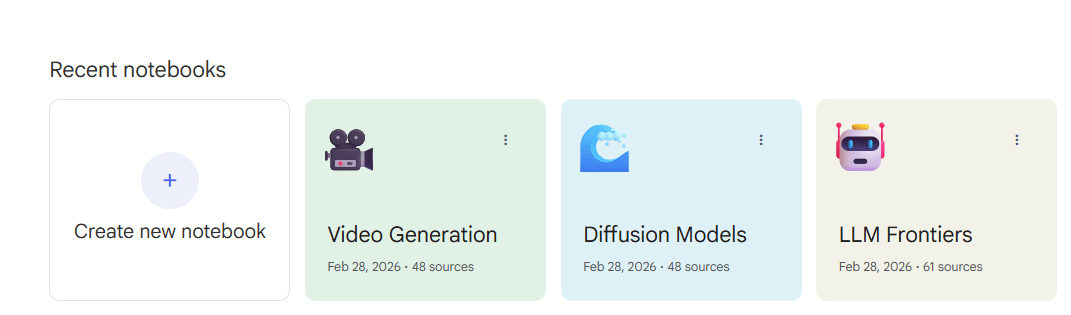
In NotebookLM, they exist separately. You can talk to one or the other but never ask a question that spans all three. The most interesting insights (the connections between architectures) are invisible.
With the integration:
Attach all three notebooks in Gemini simultaneously. Then use this simple prompt:
Compare LLMs to modern image and video generators. What are the similarities and differences in their approach to generation? Then explain how a multimodal model like Gemini integrates these to handle text, image and video in one system.Gemini synthesizes across all three knowledge bases at once. If something isn’t covered in your files, it searches the web and fills in the gap. And that’s how you get a unified, deeply informed analysis that no single notebook could produce.
This is what researchers used to spend hours doing manually: pulling information from multiple sources, finding patterns and synthesizing connections. Now it takes one prompt.

And here's the immediate pivot:
Right after that synthesis, switch to your YouTube channel notebook and ask:
Help me develop video ideas that would work well on my channel using what we just covered.In a single conversation, you went from deep technical research to practical creative strategy, all grounded in real knowledge.

3. Gems: Permanent, Auto-Syncing AI Brains
This is where the integration becomes genuinely transformative for day-to-day productivity. The first two use cases show what's possible. This one is about long-term advantage.
So, Gems are basically Google Gemini's reusable, specialized AI assistants. Think of them as saved versions of Gemini with custom personalities, instructions, tools and now a persistent knowledge base already loaded in.
Every time you open a Gem, it already knows your context, already has your instructions and is ready to work without re-uploading, re-explaining or re-prompting from scratch.
Before the integration, Gems had a hard limit of 10 uploaded files, required manual updates and if your knowledge evolved, you had to go back and reconfigure everything.

NotebookLM eliminates all 3 problems.
Building a YouTube Strategist Gem (step by step):
Step 1: Build the knowledge base in NotebookLM.
You use the analytics notebook from the first use case: 25 top video transcripts plus performance data, built in under 2 minutes.
Step 2: Create the Gem.
Next, you open the Gemini sidebar → Gems → New Gem.
Name it "YouTube Strategist".
Description: YouTube strategy assistant trained on all my channel analytics and videos.
In the knowledge section, attach your NotebookLM notebook. Then write custom instructions:
You are a highly experienced YouTube growth strategist with deep expertise in this particular channel. You have full access to its analytics, performance metrics and every script ever published.

Your responsibilities include:
- Studying performance trends to determine what content is succeeding and what is underperforming
- Generating video ideas inspired by the channel’s historically successful topics and formats
- Delivering data-backed recommendations for titles, thumbnails and video structure
- Identifying underexplored content opportunities and gaps based on performance data
- Strengthening scripts by benchmarking them against top-performing videos
- Detecting audience behavior patterns in engagement, retention and watch time

All guidance must be rooted in this channel’s actual data. When giving recommendations, reference specific videos, measurable metrics and recurring performance patterns. Be clear, practical and results-oriented - avoid vague YouTube advice. When proposing changes, explain the reasoning using historical performance evidence.

Your objective is to help produce videos that connect with this channel’s unique audience - not to provide generic platform-wide strategies.
Step 3: Use it.
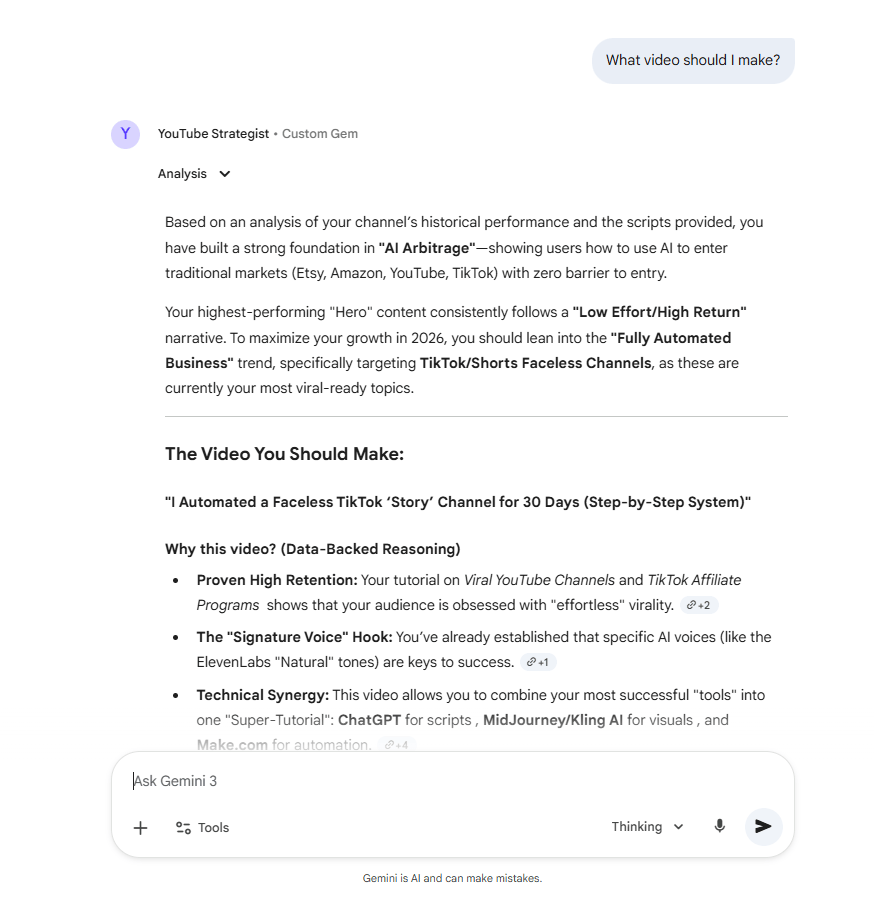
Now, when you type: “What video should I make?”
It analyzes your 25 scripts, checks performance patterns, searches current AI trends, applies your custom strategy instructions and gives grounded recommendations.
That’s the power of context. Most people never experience AI at this level because they don’t give it enough structured knowledge.
The auto-sync feature most people completely miss:
When you add a new source to your NotebookLM notebook, every Gem connected to that notebook automatically updates with zero reconfiguration needed.
So you publish a new video that performs exceptionally well.
You add its transcript to your notebook in NotebookLM.
The next time you open your YouTube Strategist Gem, it already knows about that video.
Ask it and it can answer immediately because it already read it.
For example: I uploaded my YouTube URL about the Free AI Stack that powerful than ChatGPT (you can read that post in the AI Fire community). Once the file is uploaded, I go to my Gens and ask “What is the Free AI Stack that powerful than ChatGPT?” Here is the answer I got.


Your Gems get smarter every time you add new information. Instead of being boring static tools, they're living knowledge bases that grow with you.
V. The Universal Framework: Apply This to Anything
The YouTube example illustrates a complete workflow but the pattern works in virtually any knowledge-heavy context.
For students:
Create notebooks for each course using lecture recordings, readings and past papers. Build a Gem that acts as a personal tutor with your full curriculum context. As you add new lectures and notes, the tutor stays current automatically.
For product teams:
One notebook with market research and competitor analysis. Another with internal positioning docs and customer interviews. A Gem that synthesizes across both for the go-to-market strategy, grounded in both external reality and internal context.
For researchers:
Separate notebooks for different bodies of literature or research areas. A Gem that synthesizes across studies, finds cross-domain patterns and flags research gaps you'd never spot looking at one area alone. Perfect for literature reviews and systematic analyses.
For writers:
A notebook with your style guide and published work. Another with your research sources. A Gem that edits new drafts in your actual voice (not a generic AI voice) while staying grounded in your research.
The framework is always the same:
Build focused knowledge bases in NotebookLM
        ↓
Connect them to specialized Gems with clear custom instructions
        ↓
AI assistants that actually know your context
        ↓
Add new sources → Gems auto-sync → They get smarter over time
Creating quality AI content takes serious research time ☕️ Your coffee fund helps me read whitepapers, test new tools and interview experts so you get the real story. Skip the fluff - get insights that help you understand what's actually happening in AI. Support quality over quantity here!
VI. What Mistakes Weaken The Integration?
Do not put too much random information in one notebook. If you want a "Cooking Assistant", only put recipes in that notebook. If you add car repair files, the AI will get confused.
Key takeaways
Keep notebooks focused
Write clear, role-based instructions
Avoid duplicate sources
Update notebooks consistently
Precision in structure leads to precision in reasoning.
A few things that kill the results even when the setup looks right:
One of the biggest errors is building a single, oversized notebook that tries to cover everything. A notebook called "AI Research" with 300 sources on everything sounds powerful but it usually produces vague reasoning. The more specific the notebook, the more precise the Gem's reasoning.
Another issue is writing unclear instructions for your Gem. A vague line like “act as a strategist” doesn’t guide the model in any meaningful way. Specify the role, the perspective, what to prioritize, what to avoid, how to format responses and when to ask for clarification instead of guessing. The quality of the instruction determines the quality of the output.
The third mistake is duplicating information across notebooks. When a Gem pulls from multiple notebooks, overlapping or contradictory information creates confusion. Let each notebook own a specific domain and keep them clean.
And finally, people stop feeding the system. The integration compounds over time only if you keep adding to your notebooks. A notebook you built six months ago and never updated is just a slightly better file upload. One that you actively maintain is an evolving intelligence layer.
VII. Conclusion
The core problem with AI has always been context degradation; every new chat starts from zero.
By combining NotebookLM's persistence with Gemini’s reasoning, you are building an AI that actually knows you, your style and your data and it only gets smarter the more you use it.
After six months of consistent use, your "YouTube Strategist" Gem won't just be an AI; it will be a digital twin that knows your entire documented history and every experiment you’ve run.
That's what AI that actually knows your context looks like. It becomes a specialized, ever-improving assistant that understands exactly what you do and what you need.
The setup takes minutes, the benefits compound every time you add new information and it's sitting inside your Gemini account right now, waiting to be used.
So, what is your next step?
If you are interested in other topics and how AI is transforming different aspects of our lives or even in making money using AI with more detailed, step-by-step guidance, you can find our other articles here:
How to Get Your First AI Client in 7 Days (Step-by-Step System + Proven Proof)
*indicates a premium content, if any
Reply