- AI Fire
- Posts
- ✅ Stop Using ChatGPT, Gemini, Claude Until You Set This Safety Prompt Rule!
✅ Stop Using ChatGPT, Gemini, Claude Until You Set This Safety Prompt Rule!
If you use AI for contracts, invoices, or compliance, this is the framework I use to stop confident guessing and prove every claim. It works on ChatGPT, Gemini, Claude!

Max Anh
February 10, 2026

TL;DR BOX
In 2026, using AI on documents without verification is a real risk.
When models can’t find an answer, they often guess confidently. That’s how hallucinations sneak into contracts, invoices and reports.
To fix this, you need to move from casual chat to grounded analysis, forcing the AI to stay inside your files, cite every claim and verify its work using a specialized knowledge base tool like NotebookLM.
Key points
Fact: Standalone LLMs can hallucinate logic and numbers; however, RAG + guardrails can dramatically reduce hallucinations, especially on document Q&A when you force the model to retrieve and cite.
Mistake: Assuming the default model is the smartest. For high-stakes knowledge base work, always toggle “Extended Reasoning" or "Deep Thinking" modes to ensure the AI scans your entire knowledge base before answering.
Action: Before uploading your next sensitive file, paste the knowledge base grounding template (Section II.2) to give the AI explicit "permission to say I don't know".
Critical insight
The defining skill of 2026 isn't "finding answers"; it's "Auditability". You win by demanding Page/Section Citations and Relevant Quotes for every claim, transforming the AI from a creative writer into a precise data auditor of your knowledge base.
Table of Contents
I. Introduction
Let me tell you about the time I asked ChatGPT about a legal contract I’d just uploaded... and it confidently cited a clause that was completely made up.
This wasn’t a small mistake or missing context. It was a made-up liability term that could’ve cost thousands if you trusted it.
This happens way more often than you think. And AI rarely signals when it has switched from retrieval to guessing. The good news is that you can fix this with three simple rules and a handful of verification tricks.
If you use AI to process invoices, review contracts, analyze reports or handle any document work, this guide will save you from mistakes that cost real money.
Let's fix it.
🤥 Has AI ever "hallucinated" a fake fact in your docs? |
II. Why AI Makes Things Up And How to Stop It
To fix the problem, you have to understand the "brain" of the machine. AI behavior stems from helpfulness rather than malice.
AI doesn't lie because it wants to trick you. It lies because it's built to be helpful.
Every major model (ChatGPT, Claude, Gemini) has been trained to act like a helpful assistant. So when you ask a question and it can't find the answer in your knowledge base, what happens? It guesses confidently.
Say you upload a financial report and ask "What was Apple Q2 revenue?", the AI searches your document first. But if it can't find that exact phrase or misses it while scanning, something weird happens.
Instead of saying "I don't see that", the AI thinks: "Apple reported revenue of $95.4 billion for the fiscal 2025 second quarter (Q2), which ended on March 29, 2025. I’ll go with that".

Boom. You get a polished answer built on nothing. That’s the core problem and once you understand it, you can start preventing it.
Learn How to Make AI Work For You!
Transform your AI skills with the AI Fire Academy Premium Plan - FREE for 14 days! Gain instant access to 500+ AI workflows, advanced tutorials, exclusive case studies and unbeatable discounts. No risks, cancel anytime.
The Real-World Damage
Document extraction should be one of the safest uses of AI but hallucinations turn it into a risk.
Here are some places where fake answers cause real problems:
Invoicing: One wrong line item and you overpay by thousands.
Insurance: AI says you’re covered when you’re not.
Contracts: A missed clause leads to compliance issues.
Financial reports: Fake numbers go to the board.
Legal documents: Incorrect terms break deals.
When AI invents answers in these situations, the cost isn’t inconvenience; it’s real money, legal risk and lost trust.
Use this one-page grounding checklist to stop AI hallucinations before they cost you money. Once you understand why hallucinations happen, fixing them becomes mechanical.
III. The 3-Part Fix That Actually Works
To build a reliable knowledge base workflow, you need to implement these three layers of protection:
Pick a strong reasoning model
Force it to stay inside your files with a few grounding lines
Then verify the claims before you trust them.
Let's break down each step.
1. Pick the Right Model First
Most people skip model choice and run whatever loads by default. That’s why they get made-up answers.
For document work, you want a high-level reasoning model that handles long context well.
Here's what to use (as of early 2026):
ChatGPT: GPT-5.3 Codex with High Reasoning turned ON.
Claude: Opus 4.6 with Extended Reasoning turned ON.
Gemini: Gemini 3 Pro.

Don't just use whatever model loads by default.
You should manually pick the strongest reasoning model available. These models are specifically designed to reduce hallucinations by thinking before answering.
2. Ground the AI with Strategic Prompts
This is where everything changes.
You’ll use three simple prompts that force AI to stay grounded in your document instead of making things up.
Prompt 1: The Grounding Rule
This prompt forces the AI to only use information from your uploaded document, nothing from the internet or its training data.
Base your answer ONLY on the uploaded documents. Nothing else.
Prompt 2: Permission to Say "I Don't Know"
This one gives the AI explicit permission to admit when it can't find information.
If information isn't found, say 'Not found in the documents.' Don't guess.
AI is fundamentally trained to give answers and wants to help. But sometimes the most helpful thing is admitting it doesn't know. This prompt was actually recommended by Anthropic to prevent hallucinations in RAG/knowledge base use. So yeah, it works.
Prompt 3: Demand Citations
This last one forces the AI to back up every claim with proof, including document name, page number and relevant quotes.
For each claim, cite the specific location: document name, page/section and relevant quotes.These strategic prompts do 2 things:
First, it reduces hallucinations because the AI has to actually find information to cite it.
Second, it makes verification easy because you can quickly check if the AI is correct by jumping to the cited page.
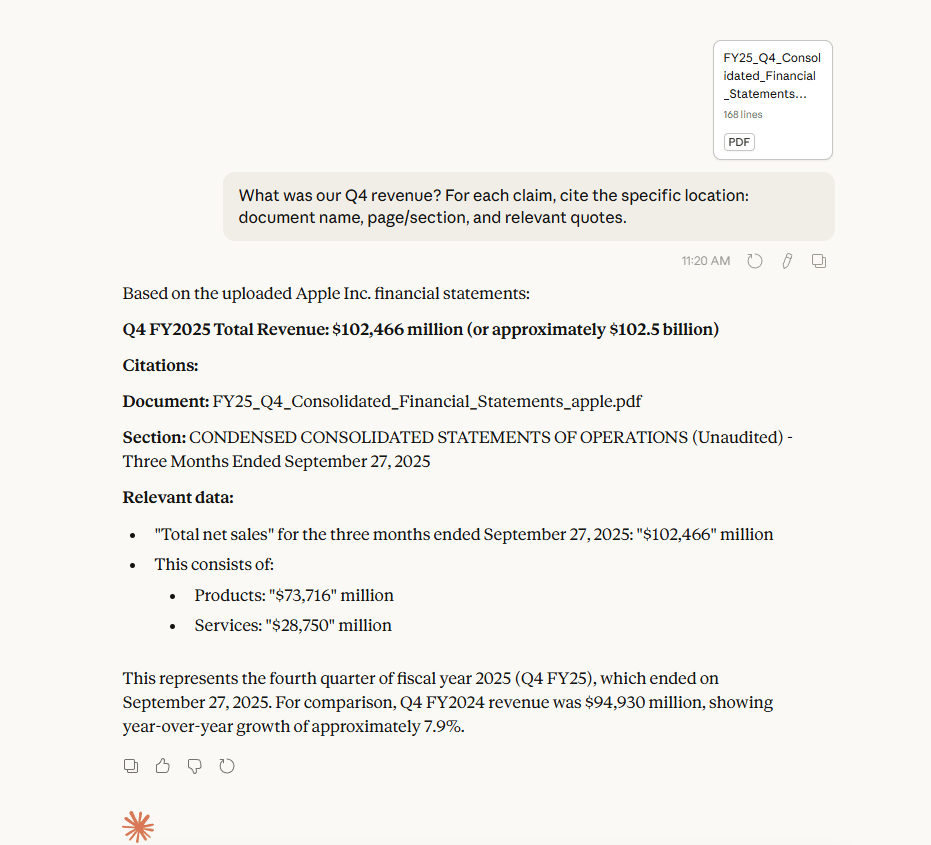
You can also add two safety lines for uncertainty and high-stakes work.
Bonus Prompt 1: The Middle Ground
Sometimes the AI isn't completely sure but it's not totally clueless either. This prompt lets it flag uncertain claims.
If you find something related but aren't fully confident it answers the question, mark it as [Unverified].This helps you prioritize what to double-check. If the AI gives you ten citations and marks two as "unverified", you know exactly where to focus.

Bonus Prompt 2: High-Stakes Mode
For contracts, legal documents, financial analysis or anything where mistakes have serious consequences, use this nuclear option:
Only respond with information if you're 100% confident it came from the file. If you're not certain, don't include it.The trade-off is that you'll get less information but everything you get will be highly accurate. Use this when precision matters more than volume.

Combine all these prompts and you’ll get the knowledge base grounding template that looks like this:
1. Base your answer ONLY on the uploaded documents. Nothing else.
2. If information isn't found, say 'Not found in the documents.' Don't guess.
3. For each claim, cite the specific location: document name, page/section and relevant quotes.
4. If you find something related but aren't fully confident it answers the question, mark it as [Unverified].
5. Only respond with information if you're 100% confident it came from the file. If you're not certain, don't include it.
Now, all you need to do is copy, paste and watch your AI output quality skyrocket.

Overall, how would you rate the Prompt Engineering Series? |
3. Verify the Output (Let AI Check AI)
Even with perfect prompting, you should still verify. But instead of manually checking everything, use AI to verify AI.
Here are three verification methods, ranked by intensity.
Method 1: Self-Check (Lowest Intensity)
You ask the same AI that gave you the answer to double-check itself. Here is a copy-paste prompt you can use right now:
Rescan the document for each claim. Give me the exact quote that supports it. If you can't find the quote, take the claim back.
Pro tip: the word "rescan" is critical. Because it forces the AI to methodically go through the document again instead of just looking at its previous answer and saying "Yep, looks good".
Method 2: Multi-Model Check (Medium Intensity)
You have a different AI check the first AI's work. The flow will look like this:
Get output from AI #1 (for example, ChatGPT).
Take that output plus the original document.
Feed both to AI #2 (for example, Claude Opus 4.6 or Gemini 3 Pro).
Ask AI #2 to verify AI #1's claims.
Let me give you a simple prompt for this method:
Review this analysis against the uploaded document. Flag any claims that aren't directly supported.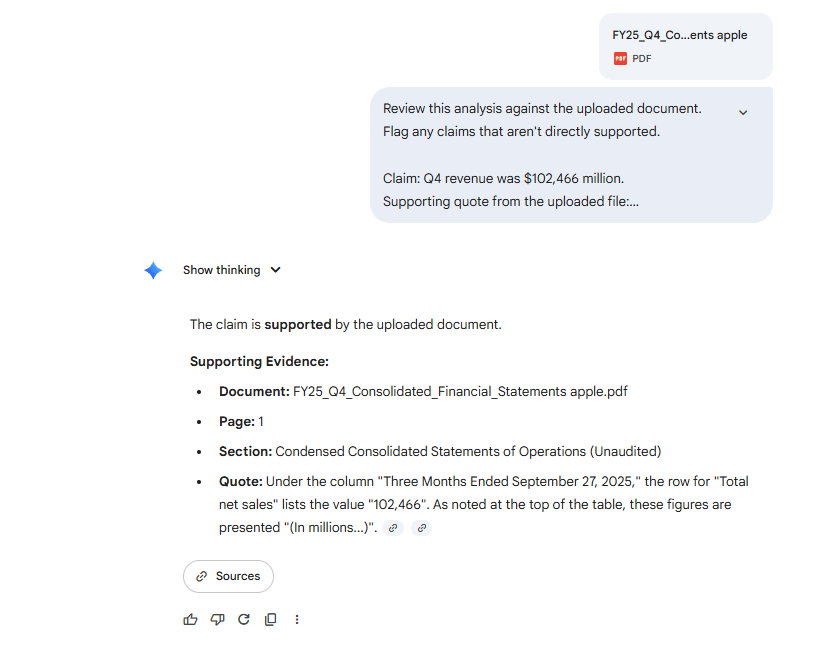
You might think “Why do I need different models to check?” It’s because different AI architectures catch different mistakes.
You can think of it like getting a second opinion from a different doctor.
Method 3: NotebookLM (Highest Intensity)
Google's NotebookLM was specifically built for grounded search and citation verification, which makes claim-by-claim checking faster.
Here is how you can use it efficiently:
Upload your document to NotebookLM.
Upload the AI's analysis.
Ask NotebookLM: "Which claims are not supported by the sources?"

What makes it stand out is how it checks every claim one by one, links you straight to the exact source and runs on Gemini 3, making it perfect for cross-checking after ChatGPT or Claude.
This is what real verification looks like.
Creating quality AI content takes serious research time ☕️ Your coffee fund helps me read whitepapers, test new tools and interview experts so you get the real story. Skip the fluff - get insights that help you understand what's actually happening in AI. Support quality over quantity here!
IV. What is a Grounded Knowledge Base NOT (Setting the Right Expectations)
Grounded Mode is not a truth engine. It does not fix bad files, missing pages or OCR failures. It reflects the quality of the source.
Key takeaways
Missing data stays missing
Poor scans confuse models
Image-only PDFs break extraction
Silence is safer than guessing
Garbage in still means garbage out.
Grounded Mode dramatically reduces hallucinations but it doesn’t turn AI into a truth machine. It’s a safety layer, not a guarantee. If you expect it to catch everything on its own, you’ll still get burned.
Here’s where humans still matter.
1. It Does Not Fix Bad or Incomplete Documents
If the source material is wrong, outdated or missing pages, the AI will reflect those flaws exactly.
It can’t extract clauses that don’t exist, infer intent that isn’t written or clean up sloppy language and inconsistencies.
OCR breakdowns are common: about 36% of data gets missed in handwritten or low-quality scans, image-only PDFs can’t be read and stylized fonts or tables often confuse the model.

Source: Parseur.
If a PDF is missing pages, poorly scanned or stitched together from multiple versions, Grounded Mode won’t fill in the gaps. That’s why silence is often safer than guessing.
A good rule of thumb is simple: if a junior analyst couldn’t answer it from the file alone, neither should the AI.
2. It Does Not Understand Legal or Financial Risk
It can tell you what a document says but it can’t tell you whether that’s a good idea.
Stanford HAI found that leading legal AI tools hallucinate 17-33% of the time on legal research queries and broader studies report 58-88% hallucination rates for general‑purpose chatbots on legal tasks.

AI doesn’t lie; it hallucinates and M&A due diligence must address that. Source: Deloitte.
It won’t warn you that a clause is unusually aggressive, that a term conflicts with local regulations or that a liability threshold is dangerous in your specific situation.
Those calls still belong to humans with context and responsibility, like lawyers, finance leads and compliance teams. You should think of it as a precision extractor, not a decision-maker.
3. It Does Not Automatically Fix Table or Number Errors
This is the critical thing that you must know. LLMs usually struggle with dense tables, multi-column financial data and math embedded inside documents (at least right now). Even in Grounded Mode, models can misread rows, skip footnotes or confuse totals and subtotals.
You can test it with this small scenario: you ask the AI to reproduce the table exactly first, then ask it to perform calculations or analysis based on that transcription.
This extra step dramatically reduces numeric mistakes.
4. It Does Not Replace Verification in High-Stakes Work
Yes, it reduces hallucinations but it doesn’t eliminate the need for checks when contracts, money or compliance are involved.
In those cases, you still want a second model pass, a NotebookLM review or a quick human skim of the cited sections.
Your goal isn’t blind trust; it’s auditability. You want to be able to show why something is true, not just feel confident that it sounds right.
5. It Does Not Make Creative Models Precise
Some models are naturally inclined to paraphrase or summarize, even when grounded.
That means they might rewrite language when you need exact wording or condense text when you want literal quotes.
For strict work, you need to be explicit. If you need exact language, say it clearly:
“Quote verbatim. Do not paraphrase.”
Grounded Mode works best when paired with reasoning-focused models rather than creative defaults.

V. Final Thoughts: Trust but Verify
AI is incredible for document processing. So, it can save you hours of manual work, catch details you'd miss and scale your analysis capacity by 10x.
But it’s not perfect and when it’s wrong, it’s confidently wrong. The good news for you is that with the right prompts and verification methods, you can catch 99% of hallucinations before they cause problems.
So here's the challenge: next time you ask AI to extract data from a document, use this framework, choose the right model, ground it with strategic prompts, verify the output.
And watch your accuracy go through the roof.
If you are interested in other topics and how AI is transforming different aspects of our lives or even in making money using AI with more detailed, step-by-step guidance, you can find our other articles here:
Create 50 AI Videos in Bulk (One Click, No Paid Tools) | FREE Automation (2026)*
Kling 3.0 is Crazy and Can Do Anything. Ultimate Guide with Pro Tips & Prompts to Try
The "AI Dream" Is Finally Here (Build A RAG Agent In 5 Mins)*
How To Create A Cinematic AI Video Ad That Looks Shockingly Real In Just 4 Steps
*indicates a premium content, if any
Reply