- AI Fire
- Posts
- 📺 How You Can Become a High-Impact AI Content Creator & Make Real Money in 2026
📺 How You Can Become a High-Impact AI Content Creator & Make Real Money in 2026
You don’t need fame or a fancy setup. This guide shows you how to use InVideo AI to build a profitable faceless channel fast.

Max Anh
January 13, 2026

TL;DR BOX
Building a "faceless" YouTube empire as an AI content creator in 2026 is a practical side hustle that uses InVideo AI to automate the entire production process from script to the final edit. This method bypasses the need for expensive equipment or on-camera presence, focusing instead on high-value, searchable niches like finance, tech reviews and DIY home improvement.
Success comes from getting specific about your niche and letting YouTube autocomplete tell you what people are really searching for. By using "Power Prompts" to define the audience and tone, an AI content creator can generate realistic, engaging videos in under five minutes. You’ll make money in a few simple ways (ads, affiliate links, sponsorships and small digital products). When you mix them together, your income grows faster.
Key points
Fact: Faceless channels and TikTok accounts make up approximately 38% of new creator monetization ventures in 2025.
Mistake: Using generic prompts like "make a video about money"; instead, define the specific audience, problem and desired visual tone for a professional result.
Action: Commit to a 90-day challenge of uploading three videos weekly to train the YouTube algorithm and build a library of affiliate-linked content.
Critical insight
Right now, YouTube rewards videos that actually help people. Nobody cares if your face is on screen; they care if you solve their problem fast.
🎥 Want a YouTube empire without showing your face? |
Table of Contents
I. Introduction
You may think making money on YouTube requires a $5,000 camera, a perfect face and the personality of a game show host. The answer is NO.
By 2026, that mindset no longer works. You have probably seen a thousand videos promising you will be rich. Most of them are just low-effort AI junk that doesn’t help anyone.
But there’s a simple method that feels like a cheat code once you see how it works. You don't need a production studio to show your face or video editing skills. All you need is about 20 minutes, a laptop and the willingness to actually take action instead of just thinking about it.
While others are busy trying to become "famous", you can quietly build a library of helpful videos that print money while you sleep. This guide is the complete manual for the modern AI content creator using tools like InVideo AI.
Here is how you can build a faceless empire using AI-generated videos.
II. Why AI Video is the Smartest Move in 2026?
YouTube is still a search engine, not just entertainment. People search for specific fixes every day. Many top results are outdated or too long. Short, clear videos win.
Key takeaways
YouTube is still a giant search engine.
Most “answers” are old, low-quality or too long.
Viewers care about value, not your face.
Faceless content can monetize if it stays helpful.
Saturation is real for “vibes.” It’s not real for clear answers. Most people think YouTube is saturated. For me, that’s totally a lie.
Millions of people type questions into YouTube every day, looking for very specific solutions like “how to fix a leaky faucet,” “best budget laptops,” or “how to train a puppy”.
The massive opportunity for an AI content creator lies in the fact that many of the existing answers are from 2017, filmed in "potato quality" or are 40 minutes long when they should be 4 minutes. This is where the opportunity shows up for you.
Viewers don't care about your face. The only thing they care about is answers, information and entertainment.
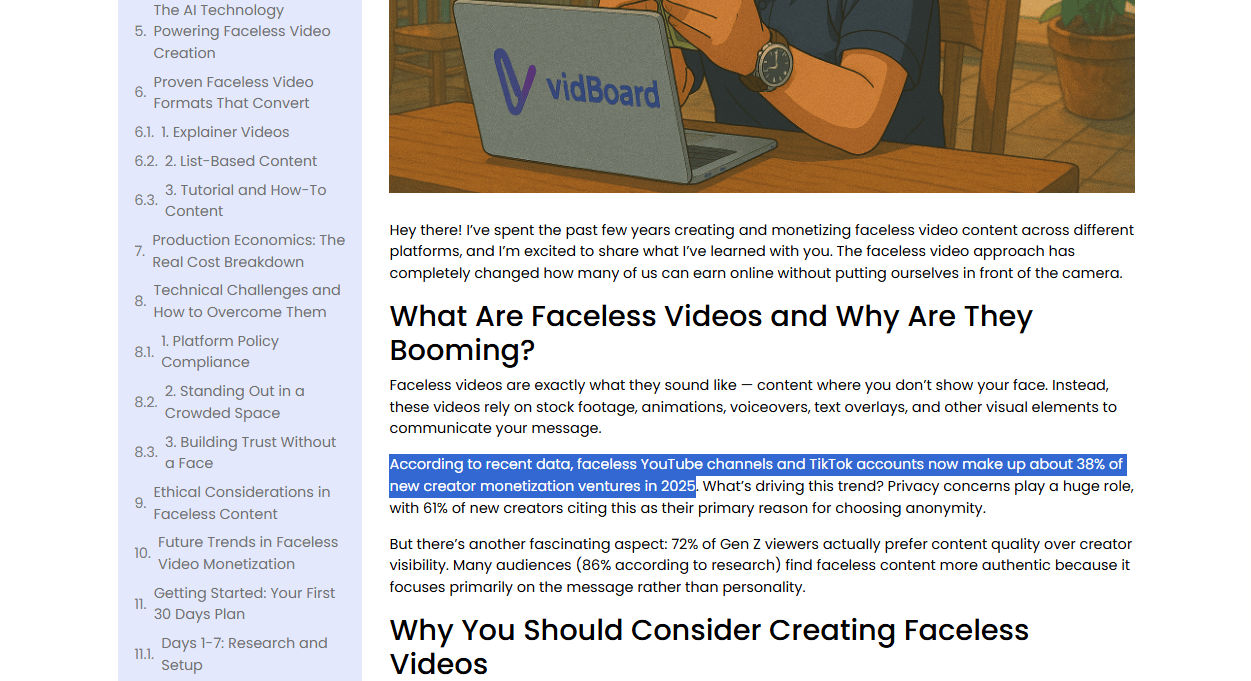
Don’t trust me? According to VidBoard.ai's 2025 Creator Report, faceless YouTube channels and TikTok accounts now make up about 38% of new creator monetization ventures in 2025 and 72% of Gen Z viewers actually prefer content quality over creator visibility.
Source: VidBoard.ai.
In 2026, AI voices and videos look so real that viewers cannot tell the difference. Even if they can, they only care about getting good information. That’s how money will follow you.
Now that you understand why AI video makes sense, let me show you the tool that makes this whole system possible.
Learn How to Make AI Work For You!
Transform your AI skills with the AI Fire Academy Premium Plan - FREE for 14 days! Gain instant access to 500+ AI workflows, advanced tutorials, exclusive case studies and unbeatable discounts. No risks, cancel anytime.
III. The Star of the Show: InVideo AI
Let's talk about what makes InVideo AI different from the dozens of other AI video generators.
InVideo AI is a professional-grade video generation engine. It is like having a scriptwriter, a voiceover artist and a video editor all living inside one browser tab.
1. What Makes It Different?
Most AI video tools slap together random stock clips with robotic narration that sounds like a GPS system from 2005. InVideo AI actually understands context, pacing and visual storytelling. It also does all of this in under 5 minutes and it only costs $28 a month, which is much cheaper than a professional studio.

The platform handles the complete video production pipeline:
Script Generation: It writes a full, engaging script based on a simple prompt.
Smart B-Roll: It finds stock footage that actually matches the words being said.
Human-Like Voiceovers: No more robot sounds. These voices have "Rizz" and sound like real people.
Complete Editing: It handles transitions, background music and text overlays automatically.
2. How It Works in Real Life?
The platform uses a prompt-based system. You describe what you want in plain English and the AI builds the video. The more specific your description, the better your output.
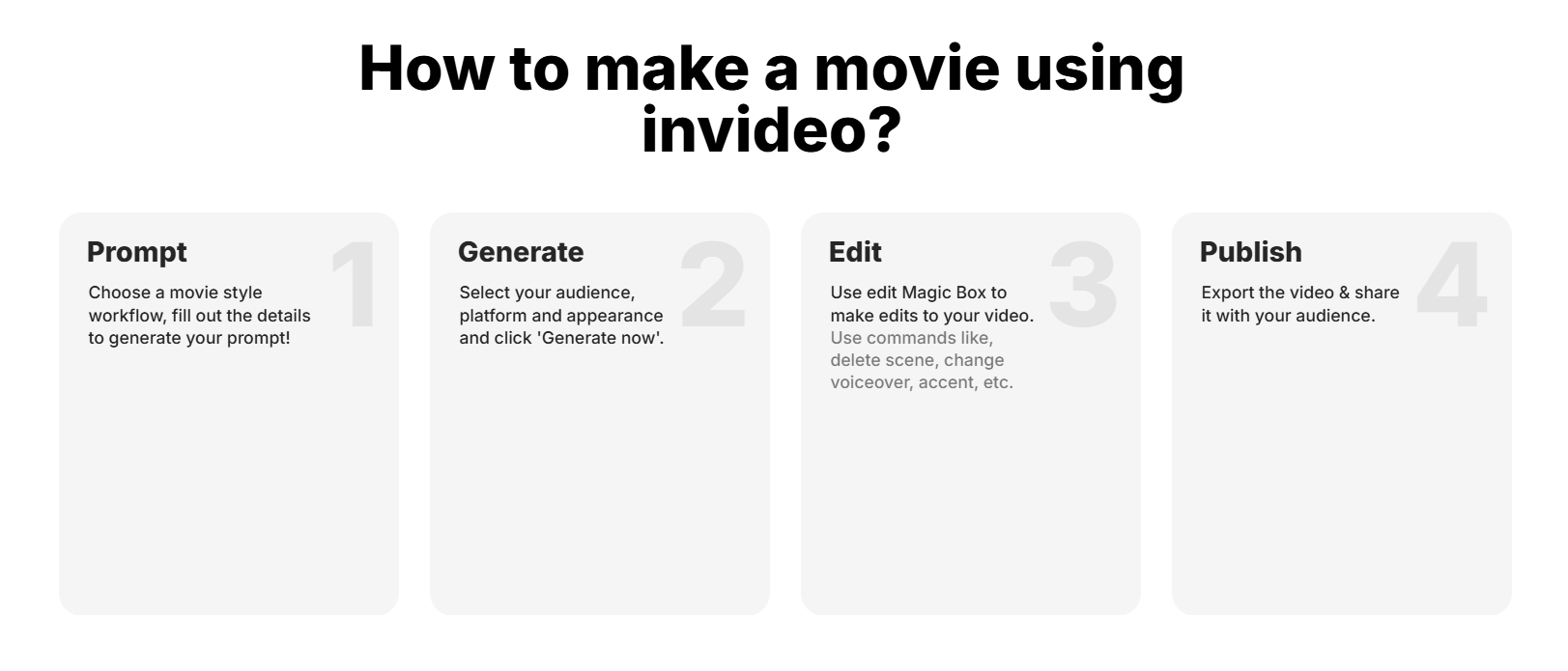
You can also edit anything after generation using natural language commands. The AI understands your instructions and makes changes automatically, so you do not need technical skills.
And now, comes the part I promised: building a faceless YouTube system with InVideo AI. First, you pick one clear audience with a real problem, let YouTube’s own data tell you what people want, turn that insight into a strong prompt, generate the video, make quick text edits, and publish.
IV. Step 1: Picking Your "Gold Mine" Niche
The biggest mistake a new AI content creator makes is being too vague. If you tell the AI "make a video about money", you will get a generic, boring result.
To make real money as an AI content creator, you must target specific audiences with specific problems.
1. High-Value Niches for 2026
After digging through many creator reports and case studies, here are the niches that keep popping up:
Personal Finance: Debt payoff, investing or "AI-powered" budgeting.
Tech Reviews: Comparing the latest gadgets or AI software.
Health & Wellness: Longevity tips or specific diet tutorials.
DIY Home Improvement: Specific fixes for homeowners.

Source: Elementor Blog.
Expert Tip: The more specific you are, the faster you grow. "Finance tips" is okay but "How to save for a house on a $50k salary" is a gold mine; it’s specific, searchable and monetizable.
V. Step 2: The Lazy Man's Keyword Research
Don't guess what videos to make. Because it’s going to take you a lot of time to think, analyze and it’s absolutely not good for your business.
Use the data that YouTube is already giving you for free.
1. The Autocomplete Hack
Go to YouTube and start typing your niche topic into the search bar. YouTube's autocomplete shows you real searches from real people right now.
If you type "how to save money", look at the suggestions that appear:
"how to save money with low income".
"how to save money fast".
"how to save money in your 20s".

You just found four proven video ideas in 10 seconds. Easy, right? And it’s efficient.
A quick warning: you shouldn’t copy videos exactly. Use them to understand the structure, then build your own version with your creativity or AI.
2. The "Sideways" Content Method
If you want more “mines” for ideas. Here are some additional research sources you could find:
Source | How to Use It | What to Look For | Why It Works |
|---|---|---|---|
Search your niche and scan top threads | Repeating questions and high upvotes | Upvotes signal real interest, not guesses | |
Quora | Browse questions in your category | High views, lots of answers | Shows what people actively want explained |
Google “People Also Ask” | Search your main keyword | Related questions and phrasing | Reveals how people actually ask the question |
Competitor Comments | Read comments on popular videos | “Can you make a video about…” | Viewers tell you exactly what to create next |
Spend 30 minutes on this research process and you'll have enough video ideas for three months of consistent uploads.
Let me take an example with Perplexity to research the niche “personal finance”, the video must have at least 500 likes or 20,000 views.
You could use this prompt below or customize based on your business.
I want to research high-performing YouTube video ideas in the niche of [YOUR NICHE].

Please analyze existing YouTube content and return results grouped by performance criteria, not guesses.

Create the following categories:

- Category 1: High Engagement, Lower Reach
+ Videos with 500+ likes
+ Views under 20,000
+ Indicates strong audience interest but low competition

- Category 2: Proven Winners
+ Videos with 20,000+ views
+ At least 1,000 likes
+ Clear demand and scalable topics

- Category 3: Underserved Opportunities
+ Videos ranking in search
+ Uploaded 2+ years ago
+ Poor production quality or overly long

- For each video, extract:
+ Video title (exact wording)
+ View count and like count
+ Upload date
+ Core problem being solved
+ Why this topic works (search intent, urgency, clarity)

- Then:
+ Rewrite each idea into a clear, modern YouTube title
+ Mark which ideas are suitable for short, faceless, or AI-assisted videos

Do not invent topics. Base everything on real performance data and real viewer behavior.
I know that Perplexity is really convenient but it’s still AI. So, always double-check the sources, data, and results before you make a decision.
Once you know what people want, the next step is telling the AI exactly how to build your video. This is where the prompt matters.
VI. Step 3: Generating Your First Masterpiece
Once you have your idea, head over to InVideo AI. This is where the magic happens.
Go to InVideo AI and create an account. The free plan gives you enough credits to test the platform and create your first few videos before committing to paid plans.
1. The Power Prompt Formula
How you use a prompt is similar to how you choose your niche.
Every successful AI content creator knows that the AI only works as well as the prompt you give it. If you say “make a video about money,” you’ll get trash. So use a structure like this:
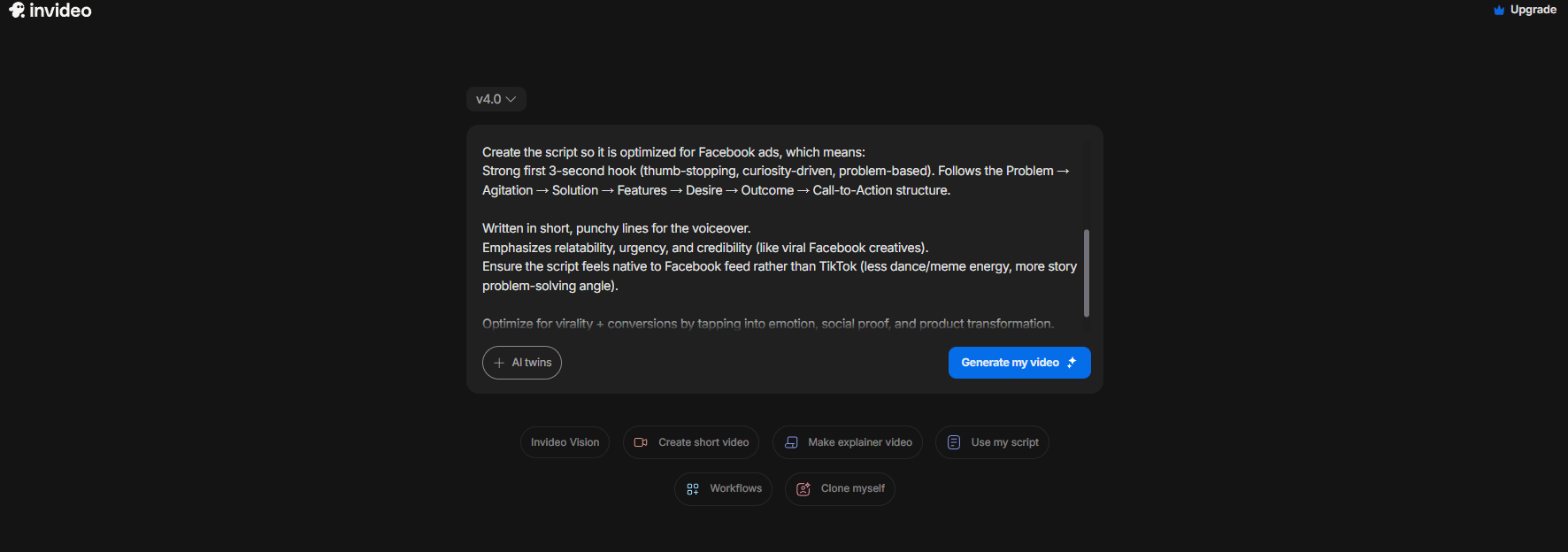
Create a [Duration] product demo video for [Product Name] on [Platform].
Use a [Visual Mood + Tone] style with [Key Visual Elements] and [Music Type] background music.

Structure the script using Hook (first 3s) → Problem → Agitation → Solution → Features → Desire → Outcome → Call-to-Action.

Write in short, punchy voiceover lines that feel native to [Platform] (avoid [What to Avoid], emphasize [What to Emphasize]).

Optimize for [Primary Goal: clicks / conversions / engagement] by using emotion, social proof, urgency and clear product transformation.
Example:
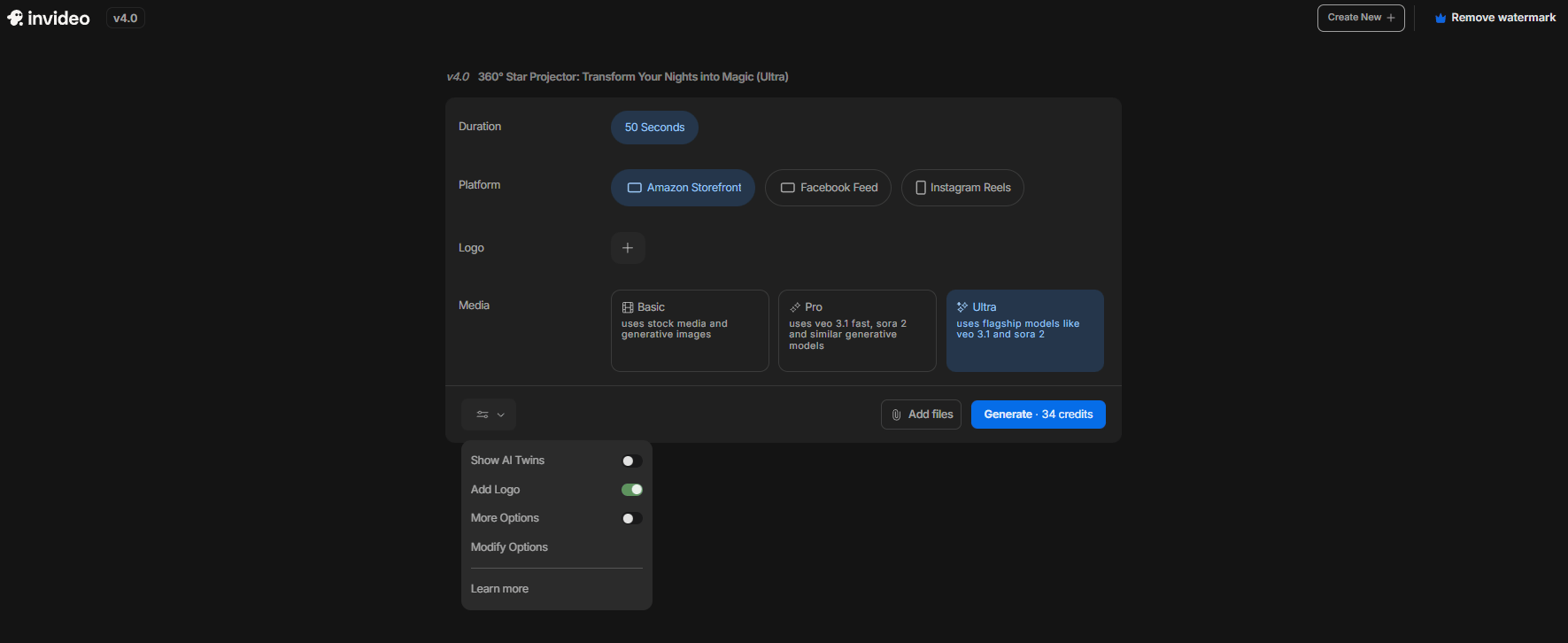
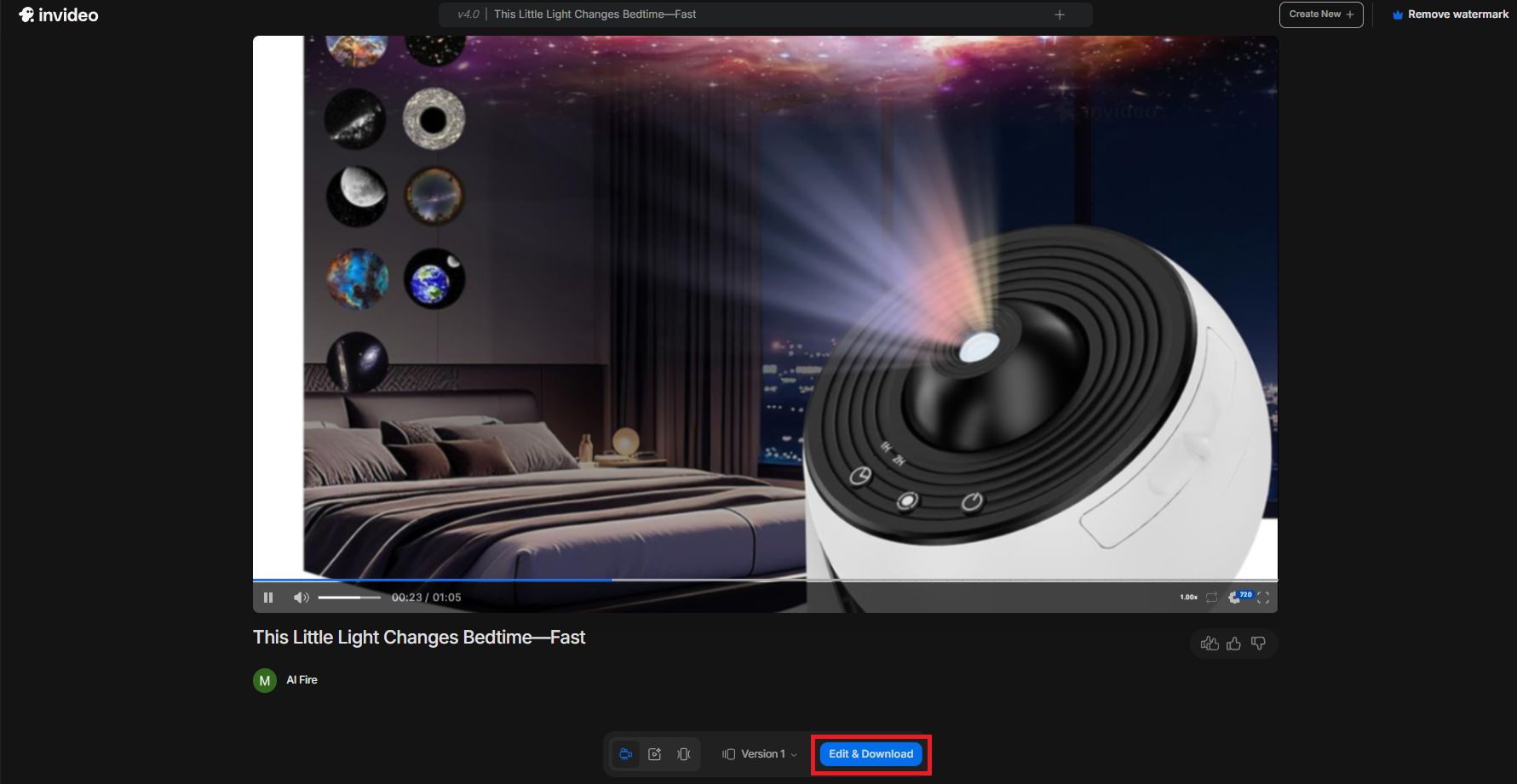
Create a product demo video for the 360° Star Projector.
The video should look cinematic, cozy and family-friendly, with smooth lighting transitions, starry night effects and a premium feel suitable for an Amazon product showcase.

The style should be clean, modern and engaging for a 50-second ad.
Add upbeat yet soothing background music.

This is the product link: https://www.amazon.in/gp/product/B0BTLR65LD/ref=ox_sc_act_title_1?%20smid=A1PFFRQSY0LBI2&th=1

Create the script so it is optimized for Facebook ads, which means:
Strong first 3-second hook (thumb-stopping, curiosity-driven, problem-based). Follows the Problem → Agitation → Solution → Features → Desire → Outcome → Call-to-Action structure.

Written in short, punchy lines for the voiceover.
Emphasizes relatability, urgency and credibility (like viral Facebook creatives).
Ensure the script feels native to Facebook feed rather than TikTok (less dance/meme energy, more story problem-solving angle).

Optimize for virality + conversions by tapping into emotion, social proof and product transformation.
See the difference? The second prompt gives the AI clear direction on length, content structure, style, audience and tone.
Now, click the “Generate my video” button and wait 3-5 minutes. The AI is building the structure of your video.
I have tested this method myself. Videos that use this structure always get better results.
2. Text-Based Editing
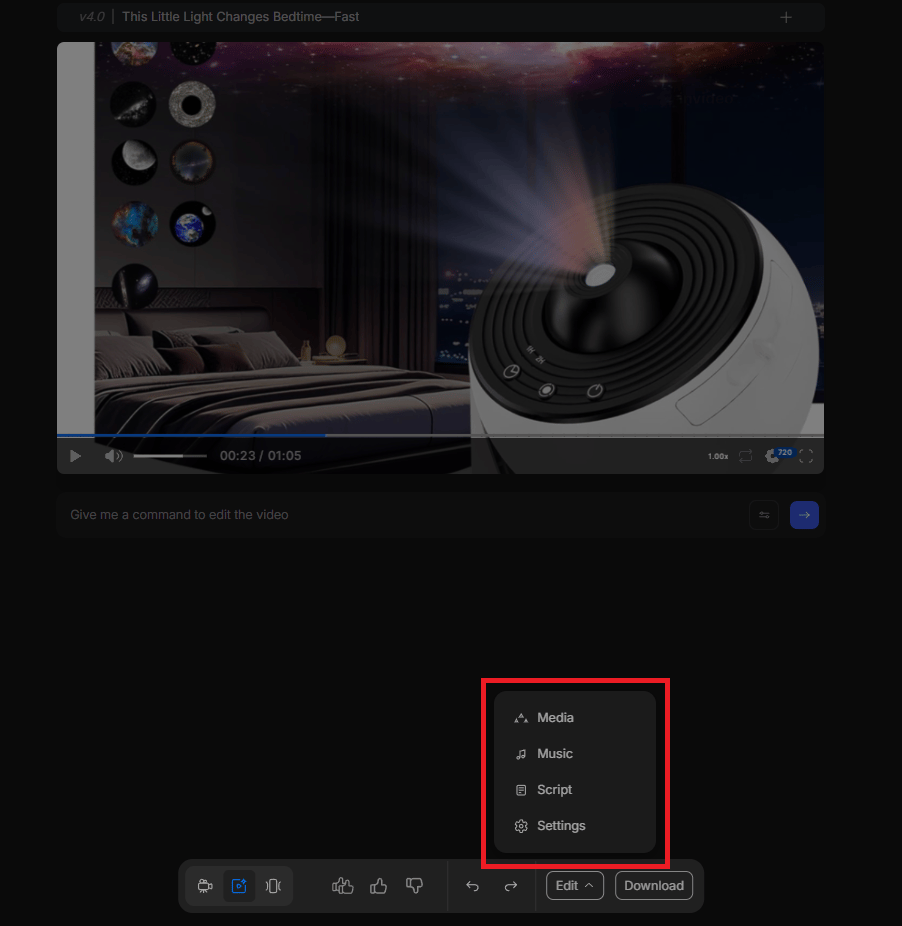
This is where InVideo AI separates itself from basic AI tools. You can use the Edit Magic Box to modify your video.
Don't like the music? Type: "Change the background music to something more upbeat and modern.”
Want different visuals? Type: "Replace the indoor office clips with outdoor nature scenes".
Need script adjustments? Type: "Make the tone more casual and reduce the formal language".
The AI understands context and implements changes accurately.
3. Export and Upload
Once you're satisfied, export in HD quality and upload directly to YouTube.
Here is the upload optimization checklist that helps you increase the chance of getting viral:
Title: Clear, benefit-driven, includes your primary keyword naturally.
Description: First 2-3 sentences hook viewers and explain value. Rest provides context and links.
Tags: Use variations of your main keyword plus related terms.
Thumbnail: Use InVideo AI's thumbnail generator or create a simple, high-contrast image in Canva.

On the free plan, exported videos include a watermark, so it’s best used for testing. If the results look good and you want to use it seriously for your business, upgrading to a paid plan makes sense.
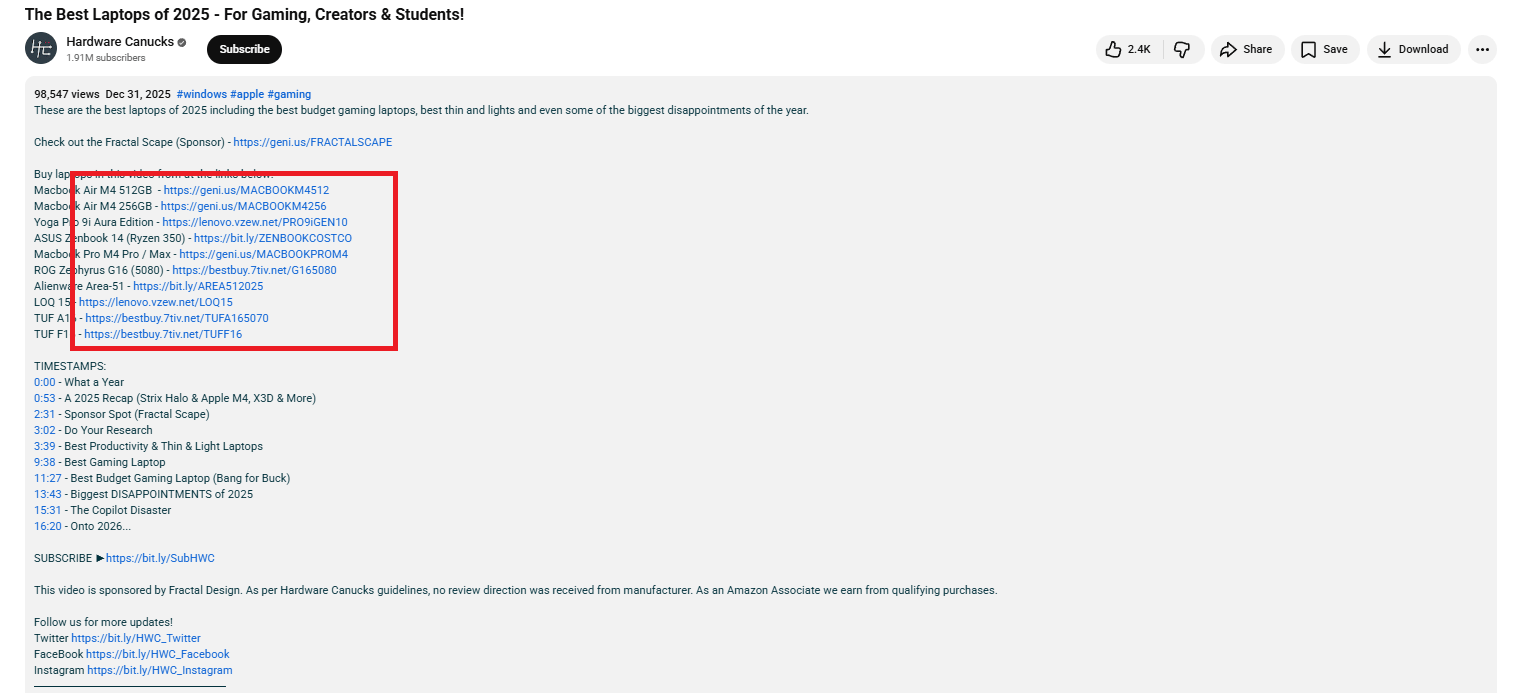
I’ve included a complete YouTube description example with titles, chapters, affiliate structure and SEO formatting and you can open and take it right now.
YouTube's algorithm needs this information to figure out who to show your video to. If you skip this part, your video dies before it even starts.
Creating quality AI content takes serious research time ☕️ Your coffee fund helps me read whitepapers, test new tools and interview experts so you get the real story. Skip the fluff - get insights that help you understand what's actually happening in AI. Support quality over quantity here!
VII. How Do Faceless YouTube Channels Make Money in 2026?
There are four main paths: ads, affiliates, sponsors and your own products. You can start earning from ads once you reach YouTube's requirements. Affiliates often pay sooner and compound over time. Digital products scale the most once trust exists.
Key takeaways
Ads: need 1,000 subs and 4,000 watch hours.
Affiliates can earn with small view counts.
Sponsors usually start around 5k-10k subs.
Digital products scale best with authority.
Ads are a bonus. Ownership beats platform payouts. Making videos is fun but getting paid is better. So let’s talk about how these channels actually make money in real life.
1. YouTube Ad Revenue
This is the classic way. Once you hit 1,000 subscribers and 4,000 watch hours, YouTube starts paying you.
In high-value niches like finance or tech, you can earn $5 to $10 for every 1,000 views. If a video goes viral and hits 100,000 views, that’s $1,500+ from ads alone. This is the foundation of your passive income.
Realistic Timeline: With consistent uploads (3-5 videos weekly), most creators hit these thresholds in 3-6 months.
But reaching 1,000 subscribers to enable ads usually takes 2-3 months and in the best case, about one month. So be patient and don’t give up. Even AI Fire took about a year to grow to 70,000 subscribers. Once momentum starts, the key is to keep going.
2. Affiliate Marketing (The Real MVP)
This is where the real "passive income" lives. You don't need millions of views to make thousands of dollars. By placing links in your description to products you mention in the video, you earn a commission on every sale.
Example: A video about "Best Budget Laptops" can include links to Amazon in the description. If someone buys a $500 laptop, you might make $15. Multiply that by 1,000 viewers and you are cooking.
Realistic Earnings: A well-optimized affiliate video can generate $500-$2,000 per month long-term, even with moderate view counts. The income compounds as your video library grows.
If you want a better way to research suitable products, try Perplexity, especially its Comet feature. With a simple prompt like “find the best laptops on Amazon in 2025”, it can automatically research products for you. Perplexity handles the rest.
I’ve already written a post explaining how to use Comet effectively, so you may want to read that first before choosing your product.
3. Brand Sponsorships
Brands pay creators directly to mention their products once you've built an engaged audience (around 5,000-10,000 subscribers).
In 2026, even faceless channels can command $500-$2,000 per video for sponsorships.

Typical Rates: $100-$1,000 per sponsored video, depending on niche, audience size and engagement metrics. Finance and technology niches command higher rates. Entertainment and lifestyle niches typically pay less but have more sponsorship opportunities.
4. Digital Products
And here’s the real final boss of monetization. Once you've established authority and audience trust, you can sell your own products: ebooks, guides, video courses, templates, tools, coaching,…
Sell a $27 ebook or a $97 course that solves the problem your video talks about. This is how you scale to $10,000+ per month.
But make sure this is the final step, once you’ve built trust and consistently delivered value. Give it 8–10 months, or about a year, before adding it in.
Overall, how would you rate the How to make money with AI Series? |
Conclusion: Consistency is the Only Real Skill
The "Lazy Person’s Guide" works but it only works if you actually do it. Most people fail because they stop after 5 videos when they do not get a million views. They are choosing to stay stuck.
Right now is honestly the easiest time in history to start a faceless channel. You have the power to create professional content for free. Your responsibility is to be consistent.
The Action Plan:
Sign up for InVideo AI (start with the free credits).
Commit to 3 videos per week for 90 days.
Focus on helpfulness, not virality.
If you follow this guide, you will have 36 videos in 3 months. By that time, the YouTube algorithm will understand your channel and you will likely earn your first $1,000.
The gold rush is happening right now. Don't be the person who just watches. Be the AI content creator who builds.
If you are interested in other topics and how AI is transforming different aspects of our lives or even in making money using AI with more detailed, step-by-step guidance, you can find our other articles here:
AI Bubble is Bursting!? Here's the Simple Play for Anyone to Still Make Passive Money
Forget "AI Toys". Try These 12 Business Solutions Instead
*indicates a premium content, if any
Reply