- AI Fire
- Posts
- 🧠 21 Practical ChatGPT Hacks Real AI Masters Use to Work 2× Faster (Most Free)
🧠 21 Practical ChatGPT Hacks Real AI Masters Use to Work 2× Faster (Most Free)
These aren’t “prompt tricks.” They’re features and routines that save time every week, even on the free plan.

Max Anh
December 17, 2025

TL;DR BOX
ChatGPT is a comprehensive AI operating system, not just a search engine. Features like "Prompt Packs", "Projects" and "Canvas" unlock advanced professional workflows.
Many users underutilize ChatGPT by treating it as a simple Q&A bot. This guide reveals 21 strategies, mostly available on the free plan, to transform it into a productivity powerhouse. Key techniques include using OpenAI’s hidden "Prompt Packs" for role-specific tasks and "Projects" to organize chats with persistent custom instructions.
Key points
Stat: Almost all 21 hacks described work on the free plan, with only data analysis visualizations requiring a paid subscription.
Mistake: Asking for a critique directly; instead, frame the request as reviewing a "colleague's work" to bypass the AI's tendency to be agreeable.
Action: Type "@" in any chat to pull a GPT into the chat without losing your current context or workflow.
Critical insight
ChatGPT can reverse-engineer its own perfect prompts; after reaching a desired result, ask it to "distill" the prompt so you can replicate the success instantly next time.
🕵️ Which hidden ChatGPT feature do you need? |
Table of Contents
I. Introduction: Stop Using ChatGPT Like Google
I’m tired of seeing people use ChatGPT like a slightly smarter Google.
All they do is type a question, get an answer, maybe ask a few follow-ups, then move on. That approach barely scratches the surface of what ChatGPT is actually capable of.
Let me help you unlock the full potential of this tool with the ultimate ChatGPT hack list. You’ll definitely love it.
If you use even 5 of these, you’ll get faster answers, cleaner work and less re-typing every day. Especially, almost all of them work on the free plan. I’ll save the few features that require a paid subscription for the very end.
Let's get into the ChatGPT hacks that will put you in the top 1% of users.
II. The Hacks
Availability can change by plan and region, so I’ll label anything that’s commonly paid-only.
1. Prompt Packs: Pre-Built Prompts from OpenAI
A lot of people get disappointing results from ChatGPT and often it's not because of the model;it's because of their prompts. Most people don't know that OpenAI provides a resource that can immediately fix this problem: Prompt Packs. This is a foundational ChatGPT hack for professionals.
These are custom prompts developed by OpenAI for specific professional roles:
Sales.
Customer Success.
Engineering.
IT.
Government.
Finance.
Marketing.

Each category contains dozens of pre-written prompts.
For example, the Marketing pack includes 25 prompts organized into subcategories like campaign planning, strategy, content development, data analysis, market research,... When you find a prompt that fits your work, click "Try it in ChatGPT" and it opens with the prompt pre-loaded, with brackets indicating any custom information you need to fill in.

2. Trigger Words: Accessing Deeper Thinking on the Free Plan
Using the right reasoning model makes a huge difference in response quality. On the paid plan, you get dropdown menus to select thinking modes (standard or extended). But on the free plan, everything runs in "auto" mode.
The problem is you don’t always know what mode it’s using, so you need to give it clearer guardrails.
If you want better answers on the free plan, don’t rely on “magic words.” Just tell ChatGPT what “good” looks like: ask for assumptions, edge cases, a final recommendation and make it show its steps:
"Think deeply".
"Be extremely thorough".
"Double check your work".
"This is critical to get right".
These phrases consistently reroute prompts to deeper thinking models, even on the free plan.

3. Recall Memories: Finding Lost Conversations
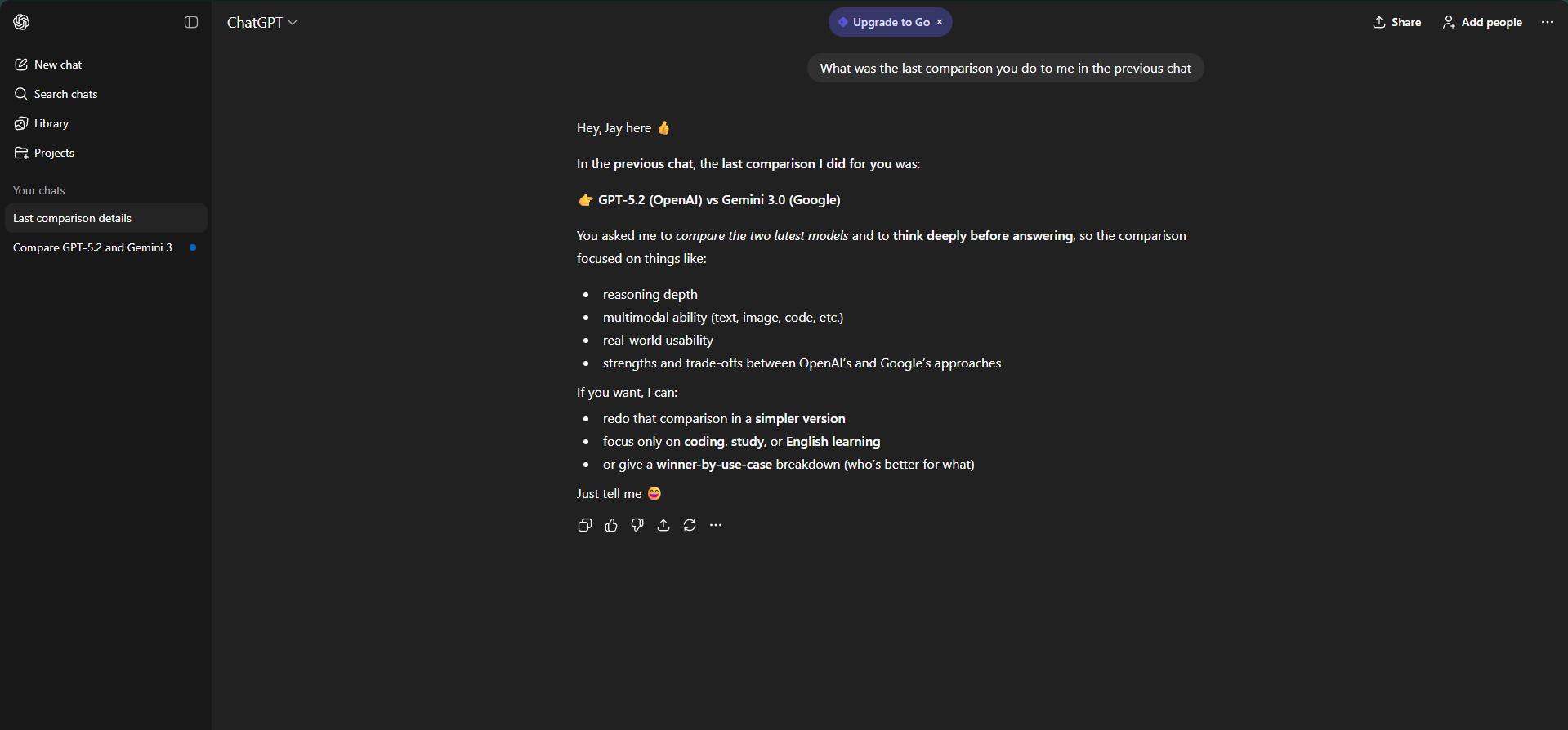
If you had an important conversation in ChatGPT that you can't find or don't want to scroll back through, here's a shortcut ChatGPT hack: ask ChatGPT in any current chat what was said in a previous conversation.
If you can’t find a past chat, use the sidebar search (keywords help). And if you’ve enabled Memory, ChatGPT might remember things you’ve explicitly saved but don’t treat it like a perfect archive.
Learn How to Make AI Work For You!
Transform your AI skills with the AI Fire Academy Premium Plan - FREE for 14 days! Gain instant access to 500+ AI workflows, advanced tutorials, exclusive case studies and unbeatable discounts. No risks, cancel anytime.
4. Projects: The Game-Changing Organization Feature
Projects are one of the most powerful features in ChatGPT and they recently became available on the free plan. It's my personal favorite feature for several reasons.
What Are Projects? Projects appear right above your chat history. They allow you to create organized folders for different categories: fitness, finance, business, writing, etc. Each conversation stays organized in its designated folder.
Upload Reference Files: You can upload files that give context for every chat in a project.
Writing Project: Upload examples of your previous work so ChatGPT understands your style.
Business Project: Upload SOPs (standard operating procedures).
Investing Project: Upload your portfolio history.

Custom Instructions Per Project: This is where Projects become truly powerful. You can set up custom instructions that explain exactly how you want ChatGPT to respond within that specific folder. Unlike account-level custom instructions (which apply everywhere), project-specific instructions only affect conversations within that folder.
Pro Tip: If you're creating a project for your business, ask ChatGPT to give you a series of questions to gather context about that topic. Answer those questions thoroughly, then paste that context into your custom instructions.

Add Knowledge.

Custom Instruction.

Setting the Project’s Memory.
5. Canvas: Advanced Document Editing
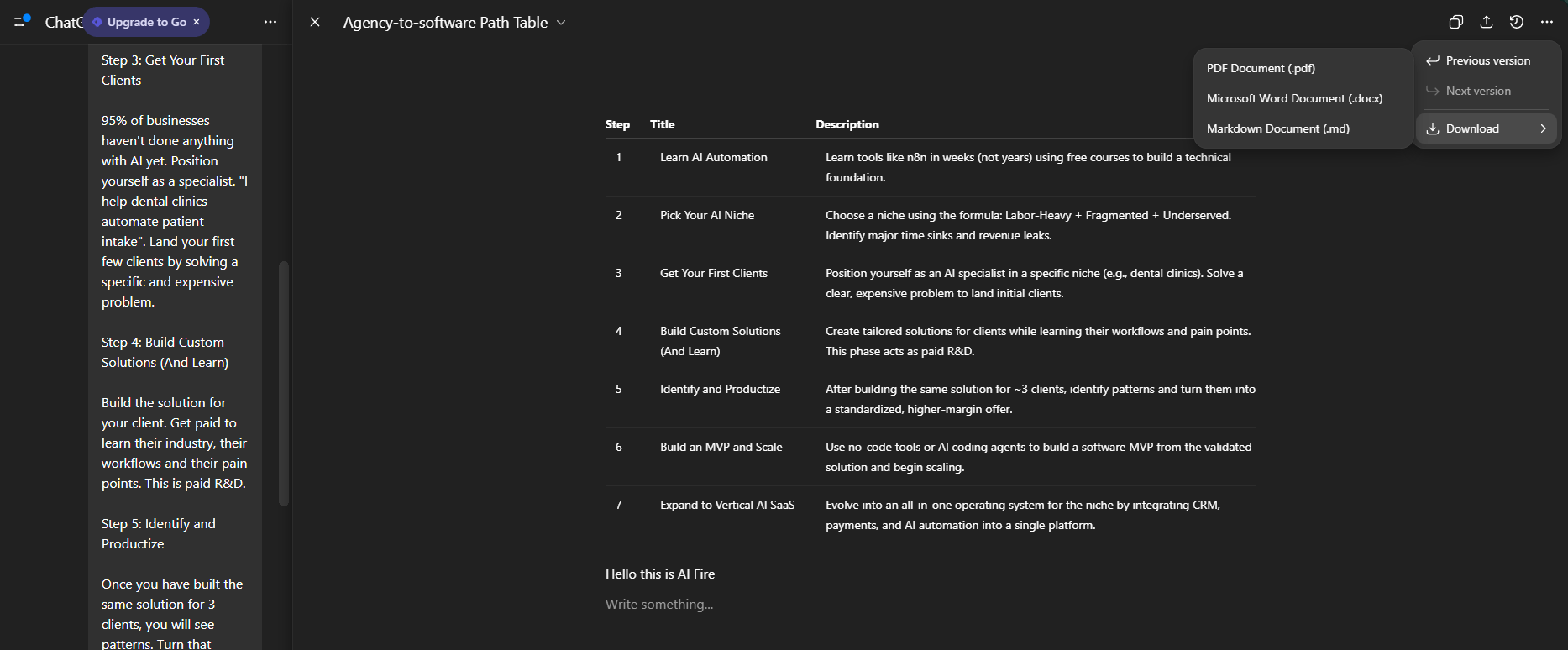
Canvas is especially useful for any type of writing. To use it, ask ChatGPT to open something in Canvas or select it from the dropdown menu.
How Canvas Works: When you click "Edit", it opens the document with a prompt box on the side. You can:
Ask for changes and watch ChatGPT scan through the text and modify it.
Manually edit the text yourself.
Highlight specific sections and prompt for changes to just that section (like "convert this into a table").


Export Options: When you download from Canvas, you can get the file as a PDF, Microsoft Word document or Markdown document. The formatting is preserved perfectly.
6. Mini Apps: Build Tools Without Coding
Even if you don't know how to code, you can create and edit mini apps in Canvas. This is a massive ChatGPT hack for productivity. Combine this with Projects to have reusable apps available whenever you need them.
Example: Building a Workout Tracker.
You can say something as simple as: "Build me a workout tracker website with all the important features I would want it to have".
Without specifying anything beyond that, ChatGPT will:
Write all the necessary code.
Create a functional interface with exercises to choose from.
Include features like adjustable rest timers and session history tracking.
Create analytics to track progress over time.

If there's anything you want changed, just describe it in natural language. This is a powerful ChatGPT hack for non-coders
7. Formatting: Export in Any File Type
You can ask ChatGPT to format its responses for different downloadable file types. Beyond the Word documents shown in Canvas, you can request:
PDF
CSV
JSON
HTML
PowerPoint
SVG
Instead of copying and pasting responses and reformatting them manually, just ask for the specific file format directly.

8. File Extraction: Convert Between Formats
You can upload one file type and have ChatGPT extract information into a different format.
PDF with Images: "Extract all the images in this PDF and provide them in a single downloadable file".
PDF with Tables: "Find all the tables in this PDF and put them in a CSV I can download".
Format Conversion: "Convert this PDF into a Word document with the same headings".

9. Keyboard Shortcuts: Speed Up Your Workflow
There are two keyboard shortcuts worth remembering:
Command/Ctrl + Shift + O: Open a new chat.
Command/Ctrl + Shift + S: Open and close the sidebar.
For additional shortcuts, go to your profile → Help → Keyboard Shortcuts to see the full list.

10. Impersonal Critique: Getting Honest Feedback
If you've ever asked ChatGPT to critique an idea or draft, you've probably noticed it's often too agreeable. Asking it to "be strict" doesn't always work.
The ChatGPT Hack: Pretend the work is someone else's. Say it's from an impersonal source like a colleague and that you have sincere doubts about it and really need help critically evaluating it and finding ways to improve it.
This business strategy is from a colleague and I have concerns about its effectiveness. I need your help in critically evaluating it and suggesting potential improvements.I use this when I want honest feedback instead of polite feedback. Instead of being too nice, it helps you by providing a genuinely critical review.

11. Clarifying Questions: Better Context Through Conversation
Adding context to your prompts dramatically improves results but sometimes it's hard to think of what context to provide.
The Workaround: Ask ChatGPT to ask you clarifying questions. Instead of: "Create a weekly newsletter plan", add this ChatGPT hack to your prompt: "Create a weekly newsletter plan. Before starting, ask me any questions you need to understand my audience and goals".
ChatGPT will ask a series of questions to gather the specific context it needs to tailor advice directly to your situation.

12. Prompt Distillation: Creating Reusable Prompts
Often, you'll change a prompt multiple times until you get the perfect result. Instead of losing that work, save it.
After you've iterated to that perfect result, say: "Write me a prompt that would have created this final result on the first try that I can reuse for [similar situations]".
ChatGPT will give you a fully structured, reusable prompt that captures all the refinements you made.

13. Voice Mode: Role-Playing and Practice
ChatGPT’s voice mode lets you have spoken conversations but there are creative ways to use it beyond simple Q&A:
Interview Practice: Have ChatGPT play the role of a hiring manager.
Difficult Conversations: Role-play conversations you've been avoiding.
Salary Negotiation: Practice negotiating in a low-stakes environment.
Language Learning: Practice conversational skills with correction of nuances.
14. Mobile Vision: Real-Time Visual Assistance
While in voice mode, you can also use real-time vision, where ChatGPT uses your camera to see what you’re pointing at.
Equipment Setup: Point your camera at the equipment and ask for guidance.
Software Help: Get help with software configurations.
Homework Helper: Work through problems visually.

15. App Connectors: Integrated Workflows
ChatGPT recently announced app connectors that integrate with external tools. To enable them, go to Settings → Apps and Connectors.

Example: Canva Integration. With Canva connected, you can say "Create a pitch deck for my business" and ChatGPT will generate the copy, create appropriate visuals and provide an editable design you can open directly in Canva.
16. Custom GPTs: Explore Pre-Built Assistants (Free Plan)
Custom GPTs are specialized versions of ChatGPT built with custom instructions and files. While building your own requires a paid plan, using existing custom GPTs is available on the free plan.
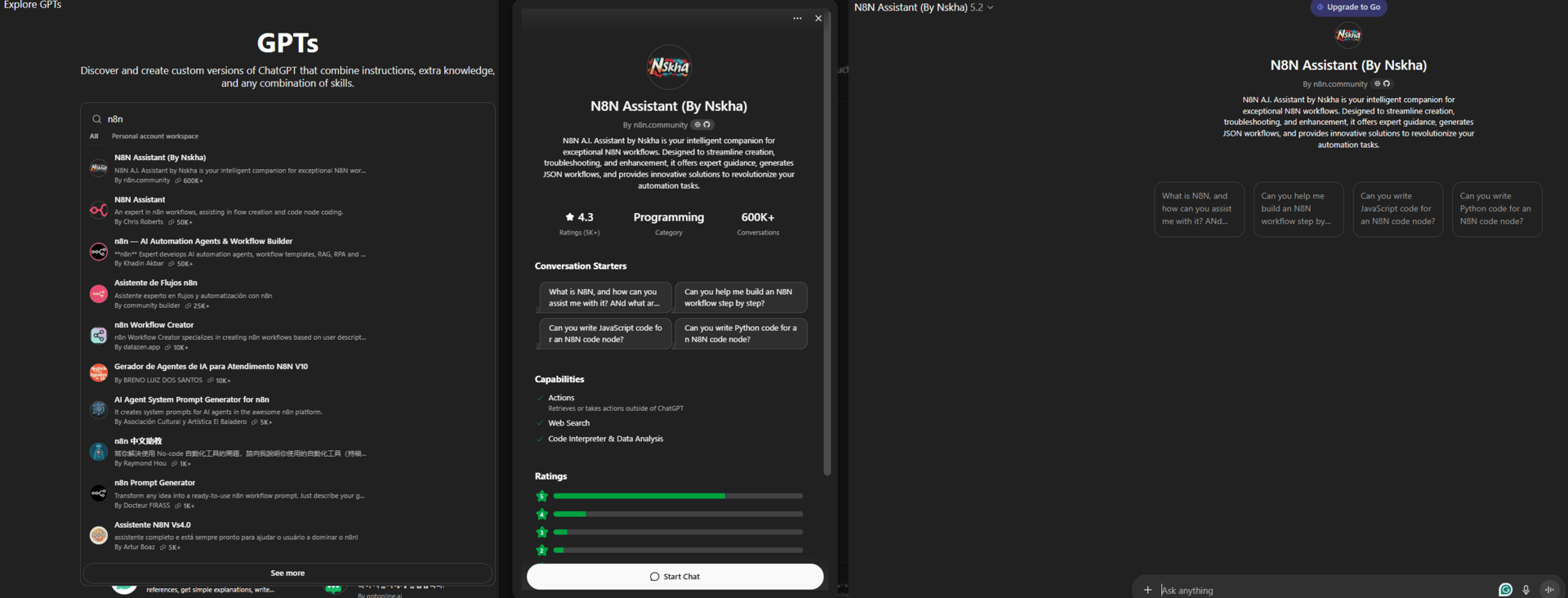
Click Explore to see thousands of pre-built custom GPTs organized by category like Education, Programming and Writing.

Useful Examples:
n8n Assistant: Trained on all n8n documentation.
Custom Instruction Generator: Transforms basic prompts into detailed custom instructions.
17. Summon GPTs: Stack Functionality
You can call custom GPTs within any chat without leaving your current conversation. Just type @ and start typing the GPT name; it will pop up as a suggestion.
This allows you to stack functionality or use specialized GPTs for one-off questions without switching contexts.

18. Data Analysis: Advanced Visualizations (Paid Feature)
With a paid plan, you can upload datasets and ask for analysis: "Analyze this dataset and provide me with five different useful visualizations of the data".
ChatGPT will process the data, generate multiple visualization options and create interactive charts and graphs that help you understand patterns.

Example: I tested it with my Pokémon dataset.
Creating quality AI content takes serious research time ☕️ Your coffee fund helps me read whitepapers, test new tools and interview experts so you get the real story. Skip the fluff - get insights that help you understand what's actually happening in AI. Support quality over quantity here!
19. Building Custom GPTs (Paid Plan)
If you want to build your own custom GPT, the process is simple. You interact through natural language and ChatGPT prompts for additional details that would improve the custom GPT.
Custom GPTs can be massive time-savers for specific repeat behaviors or topics.

20. Role + Rules Header (Bonus)
Most people only write user prompts. That’s why their results feel basic. There’s a more powerful layer most users never touch: system-level instructions.
Instead of asking ChatGPT to do a task each time, you tell it how to think and behave first, then ask your questions.
Here’s the simple version: put your “role + rules” at the top of the message, then ask the task. It’s not a true system prompt but it works because you’re setting the frame before the work.
You are a senior analyst who is skeptical, detail-oriented and prioritizes real-world constraints over theory.
Now analyze this business idea:
[Your Business Idea]
This changes the entire reasoning frame. Every response after that follows the role, tone and decision logic you set.

Why this works:
ChatGPT optimizes responses based on context hierarchy.
Behavior instructions set the “lens” before content generation.
You get more consistent, higher-quality outputs across follow-ups.
Advanced Use:
Combine this with Projects to make the behavior persistent.
Create reusable “thinking profiles” (editor, investor, lawyer, PM).
Paste the system prompt once, then work normally.
Most people try to fix bad answers with longer questions. Power users fix them by changing how the model thinks before it answers.
21. Projects Deep Dive (Bonus)
While Projects was covered earlier, there's much more to explore. You can use Projects to build mini-automations through strategic instructions and organize complex workflows across multiple related chats.
Projects turn ChatGPT from a conversation tool into a permanent workspace made for your specific needs.
If you want to set this up, check out my table below. It’s simple and efficient.
Step | What You Do | Why It Matters |
|---|---|---|
Step 1: Create a Project with a Clear Job | Create a new Project. Name it after the outcome (“Weekly Newsletter Engine”, not “Writing”). | The name sets intent. It tells ChatGPT what this system exists to do. |
Step 2: Upload the Right “Memory Files” | Upload posts, SOPs, style guides, templates, rules, datasets and briefs. | These files become a permanent context. No more repeating yourself. |
Step 3: Set Project Instructions (Key Step) | Define role, tone, rules, output format and decision criteria in Custom Instructions. | This controls behavior across every chat. This is the compounding layer. |
Step 4: Let ChatGPT Improve Its Own Instructions | Ask ChatGPT what it needs to understand the project. Answer. Then ask it to rewrite the instructions. | You upgrade the “brain” of the project. Most people skip this and stay shallow. |
Step 5: Use Projects as Chained Workspaces | Run idea → selection → outline → draft → refine → repurpose in one project. | Every chat builds on the last. Shared memory = speed + quality. |
Step 6: Build Mini-Automations with Instructions | Add rule-based flows (“summarize → extract insights → suggest angles → ask next step”). | You get workflow behavior without tools, code or buttons. |
Step 7: Duplicate Winning Projects | Duplicate the project. Change name, swap files, tweak instructions. | You create reusable AI workers, not one-off chats. |
III. Conclusion: Moving to the Top 1%
If you implement these tips, you’ll use ChatGPT better than 99% of people. These aren't gimmicks; they're fundamental features and techniques that unlock ChatGPT's true potential.
The key is experimentation. Don't just read about these features, try them. Pick one ChatGPT hack from this list and try it today. The more you use these advanced features, the more you'll discover applications specific to your unique needs and workflows.
ChatGPT is far more powerful than most people realize. Now you have the knowledge to use it like a pro.
Start here: 5 ChatGPT hacks to use today
Create one Project for your main work
Make a Project named after an outcome, not a topic (for example: Weekly Newsletter Engine). Add one simple instruction about tone and output. This alone cuts repeat explaining by 50%.
Use a role + rules header before the task
Start prompts with who ChatGPT should be and how it should decide.
Example: “You are a skeptical editor. Flag weak logic, unclear claims and fluff. Then improve it.”
Do this once, then ask the task. Answers get sharper immediately.
Ask ChatGPT to ask you questions first
Before any big task, add: “Before you start, ask me what you need to know to do this well.”
You’ll get better results with less back-and-forth.
Iterate once, then distill the prompt
When you finally get a great output, say: “Write the exact prompt that would recreate this result next time.”
Save it. Reuse it. This turns one good result into a repeatable system.
Edit in Canvas, not in chat
For anything longer than a few paragraphs, open Canvas. Highlight sections and ask for specific changes instead of rewriting everything. This is the fastest way to improve writing without starting over.
If you only do these five, ChatGPT stops feeling like a chatbot and starts acting like a real work tool.
If you are interested in other topics and how AI is transforming different aspects of our lives or even in making money using AI with more detailed, step-by-step guidance, you can find our other articles here:
How To Create A Cinematic AI Video Ad That Looks Shockingly Real In Just 4 Steps
Get Ahead Of 99% Of People With These 7 AI Hacks
*indicates a premium content, if any
🔥 How would you rate this AI Fire 101 article? |
Reply