- AI Fire
- Posts
- 🐾 Everyone Generates Cinematic B-Roll on Demand in Minutes (No Stock Footage)
🐾 Everyone Generates Cinematic B-Roll on Demand in Minutes (No Stock Footage)
Stop scrolling through generic stock libraries. I’ll show you the “Director’s Blueprint” I use to create cinematic, custom B-roll with Veo 3.1 and Kling 2.6 in under five minutes.

Max Anh
January 23, 2026

TL;DR BOX
In early 2026, the way we generate cinematic B-roll footage changed. Instead of guessing with text-to-video, the real results come from image-to-video workflows. By using Nano Banana Pro (Google's Gemini 2.5/3 Flash model) to generate a high-fidelity "starting frame" and then animating it with Veo 3.1, Sora 2 or Kling 2.6, which lets you avoid the “AI guessing” that causes weird artifacts and broken visuals.
Success depends on the "Director’s Blueprint" prompt structure: specifying camera hardware (e.g., ARRI Alexa 35), lens choice (e.g., 24mm vs 50mm) and specific motion descriptions (e.g., "slow forward tracking"). Kling 2.6 is currently leading for action and synchronized audio, while Veo 3.1 remains the benchmark for photorealistic lighting and environmental coherence in your B-Roll footage.
Key points
Fact: Nano Banana Pro is preferred for starting frames because of its superior character consistency and ability to generate high-resolution, production-ready frames with strong detail and consistency.
Mistake: Using generic prompts. Professionals use "Camera References" (Section VII) to trigger specific high-end cinematography patterns in the AI's training data.
Action: For your next project, generate a static high-res image first in Google AI Studio, then upload it to Kling 2.6 using the "First & Last Frame" technique for total motion control of your B-Roll footage.
Critical insight
The real "unfair advantage" in 2026 filmmaking is the move from describing a scene to directing one. You no longer just ask for a "train in the mountains", you specify the Sony Venice look with a 24mm lens to force the AI into a professional cinematic aesthetic for your B-Roll footage.
Table of Contents
I. Introduction: How to Generate Pro-Level B-Roll Footage When You're Out of Time
Okay, here is your situation: It’s 11 p.m. and your video drops tomorrow morning. Everything looks so good: tight edit, clean audio, solid color grade. But there is one problem.
You need one more shot. That sweeping aerial shot, slow-motion close-up or impossible transition angle that ties everything together.
And you don't have it.
So what do you do? Scroll through overused stock footage? Schedule a last-minute shoot (with what crew, exactly)? Or just slap in a placeholder clip that makes your eye twitch every time you watch it?
Here is option number 4: Use an AI video generator (like Veo 3.1, Sora 2 or Kling 2.6). Tools that can create cinematic B-roll footage from detailed prompts.
Today, I’m walking you through how to master the "Director’s Blueprint" for AI prompting and how I used these tools to create 3 types of cinematic B-roll shots.
Let's break it down.
II. How Does AI Video Generation Actually Work?
It works when you treat it like directing, not guessing. Bad results come from vague direction, not weak models.
Key takeaways
AI responds to structure, not vibes
Two-stage flow: image first, motion second
Reference images improve consistency
Prompt principles stay the same across tools
Most people treat AI video generators like magic boxes. Type something vague, hit generate, get disappointed. That's not how professionals use these tools.
The key is understanding that AI video models respond to structure. They need clear visual direction, technical specifications and motion descriptions.
Think of yourself as a director communicating with a cinematographer who needs very specific instructions.

Source: LTX Studio.
Most advanced workflows in 2026 work in two stages to ensure your B-Roll footage stays consistent:
Stage 1: Image Generation. Create your starting frame first. This is your establishing shot. You're building the exact visual composition before adding motion.
Stage 2: Video Generation. Once your starting frame is locked, you describe the motion, camera movement and action.
Some tools (like Veo 3.1 and Kling 2.6) support text-to-video directly. Others (like Sora 2) work best when you provide a reference image first, then animate it.
The workflow varies slightly by platform but the prompt engineering principles stay the same.
*P/S: In this guide, I’ll use Nano Banana Pro as the image generation tool. Why? Because it’s the easiest and has one of the best AI image tools available right now. If you’re still unsure about it, you can check my previous post to see how powerful it could be.
Learn How to Make AI Work For You!
Transform your AI skills with the AI Fire Academy Premium Plan - FREE for 14 days! Gain instant access to 500+ AI workflows, advanced tutorials, exclusive case studies and unbeatable discounts. No risks, cancel anytime.
What Makes a Good Video Prompt?
A professional video prompt has five key elements:
Camera specification: Angle, distance, movement type.
Visual composition: Subject, environment, lighting.
Technical details: Resolution, lens style, depth of field.
Motion description: What moves, how it moves, speed.
Mood and atmosphere: Color palette, time of day, weather.
Most people only include element #2. That's why their results look generic. Now let's see how to build prompts that actually work.
III. Shot #1: The Swiss Alps Train Shot (Peak Wanderlust Vibes)
This shot is pure wanderlust.
You’re looking down from above as a classic red Swiss train curves across a stone viaduct. It feels like a travel documentary shot with cinematic intent.
Building the Prompt
Like I said earlier, we always start by locking the image first. Here’s the complete prompt you can easily copy:
High angle wide establishing shot of a classic red Swiss train curving across a stone viaduct bridge over a deep ravine with a rushing blue river. Dense pine forest surrounds the scene. Snow-capped Alps in the distant background. Overcast diffused lighting typical of high altitudes. Shot on Sony Venice with RE Signature Prime lens at 24mm focal length. Rich dynamic range, professional color grading, cinematic depth of field.Why? You want that professional film look with rich dynamic range and a wide perspective that captures the grandeur of the Alps.
(Don't worry if you're not a camera nerd, I'll include a handy reference table at the end of this post so you know which combos work for which shots.)
Prompt Element | Example | What It Controls | Why It Matters |
|---|---|---|---|
Camera specification | High angle wide establishing shot | Camera position and framing | Tells the AI how the scene is composed from the start |
Visual composition | Classic red Swiss train curving across a stone viaduct | Main subject and focal action | Specific objects prevent generic or random outputs |
Environmental context | Deep ravine, rushing blue river, dense pine forest, snow-capped Alps | Scene depth and realism | Layered details make the image feel real and cinematic |
Lighting | Overcast diffused lighting at high altitude | Mood and atmosphere | Lighting changes the emotional tone of the scene |
Technical specs | Sony Venice, RE Signature Prime, 24mm | Cinematography style reference | Triggers patterns from professional film training data |
Post-production cues | Rich dynamic range, cinematic depth of field | Final visual polish | Signals high-end, film-grade output quality |

Look at the detail on the trees, the texture of the bridge, the way the light hits the train. The composition feels like something straight out of a National Geographic special.
Adding Motion
For the video generation stage, you add motion description:
Camera follows the train smoothly as it travels across the bridge through the Swiss Alps. Steady aerial tracking shot with subtle gimbal stabilization. 10 seconds duration. Natural motion blur on the train.(You can remove the duration if the platform controls that setting outside the prompt).

Pro Tip: Use an LLM to Refine Your Prompts
Here's what you can ask:
I need a cinematic prompt for an AI video generator. The scene is a red Swiss train crossing a viaduct in the mountains. Help me write a detailed prompt that includes camera specifications, lighting, environment details and professional cinematography references.The AI will give you a solid starting structure. Then you can tweak specific details to match your vision.

IV. Shot #2: The Growth Metaphor Because Every Video Needs One
Every strong video needs a moment that means something.
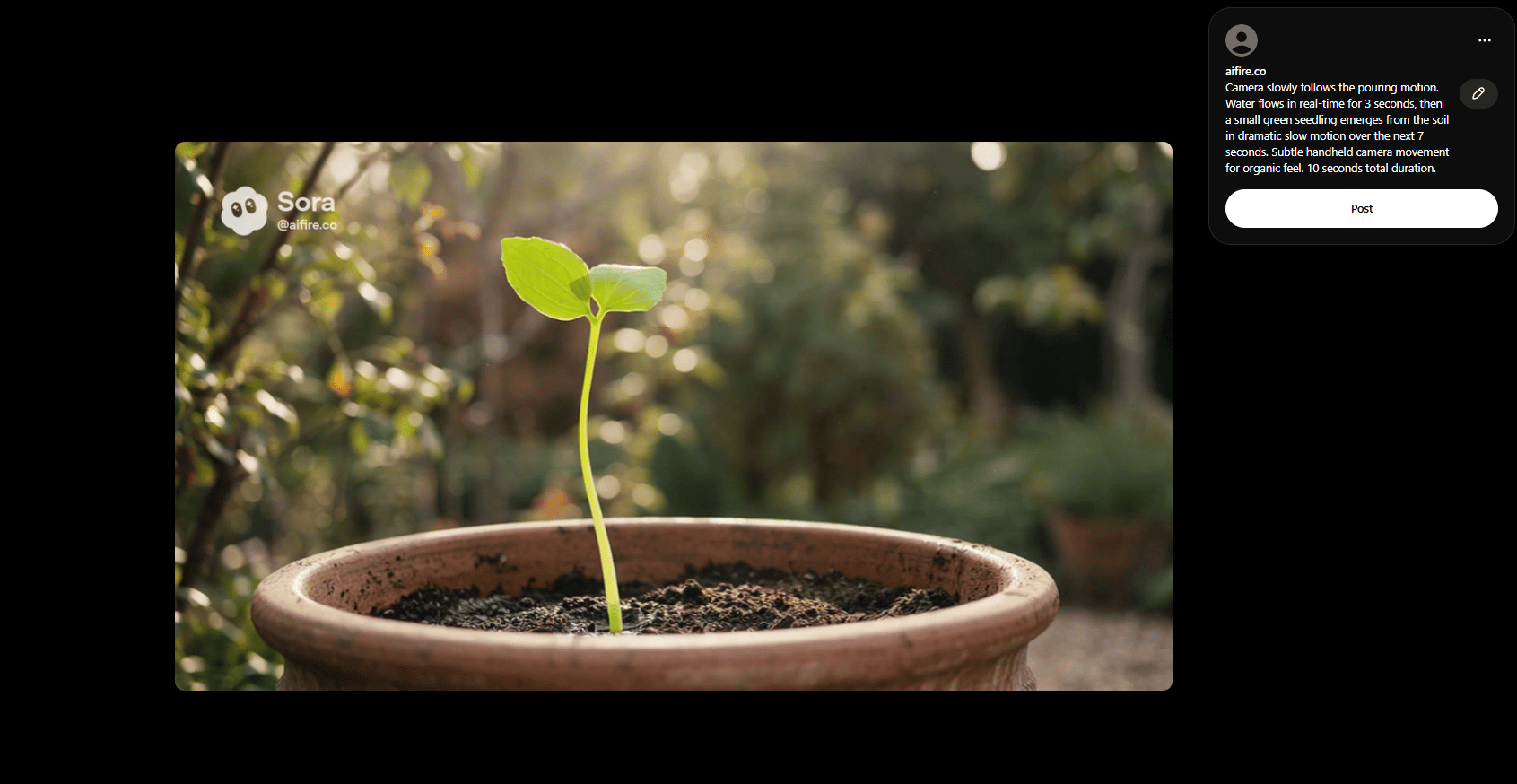
This one is about patience and progress. The image is simple: weathered hands holding a vintage watering holding an old watering can, pouring water into the soil. Then, slowly, a small plant emerges. That quiet moment of growth is what people feel.
Building the Prompt
Cinematic eye-level close-up shot in a peaceful sun-dappled outdoor garden. Weathered, hardworking hands hold a vintage copper watering can with aged patina, pouring a steady stream of water into a large terracotta pot filled with dark, rich soil. Shot on ARRI Alexa 35 with RE Signature Prime 50mm lens. Shallow depth of field with beautiful bokeh. Natural lighting with soft shadows. Warm, earthy color palette. Intimate composition with texture detail on the hands and pot.I wanted something subtle and intimate, so the 50mm gives you that natural perspective with beautiful bokeh.
And the result is just beautiful. The texture of the weathered hand, the aged patina of the watering can, the rich dark soil. All of this feels authentic and not overly polished or stock-photo-like.

Adding Motion and Slow-Motion
For the video stage, you use this prompt to keep movement minimal and intentional:
Camera slowly follows the pouring motion. Water flows in real-time for 3 seconds, then a small green seedling emerges from the soil in dramatic slow motion over the next 7 seconds. Subtle handheld camera movement for organic feel. 10 seconds total duration.And that’s how you get a subtle handheld feel.
A Word of Caution About Hand Movements
Hand movement is still hard for AI. This works because the motion is simple and controlled: hands stay mostly still, only the can tilts.
If you're trying to generate intricate finger movements, detailed tool manipulation or complex gestures, expect multiple attempts. But when you keep your B-Roll footage actions simple to maintain high realism, results improve dramatically.

V. Shot #3: The Earth-to-Chicago Zoom (The Ambitious One)
Our final test is a shot you can’t film in real life: an aerial shot starting from Earth's orbit, zooming down to Lake Michigan and finally into downtown Chicago as buildings come into focus.
This shot would cost tens of thousands of dollars and require satellite imagery, helicopter footage and serious VFX work. With AI video? Just a detailed prompt.
Building the Prompt
Hyper-realistic, cinematic 3D relief map of the United States viewed from low-Earth orbit at dusk. Slightly exaggerated topography for dramatic depth. Golden city lights glow across the continent, connected by bright, distinct highway lines. Deep blue atmospheric haze with soft volumetric lighting. Highly detailed textures and smooth elevation gradients. Shot on ARRI Alexa 35 digital camera with ARRI Signature Prime spherical lens at 50mm focal length. Stable, slow orbital motion. Professional color grading, wide dynamic range, crisp shadows and a polished cinematic look.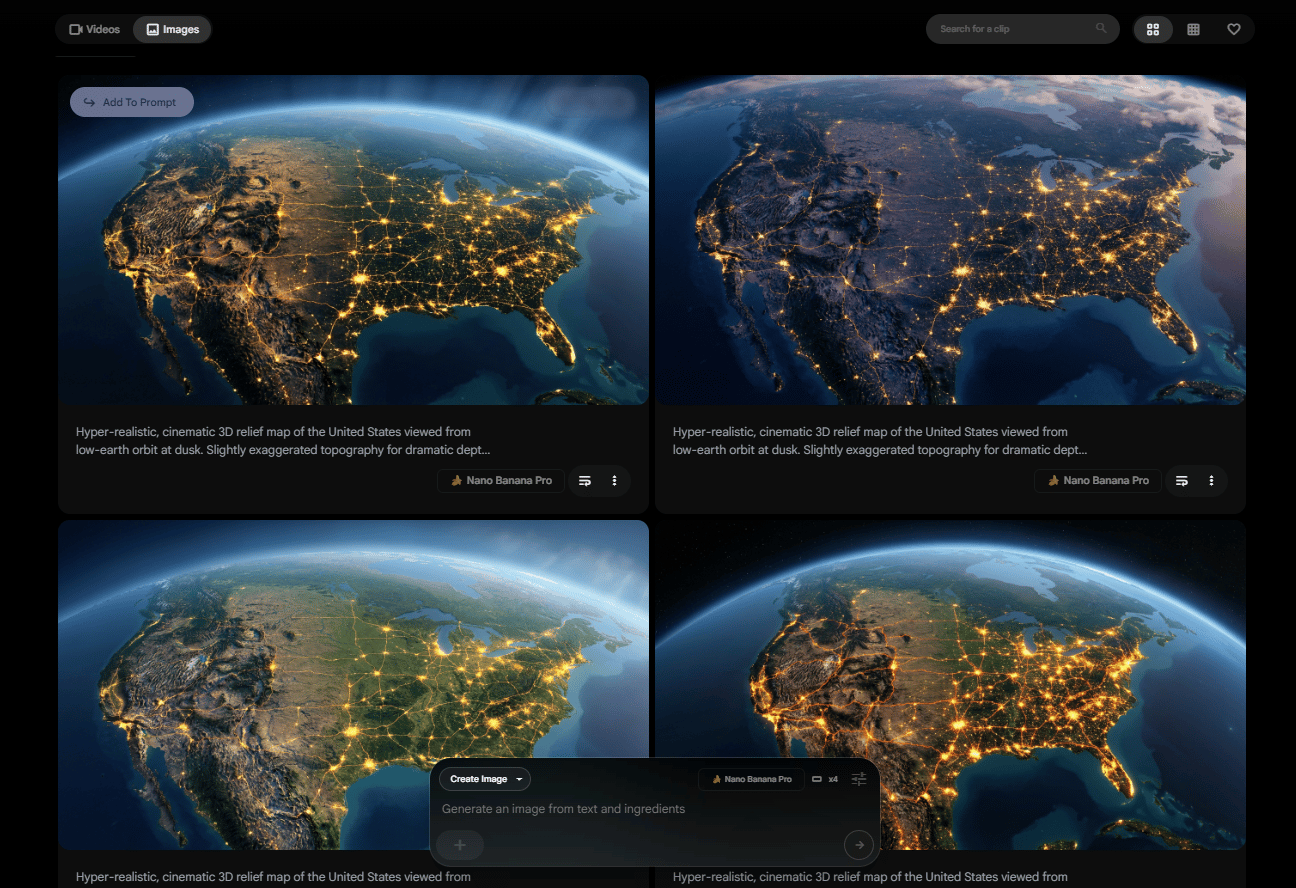
This type of shot fails without structure. You help the AI by spelling out the logic.
You describe the shot as a sequence, not a single moment. You anchor it with real geography. You explain how motion, lighting and color should evolve as altitude changes.
This structure prevents the AI from improvising in the wrong places.
Adding Motion Description
For video generation:
A cinematic hyper-lapse drone shot starting from high above Lake Michigan at night, flying rapidly forward and descending into the Chicago city center. Fast smooth motion.
The Reality Check
I’ll be honest: this shot isn’t perfect. I mean you can get it there but complex multi-stage shots like this usually take several attempts. Along the way, here is a few issues you might run into:
The transition from space to atmosphere might look abrupt.
The city might not stay in perfect focus throughout.
The zoom speed might feel unnatural in sections.
You might see small visual glitches when the camera moves from space to the ground.

This is one of my failed runs.
Even professional results might have small glitches (weird light flashes, brief focus issues, subtle warping). That's normal. You can trim around them in editing.
The key is iteration. Generate multiple versions with slight prompt variations. Pick the best 80% of each, then trim the problematic moments.
Trust me, I’ve been in this exact situation more times than I can count.
Prompt Variation Strategy
If your first attempt doesn't work, try these adjustments.
You can split the shot into stages, remove the space portion, limit visual effects or tighten movement descriptions. Small changes often produce dramatically different outcomes.
That’s how ambitious shots become usable ones.
VI. How Do Different AI Video Platforms Behave Differently?
Each platform favors a different prompt style and strengths. Platform choice matters as much as prompt quality.
Key takeaways
Veo 3.1 is best for realism.
Sora 2 is best for creative stories.
Kling 2.6 is best for fast action.
The same prompt produces very different results.
Each AI video platform has slightly different prompt requirements and capabilities. Here's what you need to know:
Platform | Key Strengths | Best For | Prompt Style | Limitations | Optimized Prompt Structure |
|---|---|---|---|---|---|
Google Veo 3.1 | Realistic outdoor scenes, architecture, natural environments | Travel content, real estate, documentary-style footage | Clear, concise, technical | Weak at highly stylized or surreal visuals |
|
OpenAI Sora 2 | Visual consistency, imagination, complex camera moves | Creative storytelling, surreal scenes, character-driven visuals | Detailed, narrative, artistic | Slower generation at times |
|
Kling 2.6 | Fast output, strong motion, action scenes | Quick tests, action-heavy content, rapid iteration | Flexible: simple or detailed | Less photorealistic than Veo or Sora |
|
Test each platform with the same prompt to see which produces results closest to your vision for specific shot types.
VII. Camera Reference Guide (Save This)
Here's a quick cheat sheet for camera/lens/focal length combos and what they work best for:
Shot Type | Camera | Lens | Focal Length |
|---|---|---|---|
Wide establishing shot | Sony Venice | RE Signature Prime | 24mm |
Cinematic portrait | ARRI Alexa 35 | Cooke S4 | 50mm |
Intimate close-up | RED Komodo | Zeiss Master Prime | 85mm |
Aerial landscape | DJI Inspire | Wide-angle | 16mm |
Documentary style | Canon C300 | Sigma Art | 35mm |
Dramatic slow-motion | Sony FX9 | RE Signature Prime | 50mm |
Screenshot this table and keep it handy when setting up shots in your prompt.
Creating quality AI content takes serious research time ☕️ Your coffee fund helps me read whitepapers, test new tools and interview experts so you get the real story. Skip the fluff - get insights that help you understand what's actually happening in AI. Support quality over quantity here!
VIII. Prompt Structure Templates (Save These)
Here are reusable prompt templates for common shot types. Fill in the bracketed sections with your specific details:
Template 1: Aerial Establishing Shot
[High/Low] angle [wide/medium] aerial shot of [subject] in [environment]. [Weather/lighting conditions]. [Background elements]. Shot on [camera] with [lens] at [focal length]. [Color palette]. [Depth of field description]. [Motion description]: Camera [movement type] [speed/smoothness]. [Duration].Template 2: Intimate Close-Up
Cinematic [angle] close-up shot of [subject] in [environment]. [Lighting type and direction]. Shot on [camera] with [lens] at [focal length]. Shallow depth of field with [bokeh description]. [Texture/detail emphasis]. [Color palette]. [Motion description]: [movement type and speed]. [Duration].Template 3: Tracking/Following Shot
[Shot distance] tracking shot following [subject] through [environment]. Camera [movement relationship to subject]. [Lighting conditions]. Shot on [camera] with [lens]. [Stabilization type]. [Motion details]: [what moves, how it moves]. [Duration].Template 4: Time-Lapse/Transformation
Cinematic time-lapse showing [transformation/growth/change]. [Environment and lighting]. Shot on [camera] with [lens]. [Starting state] transitions to [ending state] over [duration]. [Motion smoothness]. [Color grading].Template 5: Impossible/Surreal Shot
Epic [shot type] beginning from [starting position/scale] and [transitioning how] to [ending position/scale]. [Environmental details at each stage]. Shot on [camera] with [lens]. [Movement quality]. [Visual transition details]. [Duration]. [Special effects or atmosphere notes].Screenshot these templates. When you need to generate B-roll footage quickly, just fill in the brackets rather than starting from zero.
IX. Conclusion: The Future of Visual Storytelling Is Here
I know a lot of people still dislike AI video because they’re worried it replaces creativity. But in fact, AI amplifies it.
AI video tools close the gap between what you imagine and what you can execute. You get to think like a director without the budget, the crew or the waiting.
But here's the important part: these tools are only as good as your prompts.
Anyone can type a vague prompt and get average results. By understanding camera language and motion description, you can generate B-Roll footage that matches your vision exactly, without the crew or the budget.
And if you understand what makes a shot work, that barrier becomes your advantage.
Now go create something great.
If you are interested in other topics and how AI is transforming different aspects of our lives or even in making money using AI with more detailed, step-by-step guidance, you can find our other articles here:
*indicates a premium content, if any
Reply