- AI Fire
- Posts
- 📸 I Ranked 10 AI Video Creators in 2026 & Find The Best List (So You Don’t Waste Credits)
📸 I Ranked 10 AI Video Creators in 2026 & Find The Best List (So You Don’t Waste Credits)
Same prompts. Same scenes. If you want clean motion, consistent characters, and less “AI slop,” use this ranking + workflow.

Max Anh
January 13, 2026
TL;DR BOX
As of early 2026, Kling 2.6 is my top choice for AI video creation. The level of detail is amazing and it is the only tool that can create synced audio inside your video. Sora 2 can look unreal for short-form but the restrictions are exhausting.
For pro work, Google VEO 3.1 is still the safest bet for faces + lip sync. And Seedance 1.5 Pro is the “budget king” if you need volume without your costs exploding.
The big workflow shift: stop relying on text-only. Use Image-to-Video with reference frames so your characters stay consistent across clips.
Key points
Fact: Kling 2.6 is currently the only model that natively generates high-fidelity sound effects and dialogue synchronized with the video output.
Mistake: Staying loyal to one platform. Use aggregators like InVideo AI to run the same prompt through Kling, VEO and Sora simultaneously to find the best "brain" for your specific shot.
Action: Shift to an Image-to-Video workflow; generate your characters in Midjourney first, then animate them in Kling or VEO to ensure visual consistency across multiple clips.
Critical insight
The fundamental shift in 2026 filmmaking is the move from "text-prompting" to "orchestration". You no longer just describe a scene; you use start/end frames and reference images to direct the AI's motion and composition.
🎥 Which AI video generator are you betting on in 2026? |
Table of Contents
I. Introduction
If you’ve ever burned $20 in credits just to get one usable 5-10 second clip… yeah, same. The problem is just the tools. And in 2026, there are way too many “best AI video generators” to trust anyone’s marketing.
Last year, we had maybe 2-3 viable tools. Now? There are literally 10+ platforms all claiming to be "the best", each with different strengths, pricing tricks and strange problems that make you want to give up.
So I spent an ungodly amount of time testing every major AI video creation currently available (from Google VEO to the newest Kling updates), using the exact same prompts, comparing quality, pricing and real-world usability.
The result is a ranking that can save you wasted credits and hours of testing.
This guide is a battle-tested ranking system designed to help you choose the right "brain" for your project. Whether you are an AI filmmaker or just trying to go viral on social media, you need to know who is actually winning and who is just selling hype.
Let's cut through the marketing hype and figure out which tools actually deliver.
II. How Did You Rank and Judge These AI Video Tools?
The ranking uses tiers based on real-world output, not claims. A-tier means quality is hard to beat. B-tier is reliable and useful. C-tier works but has clear flaws. D-tier wastes time unless it’s free.
A clear tier system stops you from paying for branding. Before we get in, here is the tier system I used:
A-Tier: Mind-blowing quality, worth every penny. These are the tools you actually want to use.
B-Tier: Strong tools with clear strengths (often best value).
C-Tier: Usable but you’ll fight flaws. Only use for specific use cases.
D-Tier: Honestly? Skip these unless you are desperate or they are free.
And to keep it fair, I ran the same test prompt through every model:
A scientist in a low-light research lab recoils in disbelief, stumbling backward and crashing to the floor as an otherworldly creature slowly escapes a glass containment vessel and slithers across the workstation.The results expose some uncomfortable truths. The most expensive tools don't always win. Brand recognition doesn't guarantee quality. And free options sometimes outperform paid alternatives in specific scenarios.
Learn How to Make AI Work For You!
Transform your AI skills with the AI Fire Academy Premium Plan - FREE for 14 days! Gain instant access to 500+ AI workflows, advanced tutorials, exclusive case studies and unbeatable discounts. No risks, cancel anytime.
III. A-TIER: The Champions
These are the tools you use when the quality is non-negotiable for professional AI video creation. If your video needs to pass for real footage on a high-end display, you start here.
1. Kling AI 2.6 - The Reigning Champion
If I had to keep only one tool in a professional workflow, Kling is the one I’d keep. This is the one that survives the cut. While other models struggle with "smoothing" (making everything look like a plastic filter), Kling keeps skin textures, dust particles and complex lighting.

Why It Wins: It produces the crispest, most detailed videos. Characters move like actual humans, not video game NPCs. It actually listens to your prompt (revolutionary, I know).
The Killer Feature: Native Audio. It generates synchronized sound effects and dialogue right inside the video generation. No more exporting to separate audio tools for your AI video creation workflow.
The Limitation: Physics occasionally breaks in unexpected ways. Characters sometimes slide through glass doors or walk through solid objects. These glitches appear in roughly 1 out of 8 generations, manageable if you generate multiple options.
Perfect for high-quality cinematic sequences and professional content. It is the GOAT right now.
At around $1 per 10 seconds, Kling sits in the middle of the pricing spectrum. Not the cheapest option but competitive for the quality delivered.
Sora represents the most polarizing tool in this entire ranking. The quality is genuinely stunning when it works. The restrictions make you want to throw your computer out the window.
When Sora works, it looks incredible: selfie videos, influencer-style clips, news-style footage and meme formats feel real in a way most tools can’t touch. Short-form content pops immediately. It looks native to TikTok, Reels and Shorts.
Then the walls appear:
Filters are aggressive.
Prompts get rejected for reasons that feel random.
You spend more time negotiating the rules than building scenes.
Also, image-to-video limitations make it worse. Uploading images with people is off-limits, which wipes out many professional use cases.

Sora shines in a narrow lane and struggles everywhere else.
The honest takeaway: Sora is both impressive and exhausting at the same tim. The quality puts it at the top on paper, yet the restrictions stop it from actually winning. If you’re making meme-style, raw phone footage for Reels or TikTok, Sora can work. For serious, repeatable workflows, it quickly gets in the way.
IV. B-TIER: Solid Performers
These tools are solid performers. They might not have the magic of Kling but they are predictable, versatile and often more budget-friendly.
3. Google VEO 3.1 - The Versatile Workhorse
Think of VEO as the tool you reach for when the project keeps changing. One day it’s sci-fi, the next it’s historical, then a modern talking-head scene. VEO handles all of it without forcing you to jump platforms.

If your AI video creation involves characters talking to each other, VEO is your first choice. It has the most realistic facial expressions and lip-syncing in the industry. Dialogue scenes don’t fall apart the way they often do elsewhere. If your script involves people speaking on camera, this is where you feel safe.
Then there’s camera control. With a clear start frame and end frame, rotations, zooms and pans become predictable instead of a gamble.
Where VEO struggles is with motion complexity. For example, falls, stumbles and fast physical action often look off.
The intent is there but execution lags behind top-tier tools. And the detail quality can swing a lot between modes.
High-quality mode looks great but standard mode sometimes looks soft, which means you plan more carefully.
The smart move is simple: test ideas in standard quality, then switch to high quality once the shot is locked.
4. Seedance 1.5 Pro - The Budget King
Seedance is the "sleeper" hit of 2026. It offers sharpness that rivals Kling but at about half the cost ($0.52 per video).
Seedance wins when volume matters. It delivers strong visuals at a price that makes scaling realistic. Audio comes bundled, which saves time. It won’t wow anyone but it gets the job done.

The tradeoff shows up in control. I don’t know why but Seedance loves motion; even “static” prompts can drift. Results also vary more between generations, so extra attempts are part of the plan. Small glitches happen now and then but they’re manageable.
For the price, those compromises make sense.
V. C-TIER: Use With Caution
This tier is where things start to feel risky. You can get usable results but only if you know exactly what you’re trading off.
5. Runway Gen 4.5 & Gen 4 - The Expensive Disappointment
You probably recognize Runway’s name. For a long time, it led the space. That reputation still carries weight but the results no longer justify the price.
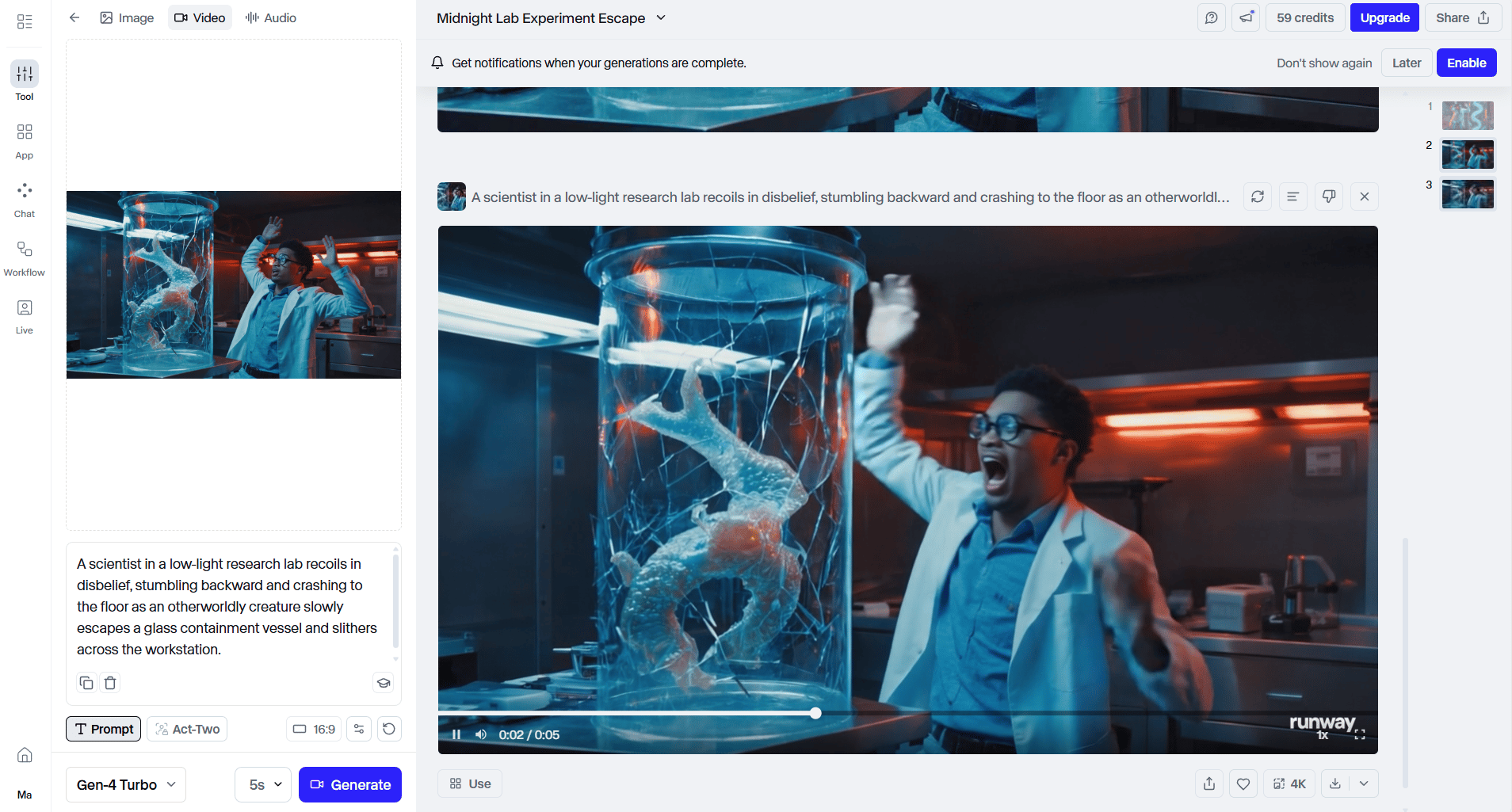
When it works:
The camera work looks great.
Tracking shots feel smooth.
Angles feel intentional.
Environments and characters often look polished, like something pulled from a commercial storyboard.
Then things break. You’ll see weird stuff show up out of nowhere: bodies bend in ways they shouldn’t, limbs twist, faces drift into uncanny territory and shots that look amazing at first glance fall apart the moment you watch closely.
You also lose flexibility. Gen 4.5 is still text-to-video only (no image-to-video), which kills consistency. This restriction eliminates the consistency hack that makes other tools more reliable. Additionally, native audio is missing, so every clip needs extra post-work.
Runway was the king 6 months ago. Now? It feels overpriced for what you get. This tool still makes sense if you’re already locked into the ecosystem or chasing cinematic camera motion above all else.
Otherwise, you’ll feel like you’re paying for the past.
6. WAN AI 2.6 - The ‘Almost There’ Tool
WAN understands how bodies move. Falls, jumps and weight shifts look believable. If you’re testing choreography or motion logic, this part feels solid.
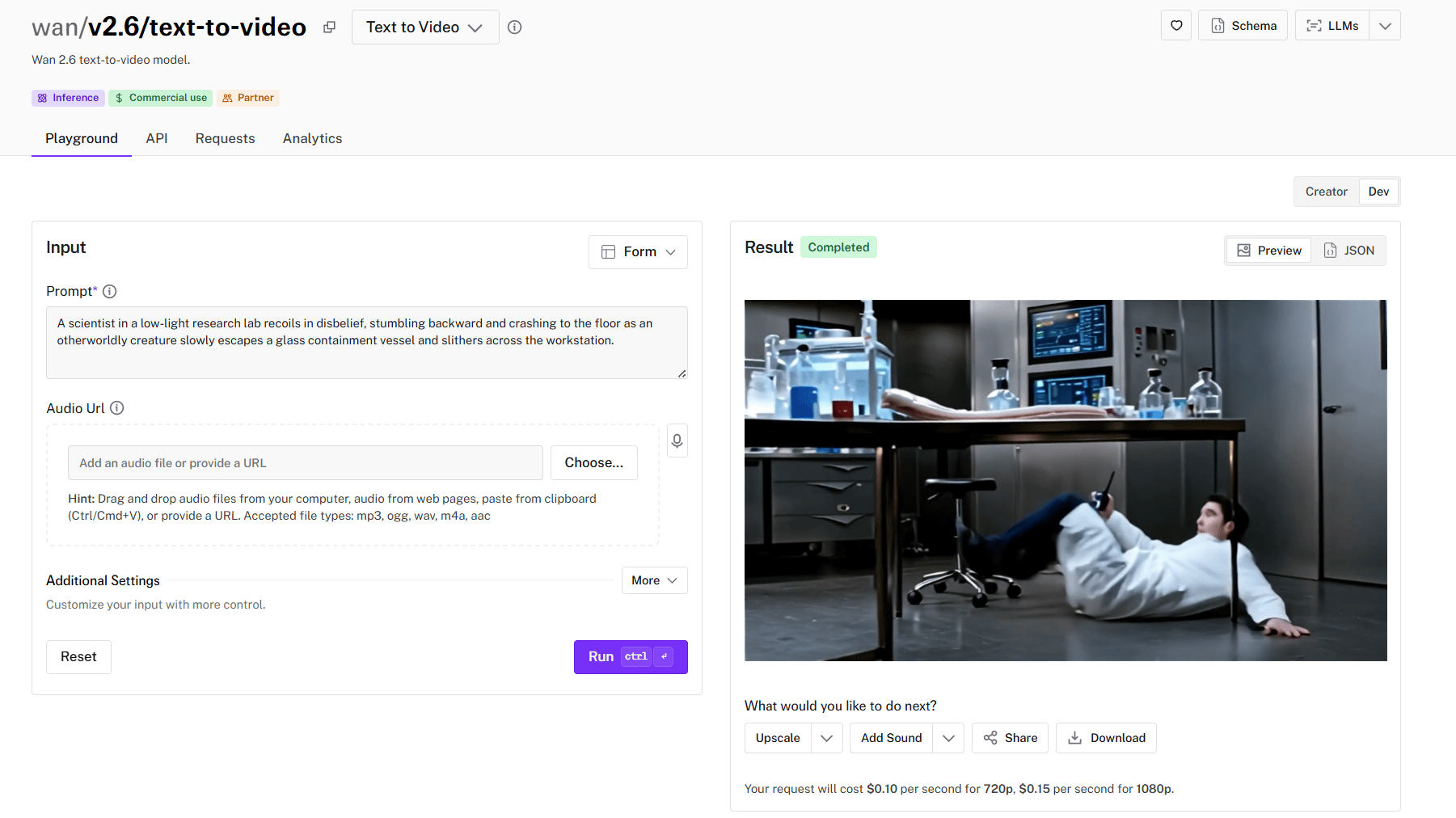
The problem shows up in clarity. The execution just looks like someone smeared Vaseline on the lens. Everything looks blurry or overly smoothed, like a beauty filter applied to the entire scene. That makes the detail and sharpness suffer significantly.
Low overall detail means textures, faces and fine elements lack the crisp clarity of A-tier tools.
Poor lip-syncing makes dialogue scenes look weird and unconvincing.
Bland color grading produces washed-out, lifeless results that require color correction in post.
The upside is cost. You can test ideas cheaply and iterate without stress. That makes WAN useful early in a pipeline, before committing to higher-end tools.
7. Luma Ray 3 - The Jittery Artist
Luma shines when nothing moves too much. It creates landscapes that look rich, textures feel layered. Also, your prompts are followed closely and large camera moves often work well.

But here’s the downside:
Like I said, it excels at static. When motion comes, it makes faces and mouths twitch unnaturally. The micro-movements create an unsettling, uncanny valley effect.
Inconsistent smoothness means some clips render perfectly while others look choppy and amateurish. You won’t know which you’ll get until it’s done.
No native audio requires a separate sound design workflow.
Short duration and high cost create poor value. At $1 per 5-second video, Luma costs double per second compared to Kling.
With short clip limits and high cost per second, this tool only makes sense for slow, controlled scenes or background visuals where characters aren’t the focus.
8. Grok Imagine (xAI) - The Free Wildcard
Grok represents the chaos agent of AI video creation. Results are imaginative, low-quality and unpredictable.
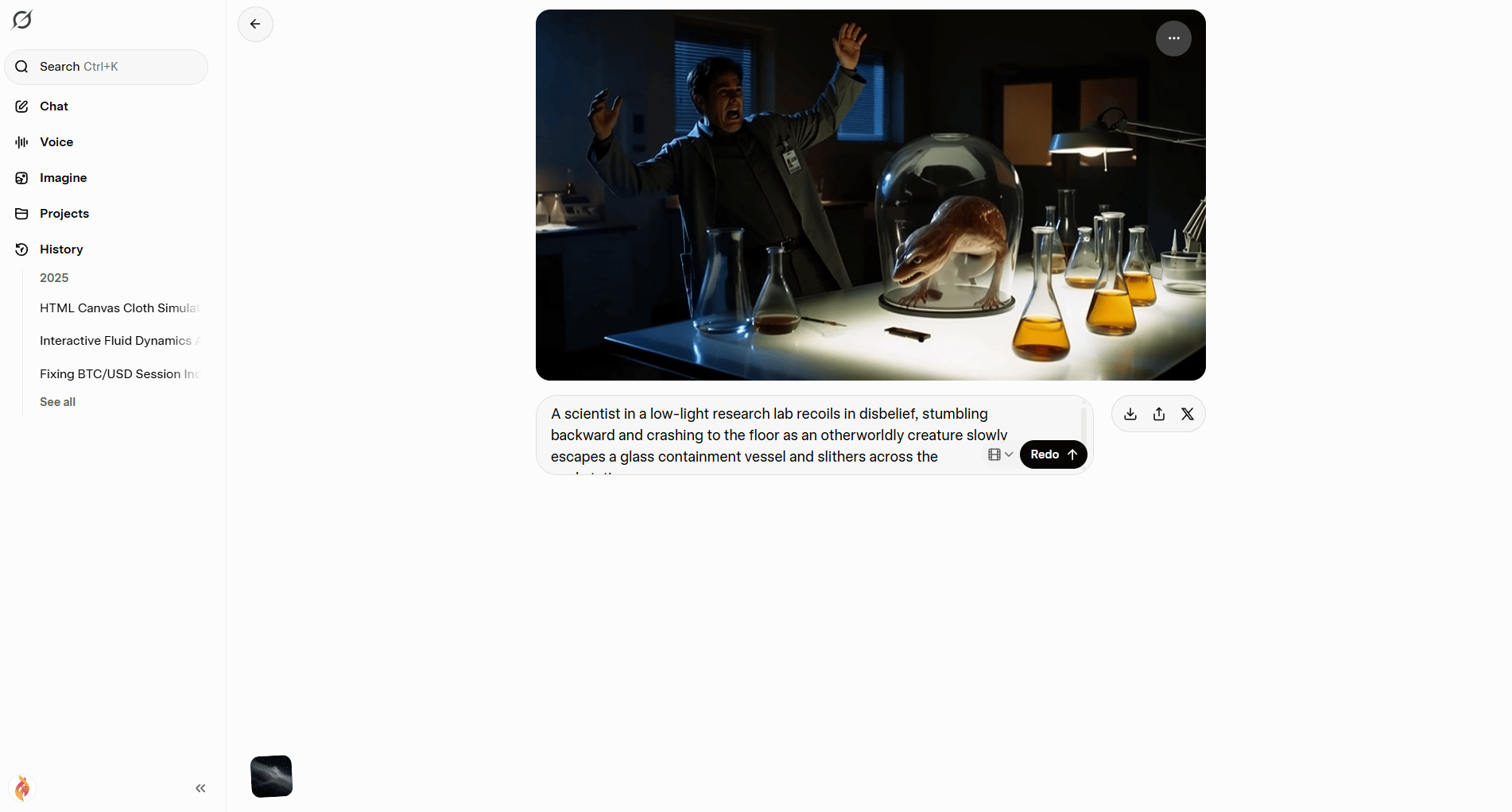
The funny thing is Grok actually has strengths:
Imagination and creative interpretation produce truly unique results. Grok takes prompts in unexpected directions that sometimes yield gold.
Free tier offers 20 free videos per day, making experimentation cost-free. This is absolute freedom; you can generate a lot.
Easy access requires only an X/Twitter account.
Now, here is what you’ll deal with:
Low detail looks like early 2000s CGI or video game cutscenes.
Short duration limits videos to 5 seconds maximum.
Robotic audio sounds like text-to-speech bots from a decade ago.
Poor logic means background elements materialize from nowhere or physics breaks completely.
The best use case you could do with Grok is for brainstorming, memes and low-stakes experiments. Make sure that you don’t use Grok for serious work.
VI. D-TIER: Skip These Entirely
This is the tier that costs you time, money and patience. If you’re serious about results, these tools slow you down instead of helping.
9. Hailuo 2.3 (Minimax)
At first glance, Hailuo promises better human motion. In practice, that promise falls apart fast.

You’ll notice the blur immediately:
Frequent blurriness makes footage look like it was shot through a dirty window or heavy fog.
Poor prompt understanding, so you ask for one thing and receive something unrelated.
Nonsensical physics creates surreal moments like rifles splitting in two or objects phasing through solid matter. None of it makes sense.
There’s no audio, so even usable clips need extra work. And while the price looks reasonable on paper, the output isn’t good enough to justify even that.
If you’re tempted to try it, don’t. Tools at the same price level already do a better job.
10. Midjourney
You already know Midjourney dominates still images. That reputation doesn’t carry over to video.
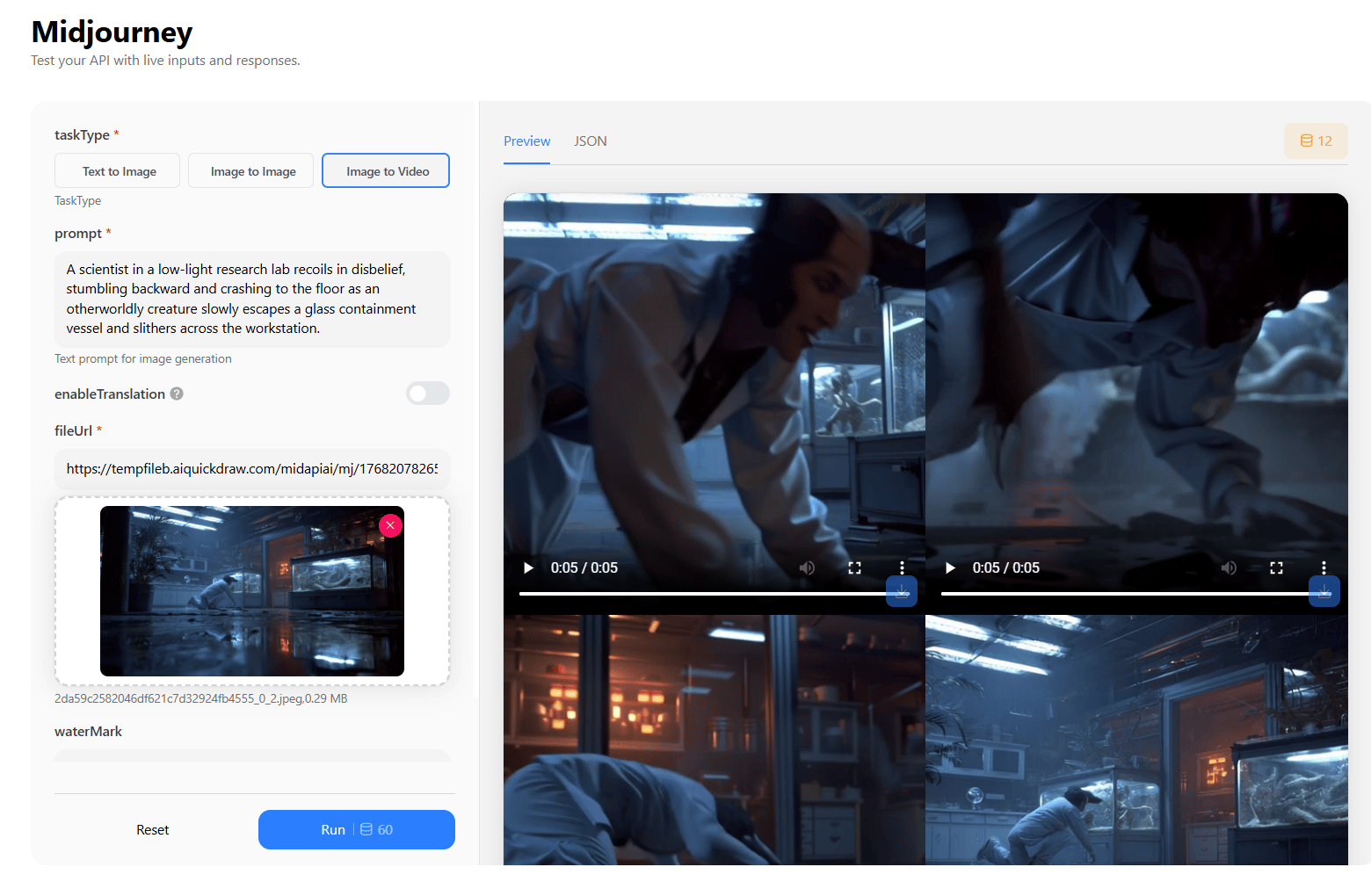
Individual frames can look beautiful but the problem starts when they move.
Extremely choppy motion looks like a slideshow rather than a video. Individual frames might look beautiful but the movement between them is jarring.
Poor prompt adherence means the tool ignores your instructions and creates whatever it feels like.
And like Hailuo, the physics can get weird fast.
Where Midjourney still shines is upstream. You only use Midjourney to generate reference images, thumbnails or visual concepts. Then take those images into stronger video tools that can handle motion properly.

Trying to force Midjourney into a video workflow will only frustrate you.
How would you rate this article on AI Tools?Your opinion matters! Let us know how we did so we can continue improving our content and help you get the most out of AI tools. |
VII. Why Is It Risky to Commit to One AI Video Platform in 2026?
Models update fast and rankings change quickly. If you lock into one subscription, you can miss better releases weeks later. The better approach is staying flexible. Compare outputs and switch based on the project.
Key takeaways
Major updates can happen every two weeks.
A “best” tool today can lose tomorrow.
Loyalty creates sunk-cost bias.
Flexibility protects your workflow and budget.
In AI video, strategy beats brand attachment.
The biggest mistake in AI video creation today is being loyal to one platform. Models update every two weeks. If you subscribe to Kling today, Google might release VEO 4.0 tomorrow and leave you behind.
If you don’t want 5 separate subscriptions, try an aggregator like InVideo AI. These are all-in-one platforms that give you access to Kling, VEO, Sora and others inside a single interface.
You can run the same prompt through three different models at once to see which one "gets" your vision. This is the ultimate way to avoid wasting credits on a model that doesn't understand your specific scene.

Creating quality AI content takes serious research time ☕️ Your coffee fund helps me read whitepapers, test new tools and interview experts so you get the real story. Skip the fluff - get insights that help you understand what's actually happening in AI. Support quality over quantity here!
VIII. Pro Workflow Strategies (What Actually Works)
After enough testing, a pattern shows up. You need to use smarter workflows to get clean, usable results, not more tools.
Here are the techniques that separate frustration from control.
1. The Image-to-Video Consistency Hack
Most creators go straight from text to video, which creates a consistency lottery. Every generation is a gamble with unpredictable results. Here is the workflow you should follow to get a great AI video:
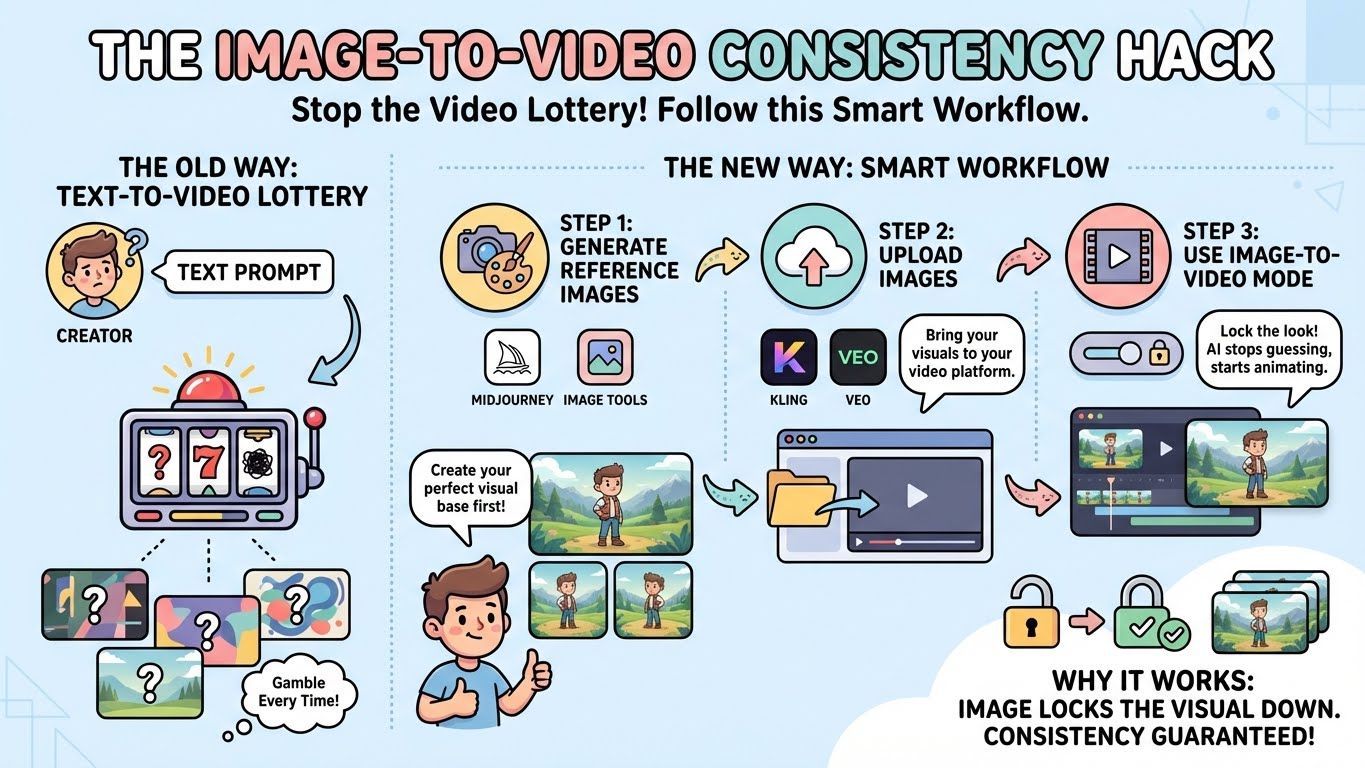
Step 1: Generate reference images in Midjourney or similar image tools.
Step 2: Upload those images to your video platform (Kling, VEO, etc.)
Step 3: Use image-to-video mode for controlled, repeatable results.
Here’s why it works. Text is interpreted differently every time and an image locks the visual down. The AI stops guessing and starts animating what you already approved. If consistency matters, this is non-negotiable.
2. Motion Control Without Guessing
Tools like VEO and Kling allow uploading start and end frames to force specific camera movements. That’s where real control comes from, when all you have to do is show the AI where the shot begins and where it ends.
For example:
Frame 1: Wide shot of the character in the environment.
Frame 2: Close-up of the character's face.
Result: Forced zoom/camera push-in between frames.
This is how you get professional camera motion without fighting prompts for ten generations.
I already have a post explaining deeply how to master any AI video tool through 7 prompt rules.
3. Spend Cheap First, Spend Smart Later
Burning premium credits while “figuring things out” is how budgets disappear. A better flow you could do is:
Experimentation phase: Use Grok (free) or Seedance (cheap)
Final production: Use Kling or VEO
Social media content: Use Sora (if censorship allows)
You test concepts on cheap tools, dial in the vision, then generate finals on premium platforms. In my tests, this usually cuts wasted credits a lot because you only pay “premium” once the shot is locked.
4. Prompts That Don’t Fall Apart
Most prompts fail because they're too vague. The formula that produces consistent results:
[Shot type + lens] + [camera move] + [subject description] + [subject action] + [environment] + [lighting] + [style] + [constraints: duration, realism, no artifacts]You want an example? Look at this:
Bad prompt: "A woman in a lab"
Good prompt: "Medium shot tracking forward, a female scientist in a dimly lit laboratory carefully examines a glowing specimen, dramatic side lighting casting long shadows, cinematic depth of field".
See the difference. When those pieces are present, outputs stop feeling random. The AI has fewer decisions to make on its own.
5. The Uncanny Valley Reality Check
Current AI video struggles with specific scenarios:
Characters talking AND moving complex body parts simultaneously.
Close-up hand movements manipulating objects.
Rapid action sequences with multiple moving elements.
Don’t try to brute-force these cases. It’s usually not worth the credits. You only end up wasting time and a lot of money.
There is a simple way to try: keep actions simple or embrace the limitations creatively.
IX. Use Case Recommendations and Pricing Comparison
If you pick tools by habit, you’ll overpay or underperform. The right choice depends on the job in front of you. Let me help you with this list:
Sci-Fi Short Film: Kling 2.6 (Quality).
TikTok/Reels: Sora 2 (Viral Style).
Product Demo Videos: Google VEO 3.1 (Lip Sync).
Action Sequences: Kling 2.6 (Motion).
Historical Recreations: Google VEO 3.1 (Accuracy and Consistency).
Experimental or Artistic Projects: Kling 2.6 (Controlled experimentation).
Landscapes & Environments: Luma Ray 3 (rich detail).
Budget Projects: Seedance 1.5 Pro (Value).
Now, let’s talk about the price. You might need this checklist to find out which tools should be in your cart.
Tool | Price (per 10 sec) | Quality Tier | Value Rating |
|---|---|---|---|
Kling 2.6 | ~$1.00 | A-Tier | ⭐⭐⭐⭐⭐ |
Sora 2 | Varies | A-Tier* | ⭐⭐⭐⭐ (niche) |
VEO 3.1 (HQ) | ~$1.25 | B-Tier | ⭐⭐⭐⭐ |
VEO 3.1 (Standard) | ~$0.25 | B-Tier | ⭐⭐⭐⭐⭐ |
Seedance 1.5 Pro | ~$0.52 | B-Tier | ⭐⭐⭐⭐⭐ |
WAN 2.6 | ~$0.65 | C-Tier | ⭐⭐⭐ |
Runway Gen 4.5 | ~$2.50 | C-Tier | ⭐⭐ |
Runway Gen 4 | ~$1.00 | C-Tier | ⭐⭐⭐ |
Luma Ray 3 | ~$2.00 | C-Tier | ⭐⭐ |
Grok Imagine | FREE | C-Tier | ⭐⭐⭐⭐ (free!) |
Hailuo 2.3 | ~$1.03 | D-Tier | ⭐ |
Midjourney (HD) | Pricing varies (not competitive) | D-Tier | ⭐⭐ |
Best overall value: Kling 2.6 or Seedance 1.5 Pro.
Best budget option: Grok Imagine (free) or VEO 3.1 (standard quality).
If you’re new and want a simple starting plan, do this first. It’ll save you credits and guesswork.
X. Conclusion: The Revolution is Here
In 2026, the "best" tool is the one that fixes the problem in front of you. There is no longer a single winner.
The future of AI video creation isn't about who has the best equipment; it is about who understands how to direct AI. Master the "Image-to-Video" workflow to maintain character consistency across your shots.
My advice: Start trying these tools NOW. They are already good enough to help you make high-quality videos.
If you want one move that upgrades your results fast: start with Image-to-Video + reference frames. That’s the cheat code this year.
If you are interested in other topics and how AI is transforming different aspects of our lives or even in making money using AI with more detailed, step-by-step guidance, you can find our other articles here:
Scale To $1M Without Hiring: 4 AI Systems That Do The Heavy Lifting*
This “Super Agent” Update Changed How You Work (ChatGPT Can Compete or Not?)
Easy Guide to Make a Realistic Talking AI Clone That Looks Just Like You (Same Tone, Voice,...)
Forget Midjourney, Try This Watermark-Free AI Instead*
*indicates a premium content, if any
Reply