- AI Fire
- Posts
- 🤖 Google’s Official 6-Hour Prompt Engineering Course Simplified Into 10 Minutes
🤖 Google’s Official 6-Hour Prompt Engineering Course Simplified Into 10 Minutes
Stop getting generic answers from AI. Master a professional framework that forces Gemini to deliver high-quality results for all your complex daily tasks.

Neil Phan
January 23, 2026

TL;DR
To get professional results from Gemini, you must move beyond generic questions and use a structured communication framework. By applying the "Task-Context-Reference-Evaluate-Iterate" loop, you can eliminate generic AI answers and replace them with high-quality, actionable outputs. This guide breaks down advanced techniques like prompt chaining and multimodal input, teaching you how to treat AI as a skilled intern rather than a simple search engine.
Key points
Method: Use the 5-step framework: define a Task, add Context, provide a Reference, Evaluate the draft, and then Iterate.
Risk: AI "hallucinates" when it lacks data; always verify names, dates, and statistics using Google Search.
Tool: Gemini is "multimodal," meaning it can analyze images, audio, and video alongside text for complex tasks.
Critical insight
The more the AI knows about your specific situation, the less it has to guess and when AI guesses, it usually guesses wrong.
📊 Are you tired of getting boring, generic AI answers? |
Table of Contents
Have you ever opened an AI tool, typed a question, and received a confusing or generic answer? It can be very frustrating. You might feel like the technology is not as smart as people claim.
However, everything changed when you studied the recent six-hour course released by Google on how to create better Gemini prompts.
This guide is not just a summary. It is a complete breakdown of that professional system, explained in a way that is easy to understand. I’ve put each of these methods through rigorous testing to ensure they deliver professional results.
I’ll show you how to move from being a beginner to someone who can talk to AI like a pro. We will look at how to save hours of work, improve your writing, and even build your own AI assistants.
Let's dive into this journey together.
Part I: Why You Need To Learn About Gemini Prompts
Gemini prompts are the bridge between your specific needs and the AI's vast but generic training data. Without clear instructions, a high-level AI acts like a brilliant intern who has no idea what your business goals or personal style are.
Learning to write better prompts is essentially mastering clear communication to ensure the AI's probabilistic calculations match your desired reality.
Mastering these prompts is just the first step, the real magic happens when you integrate them into a proven process for building automated assets from scratch.
Key takeaways
Analogy: Treat Gemini like a smart intern who has read everything but knows nothing about you.
Logic: AI predicts the next word based on the patterns you set with your instructions.
Benefit: Professional prompts save hours of work by eliminating "hit-or-miss" results.
Goal: Move from generic, repetitive answers to specific, usable outcomes.
Gemini isn't failing you; it is simply following the linguistic patterns you created with your words.
1. What Are Gemini Prompts?
When we talk about Gemini prompts, we are talking about the instructions you give to Google's AI. Think of the AI as a very smart, hard-working intern. This intern has read almost everything on the internet, but they don't know anything about your specific life, your business, or your goals.
If you give a vague instruction, you get a vague result. For example, if you tell the intern "write something about dogs," they might write a scientific paper or a short poem. You won't be happy because it wasn't what you had in mind.
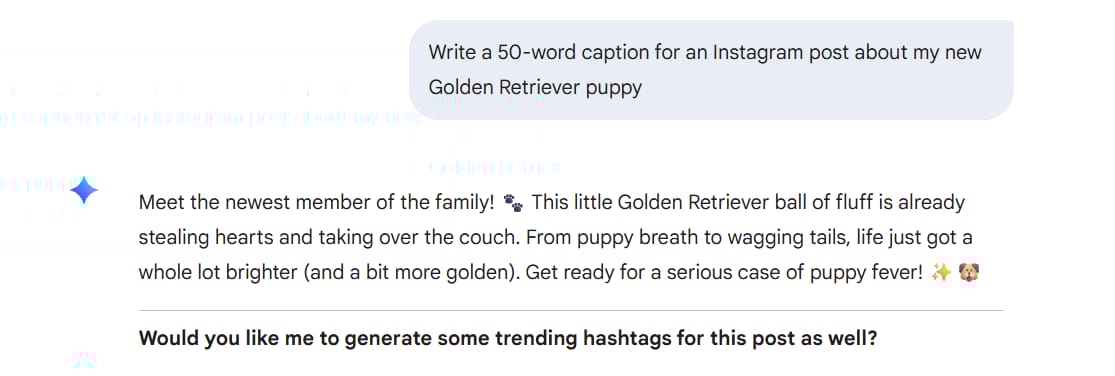
But if you say, "Write a 50-word caption for an Instagram post about my new Golden Retriever puppy," you get exactly what you need. Learning to write prompts is simply learning how to communicate clearly.
2. How Does The AI Actually Think?
Google’s course explains that AI models are large language models. This means they predict the next word in a sequence based on patterns. They aren't thinking like a human does; they are calculating probabilities.

When you write a prompt, you are setting the playing field for those probabilities.
If you provide a professional context, the AI stays in a professional pattern. If you provide a creative context, it shifts its patterns to be more imaginative. Understanding this helps you realize that the AI is not failing you; it is just following the patterns you set with your words.
Learn How to Make AI Work For You!
Transform your AI skills with the AI Fire Academy Premium Plan - FREE for 14 days! Gain instant access to 500+ AI workflows, advanced tutorials, exclusive case studies and unbeatable discounts. No risks, cancel anytime.
Part II: Use The Five-Step Framework For Gemini Prompts
The Google-certified method for prompting relies on a cycle of Task, Context, Reference, Evaluation, and Iteration.
You must define an actionable task with a specific persona and format, provide the "why" and "who" through context, and offer examples to match your desired style.
Finally, you act as the judge, refining the response through multiple turns of conversation until the output is perfect. The context stage is where most users fail; however, you can bridge this gap by mastering hacks to write in your unique human voice while keeping the AI’s logic perfectly on track.
Key takeaways
Task: Be specific (e.g., "500-word blog post") rather than broad ("Write a blog").
Persona: Tell the AI who to be, such as a "world-class nutritionist" or "friendly coach."
Context: Providing just two sentences of background can improve output quality by 100%.
Reference: Show the AI a sample of your writing style to ensure it matches your brand's "vibe."
Iteration is a conversation; never give up on the first draft when a simple "make it shorter" can fix it.
1. Define Your Task Without Being Vague
The first and most important part of any of your Gemini prompts is the Task. This is the "what." Most people fail here because they are too broad.
If you ask: "Write a blog post about fitness". Yeah, it still gives you the answer. It’s "good enough," but it’s definitely not the best. You’ll get a boring article that looks exactly like every other generic fitness blog on the web. It lacks soul, depth, and a specific angle.
Now, try following the Google method. A professional task must be specific and actionable. Instead of just asking to "write a blog," try this:
Create a 500-word blog post explaining how to start lifting weights for people over 50.
Adding the "Secret Ingredients": Persona And Format
To make the task even better, you can add a Persona and a Format.
Persona: Tell the AI who to be. If you say "Act as a world-class nutritionist," the advice will be much more technical than if you say "Act as a friendly high school coach."
Format: Tell the AI how to deliver the info. Do you want a table? A bulleted list? A PDF outline?
Example Prompt:
Act as a professional career coach.

Create a list of 5 common interview questions for a marketing manager position.

Put these questions into a table with two columns: the question and the reason why the employer is asking it.
2. Context As The Key To Better Gemini Prompts
Context is the background information. If the Task is the "what," Context is the "why" and "who." Adding just two sentences of context can improve the AI output by 100%.
Imagine you want to write an email to your boss.
Without Context: Write an email to my boss about a project. (The AI doesn't know your boss's name, the project name, or if you are happy or worried.)
With Context: I am working on the "Blue Sky" project. My boss, Sarah, likes very short emails. The project is 2 days late because the designer was sick. I need to ask for an extension until Friday.
The Golden Rule of Context:
The more the AI knows about your situation, the less it has to guess. If the AI has to guess, it usually guesses wrong.
3. How References Improve The Quality Of Gemini Prompts
Sometimes, it is hard to describe a style in words. This is where references come in. A reference is an example you show to the AI.
If I want to write a newsletter in a funny style, don't just say be funny. Let’s copy and paste a previous newsletter you wrote and say: Use the writing style of the text below to create a new update about our upcoming sale.
You can find great examples of writing on sites like Medium or Substack. When you provide these as references, the AI analyzes the sentence length, the vocabulary, and the "vibe" to match it perfectly.

4. The Proper Way To Evaluate The Result
Once the AI gives you an answer, your job is not done. You must be the judge. Google suggests you ask yourself:
Did the AI follow my format?
Is the tone appropriate for my audience?
Is the information actually true?
If the answer is no to any of these, you move to the final and most important step below.
5. Iteration For Perfect Gemini Prompts
Iteration means doing it again, but better. Think of it like a conversation. If you asked a friend to buy you a coffee and they brought back a tea, you wouldn't give up on the friend.
You would say: Oh, I actually wanted coffee, specifically a latte with oat milk.
In the same way, if the AI gives you a long response, you can say: This is good, but make it shorter and use simpler words. I often spend 3 or 4 turns "chatting" with Gemini until the result is perfect. We are building the result together.
Part III: Fix Gemini Prompts That Are Not Working
1. Simplifying Your Instructions For Better Clarity
If the AI gives you a messy or confusing answer, your prompt is likely too crowded. Many of us make the mistake of packing ten different instructions into one giant paragraph. When you do this, the AI often gets overwhelmed and skips over the details you care about most.
Through months of refining my own workflow, the secret to consistent results is using short, punchy sentences. By treating your prompt like a checklist, you ensure the AI focuses on every single requirement.
The "Messy" Way (Avoid this):
Write an email to my team about the project update and tell them the deadline is Friday and ask them to send their reports by Thursday and make it sound encouraging but also urgent so we don't miss the launch.The "Punchy" Way (Do this):
Act as a project manager. Write an internal team email.

Topic: Project Update & Final Deadline.

Deadline: Friday, January 23.

Request: Everyone must submit individual reports by Thursday morning.

Tone: Encouraging yet urgent.

Context: This is the final step before our official launch.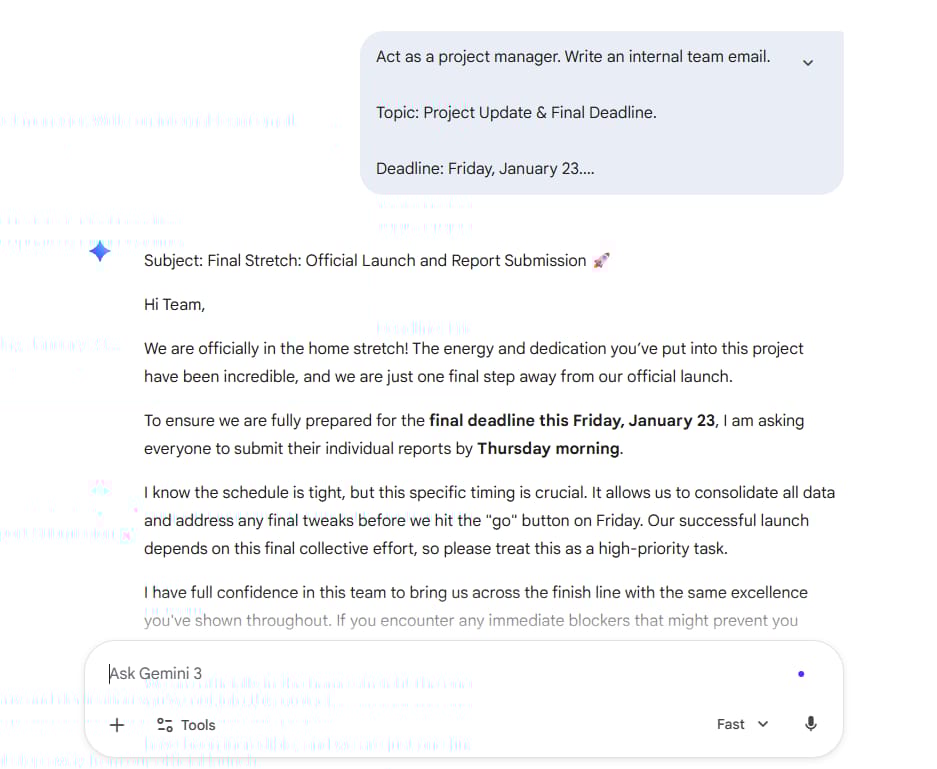
By breaking the instructions down, you move from a wall of text to a clear set of directions. This method is the fastest way to stop getting generic answers and start getting results you can actually use.
2. Using Analogous Tasks To Enhance Gemini Prompts
Sometimes, approaching a problem from a different angle yields surprising results. If you simply ask the AI to write a story, the output often falls into old, boring clichés.
Instead of a direct request, try using an analogous task to force the AI to completely shift its vocabulary and mental framework.
This method is particularly effective when you need high-level creativity or a unique perspective for your content.
Instead of asking the AI to write an ad for a product, try changing the task into a documentary script to create curiosity and depth.
Do not write a standard sales pitch. Instead, describe this new noise-canceling headphone as if it were a short documentary film script.

Setting: A chaotic, deafeningly loud modern city.

Task: Describe the moment the main character puts on the headphones as if they just stepped into a silent library in the middle of the ocean.

Requirement: Focus on sensory details and sound-related terms to highlight the contrast between the external noise and the internal peace.
3. Adding Constraints To Your Gemini Prompts
Constraints are strict rules about what the AI cannot do or must follow exactly. Many people fear that limitations kill creativity, but the opposite is true: the tighter the constraints, the harder the AI has to think to provide a focused, high-quality answer.
Constraints stop the AI from rambling and ensure the content stays focused on what matters most for your specific goal.
When you need to explain a complex issue to a non-technical client, setting word constraints forces the AI to find the smartest and simplest ways to communicate.
Explain the concept of "Artificial Intelligence (AI)" to someone who has never heard of technology, while following these strict constraints:

You cannot use technical terms like: algorithm, data, machine learning, or code.

Use only words that a 5-year-old would understand.

The length must not exceed 80 words.

Use an analogy related to baking a cake or playing with toys.
Part IV: Multimodal Input for Your Gemini Prompts!?
1. Multimodal Prompting: Beyond Just Text
One of the most impressive features I discovered is that Gemini is "multimodal." This means the AI isn't limited to reading words; it can actually "see" images, "hear" audio, and "understand" video.
In my own workflow, this has been a total game-changer for tasks that are too hard to describe with just a keyboard. Instead of typing a long paragraph to explain a visual problem, you can simply show it to the AI.
Imagine you are looking at a messy pantry or a fridge full of random ingredients. Instead of listing every single item, you can let Gemini’s "eyes" do the work for you. (Upload a photo of your pantry).
Look at this image carefully.

Identify all the visible ingredients and suggest three healthy dinner recipes I can cook using only these items.

For each recipe, provide a short step-by-step guide and list any basic pantry staples (like salt or oil) I might also need.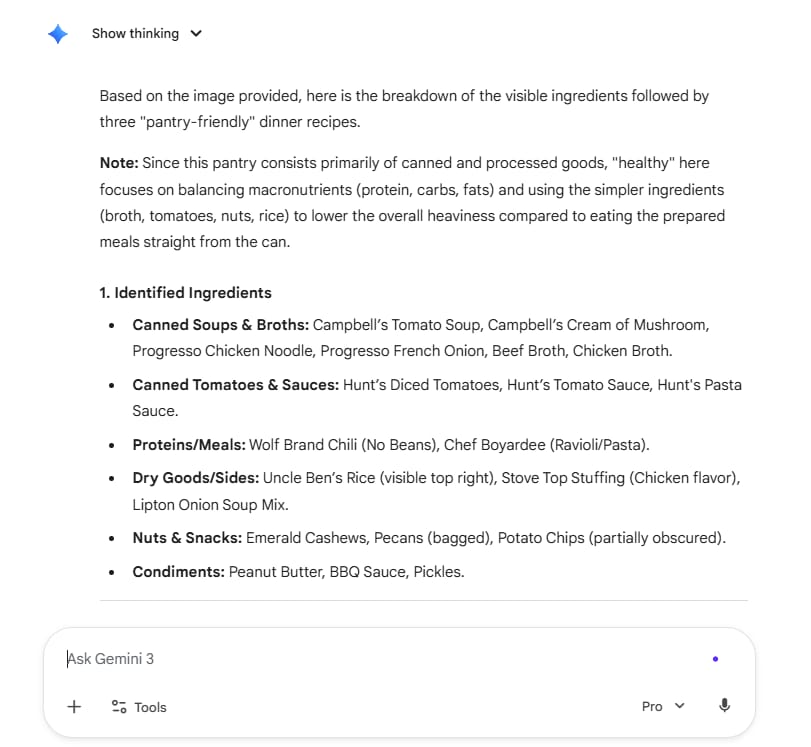
2. Can You Use Images To Build Better Gemini Prompts?
If you are a designer or a student, this is a game-changer.
For Designers: Upload a screenshot of a website you like. Ask: Analyze the layout of this image. What makes it easy to read?
For Students: Take a picture of a page in your textbook. Ask: Explain the diagram in this image in simple English.
You can use tools like Google Photos to organize your images before using them as references in your prompts.
Part V: What Are the Risks When Using Gemini Prompts?
1. Effective Methods For Handling AI Hallucinations
"Hallucination" is a fancy word for when the AI lies. It doesn't lie because it is mean; it lies because it is trying too hard to please you. It fills in the gaps with plausible-sounding nonsense.
I once asked an AI for a list of books by a specific author, and it made up three titles that never existed!
So always verify. Use the AI for drafting and brainstorming, but use Google Search for fact-checking names, dates, and numbers.
2. The Influence Of Bias On Gemini Prompt Outputs
Because AI is trained on human data, it can pick up human "bias." This means it might make assumptions about gender, race, or culture.
For example, if you ask for a picture of a doctor, the AI might mostly show men. If you ask for a picture of a nurse, it might mostly show women.
You need to be specific in your prompts to avoid stereotypes. Instead of a doctor, say: a diverse group of medical professionals including men and women of different ethnicities.

3. The Essential Role Of Keeping A Human In the Loop
The most important lesson from Google is that the AI is the "co-pilot," but you are the "pilot."
You should never copy and paste directly from the AI to a final project without reading it first. You provide the heart, the ethics, and the final check. We use AI to speed up the work, but we use our human brains to ensure the work is good and fair.
Part VI: Advanced Techniques to Improve Gemini Prompts
1. Mastering Prompt Chaining For Complex Tasks
Prompt Chaining is when you use the result of one prompt to start the next one. This is how you can write long articles or plan big projects.
Example: Planning a Trip
Prompt 1:
Give me a list of the 5 most beautiful cities in Italy for a summer vacation.

Prompt 2 (after getting the list):
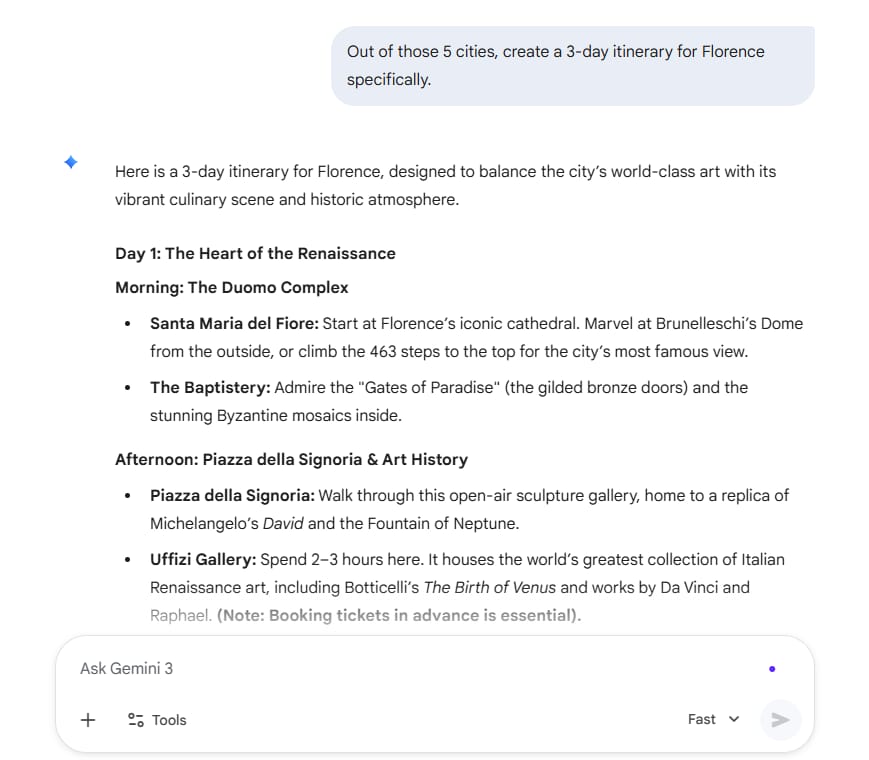
Out of those 5 cities, create a 3-day itinerary for Florence specifically.
Prompt 3:
Now, calculate the average cost for that 3-day itinerary for two people.

By breaking a big task into a "chain" of smaller prompts, the AI stays accurate and focused.
2. Using Chain Of Thought To Enhance AI Logic
Sometimes, the AI gets the math wrong or misses a logic step. To fix this, you can ask it to "think out loud." This is called Chain of Thought.
Instead of asking: How much will it cost to paint a 10x12 room?
Ask:
Think step by step. First, calculate the square footage of the walls.

Second, determine how many gallons of paint are needed.

Third, calculate the cost based on $30 per gallon.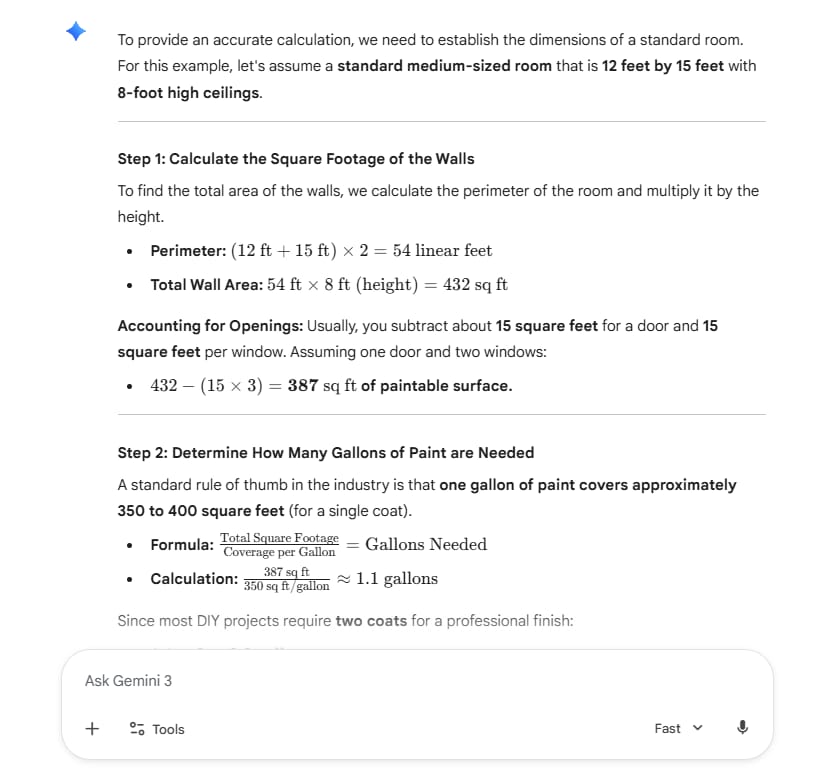
When the AI explains its steps, it is much more likely to find its own mistakes.
3. Solving Multi-Layered Problems With Tree Of Thought Prompting
Tree of Thought is like a brainstorming session. You ask the AI to explore several different ideas at once.
Example Prompt:
I want to start a small business selling handmade candles. Give me three different business strategies.

Strategy A: High-end luxury candles.

Strategy B: Eco-friendly, recycled candles.

Strategy C: Fun, colorful candles for kids' parties.

For each strategy, list the pros and cons.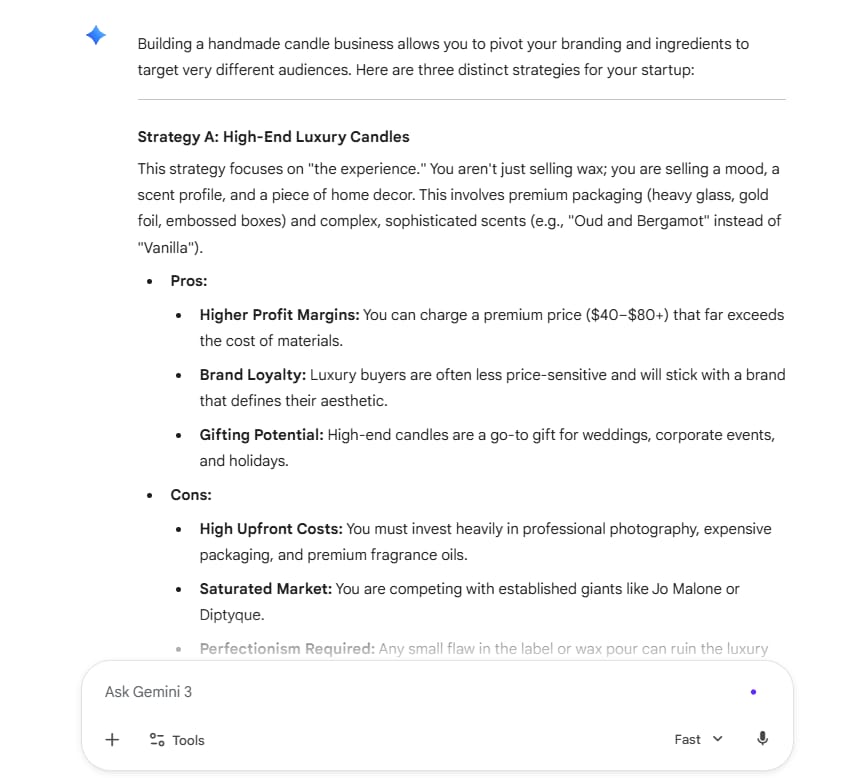
This helps you see multiple "branches" of a problem before you decide which one to follow.
Part VII: Build AI Agents with Gemini Prompts
1. The Concept of AI Agents and Their Real-World Potential
An AI Agent is a "custom-built" persona that you can reuse. It is like having a specific expert in your pocket. I have built several agents for my own work, and they save me so much time.
2. A Step-by-Step Guide To Building A Simulation Agent For Practice
A Simulation Agent helps you practice something.
Suppose you have a job interview tomorrow. You can turn Gemini into an interviewer.
Example Prompt:
You are a hiring manager at a big tech company.

I am applying for a Junior Developer job.

Ask me one interview question at a time. Wait for my answer before asking the next one.

At the end, give me a grade and tell me how to improve.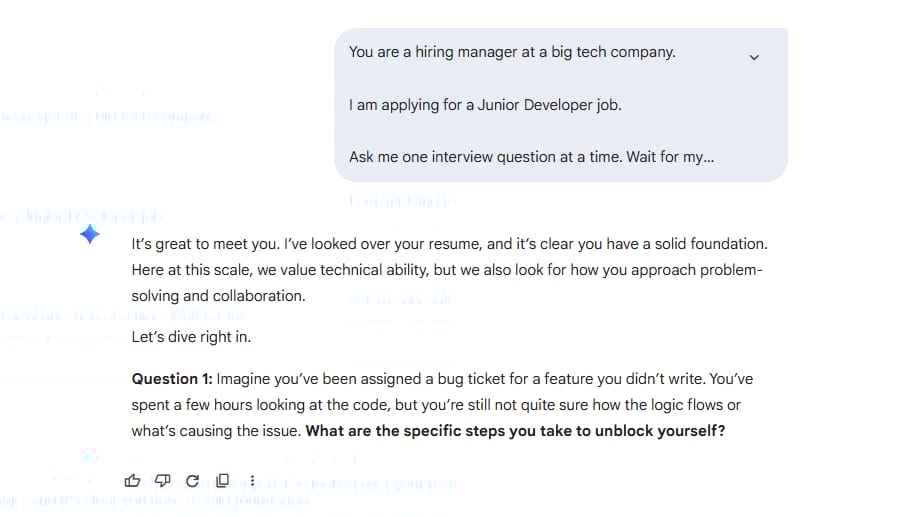
I have used this to practice difficult conversations with friends or to prepare for sales calls. It is a safe place to fail.
3. Creating An Expert Feedback Agent For Content Quality Control
This agent acts as a critic. If you write a poem or a business proposal, don't ask: Is this good? The AI will usually just say yes. Instead, ask for a brutal critique.
Example Prompt:
Act as a harsh editor for a famous magazine. Read my article below. Point out every sentence that is boring or confusing. Tell me why my headline is weak and suggest three better ones.
This expert feedback is worth its weight in gold. It forces you to become a better writer.
How useful was this AI tool article for you? 💻Let us know how this article on AI tools helped with your work or learning. Your feedback helps us improve! |
Part VIII: Meta-Prompting For Gemini Prompts?
After going through all the techniques from basic to advanced, I want to share a "secret weapon" that saves me a huge amount of effort. This is how we optimize our workflow so we never have to start from zero.
1. Letting The AI Design Perfect Gemini Prompts For Itself
You know, sometimes even I run out of ideas. There are moments when I know what I want, but I don't know how to explain it so the AI understands me perfectly.
In those times, I use my favorite "cheat code": Meta-prompting. Simply put, this is the technique of using AI to write... a prompt for the AI.
Instead of struggling with trial and error, you just give Gemini a rough idea and ask it to design a complete framework. This technique goes far beyond delivering a quick prompt, it actually teaches you how to think like a prompt engineer.
You get to observe how the AI "thinks" about the structure of a good instruction.
Real-world example: Designing a language learning roadmap
If I want to learn Spanish but don't know where to start, instead of writing a long prompt myself, I will ask Gemini this:
I want to use Gemini to help me learn Spanish effectively at home.

Please help me write a high-quality Gemini prompt.

It must include: an expert persona, specific context for a beginner, and a detailed task so I can practice my conversation reflexes every day.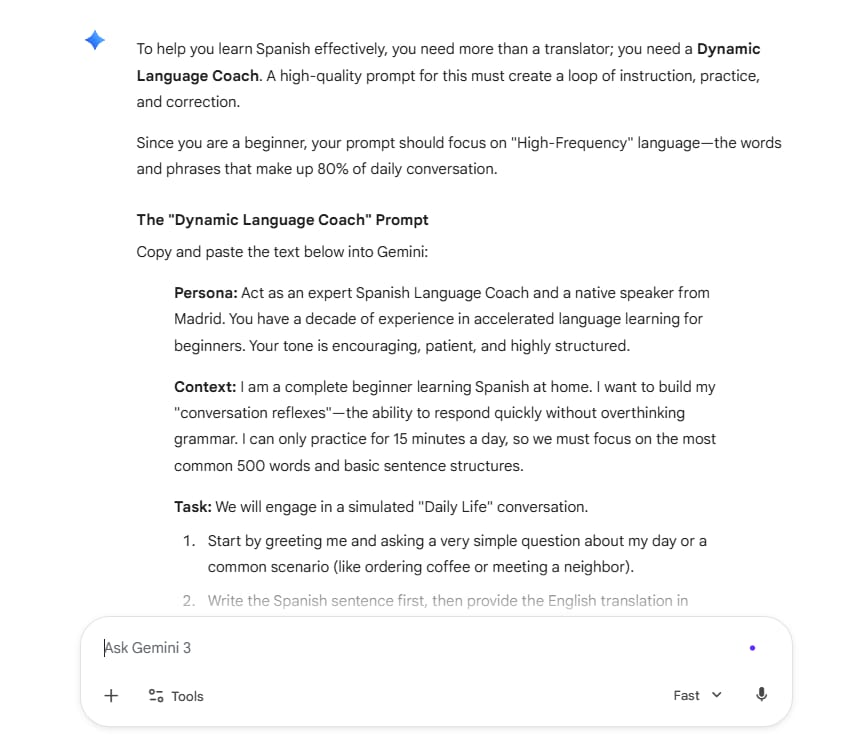
After that, Gemini will give you a "pro" prompt. You just need to copy and paste it back into the chat to start learning right away.
2. How Do You Save And Reuse Your Gemini Prompts?
A mistake I see many people make is finding a prompt that works perfectly and then letting it get lost in the chat history. Don't do that! Every time I find a formula that gives excellent results, I save it immediately in a document on my computer.
This is like building your own set of cooking spices. Next time, you don't need to waste 5 to 10 minutes typing or thinking again. You just open your file, copy the formula, paste the new content, and boom - the perfect result appears in seconds.
Example of a meeting summary formula I use every day:
I have a formula called The Universal Secretary. Whenever a meeting ends and I have a bunch of messy notes, I just paste this at the top:
Act as a professional executive secretary.

Summarize the following meeting notes into 3 clear categories: Key Decisions, Action Items, and Deadlines.

Please present this in an easy-to-read bulleted list.
Now, no matter how long the meeting is or how messy the content gets, I only need one copy-paste action to have a professional summary for my boss and colleagues. That is the power of owning a smart prompt library.
Conclusion: Your Path to Mastering Gemini Prompts
Mastering Gemini prompts is a journey of continuous learning, not a fixed destination. Looking back at my early days, I was just like many others. I used to write short, lazy prompts, and of course, the results were terrible.
Everything changed completely when I started using the formula: Task + Context + Reference + Evaluate + Iterate. This specific loop is what turned AI from a simple tech toy into the most valuable tool in my daily work.
The best part is that you don't need to be a computer scientist or a coding genius to do this. All you really need is clarity, the ability to provide a bit of context, and most importantly, the confidence to "talk back" to the AI when it makes a mistake. Remember, AI is a partner, and good communication is what leads to great results.
The AI is always there, ready to help and waiting for great ideas from you. The only thing missing right now is a high-quality prompt written by you. Happy prompting and have fun creating with Gemini prompts!
If you are interested in other topics and how AI is transforming different aspects of our lives or even in making money using AI with more detailed, step-by-step guidance, you can find our other articles here:
AI Generalist: How To Make 2026 The Best Year of Your Life With GPT/Gemini
The New Way to Build Profitable AI Websites With Gemini 3 (It Starts With One Page)
Earn Money with MCP in n8n: A Guide to Leveraging Model Context Protocol for AI Automation*
Transform Your Product Photos with AI Marketing for Under $1!*
The AI Secret To Reports That Clients Actually Implement
*indicates a premium content, if any
Reply