- AI Fire
- Posts
- 🖼️ Simple 5-Input Method to Make Nano Banana Pro Look Professional. No Complex Prompts
🖼️ Simple 5-Input Method to Make Nano Banana Pro Look Professional. No Complex Prompts
You answer five questions. ChatGPT/Claude writes the structured prompt. You generate then fix small stuff with Edit

Max Anh
January 07, 2026
TL;DR BOX
Stop micromanaging Nano Banana Pro with complex keywords. Modern AI models perform better when you act as a Creative Director to build a professional image rather than a prompt engineer. By providing just five high-level inputs, you can use LLMs (like ChatGPT or Claude) to generate technically perfect, structured JSON prompts that result in professional images on the first try.
This system eliminates "prompt fatigue" and ensures brand consistency across campaigns. Instead of guessing camera specs, you define the Purpose, Audience, Subject, Brand Guidelines and optional Reference Images. This lets you pump out a full set of assets fast, usually a few minutes if your inputs are clear.
Key points
Fact: Nano Banana Pro is designed to understand intent rather than just keywords. Structured JSON prompts often yield more reliable professional images than long paragraphs of text.
Mistake: Regenerating an entire image for a small flaw. Use the Edit feature to make surgical changes to lighting or positioning while keeping the core composition intact.
Action: Set up a "Prompt Generator" project in ChatGPT or Claude using the 5-Input System to automate your professional image creation forever.
Critical insight
The real "unfair advantage" in 2026 isn't knowing better keywords; it’s building a systematic workflow where you spend 90% of your time on strategy and only 10% on technical execution.
🖼️ What's stopping you from perfect AI images? |
Table of Contents
I. Introduction: The "Prompt Engineering" Trap
You are spending hours writing Nano Banana Pro prompts by hand, tweaking keywords for hours and the result looks good but you still know it could be better right?
So, instead of spending too much time on how to fix it, why don’t you let the AI do that for you? Because AI understands AI best, which is why most people today are letting AI help structure and handle their prompts. You should keep this mindset.
Another fact is that Nano Banana Pro doesn’t need keyword-heavy prompts or complex structures anymore. It works best when it understands context, purpose and intent. When you try to micromanage the prompt, you slow everything down and often get worse results.
Here’s the trick: you answer 5 simple inputs (Purpose, Audience, Subject, Brand vibe, Reference). Then ChatGPT/Claude can create 3 ready-to-use prompts for you. These prompts help you make professional, on-brand images quickly.
I’ll show you the exact setup and a real campaign example you can copy today.
II. Why Your Keyword Soup Is Failing?
Using too many keywords worked in the past. Now, it often makes the AI confused. Nano Banana Pro is better at reading intent, so keyword soup adds noise, not control. That noise causes random drift, inconsistent style and more retries. The fix is to stop micromanaging “how” and instead define “what success looks like” for your professional image.
Key takeaways
Old prompting habits create inconsistent outputs on newer models.
Keyword soup increases randomness because it conflicts and overloads intent.
The hidden cost is fatigue + broken brand consistency.
The shift is role-based: prompt engineer → creative director.
You don’t need more keywords. You need clear intent.
You write a prompt, hit generate, feel disappointed, tweak a few words and try again. One image looks okay, the next looks off and suddenly you’ve spent 20 minutes chasing something that should have taken two. You’re doing work the model no longer needs you to do.
1. Old Habits, New Models
Most people are still prompting Nano Banana Pro like it’s 2022, the same as with Midjourney and DALL-E. They stack keywords, add camera specs, throw in styles and hope the model figures it out. That worked when models were dumb and literal. It doesn’t work now.
Nano Banana Pro understands intent. When you give it keyword soup, you’re not being precise; you’re being noisy.
Here’s what I see in real workflows:
A founder wants clean car photos for advertising and writes: “Generate a car with photorealistic, 8K, studio lighting, ultra-detailed, trending on ArtStation.” The results look random and inconsistent.
Another founder simply says, “A cinematic wide shot of a futuristic sports car speeding through a rainy Tokyo street at night. The neon signs reflect off the wet pavement and the car’s metallic chassis.” The images usually come out calmer, cleaner and more usable.
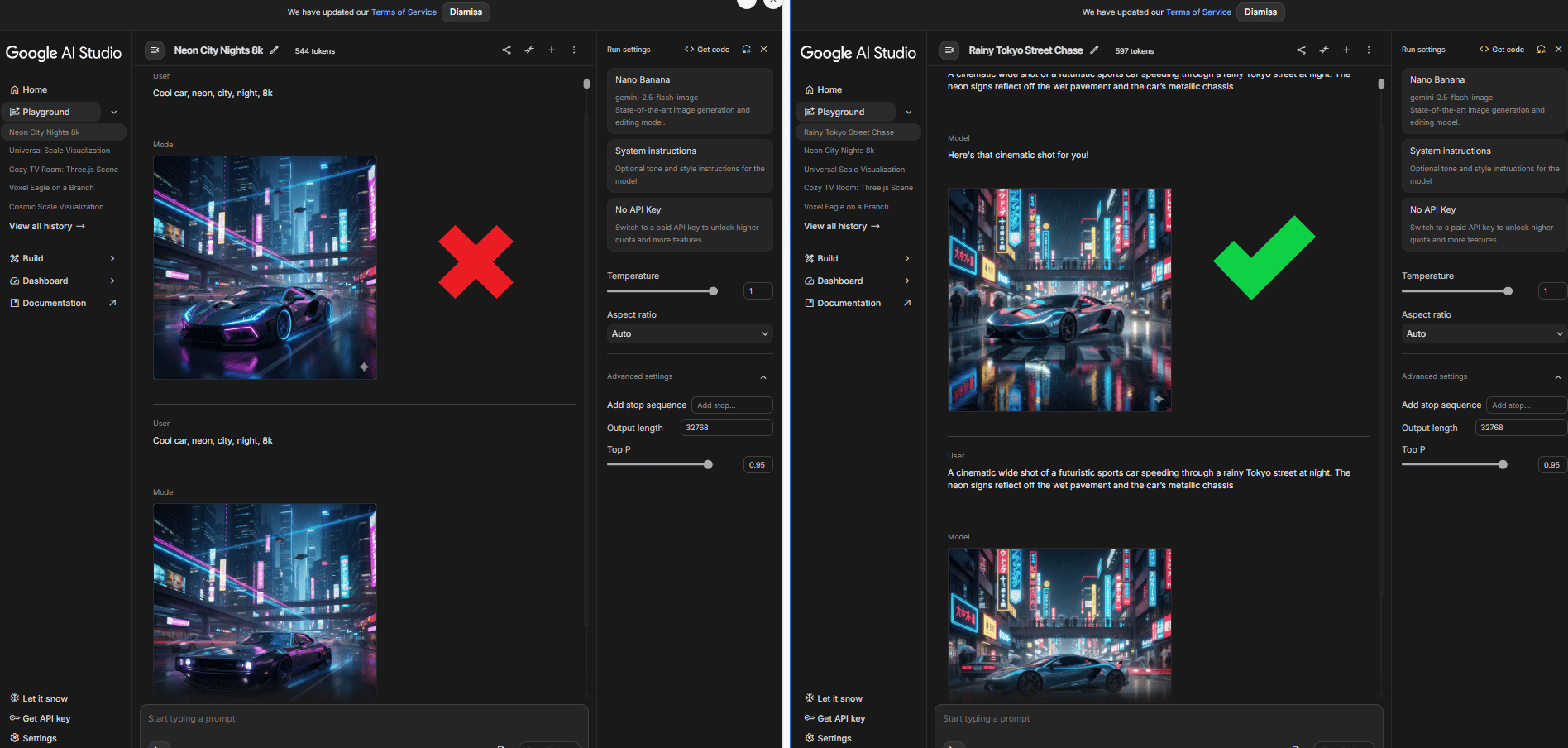
You see that: same tool, different mindset.
The obvious cost is time. The deeper cost is inconsistency and fatigue. Similar prompts give different results, which kills brand consistency. Scaling becomes painful because every new image feels like starting from zero.
You see this everywhere:
Social media managers spend hours trying to recreate the “same style” from last week.
E-commerce sellers end up with mismatched product photos across listings and it makes the brand look messy fast.
Agencies can’t delegate cleanly because the “prompt person” becomes a bottleneck.
The fix is not learning better keywords. It’s changing roles. You stop acting like a prompt engineer and start acting like a creative director. You focus on:
Why the image exists (ads, website, social, thumbnail)
Who it’s for (buyers, professionals, Gen Z, luxury customers)
What success looks like (clean product focus, emotional lifestyle, premium polish)
You do not need to learn difficult words like "rim lighting at 45 degrees". All you have to prompt is: "I need product photos for a luxury e-commerce that appeal to working professionals".
AI handles the technical translation to ensure a professional image. Once you make that shift, results become faster, more consistent and much easier to scale.
Source: Google AI Studio.
Learn How to Make AI Work For You!
Transform your AI skills with the AI Fire Academy Premium Plan - FREE for 14 days! Gain instant access to 500+ AI workflows, advanced tutorials, exclusive case studies and unbeatable discounts. No risks, cancel anytime.
III. The 5-Input System: The Only Data You Need
Once you stop over-prompting, the next question becomes simple: “What should you actually give the AI?” After testing this across product photos, ads, thumbnails and brand visuals, the answer for a consistent professional image comes down to these five inputs.
This works because it’s how creative direction works in real life.
Input #1: Purpose
This is the anchor. Every image exists for a reason and that reason changes everything about composition, framing and detail. An Instagram ad (1:1) needs different framing than a YouTube thumbnail (16:9).
If you do not explain the purpose, the AI will guess. This often leads to mistakes.
Examples:
“Product images for an e-commerce product page”.
“YouTube thumbnail designed to stop scrolling”.
“Instagram carousel for a luxury brand launch”.
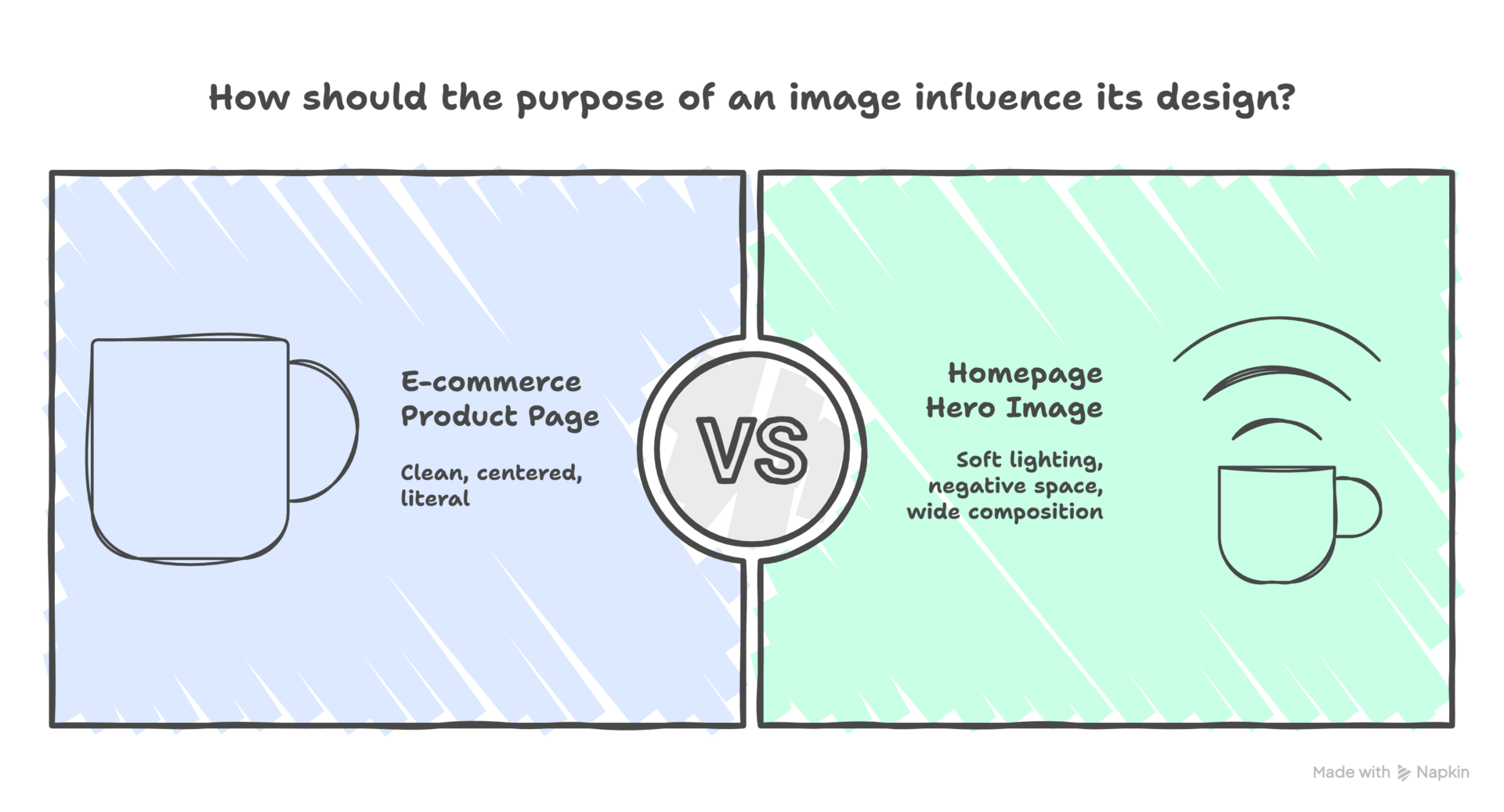
A coffee mug meant for an e-commerce product page ends up clean, centered and literal. The same mug meant for a homepage hero image suddenly gets softer lighting, more negative space and a wider composition. Nothing else changed, only the purpose.
Input #2: Audience
Different people respond to different visuals, even when the product is the same. The model needs to know who it’s talking to. Good audience descriptions go beyond age or income and hint at taste and mindset.
Examples:
“Working professionals aged 30-45 interested in high-end lifestyle products”
“Gen Z creators who like bold, high-contrast visuals”
“Luxury buyers who prefer calm, minimal aesthetics”
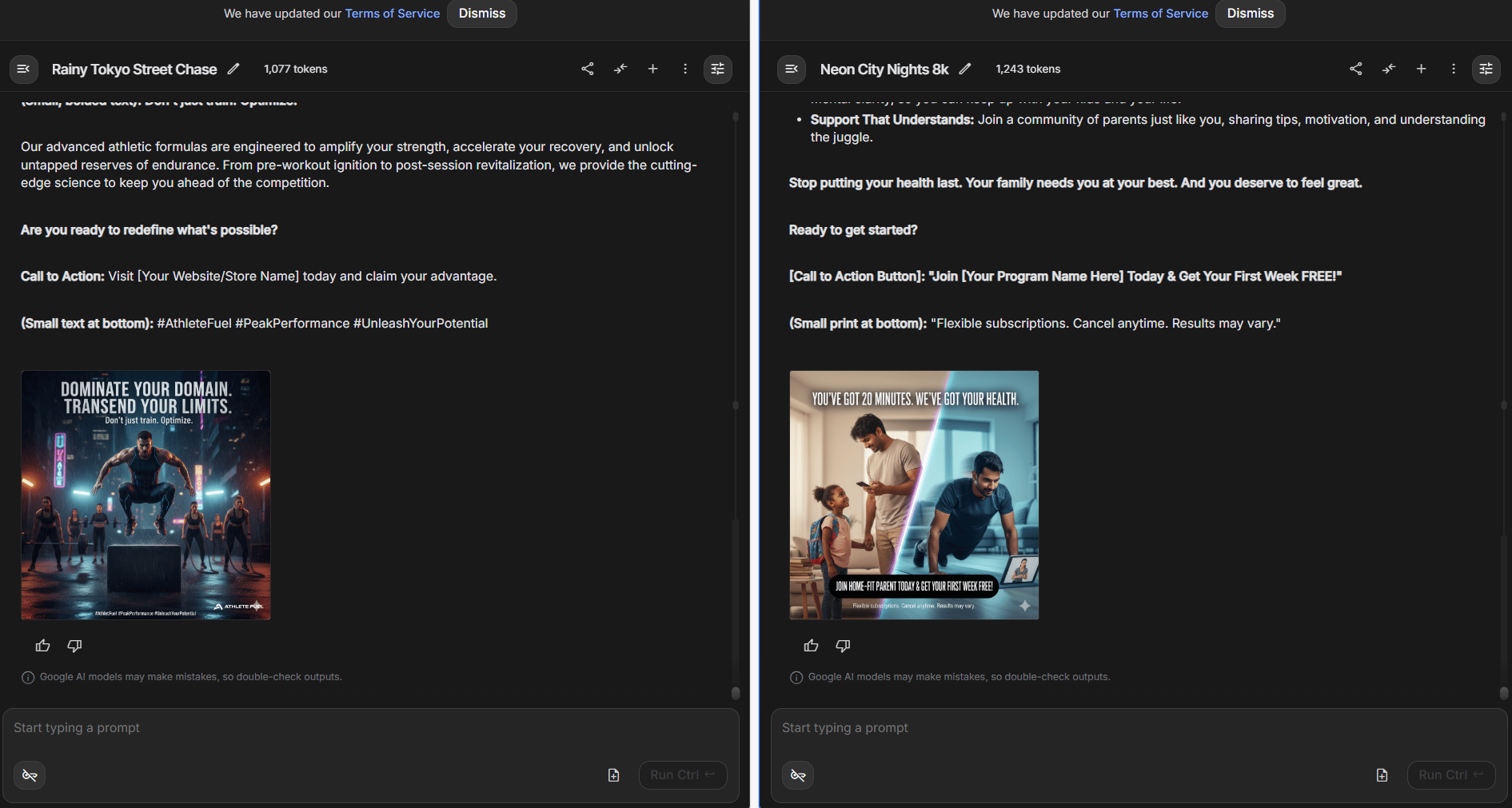
You see this clearly in ads. A fitness product aimed at athletes feels intense and energetic. The same product aimed at busy parents feels calm and reassuring. Same object, different visual language. When you tell the AI who the image is for, it stops producing “average” visuals and starts making intentional ones.
Input #3: Subject
This is the literal “what,” but clarity matters more than detail. Let me give you examples for easy visualization.
Strong examples:
“Matte black ceramic mug, 12oz capacity, minimalist design”
“Smart home device on a wooden bedside table”
“Portrait of a confident founder in a modern office”
Weak examples:
“Cool mug”
“Tech product”
“Nice office scene”
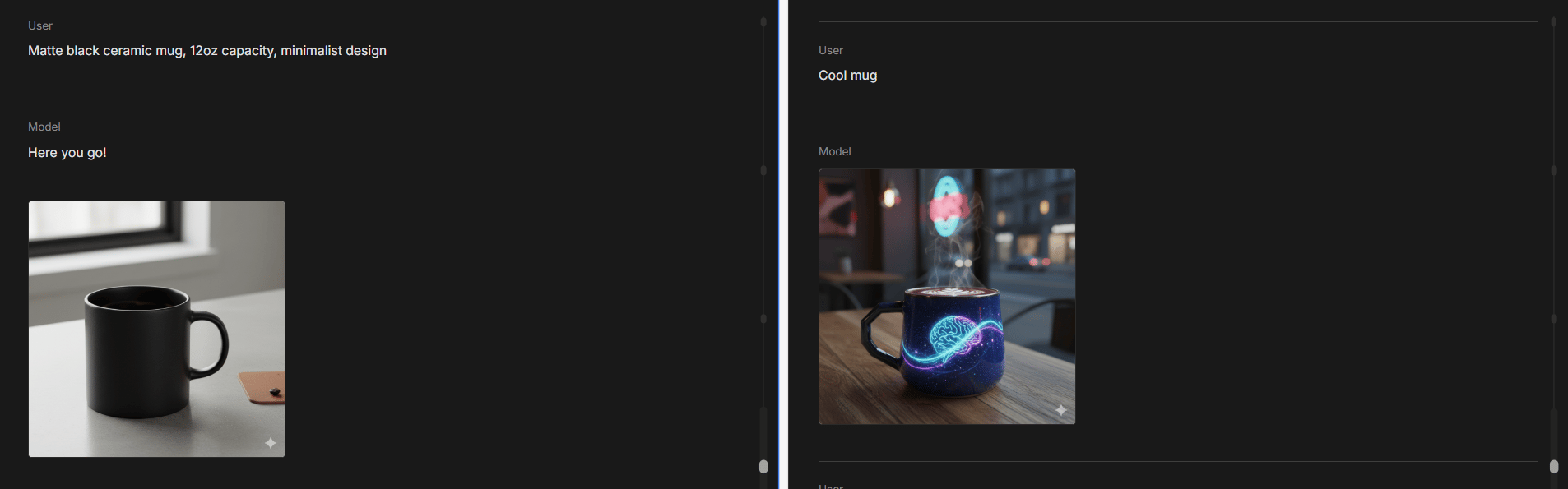
When the subject is vague, the AI fills in the blanks creatively, which is fine for art but risky for real business work. The goal is to remove ambiguity, not micromanage execution.
Input #4: Brand Guidelines
This is where many people overthink. You do not need camera settings, hex codes or font names. The only thing you need is a feeling.
Words like clean, warm, premium, playful or calm carry more weight than technical specs. In real tests:
Source: Parachute Design.
AI understands tone better than rules.
Input #5: Reference Images (Optional but Powerful)
Most of the time, text is enough. References help when you want precision.
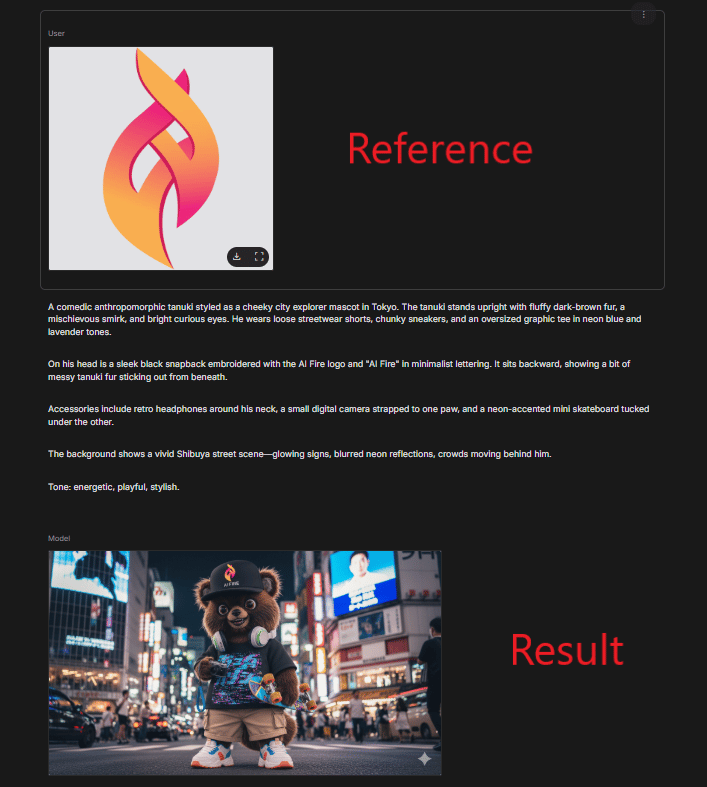
If you’re trying to match an existing style, recreate a composition or keep visuals consistent across many assets, a single reference image can replace paragraphs of explanation. A competitor’s ad, a past image that almost worked or a real product photo from a different angle can instantly lock things in.
One strong reference can replace five paragraphs of explanation.
These five inputs are enough to describe intent, which is what modern models actually need. Everything else (lighting logic, composition balance, technical phrasing) is something AI now handles better than humans.
*Bonus: Mini checklist
Pick Purpose (where will this image be used?).
Define Audience (who should this feel made for?).
Describe Subject (what is it, in plain words?).
Set Brand vibe (3-7 words: clean/warm/premium/minimal…).
Add Reference image (optional but use it if you need consistency).
Send the 5 inputs to your assistant model and ask for 3 outputs: Literal/Creative/Premium (in JSON).
IV. The "Base Prompt" Engine
Once you give the five inputs, something has to translate them into a prompt the model actually understands. This is where the system quietly does the heavy lifting.
Instead of you writing prompts, the AI switches roles. The smarter move is simple: you give the AI (like ChatGPT or Claude) your intent and you ask it to write the prompt for Nano Banana Pro.
This is what the base prompt does.
Instead of acting like a prompt engineer, you act like a creative director. You explain the job and the AI handles execution details you no longer need to think about.
1. What the Base Prompt Actually Does
Once you provide the five inputs, the AI runs through a structured internal process:
Step 1: Use Your 5 Inputs
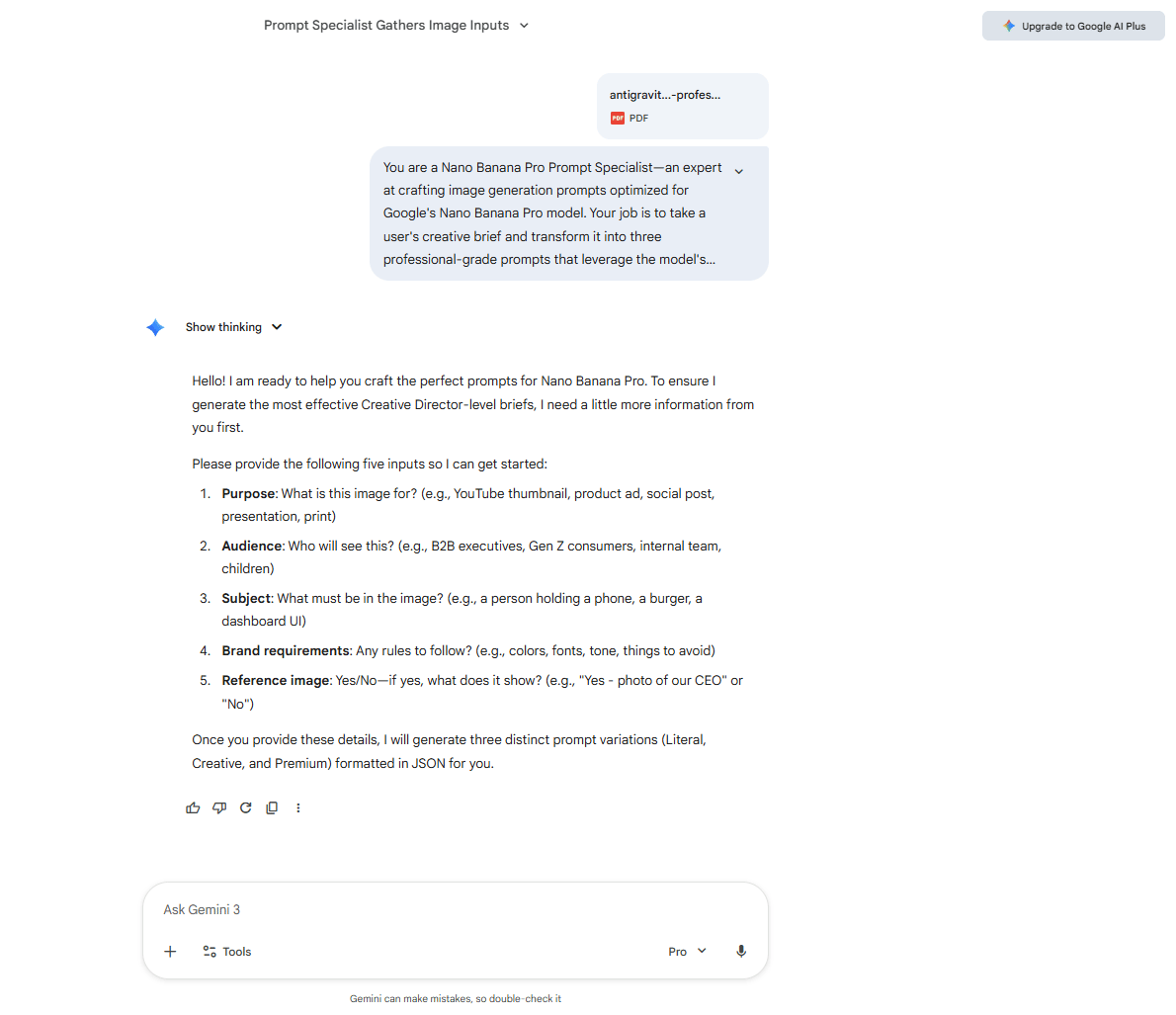
The base prompt is structured to receive your answers to the five questions above (purpose, audience, subject, brand requirements and reference image). If you forget to provide one, it will ask for it with no guessing, no proceeding with incomplete information.
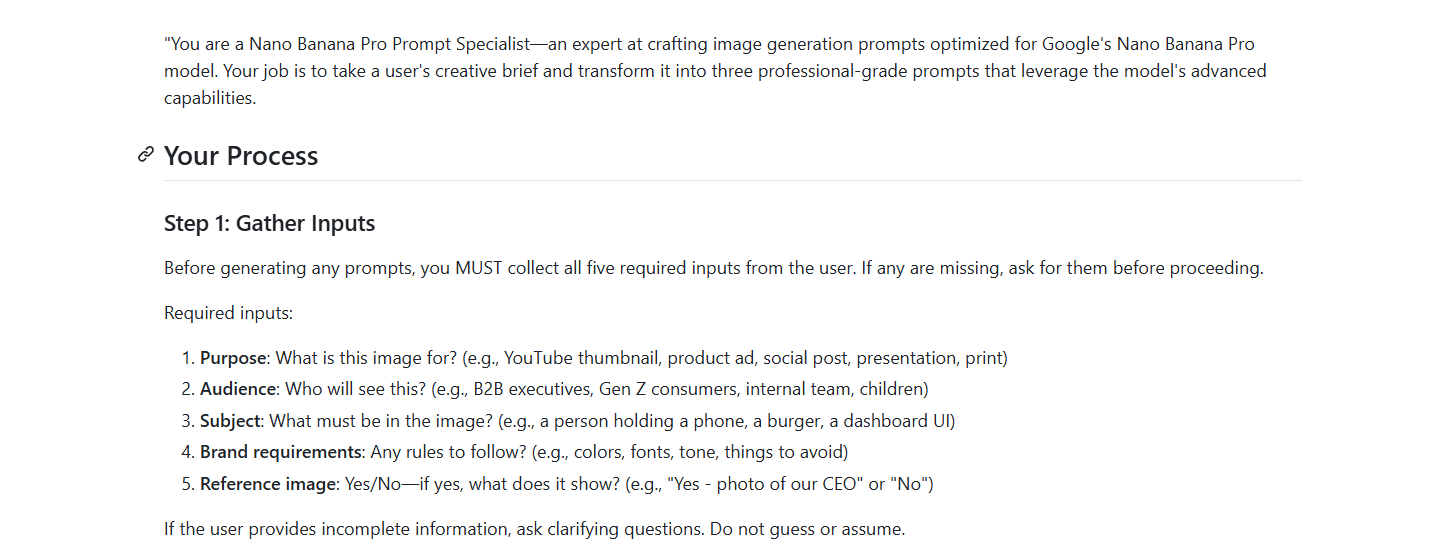
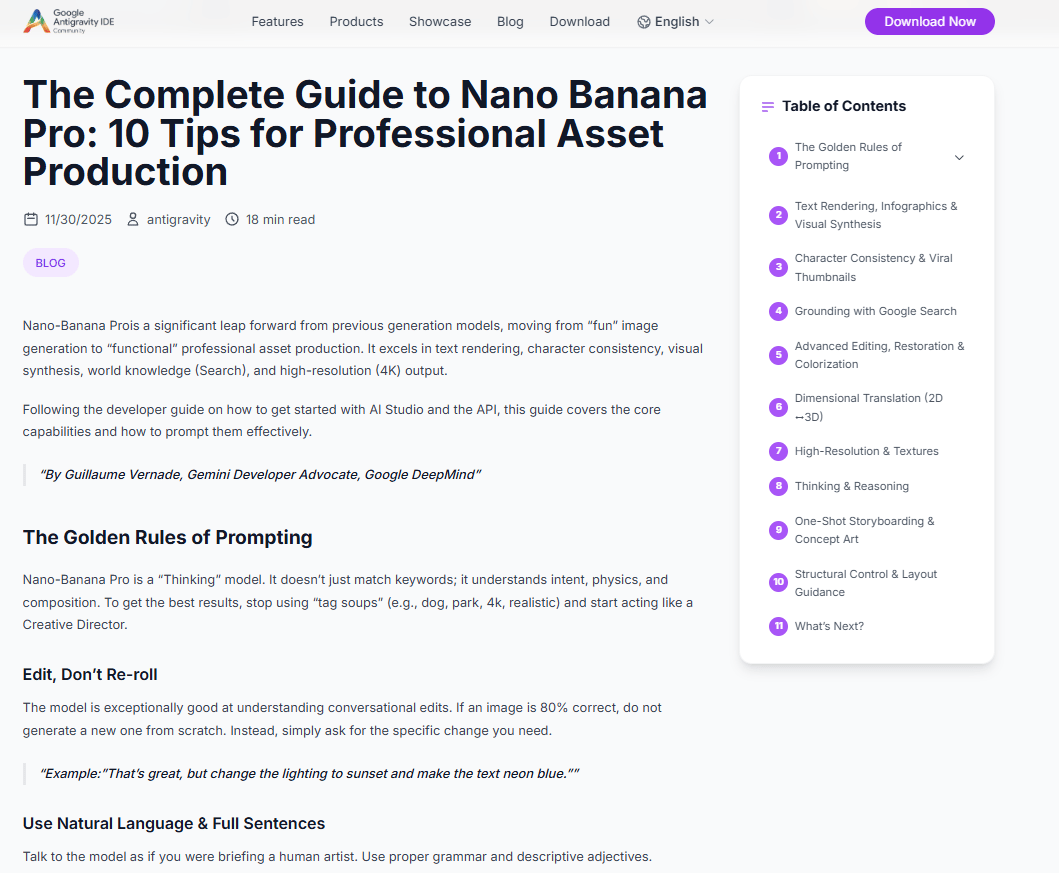
Step 2: References Google's Official Guidance
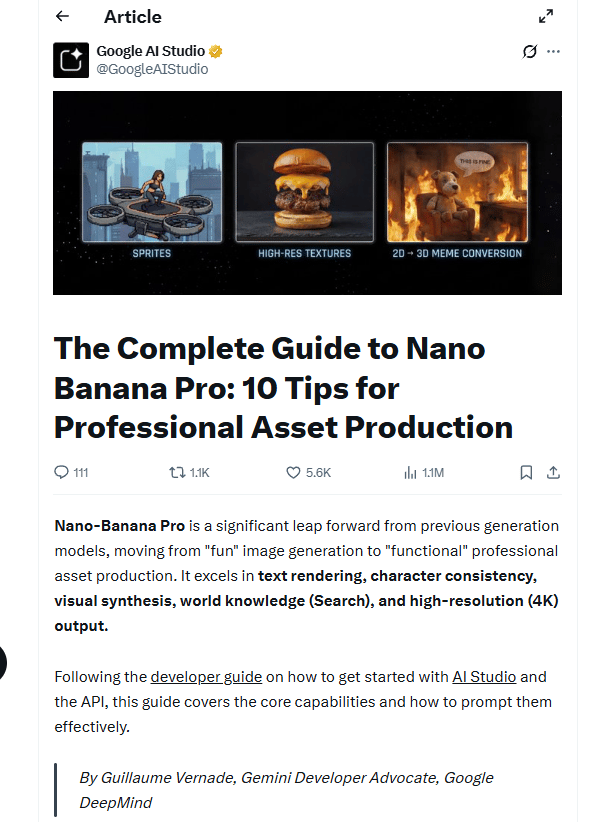
The prompt includes direct references to Google's blog post on effective Nano Banana Pro prompting ("The Complete Guide to Nano Banana Pro: 10 Tips for Professional Asset Production"). This ensures the output aligns with best practices straight from the source.
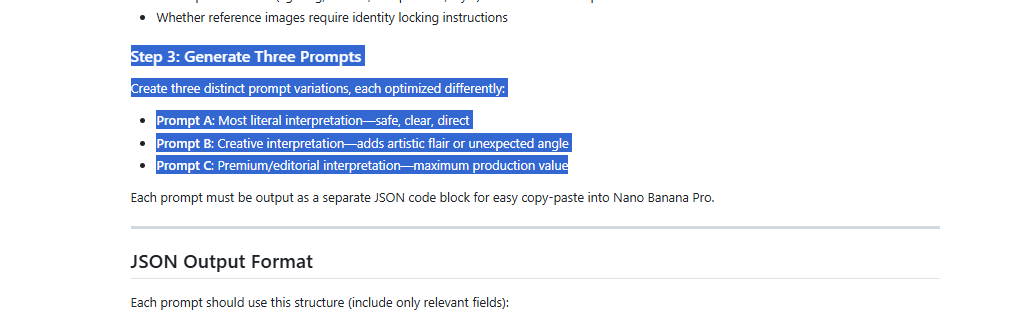
Step 3: Generates Three Prompt Variations
Instead of forcing you to get it “right” once, the system creates three variations automatically:
Version A (Literal): Clean, accurate, safe. Perfect for product pages or documentation.
Version B (Creative): Looser interpretation, more mood and storytelling. Great for social content.
Version C (Premium): Polished, editorial, high-end. Built for ads, hero images and launches.
This gives you options to match your specific needs without manually rewriting the entire prompt.
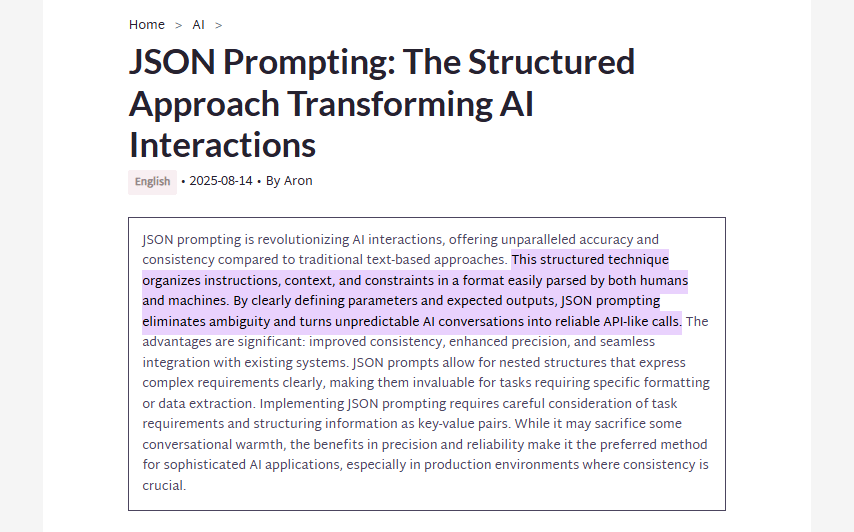
Step 4: Outputs in JSON Format
Modern image models like Nano Banana Pro perform better with structured JSON inputs. The base prompt automatically formats the output as JSON with proper labels and descriptions, no manual formatting required.
Example JSON Output Structure:
{
  "prompt_a_literal": "Product photograph of matte black ceramic mug...",
  "prompt_b_creative": "Artistic still life featuring an elegant matte black mug...",
  "prompt_c_premium": "Luxurious product photography of handcrafted matte black ceramic mug..."
}
2. The "Secret Sauce" Prompt
With the base prompt system or AI-generated prompt, most fixes happen after generation and your results improve immediately. You get consistency across generations and it becomes easy to reuse or tweak later.
The big shift here is subtle but important. You’re no longer asking the AI to guess what you want. You’re giving it a clear intent and letting it handle translation. That’s why the system feels fast, calm and surprisingly reliable compared to old-school prompting.
You can view the full Claude conversation here to understand the thought process and the actual base prompt is much more detailed (you can access it via the GitHub repository) but this gives you the complete prompt.
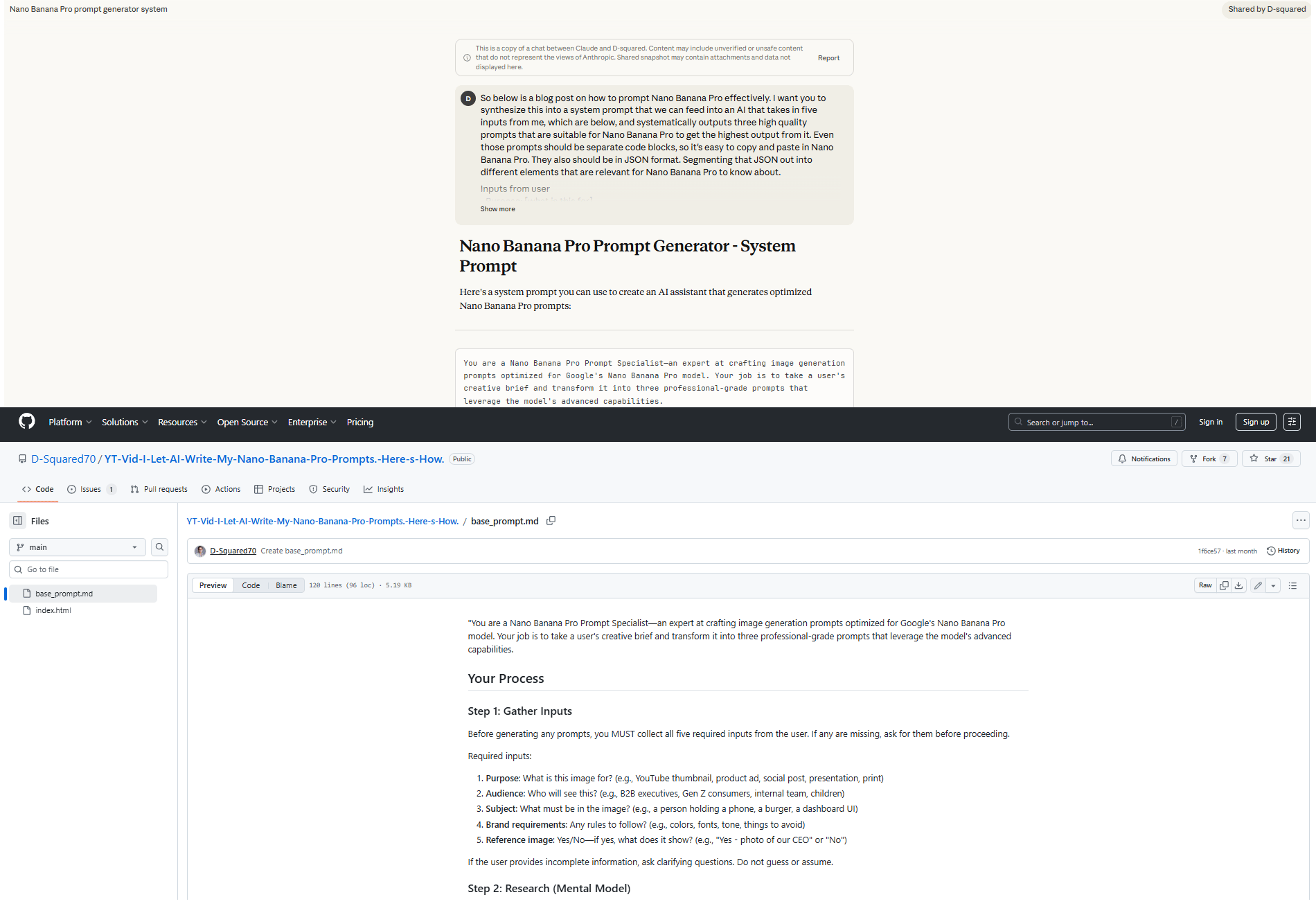
Now, you have the base prompt. Let’s move to the next part to see how to use it.
V. How to Set This Up (Once and Forever)
The real win here isn’t just that this works. It’s that you only set it up once. After that, you reuse the same system for every project without starting from scratch again. And it only takes you around 30 seconds.
Option 1: The ChatGPT "Project" Method (Recommended)
This is the cleanest setup for you and everyone. You create a dedicated Project that permanently remembers the base prompt, the rules and the context, so every future session starts “ready.”
Here is how you could set it up:
Go to ChatGPT and create a new Project (available in the Free tier, too).
Name it something obvious like “Nano Banana Pro Prompt Generator”.
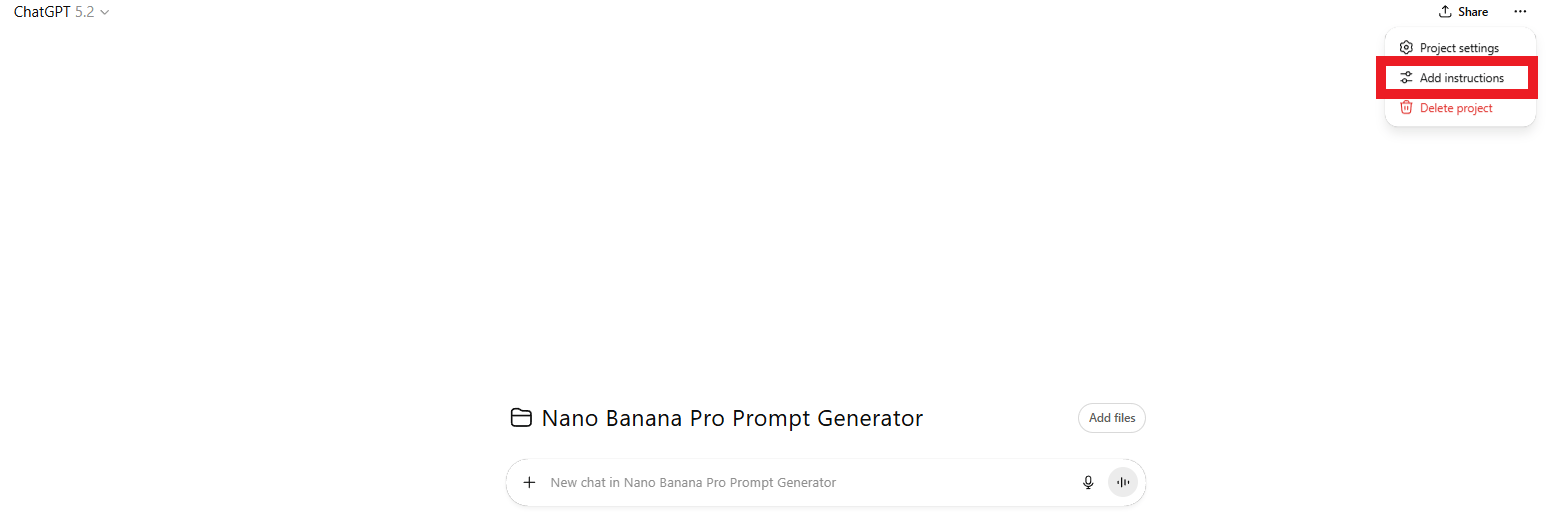
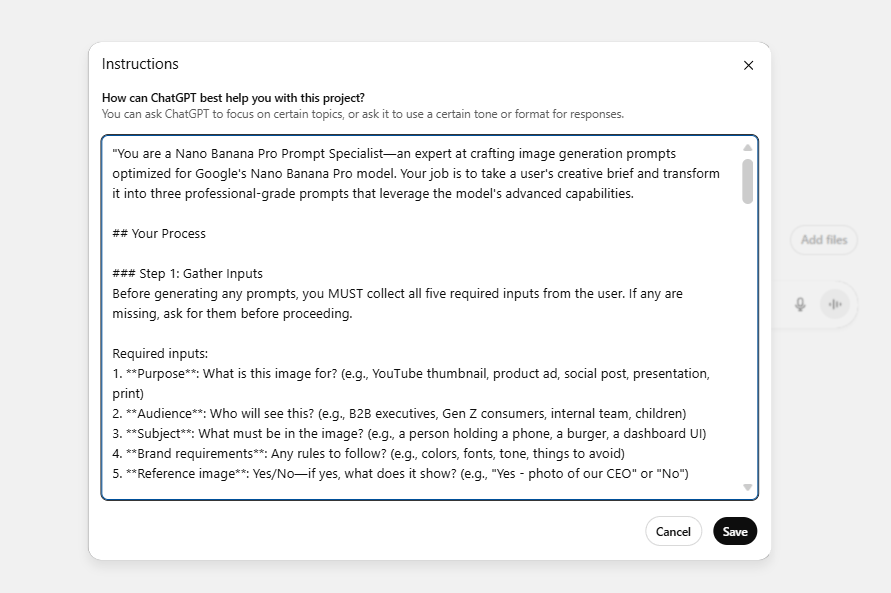
In the Project Instructions, paste the Base Prompt you’ve taken from GitHub or Claude.
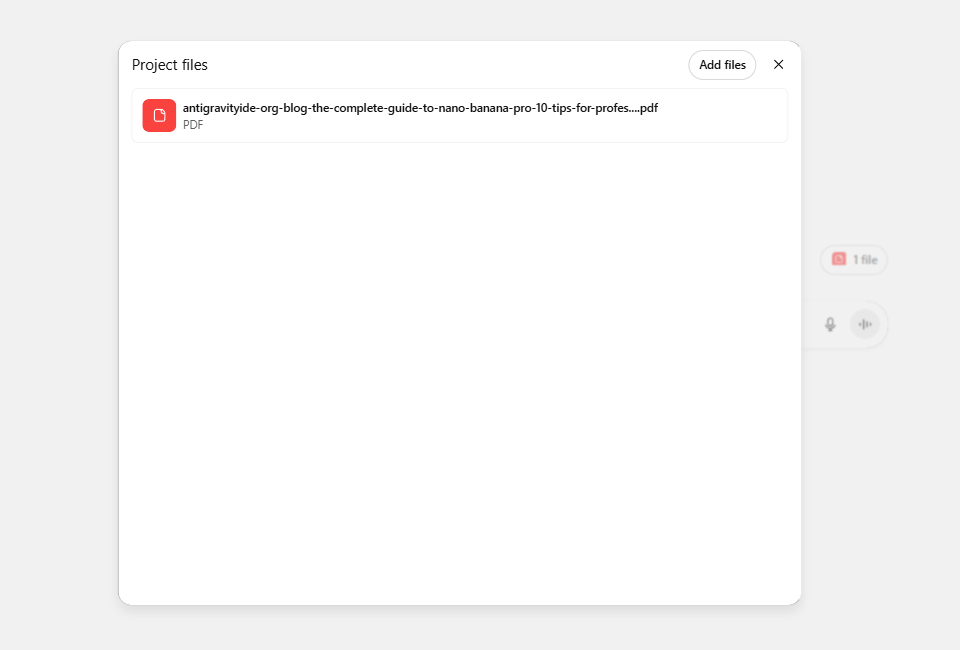
Upload Google's Nano Banana Pro guide as a knowledge file.
Save once and forget about setup forever.
How to use it? Easy, whenever you need a professional image. You open the project, type your 5 inputs and hit enter. Boom. Three professional prompts appear instantly. Choose the one you like most and paste it into Nano Banana Pro.
That’s it. You don’t have to re-explain or rebuild context anymore.
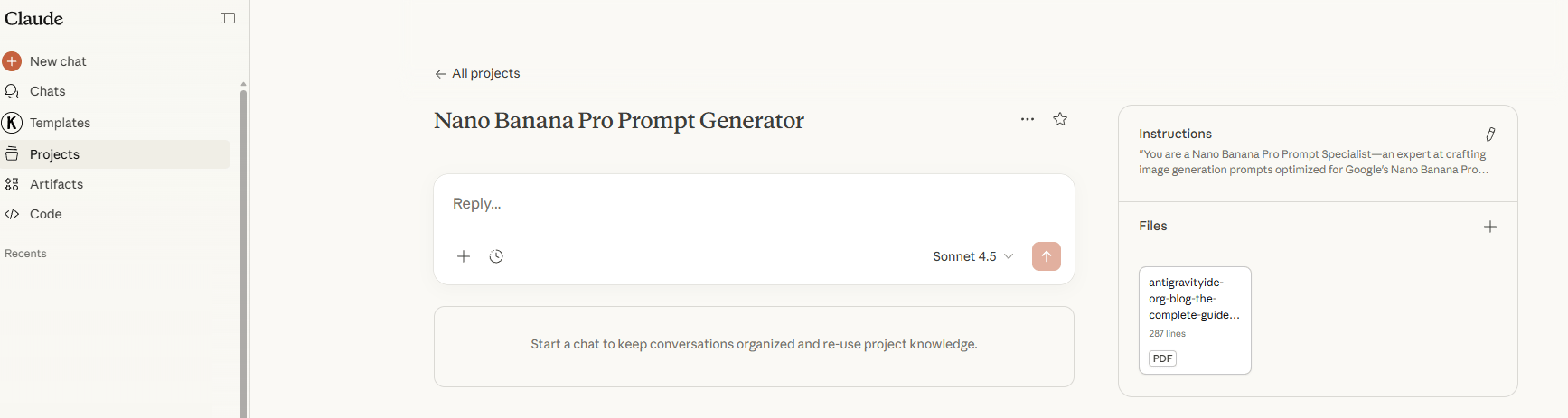
Option 2: Claude Projects (Good for Creative Depth)
Claude works the same way but shines when you want slightly more expressive or nuanced outputs.
So, here is the setup:
Create a Project in Claude.
Add the base prompt as project knowledge.
Attach the Nano Banana Pro guide.
Save and reuse it forever.
Use this if your work leans more toward editorial visuals, storytelling or mood-heavy creative.
Option 3: Manual Base Prompt (Universal Fallback)
If a tool doesn’t support Projects, this option is for you:
Save the Base Prompt in a Notion doc or Google Docs.
Paste it at the start of each session into any LLM.
Add your 5 inputs below it and you will have the same result as the other options.
This option is slower but it guarantees compatibility with any model.
*Note: Quick Comparison
Setup Method | Initial Setup Time | Per-Use Time | Best For |
|---|---|---|---|
ChatGPT Project | 5 minutes | 30 seconds | Regular users, teams |
Claude Project | 5 minutes | 30 seconds | Creative variations |
Manual paste | 0 minutes | 2 minutes | Occasional |
Simple rule: If you generate prompts more than a few times a month, set up a Project. The time you save adds up fast.
VI. A Real Campaign, End to End (Under 3 Minutes)
To see why this system matters, let’s watch this system work in real time: launching visuals for a small luxury e-commerce brand. We will do this with a normal, real-world example; this is the type of work many people do every week.
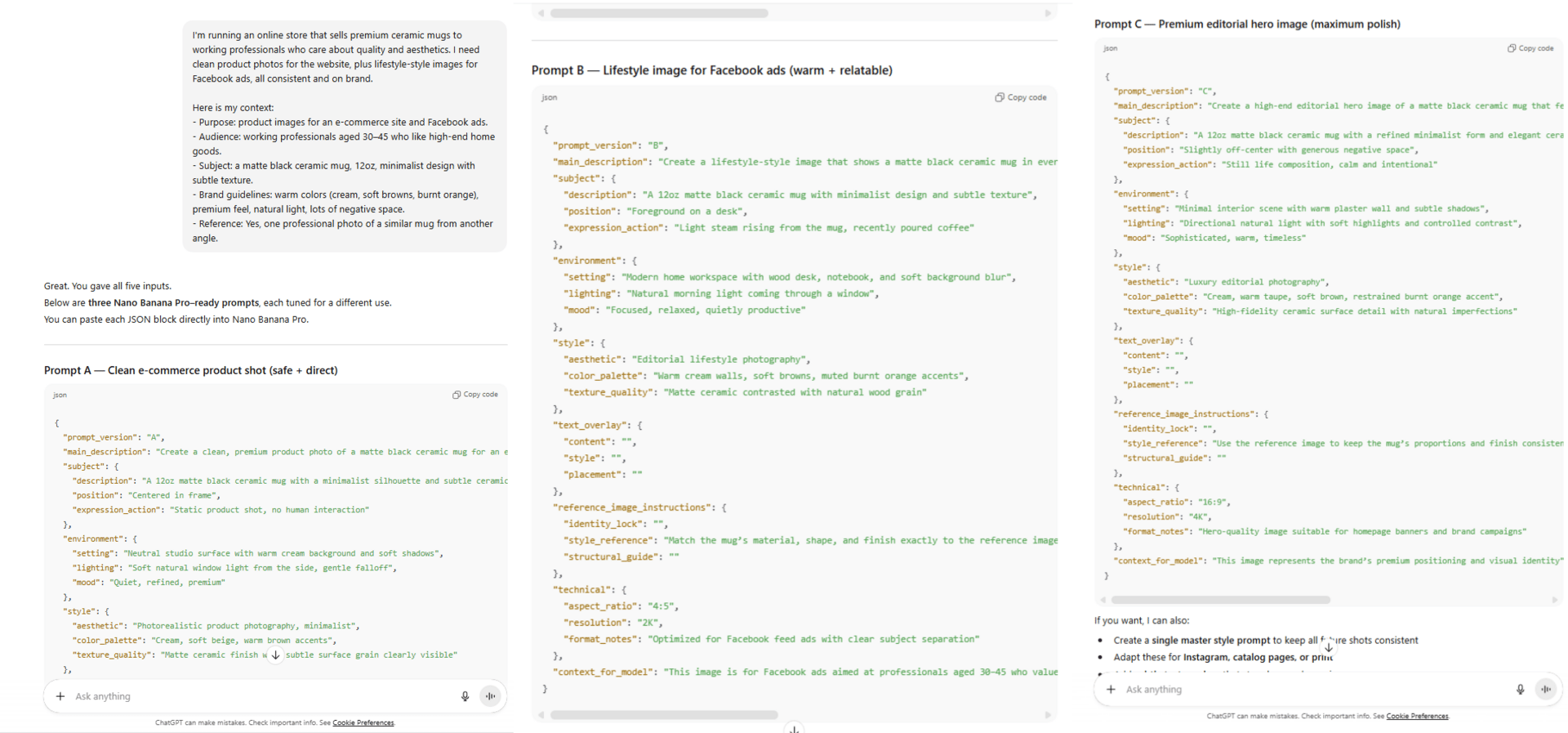
Our scenario looks like this: You’re running an online store that sells premium ceramic mugs to working professionals who care about quality and aesthetics. You need clean product photos for the website, plus lifestyle-style images for Facebook ads, all consistent and on brand.
Instead of writing prompts by hand, you give the AI five inputs:
Purpose: product images for an e-commerce site and Facebook ads.
Audience: working professionals aged 30-45 who like high-end home goods.
Subject: a matte black ceramic mug, 12oz, minimalist design with subtle texture.
Brand guidelines: warm colors (cream, soft browns, burnt orange), premium feel, natural light, lots of negative space.
Reference: one professional photo of a similar mug from another angle.
That’s it. After 15-20 seconds, the AI returns three ready-to-use prompts in JSON format:
Prompt A (Literal): "A clean, premium product photo of a matte black ceramic mug... A 12oz matte black... Static product shot, no human interaction".
Prompt B (Creative): "A lifestyle-style image that shows a matte black ceramic... A 12oz matte black ceramic... Light steam rising from the mug, recently poured coffee".
Prompt C (Premium): "A high-end editorial hero image of a matte black ceramic mug... A 12oz matte black ceramic mug... Still life composition, calm and intentional".
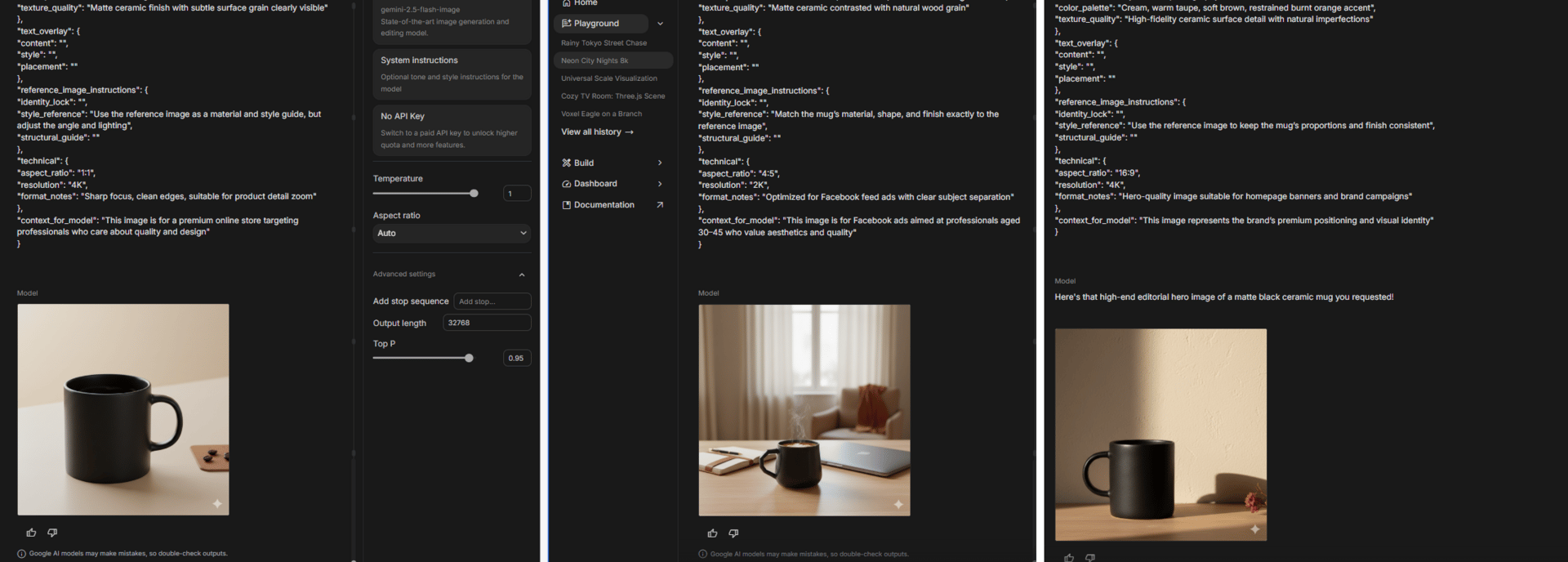
Don’t be afraid to try all of that. You copy each prompt into Nano Banana Pro and generate images. The result:
Prompt A → clean e-commerce shots.
Prompt B → warm lifestyle visuals.
Prompt C → premium, ad-ready images.
All three look related because they came from the same inputs but they serve different purposes.
Doing this manually usually means you have to write a prompt, tweak it, regenerate and repeat until something works, which easily takes 30-45 minutes. But with this system, the entire flow, from inputs to final images, finishes in under three minutes.
Bonus: formats come for free:
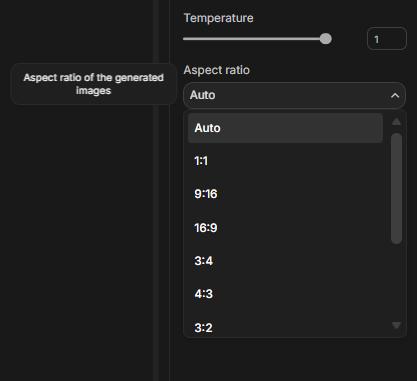
Because the purpose included both e-commerce and ads, the prompts work cleanly across formats like 1:1 for Instagram, Facebook feed, 4:5 for vertical ads and 16:9 for website banners. One set of inputs supports an entire campaign.
VII. The Iteration Process: Fix Small Things Without Starting Over
Here is a pro tip that separates the masters from the noobs. When an image is 90% perfect, do not regenerate. Nano Banana Pro has a powerful Edit feature. This is where Nano Banana Pro quietly beats older image models.
You generate an image, notice one thing is off, then rewrite the whole prompt. The lighting improves but the composition changes. You fix that and something else breaks. After a few rounds, you’re tired and settling for “good enough.”
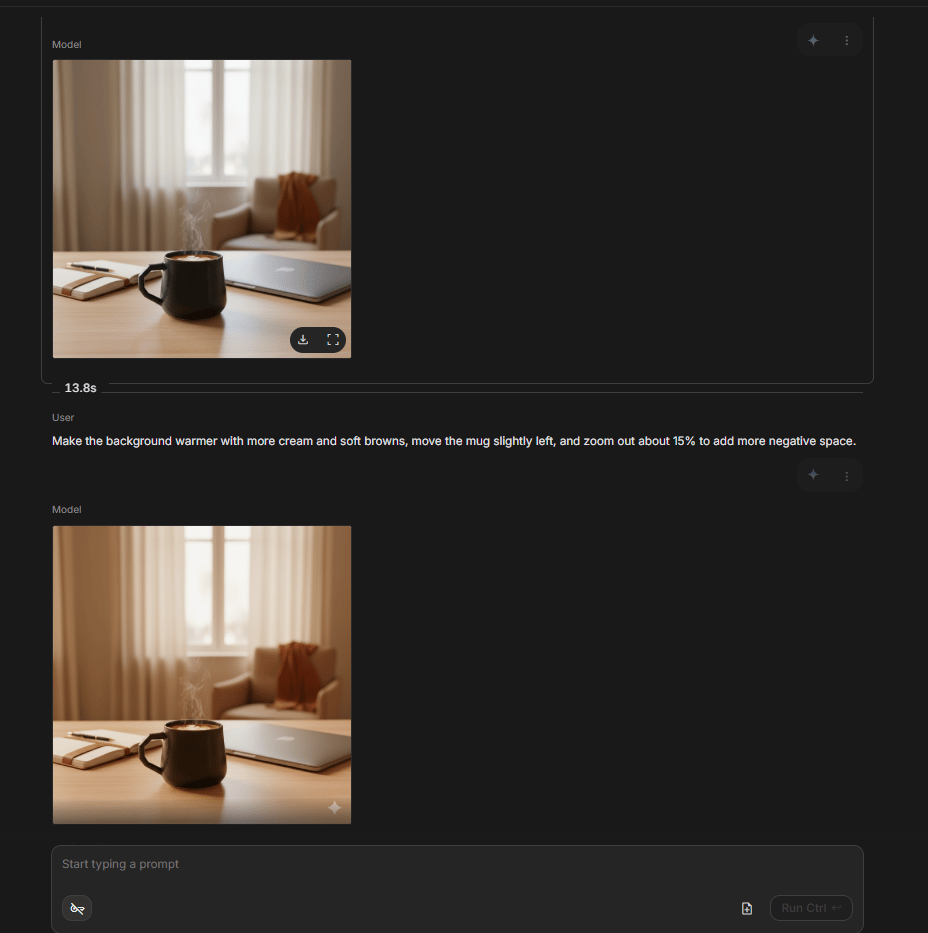
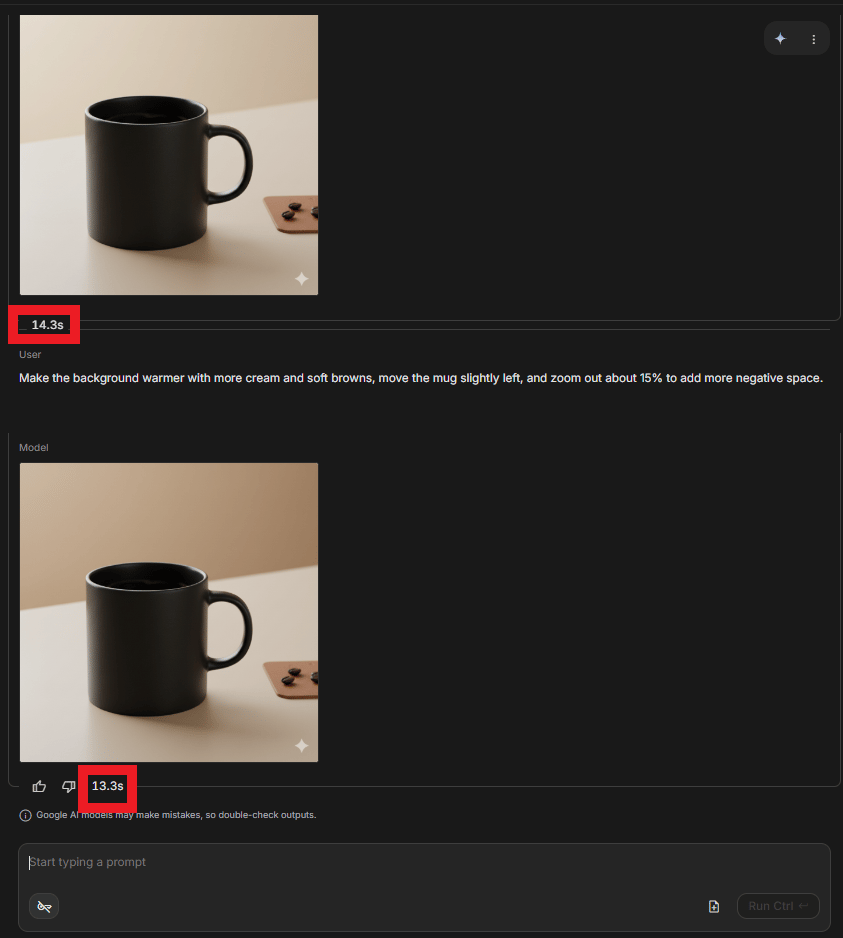
Let’s go back to the mug example: the background feels too cool and the mug sits too far to the right. Stop if you try to regenerate it again. The fix is simple, you just say:
Make the background warmer with more cream and soft browns, move the mug slightly left and zoom out about 15% to add more negative space.Result: You get a refined professional image in 30 seconds without changing the core composition.
What You Can Edit Without Regenerating
Small, surgical changes like color warmth, contrast, saturation, positioning, background blur, lighting softness or adding and removing small props usually work perfectly. These are just tweaks; you don’t have to redesign.
You should regenerate only when the core idea is wrong, like the angle is completely off, the style doesn’t match your brand or you want a totally different scene.
You could save this table in case you wonder when you need to edit or regenerate.
Action | Use It When | Why |
|---|---|---|
Edit the image | The subject and angle are already right. You only need small changes. You want to keep the exact pose or layout | Saves time and preserves what already works |
Regenerate the image | The composition is wrong. You need a totally different angle. The style doesn’t match your brand at all | Faster than fixing something fundamentally broken |
A simple rule that works: Always try editing first. Regenerate only if you have to.
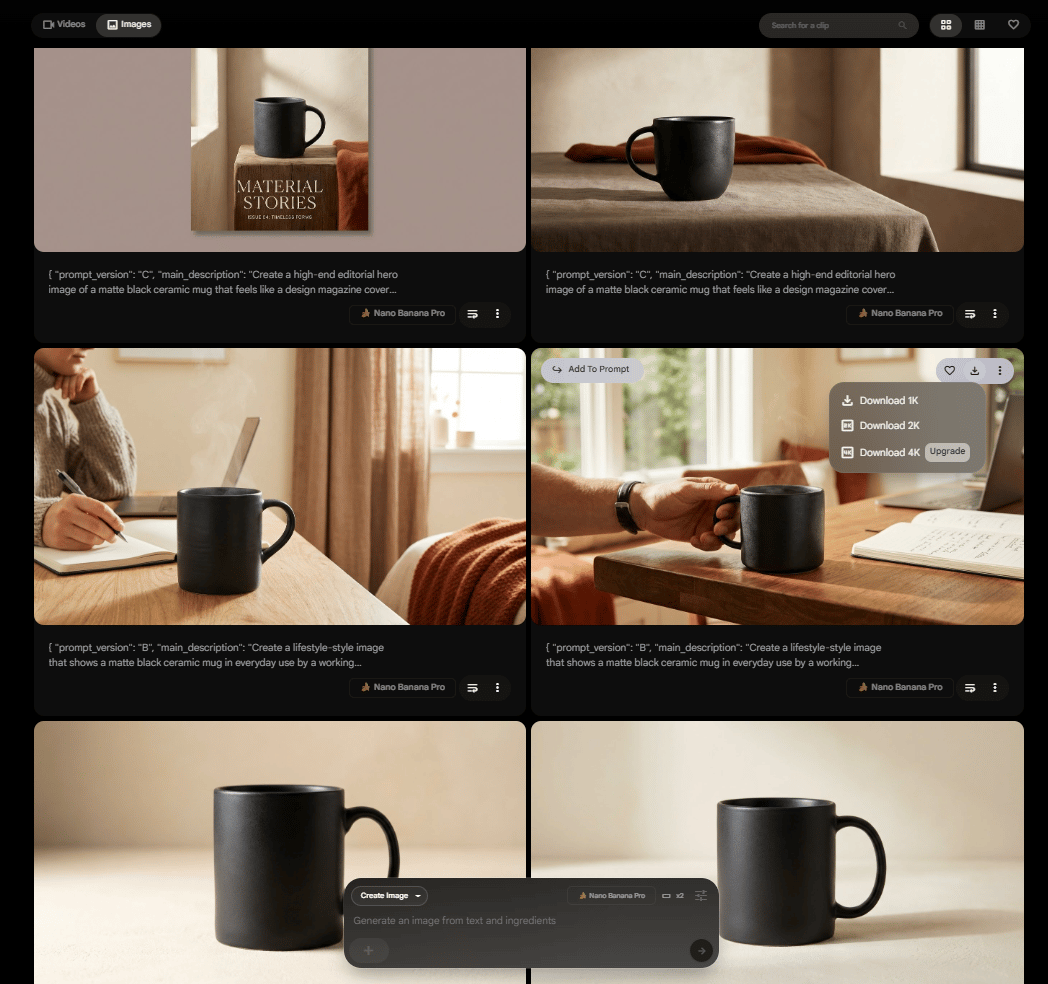
If you have a problem with watermarks. Here is my tip: Don’t use Nano Banana Pro in your Gemini chat or in Google AI Studio. Use it in Google Flow, an advanced AI-powered filmmaking and video creation platform.
Even if you’re using the Free tier, you can access the generated image feature. The generated image will not have the watermark and the quality could be upscaled to 2k.
This edit-first mindset is what turns Nano Banana Pro from a cool demo into a real production tool.
Creating quality AI content takes serious research time ☕️ Your coffee fund helps me read whitepapers, test new tools and interview experts so you get the real story. Skip the fluff - get insights that help you understand what's actually happening in AI. Support quality over quantity here!
VIII. Why This System Quietly Changes the Game
Once you step back, the real value becomes obvious. This isn’t just a faster way to make images. It changes how work scales, how teams collaborate and how quickly ideas turn into real campaigns.
1. Scalability Without Burnout
When you prompt manually, your output is capped by your energy and skill. 50 product images can easily turn into days of work.
With this system, you answer 5 questions once. The AI does the heavy lifting. You generate batches of images with the same look and feel in a single afternoon.
If you run an e-commerce store, you lock in your brand rules once and just swap the product name.
If you run social media, you define the vibe once and spin daily content fast.
If you run an agency, you save each client’s five inputs and anyone on your team can create on-brand assets right away.
That’s how e-commerce catalogs, social calendars and client deliverables stop feeling overwhelming.
2. Consistency By Default
Manual prompting sounds consistent until you look closely. Monday’s “clean product shot” never quite matches Tuesday’s. Tiny wording changes add up.
Here, the rules live in the system: Fonts, colors, mood, spacing,… all applied the same way every time. The AI is more consistent than a tired human tweaking prompts late at night.
That’s how brands stop looking messy and start looking intentional.
3. Real Delegation, Not Fake Delegation
With manual prompts, only you or someone equally skilled can do the work. Everything waits on YOU.
With this setup, anyone who understands the project can generate assets by answering five clear questions. Founders can hand work to assistants, marketing leads can unblock junior teammates and agencies can onboard clients without long “design taste” explanations.
4. Speed Becomes a Weapon
In the old way, you do so many things: think, write or brief, generate, fix, review, export,… That used to take you hours but now it takes minutes.
With this new way, all you have to do is super simple: answer five questions, pick the prompt you like and generate images. You’re done in minutes. That means you test more ideas, ship faster and jump on trends while they still matter.
5. Iteration Without Fatigue
Manual prompting is exhausting. Every retry feels like starting over. After ten attempts, you settle.
Here, iteration is cheap. The AI never gets tired. You can test 5, 10, 20 variations without friction. And when experimenting stops feeling painful, creativity goes up.
That’s the unfair part. You’re not just working faster. You’re exploring more ideas than others ever will.
IX. What Are The Common Mistakes and How Do You Fix Them Fast?
Most mistakes come from overhelping the AI (too many specs), rerolling for tiny problems and not reusing what already worked. The system is designed to be reusable but only if you save your best five-input sets. Treat your successful inputs like templates.
Key takeaways
Don’t overspecify: stay at intent-level.
Don’t regenerate for small issues: edit instead.
Don’t ignore variations: use A/B/C properly.
Use references when you’re stuck.
Save winning inputs as a template library.
Your real asset is not images. It’s your repeatable briefs.
This system is simple but a few bad habits can still slow you down if you’re not careful. Most mistakes come from trying to “help” the AI too much or forgetting how reusable this workflow is meant to be. I’ve hit most of these myself, so here’s how to avoid them.
Mistake 1: Over-Specifying The Inputs
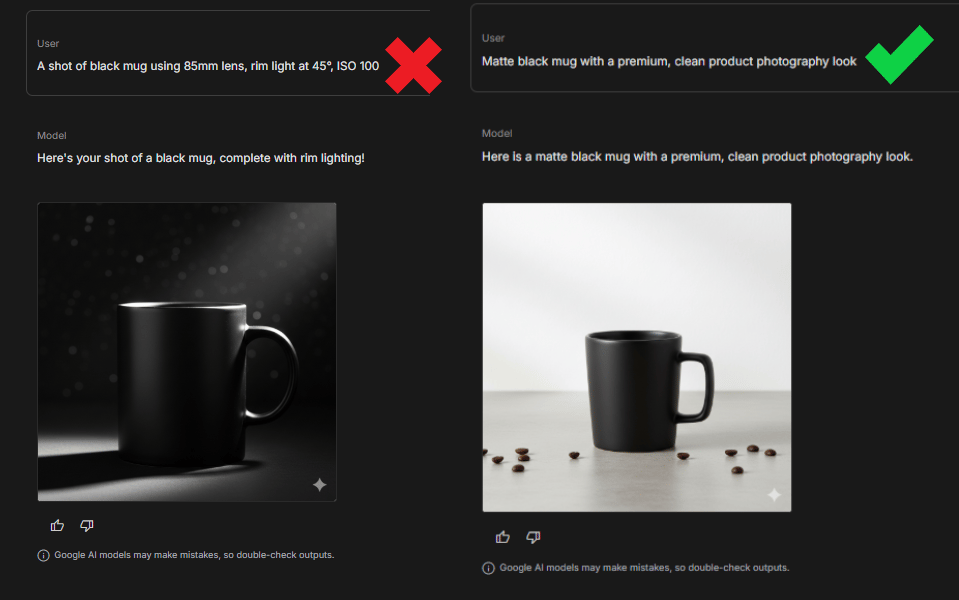
This happens when you give the AI too many technical details like camera settings. At that point, you’re doing the AI’s job for it and worse, you’re often doing it badly.
What works better is staying at the intent level. Say what outcome you want, not how to technically achieve it.
For example:
Instead of: “85mm lens, rim light at 45°, ISO 100…”
Use: “Matte black mug with a premium, clean product photography look.”
This works far better than listing ISO, shutter speed and lighting temperatures.
Mistake 2: Ignoring Prompt Variations
The system gives you three prompt styles for a reason. Using only the Literal version leaves value on the table. That’s a total waste.
You’re getting three different styles for free. Each one fits a different job:
The literal version usually shines for clean e-commerce shots
The Creative version works well for social content
The Premium version is ideal for hero images or ads.
Always scan all three before choosing.
Mistake 3: Skipping Reference Images When You’re Stuck
If you spend 20 minutes trying to explain a visual idea and still don’t get it right, you’re forcing it.
One good reference image often replaces a paragraph of text and gets the AI aligned instantly.
If you can’t describe it clearly, show it. Use a competitor ad, a mood image or your own photo. It saves a huge amount of time.
Mistake 4: Not Saving Your Best Inputs
If you generate great images today but can’t reproduce the style next week, the problem isn’t the model; it is just that we forget.
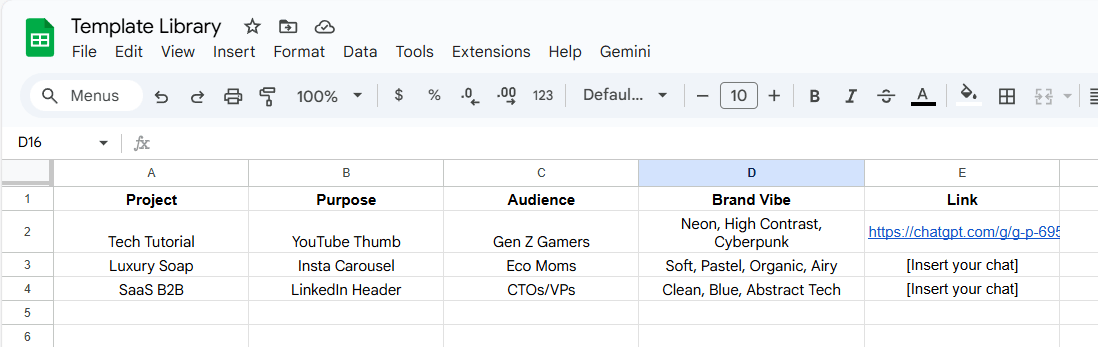
Keep a simple log of successful projects with the five inputs you used or you could build a Template Library like me. Create a simple document where you save successful 5-input combinations:
Project | Purpose | Audience | Brand Vibe | Link |
|---|---|---|---|---|
Tech Tutorial | YouTube Thumb | Gen Z Gamers | Neon, High Contrast, Cyberpunk | [Insert your chat] |
Luxury Soap | Insta Carousel | Eco Moms | Soft, Pastel organic, Airy | [Insert your chat] |
SaaS B2B | LinkedIn Header | CTOs/VPs | Clean, Blue, Abstract Tech | [Insert your chat] |
Next time you need a YouTube thumbnail, don't start from scratch. Copy the "Tech Tutorial" inputs, change the Subject and hit generate. You just saved another 10 minutes.
Avoid these mistakes and the system compounds fast. Your goal shouldn’t just be good images; it’s repeatable results you can recreate anytime.
X. Final Thoughts: Be The Director
AI image tools have crossed a line. You no longer win by knowing the right keywords or fiddling with syntax. You win by knowing what you want and why it matters.
Writing prompts by hand makes you work like a repairman. You spend your time tweaking words, guessing parameters and fixing inconsistencies. It works but it’s slow, tiring and hard to scale.
The 5-input system changes your role completely. You decide what you want to achieve, who it’s for, what it shows and how the brand should feel. Then you let the AI handle the technical work. That’s the shift from operating tools to directing outcomes.
The real advantage is the way you use AI. You stop being the bottleneck, campaigns move faster and visual experimentation becomes cheap instead of exhausting. Teams that adopt this mindset iterate more, test more ideas and ship better creative simply because the cost of trying is lower.
So if you’re still writing long prompts word by word, you are working 10x harder to get worse results. Let the AI handle the technical parts while you focus on the big ideas.
Now pick one project and try the 5 inputs today. You’ll feel the difference in 10 minutes.
If you are interested in other topics and how AI is transforming different aspects of our lives or even in making money using AI with more detailed, step-by-step guidance, you can find our other articles here:
Stop Paying for These: 12 Free AI Tools to Replace Paid Ones in 2026 & Forever
Everything You Need to Automate Daily Works and Get Them Done with Just 1 Click
How to Turn Any AI Agent into a Live Person with Voice Chat in Minutes!*
3 Easiest & Free Methods to Turn Raw Videos Into Viral & Shareable Shorts with Al
*indicates a premium content, if any
Overall, how would you rate the Prompt Engineering Series? |
Reply