- AI Fire
- Posts
- 🎥 How I Built My Own VIRAL AI Inspirational Finance Channel with Only Free AI Tools
🎥 How I Built My Own VIRAL AI Inspirational Finance Channel with Only Free AI Tools
Stop trading your face for views. This guide shows the exact 2026 workflow to build high-RPM finance videos using free AI tools without camera or hyping.

Max Anh
January 23, 2026

TL;DR BOX
Building a viral faceless finance channel in 2026 is a math-based side hustle. Finance content commands the highest RPM (Revenue Per Mille) on YouTube, often earning $12-$22 per 1,000 views, compared to just $3 for gaming. By using a stack of free AI tools, you can create high-retention storytelling videos without showing your face or owning a camera.
The strategy relies on Pattern Recognition (reverse-engineering successful "Millionaire Mindset" videos) and using Gemini 3 to maintain consistent AI characters across scenes. By combining ElevenLabs for natural narration and Grok Imagine for subtle motion, you can produce 10-minute videos in about 8-11 hours. Success requires a 90-day commitment to train the algorithm and reach the monetization threshold of 1,000 subscribers and 4,000 watch hours.
Key points
Fact: Finance videos earn up to 6x more than entertainment channels because advertisers pay a premium to reach viewers interested in wealth and investing.
Mistake: Having inconsistent AI characters. Use the "Reference Image Hack" in Gemini (Section VII) to ensure your character looks the same in every scene.
Action: Commit to two videos per week for 90 days. The algorithm needs data to identify your high-value US-based audience.
Critical insight
The real "unfair advantage" in 2026 isn't the AI; it's Retention Engineering. Every 90 seconds, you must change something in the video (like a new fact or a different visual). This keeps the viewer's brain engaged, which signals YouTube to push your video to millions.
Table of Contents
I. Introduction
Finally, here is a side hustle where you do not have to show your face, learn complex editing or act like an influencer"
You have probably seen a thousand "make money with AI" videos promising you will be rich by the next day. Most of them are garbage. But this one is actually worth paying attention to.
In this guide, I’ll show you the exact step-by-step process for building AI finance videos. It’s simple, repeatable and honestly something I wish I had started earlier.
You don't need:
A fancy camera.
Video editing skills.
To show your face (thank god).
A production studio.
What you do need is focused time, a decent internet connection and the willingness to actually publish instead of just consuming content.
II. Why Finance Videos Print Money in 2026
Finance content pays higher ad rates. Advertisers pay more to reach people interested in money. Views in this niche are worth more.
Key takeaways
Gaming RPM ≈ $3 per 1,000 views
Finance RPM ≈ $12-$22 per 1,000 views
Stories outperform lectures
Emotion drives retention
Before you touch a tool, you have to understand why this niche is an absolute goldmine. In short, money topics trigger attention and advertiser demand at the same time.
1. The Revenue Gap
Finance content on YouTube pays better than almost anything else. While gaming channels earn around $3 to $7 per thousand views, finance videos can bring in $15 to $22 for the same number.

Source: OutlierKit.
That difference adds up fast. A million views on a gaming video might earn you $3,000. The same million views on a finance video could bring $20,000.
But the problem with most finance content is that people find it boring. Nobody wants to watch a 15-minute lecture on compound interest or stock market fundamentals. The numbers might be useful but they don't make you feel anything.
That's where storytelling changes the game.
🎥 Ready to build a Faceless Finance Channel? |
2. The Global Target
Combine emotional narratives about financial success, millionaire mindsets and rags-to-riches stories with actual financial wisdom and you've got content that:
Goes Viral: High retention because of the story.
Attracts Money: High RPM because of the finance keywords.
Builds authority: You're providing actual value.
Works Faceless: You don't need a personality; you need a script.
Channels using this strategy have gone from zero to hundreds of thousands of subscribers in under a year. The opportunity is real but only if you actually execute.


A successful case study. Source: YouTube.
III. Every Free AI Tool You Actually Need
Before you start, you need the right tools. Don’t worry, you don’t need a $5,000 production studio. These aren't trial versions or limited demos. They're genuinely free to use at a level that lets you produce real content.
Tool | Primary Use | Free Tier Details | What You’ll Use It For |
|---|---|---|---|
ChatGPT | Script writing & research | Free tier available | Viral video ideas, high-retention scripts, finance research |
ElevenLabs | AI voiceover | 10,000 characters/month free 2,500 chars per generation | Human-sounding voiceovers |
Gemini Nano Banana Pro | AI image generation | Free with Google account | Consistent AI characters, scene backgrounds |
Grok Imagine | Image → video | Free with X (Twitter) account | Animate static images into video clips |
CapCut/Filmora | Video editing | Free versions available | Editing, text overlays, transitions |
Total cost if you stay in free tiers: $0 per month.
Learn How to Make AI Work For You!
Transform your AI skills with the AI Fire Academy Premium Plan - FREE for 14 days! Gain instant access to 500+ AI workflows, advanced tutorials, exclusive case studies and unbeatable discounts. No risks, cancel anytime.
IV. Step 1: Finding Topics That Actually Go Viral
The first rule is simple: pick the right niche. You can't just pick a random finance topic and hope people care. You need to reverse-engineer what's already working.
1. Find Successful Channels in the Niche
First, you go to YouTube and search for terms like "millionaire mindset", "financial freedom" and "wealth psychology". Look for faceless channels with over 100,000 subscribers.
Sort their videos by "Popularity". You watch the top three and pay attention to:

How do the titles grab your attention?
What emotions do they trigger? (Curiosity, fear of missing out, aspiration).
How long are the videos? (Usually 8 to 15 minutes for maximum ad revenue).
What structure do they follow? (Problem, journey, solution, call to action).
*Bonus: If you don’t want to spend hours doing this manually, there’s a faster option. You can use NotebookLM to import every video from a channel and actually talk to that content. From there, you can generate unlimited title ideas in minutes. I’ve already shared a step-by-step guide on how to use this efficiently in a previous post.
2. The Pattern Recognition Method
Most viral finance videos follow similar formulas. They open with a dramatic hook, tell a personal story, break down actionable lessons and end with motivation.
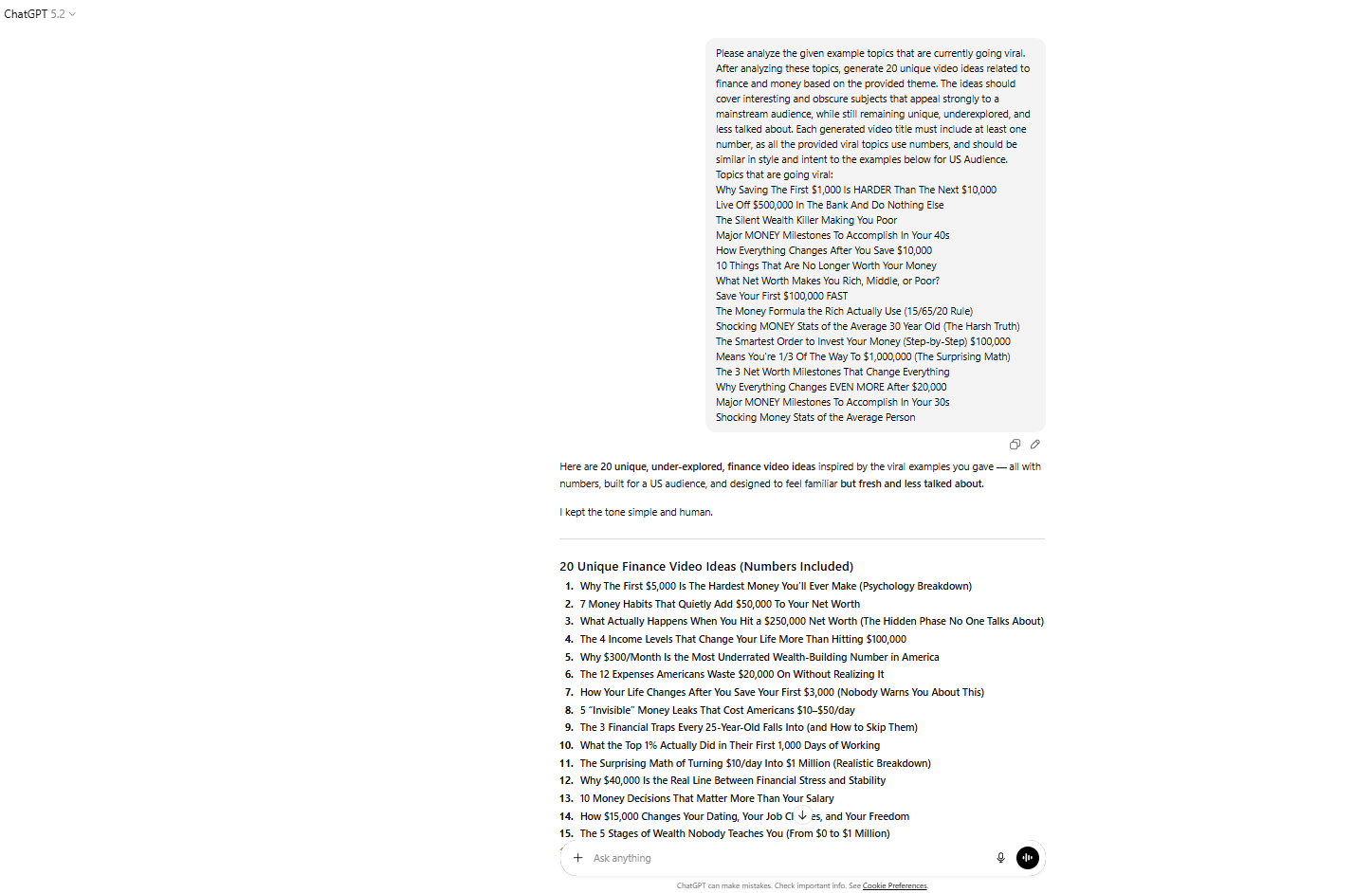
Instead of copying them, you're learning the blueprint. To do that, let’s use our first tool, ChatGPT.
Here's a prompt you can copy and paste:
Carefully review the example video topics that are currently gaining strong viral traction.
After evaluating these examples, create 20 original video ideas focused on finance and money that align with the same overall theme.
The ideas should explore intriguing, lesser-known angles that still strongly appeal to a broad mainstream audience, while remaining fresh, unique and underrepresented.
Each video title must include at least one number, mirroring the structure of the viral examples and should match their tone and intent.
All ideas should be tailored for a US-based audience.

Topics that are going viral:
[Insert all titles you find]
Not all 20 will be good. You’re looking for one idea that feels clear, emotional and easy to explain. You'll be spending hours on this video, so choose something you won't hate halfway through.
V. Step 2: Writing a Script That Keeps People Watching
Most beginner scripts lose viewers in the first 10 seconds. They start with weak intros like "Hey guys, in this video I'm going to talk about…" and wonder why nobody sticks around.
Your script needs to hook people immediately and keep them watching until the end.
The Retention Formula
Follow this formula and you will have a strong introduction that helps your viewer keep watching.
First 5 seconds: Start with a bold statement or a surprising fact to grab attention immediately. Example: "Most people will never be rich because they believe one dangerous lie".
Seconds 6-30: Promise value and tease the payoff. Example: "In the next ten minutes, you'll learn the three mindset shifts that separate millionaires from everyone else".
Middle section: Tell a story with lessons woven in. Use real examples, specific numbers and pattern interrupts every 90 seconds to keep attention.
Last 60 seconds: Recap the key points, deliver a motivational closer and remind people to subscribe.
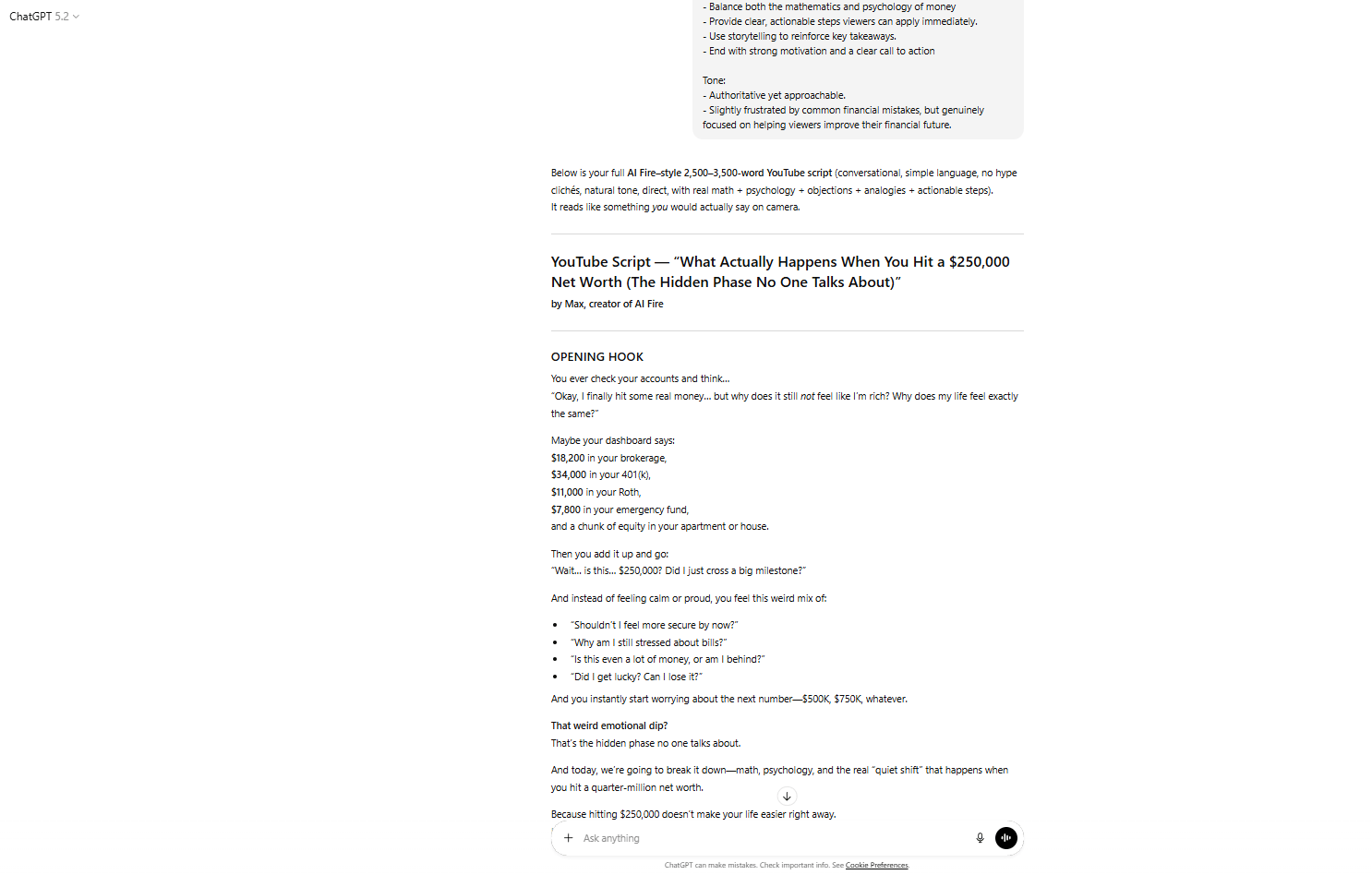
And the best part? You don’t have to write this by hand. Here is the prompt you can use in ChatGPT to create your own script:
Write a full YouTube script in [AI Fire]’s recognizable financial-education voice for a video titled: “[INSERT YOUR YOUTUBE VIDEO TITLE HERE].”

The script must follow [AI Fire]’s established structure:
- Opening Hook: Begin with a highly relatable money situation that immediately makes viewers think, “That’s literally me.”
- Introduction: Include this exact sentence:
  “My name is [AI Fire] and I spend way too much time thinking about [relevant financial topic]. If you’re someone who [describe the viewer’s financial struggle], make sure to hit the subscribe button and give this video a thumbs up if this helps you out.”

Style Guidelines:
- Natural, conversational tone (use phrases like “Here’s the thing…”, “Look,” “Um”)
- Challenge common financial beliefs early
- Include concrete, eye-opening statistics from realistic and credible sources
- Walk through simple math examples using real dollar figures
- Explain the psychology behind financial decisions
- Address objections directly (“Now, you might be thinking…”)
- Use relatable analogies to clarify complex ideas
- Gradually build toward surprising insights
- Include phrases such as “Here’s what most people don’t realize…” and “This is where it gets really interesting…”

Content Requirements:
- Length: 2,500-3,500 words (optimized for a 10-15 minute video)
- Balance both numerical reasoning and money psychology
- Provide clear, actionable steps viewers can apply immediately
- Use storytelling to reinforce lessons
- End with strong motivation and a clear call to action

Tone:
- Confident and authoritative, yet approachable
- Slightly frustrated by common financial mistakes but genuinely focused on helping viewers improve their financial future
ChatGPT will give you a strong first draft. Read it out loud. If something sounds robotic or stiff, rewrite it in your own words.
*Pro tip: A 10-minute video is a long time for a modern attention span. To keep viewers watching (and the revenue flowing), your script needs "Pattern Interrupts" every 90 seconds.
Every 90 to 120 seconds, you need to reset the viewer’s attention. This could be:
A controversial statement.
A surprising statistic.
A rhetorical question.
A shift in perspective.
Without these, people zone out. With them, retention stays high.
VI. Step 3: Creating Professional AI Voiceovers (Without Sounding Like a Robot)
ElevenLabs changed the game for AI voiceovers. Before this tool, most AI voices sounded flat and lifeless. Now, if you configure the settings correctly, most viewers can't tell the difference.
How to Maximize Your Free Characters
The free plan gives you 10,000 characters per month. That's roughly three to four videos. Here's how to stretch it:

ElevenLabs Pricing.
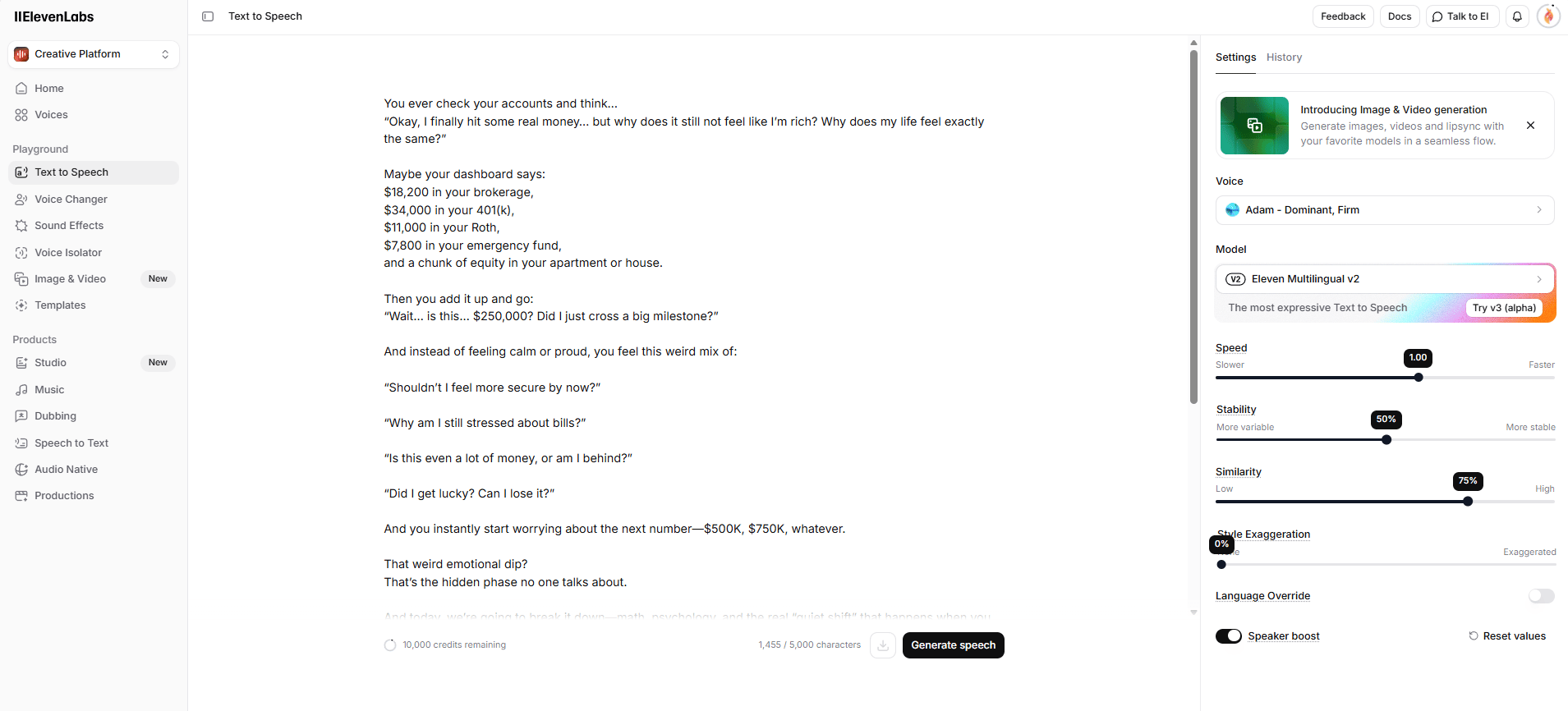
Break your script into chunks: ElevenLabs limits each generation to 2,500 characters on the free plan. Copy your script into sections and generate them separately in the “text to speech” tab.
Choose the right voice: Test a few options. Adam, Anthony and Bella are popular because they sound authoritative without being cold. Play around until you find one that matches your content.
Adjust the settings:
Stability: 50-60%. Too high makes it sound robotic. Too low makes it inconsistent.
Similarity: 75%. This controls how closely the AI matches the original voice model.
Style: 0. Leave this at zero unless you want extra expressiveness.
Download each section as a separate audio file. You'll stitch them together in editing.
*Bonus trick: The Free Character Hack
If you run out of characters, create multiple accounts using Gmail's plus trick. Add "+1" before the @ symbol in your email ([email protected]) and sign up again. ElevenLabs treats this as a new account but all emails still go to your main inbox.
Yes, this works.
VII. Step 4: Generating Consistent AI Characters and Scenes
The biggest mistake in AI video is having your character look different in every shot. If your "millionaire" has a beard in Scene 1 and is clean-shaven in Scene 2, viewers subconsciously stop trusting the content.
So, here is how you can fix that using Google Gemini.
1. Create Your Main Character in Gemini
Start by generating one strong base character. Use this prompt:
Create a unique recurring character named “[Max]” designed specifically for YouTube finance explainer visuals.

Character Style (MANDATORY):
- Simple 2D, hand-drawn minimalist cartoon
- Thin black outlines, flat pastel colors, clean white or very light background
- Visual style similar to basic explainer doodles
- No realism, no 3D, no cinematic lighting, no textures

Core Identity (LOCKED):
- Adult male cartoon character, early 30s
- Average height and build
- Round head with minimal facial features: small dot eyes, thin eyebrows, simple nose, small expressive mouth
- Short, slightly messy black hair
- Light skin tone in flat color style

Clothing (ALWAYS IDENTICAL):
- Plain solid-color T-shirt (soft green or light blue)
- Simple blue jeans
- Basic white sneakers
- No logos, patterns or accessories

Line & Color Rules:
- Thin-to-medium black outlines
- Flat fills only, no gradients
- Very light or no shading
- Muted pastel palette

Framing & Composition:
- Full-body view only, head-to-toe visible
- Never cropped
- Character centered or slightly off-center
- Clean, uncluttered scene

Expressions & Poses:
- Simple but exaggerated facial expressions
- Clear body language showing emotion (confusion, stress, relief, happiness, motivation)
- Poses must remain simple and readable

Props (ONLY when contextually necessary):
- Alarm clock, calendar, cash, charts, arrows, phone, laptop
- Props must match the same flat doodle style

Strict Rules:
- No text inside the image
- No unnecessary background details
- [Max] must remain 100% visually consistent across all images
- Always refer to the character by name: [Max]

Output a single, complete image-generation prompt describing [Max] while following all rules above.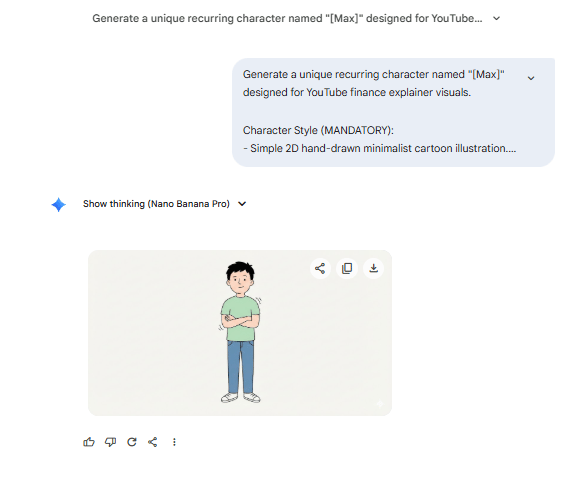
Once you have a perfect image, download it. This is your reference character before going into the next step.
2. Maintain Consistency Across Scenes
Now, you have your own reference image, what is your next move? Of course it’s not using Adobe After Effect to make it move. The secret is behind our script above, you takes it and feed it to another chat to make it create every prompt for scenes.
Here is the prompt helps you in this step:
You are a professional AI visual storyboard engineer specializing in YouTube finance videos.
I will paste a YouTube script below.

YOUR TASK:
- Break the script down line by line
- Treat each sentence or short paragraph as a separate scene
- For EACH scene, generate EXACTLY:
  - One IMAGE PROMPT
  - One VIDEO PROMPT (image-to-video animation)

IMAGE PROMPT REQUIREMENTS (MANDATORY):
- Full-body view of the SAME male character in every image
- Head-to-toe visibility, never cropped

Style:
- Simple 2D, hand-drawn minimalist cartoon/doodle
- Thin black outlines, flat fills
- No realism, no 3D, no cinematic lighting
- Character centered or slightly off-center
- Clean white or very light background
- Flat pastel or muted colors, minimal or no shading
- Simple facial features
- Clear, exaggerated expressions matching the script’s emotion

Character Identity (STRICT):
- Character name: [CHARACTER_NAME - default: “[Max]”]
- Every Image Prompt MUST begin by explicitly naming the character (e.g., “Full-body illustration of [Max] standing…”)
- Use the same name consistently unless changed by the user

Character Clothing (ALWAYS THE SAME):
- Plain T-shirt or hoodie
- Simple jeans or trousers
- Basic sneakers
- No logos or patterns

Props (ONLY if relevant to the script line):
- Alarm clock
- Calendar
- Money or coins
- Simple charts or arrows
- Paycheck envelope
- Phone or laptop
- Props must be flat line-art style
- No text inside images

VIDEO PROMPT RULES (IMAGE-TO-VIDEO):
- Animate the SAME full-body character [CHARACTER_NAME - default: “[Max]”]
- Preserve identical design, clothing, proportions and colors
- Subtle, natural movement only:
  - Blinking
  - Breathing
  - Slight head tilt or nod
  - Small hand or arm movement
  - Gentle weight shift
- Optional light object motion (clock ticking, calendar flipping, money shifting)
- Optional comic-style speech or thought bubble:
  - Appears briefly with a soft “pop”
  - Contains very short, relevant text
  - Disappears naturally
  - Must not cover the character
- Optional slow zoom or gentle parallax (never crop full body)
- No camera shake
- No fast cuts
- Calm, clean animation suitable for finance narration

Clip Duration:
- 3-5 seconds

OUTPUT FORMAT (STRICT - DO NOT CHANGE):
- Scene Number: (from script)
- Script Line: (exact text)
- Image Prompt: (must explicitly name [CHARACTER_NAME] and confirm full-body framing)
- Video Prompt: (single detailed paragraph describing subtle animation)

SCRIPT PLACEHOLDER:
[PASTE YOUR SCRIPT HERE]
Oh, a small note for you is NEVER paste your entire script at once. For the best result, you should copy around 30-40 lines of script at a time. Once it done, come back and copy the next 30-40 lines. This keeps your output clean, detailed and scene accurate.
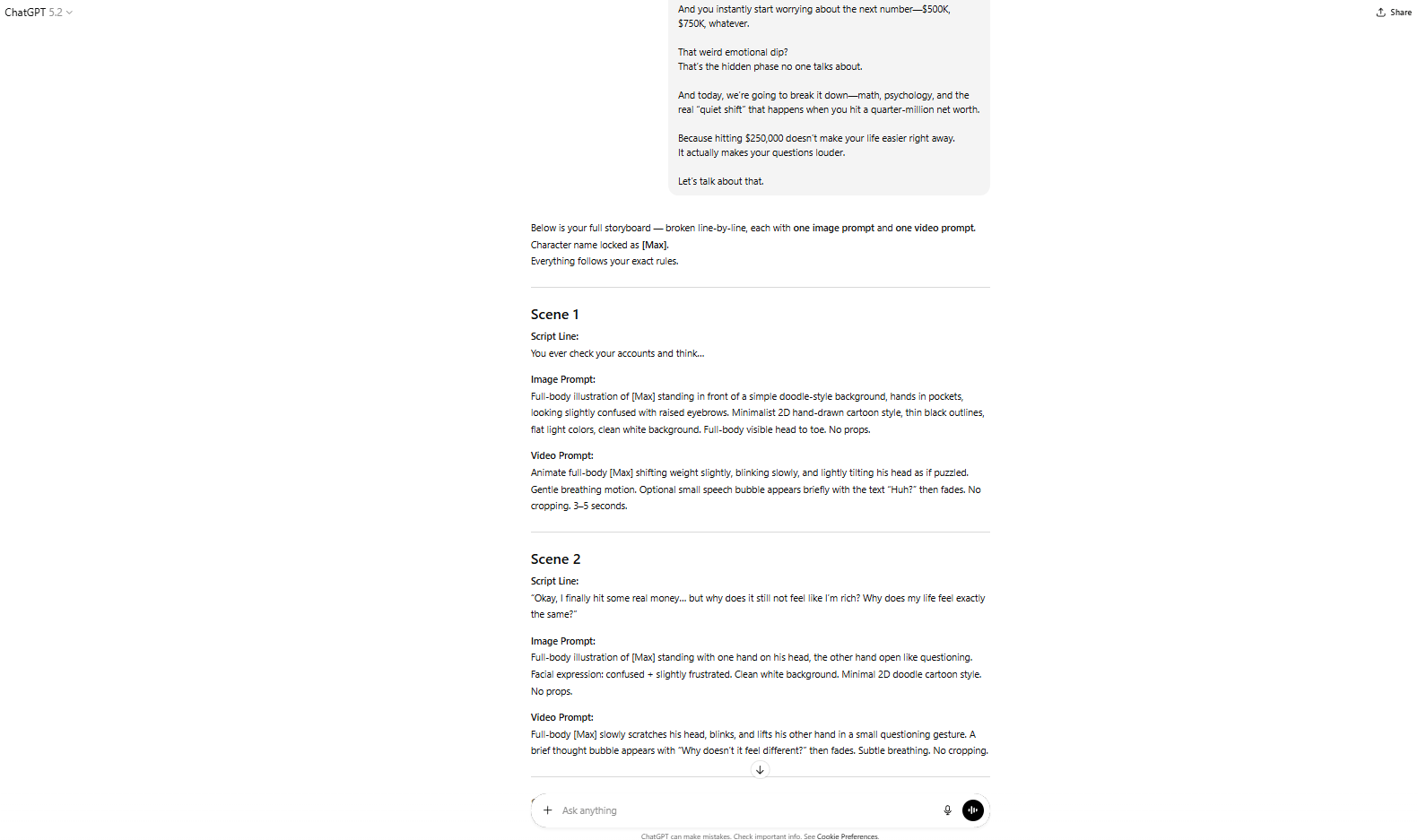
And now, you can get any prompt from that, go back to Gemini and create your new image that definitely remains consistency.
Gemini will generate a new scene while keeping the same person. This trick alone makes your videos look 10x more professional.
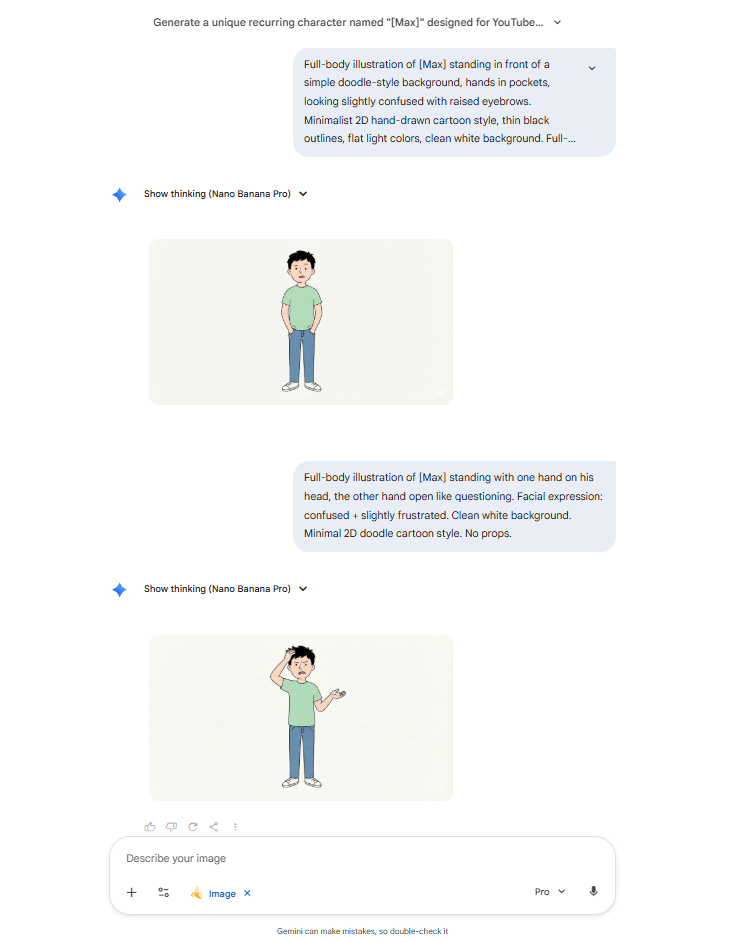
*Important note: When you generate images too much, your Gemini chat may become heavier and slower, which can cause your images to lose consistency. But don’t worry too much.
All you have to do is open a new chat in Gemini, upload your character image and paste this prompt:
This is my character [Max]. Store this character for future reference.
Whenever “[Max]” is mentioned in future prompts, automatically use this exact character design to generate all related images and visuals.
This trick helps you save a lot of time. Instead of creating your character from the beginning, you just feed the reference and keep it as a default in your new chat.
Rule: One character, one reference image, one style. Never regenerate from scratch.
VIII. Step 5: Turning Static Images Into Video Clips
Once you have your images, you need movement. Static images look cheap on YouTube. Even a tiny bit of motion makes everything feel more cinematic.
Grok Imagine handles this. It's completely free and turns your AI-generated images into short video clips with subtle movement.
The workflow is simple:
You go to Grok Imagine, switch to Video Mode.
Grab your image in scene 1 and video prompt for scene 1.
Paste into Grok and hit Enter. Done! That’s all.
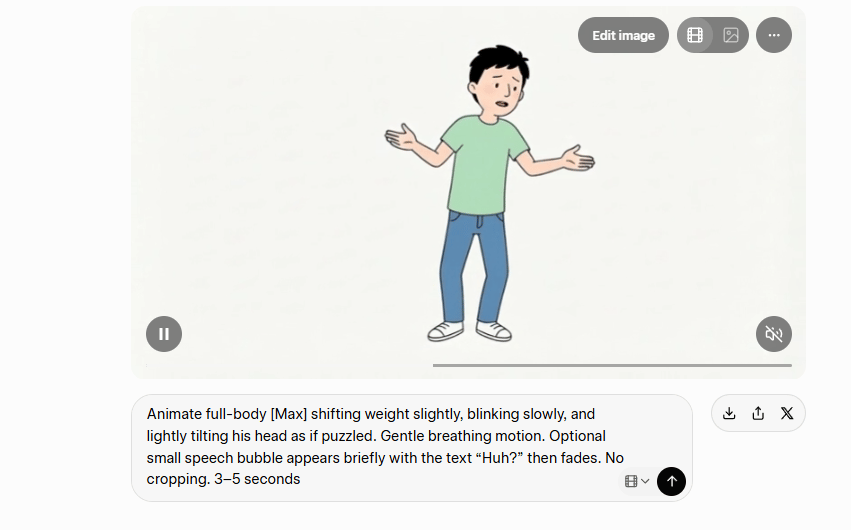
In a few seconds, you have your first video. Download and repeat for each scene in your script. And that’s how you create a library for your video.

IX. Step 6: Editing Like a Pro Even If You've Never Edited Before
At this point, you have:
Voiceover audio (from ElevenLabs)
Video clips (from Grok)
A clear script.
Now you put it all together. These are video editors that don't require a film degree to understand. Remember: you’re stitching clips together, adding text and syncing everything to a voiceover, not making a Marvel movie.
Basic Editing Workflow in CapCut or Filmora
Just follow these steps and you will have a perfect video for your YouTube channel:
Import your voiceover first: This becomes the foundation of your timeline. Everything else syncs to it.
Lay video clips over the audio: Match visuals to what's being said. If the voiceover talks about office work, show office scenes.
Add B-roll every 5 to 7 seconds: Add stock footage of money, cities or luxury items every 5-7 seconds to break the pattern.
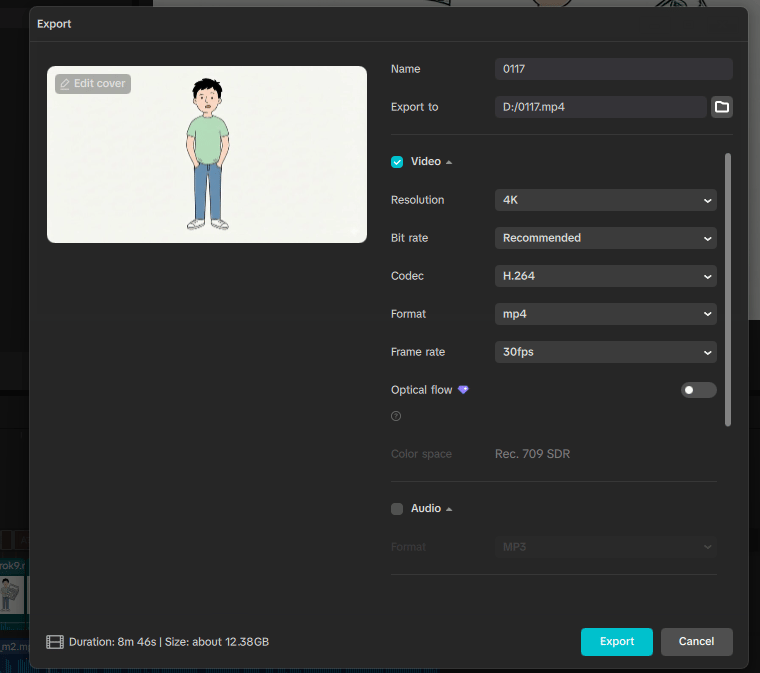
Add text and captions: Use the "Auto Captions" feature in CapCut so you do not have to type every word by hand. Then, use big, bold fonts. Most people watch on phones, so small text disappears.
Add background music at 30 to 40% volume: Never louder than the voiceover. Music sets the mood but shouldn't distract.
Use simple transitions. Quick cuts or short fades. Fancy transitions look amateurish.
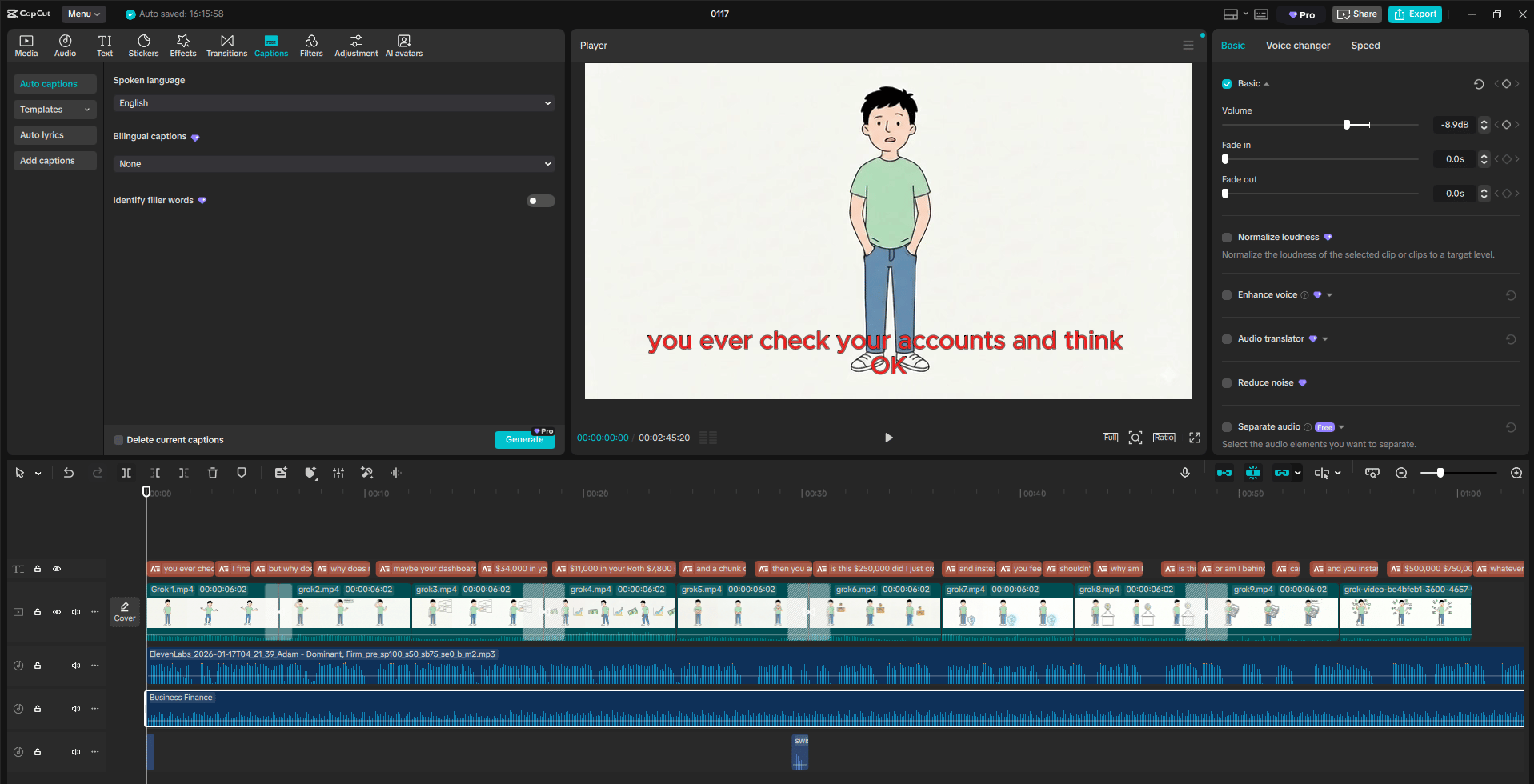
Oh, there is something you need to know: YouTube favors videos over 8 minutes because that's when mid-roll ads kick in. If your video is 7:30, add a slightly longer intro or outro to cross that threshold. This literally doubles your ad revenue potential.
If you want your video to look more professional, these are some tricks you can follow:
Progress bars or chapter markers: People like knowing how much content is left.
Silence Removal: Use the "Auto-Ripple" or "Silence Detection" feature to remove every "um", "ah" and long pause.
Soundscapes: Add a push-right transition with a "Click" sound effect or a flash transition with a "Whoosh". These tiny details signal to the brain that the video is high-quality.
Visual pattern interrupts: Change scenes, zoom in or add graphics every 10 to 15 seconds.
X. Step 7: Uploading for Maximum USA Revenue
You can create a great video and still earn terrible RPM if you don't optimize for the right audience. Finance content earns the highest payouts when it reaches viewers in the USA, UK, Canada and Australia. To make that happen you need to guide the algorithm instead of hoping for luck.
1. Target USA Viewers Explicitly
Picture a viewer in New York or Texas scrolling through YouTube after work. The platform shows them content that looks familiar, local and relevant. To reach that audience, you need to shape your video the same way:
Use American spelling (like "color" instead of "colour") to attract viewers in the USA, where ad rates are higher.
Reference USD, US cities and American success stories.
Upload during USA peak times (6 to 9 PM Eastern Standard Time).
The algorithm pushes videos toward the audience they look and feel built for.

YouTube Channel settings.
2. Thumbnail Psychology
Imagine a viewer stopping mid-scroll because a thumbnail triggers an instant emotional signal. That pause is everything. The best thumbnails usually include:
Face showing emotion (shock, confidence, determination).
Text overlay: 3 to 5 words maximum ("$1M in 7 Years").
High contrast colors (red, yellow, white on dark backgrounds).
Professional look, not clickbait.
Clickbait thumbnails get tapped but they don’t keep viewers watching. Professional visuals do both of them do build trust to viewer.
Creating quality AI content takes serious research time ☕️ Your coffee fund helps me read whitepapers, test new tools and interview experts so you get the real story. Skip the fluff - get insights that help you understand what's actually happening in AI. Support quality over quantity here!
3. Description Optimization
When someone glances at your description, they’re deciding in seconds whether the video is worth their time. The strongest descriptions:
Lead with two sharp lines telling viewers what they’ll learn. This shows up in search results.
Include timestamps. YouTube loves this. Example:
0:00 - Introduction
1:30 - The First Money Rule
4:15 - How to Apply This Today
Use relevant keywords naturally, without stuffing.
Include any tools or resources mentioned to build authority.
A good description helps YouTube understand your content and helps viewers trust it.
Tags don’t make videos go viral but they help YouTube categorize your content correctly. A simple structure works best:
Primary: Your exact topic (e.g., "millionaire mindset").
Secondary: Related finance terms (e.g., "wealth building", "passive income").
Tertiary: Broader terms (e.g., "personal finance", "money management").
When tags match the topic clearly, YouTube is more likely to show the video to viewers who actually want it.
To avoid making this post too long and confusing. I already create a one-page list that contains all the prompts that help you create a YouTube channel name, logo, banner, tags, channel description. Instead of researching, finding and thinking too much, all you need is open this list and paste it into your ChatGPT. Convenient, right?
⭐ How would you rate this "How to Make Money with AI" blog post?Help us improve by picking one that best describes your thoughts: |
|
XI. The Reality Check: What They Don't Tell You
This system works. But you need to understand what "works" actually means.
1. Your First Videos Will Get Low Views
Your first five videos might get 100 to 500 views each. That's normal. That’s the algorithm learning who your audience is. It can’t recommend your content confidently until it understands what you make and who responds to it.
Most give up too early. The ones who stay consistent start to see the shift.
2. Consistency Beats Perfection
You need to post 2 to 3 videos per week for 2 to 3 months before the algorithm really picks you up. One viral video can change everything but you can't predict which one it'll be.
3. The RPM Numbers
When a channel finally reaches the right audience (finance viewers in the USA), the payouts climb fast:
$12 to $22 per 1,000 views
100,000 views = roughly $1,200 to $2,200
1 million views = $12,000 to $22,000
But none of that activates until your channel crosses monetization:
1,000 subscribers.
4,000 watch hours (or 10 million Shorts views in 90 days).

4. Time Investment Per Video
Behind every “simple” video is real work:
Research and scripting: 2 to 3 hours
Voiceover generation: 30 minutes
Image and video generation: 2 to 3 hours
Editing: 3 to 4 hours
Expect to spend 8 to 11 hours making each video. This is a real job, not a "get rich quick" scheme.
Can you commit to one video per week? 12 videos in three months is enough for the algorithm to understand you and enough for your content to start compounding.
XII. The Bottom Line
Here's the truth: 90% of people who read this will never make a single video. They'll bookmark it, tell themselves "I'll start next week" and never follow through.
Don't be that person. There’s a saying: “The best time to plant a tree was 20 years ago. The second best time is now”. And it applies here as well.
If you follow this free AI workflow, you remove every excuse. You don't need a team, a budget or a camera. You just need to commit to two videos a week for 90 days. That's how faceless finance channels go from zero to millions of views.
And that's exactly how you'll do it too.
If you are interested in other topics and how AI is transforming different aspects of our lives or even in making money using AI with more detailed, step-by-step guidance, you can find our other articles here:
YouTube Cloning Hack: Reverse-Engineer Any Viral Channel in 10 Minutes (No Guessing)*
Only 7 Prompt Rules You Need to Master Any Al Video Tool (Veo, Sora, Even 2026 Ones)
21 Practical ChatGPT Hacks Real Al Masters Use to Work 2x Faster (Most Free)
Google's Gemini or ChatGPT: The Clear Best AI to Boost Your Marketing Traffic & Sales in 2026
*indicates a premium content, if any
Reply