- AI Fire
- Posts
- ⚡ 7 Ways To Master Your AI Automation (Part 2)
⚡ 7 Ways To Master Your AI Automation (Part 2)
Part 2 of the n8n masterclass. Learn the 7 advanced nodes (like Code, Webhooks, and AI Agents) that give your automations a brain and hands

Max Anh
December 05, 2025

TL;DR BOX
Part 2 of this n8n guide introduces seven advanced nodes essential for building intelligent AI agents, covering complex data handling, real-time connectivity and LLM integration. While Part 1 focused on basic automation, these nodes enable workflows to reason, execute code and interact dynamically with external apps.
Users will learn to use "Aggregate" and "Code" nodes to clean and restructure data, while "Webhooks" allow n8n to communicate bi-directionally with websites. The guide also details the "AI Agent" suite, which gives automations a "brain" to think and "hands" to execute tasks via connected tools.
Key points
Stat: These 17 total nodes (10 from Part 1, 7 from Part 2) power approximately 90% of all real-world automations.
Mistake: Relying on the "Edit Fields" node for complex formatting; use the "Code" node with ChatGPT-generated scripts for deterministic results.
Action: Enable the "Structured Output Parser" to force AI agents to return clean JSON data instead of conversational text.
Critical insight
An AI Agent is useless without "Tools"; connecting the "AI Tools" node transforms a passive chatbot into an active worker that can check calendars and scrape data
🎯 What’s your biggest automation goal right now? |
Table of Contents
I. Introduction: Leveling Up in AI Automation
Welcome back. In Part 1, we covered the foundation, the alarm clocks, the doorbells and the decision-makers. Now, we are going to the expert level.
These next 7 nodes are the ones that allow you to build AI automation agents. They let you handle complex data, connect to external apps in real-time and give your automations a "brain".
If Part 1 was about building the body of the robot, Part 2 is about giving it a mind for true AI automation.
II. How Do Aggregate And Code Nodes Help With Complex Data?
Answer
The Aggregate node is the opposite of Split Out. It takes many items and combines them back into a single list. That is perfect when you want to send one clean report instead of 10 separate messages. The Code node lets you run custom JavaScript or Python for tricky transformations. You can use ChatGPT to write the code, paste it in and get deterministic behavior when Edit Fields is not enough.
Key takeaways
Aggregate = join many items into one list for final reports or summaries.
Code node = handle messy formats, math or logic that other nodes cannot do.
You can let ChatGPT write the code and refine it through a few test cycles.
Critical insight
Edit Fields is great for simple labeling. When you need exact control, Code is the scalpel that gives predictable, repeatable results.
11. Aggregate, The "Cleanup Crew"
In Part 1, we talked about "Split Out", which dumps the bag of marbles onto the table. Aggregate does the opposite.
What It Does: It takes all the separate items (marbles) and puts them back into a single bag (a list).
Input: 10 separate emails that you just generated AI summaries for.
Output: One single list containing all 10 summaries.

From 10 separate items to one single list.

Why It Matters: Sometimes you want to send one report to your boss that lists all the work you did. You don't want to send him 10 separate emails. You use Aggregate to combine everything into one neat list and then send that one list in a single email.
12. Code Node, The "Calculator"
This is the only node that might look scary but it is the most powerful for customizing your AI automation.
What It Does: It lets you write small pieces of JavaScript or Python code.
Example: I created a workflow to extract any YouTube video’s transcripts through the Apify website (using the HTTP node).
My problem is that the output looks messy and I almost can’t use it.
I want to split the transcript and the timestamp into different places but the Split Out node or Edit Fields node can’t do that BUT the Code node can.
So, I copied the output and used ChatGPT to write the code for me.
After getting scripts for 2 different code nodes, I go back to n8n → create 2 new Code nodes → paste the scripts into them → run them.
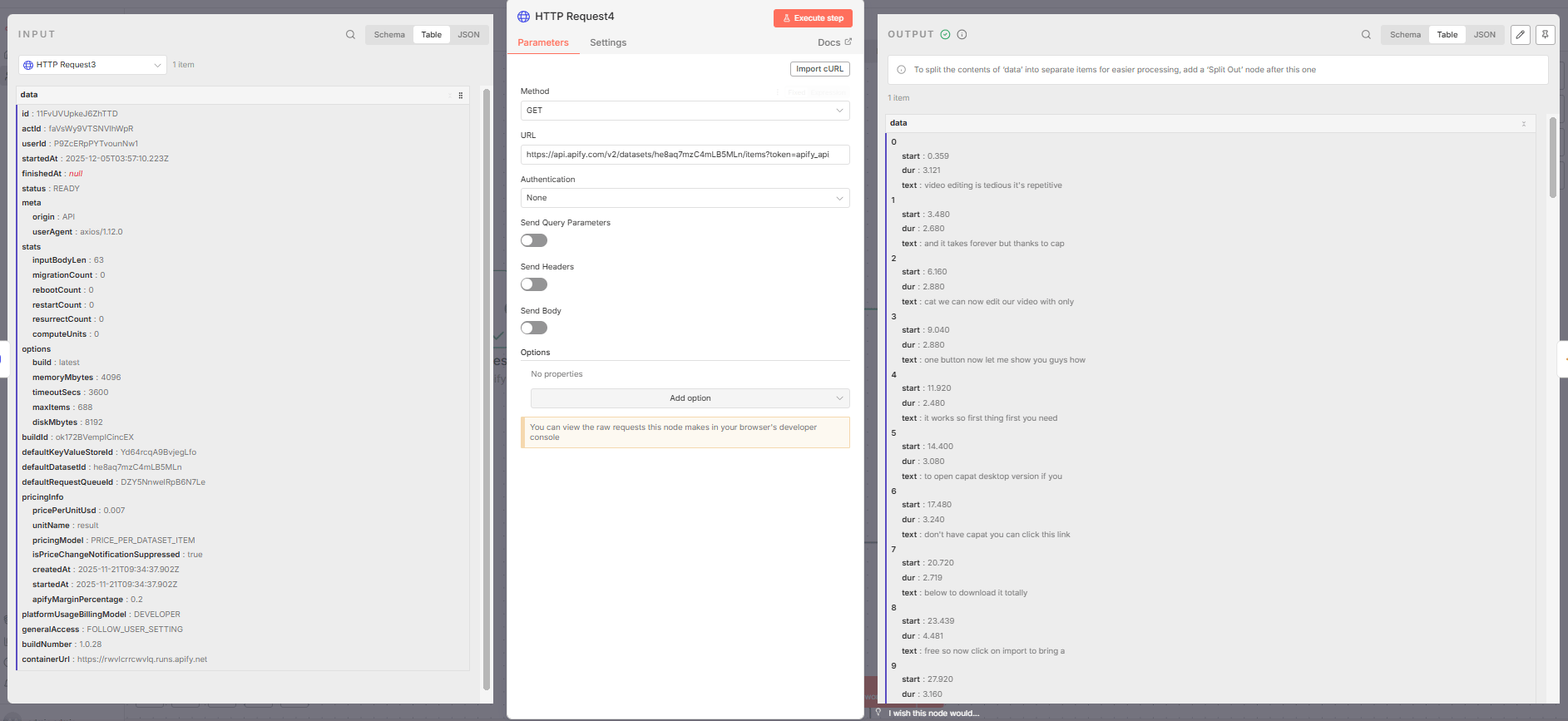
My problem.
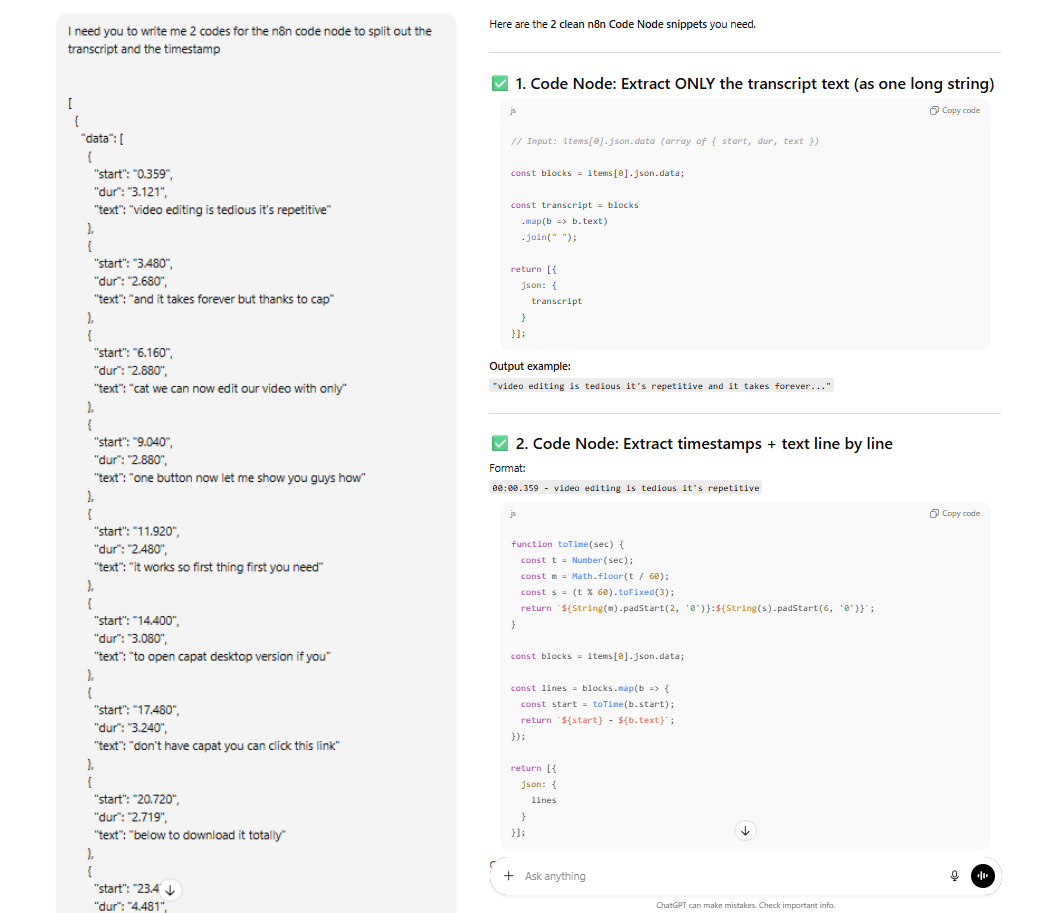
ChatGPT helps me with the coding part.

New Transcript Text.

New Timestamp.
*Note: Maybe the result will not be perfect on the first try. Don’t worry, that is normal. I have it most of the time.
The key is you have to give it the input, what you want it to do, the output you got after you test and why it is wrong.
You have to go back and forth a couple of times but that’s how you could get the best result.
Why It Matters: Sometimes, the "Edit Fields" node isn't enough. Maybe you need to do complex math or weird text formatting or logic that is very specific. The Code node is purely deterministic; it does exactly what you tell it to do, every time. It is faster and cheaper than asking an AI model to "fix this text" within your AI automation.
III. How Do Webhook And Respond To Webhook Let n8n Talk To The Outside World?
Answer
Webhook creates a special URL. When another app sends data to that URL, your workflow fires. It is how a form, a custom app or a script can push data into n8n without any built-in node. Respond to Webhook is the reply. It sends a response back to whoever called the webhook. That is how you power live chatbots, forms or APIs where the caller waits for an answer.
Key takeaways
Webhook = inbox for data from websites, apps and scripts.
Respond to Webhook = send a reply back once your flow finishes.
Together they let you build your own mini API or live chatbot backend.
Critical insight
Once you understand this pair, any app that can call a URL can trigger your automations and get real-time answers.
13. Webhook, The "Mailbox"
We talked about triggers before but the Webhook is special for connecting external tools to your AI automation.
What It Does: It creates a unique URL (a web address). Whenever anyone or any app sends data to that address, your workflow triggers.
Why It Matters: This is how you connect n8n to apps that don't have a built-in integration.
Example: I built an app in Google AI Studio to scrape leads and I want to send that data to my Google Sheets.
When I click the "Scrape Leads” button, the form sends the data to your n8n Webhook URL.
n8n catches it instantly and starts working. It is the universal receiver.
The final data will be sent to my Google Sheets.


If you want to build this workflow, you could see the guide right here: AI Lead Scraper.
14. Respond to Webhook, The "Reply"
If the Webhook is the ear listening for a message, this node is the mouth answering back.
What It Does: It sends data back to the thing that triggered the webhook.
Why It Matters: Imagine you have a chatbot on your website connected to your AI automation.
User types "Hello".
Website sends "Hello" to your Webhook.
Your AI thinks and generates a response.
Respond to Webhook sends that response back to the website so the user can see it. Without this node, your website would just hang there waiting for an answer that never comes.
Example: I used a super simple workflow
First, I go to the Postman website and create a GET request. In the Query Params field, I fill “message” in the Key field and “Hello from Postman!” in the Value field.

Now I go back to n8n, create a simple workflow with a Webhook Trigger, an AI Agent node and a Respond to Webhook node.

In the Webhook Trigger, I set the HTTP Method to GET and the Respond field from “Immediately” to “Using ‘Respond to Webhook’ Node” (this is an important part!). After that, I copied the Test URL and pasted it into the URL field in Postman.

Then I hit the Execute Step. If you don't see anything, don't worry, it's because our AI Agent is not working yet.
Now, open the AI Agent Node. I’ll change the “Source for Prompt” to Define below and grab the message to the Prompt field.

Let's move to our last node, the Respond to Webhook node. Here, I'll change the “Respond With” field to First Incoming Item. And everything is set up.
The last thing I do is hit the “Execute Workflow” button → go to Postman and hit the Send button. And you'll see the answer.
That is how the “Respond to Webhook” node works; it gives your website the answer.

IV. What Do AI Agent, AI Tools and Structured Output Parser Actually Do?
Answer
The AI Agent node is the “brain.” It connects your flow to an LLM like Gemini, ChatGPT or Claude. You give it a system message and input. It reasons and produces an answer. The AI Tools node is the “hands.” It gives that brain access to actions like HTTP calls, calendars or search. Structured Output Parser is the “translator.” It forces the model to return strict JSON so other nodes can trust the result.
Key takeaways
AI Agent = natural language reasoning inside your workflow.
AI Tools = let the agent act on the world instead of just talking.
Structured Output Parser = clean, reliable JSON instead of messy text.
Critical insight
An “agent” is just an LLM plus tools plus structure. Without tools it is a chatbot. With tools and strict output, it becomes a reliable worker.
15. AI Agent, The "Brain"
This is the star of the show for any AI automation.
What It Does: It connects your workflow to a Large Language Model (LLM) like ChatGPT or Claude.
You give it a "System Message" (Instructions: "You are a helpful assistant").
You give it the input (The user's question).
It thinks and gives you an answer.
Example: Let’s take the AI Agent node in the previous example (#14).
As you can see, the output for the input “Hello from Postman!” is kind of basic.

So, I level it up by using the System Message.

With a small change to the message, the output is much better.

Why It Matters: This node transforms your AI automation from a simple script into an intelligent worker. It can understand language, make decisions based on context and write creative text.
16. AI Tools, The "Hands"
An AI Agent is just a brain in a jar. It can think but it can't do anything. This node changes that.
What It Does: It connects the AI Agent to other nodes in your workflow.
You can give the AI a "Google Calendar Tool".
Now, when you ask the AI, "Am I free at 2 PM?", it doesn't guess. It actually uses the tool to check your calendar and gives you the real answer.

Why It Matters: This is how you build "Agents". An Agent is just an AI that has access to Tools. This node lets the AI click buttons, send emails and search the web.
17. Structured Output Parser, The "Translator"
AI models love to ramble. They speak in paragraphs. But computers need structure (like strict lists or databases).
How to access: In the AI Agent node, you will see an option called “Require Specific Output Format.” Turn it on and go outside the node.
Add a “Structured Output Parser” node in the Output Parsers option.

What It Does: It forces the AI to reply in a specific, strict format (usually JSON).
You ask: "Read this email and tell me the sender and the tone".
Without Parser: "Sure! The sender seems to be John and he sounds angry…" (This is hard for a computer to use).
With Parser:
{
  "sender": "John",
  "tone": "Angry"
}
Structured Output Parser setting.

Without Parser.

With Parser
Why It Matters: This ensures reliability. If you are saving data to a database, you need it to be perfect every time. This node forces the AI to stop chatting and start outputting clean data.
V. Conclusion: You Are Now Ready
You have just learned the 17 Essential Nodes of n8n.
Part 1 gave you the foundation: Scheduling, Triggers, Sheets and Logic.
Part 2 gave you the superpowers: Webhooks, Code and the entire AI Agent suite.
You do not need to learn the other 500 nodes right now. These 17 are the LEGO bricks you will use to build 90% of your AI automations. You can build customer support bots, lead scrapers, content generators and business dashboards just with this list.
The path from beginner to confident builder isn't about knowing everything. It's about mastering the essentials that power everything. "Focus determines reality".
Now, go build something amazing.
If you are interested in other topics and how AI is transforming different aspects of our lives or even in making money using AI with more detailed, step-by-step guidance, you can find our other articles here:
How To Scrape Google Maps For $30k/Month Business Ideas*
*indicates a premium content, if any
How would you rate this article on AI Automation?We’d love your feedback to help improve future content and ensure we’re delivering the most useful information about building AI-powered teams and automating workflows |
Reply