- AI Fire
- Posts
- 🤖 My Exact 5-Step System: How I Train ChatGPT To Write Copy That Actually Sells
🤖 My Exact 5-Step System: How I Train ChatGPT To Write Copy That Actually Sells
Most AI copy sounds robotic. I share my 5-step system to train ChatGPT with your customer's voice so it writes website content that actually sells.

Neil Phan
December 12, 2025
TL;DR
Train ChatGPT with specific business data and customer research to stop generic, robotic outputs. You must feed it facts and real customer language before asking it to write.
Standard AI models copy boring corporate language because they are trained on the "average" internet. To fix this, create a "Business Cheat Sheet" containing your specific services and a "Voice Dictionary" with real customer complaints found on forums. Upload these documents to a Custom GPT.
This process forces the AI to speak in your unique brand voice rather than using safe, filler text. You must also set strict rules that forbid common fluff words to ensure the copy sounds human.
Key points
Fact: AI defaults to "safe," average text that describes features rather than selling benefits.
Mistake: Asking ChatGPT to write your entire website in a single prompt.
Takeaway: Scrape forums for exact customer slang to replace corporate jargon.
Critical insight
Effective AI writing requires setting strict negative constraints on what the tool cannot say, just as much as telling it what to write.
😫 What’s your biggest headache with AI writing? |
Table of Contents
I remember the first time I tried to use AI to write copy for my website. I opened ChatGPT, typed "Write a homepage for my consulting business," and waited.
The result? It was terrible.
It said things like, "We are committed to excellence in every project" and "We bring your dreams to life." It sounded exactly like every other boring website on the internet. It didn't sound like me. It didn't sound like a real human being. And worst of all, I knew that if a real customer read it, they would leave my site in two seconds.
I almost gave up. But then I spent months testing different ways to talk to the AI. I realized that the tool wasn't the problem. The problem was how I was teaching it.
If you treat ChatGPT like a random freelancer who knows nothing about you, you get bad results. But if you treat it like a partner and give it the right "brain," it changes everything.
I have built a 5-step system that fixes this. It stops the robot talk. It creates content that makes people want to buy. And once you set it up, you can use it forever.
Here is exactly how I do it.
Part I: Why Does Standard AI Writing Fail So Hard?
Standard AI models are trained on millions of websites, most of which use boring, generic corporate language. Consequently, the AI outputs the "safe average" of this data, resulting in bland text that describes features rather than selling benefits. Furthermore, without specific facts, the AI will "hallucinate" or invent details to make the text look complete, which destroys customer trust.
Key takeaways
Fact: AI defaults to "safe" answers, avoiding the distinct language needed for sales.
Comparison: Writing sentences is not the same as selling; AI needs training to understand "pain points."
Update note: If you don't provide specific dates or experience levels, the AI will likely lie to fill the gap.
Action: Never accept the first generic draft; you must input specific constraints to stop the robot talk.
Default AI prioritizes sounding "professional" over being effective, which is often the kiss of death for actual sales.
Before we fix the problem, we need to understand why it happens. When you know why ChatGPT writes bad copy, you will stop making the same mistakes as everyone else.

1. It Copies The "Average" Of The Internet
ChatGPT was trained by reading millions of websites. Think about that for a second. Most websites are bad. They are boring, confusing, and full of business words that mean nothing.
When you ask for a "professional website," the AI looks at its memory and gives you the average of what it has seen. It gives you the "safe" answer. It gives you "We provide high-quality solutions." This is the kiss of death for sales. You do not want to be average. You want to be different.
2. It Does Not Know How To Sell
There is a big difference between "writing sentences" and "selling." Standard AI thinks its job is just to describe what you do. But a good website does not just describe. It tells a story. It makes the customer feel understood. It leads them to click the "Buy" button.
Without specific training, ChatGPT doesn't know about "pain points" or "calls to action." It just fills the page with text.
3. It Lies (Hallucinations)
This is the scary part. If I don't give it facts, it will make them up. I have seen ChatGPT say a business has "20 years of experience" when it only opened last year. It does this to make the text look complete. But if a customer catches you in a lie, trust is gone forever.
The solution isn't to ban AI but to channel it into the right use cases where accuracy is controlled. We need to shift from creative writing to data driven tasks where the machine excels.
I have compiled the most effective ways to use this technology that actually work in the real world in my article Triple Your Results Without Hiring. 5 Easy AI Use Cases. Learn how to harness this power correctly to get ahead of ninety nine percent of businesses who are still just guessing.
Learn How to Make AI Work For You!
Transform your AI skills with the AI Fire Academy Premium Plan - FREE for 14 days! Gain instant access to 500+ AI workflows, advanced tutorials, exclusive case studies and unbeatable discounts. No risks, cancel anytime.
Part II: How Do I Prepare The AI Before Writing A Single Word?
You must provide the AI with a "brain" by creating a "Business Cheat Sheet" containing your specific services, guarantees, and ideal client details. Additionally, you need to find the "Voice of the Customer" by using a research prompt to scrape forums like Reddit for the actual slang and complaints your clients use. This replaces corporate jargon with language that resonates emotionally.
Key takeaways
Fact: Your "Business Cheat Sheet" acts as the "truth source" to prevent hallucinations.
Comparison: Businesses say "comprehensive solutions," but customers say "I want white teeth without pain."
Tool: Use the "Deep Research" prompt to gather 15–20 direct quotes from real people.
Action: Create a "Voice Dictionary" to teach the AI exactly how your customers speak to their friends.
If you don't feed the AI the specific facts inside your head, it effectively has to guess, leading to generic results.
Most people skip this part. They jump straight to "Write my homepage." That is a mistake. You need to give the AI a brain before you ask it to speak.
1. The "Business Cheat Sheet" (Data Dump)
I never let the AI guess. I create a simple text document (a Word doc or a Notepad file) called my "Business Cheat Sheet." I put everything I know about my business in here. It does not need to be neat. It just needs to be true.
Here is what I put inside:
My Services: I list them in order. Which one makes the most money? Which one is the most popular?
The "Why Me" Factor: Why am I better than the guy down the street? Do I work faster? Is my quality higher?
The Boring Details: My hours, my guarantees, exactly what comes in the package. If I offer 24/7 support, I write it down.
My Ideal Client: Who are they? Are they young moms? Old business owners? What are they afraid of?
I save this file. This is the "truth" source.
2. Finding The "Voice Of The Customer"
This is my secret weapon. You think you know what your customers want. But usually, businesses use different words than customers.
Business says: "We offer comprehensive dental hygiene solutions."
Customer says: "I just want my teeth to look white without pain."
If your website uses business words, you lose. You need to use the words your customers use when they talk to their friends.
I use ChatGPT to find these words. I use a "Deep Research" prompt to find where my customers hang out online (like Reddit, Facebook groups, or review sites) and see what they say.
Use this Prompt to find their voice:
"I need you to act as a Market Researcher. I am uploading my 'Business Cheat Sheet' so you know what I do.
Now, please use your browsing tool to find real discussions online from people who need my service. Look at Reddit, Quora, and review sites.
I want you to find 15-20 direct quotes from real people. I am looking for:
The Struggle: Exact phrases they use when they are frustrated.
The Wish: What do they say they wish existed?
The Anger: What did they hate about other companies they hired?
Please list the actual quotes. Do not summarize them. I need their real slang and emotions."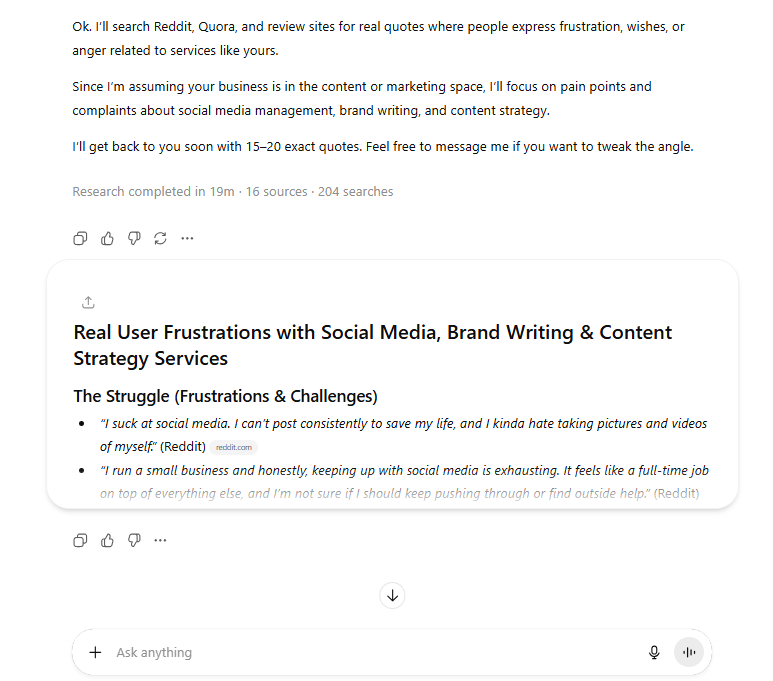
When ChatGPT gives me this list, I save it. This is my "Voice Dictionary." Now I can sound like my customers.
Part III: How Can I Learn From The Best Without Stealing?
You do not need to invent a new website layout. The biggest companies in your industry have already spent millions of dollars figuring out what works. We should learn from them.
This is not about copying their words. It is about copying their structure. Does their homepage have a video at the top? Do they put pricing on the front page?
I use ChatGPT to spy on the winners.
Use this Prompt to analyze competitors:
"I want to analyze the top 3 leaders in the [INSERT YOUR INDUSTRY] industry. Do not look at small local businesses. Look at the national giants who are winning.
Please visit their websites and analyze their Homepage and Service Page. Create a table for me that shows:
Section Order: What comes first, second, third?
The Hook: What is the very first sentence they use?
Trust Elements: Do they use logos? Testimonials? Numbers?
Call to Action: What does the main button say?
Tell me the common patterns you see. What are all the winners doing that I am not?"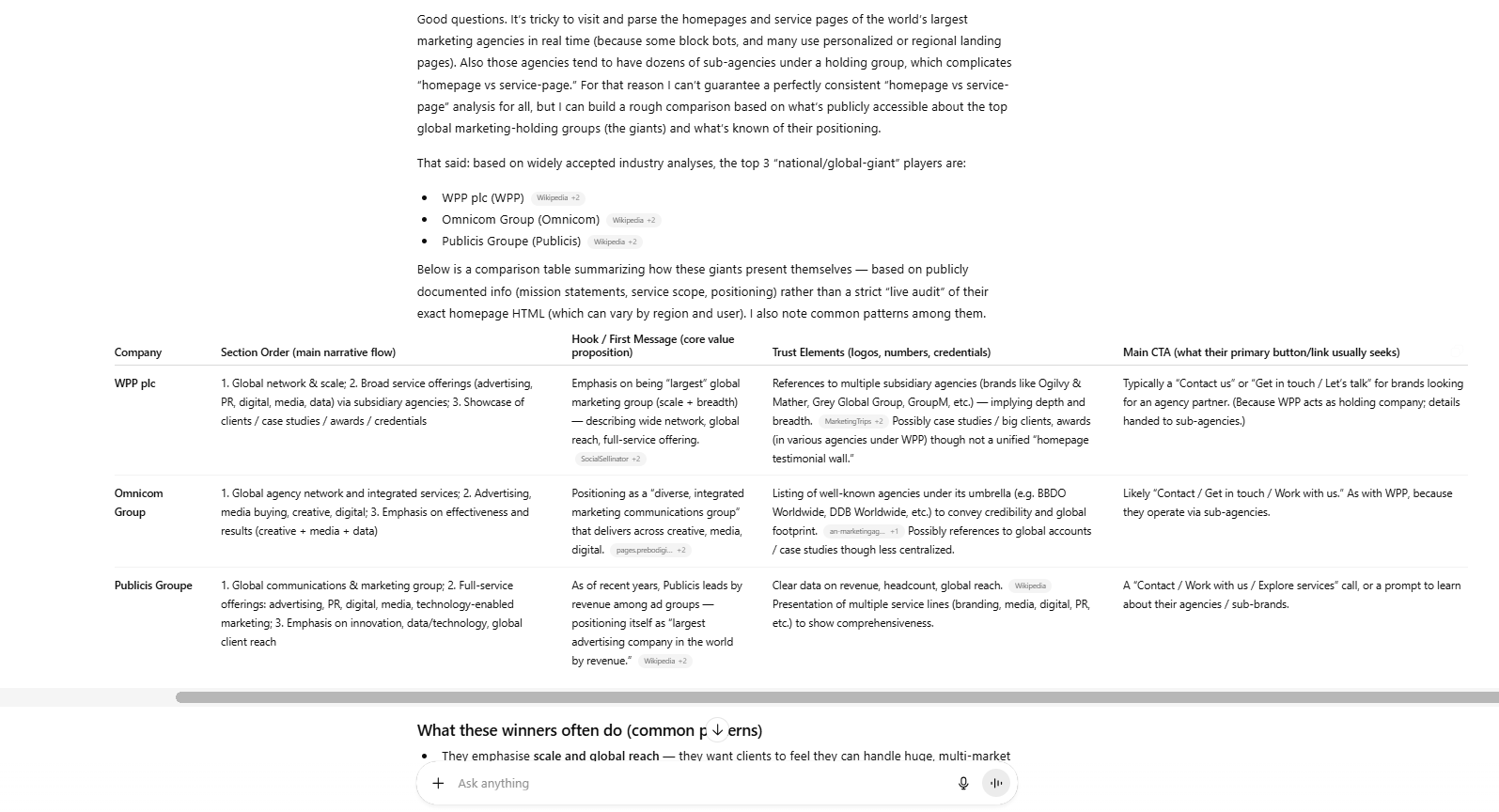
I copy these findings into a document called "Competitor Secrets."
Part IV: How Do I Build My Permanent Writing Assistant?
If you have the paid version of ChatGPT, you can build a "Custom GPT" that permanently remembers your business details. Upload your "Business Cheat Sheet," "Voice Dictionary," and "Competitor Secrets" into the knowledge base so you don't have to paste them every time. Then, provide "Golden Instructions" that strictly forbid fluff words and enforce a conversational tone.
Key takeaways
Fact: A Custom GPT acts like a dedicated employee who never forgets your brand guidelines.
Comparison: Standard chats forget context eventually; Custom GPTs retain files permanently.
Detail: Explicitly ban words like "unleash," "elevate," and "cutting-edge" in the instructions.
Action: Name your GPT "My Website Copywriter" and treat it as your primary marketing asset.
Setting strict "negative constraints" (what not to do) is just as important as telling the AI what to write.
Now comes the fun part. We are going to build a "Custom GPT."
If you use the free version of ChatGPT, you can just paste your documents into the chat every time. But if you have the Plus version, you can create a Custom GPT that remembers this forever.
1. Setting It Up
Go to ChatGPT and click on your name or the sidebar.
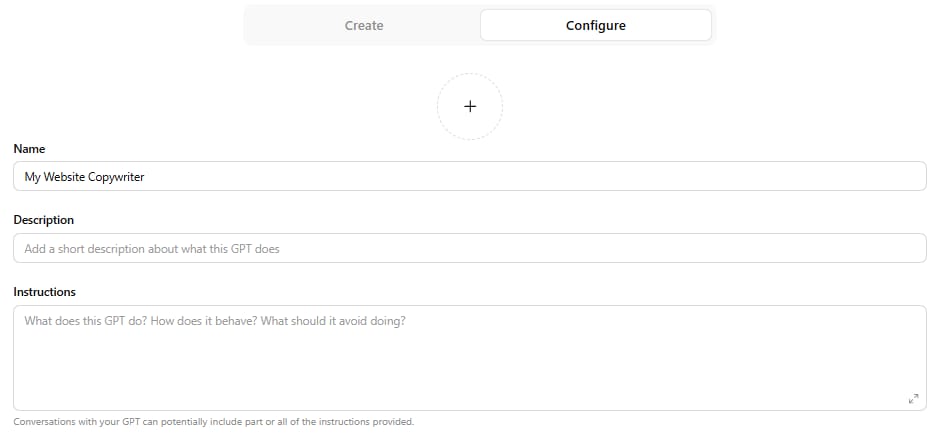
Click "My GPTs" -> "Create a GPT."
Go to the "Configure" tab.
Name it "My Website Copywriter."
Upload files: This is key. Upload your "Business Cheat Sheet," your "Voice Dictionary," and your "Competitor Secrets."
Building a Custom GPT is powerful but it is actually just one of many hidden features inside this tool. Most users stop at simple chatting and never discover things like temporary Projects or long term Memory.
To unlock the full potential of your subscription and stop wasting time on basic tasks read Most People Use ChatGPT Wrong. Here Are 20 Smarter Ways. It covers everything you need to know to move from a beginner to a power user.
2. The Golden Instructions
Now you need to tell it how to behave. In the "Instructions" box, paste something like this. This prompt is different from the video because it focuses heavily on tone and strict rules.
Copy these instructions:
"You are my expert Copywriter. Your goal is to write website pages for my business.
Your Knowledge Base: Always look at my uploaded files first.
Use the facts from 'Business Cheat Sheet.' Never invent new facts.
Use the tone and slang from 'Voice Dictionary.'
Use the page structure from 'Competitor Secrets.'
Writing Rules:
No Fluff: Never use words like 'unleash,' 'elevate,' 'navigate,' 'digital landscape,' or 'cutting-edge.'
Be Human: Write like a friend talking to a friend over coffee. Short sentences. Simple words.
Focus on 'You': Use the word 'You' more than 'We.' Talk about the customer's problem, not just my solution.
Format: When I ask for a page, break it down into clear sections (Hero, Problem, Solution, Proof, CTA).
My First Request: Wait for me to tell you which page to write."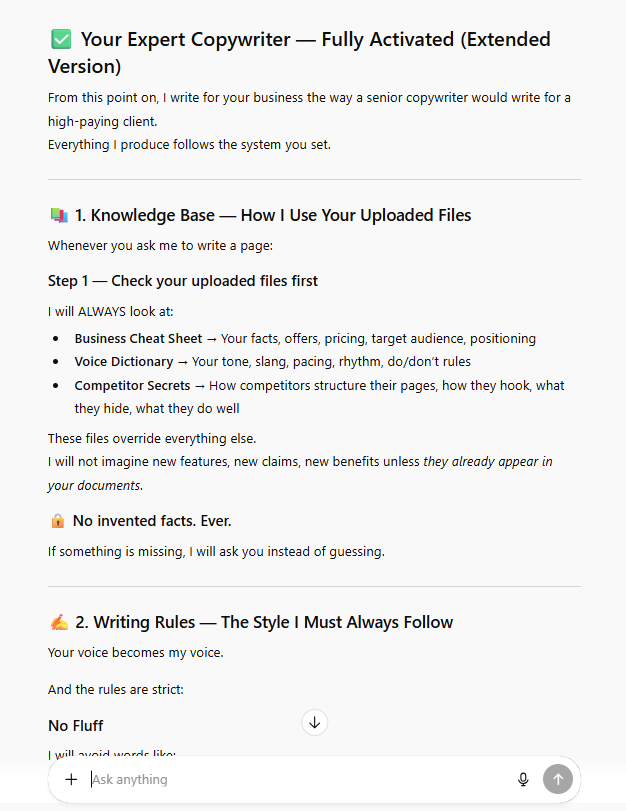
Now, save this GPT. You now have an employee who knows your business perfectly and will never forget.
Part V: What Is The Workflow To Actually Write The Pages?
Do not ask the AI to "Write the whole website." It will get overwhelmed and give you bad quality. You must go page by page.
Step 1: The Homepage
I start here. I open my Custom GPT and say:
Prompt:
"I need to write the Homepage. Based on the competitor analysis, outline the sections we need. Then, write the copy for the 'Hero Section' (the top part) and the 'Problem Section.'
Use the quotes from the Voice Dictionary to describe the customer's pain. Make the headline punchy and short."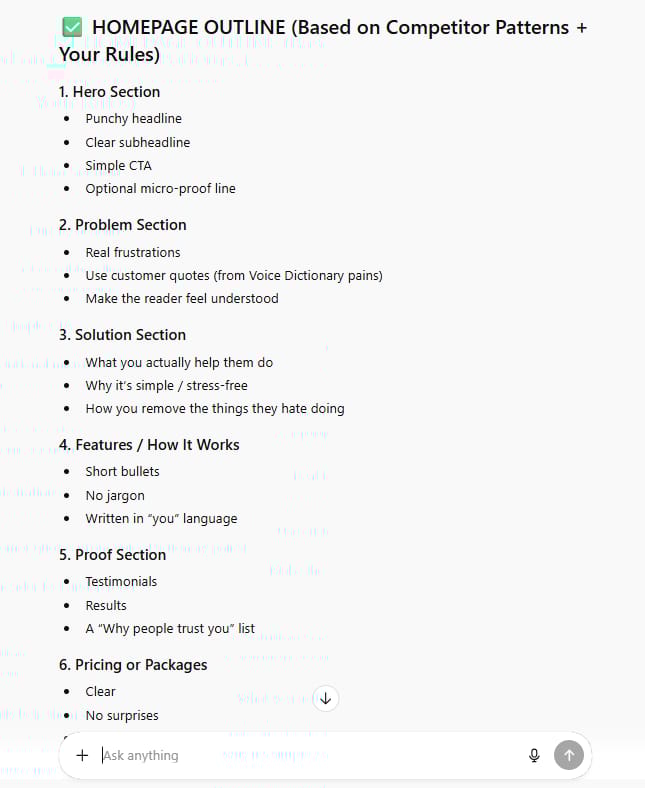
Step 2: The "About Us" Page
This page is tricky. Most people write a boring history lesson. The "About Us" page is actually about the customer. It should be: "Here is who we are, and here is why that is good for you."
Prompt:
"Write the 'About Us' page. Do not make it a boring timeline.
focus on this story arc:
We saw a problem in the industry (use the Voice Dictionary).
We built a solution to fix it.
Here are the values we promise to you.
Keep it humble and honest."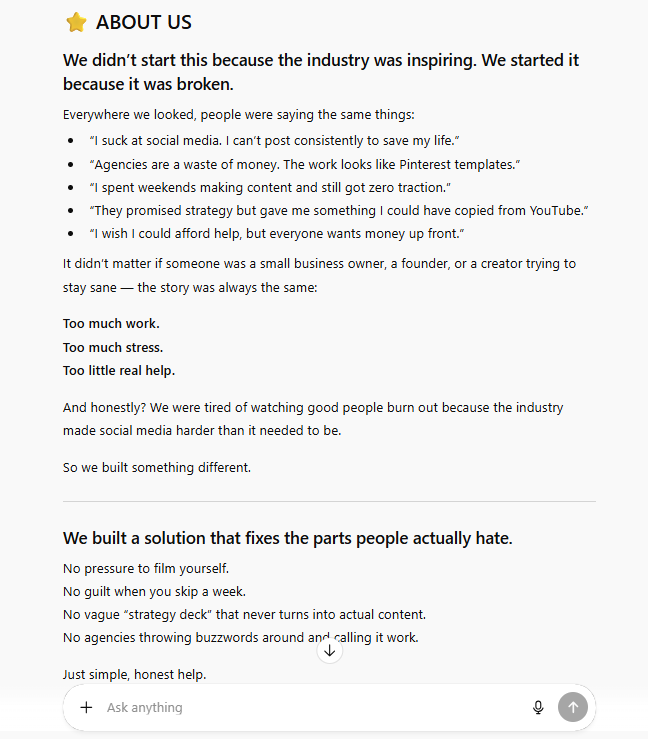
Step 3: The Refine Loop
The first draft is never perfect. That is okay. I read it and I act like a harsh editor.
If it sounds too happy/fake, I say: "Tone it down. Make it more serious."
If it uses a weird word, I say: "Don't use the word 'synergy.' Say 'working together' instead."
The "Human Polish" Checklist: Before I put any text on my website, I do these three things myself:
Read it out loud. If I stumble over a sentence, I delete it.
Check the facts. Did it get my price right?
Add my personal flair. I might add a joke or a local reference that only I would know. The AI gets me 90% of the way there; I do the last 10%.
By building this sophisticated workflow, you are officially in the top tier of AI users. While you are optimizing for revenue and efficiency, the vast majority of the world is using these powerful models for something completely different.
In fact, most people aren't using AI for work at all. To discover what the other seven hundred million users are actually whispering to their chatbots, read my report AI's Big Secret: What 700M People Use It For (It's Not Work). The data reveals a surprising trend that goes far beyond business."
Part VI: Does The Website Structure Really Matter?
You can have the best writing in the world, but if your website is messy, you will lose money.
Through my research, I found that almost every successful service business needs these 5 core pages. Do not try to be clever. Just use what works.
1. The Homepage
This is your storefront. It must answer three questions in 5 seconds:
What do you do?
Who is it for?
How do I buy it?
2. The Services Page
This is your menu. List your offers clearly. Do not hide the price (or at least give a range). People hate guessing.
3. The "About" Page
As mentioned, this builds trust. People buy from people. Show your face.
4. The "Social Proof" (Reviews)
You can put this on a separate page or sprinkle it everywhere. If you say you are good, nobody cares. If your neighbor says you are good, everyone listens.
5. The Contact Page
Make it easy. A phone number, an email, and a simple form. Do not make them create an account just to ask a question.
However, structure is only half the battle. If your site is organized perfectly but looks like it was built in the nineties, no one will read your content. You do not need to hire expensive designers to make it look professional. I have developed a method to create stunning visuals yourself using AI. Check out Gemini 3 Pro UI Hack: The 4-Step System That Beats Hiring Designers to learn how to visualize these pages before you even write a line of code."
Conclusion: It Is Time To Start
Writing a website used to be my biggest headache. I would stare at a blank screen for hours. Now, with this system, I can write a full website in one afternoon. And it is not just "filler" text. It is text that uses my customers' own words to sell to them.
Here is your homework:
Open a blank document right now.
Spend 15 minutes writing your "Business Cheat Sheet." Just dump everything you know out of your head.
Go to ChatGPT and do the research.
The robot is only as smart as the teacher. Be a good teacher, and you will get a website that works for you 24/7.
Good luck!
If you are interested in other topics and how AI is transforming different aspects of our lives or even in making money using AI with more detailed, step-by-step guidance, you can find our other articles here:
Quit Paying Pros: Build $5k Websites With Free Google AI Tools
Google Is Dead? This New ChatGPT Shopping Trick Changes Everything
Earn Money with MCP in n8n: A Guide to Leveraging Model Context Protocol for AI Automation*
Transform Your Product Photos with AI Marketing for Under $1!*
Forget ChatGPT: 10 New AI Tools Minting Millionaires In 2026 List
*indicates a premium content, if any
How useful was this AI tool article for you? 💻Let us know how this article on AI tools helped with your work or learning. Your feedback helps us improve! |
Reply