- AI Fire
- Posts
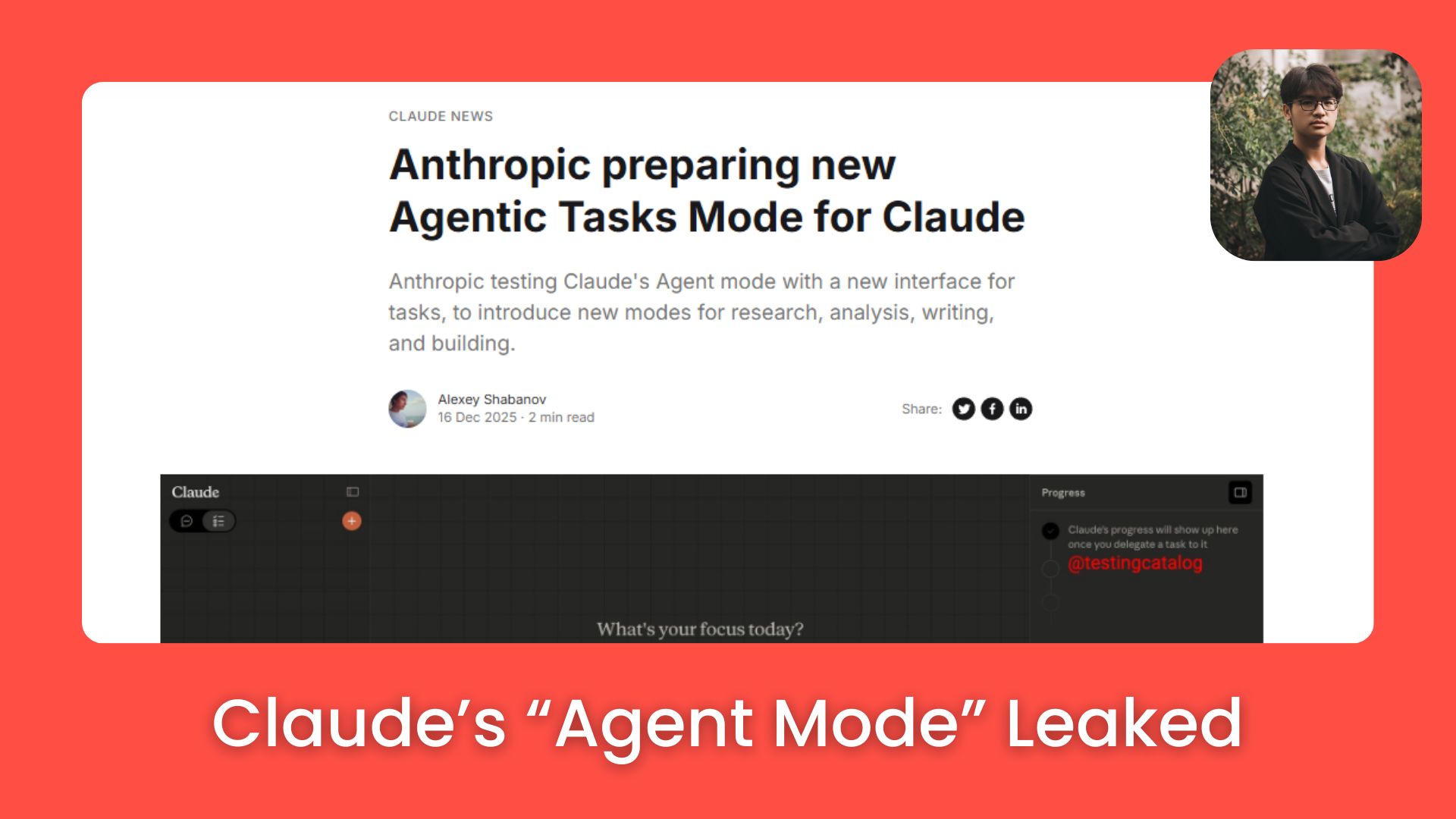
- 🕵️♂️ Claude’s “Agent Mode” Leaked: Why the Blank Chat Box Is About to Die
🕵️♂️ Claude’s “Agent Mode” Leaked: Why the Blank Chat Box Is About to Die
The blank chat box is dying. Here’s how Claude’s Agent Mode changes AI work and how to use it to validate trends and build real ideas.

Max Anh
January 05, 2026
TL;DR BOX
Claude's leaked "Agent Mode" replaces the blank chat box with five specialized task buckets, transforming Claude from a chatbot into an agent you manage. This shift allows users to delegate complex workflows like research and coding with real-time progress tracking.
The update solves "prompt paralysis" by guiding users through specific modes for outcomes rather than forcing them to structure raw text. This guide also details a 5-minute method to validate trends using search data and highlights tools like Krea and NotebookLM to streamline creative AI work.
Key points
Stat: Hyrox search interest rose 266% year-over-year, signaling a validated "high growth, low competition" opportunity.
Mistake: Staring at a blank prompt box; instead, select a specific "task bucket" to guide the AI's output.
Action: Upload documents to NotebookLM to instantly generate structured slide decks for presentations.
Critical insight
Success is moving from "prompt engineering" to "agent delegation", where you direct autonomous systems rather than micromanaging every step.
🤯 Is writing AI prompts burning you out? |
Table of Contents
I. Introduction: The Death of the Blank Text Box
For a long time, using AI meant staring at a blank text box and trying to guess how to phrase your thoughts. If you’ve ever felt stuck before typing anything, it’s not because you’re bad at prompting. This leak shows what happens when that responsibility shifts.
The biggest bottleneck isn’t the AI, it’s you trying to turn messy thoughts into perfect instructions upfront.
That empty box looks simple but it quietly asks you to plan, structure and explain everything up front. Most people burn energy before the AI even starts working.
This leak showed what happens when that responsibility shifts. We’ll walk through a complete framework for validating trends, two underrated AI tools you should be using today and a startup idea in the hospitality space that is criminally simple.
Let's break it all down.
II. Part 1: What Did The Claude Agent Mode Leak Show and Why Does It Matter?
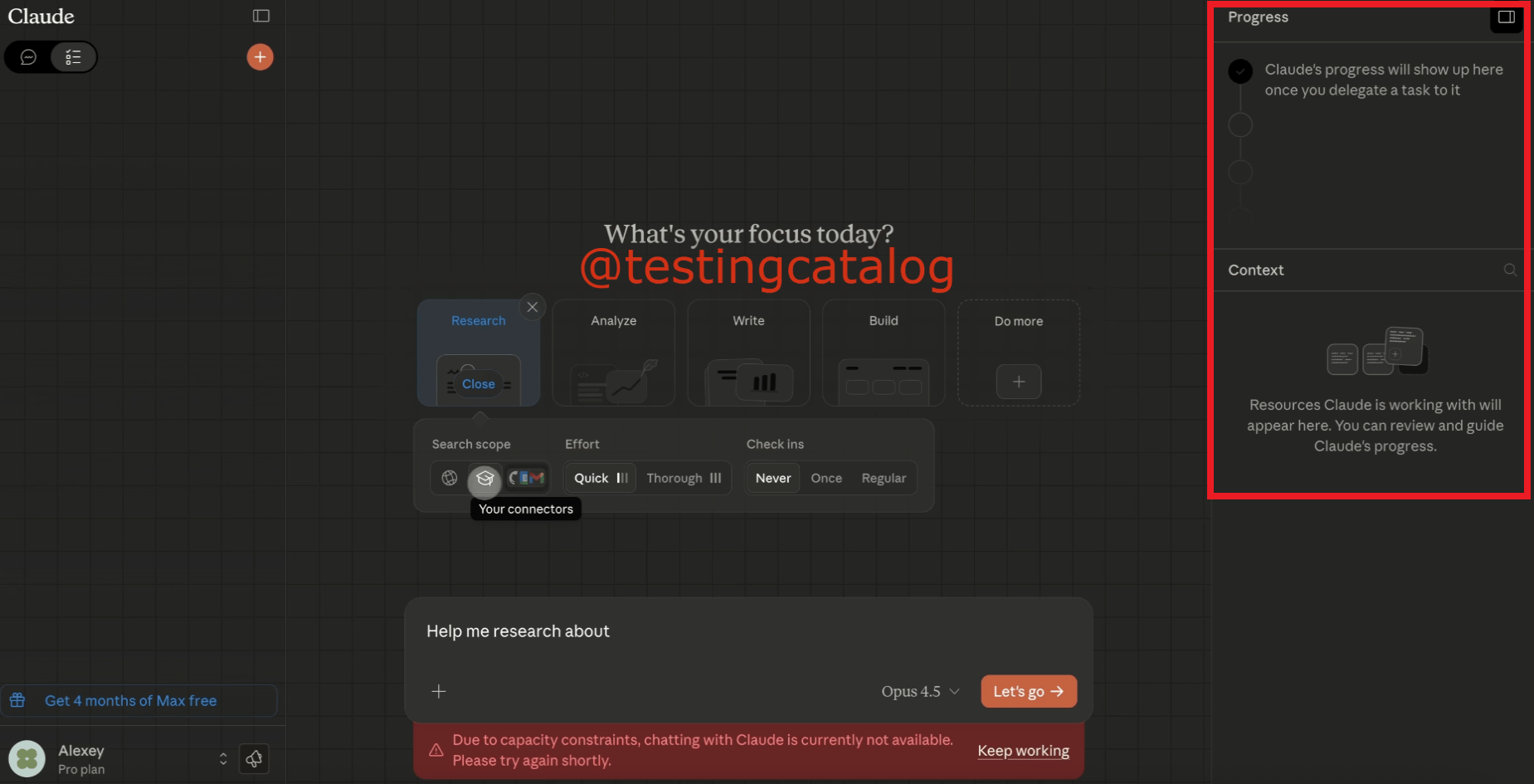
The leak suggests Claude may move from one chat box to task buckets. You choose the type of work first and then provide the information. You can also see the progress and the sources the AI is using. This changes AI from a simple "answer machine" into a helper you can give tasks to.
Key takeaways
The UI showed five buckets: Research, Analyze, Write, Build, Do More.
A guided workflow differs from one mega-prompt guessing game.
Progress and context panels stop the "what is it doing?" confusion.
Practical use: choose “Write,” set format and request citations.
When you can see the steps, I bet you’re going to stop over-explaining everything.
Someone posted screenshots of what appears to be Anthropic's internal testing of a new "Agent Mode" for Claude. This isn’t a small visual update. It’s a clear shift in how people work with AI.
Instead of typing everything into one empty chat box, Claude seems to be moving toward a system where you assign work instead of writing prompts.
I can’t embed the video here but you can click on this link to see it.
*Small disclaimer: Screenshots have been circulating that appear to show Anthropic testing a new “Agent Mode” UI. Take it as a preview, not a promise.
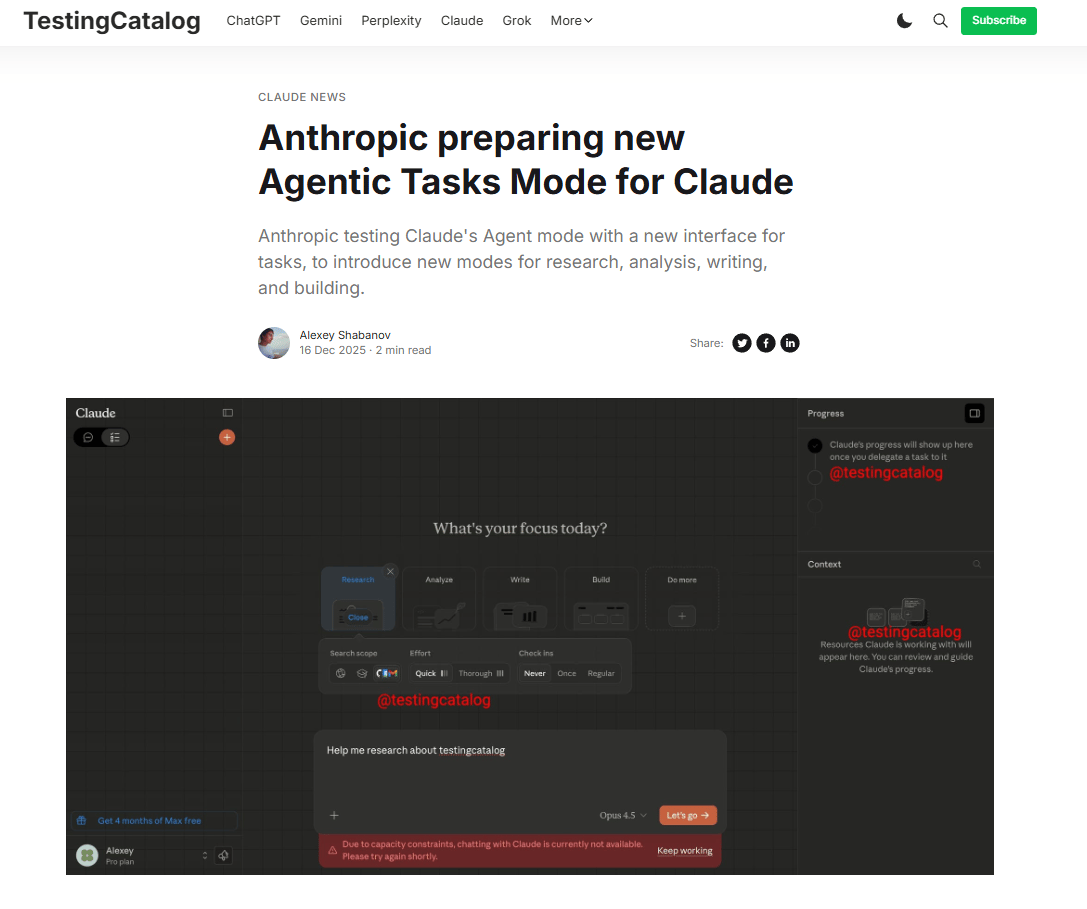
Source: Testing Catalog.
1. The Five Core Buckets
The leaked interface replaces the blank chat you usually see in Claude. Now, you have five distinct task categories:
Research: Deep dives, information gathering, source compilation.
Analyze: Data analysis, comparisons, forecasting, validation.
Write: Content creation with format selection and citation support.
Build: App development with theme and layout choices.
Do More: Multi-step tasks that combine modes.
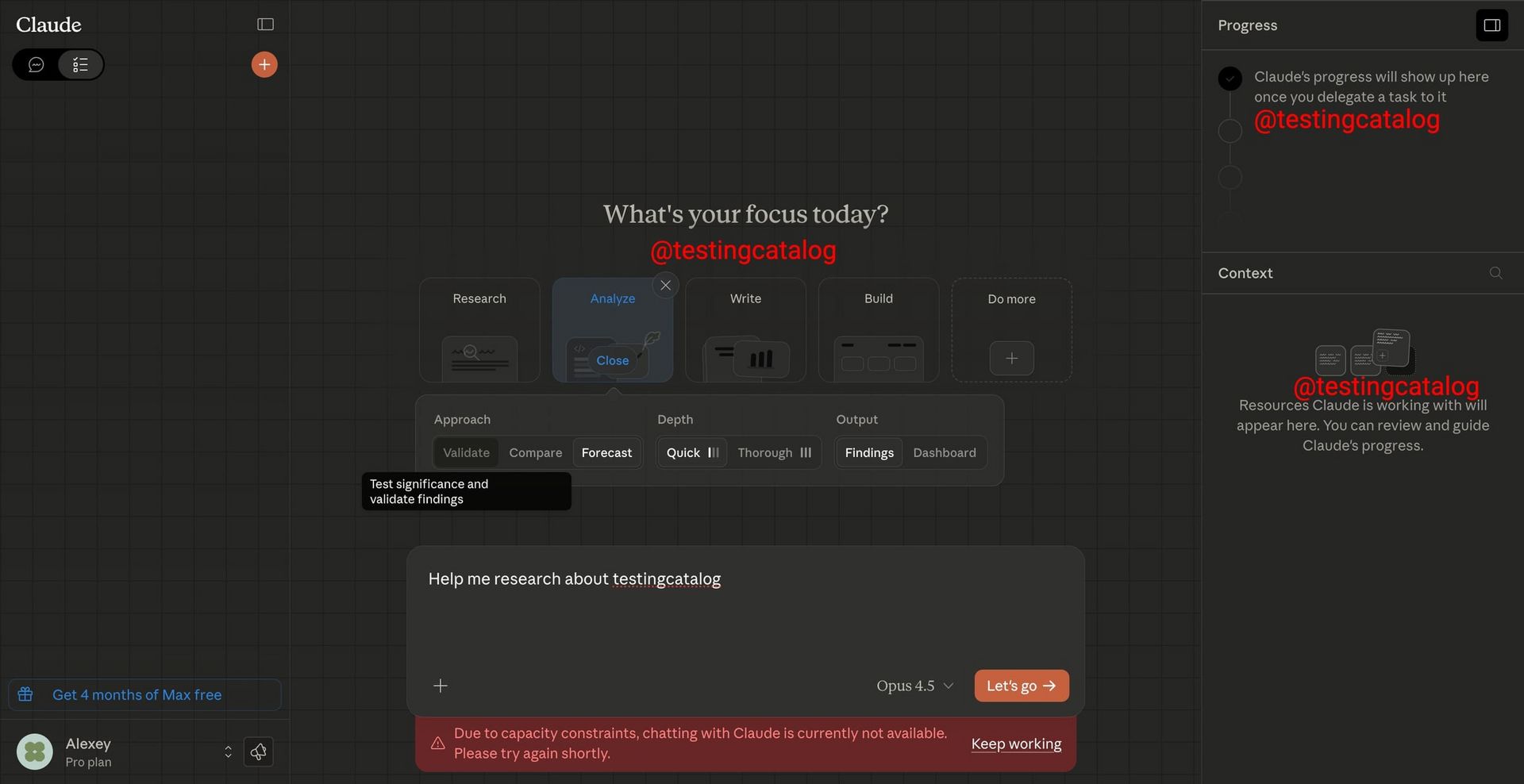
You don’t start by guessing what to type anymore. With these five buckets, you start by choosing what kind of AI work you want done.
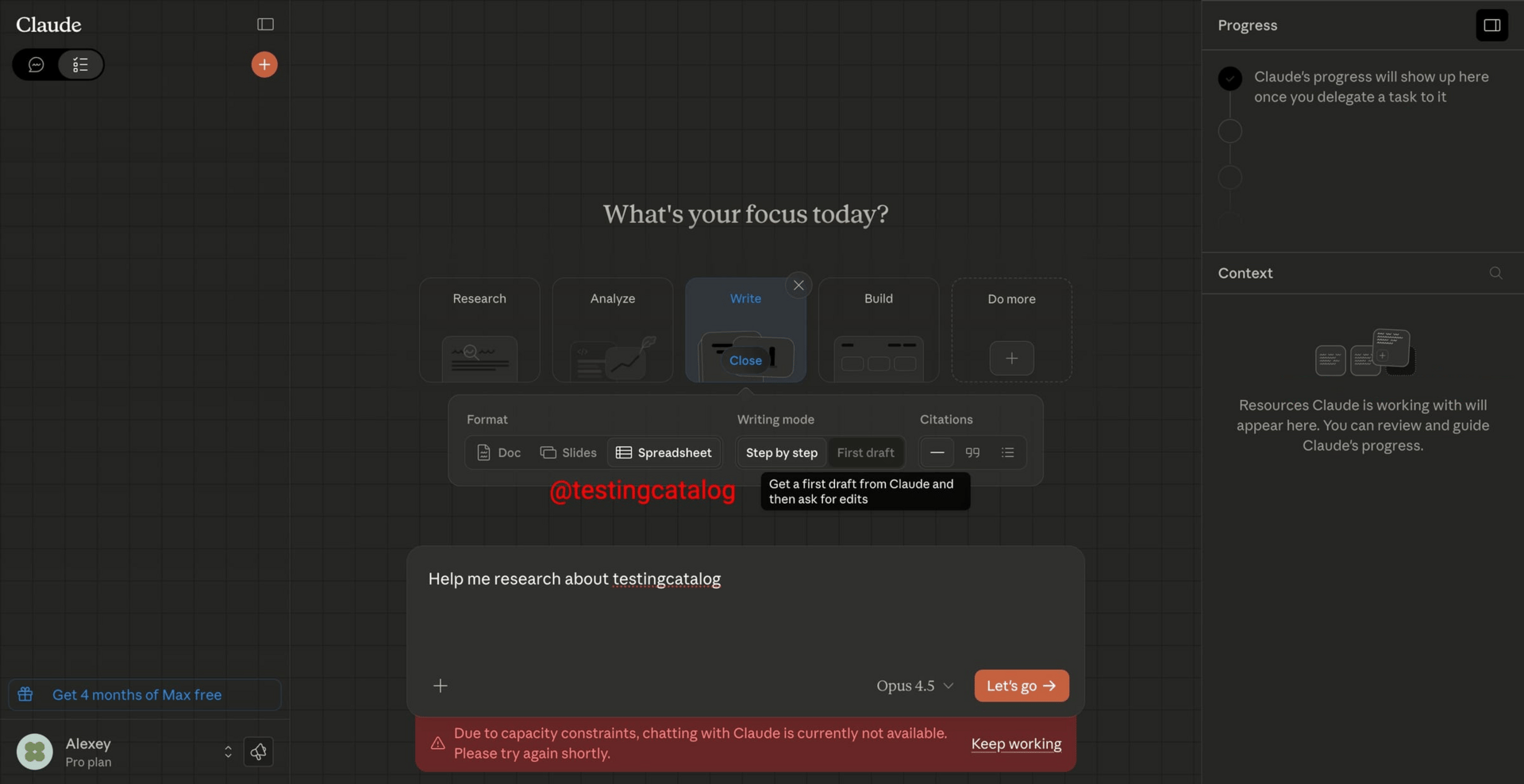
2. Write Mode: More Than Just "Generate Content"
Write Mode goes far beyond “generate text.”
You can choose:
Output format (Doc, Slides, Spreadsheet).
Writing style ("Step-by-step" vs. "First draft").
Automatic citation support.
Instead of dumping paragraphs into a chat, Claude produces structured files that look ready to use.
3. The Game-Changer: Progress & Context Windows
Here is where it gets really interesting. The leaked UI shows:
Progress Tracker: A sidebar that breaks down the agent's current tasks in real-time. You can literally watch Claude work through your delegation. This feature actually reminds me of an agent-style “task tracker” UI.
Context Manager: A list of all resources Claude is currently using (documents, URLs, data sources).
With these upcoming features, you can see the work as it happens. And if anything goes wrong, you could easily check which step has a problem.
4. Why This Matters
Empty prompt boxes put all the thinking on you. You have to plan, structure and explain everything up front. That’s terrible and inefficient. But the Agent Mode flips that; the new interface guides you.
You don’t write a long prompt. You click Research, choose depth, add a topic and Claude handles the structure. The result? Better prompts without having to be a prompt engineer.
Think of Agent Mode like assigning work to a junior teammate instead of arguing with a chatbot.
My prediction on this is: In 6 months, you won’t “chat” with Claude much at all. You will delegate AI work to Claude. You set the direction, check the progress tracker and review the output.
Agent Mode makes AI feel less like a tool you wrestle with and more like a teammate you manage.
Learn How to Make AI Work For You!
Transform your AI skills with the AI Fire Academy Premium Plan - FREE for 14 days! Gain instant access to 500+ AI workflows, advanced tutorials, exclusive case studies and unbeatable discounts. No risks, cancel anytime.
III. Part 2: How to Validate Trends in 5 Minutes (The Hyrox Example)
You don’t need months of research to spot a real opportunity. It takes too much time and the result may not great as you expected. All you need is a simple AI work workflow that tells you if something is noise or momentum.
Here is the process to spot opportunities before they become obvious.
A trend usually whispers before it shouts.
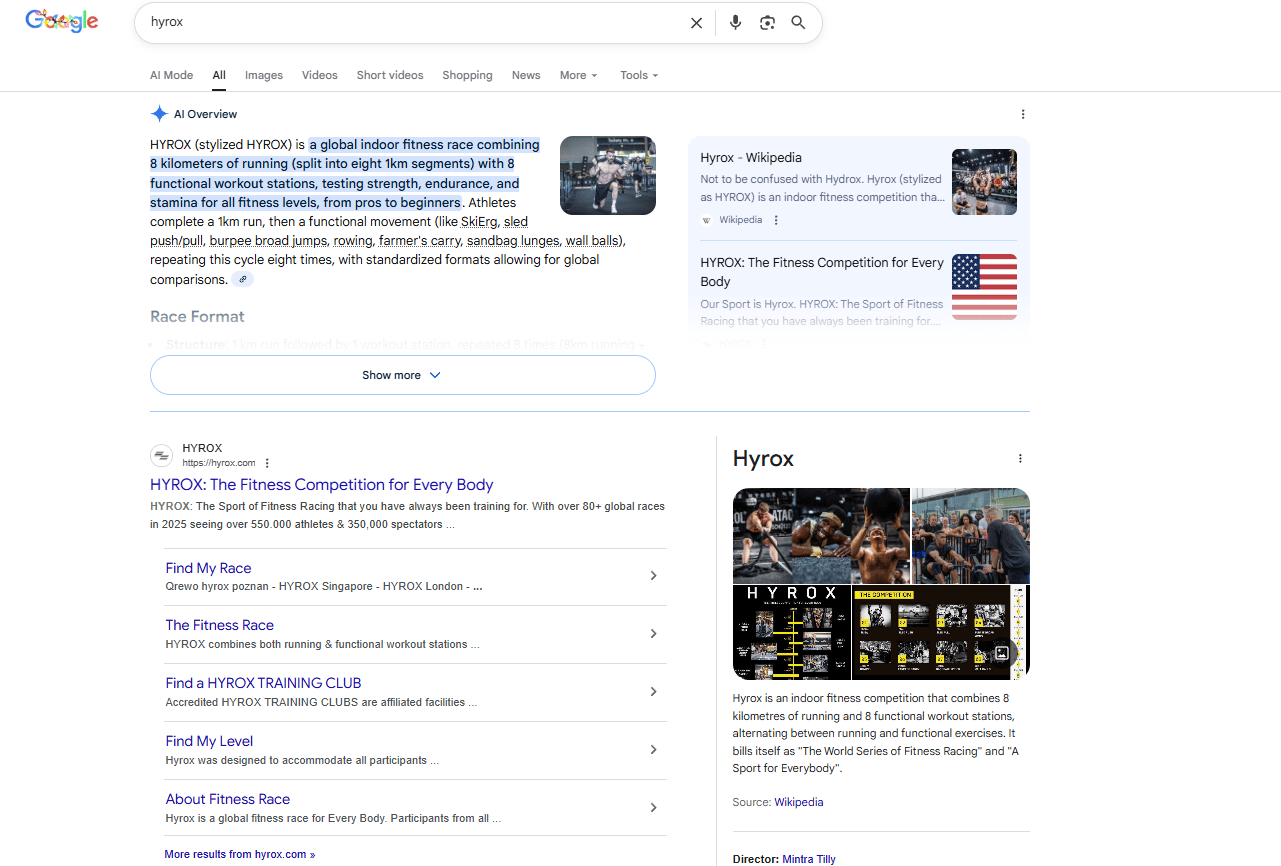
You start seeing the same word again and again: short videos, comments and casual mentions. That’s what happened with Hyrox, an indoor fitness competition. It kept showing up on TikTok, in gym circles and in random conversations.
That repetition is your first clue. Culture moves before data does.
Step 2: The Quick Data Check
Before you build anything, you check if the interest is real.
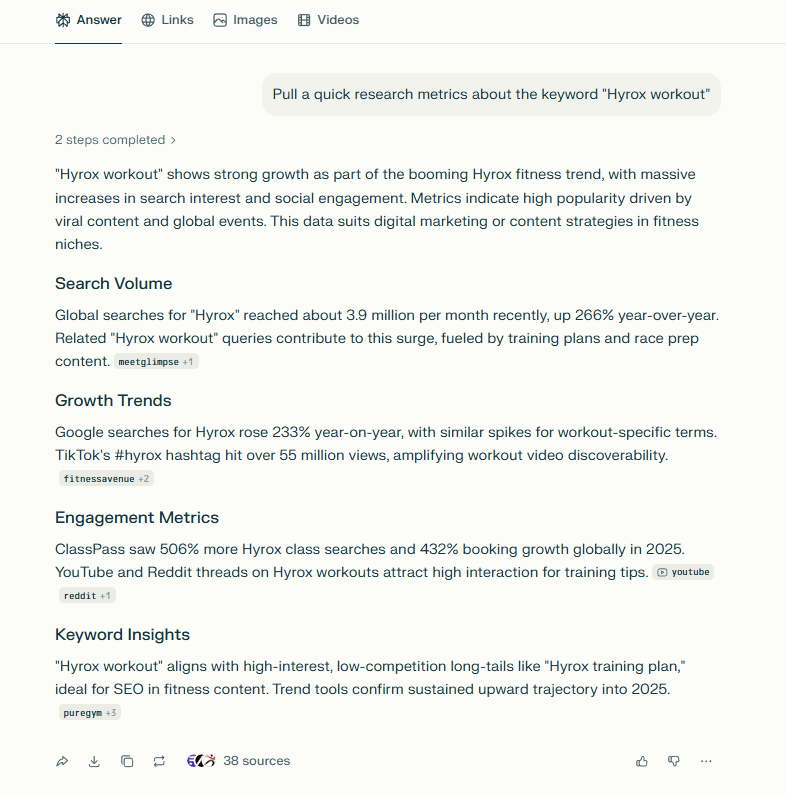
So how do you check that quickly? Perplexity is the fastest tool I’ve found for this. All you need to do is type:
Pull a quick research metric about the keyword “YOUR KEYWORDS"In a blink, it gives you the result. Here is a quick lookup showing this for “Hyrox workout”:
Monthly searches: about 3.9 million, up 266% year-over-year.
Growth: rose 233% year-on-year.
Engagement Metrics: ClassPass saw a 506% increase in Hyrox searches and 432% growth in bookings worldwide in 2025.
Keyword Insights: low competition.
You could level it up by asking for the chart or anything else you want to know about the keyword. All of that just by asking.
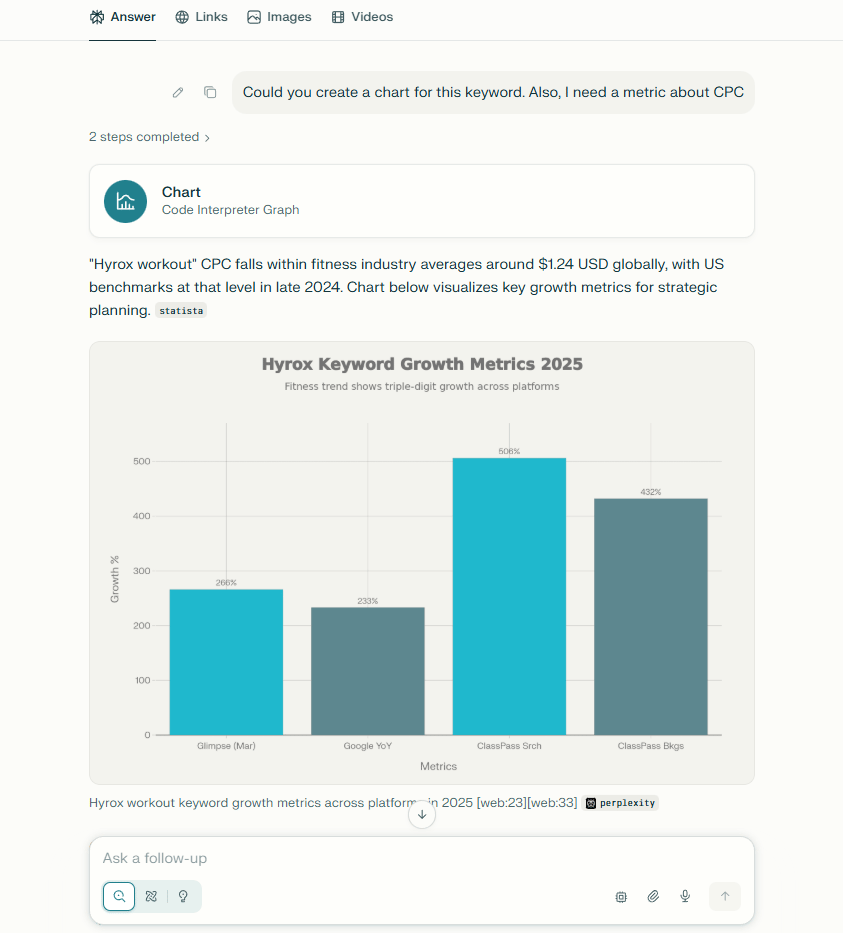
I asked Perplexity to create a chart and show the CPC of the keyword.
This combination is rare. High growth and low competition usually do not stay together for very long. This is the moment most people miss in their AI work.
Step 3: Why This Is a Golden Opportunity
Most trends don't give you this combination: massive growth, low competition and cheap CPC. This is a gift.
You don’t try to build “the Hyrox platform.” That’s too vague.
You ask: What does this group struggle with every week? A few obvious ideas pop up fast:
A training tracker to log workouts and personal bests.
A gear guide for things like “best shoes for Hyrox” (thousands already search for this).
An AI check-in buddy that sends reminders, prep tips or race-day motivation.
None of these is massive. That’s the point.
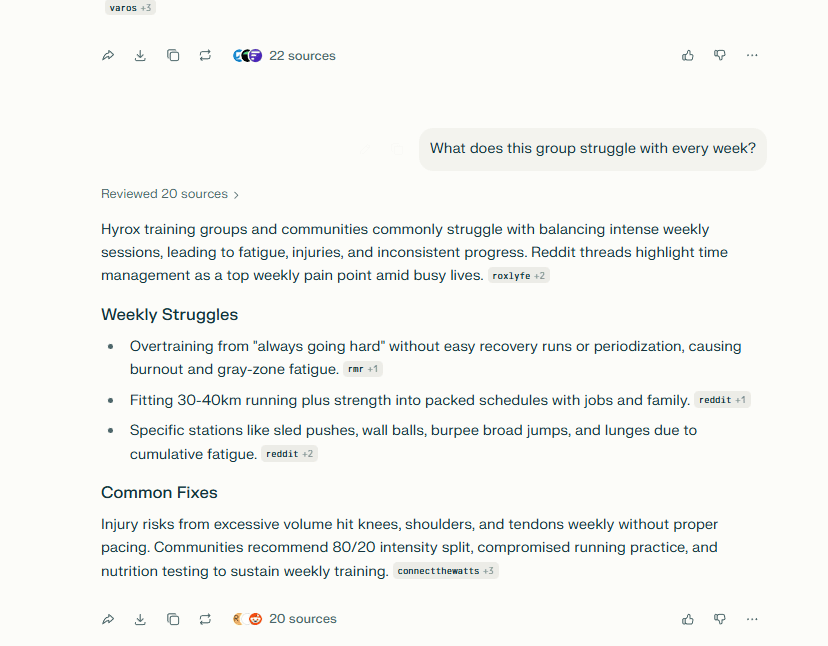
Here’s the real lesson: Trends are everywhere and opportunities are rare. You win by spotting momentum early, checking the data quickly and building something narrow for people who already care.
If you do that, you’re not guessing anymore. You’re responding to a demand that already exists.
Once you start thinking in agents instead of prompts, tool choice suddenly matters a lot more.
IV. Part 3: What Two Underrated AI Tools Should You Test Right Now?
Krea helps you create media without jumping between apps. NotebookLM helps you turn source material into structured slides. Both reduce setup friction, which is what slows most creators. You use them for speed first, then polish elsewhere.
Key takeaways
The real time sink is switching tools, exports and re-learning UIs.
“All-in-one creation” differs from a stack of single-purpose tools.
Use cases show up immediately in weekly content workflows.
Example action: upload a document to NotebookLM and create a slide deck.
There are a lot of AI tools out there. Most of them do one thing. A few quietly do a lot more than people realize for efficient AI work. These two fall into that second group.
Tool #1: Krea (Krea.ai) - A Multi-Tool for Creativity
Krea is what you reach for when you don’t want to juggle five different subscriptions.
It bundles several strong AI models in one place. You can generate images (Flux, Gemini), create videos (Runway, Luma) and even render visuals in real time. Instead of bouncing between tools for images, then videos, then experiments, you stay in one workspace.
Why this matters in real life: After months of testing different tools, the biggest time killer wasn’t quality. It was switching apps, exporting files and re-learning interfaces. Krea removes that friction. You pay once, open one dashboard and keep moving.
If you want a tool like Adobe Creative Cloud but made for AI. Krea is a great choice.
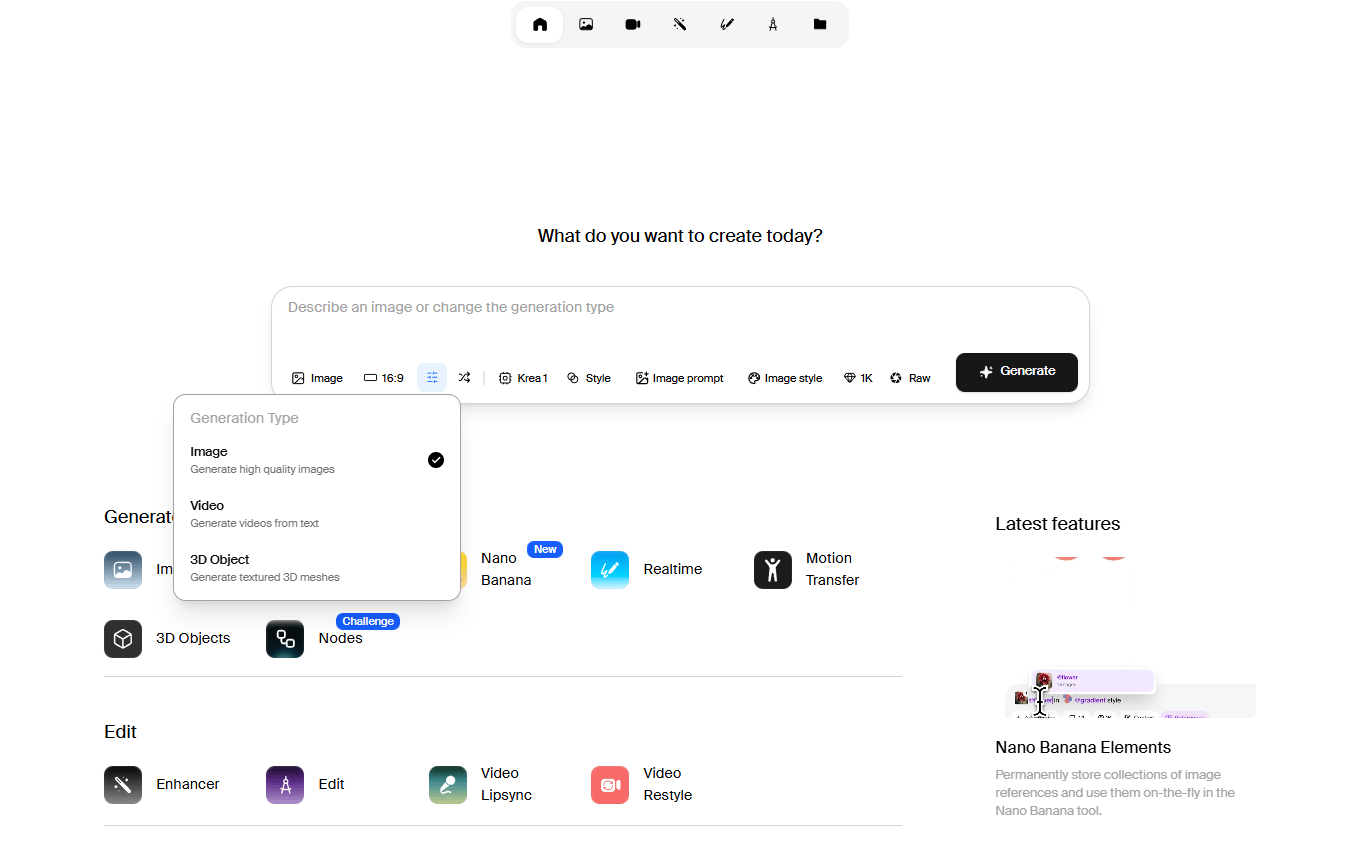
*Bonus: If you want a similar tool but for chatting, researching,… but not for generating media. I highly recommend OpenRouter to you. You could access over 400 AI models from dozens of providers through a single endpoint.
Tool #2: Google NotebookLM - The Underrated Slide Generator
If you think NotebookLM is just for summaries or AI podcasts, you’re missing the best part. Its slide generation is quietly powerful.
Here’s how it works: you upload your source material. That can be PDFs, blog posts, transcripts or web pages. Then you tell it what the presentation is for. NotebookLM pulls the ideas organizes them and turns them into clean slides with a clear flow.
Example: this is a small project I did about Blockchain fundamentals. As you can see, you give it all your documents or even not (you could use the “search” feature to pull it). Then you click on the “Slide Deck” button and wait a few minutes.
The result is perfect, since the images were made by Nano Banana Pro, you will not have problems with text errors or changing characters, which are the biggest problems in image generation.

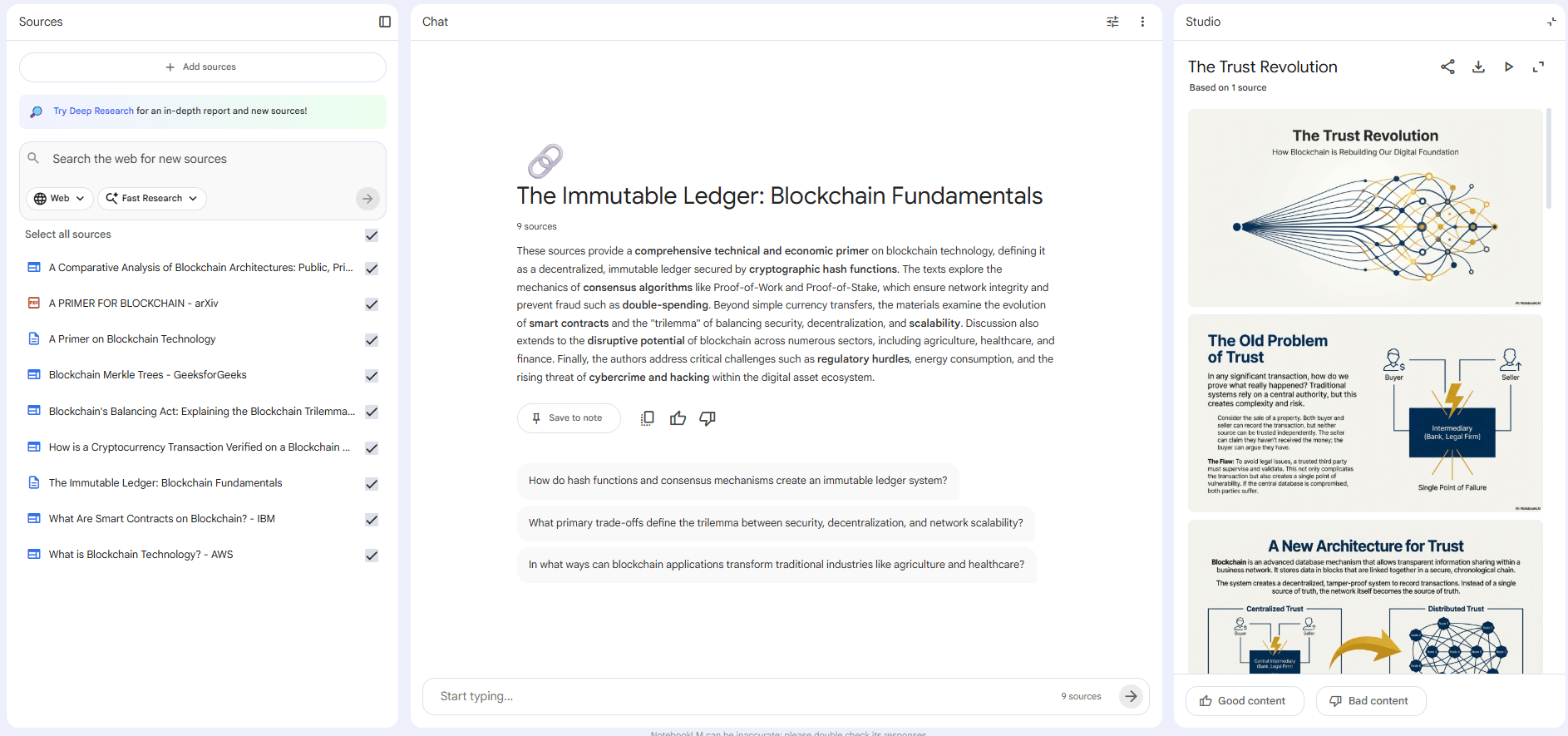
Why this is different: Most slide tools expect you to write everything first and then design. NotebookLM flips that. It understands the content before it designs anything. That’s a huge deal if you’re tired of staring at a blank slide deck.
If you teach, pitch or explain ideas often, this tool saves hours without lowering quality.
Creating quality AI content takes serious research time ☕️ Your coffee fund helps me read whitepapers, test new tools and interview experts so you get the real story. Skip the fluff - get insights that help you understand what's actually happening in AI. Support quality over quantity here!
V. Part 4: A Startup Idea You Can Take - The Digital Hotel Concierge
This is one of those ideas that sounds obvious once you hear it.
Think about a hotel front desk. Guests ask the same questions all day, every day: Wi-Fi password, breakfast hours, late checkout, local food spots,... and your staff spend hours repeating answers instead of helping with real problems.
That’s the gap. So, instead of sending every guest to the front desk, you give them a QR code in the room. Guests scan it and see a digital guide immediately. They do not need to download an app or learn how to use it; they just get instant answers.
What will your guide include? It will need:
Auto FAQs: Wi-Fi, breakfast time, pool rules, checkout.
Short walkthrough videos: gym, spa, parking, room features.
Local tips: nearby restaurants, tours, transport.
Checkout help: late checkout rules, luggage storage.

Guests get answers quickly and the staff saves a lot of time.
Then you might think, “Does this really make money?” Yes, absolutely. You could sell your idea around these business models:
SaaS Pricing: $29-$79/month per property.
Affiliate Revenue: Earn commissions on bookings for local tours and restaurants.
Hotels don’t care about tech buzzwords. They care about saving time and reducing complaints. This does both.
That’s why this idea wins: Search interest for hotel messaging tools is exploding. Hotels already know this problem exists. You do not have to convince hotels they have a problem; you are just offering them a better solution.
VI. Part 5: The "1000 People Framework" (How to Get Clarity Fast)
This is where most people get stuck after spotting a trend. They see momentum but they do not know who they are building for.
If you’ve ever stared at a blank doc thinking “I have no idea who I’m building for”, this part is for you. I’ve been there more times than I want to admit. And every time, the issue wasn’t motivation or skill. It was vagueness.
The idea is simple: you don’t need millions of users. You need 1,000 very specific people with the same painful problem. Here’s how you find them and build something they’ll actually pay for.
Step 1: Identify the "1,000 People"
Instead of chasing a big market, you pick exactly 1,000 people. Not “founders” or “creators”; you need a group where everyone wakes up with the same frustration.
So, instead of: Small business owners. You should think more specifically like this: Italian restaurant owners who lose money because customers book tables but do not show up.
Now you’re dealing with a real situation. You can picture their day. You can imagine the stress. If you can’t clearly describe who they are and what they complain about weekly, you’re not ready to build yet.
Step 2: Deep Persona Research
Once you lock onto those 1,000 people, you don’t assume what they want. You ask or you simulate asking. This is where AI helps a lot.
I usually let AI role-play as that person and interview them like I would in real life. You ask about their day, what annoys them, what they complain about at night, what feels like a waste of time,...
When you do this right, patterns show up fast. You need to stop guessing and start recognizing the language they actually use.
After doing this for months across different ideas, you start seeing the same thing again and again: people do not pay for "smart" ideas. They pay to solve a problem.
Step 3: Define the $50-$100 Annual Offer
Now ask yourself one sharp question: “What would all 1,000 of these people happily pay $50-$100 every year for without overthinking?”
Not for your cool feature, not for a nice bonus or other fancy things. It must be something that quietly saves time, money or stress.
Let me take an example: Snowflake safely stores and organizes company data, so teams never worry about slow servers again (that is their pain). That’s why their renewals are always high, even if teams pay $100k+/year.
If you can’t answer that in one sentence, you’re not ready to build yet.
Step 4: Reach Strategy
This is where many ideas quietly die. If you don’t know how to reach these people, the idea is dead on arrival.
You don’t say, “I’ll run ads” or “I’ll go viral.” You need to say it in more detail:
I’ll DM people who use the hashtag #HyroxTraining.
I’ll email restaurant owners listed on OpenTable.
I’ll post daily in two specific Facebook groups.
Suppose you can’t name the place where your 1,000 people already hang out, stop and fix that first. Distribution clarity beats product polish.
Step 5: Build the Value Ladder
Finally, you don’t sell the big thing first. You map how someone goes from curious to customer to power user.
Free resource that solves one small problem.
Low-cost offer that proves value.
Core product that fixes the main pain.
Then, if it makes sense, optional higher-ticket support or service.
Every step is logical and easy to follow. All you need is a clear plan.
You might think, “Are you sure this works?” Most people don’t fail because they’re lazy. They fail because everything is vague. This framework forces you to slow down before you build. Once you lock in the right 1,000 people, everything else gets easier: messaging, pricing, features, marketing.
You’re no longer building for “everyone.” You’re building for someone you understand deeply and that’s where clarity and momentum come from.
VII. Your Action Plan: What to Do With All This
You’ve read a lot. Now here’s how you turn it into movement instead of just taking notes you will never read.
Timeframe | Focus | What To Do |
|---|---|---|
Immediate (This Week) | Testing & Validation | • Test the Agent Mode mindset: delegate to Claude in steps (“research X → analyze Y”). • Validate one trend using Google Keyword Planner or Greg’s Idea Browser (check volume + competition). • Try NotebookLM Slides: upload a long doc and generate a slide deck. |
Short-Term (This Month) | Clarity & Leverage | • Run the 1,000 People exercise: identify your core audience and what they’d pay $100/year for. • Evaluate Krea to see if it can replace or reduce your visual tool stack. |
Long-Term (This Quarter) | Building & Mindset Shift | • Build the Hotel Concierge idea: start with 10 hotels, first month free. • Change your mindset: stop saying “I use tools” and start saying “I give tasks to agents.” |
That’s it. You don’t need more content. You need one small test, then another. Momentum comes from action, not understanding everything first.
VIII. Conclusion: The Leak Is the Preview
Whether this exact Claude Agent Mode ships next week or gets redesigned doesn't really matter. The leak shows us where the industry is heading: from chatbots to agents, from open-ended conversations to structured AI work.
The most successful people in 2026 will not be those who have better tools. Everyone will have similar tools. The winners will be the people who delegate clearly and move fast.
Start practicing now. By next year, some version of “Agent Mode” will feel normal across most AI tools. And the opportunity window will be smaller.
If you are interested in other topics and how AI is transforming different aspects of our lives or even in making money using AI with more detailed, step-by-step guidance, you can find our other articles here:
How would you rate this article on AI Tools?Your opinion matters! Let us know how we did so we can continue improving our content and help you get the most out of AI tools. |
Reply