- AI Fire
- Posts
- ⚠️ 9 AI Skills You Must Have to Master ChatGPT, Claude, Gemini or any Other AIs
⚠️ 9 AI Skills You Must Have to Master ChatGPT, Claude, Gemini or any Other AIs
Prompting is just the starting point. Here’s the full March 2026 AI skill stack (from taste curation to context compression) that turns AI into a real productivity multiplier

Max Anh
March 04, 2026

TL;DR BOX
The difference between “ordering fast food” from AI and running it like a virtual department comes down to one thing: Strategic Context Control. Most people start every chat from zero. The best users use a "Master Prompt" (a PDF about themselves) so the AI always knows their goals and style.
Key advancements include using ChatGPT’s Canvas for real-time collaborative editing, enforcing AI Self-Reflection by assigning the "Devil’s Advocate" role to find blind spots and practicing Context Compression to prevent "instruction drift" in long conversations. By using pictures and listening to AI-made lessons, you turn the AI into your own private teacher.
Key Points
Fact: In 2026, many employers report growing skill gaps in AI literacy, making these skills a primary career differentiator.
Mistake: Assuming more data is better. Overloading AI leads to "noise". Always use the Three-Step Compression Workflow (Section VIII) to keep context sharp.
Action: Tell Gemini or ChatGPT: "Act like an interviewer. Ask me questions so you can learn everything about my job and goals".
Critical Insight
The real advantage in 2026 is "Taste as a Rule Set". AI can generate 100 drafts but only humans with a curated library of "excellence" can teach the AI the precise constraints (Section III.2) required to produce world-class output consistently.
Table of Contents
I. Introduction
Here is a sad fact: most people are using AI the same way they used Google in 2005. They type a question, skim the answer and move on.
That is "Beginner Mode" and it’s exactly why most users get mid results while the top 1% are quietly running circles around them.
You might think they’re smarter or just more technical but the truth is that they just learned 9 specific AI skills that most people were never taught.
This post covers all 9. Not as a surface-level overview but as a real, practical guide you can apply today. So by the end, you will understand exactly why your AI outputs feel generic and exactly how to fix that.
🚦 Be honest: How are you actually using AI right now? |
II. AI Skill #1: Prompt Engineering
The rule “garbage in, garbage out” has always applied to computers. With AI, it is even more true. The quality of your prompt almost always determines the quality of the result.
Prompt engineering is simply the skill of writing instructions that get great results and there’s a simple structure that works across almost every tool.
Every strong prompt has 4 components:
Component | What It Does | Example | Why It Matters |
|---|---|---|---|
Role | Defines who the AI should act as | “Act as a senior copywriter with 15 years of direct response experience.” | Narrows the model’s thinking to one expertise area |
Context | Explains your specific situation | “I run a B2B SaaS company targeting HR managers at 200-500 employee firms.” | Specific inputs create specific outputs |
Command | States exactly what to produce | “Write 10 cold email subject lines.” | Prevents vague, unfocused responses |
Format | Controls output structure | “Return as a numbered list, max 10 words per line.” | Saves editing time and improves usability |
If you have a piece of writing, a design or a document that represents exactly the quality level you want, upload it. Then say: "Match this style exactly".

AI models are strong at pattern recognition. So, when you show it what "great" looks like, it stops guessing and starts replicating.
This one trick alone is worth 10 hours of prompt trial and error.
But even perfect prompts won’t save you if you don’t know what “good” looks like. That’s where Skill #2 comes in.
Learn How to Make AI Work For You!
Transform your AI skills with the AI Fire Academy Premium Plan - FREE for 14 days! Gain instant access to 500+ AI workflows, advanced tutorials, exclusive case studies and unbeatable discounts. No risks, cancel anytime.
III. AI Skill #2: Taste Curation
AI can generate 100 options in 30 seconds but the hard part is choosing the 2 that are actually worth using. That decision requires judgment and is called taste.
Unlike what most people think, taste is not some innate gift you either have or don't. It is a documented, learnable skill.
Ben Affleck once said something that applies perfectly here: "Being a craftsman is knowing how to work. But art is knowing when to stop".

That gap, between competent and excellent, is where taste lives.
1. How to Build Your Taste Library
The fastest way to develop taste is to collect examples of work you find excellent, then study what makes them work.
If you are a writer, save the headlines and opening lines that stop you mid-scroll.
If you are a designer, screenshot every UI that makes you think "that's clean".
If you are building a product, analyze strong pitch decks and notice what the founder emphasizes and what they leave out.
Over time, your brain starts to build a reference library of what "great" feels like. You stop describing quality in vague terms and start describing it in precise ones.
2. Turning Taste Into Rules
Vague instructions produce vague results (kind of the same as the garbage quote, right?).
You can tell an AI to write something “punchy” for you and I’m sure that the result rarely works.
But if you tell it something like this, “max line length of 100 characters, start with a reframe, end with a consequence,” the AI will give you something to work with.

This can also apply to word choice when "Leader" and "boss" are close synonyms in everyday conversation but they produce noticeably different AI outputs because they carry different associations.
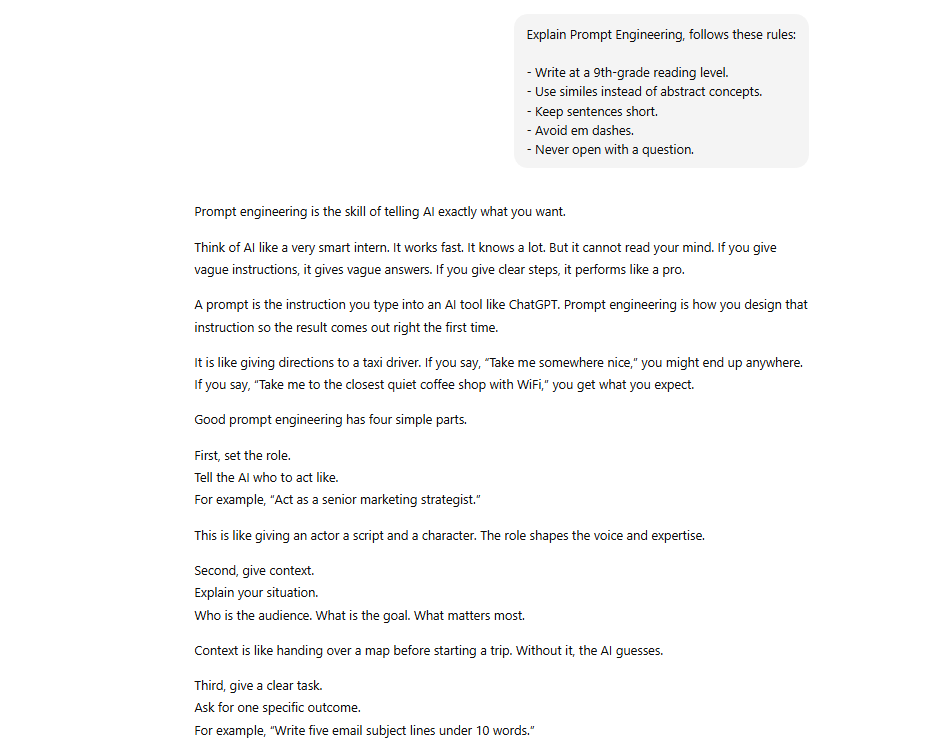
So, to turn taste into rules, you can write down your personal rules.
A strong taste document might include things like:
- Write at a 9th-grade reading level.
- Use similes instead of abstract concepts.
- Keep sentences short.
- Avoid em dashes.
- Never open with a question.
Once your rules are written down, you can feed them into every prompt and get consistent results without thinking about it each time.
IV. AI Skill #3: The Master Prompt
Everybody experiences this situation: every time you open a new AI conversation, the AI knows nothing about you. It doesn’t know your role, your goals, your audience, your tone or your past work and you have to start from zero each time.
The solution for you is building a Master Prompt. It is a document that contains everything the AI needs to know about you (your role, your goals, your context, your preferences) that you upload at the start of every important conversation.
You can think of it as your digital ID for every AI platform.
1. How to Build One
The flow is easy to follow; you just ask the AI to interview you with this prompt:
Act as an interviewer. Ask me everything you need to know to build a complete master prompt for my professional role.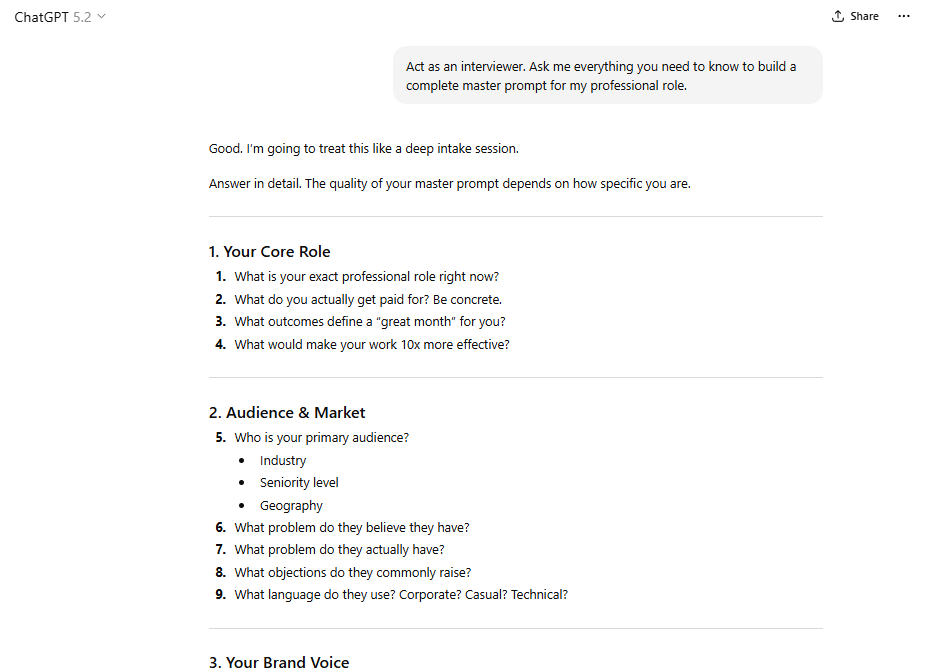
Then you answer every question it asks.
A small tip is to use voice-to-text if typing feels slow. The more raw detail you provide (projects, tone preferences, constraints, examples), the stronger the final document becomes.

Once you have answered everything, ask the AI to synthesize your answers into a clean, concise master prompt document. Your job is to review it, edit anything that feels off and save the final version.
2. The Critical Step Most People Skip
You should save your Master Prompt as a PDF.
This matters because a PDF can be uploaded to any AI platform, like ChatGPT, Claude, Grok, Gemini or whatever new model appears next year.
By saving it as a PDF rather than a platform-specific format, your document travels with you across every tool that exists now and every tool that hasn't been built yet.

One team that implemented this saw the majority of their workflow become AI-supported within months. Once each person has their own Master Prompt, AI output becomes faster, more aligned and far more useful.
That’s what a Master Prompt gives you: leverage through clarity.
Once context is locked in, the next differentiator isn’t what you ask, it’s how you refine.
V. AI Skill #4: Output Iteration
The first response from an AI is rarely the best response. It’s a raw material and the top 1% treat it like clay to push, pull and shape until it becomes exactly what they need.
Look at this example: Coca-Cola used 70,000 AI prompts (made by just 5 AI specialists) to create one single Christmas commercial. Yes, that’s seventy thousand prompts for one final output.

Source: Futurism.
Most people quit after 2 or 3 attempts. That gap explains most of the quality difference between average AI users and great ones.
1. How to Iterate Effectively
Start every session by uploading your Master Prompt. That gives the AI full context before you ask it anything. If you skip this, you’re always starting from zero.
After that, when you give specific feedback, be precise. For example:
"Make it punchier" is too vague. The AI doesn’t know what “punchy” means to you.
"Open with a reframe that challenges the assumption that X is necessary. The first sentence should feel like a gut punch to someone who has been doing it wrong", giving it a clear target.

You can use the Canvas feature in ChatGPT.
When you ask the AI to write something "as a canvas", it creates a document-style editor inside the interface. You can manually edit individual sentences, then say:
Use this exact format to write the next 10 versions.You lock in the structure and scale from there.


2. The Mistake to Avoid
When you start a new piece, don’t ask for a final product on the first try. Begin with an outline. Make sure the structure feels right before adding detail.
Changing direction on an outline takes 30 seconds, while changing direction on a completed 1,500-word draft takes an hour.
VI. AI Skill #5: System Prompts
AI is the first major technology you program with plain language instead of code. That means anyone who can write a sentence can technically program an AI model.
A System Prompt is the instruction set that tells an AI how to behave. It is different from a Master Prompt.
While a Master Prompt tells the AI who you are, a System Prompt tells the AI what it is, what role to play, how to respond, what rules to follow and what to never do.
1. How to Build One Without Starting From Scratch
The smartest method is reverse-engineering.
You take the best output an AI has ever produced for you (the one that felt perfect) and ask the AI:
Write the system prompt that would have generated this exact output.
AI will handle the rest by revealing the structure, tone and constraints behind it. That becomes your starting blueprint. From there, you refine it until the behavior feels consistent.
Save it as a PDF, just like the Master Prompt, so you can reuse it across platforms.
2. Turn It Into a Reusable Tool
Once you have a strong system prompt, paste it into a Custom GPT's instruction field. Now you have a specialized AI tool that anyone on your team can access through a single link, with no setup required on their end.
We, for example, built a "Book Architect" Custom GPT that takes any topic, pulls from a person's existing body of published work and drafts a book in their voice.

Tools like that take maybe an hour to build and save hundreds of hours afterward.
Overall, how would you rate the Prompt Engineering Series? |
VII. AI Skill #6: Using AI as a Critic
By default, AI is designed to be agreeable. So, most of the time, it validates your ideas, finds the good in your plans and rarely challenges your assumptions. Left alone, it behaves like a very polite colleague who avoids difficult feedback.
I’m not making this up. This has actually been proven by a study from University College London.

Source: University College London research.
That sounds helpful but it’s not. Because if the AI only reflects your existing thinking back at you, you never find your blind spots. You just get faster at being wrong.
So, the solution is to force pushback.
1. How to Make It Fight Back
You can do that by assigning it the Devil's Advocate role directly in your prompt. Here is the prompt I recommend you use:
Act as a devil's advocate. Stress-test every assumption in this plan and list every major risk, including the ones I might not want to hear.
Once it criticizes your idea, you can go deeper by using this prompt:
Break down that criticism through the lens of first principles.
That second layer pushes the AI beyond surface-level objections and into first-principles thinking.
Then you can capture the insights that land. If the AI surfaces a blind spot you agree with, update your Master Prompt so that every future conversation reflects that new understanding.
2. A Prompt Worth Trying Right Now
There’s also a prompt worth using immediately:
Based on everything you know about me from our conversations, what patterns in my thinking or behavior might be holding me back that I've never thought to ask you about?
It is an uncomfortable prompt, so the answer is usually uncomfortably accurate. But that discomfort is the point; it means you’re finally seeing something you were too close to notice.
VIII. AI Skill #7: Context Compression
Giving an AI too much information makes it worse, not better.
When a conversation gets too long or when you paste in too many documents, the AI starts to lose track of what matters. The important information gets lost in the mess and the outputs become vague, generic and unfocused.

Many people using AI hit this wall while building a personalized AI system.
For example: If you dump 20 PDFs and a 50-message thread into one chat, quality drops fast. The outputs will be poor until you pre-compress all of it down to 200,000 words. Only then did the AI start producing sharp, useful results.
Context compression is the skill of giving AI less information but the right information.
The Three-Step Compression Workflow
First, you paste everything you have into the AI. Then ask it:
Summarize this with bullets covering all key facts, data and stories. Reduce it to approximately 10% of its original size.
Second and this is the step most people skip, you ask:
What important information did you leave out? List it so I can decide whether to add it back. Compression always cuts something and you want to choose what gets cut, not have the AI choose for you.

Third, you open a brand new conversation and paste only the compressed version.
Do not continue working in the same overloaded thread. A fresh conversation with tight context produces dramatically cleaner outputs than a long conversation with accumulated noise.
Creating quality AI content takes serious research time ☕️ Your coffee fund helps me read whitepapers, test new tools and interview experts so you get the real story. Skip the fluff - get insights that help you understand what's actually happening in AI. Support quality over quantity here!
IX. AI Skill #8: Knowledge Base Gardening
When a company first adopts AI, things usually get messy fast.
Team members open separate accounts, run random prompts and train their tools with different data and formats. Everyone builds their own version of “how it works,” and none of it connects.
The result is chaos when each person's AI outputs sound different, follow different rules and reflect different standards. Instead of one consistent company voice, you get 12 inconsistent ones.
The fix is treating your AI workspace like a garden. It needs structure, consistent inputs and regular maintenance.
1. How to Organize It
You start by creating a project folder for each major initiative. In ChatGPT, this means using the Projects feature.
Name each folder clearly: "Q1 Campaign", "Product Launch", "Investor Outreach". The name matters more than it seems. Because if you can’t name it cleanly, you probably don’t understand it cleanly.

Then upload your Master Prompt and a compressed context document into each project so every conversation begins from the same base, not from scratch.
Next, store your best system prompts by department or function in organized PDF folders, like marketing prompts, sales prompts, operations prompts, customer support prompts or other related prompts together.

When a better AI model launches and a better one always does, your prompts travel with you. Instead of starting over, you are just plugging your existing library into a faster engine.
2. The Mindset Behind It
"A messy mind creates messy prompts and worse outputs". That observation is simple but it is worth sitting with.
The quality of your AI workspace reflects the quality of your thinking. So, clean it up and the outputs improve automatically.
Version drift kills teams. Without shared prompts, AI output fractures across departments.
X. AI Skill #9: Personalized Learning
Most people use AI like a search bar with better grammar. Meanwhile, the top 1% use it like a personalized education system that never closes, never charges tuition and never runs out of material.
The idea is simple:
You ask the AI to write a research paper in story format on any topic you want to understand, whether technical, historical or nuanced.
Then you listen to it through a text-to-speech app while walking, commuting or at the gym.
While most people scroll social media during their morning workout, with this skill, you’ve already absorbed a deep dive on pricing strategy, negotiation psychology or competitive market dynamics.
Over weeks and months, that compounding knowledge becomes a real edge.
1. How to Set It Up in Three Steps
The first step is set up a time limit with this prompt:
Teach me [topic]. I have [A time limit].This forces the AI to prioritize, so it cannot ramble when you give it a constraint.

The second one sets the language level to something conversational but precise. For example:
Write this in 8th-grade conversational language.At a 5th-grade level, you get too many metaphors and not enough precision. At a 12th-grade level, it turns dense and slow. The 7th-9th grade range hits the balance: clear enough to understand fast, detailed enough to be useful.

The habit: Click the three dots below the response, you will find the Read aloud icon, put in your AirPods and learn while you're at the gym or commuting. This turns dead time into an expert-level education.

2. The Bigger Reframe
Stop treating AI like a chatbot that just answers questions. See it as a creative operating system you can use to co-create ideas, spot blind spots, rehearse hard conversations, test decisions and learn anything to the depth you want.
The tool is the same and your perspective changes everything.
XI. The Full Skill Stack at a Glance
Skill | What It Is | The Move That Changes Everything |
|---|---|---|
Prompt Engineering | Role + Context + Command + Format | Upload example outputs to pattern-match |
Taste Curation | Knowing what great looks like | Write your rules as a reusable document |
Master Prompt | Your digital ID for every AI | Save as PDF - works on every platform |
Output Iteration | Shape it until it is right | Use Canvas to lock format, then scale |
System Prompts | Program AI in plain language | Build Custom GPTs your team can share |
AI as Critic | Make it push back, not agree | First principles breakdown of its criticism |
Context Compression | Less context, sharper output | Start fresh with the compressed version only |
Knowledge Base Gardening | Organized inputs = clean outputs | Store everything in PDF by department |
Personalized Learning | AI as your on-demand university | Listen to custom research papers on the go |
All prompts from this guide are organized inside the AI Skill Prompt Library for direct use.
XII. Conclusion
Instead of replacing people who know how to use it well, AI is going to make them unstoppable. The gap between someone who uses AI casually and someone who uses it with intention is already massive and it's only getting wider.
The nine skills in this post are not complicated. Actually, none of them require a technical background or years of experience.
They require something simpler: the willingness to be deliberate about how you work instead of just firing off prompts and hoping the output is good enough.
Most people will read this and nod along. But a few will actually apply it and start building differently from there. Those are the people who will look back in six months or a year and barely recognize how differently they work now.
If you want a starting point, here's what I'd recommend:
Build your Master Prompt PDF this weekend.
Assign the Critic role to your next business decision.
Listen to a custom research paper during your next workout.
The gap between where you are and where the top 1% operate isn’t as big as it seems. These 9 AI skills are the whole distance.
If you are interested in other topics and how AI is transforming different aspects of our lives or even in making money using AI with more detailed, step-by-step guidance, you can find our other articles here:
Top 4 Sites That Let You Test ALL Pro Al Models for Free & Unlimited in 2026*
Google's Gemini or ChatGPT: The Clear Best Al to Boost Your Marketing Traffic & Sales in 2026
95% Tools Are Trash? I Ranked 24 Best Als to Get Final Money-Making Al Stack!
Google Antigravity Advanced Mastery Guide: 100 Hours of Agent in Under 1 Hour*
*indicates a premium content, if any
Reply