- AI Fire
- Posts
- 🤯 Gemini 3.1 Pro Fully Tested: Crazy Results That Will Shock All Tech Fans!
🤯 Gemini 3.1 Pro Fully Tested: Crazy Results That Will Shock All Tech Fans!
Gemini 3.1 Pro just dropped a few days ago and it is totally wild! We tested every single feature to see if it really beats all the other top tools on the market.

Neil Phan
February 25, 2026

TL;DR
Gemini 3.1 Pro is Google's high-performance AI model designed for 2026, offering a massive 1-million-token memory and superior multimodal capabilities. It excels at processing large files, video analysis, and coding simulations while outperforming competitors like GPT-5.2 and Claude Opus in tool-use efficiency. By integrating seamlessly into Google Workspace, it provides a cost-effective, intelligent personal helper for planning presentations, automating medical summaries, and building web games.
Key points
Memory: A 1-million-token context window allows the AI to remember an entire hour of video or several thick books at once.
Multimodality: It has "eyes and ears," meaning it can simultaneously analyze pictures, listen to audio, and watch videos.
Performance: Gemini 3.1 Pro leads the APEX-Agents benchmark (33.5%), proving its superior ability to use digital tools independently.
Critical insight
In 2026, the competitive advantage isn't just knowing AI exists, but mastering "feature stacking" - using Gemini's vision and coding skills together to turn a video observation into a working web simulation.
What is your biggest headache with AI tools today? 😩 |
Table of Contents
Introduction
Gemini 3.1 Pro is the newest big release from Google today. I've been testing many new tools recently, and this one really stands out.
We hear a lot of confusing technical words on the internet right now. People talk about machine learning and complex algorithms. We’ll walk through this together.
In this post, we will look at real examples. You’ll see exactly how to use this tool to work faster. We will test it on making presentations, changing website codes, and even creating fun games.
By the end of this read, you’ll know exactly how to use this new AI for your daily tasks. Let us begin our deep look into this helpful system!
I. The Core Information About Gemini 3.1 Pro
Gemini 3.1 Pro is a multimodal computer program designed to process text, audio, images, and video simultaneously. It functions as a high-speed personal assistant capable of sorting messy data, solving complex math, and creating creative content from scratch. You can access this power through the Gemini homepage, Google AI Studio for coding, or NotebookLM for dense research and summaries.

Key takeaways
Fact: The system can analyze details in photos and listen to audio files smoothly to extract facts.
Contrast: Unlike older models, it natively integrates into Google AI Studio and NotebookLM without needing complex plugins.
Update: Google has placed this model across its entire ecosystem for instant, browser-based access.
Tool: Use Google AI Studio if you want to leverage Gemini's power for writing and testing computer code.
When we talk about brand new software, it is very important to understand its base first.
In this part, I will explain fully to you what this tool really is. At the same time, I will show you the places where you can easily find and use it right away.
1. The Main Idea Behind Gemini 3.1 Pro
To understand simply, this is a computer program that has super smart intelligence.
It can do much more than just read long and boring text. This model can also look at and analyze the details in the photos you give it.
The fun point is that it can take in many different types of info to process:
It can listen to audio files and watch videos very smoothly to get facts.
The system will automatically sort your messy info to make it neat and clear.
From that base data, it can help you make totally new and creative products.
You can just imagine it looks exactly like a super fast personal helper.
This virtual helper is very excellent at reading files, writing, and doing hard math.
2. The Places For You To Access This Tool Quickly
Now you already know its power, this next part will take us to info that is just as important. That is, where can we use this power?
Good news for you is we don’t need to wait in line to sign up or wait for tiring approvals at all. Right at this moment, you just open the web browser on your computer or phone.
Everything is ready for you to try right away with these very simple ways:

You can go straight to the Gemini homepage and pick the Pro option right away to start trying.
If you are a coder or like to write code, try using Google AI Studio to make your work lighter.
And if you are someone who likes to study thick books, NotebookLM will be a very great tool for notes and summaries.
As you see, Google is very thoughtful to put this model everywhere in their system. The final goal is so that anyone of us can reach and use it in the most handy way possible.
Learn How to Make AI Work For You!
Transform your AI skills with the AI Fire Academy Premium Plan - FREE for 14 days! Gain instant access to 500+ AI workflows, advanced tutorials, exclusive case studies and unbeatable discounts. No risks, cancel anytime.
II. How Do We Use Gemini 3.1 Pro Every Day?
You can use Gemini 3.1 Pro to automate time-consuming tasks like presentation outlining, email summarization, and website code updates. For example, it can take photos of messy store receipts and instantly generate a neat expense table for your records. It also features a powerful "video-to-code" ability, where it can watch a traffic video and build a matching web simulation automatically.
Key takeaways
Efficiency: Ask for a 10-slide presentation outline to save hours of staring at a blank screen.
Comparison: It can update HTML pricing pages in two minutes, a task that normally requires a paid developer.
Timeframe: Daily summaries of unread emails and calendar events can be generated in seconds each morning.
Action: Upload store receipt photos to have the AI automatically extract store names, dates, and total costs.
Theory is good, but real practice is much better. Let us test this system together. I’ll give you the exact words to type. You can try these ideas on your own computer later.
1. Planning Work With Gemini 3.1 Pro
Making a presentation takes a lot of time. You have to think about the titles, the points, and the flow. We can ask the AI to do the hard planning for us.
Imagine you need to show your boss what your team did recently. You can give the AI a clear instruction.
Type this prompt:
I need a 10-slide presentation about our Q1 marketing performance. Give me the titles and the main points for each slide. Make it look professional.
The AI gives you a perfect outline. It gives you an introduction slide, a slide for money spent & a slide for the final results. You just take this outline and put it into your presentation file. You save hours of staring at a blank screen.
2. Making Daily Summaries With Gemini 3.1 Pro
We all get too many emails and meetings. It’s really hard to know what to do first when you wake up. So you can ask the AI to help you prepare for the day.
Type this prompt:
Look at my calendar and my unread emails. Create a short summary for me. List all my meetings for the week that need preparation. Group them neatly.
The AI reads the messy information. It gives you a very clean list. You’ll know exactly what you need to read before your big Monday meeting. This helps you stay calm and organized.
3. Updating Web Pages Fast With Gemini 3.1 Pro
Sometimes you have a simple web page, and you need to change a small number. You do not want to call an expensive developer for a small edit.
Type this prompt:
Look at this HTML code for my pricing page. Change the emergency service price on this page from $149 to $99. Give me the updated code.
The AI finds the exact line in the code. It changes the number safely. It gives you the new code back. You just copy and paste it. Your website is updated in 2 minutes.
4. Making Hard Files Easy To Read With Gemini 3.1 Pro
Some files are very long and boring. If you want to learn about something complex like quantum physics, reading a big book can make you sleepy. We can make it interactive.
Type this prompt:
Read this dense PDF document about quantum physics. Turn the main ideas into an interactive quiz with five questions. Show me the correct answers at the end.
The AI reads the whole book fast. It finds the most important rules. Then, it gives you a fun quiz. You can test your brain. Learning becomes a game instead of a chore.
If you share news with people, you need fresh ideas. Writing good content every week is tiring. For example, I like to share updates in my AI Fire newsletter.
Type this prompt:
Write a short and friendly post for my AI Fire newsletter. Talk about three new AI updates from this week. Use very simple words.
The AI gives you a nice draft. It says hello to your readers. It explains the news clearly. It says goodbye nicely. You just fix a few words and send it out (though I usually do it myself)
6. Managing Store Receipts With Gemini 3.1 Pro
Typing numbers from small paper receipts into a computer is very boring. You can make mistakes easily.
Type this prompt:
Look at these five photos of store receipts. Find the date, the store name, and the total money for each one. Put all this information into a neat table.
The AI can read messy handwriting. It looks at the photos and types out the numbers, then gives you a clean table. You can copy this table right into your spreadsheet software.
7. The Small Mistake In Gemini 3.1 Pro
AI is smart, but it can still make silly errors. We call this a hallucination. It means the computer makes a wrong guess but acts like it is right.
We can test this with a picture. Imagine a photo of a very crowded park with many dogs.
Type this prompt:
Look at this busy park picture. Find the small brown dog with a red collar and tell me exactly where it is.
Sometimes, the AI says there is no brown dog. But if you look closely with your own eyes, the dog is sitting in the corner. Remember to always check the AI's work. You can’t trust it completely for very small details.
8. Watching A Video And Coding With Gemini 3.1 Pro
This is a very powerful feature. This model can watch a video and understand what is happening. Then, it can write computer code based on the video.
Imagine you have a video showing how cars move in a city traffic jam.
Type this prompt:
Watch this video of a city traffic jam. Build a simple web page simulation. Show small cars moving and stopping just like they do in the video.
The AI watches the movement. It writes the HTML and JavaScript code. When you open the code, you see a small animation of cars stopping and going. It learned the rule just from watching the video.
9. Teaching Science To Kids With Gemini 3.1 Pro
Children learn best when they can play with things. You can build small lessons for them. Type this prompt:
Make a fun lesson for a ten-year-old child about how plants grow and eat sunlight. Add a small drag-and-drop game concept to the lesson.
The AI writes a cute story about a thirsty plant. It explains photosynthesis simply. It gives you an idea for a game where the child moves sun drops to the plant leaves.
10. Building A Fun Web Game With Gemini 3.1 Pro
You do not need to study coding for years to make a simple game anymore.
Type this prompt:
Write a simple space shooter game in one single HTML file. Make a small ship at the bottom. The ship needs to shoot rocks falling from the top. Add a score counter.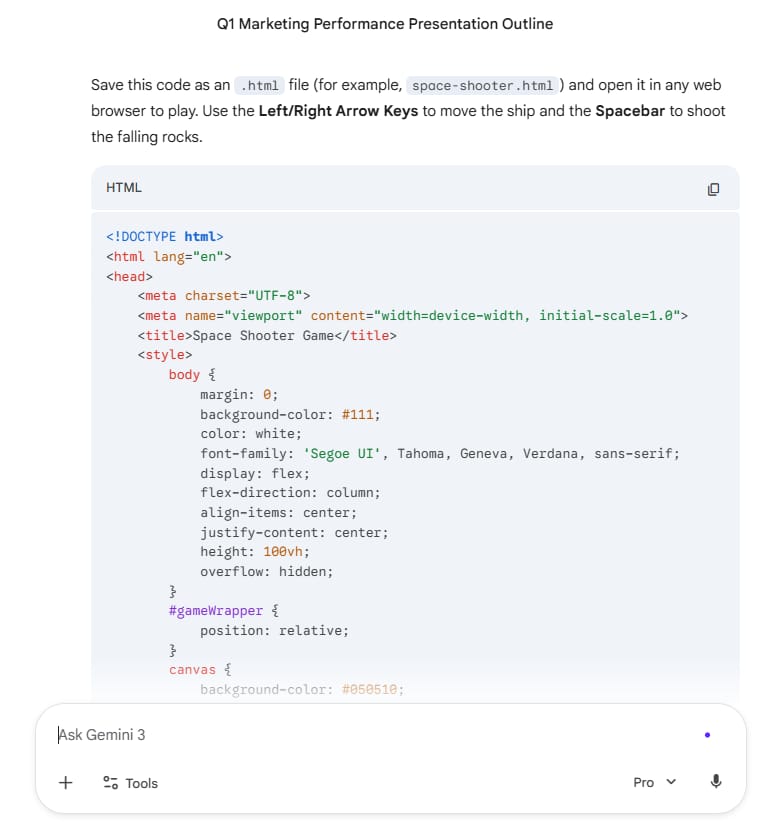
The AI gives you a long block of code. You save it on your computer. You open it in your browser. You can use your keyboard to move the ship and play the game immediately.
11. Reading Hard Medical Papers With Gemini 3.1 Pro
Doctors and scientists read very long reports. The AI can help them find facts quickly. Type this prompt:
Read this long medical report about a new medicine. Make a simple table. Compare the good effects and the bad effects of this medicine.
The AI pulls out the exact facts. It builds a table. You can read the summary in one minute instead of reading fifty pages.
How useful was this AI tool article for you? 💻Let us know how this article on AI tools helped with your work or learning. Your feedback helps us improve! |
III. Gemini 3.1 Pro Tech Specs And Details
We saw what it can do. Now let us talk about how it works on the inside. I will explain the technology behind this model using easy concepts for you.
1. A Very Big Memory System
This model has a massive context window. A context window is like a short-term memory box. It has a one million token window. A token is a piece of a word. This means you can put huge amounts of data into the box at one time.

You can upload an entire book or an hour of video. The AI will remember all of it while it talks to you.
2. Multi-Modal Abilities
Multi-modal is a big word, but it means something simple. It means the AI has eyes and ears. Older systems could only read text.

This new model can look at a picture, read a text document, and listen to a song all at the same time. It mixes the information together perfectly to give you a smart answer.
IV. Gemini 3.1 Pro Test Scores And Results
Scientists give exams to AI models to see how smart they are. Let us look at how this model did on the big exams.
1. Learning New Rules Fast
There is a famous test called the ARC exam. This test checks if a computer can learn a completely new visual puzzle rule. Most computers fail because they only know what they memorized before.

This new Google model scored very high on this test. It can look at a new pattern, understand the rule, and solve the next puzzle correctly.
2. Passing Hard Skill Tests
This tool is great at learning facts. Also, it is very excellent at doing real work. There is a very hard test called APEX-Agents. This test checks how well the AI can use tools by itself.

Image note: Gemini 3.1 Pro gets the highest score (33.5%), beating both Claude Opus 4.6 and GPT-5.2.
As you can see on the chart, it sits right at the top of the list. It leaves the other tools far behind. This shows that the new model knows a lot of deep facts about the world. At the same time, it acts just like a very wonderful real helper.
We talked about hallucinations earlier. Tests show that this new version tells fewer lies than the older versions. It is much more honest. If it does not know something, it tries to be accurate.
V. Gemini 3.1 Pro Vs Other Big AI Tools
There are many AI tools on the internet today. You might wonder how this one compares to the others.
You probably know about ChatGPT. You might also know about Claude. These are all very smart systems.
This Google model is very good at reading long files because of its big memory box. It is also very good at looking at videos.
→ Claude is sometimes a little bit better at writing very soft and emotional text.
→ ChatGPT is sometimes a little bit better at writing very hard math code.

But this model is very cheap to use. It costs less money to run big tasks on it. This makes it a great choice for daily work. You get a very smart brain for a very good price.
VI. How Do You Talk To Gemini 3.1 Pro Better?
If you want the best answers, you need to ask the best questions. Here are a few clear tips for you.
1. Give It A Lot Of Background Context
Do not ask very short questions. If you want a good email, tell the AI who you are writing to. Tell it why you are writing. Tell it how you want the person to feel. The more details you give, the better the final result will be.
2. Use The Special Canvas Window

When you ask for code or a big table, use the special side window feature. It opens the result on the right side of your screen. This makes it very easy to read. You can highlight one sentence and ask the AI to change just that one sentence.
3. Mix Your Files Together
Try giving it a picture and a text file at the same time. You can take a picture of your messy desk. You can upload a list of your goals. You can ask the AI to help you organize your room to match your goals. It loves connecting different types of information.
Conclusion
We have gone on a quite long trip together to learn about this system. I hope the info just now helped you see its real power. Different from other hard tools, Gemini 3.1 Pro is very friendly and handy for your daily work.
To make it easy to remember before we finish this post, I will sum up the main reasons you should start using it:
It has a huge memory to read a lot of your long files at the same time.
This system is super smart at mixing text, pictures, sounds, and videos together.
It works very fast, gives right answers, and helps you save a lot of money.
Rules are just rules if we do not try doing it ourselves. The best way to understand an AI software is to type your very first prompts yourself. You can open the website, log in, and try asking it for a few fresh ideas for your newsletter this week. You will surely be surprised.
The future of tech is happening right now and it is for everyone. If you have any questions while using it, please leave a comment below this post. We will talk together and find the best ways to use it!
If you are interested in other topics and how AI is transforming different aspects of our lives or even in making money using AI with more detailed, step-by-step guidance, you can find our other articles here:
AI Generalist: How To Make 2026 The Best Year of Your Life With GPT/Gemini
The New Way to Build Profitable AI Websites With Gemini 3 (It Starts With One Page)
Earn Money with MCP in n8n: A Guide to Leveraging Model Context Protocol for AI Automation*
Transform Your Product Photos with AI Marketing for Under $1!*
The AI Secret To Reports That Clients Actually Implement
*indicates a premium content, if any
Reply