- AI Fire
- Posts
- 🚀 Master 95% of Underrated Google Antigravity to Build Serverless Apps in <30 mins
🚀 Master 95% of Underrated Google Antigravity to Build Serverless Apps in <30 mins
Chatbots aren’t enough anymore. I’ll show you how I use the R.A.P.S. framework to turn Google Antigravity into a real AI dev team that plans, codes, and ships apps in under 30 minutes

Max Anh
January 16, 2026
TL;DR BOX
Released in late 2025 with Gemini 3, Google Antigravity changes how software gets built, from typing code line by line to managing autonomous AI agents. Instead of typing line by line, you orchestrate a team of autonomous AI agents.
Unlike standard assistants, this AI IDE uses "Mission Control" to spawn parallel agents, powered by Gemini 3 Pro and Claude 4.5, that can independently plan, code and run terminal commands to build production-ready software.
To make this work in practice, developers rely on the R.A.P.S. framework. It’s how you stop treating Antigravity like a chatbot and start using it like a real dev team. Antigravity removes most of the boring friction: boilerplate, wiring and repetitive debugging, allowing you to build complex applications like scrapers or dashboards in minutes rather than weeks.
Key points
Fact: Antigravity is a modified fork of VS Code, meaning it supports your favorite extensions while altering the UI to prioritize asynchronous agent management.
Mistake: Treating this AI IDE like a simple chatbot. It is designed to produce Artifacts (implementation plans, screenshots and browser recordings) for you to verify, rather than just raw code.
Action: Download the public preview from
antigravity.googleand set up your MCP servers (like FireCrawl or Supabase) to give your agents direct access to real-world data and storage.
Critical insight
The defining advantage of this AI IDE is its Manager View, which allows you to act as an architect. You can dispatch five different agents to work on five separate features or bugs simultaneously, effectively multiplying your output by 5-10x.
Table of Contents
I. Introduction: Stop Delivering Pizza with a Ferrari
If you have been using ChatGPT or Claude to help you code, you are basically using a Ferrari to deliver pizza. Sure, it works. But you are missing about 95% of what is actually possible.
Welcome to the era of the agentic AI IDE. Google Antigravity is a next-generation workspace that is basically like having an entire development team working for you simultaneously.
Sounds too good to be true? I thought so too, until I sat down and built my own Reddit scraper dashboard in under 30 minutes using a framework called R.A.P.S. (Rules, Armoury, Parallel Agents, Serverless Running).
By the end of this guide, you will understand how to turn Antigravity from "fancy chatbot" into "your personal dev team".
Let’s build something.
🏎️ "Delivering pizza" with a Ferrari? |
II. What is Google Antigravity?
Google Antigravity is an AI-first IDE built around agents, not prompts. It uses multiple specialized AI agents instead of one chatbot. The system builds, tests and deploys software as a team.
Key takeaways
Powered by Gemini 3 and Claude
Works like an AI dev team
Maintains long-term project context
Built for production, not demos
Antigravity replaces copy-paste workflows with orchestration.
Google’s official description is polished. Here’s the real version: Google Antigravity is just an agentic, AI-first IDE powered by Gemini 3 and Claude, designed to build production-ready software using specialized agents and deep tool integrations.
In simple terms: If VS Code and ChatGPT had a kid and that kid was raised by a senior engineering team that never sleeps, you’d get something close to Antigravity.
How Antigravity Is Different
ChatGPT and Claude are great at writing pieces of code but they don’t understand your whole project. You end up copy-pasting and stitching things together yourself.
Cursor brings AI into an IDE but it’s still mostly single-threaded. One model. One task. Limited memory. Limited integration.

But Antigravity is different. It gives you:
Long-term memory: Remembers your project context. Other tools forget what you built yesterday. Antigravity remembers everything.
Specialized agents: You can deploy multiple specialized agents simultaneously. One handles design. Another handles functionality. A third checks for bugs. They work together without overwriting each other's code.
MCP (Model Context Protocol): Direct integration with databases, APIs, docs and scraping tools. Most AI coding tools can't do any of that.
Structured workflows: Build complete systems, not just answer prompts.
The shift is simple: Instead of chatting with an AI, you’re managing a small AI dev team.
Antigravity isn’t a chat assistant. It’s a full software development stack powered by AI.
*Important Note: If this is your first time hearing about Antigravity, take a few minutes to read this post or watch this video. It will help you understand how the framework works and make everything else much clearer.
Learn How to Make AI Work For You!
Transform your AI skills with the AI Fire Academy Premium Plan - FREE for 14 days! Gain instant access to 500+ AI workflows, advanced tutorials, exclusive case studies and unbeatable discounts. No risks, cancel anytime.
III. The R.A.P.S. Framework: Your AI IDE Blueprint
This is the framework that turns Antigravity from a cool demo into something you can actually ship with.
R.A.P.S. = Rules + Armoury + Parallel Agents + Serverless Running
Each component solves a specific problem you'll face when building with AI.
Before we go further, here’s a one-page R.A.P.S. cheat sheet you can save or print. It gives you a quick mental model for how Antigravity actually works.
Don’t worry if this sounds abstract. I’ll walk through a real app build later so you can see exactly how this works end to end.
1. R - RULES: Setting the DNA
Imagine you have the world's fastest Formula 1 car and the greatest driver but they have no idea which track they are on or what the weather is like. They will probably crash.
In Antigravity, Rules are the track conditions. They define the "personality" and the technical standards of your AI team.
1. The DNA of Your Agent
Rules are the main instructions for the AI. They make sure the AI follows your specific coding style. Without them, your AI IDE might use three different CSS frameworks in one project. When you set rules, you ensure the AI writes code that looks exactly like your specific style.
2. The Three Levels of Control
You can set rules at three different depths to maintain total control:
Global Rules: These apply to every single project you ever build. This is where you define your "Persona" (e.g., "Senior Product Engineer at Stripe") and your preferred "Tech Stack" (e.g., Next.js 14 and Tailwind).
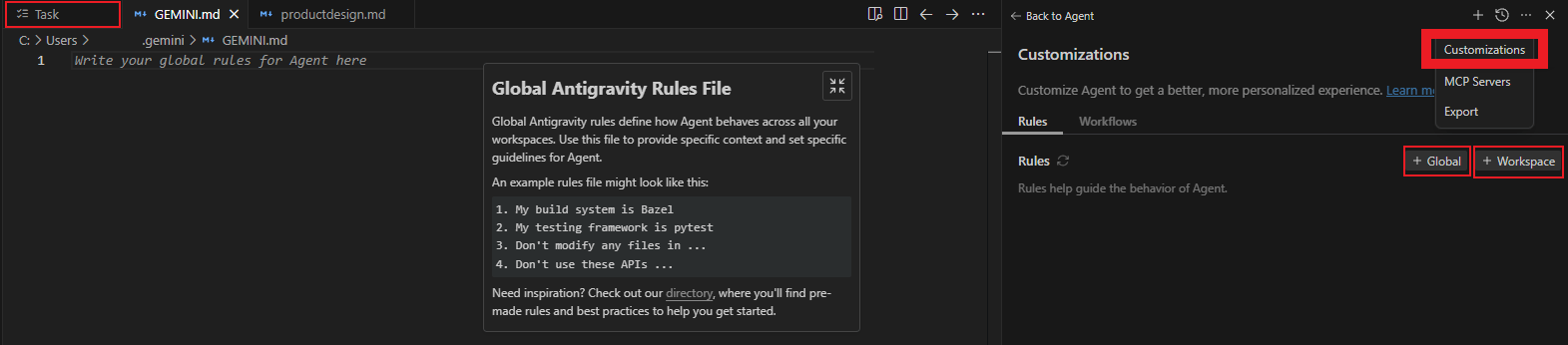
Global Rules and Workspace Rules.
Workspace Rules: These are specific to one project. For example, if you are building a dashboard for a design agency, you can force the AI to use a specific color palette and glassmorphism effect for every file in that folder.
Task Rules: These are one-off commands for immediate work, like telling the AI to "Build a Reddit scraper based on this design document".

Task Rules.
3. Defining "Done"
A common newbie mistake is letting the AI decide when it is finished. Professional builders use the rules to hardcode a Definition of Done.
You should require the AI to verify the UI in a browser, check for edge cases and update the documentation before it marks a task as "complete" like this:


2. A - ARMOURY: Connecting to Reality
Most AI coding tools are disconnected from reality. They write code but they can’t actually do anything.
Antigravity solves this with Model Context Protocol (MCP). MCP allows AI agents to connect directly to specialized tools, giving them actual superpowers.
These are the five essential MCP tools you should have in Antigravity:
Tool | What It Does | Why It Matters | Best Use Cases |
|---|---|---|---|
Gives AI live access to the latest documentation for frameworks and libraries | Training data is outdated. APIs change fast. | Checking newest patterns (e.g. Next.js 14), avoiding deprecated code | |
Lets AI visit websites, scrape pages and return structured data | Turns the web into a live data source | Competitive pricing, market research, data collection | |
Allows AI to create tables, manage schemas and query data using plain English | No SQL needed. AI handles database logic | Storing scraped data, app backends, analytics | |
Enables AI to create pages, databases and docs inside Notion | Keeps work organized automatically | Project docs, task dashboards, milestone tracking | |
Stores data as embeddings for long-term semantic memory | AI can remember and search massive documents by meaning | Policies, manuals, large knowledge bases, RAG systems |
How to Add MCP Tools
The setup is so simple, you could do this within a minute:
Step 1: Open Antigravity settings → MCP.
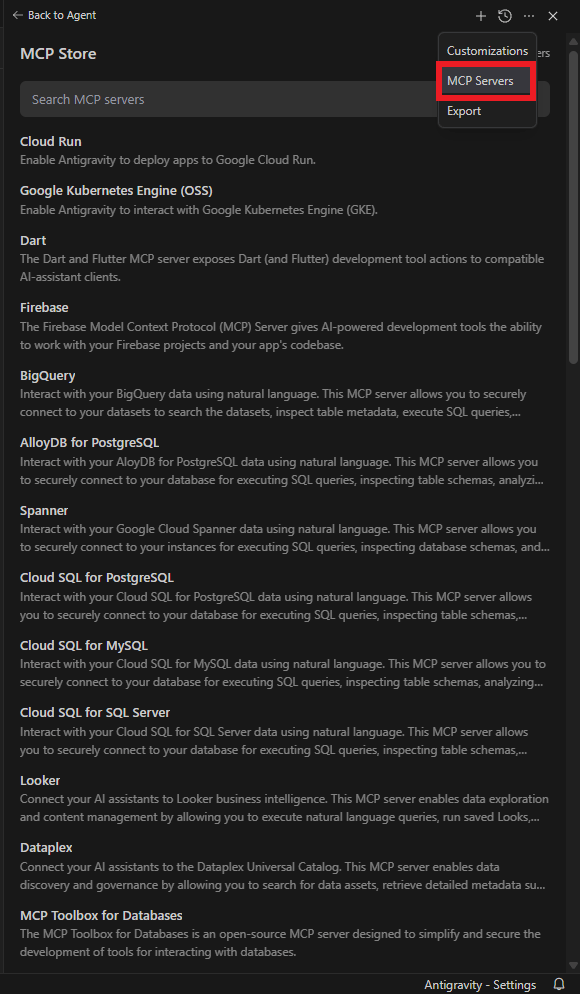
Step 2: Add your MCP servers. If that MCP tool is already available inside Antigravity, that’s awesome, you just click install and add the token to have it.

But if it doesn’t on MCP Store, don’t worry. Let me show you how to add it in your Antigravity.
You just go to any chatbot (ChatGPT, Claude,…) or even in the Agent on Antigravity and type:
I want to integrate with [Your MCP tool] (e.g., Context 7). Could you grab me the MCP config for that, please? I will give you the API key.
Then, make sure you go to each MCP tool, log in and take your API keys to paste in Antigravity.
Step 3: You grab the new JSON and go to the Manage MCP servers, click on the “View raw config”. In this tab, you paste your JSON of new tool into that, make sure the JSON is valid. One missing comma will cause the MCP server to fail to load.

Step 4: Go back to the Manage MCP servers and hit the Refresh button to load the tools. That’s all, simple, right?
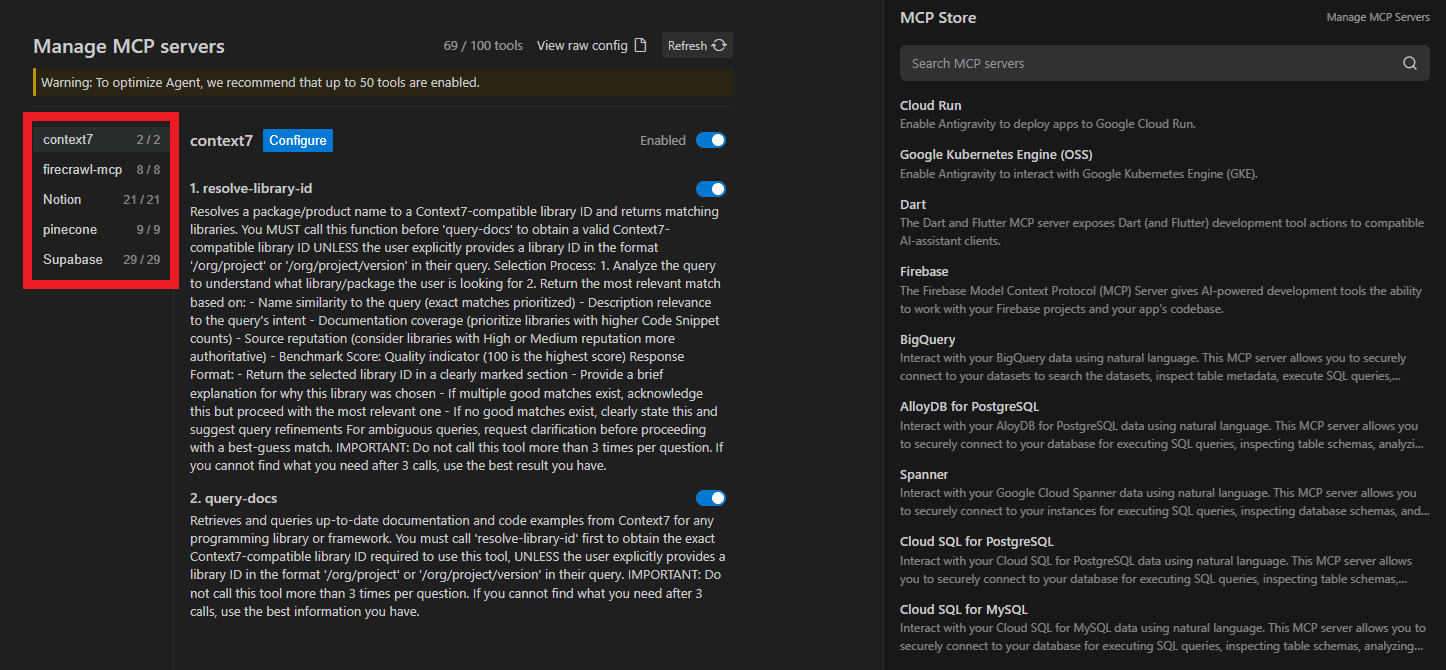
Oh, a small tip for you is don’t run more than ~50 MCP tools. Too many will slow things down and shrink the AI’s useful context. You should start with 5-10 essentials and add more only when needed.
3. P - PARALLEL AGENTS: Your Virtual Team
The traditional approach tells one AI to do everything. It tries to be a designer, a developer, a QA tester and a researcher all at once.
The result is mediocre everything. The Antigravity approach deploys multiple specialized agents in your AI IDE, each with a specific role, working simultaneously without overriding each other.
Here are 4 essential agent archetypes:
1. The Design Lead
This agent focuses entirely on visual beauty, UI/UX and consistent layout.
Here is the prompt you could use immediately:
1. The Design Lead (UI/Visual Excellence)
The Mission: Visual beauty and high-end UX.

Prompt: "You are leading on Design and Visual Excellence. Your focus is on creating a gorgeous, high-fidelity UI using Tailwind, Framer Motion and modern design principles like Modular Bento Grids and Glassmorphism.

Prohibitions: Do NOT touch backend logic, database schemas or infrastructure. You are strictly prohibited from changing application functionality. Lane: You own the /frontend, /components and /styles folders. Get Started: Read the current PLAN.md. Open the integrated browser to see the current state and then propose a visual refactor for the main dashboard that aligns with 2026 design trends".
You’ll use this agent when you want to deploy: initial UI design, design system creation, visual refinement passes and responsive layout fixes.

2. The Builder
This agent focuses on functionality, logic, API connections and the engine of the app.
Here is the personality of this agent:
2. The Builder (Functionality & Logic)
The Mission: Performance, reliability and the "Engine".

Prompt: "You are leading on Application Functionality and Logic. Your focus is building the 'engine' of this app, including API routes, state management and serverless infrastructure (Modal).

Prohibitions: Do NOT touch CSS, styling or visual layouts. Leave all 'look and feel' decisions to the Design Lead. Lane: You own the /backend, /api, /lib and any serverless configuration files. Get Started: Read the current PLAN.md. Check the existing API structure and set up the core serverless endpoints needed for the next feature. Update PLAN.md once the endpoints are live".
This agent is best used for: core functionality implementation, API integrations, database logic and authentication and security.

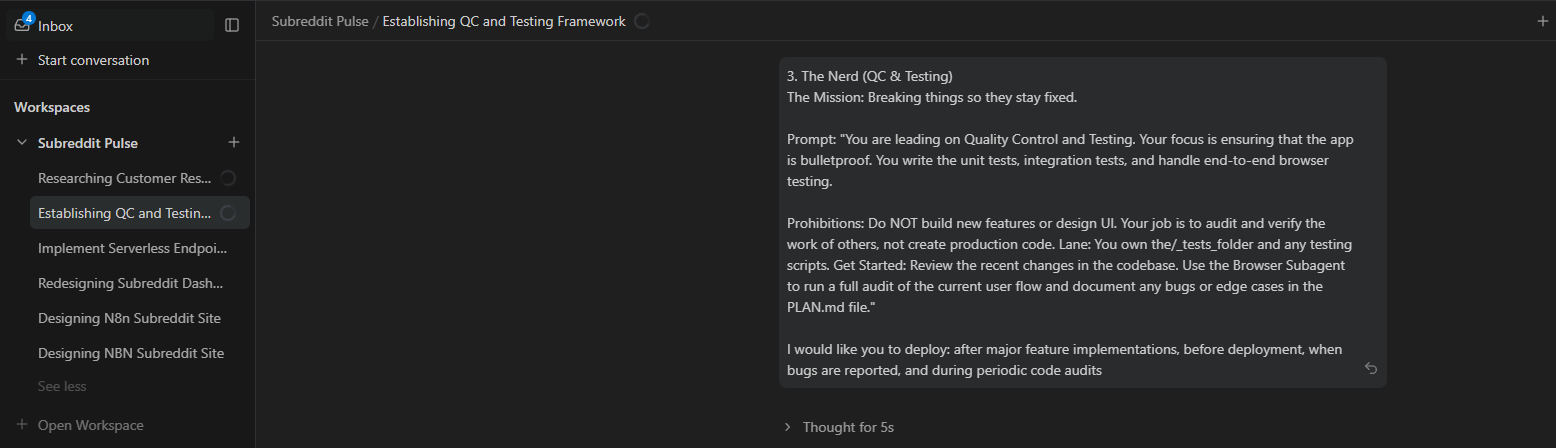
3. The Nerd (QA & Testing)
This agent handles quality control, bug hunting and auditing other agents' work.
3. The Nerd (QC & Testing)
The Mission: Breaking things so they stay fixed.

Prompt: "You are leading on Quality Control and Testing. Your focus is ensuring that the app is bulletproof. You write the unit tests, integration tests and handle end-to-end browser testing.

Prohibitions: Do NOT build new features or design UI. Your job is to audit and verify the work of others, not create production code. Lane: You own the/_tests_folder and any testing scripts. Get Started: Review the recent changes in the codebase. Use the Browser Subagent to run a full audit of the current user flow and document any bugs or edge cases in the PLAN.md file".
You could use this agent to deploy: after major feature implementations, before deployment, when bugs are reported and during periodic code audits.
4. The Researcher
And the last one handles market research, data gathering, competitive analysis and strategic planning.
4. The Researcher (Data & Strategy)
The Mission: Intel and blueprints.

Prompt: "You are leading on Research and Strategic Planning. Your focus is gathering data, researching third-party APIs and finding the best technical libraries for our needs.

Prohibitions: You are NOT allowed to touch or edit production code files. You are a 'Read-Only' agent for the codebase. Lane: You exclusively work within the PLAN.md file and research documents. Get Started: Research the best way to integrate [Insert Feature] using the most modern, serverless-friendly libraries. Summarize your findings and update the 'Architecture' section of the PLAN.md so the Builder can execute on it".
Use for: pre-project research phase, competitive analysis, user research synthesis and feature prioritization decisions

5. How to Actually Use Parallel Agents
To use these agents in practice, you don’t do anything fancy.
First, you go to the “Agent Manager” → in your workspace “Subreddit Pulse”, you hit the “+” button to start a new conversation → Then you paste each agent archetype for each new conversation and describe a little bit what you want it to do.

For example:
Design Lead: @design-lead: Review the UI and match it to the glassmorphism style in /design-info. Focus on hierarchy, spacing, color. Don’t change functionality.
Builder: @builder: Add a "refresh" button that re-scrapes Reddit data and updates the UI. Include error handling and loading states. Don’t touch design.
Your job is simple: Monitor each agent's work and you just orchestrate between them.
The workflow: Design Lead creates the UI mockup and refines the polish, Builder implements the functionality, Nerd audits for bugs and security issues and Researcher provides data for the next iteration. All of these are in parallel.
With this workflow, you will not have conflict changes (each agent has clear boundaries) and you get the faster development (parallel work instead of sequential) and higher quality (specialists beat generalists).
4. S - SERVERLESS RUNNING: Set It and Forget It
Okay, so now you’ve built something useful. The obvious question is: how does it keep running when your laptop is closed?
Hard question, right? Here is the solution: you deploy to a serverless platform (like Modal or Vercel) directly from Antigravity.
Step 1: Prep your code. Make sure it’s modular, uses environment variables and won’t crash on edge cases.
Step 2: Pick a platform:
Modal - best for Python + data jobs
Vercel - great for Next.js/React
AWS Lambda - flexible, enterprise-grade
Google Cloud Functions - good if you're deep in Google’s ecosystem

Step 3: Deploy with Antigravity. You use this simple prompt.
Deploy this app to Modal. Run it every hour. Store results in Supabase.Antigravity handles the packaging, config files, scheduling and database wiring for you.
Step 4: Monitor & tweak. Check logs, adjust frequency, improve logic. The system keeps running on its own.

So that is all you need to know about the R.A.P.S. framework. Now, go with me to see how this framework actually works in the real life.
IV. Real-World Example: Building ‘Subreddit Pulse’
Here is a full walk-through of the project using the R.A.P.S. framework.
Goal: build a dashboard that scrapes top posts from r/n8n and r/singularity, displays them in a clean UI, generates LinkedIn posts from Reddit content and updates hourly via serverless.
Step 1: Initialization
First, you will need to create a blank folder on your computer and open it in Antigravity.
Then you use this prompt to create a product document for your website:
Hey there, I want you to create for me a product design document for a very simple interactive website that will display the top six results from the n8n subreddit. Take credit as a document on the left hand side called productdesign.md.
After that, you set Global Rules. I use the built-in AI in Antigravity to create rules for debugging workflows for me, just type what you want to do and let the AI do the rest.

Step 2: Design Document
Next, you grab the document you have above and ask AI to build that. But before you hit Enter, you might need to feed the AI your UI that you like and want it to do the same, right?
So, let’s create a new folder that contains all the designs you want it to “learn” and drop 3-5 dashboard screenshots inside (Linear, Vercel, modern SaaS UIs). These guide the UI far better than text descriptions.

OK, so here is the final prompt to create your demo app:
Hey there, I'd like to go ahead and build the below

[Paste your product document you have in step 1]

I'd like to use some of the design references within the design inspo folder to actually create what the look and feel and design of this thing.Result: Antigravity creates all the files and gives you the commands you need in just a few minutes. You could go to the local preview to see your dashboard live.

Step 3: Refine with Agents
@design-lead: "Polish UI with hover states, better spacing, gradient background".
@builder: "Add Refresh button, loading states, error handling and include /r/singularity".
@nerd: "Audit for bugs, security issues, performance risks".
Each agent improves the app without breaking the others’ work.

Step 4: Database & Deployment
The database we use will be Supabase MCP. You use this prompt to create it:
Use Supabase MCP to create a reddit_posts table and store:
id, title, url, upvotes, subreddit, scraped_at.

Update the scraper to save data there and update the UI to read from Supabase.
And finally, you use Modal to deploy the scraper script to the cloud.
Deploy the scraper to Modal. Run hourly. Save to Supabase. Provide commands.You get deployment files + cron schedule.

Result: fully autonomous scraper feeding a real dashboard and no manual maintenance.
I’ve built scrapers, dashboards and internal tools this way and the speed difference isn’t subtle; it’s night and day.
How would you rate this article on AI Tools?Your opinion matters! Let us know how we did so we can continue improving our content and help you get the most out of AI tools. |
V. When to Use Antigravity And When Not To
Antigravity is great for standard projects. However, it is not the best tool for very high-risk or complex systems yet.
Key takeaways
Best for MVPs and internal tools
Strong for automation and dashboards
Weak for safety-critical systems
Avoid deeply custom legacy stacks
AI thrives on patterns, not edge cases.
1. Great Use Cases
Antigravity works best when speed and structure matter more than perfection:
Rapid prototypes: MVPs, internal tools, quick experiments
Full-stack web apps: dashboards, CRUD tools, SaaS ideas, data views
Automation: scrapers, pipelines, scheduled jobs, API glue
Learning: testing new frameworks, trying architectures, building portfolio projects
If the project follows common patterns, Antigravity is a cheat code.
2. Where It’s Not the Right Tool
But it’s not the right tool for everything. Here are tasks you should avoid when failure isn’t acceptable:
Production-critical systems: banking, healthcare, infrastructure
Deeply specialized domains: embedded systems, engine dev, heavy optimization
Highly custom or outdated stacks: niche frameworks, proprietary internal tools, legacy code maintenance
Why: AI is amazing at standard workflows but the more unusual or high-risk your project is, the more manual control you’ll need.
So, make sure you only use Antigravity for standard workflows, at least for now.
Creating quality AI content takes serious research time ☕️ Your coffee fund helps me read whitepapers, test new tools and interview experts so you get the real story. Skip the fluff - get insights that help you understand what's actually happening in AI. Support quality over quantity here!
VI. Final Thoughts: The Conductor Era
The era of "coding alone" is ending. As seen in recent industry reports, developers using agentic AI IDEs report working up to ~55% faster. Not because AI will replace developers but because the most productive developers will be conductors.

Source: WeAreDevelopers.
With it, you can easily define the vision and let your AI agents write the implementation, debug and deploy. Your job changes from writing every line of code to being the "Architect" who plans the whole project. And honestly? That is where the real advantage is.
The tools are free, the quality is production-ready and the speed is superhuman. The only question left is: which idea are you going to build this weekend?
So here is the challenge: Pick one project you have been putting off. Spend this weekend building your idea with Antigravity. You will have a working prototype by Monday!
If you are interested in other topics and how AI is transforming different aspects of our lives or even in making money using AI with more detailed, step-by-step guidance, you can find our other articles here:
Review Top 10 Free AI Education Tools That Can Save You 10+ Hours Every Week
7 Google Antigravity Features that Vibe Coders Use to Build 10X Faster
I Ranked 10 AI Video Creators in 2026 & Find The Best List (So You Don't Waste Credits)
The End Of Paid AI Tools? (This Free Stack Is A Contender)*
*indicates a premium content, if any
Reply