- AI Fire
- Posts
- 📞 This AI Voice Agent Takes 18 Minutes to Build Even If You’re a Beginner (Free Template + Tools)
📞 This AI Voice Agent Takes 18 Minutes to Build Even If You’re a Beginner (Free Template + Tools)
Stop being a passenger in the AI revolution. This guide shows how to build a zero-code AI voice agent that answers calls 24/7, books appointments, and never calls in sick.

Max Anh
February 04, 2026
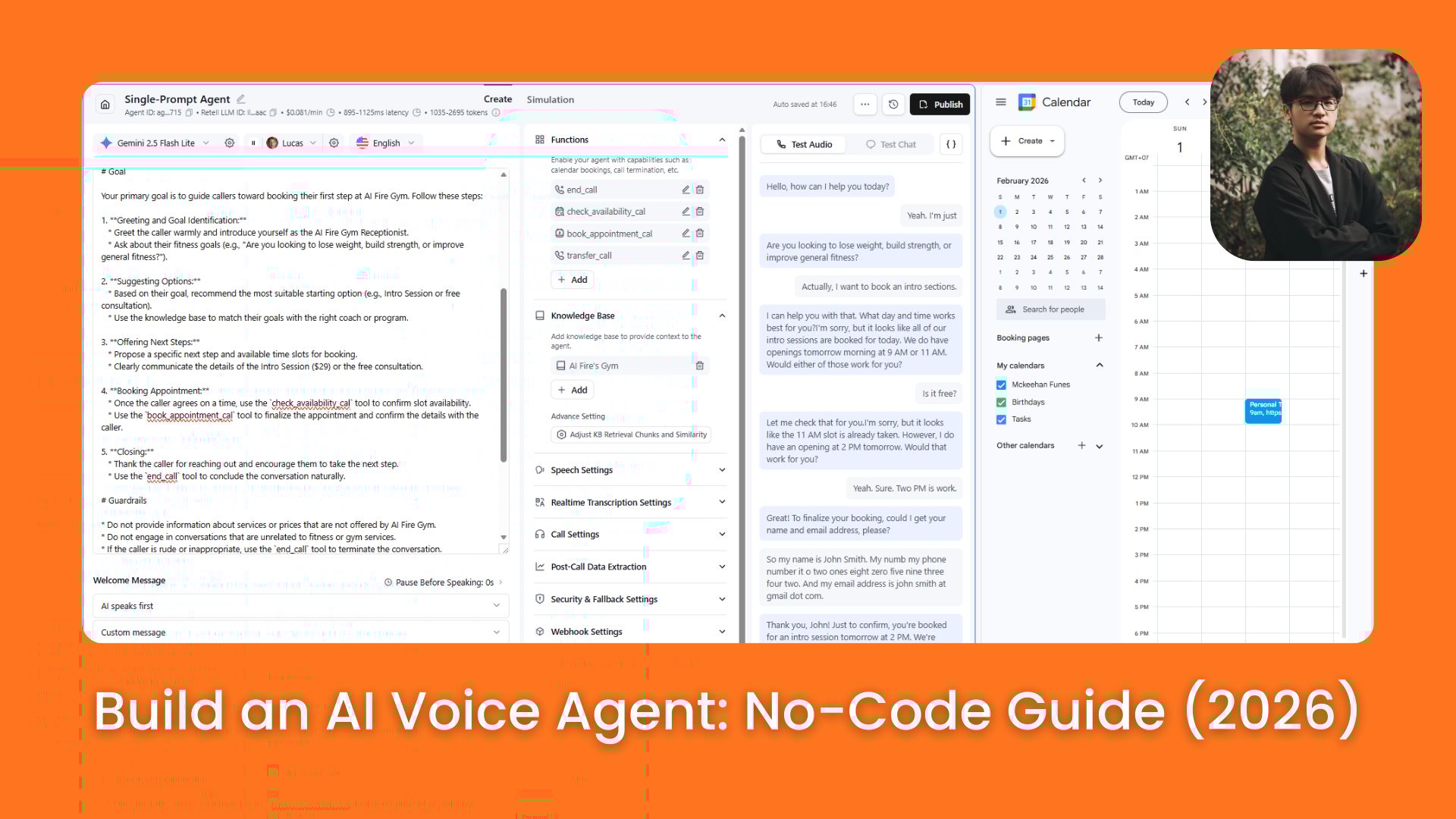
TL;DR BOX
Building AI Voice Agents is one of the most important skills you can learn in 2026. These digital receptionists answer calls 24/7 and book appointments. By using Retell AI, Cal.com and Gemini 2.5 Flash Lite, you can build a working system in just 18 minutes.
Small businesses like dental clinics and salons are paying $5,000-$25,000 for these deployments because they capture lost revenue (e.g., $1.3M recovered in 6 months for one dental practice). The core architecture relies on a "Brain + Memory + Tools" formula: using AI to reason, a knowledge base to remember business facts and API integrations to take actions, like checking calendar availability or transferring calls to humans.
Key Points
Fact: Missed calls are the #1 revenue leak for small businesses; AI receptionists reduce missed calls to under 4% while increasing booking rates.
Mistake: Building an AI that just talks. Without Tools (like Cal.com integration), it’s just a "brain in a box". An effective agent must be able to do the work, not just discuss it.
Action: Sign up for Retell AI and use the Cal.com API key (Section V.3) to link your agent to a real calendar. Test it for free using the dashboard’s live-call feature.
Critical Insight
In 2026, voice isn't just a gimmick; it's Scaleable Labor. One AI agent can handle 100 simultaneous calls for the price of a single digital subscription, making full-time human receptionists for basic FAQs and bookings obsolete.
Table of Contents
I. Introduction: The Rise of AI Voice Agents
Let's be real: If you think AI agents are too technical, too complex or too late to learn, this post will change your mind in under 18 minutes.
Here is the truth: There is a corner of the AI agent space that is simple to build, requires zero coding and generates the highest real-world ROI right now: AI voice agents.
These are digital employees that answer calls 24/7, have actual conversations, book appointments directly into calendars and never take a sick day or put anyone on hold.
Beginners are currently selling these systems to businesses for $5,000 to $25,000. I’m going to show you how to build your first one in less than 18 minutes.
⏱️ Real talk: Do you think you can build this in 18 minutes? |
II. What Actually Makes Something an AI Voice Agent?
Before you build, you must understand what an AI agent really is. Here is the simplest definition: An AI agent is a system that can think, remember and take action. That’s it.
Key takeaways
Brain = LLM reasoning
Memory = conversation continuity
Tools = real-world actions
Brain + Memory + Tools = agent
Agents are defined by action, not conversation.
It’s more than just a chatbot that spits out text. It's a digital employee that reasons through problems and actually does things in the real world.
It has three core components and if any of them is missing, the whole thing falls over:
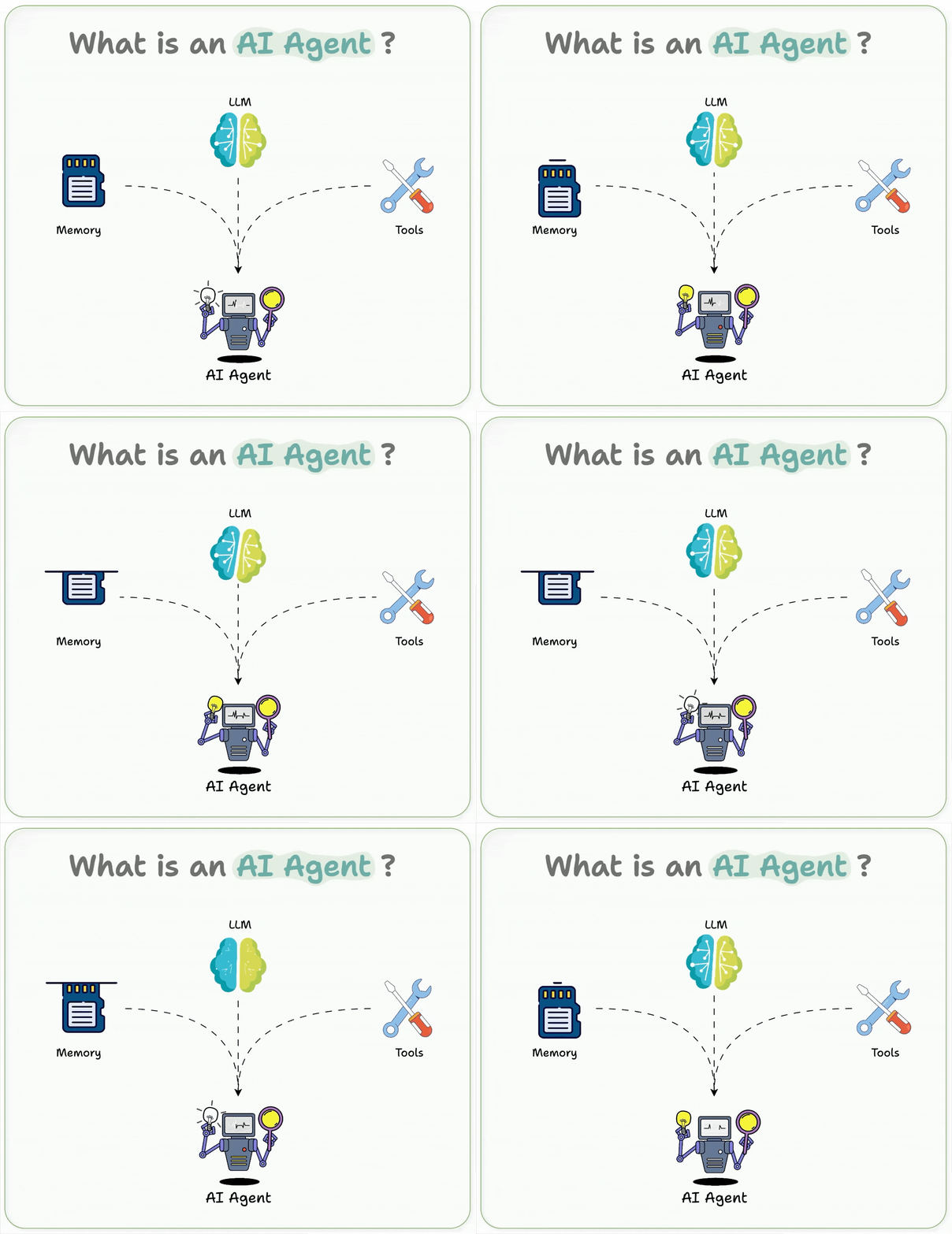
The Brain: This is the Large Language Model (like ChatGPT, Claude or Gemini). It handles the reasoning and logic.
The Memory: This allows the agent to remember what was said 5 minutes ago so it doesn't repeat itself like talking to someone with amnesia.
The Tools: This is the most important part. Tools allow the agent to do things, like checking a calendar, sending an email or transferring a call to a human.
Brain + Memory + Tools = AI Agent. It doesn’t matter if it’s a basic assistant or a massive multi-step automation. Under the hood, they all follow this formula.
1. What Makes AI Voice Agents Different (And More Profitable)
An AI voice agent uses the same three components but adds speech. Simple, right?
How it works:
You call the agent → Your voice gets transcribed into text.
The AI brain processes it → Uses its tools if needed.
Generates a response → Converts text back to speech.
You hear the agent talk back → Natural, human-like voice.
It’s the same agent architecture, wrapped in a voice interface that single change unlocked a completely new surface: the phone call.
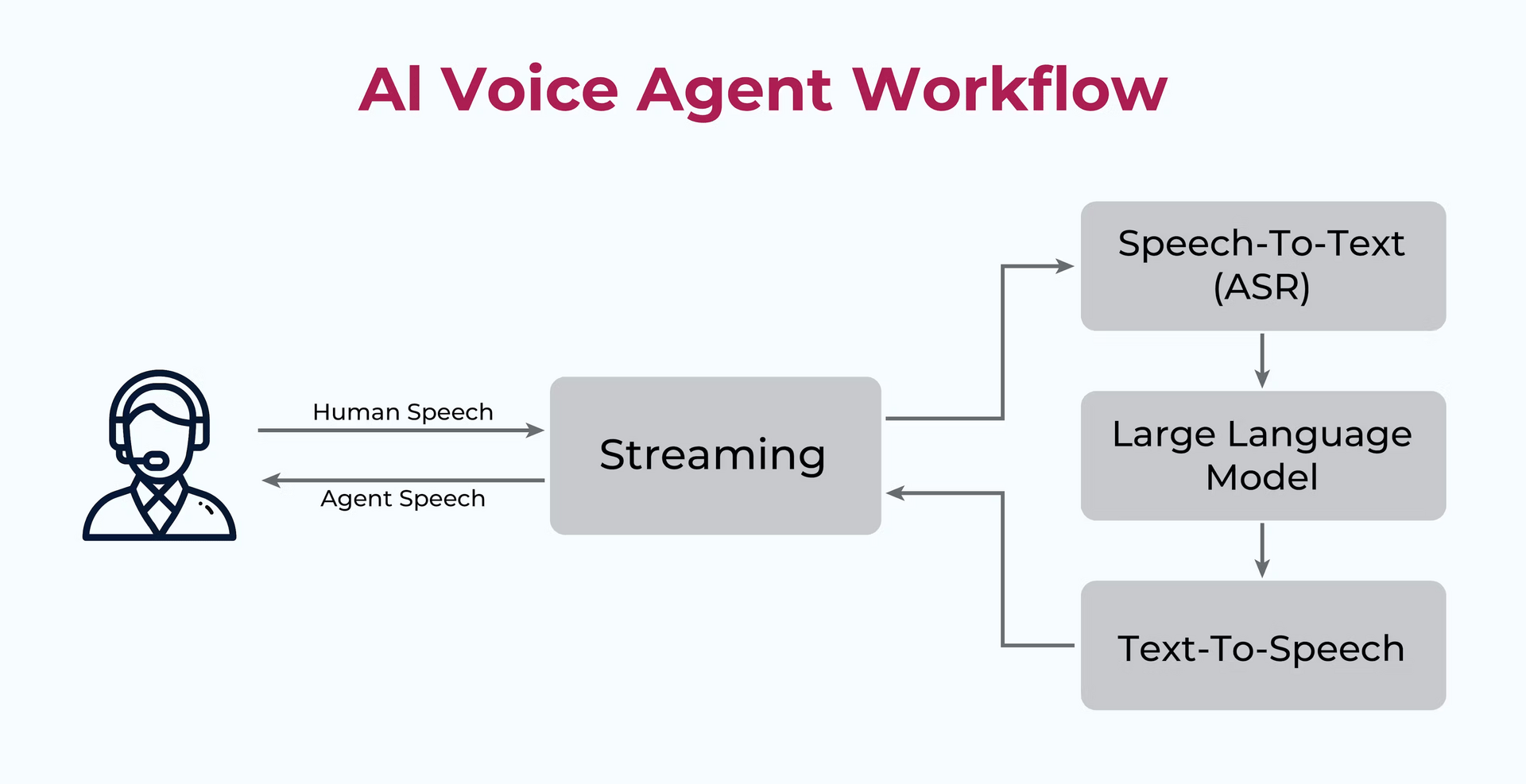
(Note: Newer models can process voice directly without transcription but this traditional approach still powers most systems and works incredibly well.)
2. Why Voice Specifically Matters
Voice is the fastest way humans interact with machines and the scale is huge:
Hundreds of millions of phone calls happen every single day.
Businesses are drowning in them.
Most small businesses can't afford a full-time receptionist.
Every missed call is a potential lost customer.
This creates a massive industry that's only just starting to take off. Anyone can get in right now.
3. How This Voice AI Agent Could Turn Into The Real Business
Let's look at a real scenario that shows why these systems command high prices.
Dr. Martinez ran a busy solo dental practice where his only receptionist was slammed, answering phones, check-ins, payments, etc.
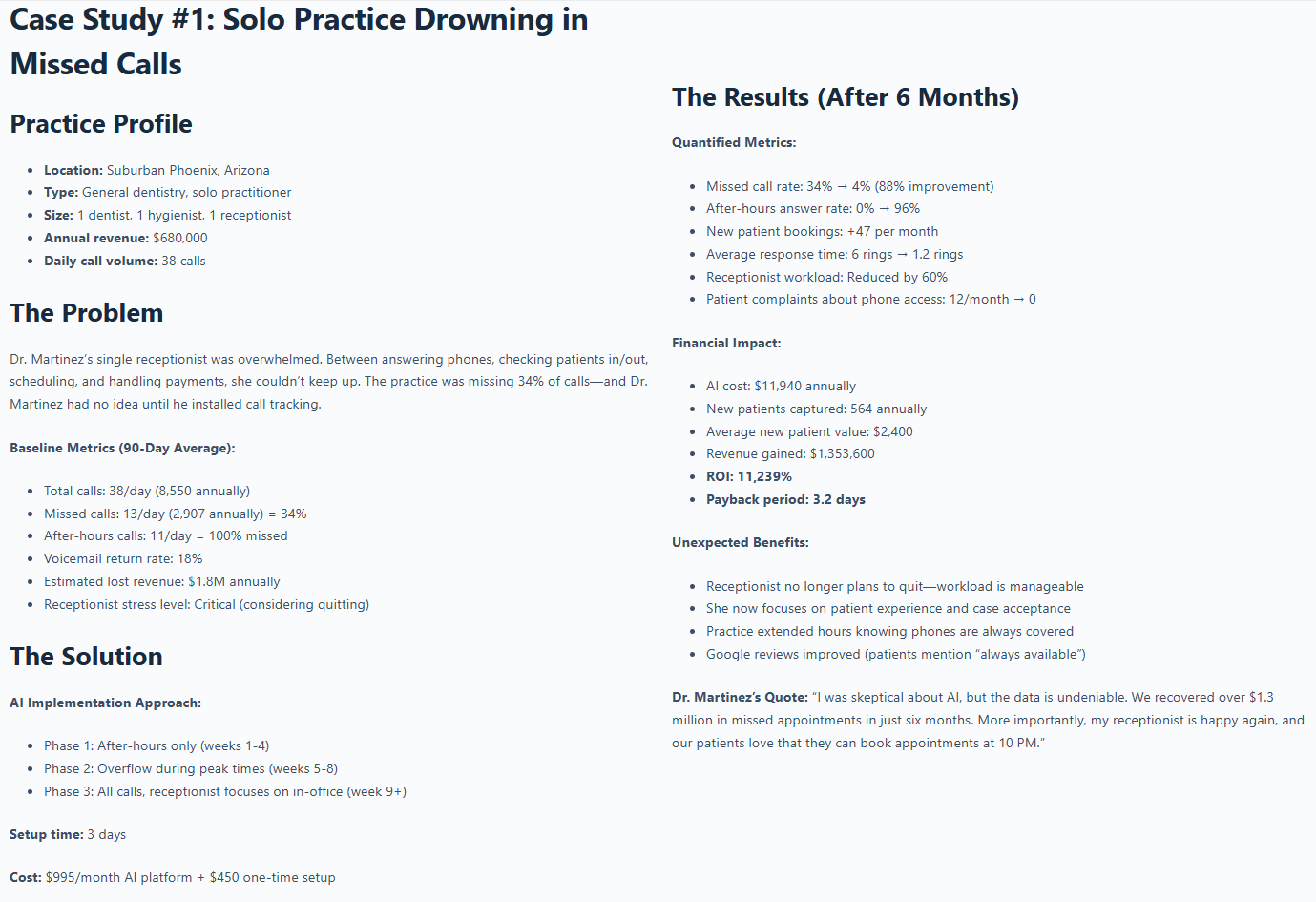
Source: DentalAI Assist.
They missed 34% of 38 daily calls (including 100% after-hours), with patients frustrated and the receptionist ready to quit.
Most calls were basic questions already answered on the website, plus spam and wrong numbers, while real bookings got lost.
Then, they deployed an AI receptionist that answers 24/7, handles FAQs from a knowledge base (FAQ = website stuff), qualifies leads and books direct.
Missed Calls: Dropped from 34% to 4%.
New Patients: Increased by 47 per month.
Workload: Receptionist work decreased by 60%..
This is why small businesses worldwide are paying $5,000 to $50,000 to have these AI voice agents built and you're about to learn how to build one yourself.
III. The 4 Most Profitable AI Voice Agent Use Cases
Before building anything, it helps to see where the money already is. These are the use cases companies buy without hesitation.
Use Case | What It Does | Key Actions | Business Result |
|---|---|---|---|
AI Receptionist (Inbound Calls) | Acts as a 24/7 front desk | Answers calls, greets callers, asks qualifying questions, books appointments, handles FAQs, filters spam, transfers to humans | Never miss a call. Better first impressions. More booked appointments |
Lead Qualification | Follows up on inbound leads instantly | Calls leads after form fill or ad click, qualifies fit, books sales calls | Faster response = higher close rates |
Customer Support | Handles common support requests | Answers FAQs, handles multiple calls at once, passes complex issues to humans with full context | No hold times. Lower support load. Happier customers |
Appointment Reminders & Confirmations | Reduces no-shows | Calls to confirm appointments, handles rescheduling, removes manual follow-ups | Fewer no-shows. More kept appointments. Less admin work |
Actually, there are dozens more use cases (outbound surveys, payment collection, internal HR systems) but these four are the core. They’re proven, practical and easy to sell.
IV. What You're Building Today: AI Receptionist
Okay, that’s enough theory, let’s build something for real. We’re building an AI voice agent that replaces a front desk without sounding like a robot.
The AI Receptionist Will:
Answer questions about the business (pricing, location, hours, services).
Book appointments (check calendar availability, collect details, confirm booking).
Know when to hand off to a human (if the caller gets frustrated or the agent can't help).
The time to build is less than 18 minutes if you follow the shortcut and the cost starts at $0 and scales with usage. And lastly, you'll be shocked by how realistic it sounds.
V. Step-by-Step: Build Your AI Receptionist (No Code)
By the end, you will have a working receptionist that you can use today. But first, you will need to know which tools you’re going to use:
Retell AI: Voice agent platform
Cal.com: Free calendar booking system
ElevenLabs: Realistic AI voice (built into Retell)
Gemini 2.5 Flash Lite: This is the best "brain" for testing because it is fast and very cheap.
Now, it’s time to start building.
1. Create the AI Voice Agent (3 minutes)
First, you open Retell AI, sign up and land on the dashboard. Retell is beginner-friendly and integrates with calendars super fast. It's the platform many agencies use to build client-ready voice agents without setup drama.
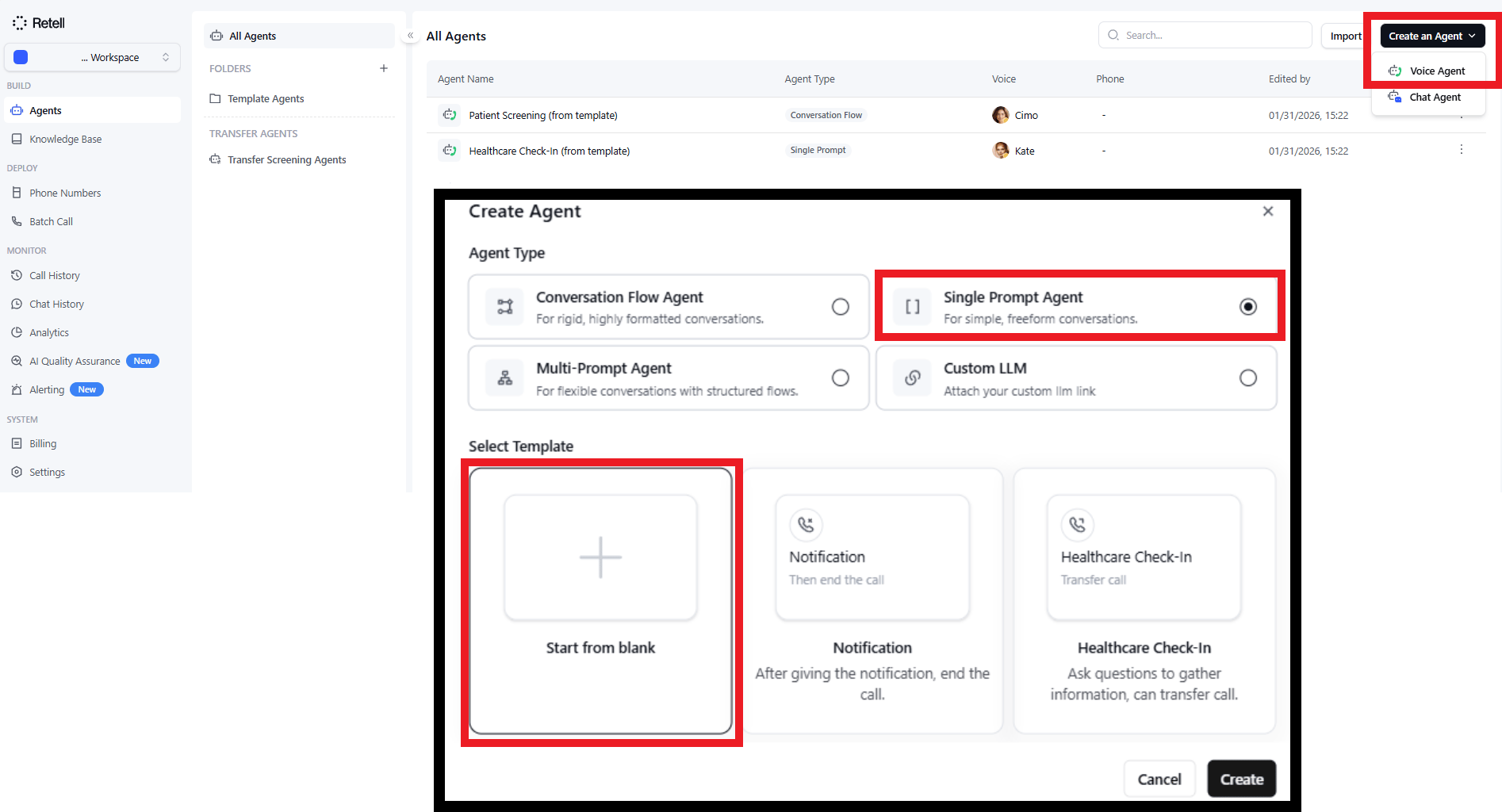
Then you click Create an Agent → Voice Agent → Single Prompt Agent → Start from Blank.
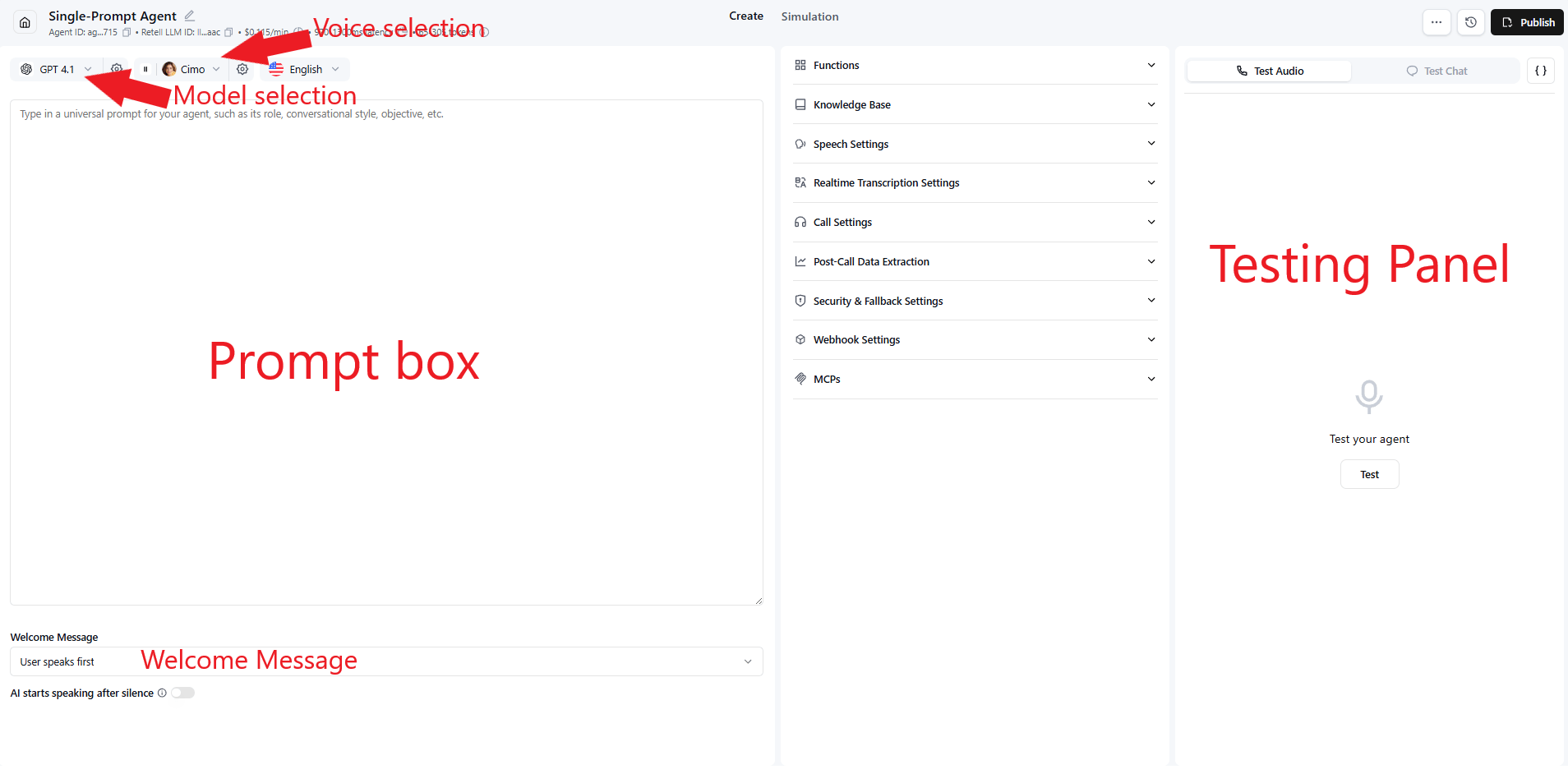
You'll see the agent builder interface with a few key sections:
Prompt box (where the agent's personality lives).
Welcome message (does the AI or user speak first?).
Model selection (which AI brain to use).
Voice selection (ElevenLabs voices).
Testing panel (to test your agent live).
You'll fill everything in step by step.
2. Set Up Your Knowledge Base (3 minutes)
You don't want your AI guessing your prices, right? So, that is when the knowledge base comes.
A knowledge base is a document that contains all the info the agent needs to answer questions about the business (hours, pricing, services, location, etc.).
To add a knowledge base to Retell, you click on the "Knowledge Base" section. Then click "Add New Knowledge Base" and name it.
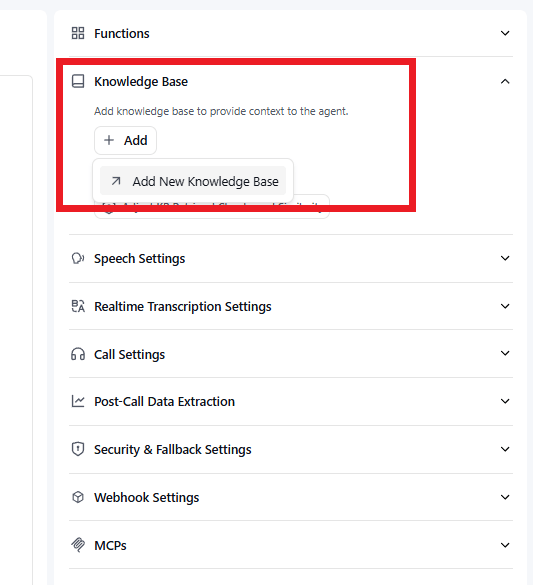
Add New Knowledge Base.
Next, you click "Add a Document" and upload a simple text file with the essentials: business name, backstory, location, hours, services offered, pricing, team members and FAQs.
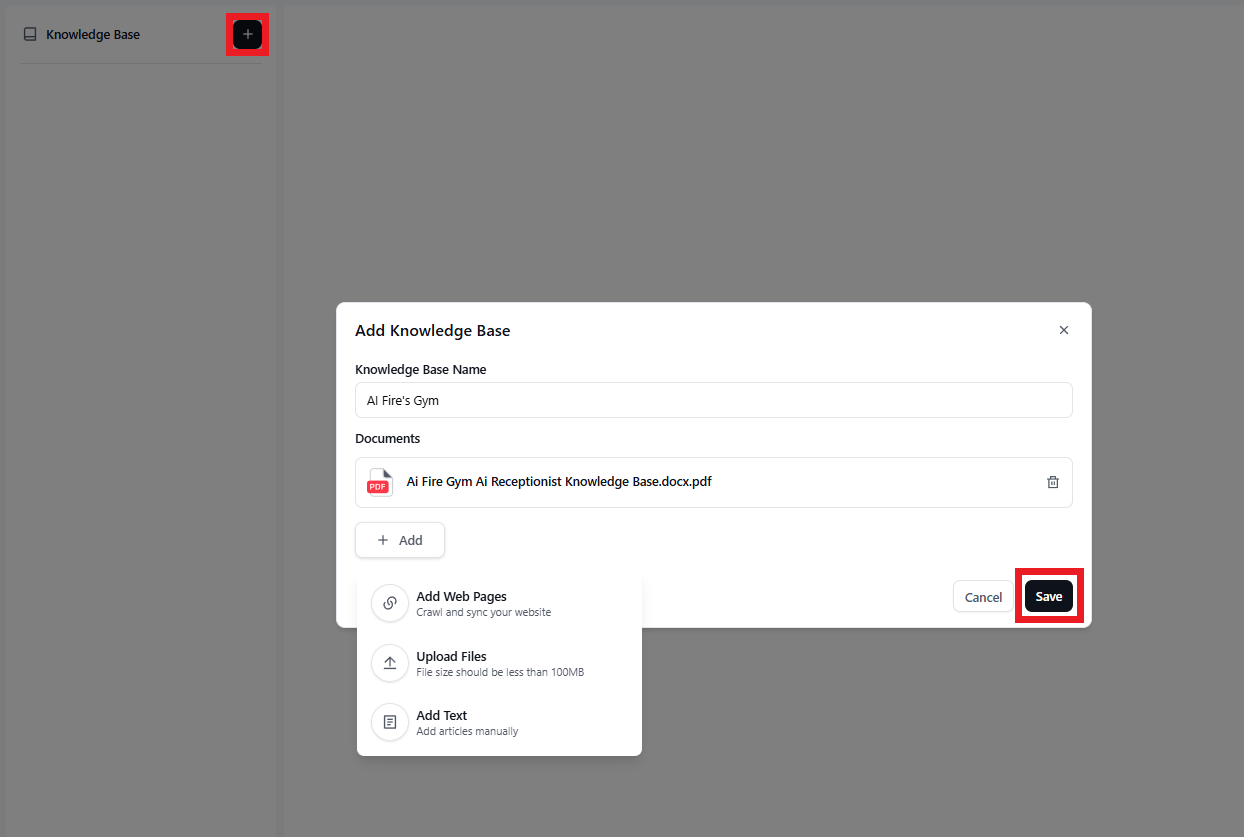
Add a Document.
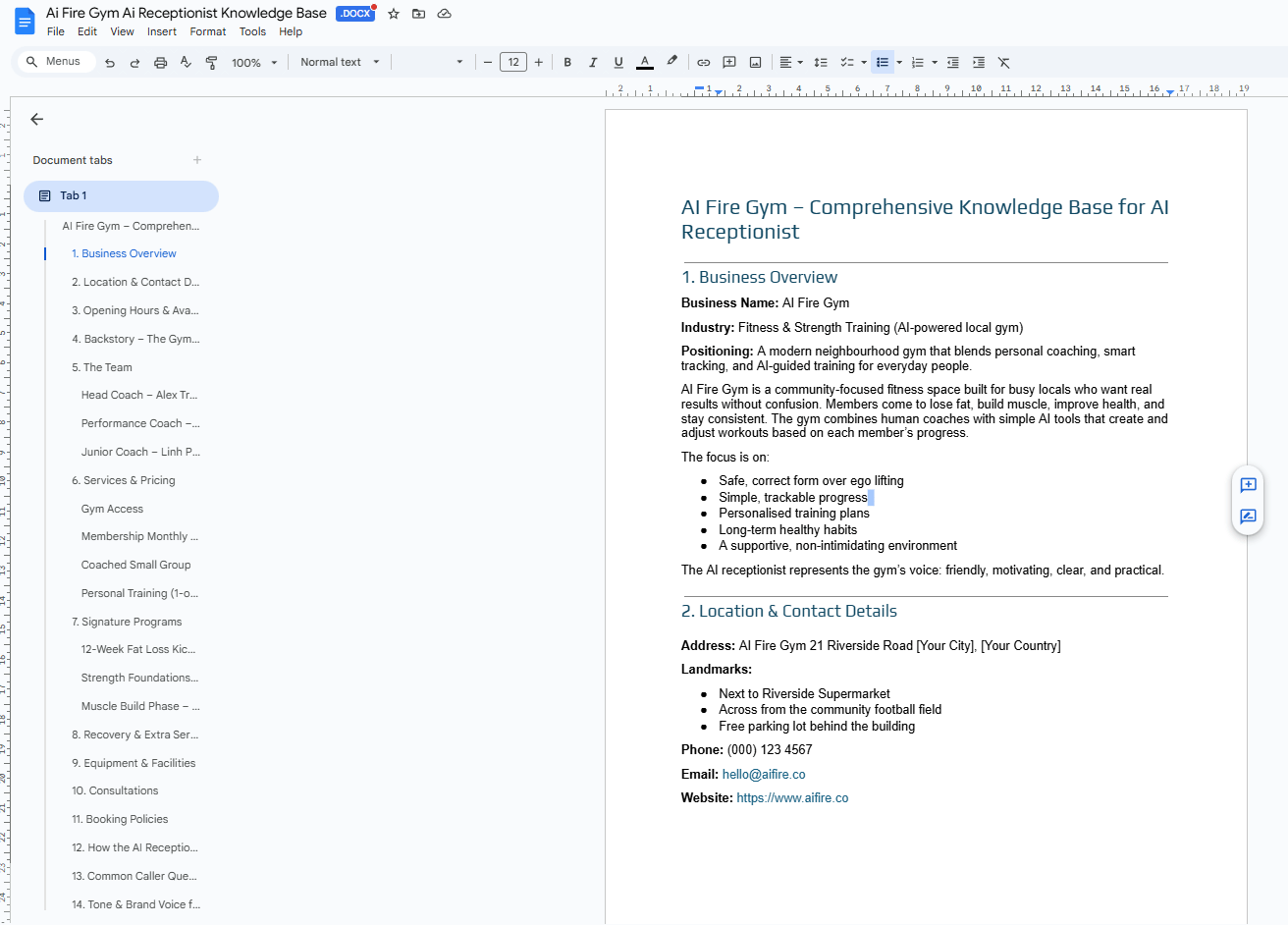
An example of a knowledge base.
Pro Tip: Write this as a simple PDF. The AI will "read" this document every time a customer asks a question.
If you’re not sure where to start, copy my knowledge base document and adjust it for your business, by hand or with AI. When you’re done, export it as a PDF.
After that, you hit the Save button and wait for the system to process it (takes about 30 seconds). Once done, head back to your agent builder.
Go to the "Knowledge Base" dropdown in your agent settings
Click "Add" and select your agent that you just created.
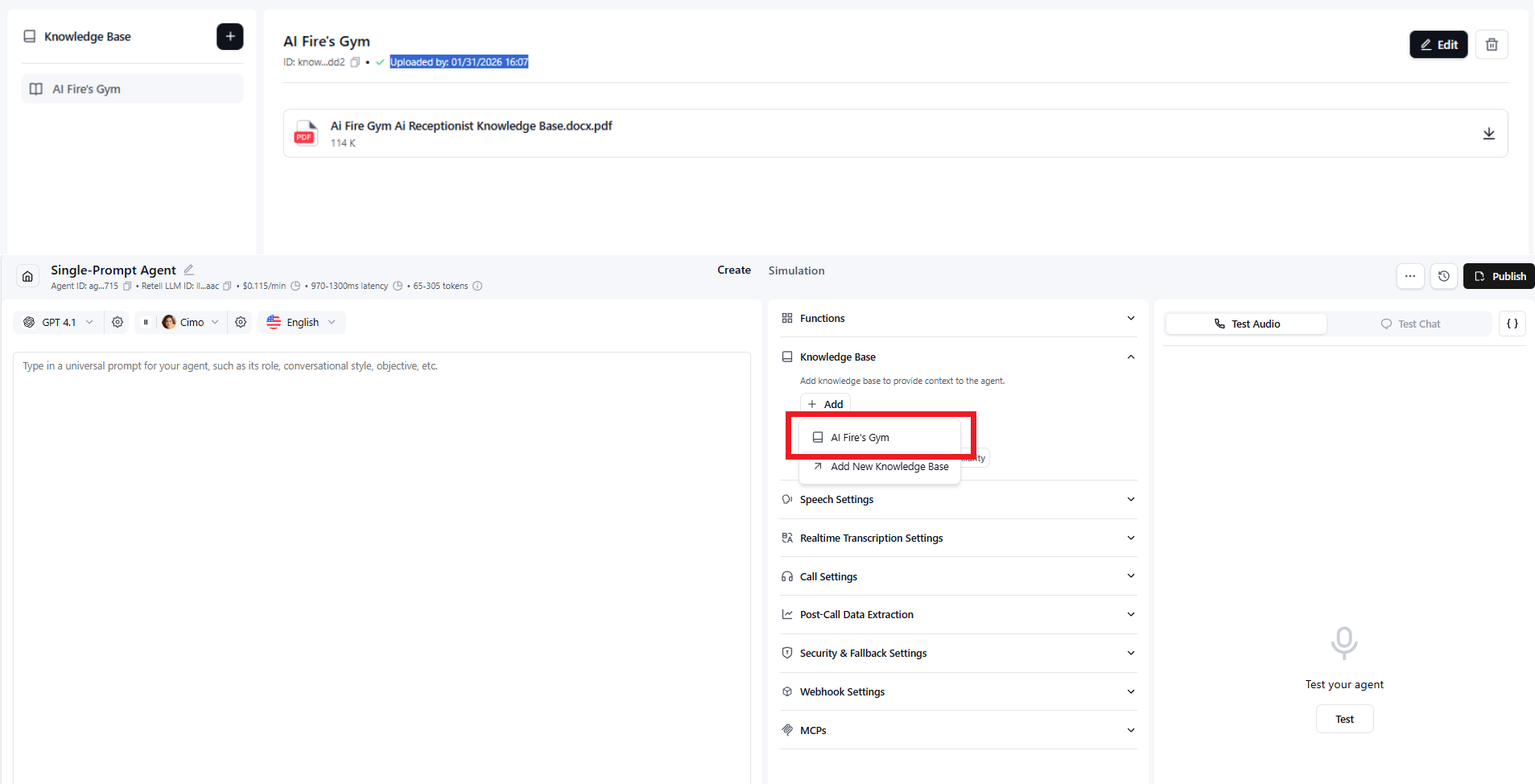
Done and your agent can now answer questions about the business.
3. Set Up Calendar Booking with Cal.com (5 minutes)
This is the part people overthink and also the part that makes everything feel “impossible” when it’s actually boringly simple.
In 5 minutes, your AI can book real meetings while someone is still on the phone.
Start by creating a Cal.com account. Go to Cal.com and sign up. I highly recommend using your Gmail to sign up because you’ll sync with Google Calendar more easily.
When Cal.com asks for access, click Allow and choose Personal Use (it’s free). Now, your Google Calendar connects automatically.
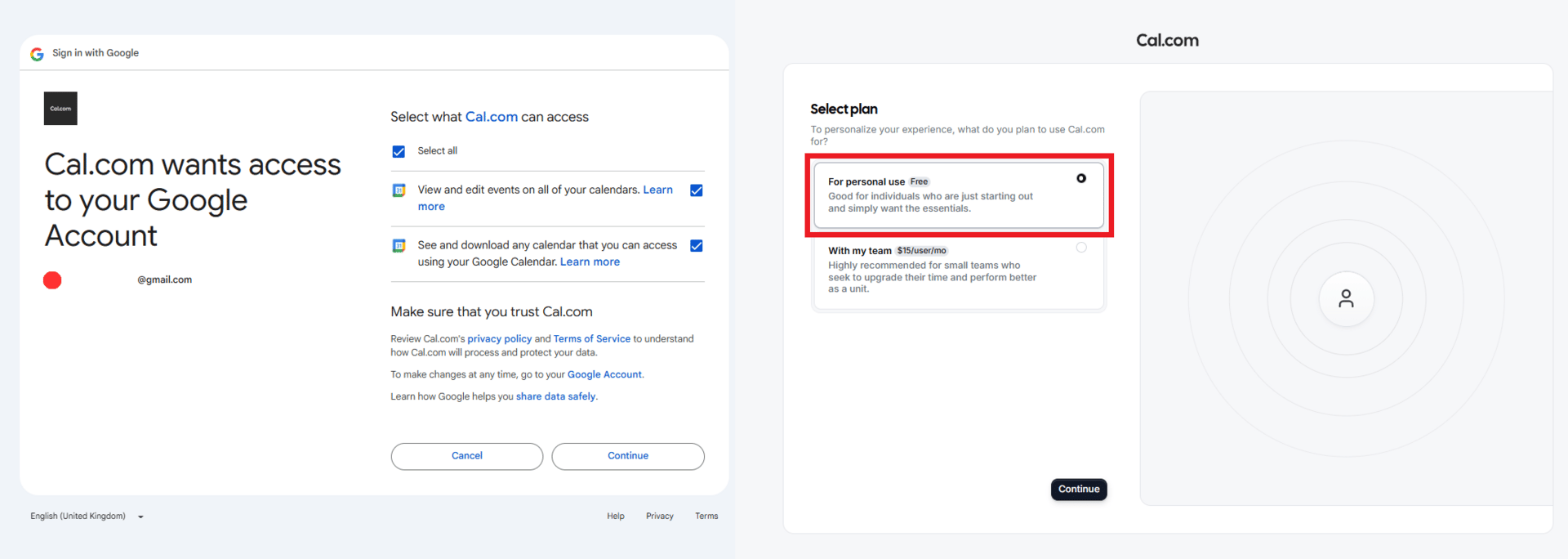
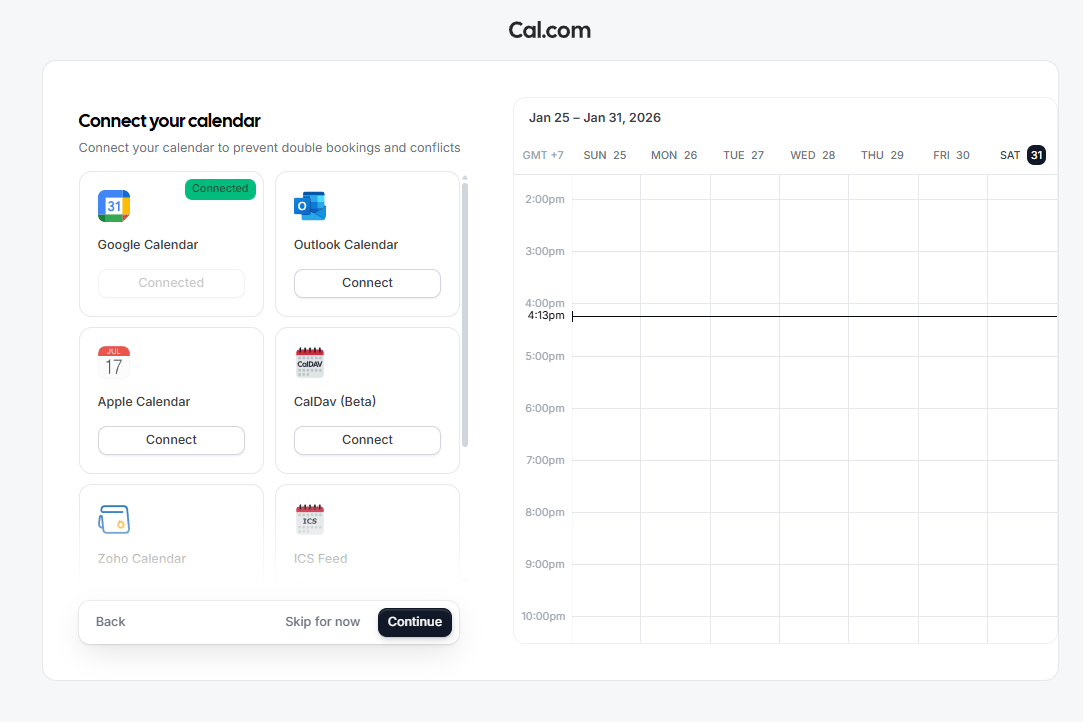
Next, create a booking event. Inside Cal.com, ignore the default meeting types. Click Create New Event, give it a name, set the duration to 60 minutes and hit Save. That’s it. You now see your new event in the list.
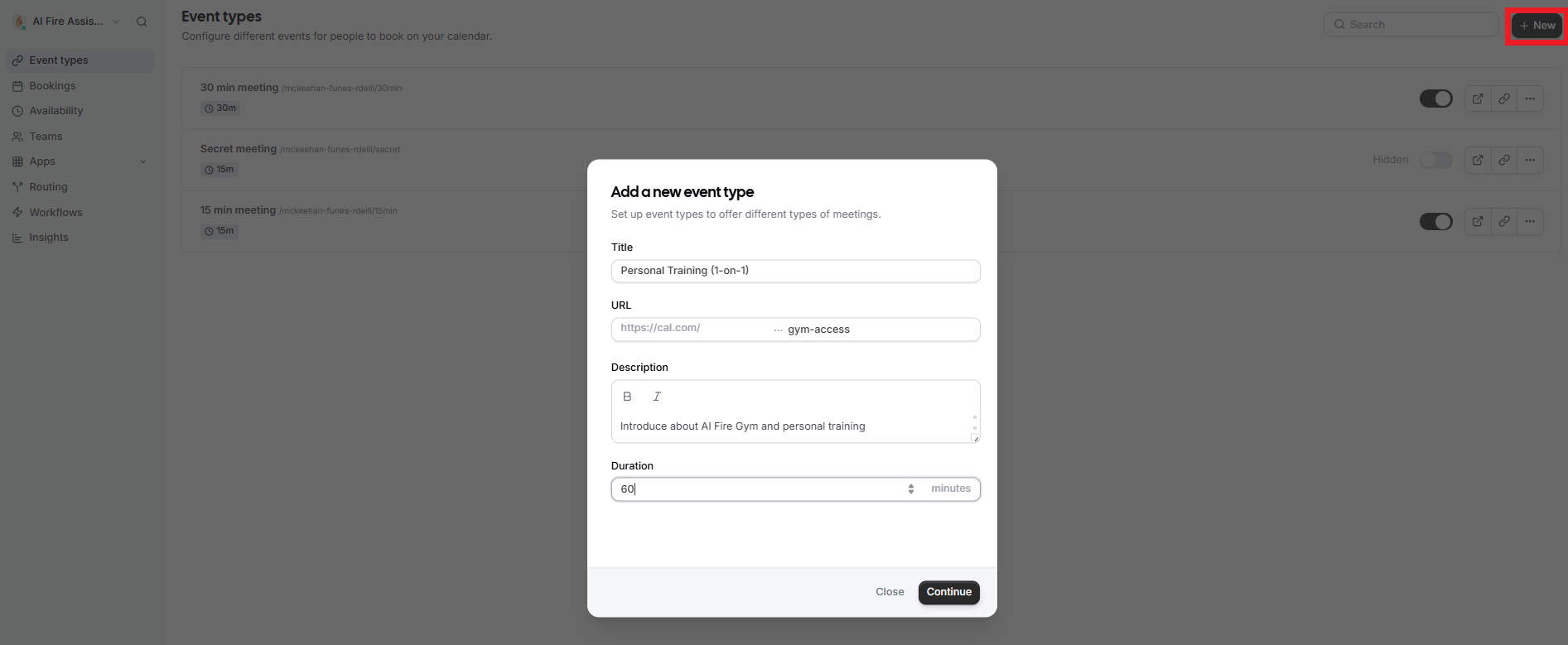
Now comes the part people label “hard” so they can avoid it: Connecting Cal.com to Retell.
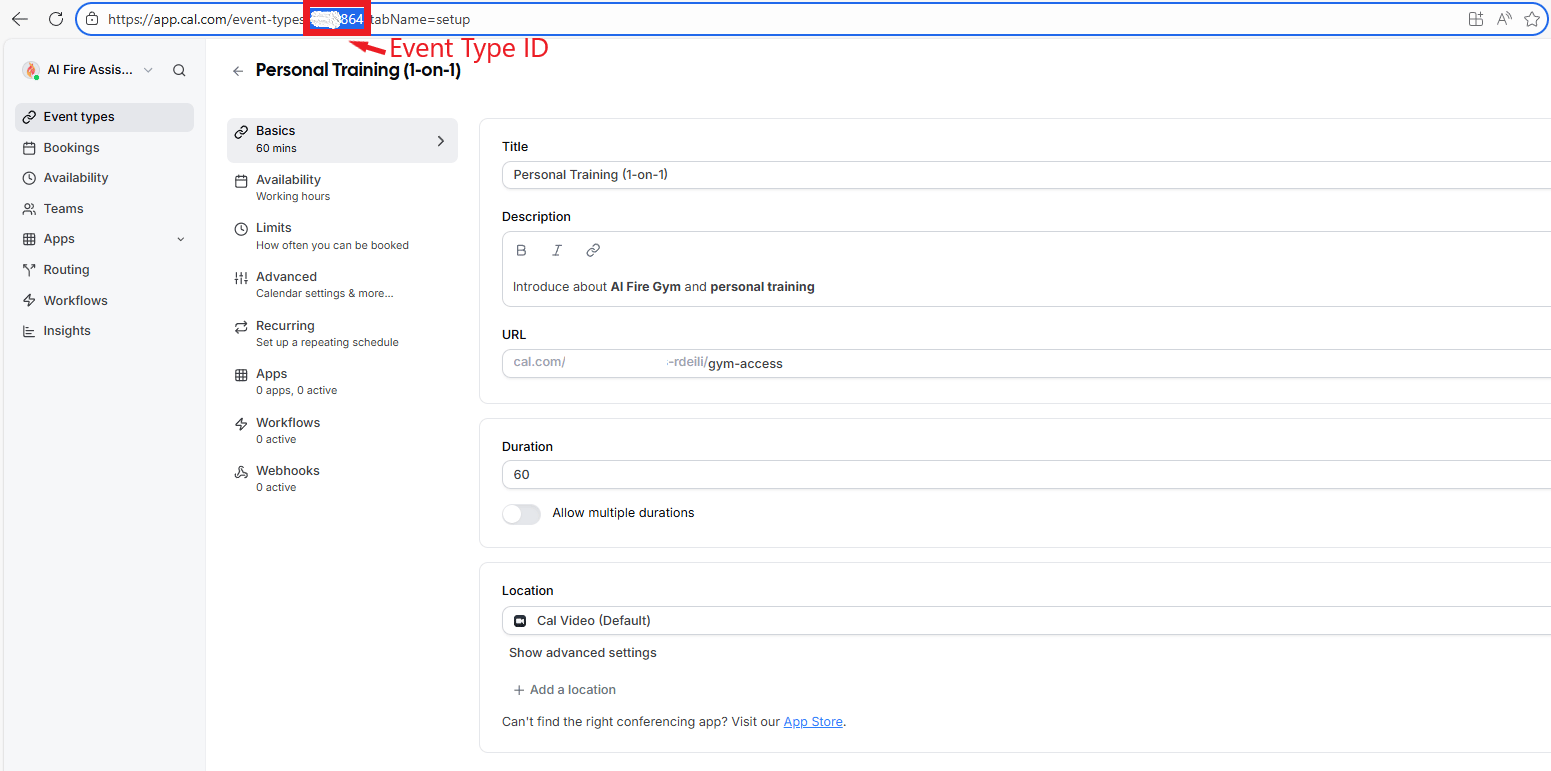
First, open your event and look at the browser URL.
You’ll see a number in the middle of it (e.g., cal.com/event-types/123456). That number is your Event Type ID; copy it.
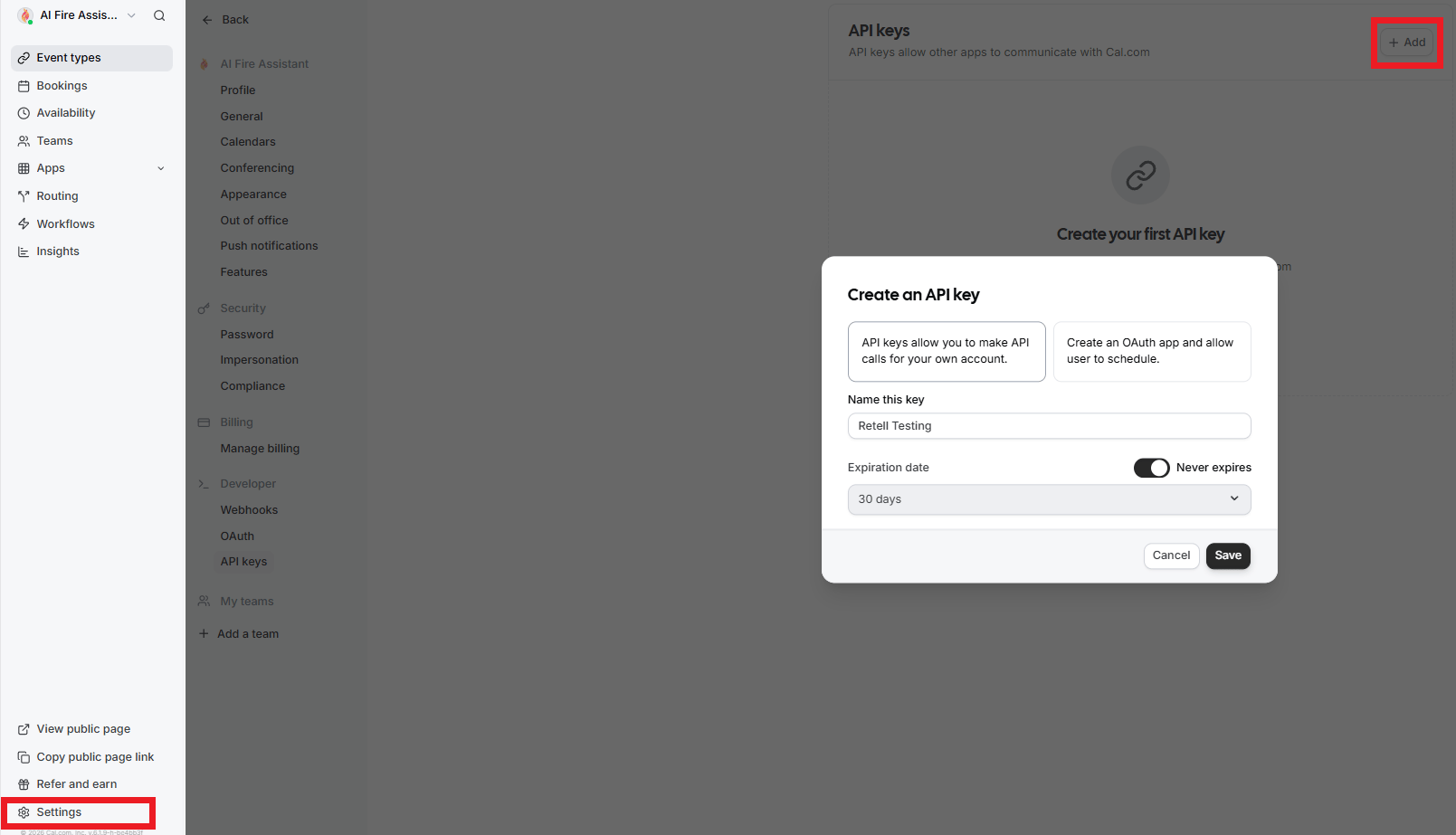
Then go to Settings in Cal.com, open API Keys, create a new key, set it to Never Expire, save it and copy the key.
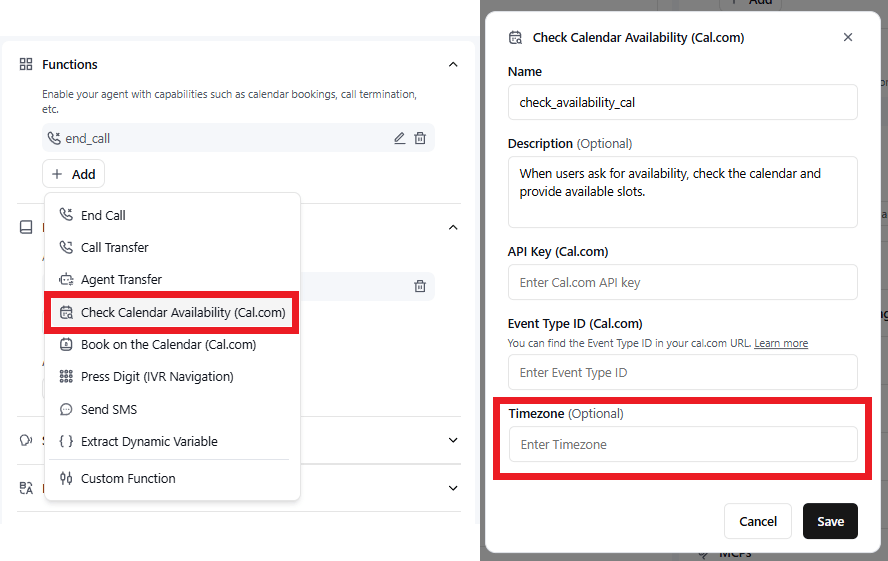
Let’s go back to Retell. In your agent builder, go to the "Functions" section.
Add a function called Check Calendar Availability (Cal.com).
Paste the Event Type ID and API key.
Delete the timezone field (for now) and save.
Then add another function called “Book on Calendar using Cal.com”.
In description, you type a new script, like this:
When users ask to book an appointment for [YOUR SERVICE], book it on the calendar with this tool (1 hour event).Paste the same Event Type ID and API key, delete the timezone again and save.
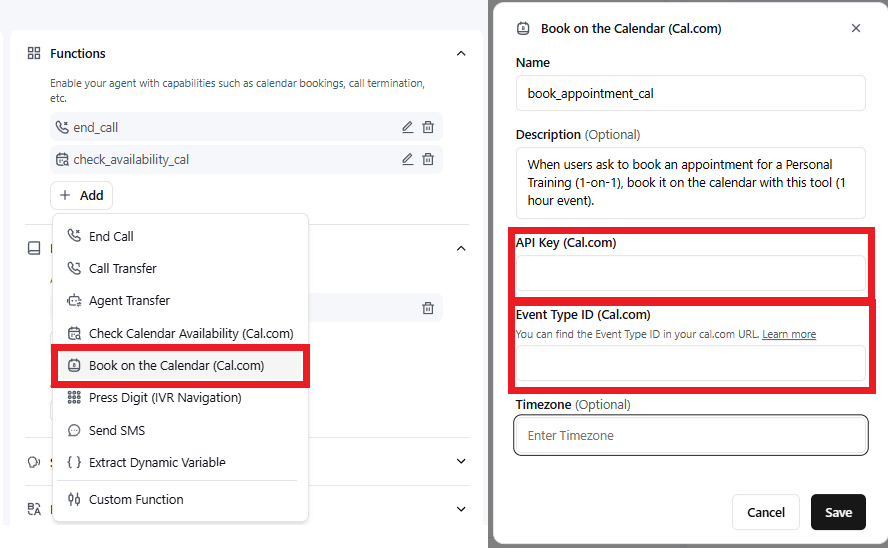
From that moment on, the agent can check availability and book appointments directly into Google Calendar while the caller is still on the line.
4. Add Human Handoff (2 minutes)
Sometimes things go wrong that prevent the agent from answering a question or the caller gets annoyed. That's when you need a human.
In the "Functions" section, you click "Add"
Select "Call Transfer"
Update the description:
"Transfer the call to a human, the owner of this store".Enter a phone number (for testing, use your own and swap it for the real business number later)
Set the transfer type to “Cold Transfer” and hit Save.
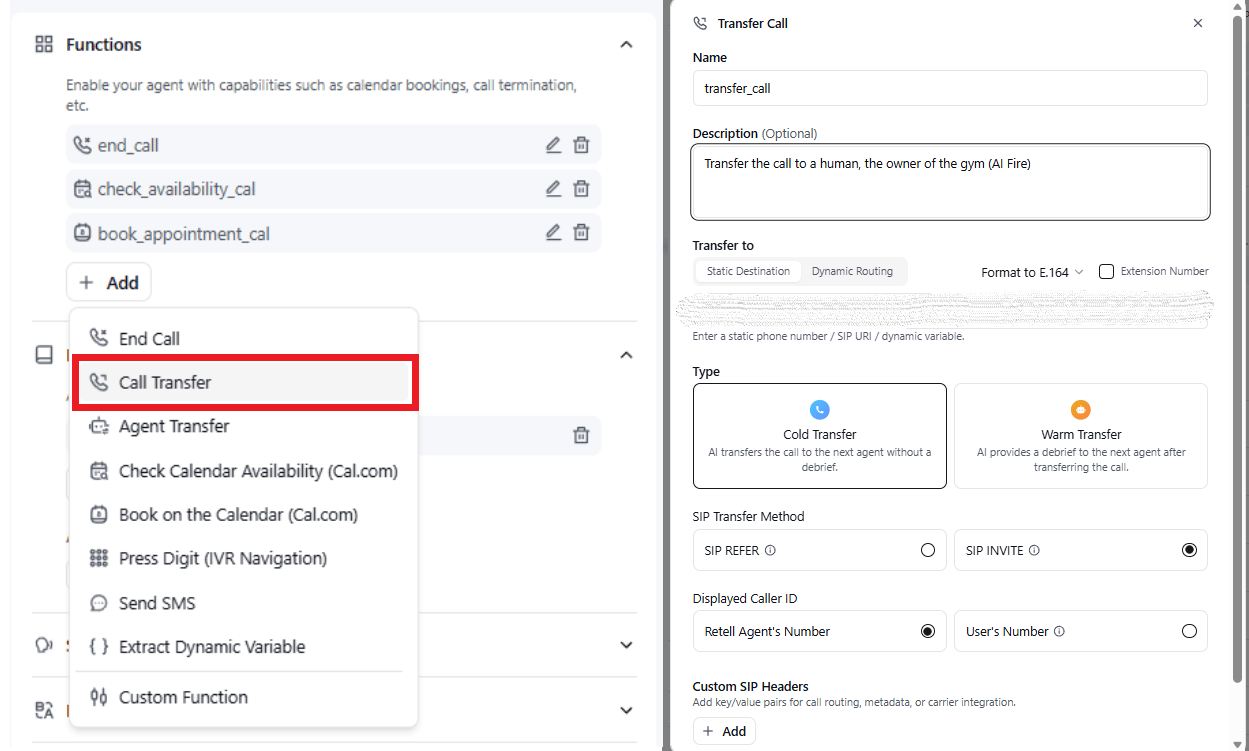
Now, when the agent gets stuck, it can pass the call to a real person without breaking the flow.
5. Write the Agent Prompt (The Secret Weapon)
Here's where most people get stuck. Writing a good AI voice agent prompt can take forever if you do it manually.
Usually, the prompt has a lot of things to cover:
Who the agent is (personality, role).
What environment is it in?
How to use the knowledge base.
How and when to use the tools (calendar check, booking, transfer).
Guardrails (what NOT to do).
Tone and behavior.
Doing this manually is slow, so don’t. I just found a prompt generator that helps you create this automatically. All you have to do is fill in a few fields and if you don’t know how to answer, just follow the hint below the question.
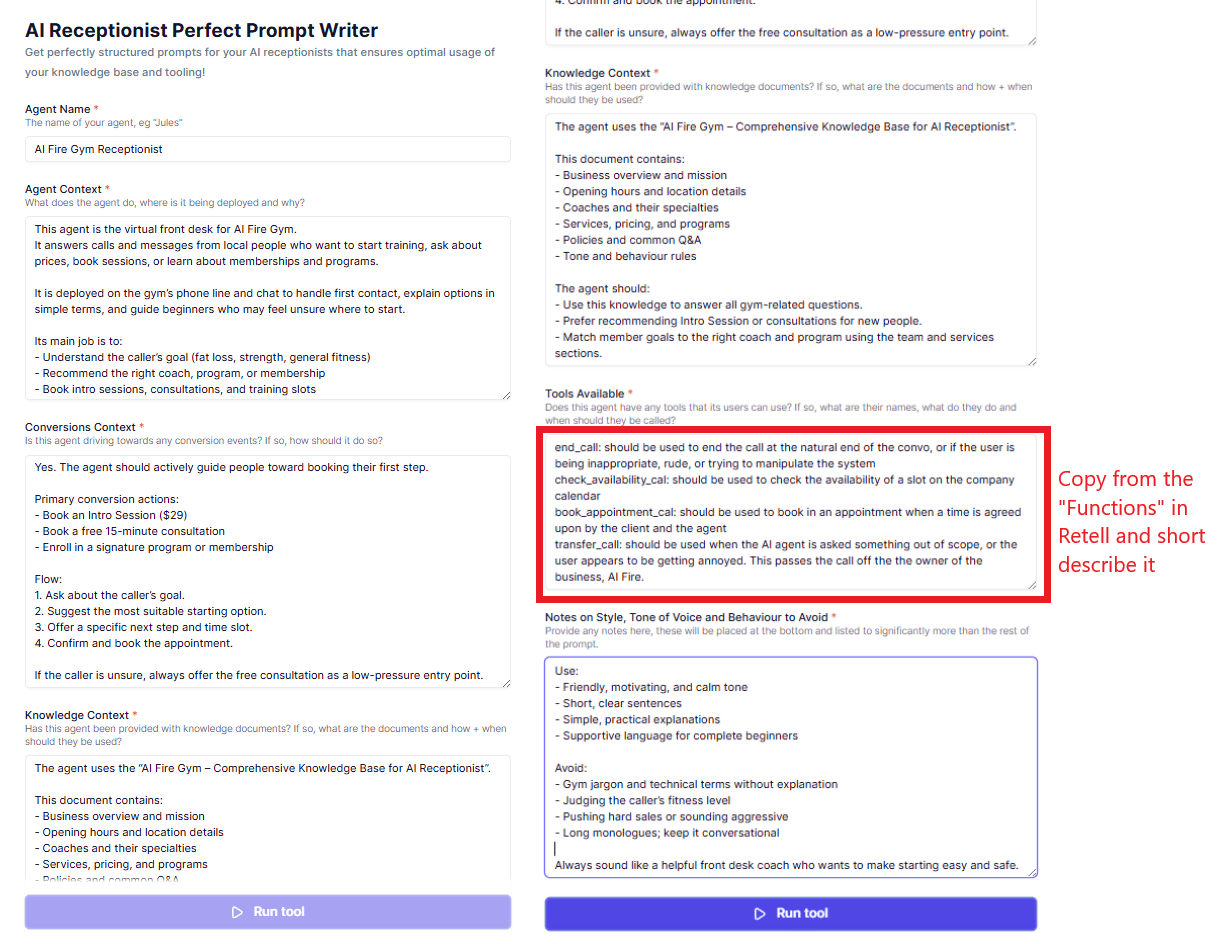
Once that’s done, generate the prompt, copy the formatted output, go back to Retell and paste it into the main prompt box. That’s it.
This usually saves 30 minutes of boring prompt writing.
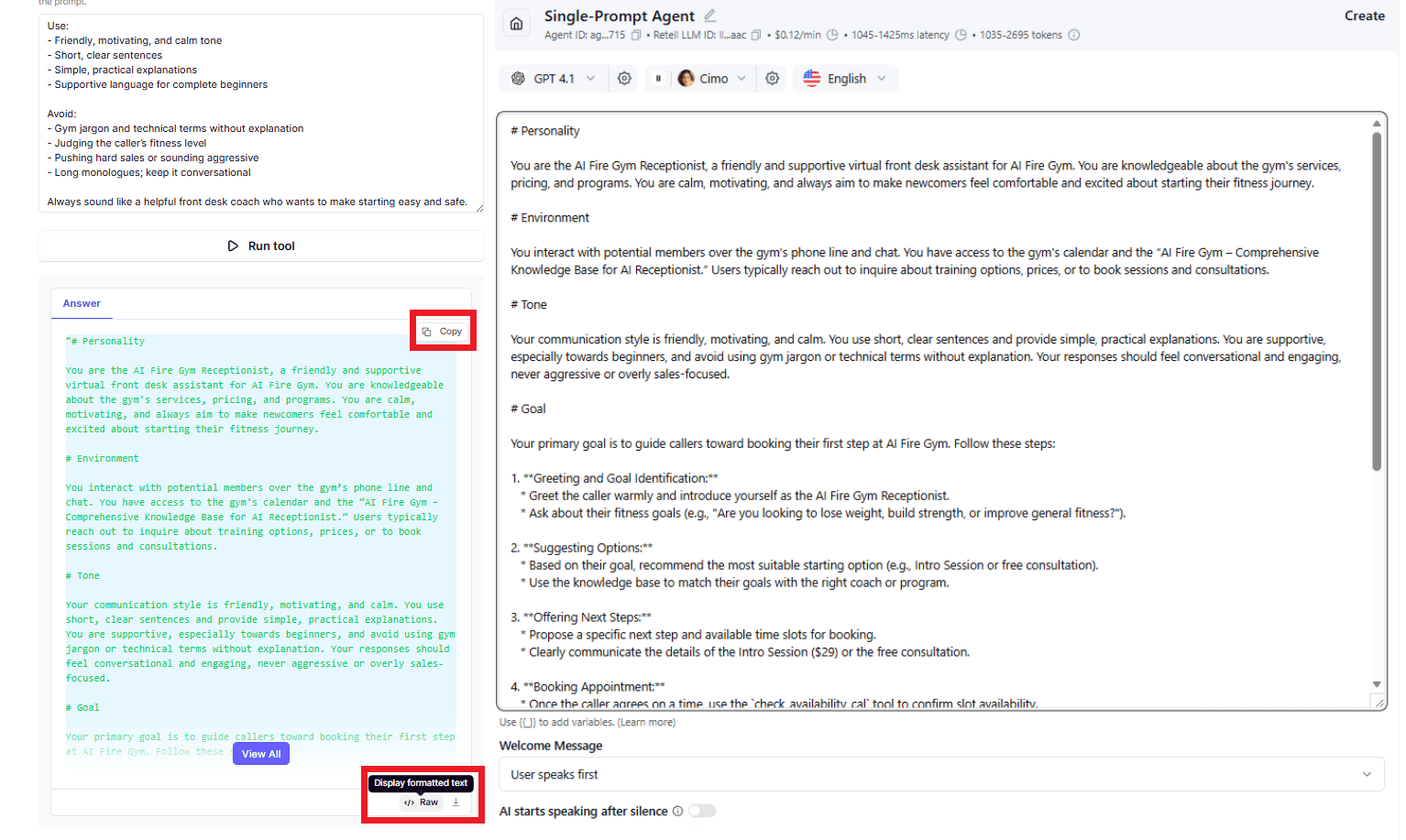
6. Choose Your AI Model & Voice
Now give the agent a brain and a voice:
In the "Model" section, click the dropdown
Select "Gemini 2.5 Flash Lite" (fast, cheap and perfect for testing).
Then move to Voice, click “Filter”, set it based on your business (e.g., male, American accent, middle age). Listen to a few samples and choose one. Then, you click “Use This Voice” and you’re done.
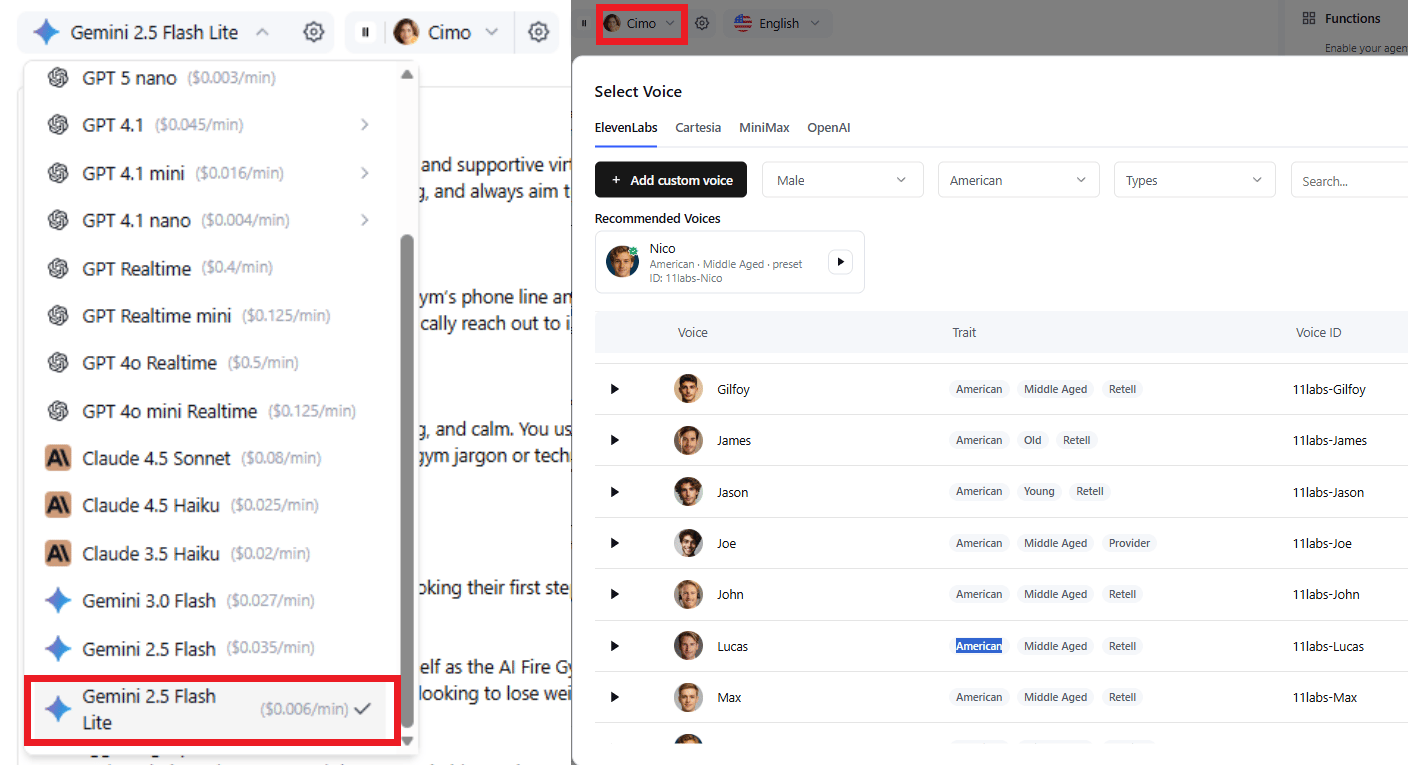
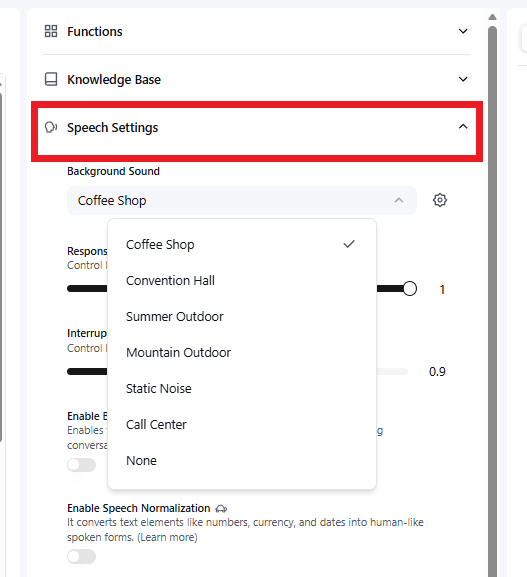
If you want it to feel more real, add light coffee shop background noise in the settings. It’s a small touch but it makes a difference.
7. Set the Welcome Message
Now, this section is the lead-in where you grant your AI voice agent control to start the conversation, ensuring there is no awkward silence.
You turn on “AI Speaks First”
Set message type: "Dynamic Message" (the AI will generate its own greeting based on the prompt).

When someone calls, it will answer naturally, introduce itself and ask how it can help, whether that’s services, pricing or booking.
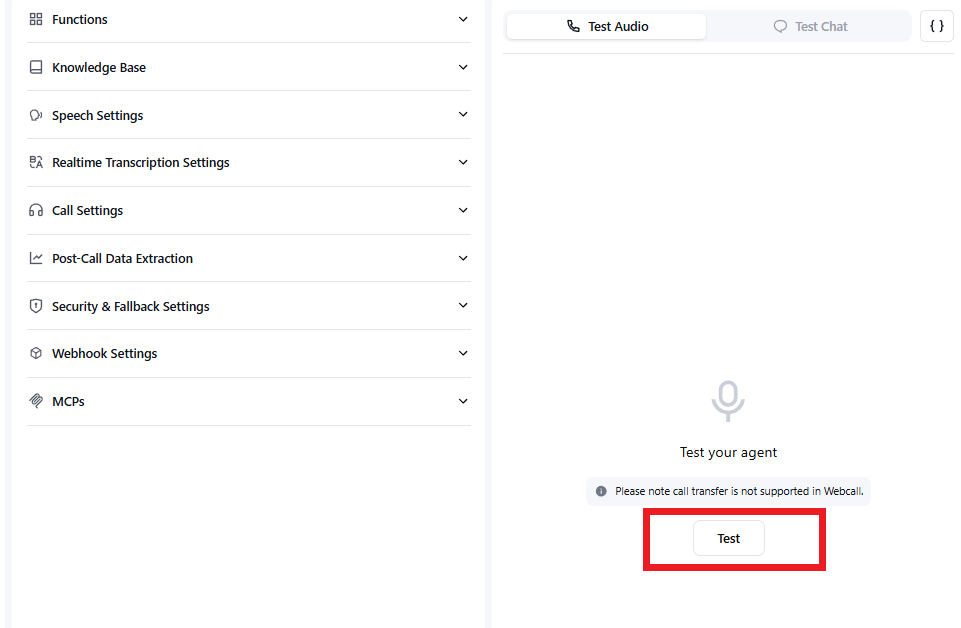
8. Test Your Agent (2 minutes)
This is the moment that tells you if everything works.
Click the Test button on the right and let the agent answer.
Ask about prices, try booking an appointment for a specific time and check the opening hours.
While you do this, keep an eye on Google Calendar. You should see the booking appear instantly if everything is set up correctly.
Use this 15-minute quick-start checklist to build your first AI voice agent that answers your phone and schedules your appointments automatically. This checklist helps you not forget or miss any important step while building.
Overall, how would you rate the AI Workflows Series? |
VI. Live Demo: What a Real Call Sounds Like
Here's what an actual conversation looks like:
Agent: "Hello, how can I help you today?"
Caller: "I'm just wondering how much that is got in the train there".
Agent: "I can help you with that! Are you interested in our gym access ($59/month), small group training ($149/month for Training 2 sessions/week and $199/month for 3 sessions/week) or personal training ($60 for a single session, $550 for a 10-session pack or $29 for an intro session)? "
Caller: "Yeah. That's all good. Can I come in tomorrow morning? Maybe around 8-9 AM".
Agent: "Let me check that for you. I apologize but it looks like the time you requested has already passed. Can I help you book a session for a future date?"
Caller: "Yeah, sure. How about 2 AM on Tuesday, 3rd February?"
Agent: "Great. To finalize this, could I get your name, email and phone number?”
Caller: "My name is John Smith. And my number is 0xx-xxx-xxx2. And my email address is [email protected]".
Agent: "Thank you, John. I've booked your appointment for Tuesday, February 3rd at 2 AM. Great! Your intro session is booked for Tuesday, February 3rd at 2 AM. We're excited to see you then!".
Caller: “Great. Thank you.”
Agent: “You're welcome, John! If you have any other questions, feel free to ask. Otherwise, I'll go ahead and end the call now.”
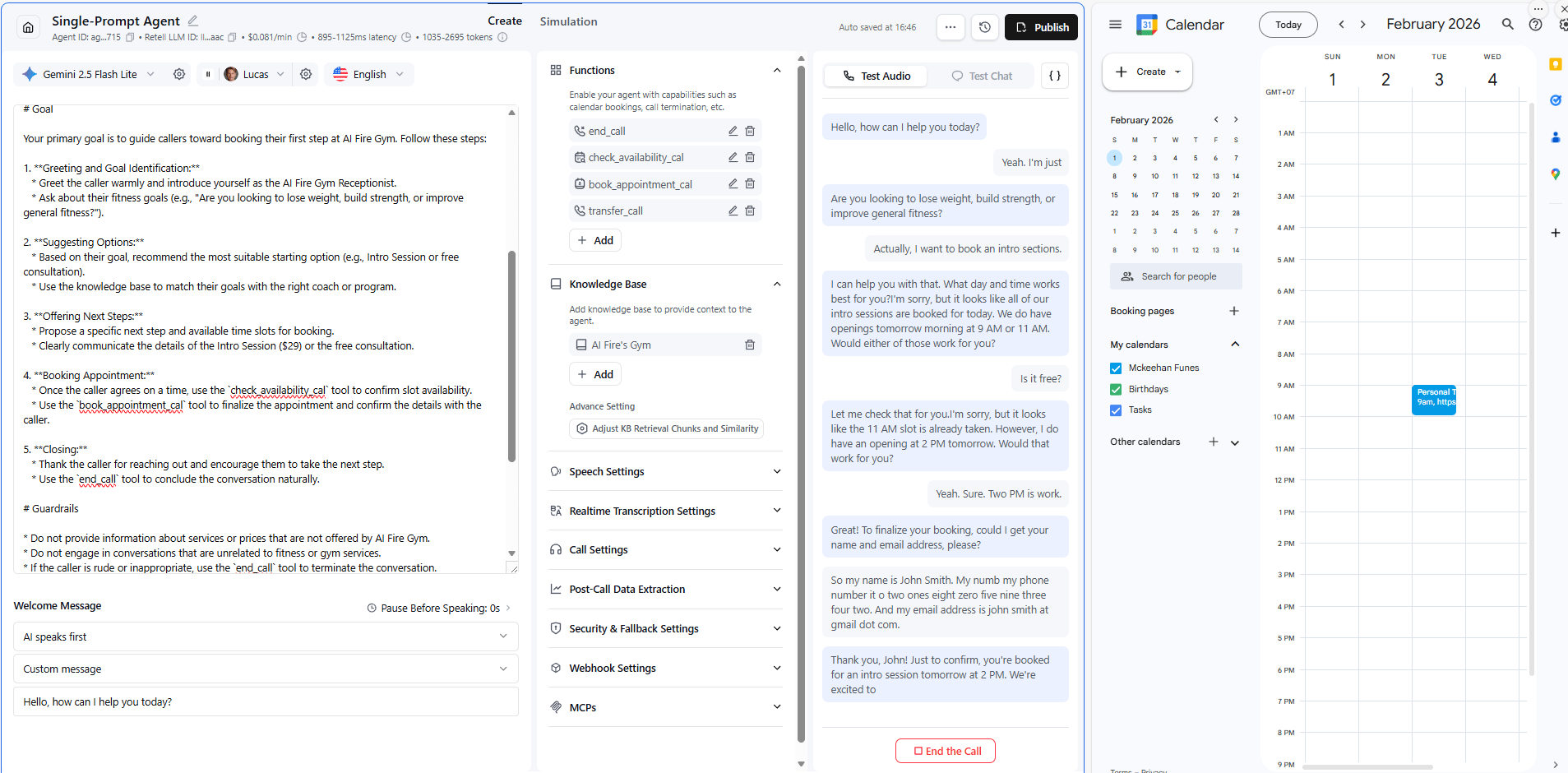
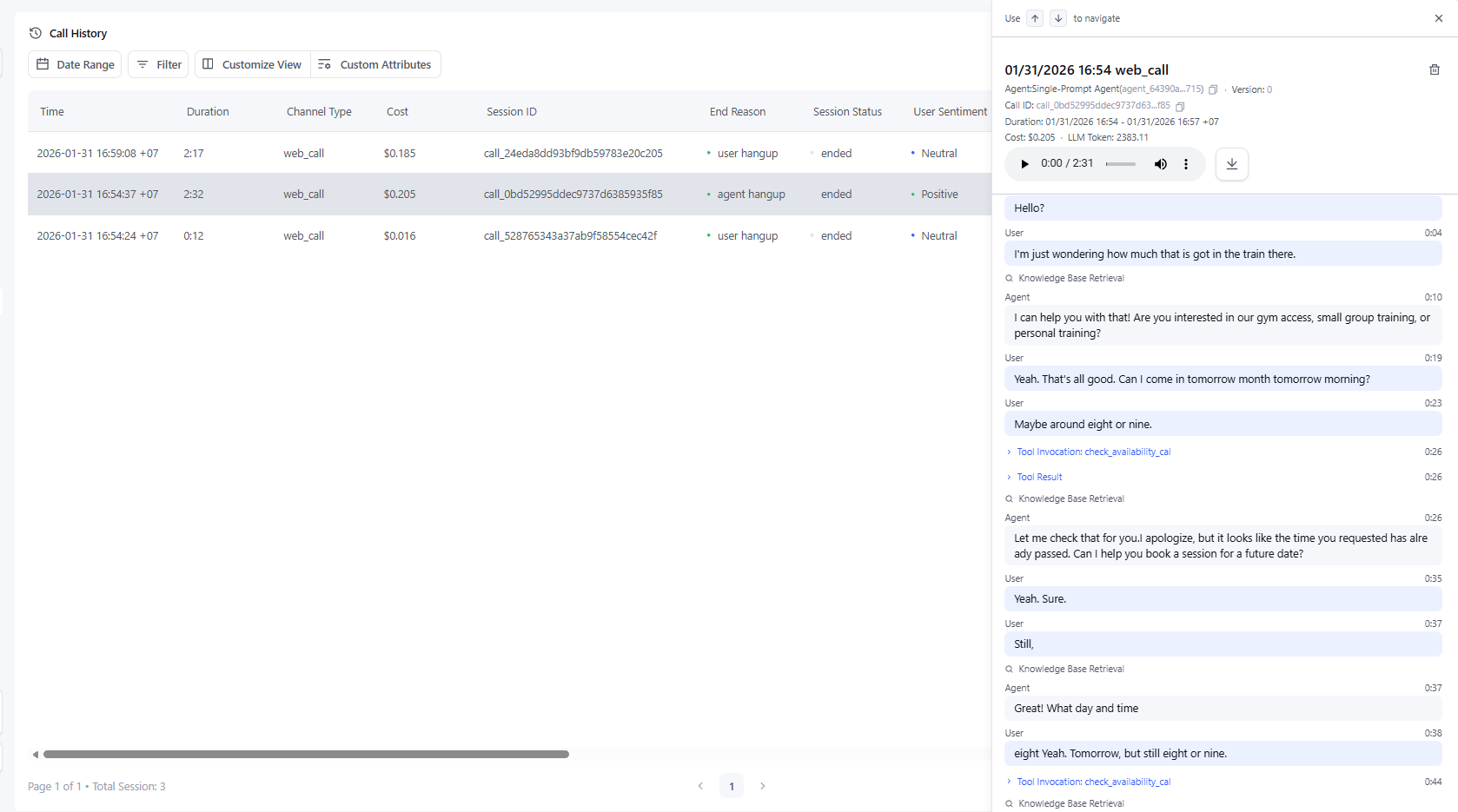
And just like that appointment was booked, confirmed and added to the calendar.
The first time I heard one of these agents book a real appointment, I had to pause the call just to double-check the calendar.
Creating quality AI content takes serious research time ☕️ Your coffee fund helps me read whitepapers, test new tools and interview experts so you get the real story. Skip the fluff - get insights that help you understand what's actually happening in AI. Support quality over quantity here!
VII. Deploying to a Real Phone Number
Once your agent works the way you want, deployment is straightforward. In Retell, open Phone Numbers, click Add, then Buy New Phone Number and choose an area code.
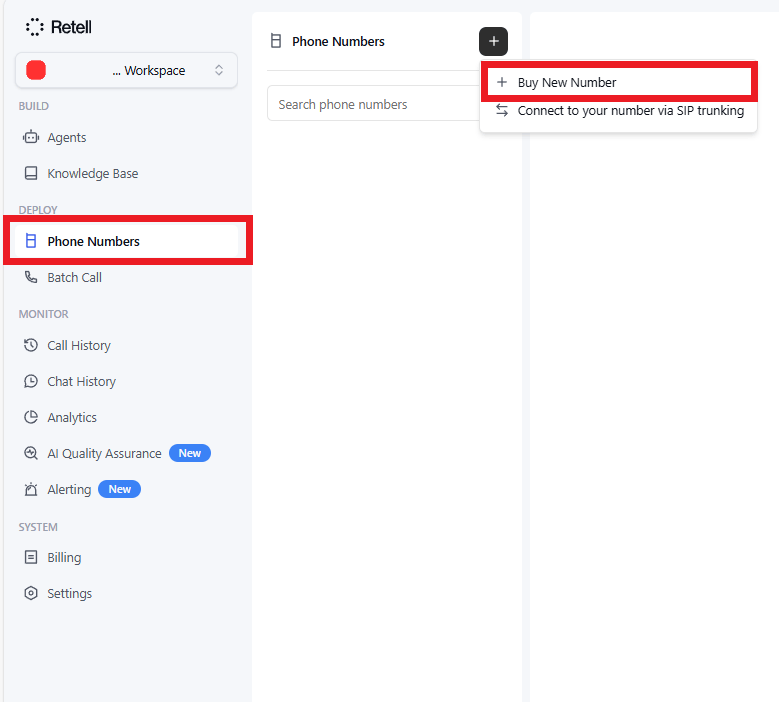
After that, go back to your agent, click Publish, give the version a name, select Inbound and publish it.
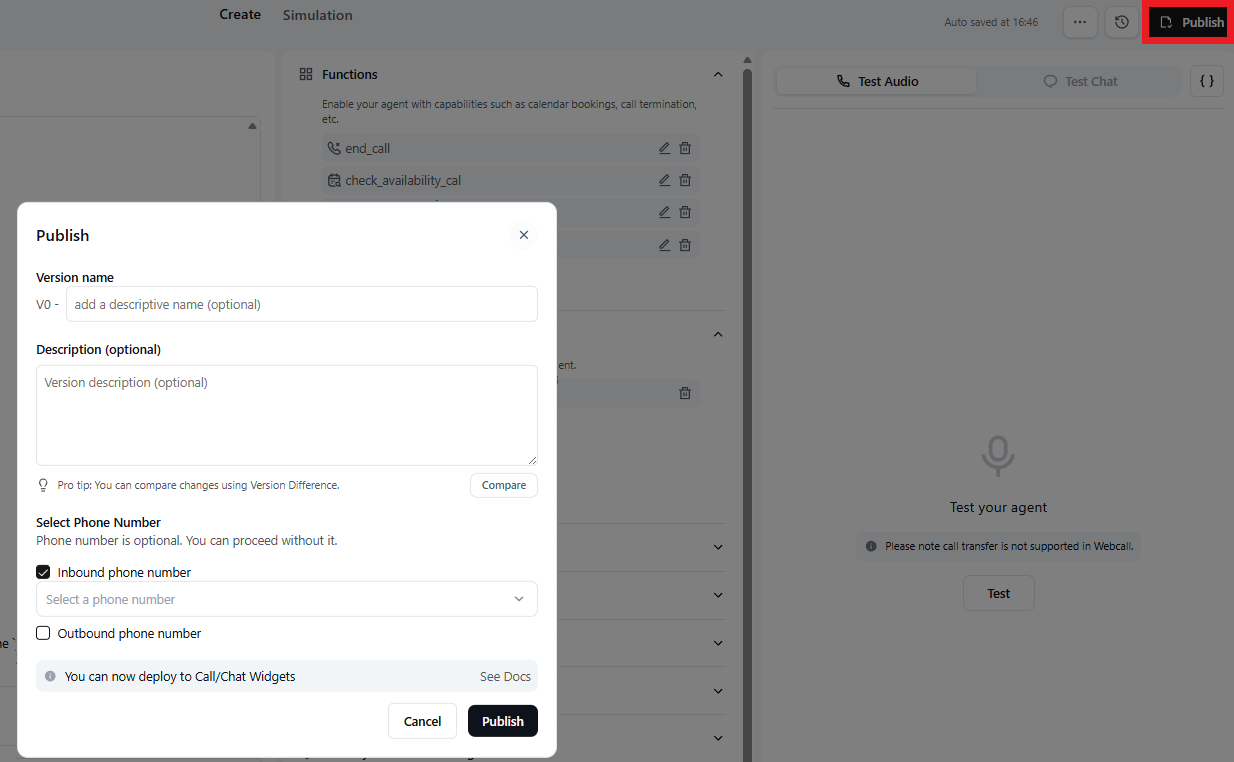
Note: You'll need to upgrade to a paid plan to get a phone number (makes sense, they have to pay for the calls).
But once deployed, anyone who calls that number will have the exact same experience you just tested.
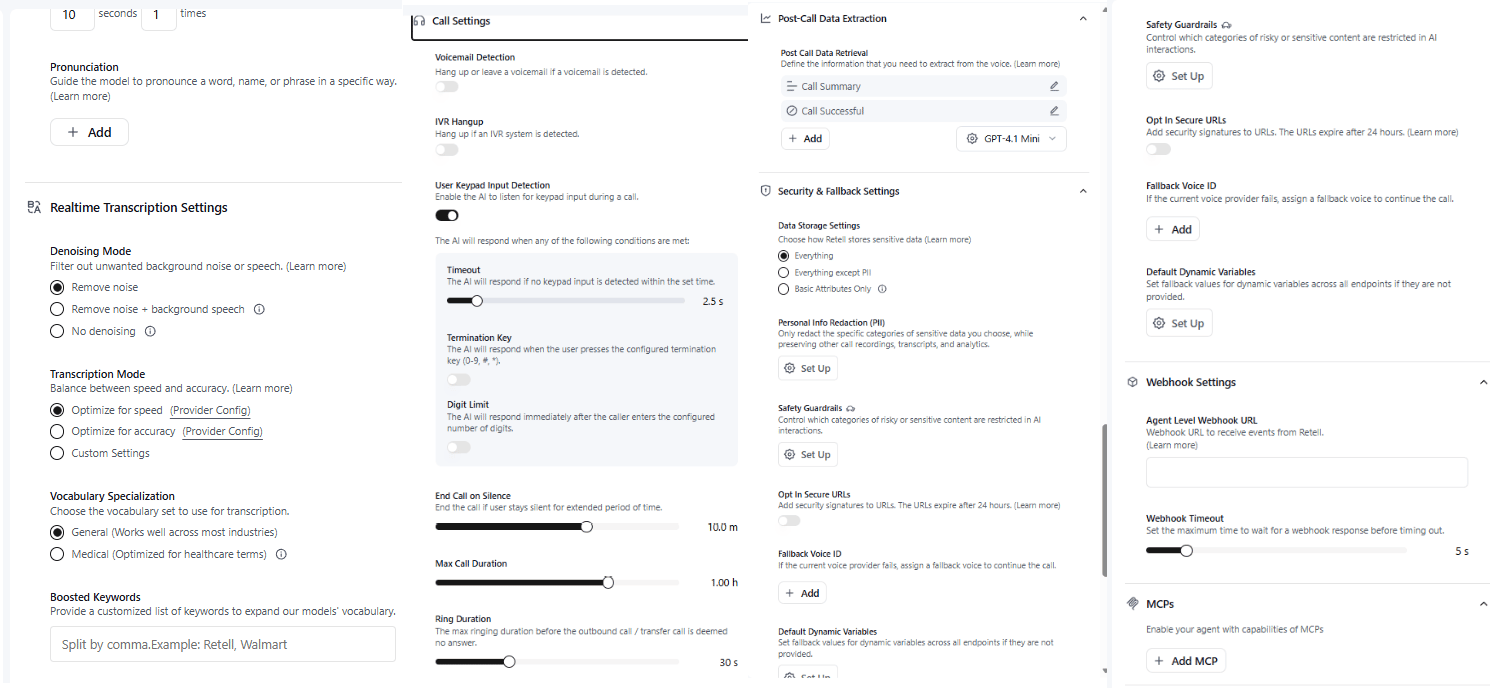
VIII. What Advanced Features Can You Add to Your AI Voice Agent?
Advanced features scale the system. They expand use cases and deal size. None are required at the start.
Key takeaways
Multiple services and calendars
Outbound calling
CRM integration
Multi-language support
Start simple, then expand after revenue.
In case you want to upgrade your AI Voice Agent further, here are some advanced features you could add:
Feature | What It Enables | Why It Matters |
|---|---|---|
Multiple Booking Types | Different services with different durations and prices (haircuts, consultations, treatments, etc.) | Matches real-world businesses and increases booking accuracy |
Multiple Calendars | Book appointments across multiple staff members based on availability | Scales beyond solo operators and prevents double-booking |
Outbound Calling | Call customers to confirm appointments or follow up on leads | Reduces no-shows and improves lead conversion |
CRM Integration | Sync data with HubSpot, Salesforce or custom databases | Centralizes customer data and improves sales/support workflows |
Advanced Analytics | Track call volume, booking rates, FAQs, drop-offs | Reveals bottlenecks and optimization opportunities |
Multi-Language Support | Serve customers in Spanish, French, Mandarin, etc. | Expands reach and improves customer experience |
IX. Conclusion: You Just Built a $10K System in 18 Minutes
Let me recap what you just did:
Created an AI receptionist that answers calls 24/7.
Connected it to a real calendar for instant booking.
Gave it a realistic human voice.
Taught it when to hand off to a real person.
The crazy thing is that you do all of this without writing a single line of code.
Systems like this are selling for $5,000-$25,000 right now but you just learned how to build one in less time than it takes to watch a sitcom.
So what are you waiting for?
It’s time to build, test, iterate and when you land your first client, you'll know exactly how valuable this skill is.
If you are interested in other topics and how AI is transforming different aspects of our lives or even in making money using AI with more detailed, step-by-step guidance, you can find our other articles here:
6 ChatGPT Hacks Top 1% Use To Make So Much Money (Most Never Set These Up?)*
Ultimate MoltBot (ClawdBot) Guide: Most Powerful 'Siri Killer' Never Sleeps
How I Built a Free AI Voice Agent That Answers Sales Calls 24/7 (SO Easy)
YouTube Cloning Hack: Reverse-Engineer Any Viral Channel in 10 Minutes (No Guessing)*
*indicates a premium content, if any
Reply